


Claude Code Credit Balance Is Too Low Fixed (2026): Why It Happens, How to Add Credits, Usage Credits, Gift Card Myths and Free Credit Facts
If you use Claude Code long enough, you will probably meet a short and annoying message: “Credit balance is too low”. It usually appears right in the middle of a task, stops the agent, and leaves many developers confused, especially those who are sure they pay for a Claude subscription. This guide explains what the message really means, why it often appears even when you have a Pro or Max plan, how to fix it in a few minutes, how to add credits the right way, and what is true and false about gift cards and “free Claude Code credits”. Pricing, limits and menu names change over time, so treat the numbers here as a snapshot and confirm them on the official Anthropic pages before you pay.
What the “Credit balance is too low” message means
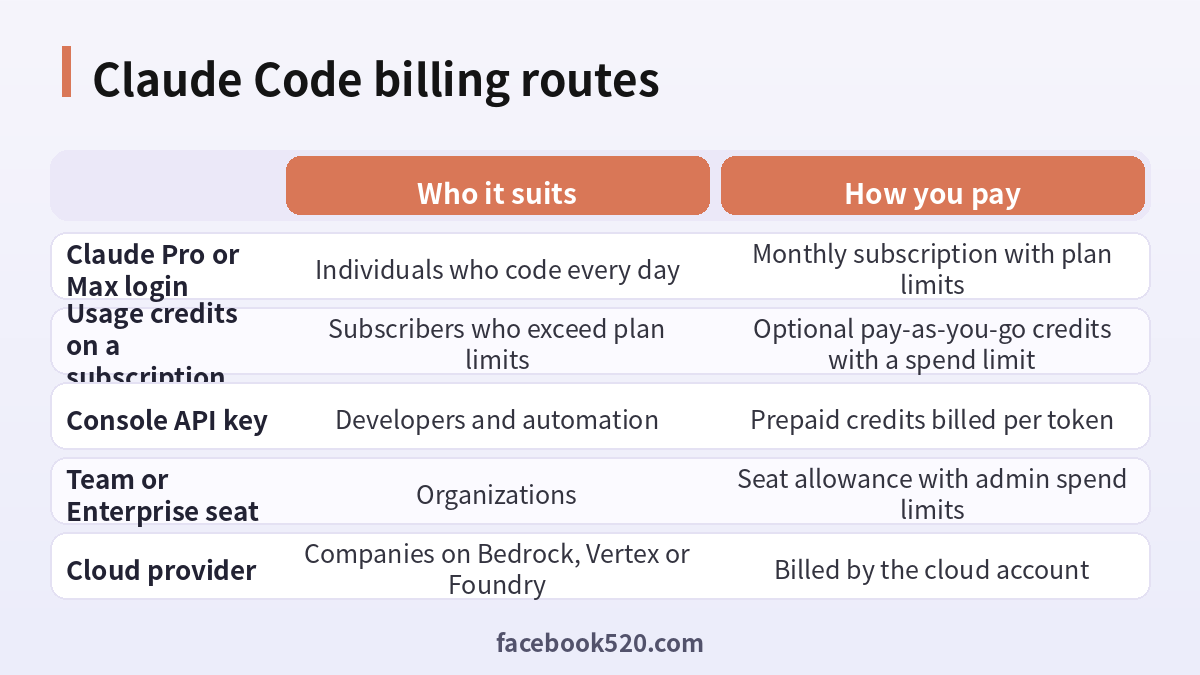
Claude Code can authenticate in two quite different ways. The first is a Claude account login, for example a Pro, Max, Team or Enterprise plan, where usage is covered by a seat allowance that resets on a rolling window. The second is an API key from the Claude Console, where every request is billed per token against a prepaid credit balance. The message “Credit balance is too low” belongs to the second world. It is an API billing error: the account behind the key has run out of prepaid credits, or the workspace is blocked from spending more.
That explains the most common surprise. Many people have a subscription and still see the error, because an environment variable named ANTHROPIC_API_KEY is set somewhere on their machine. When that variable exists, Claude Code can prefer the key over the login, so the requests are billed to the Console balance rather than to the subscription. If that balance is zero, the error appears even though the subscription is perfectly healthy.
Step one: find out which login Claude Code is using
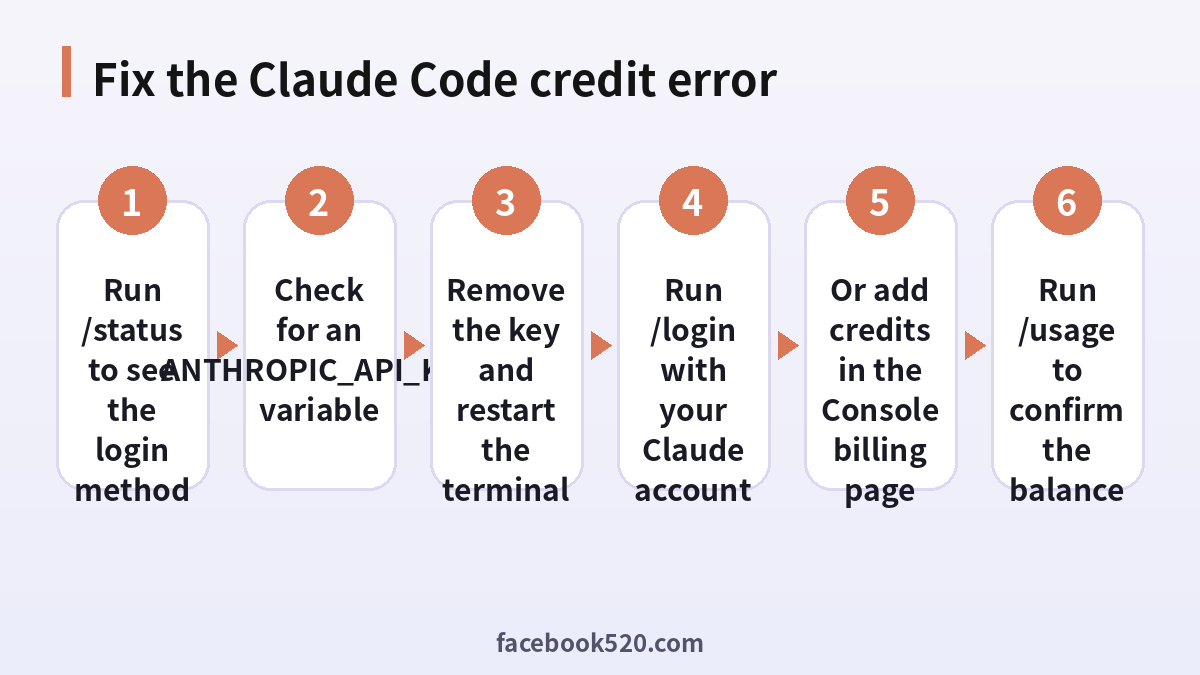
Before you spend any money, check how you are authenticated. Open Claude Code and run the status command. It shows the account, the login method and the active model. If it says you are signed in with a Claude account, the credit message is unexpected and probably comes from a leftover key. If it shows an API key, the billing route is the Console, and you either need to add credits or switch to your subscription login.
Then look for the variable itself. On macOS and Linux, search your shell profile files such as .zshrc, .bashrc and .profile, and check project files such as .env. On Windows, check the user and system environment variables. Also look at tools that start Claude Code for you, such as IDE extensions, CI jobs and containers, because they can inject the key without you noticing.
How to fix it if you want to use your subscription
If you intend to use your Pro or Max plan, the fix is usually to remove the key and log in again. First delete or comment out the ANTHROPIC_API_KEY line in every place you found it. Then close the terminal completely and open a new one so the old value is gone from the session. Start Claude Code and run the login command, choose the option for a Claude account, and finish the browser sign-in. Run the status command again and confirm that the account is shown instead of an API key.
If you work in several projects, repeat the check in each one, because a project-level .env file can bring the key back. If you really need a key for one project but not for others, keep it in that project only and unset it elsewhere, or use a separate shell profile for that project.
How to fix it if you want to use API billing
If you deliberately use a Console API key, the correct fix is to add credits. Sign in to the Claude Console, open the plans and billing area, and look at the current credit balance. Choose the option to buy credits, pick an amount and pay with a supported card. Credits are prepaid, which means you pay first and the balance is reduced as tokens are used. After the payment is confirmed, return to Claude Code and try again. If the error remains, wait a minute and refresh, and check that you added the credits to the same organization and workspace that owns the key.
Two settings help you avoid the same interruption later. Auto-reload tops up the balance automatically when it falls below a threshold you choose, which suits long-running jobs but should be paired with a monthly limit. Workspace spend limits cap how much a workspace can spend, which protects you from a runaway loop. Both are configured in the Console, not in Claude Code.
| Situation | Likely cause | What to do |
|---|---|---|
| You have a subscription but see the error | ANTHROPIC_API_KEY is set | Remove the key, restart, run /login |
| You use a Console key and the balance is zero | Prepaid credits are exhausted | Buy credits and consider auto-reload |
| Balance is positive but errors continue | Wrong organization or workspace | Check where credits were added |
| Error appears only in CI | Pipeline holds an old key | Rotate the key and fund the right account |
| Error appears after a spend limit is set | Workspace limit reached | Raise the limit or wait for the reset |
Usage credits for subscribers
Subscribers have a third option that is easy to miss. On Pro and Max, you can turn on usage credits, which let you keep working after you pass the plan limit instead of waiting for the window to reset. According to the Claude Code cost documentation, the command for this is available only when you are signed in with your Claude account, not when you use an API key. It opens the usage settings in your browser, where you can switch usage credits on or off, check your balance and spend this month, and set a monthly spend limit. Team and Enterprise members use the organization settings, and members without billing access can send a request to an admin.
Usage credits are different from Console credits. They belong to your Claude account, are consumed only after your plan allowance, and can be capped by a spend limit that you control. If your goal is simply to avoid getting stuck on busy days, this is usually a more comfortable route than buying API credits.
Is there a Claude Code gift card?
Many people search for a Claude Code gift card, hoping to pay with a voucher bought in a shop. As far as we could verify, Anthropic does not sell a dedicated Claude Code gift card. Claude Code is a product that you pay for through a subscription, usage credits or API credits. If you want to gift access to someone, check the official Claude pages for the current options, because gifting and promotional programs change.
Be careful with third-party sites that sell codes described as Claude Code credits. Codes that cannot be verified on the official billing pages, discounted resale of API keys and “unlimited” offers are common ways to lose money or to have an account closed. A safe rule is simple: pay only through the official Claude and Console pages, and never share an API key with a seller.
How to get free Claude Code credits (what is real)
The phrase “free Claude Code credits” attracts a lot of clicks, and most of the content behind it is misleading. There is no permanent free credit that you can claim by following a link. What does exist, from time to time, falls into a few honest categories. Anthropic sometimes runs limited promotions or trial offers for specific plans or regions. Education and startup programs may provide credits for qualifying organizations. Some developer events and partner programs hand out credits to participants. These offers are announced on official channels and usually have conditions and an expiry date.
Anything that asks you to paste an API key into a website, to install an unknown extension, or to share a login in exchange for “free credits” should be treated as an attempt to steal your account. Keep your keys in a secrets manager, rotate any key that might have been exposed, and review the usage page for activity you do not recognise.
A quick numbered recovery plan
When the error stops you in the middle of a task, follow this order and you will usually be back to work in ten minutes.
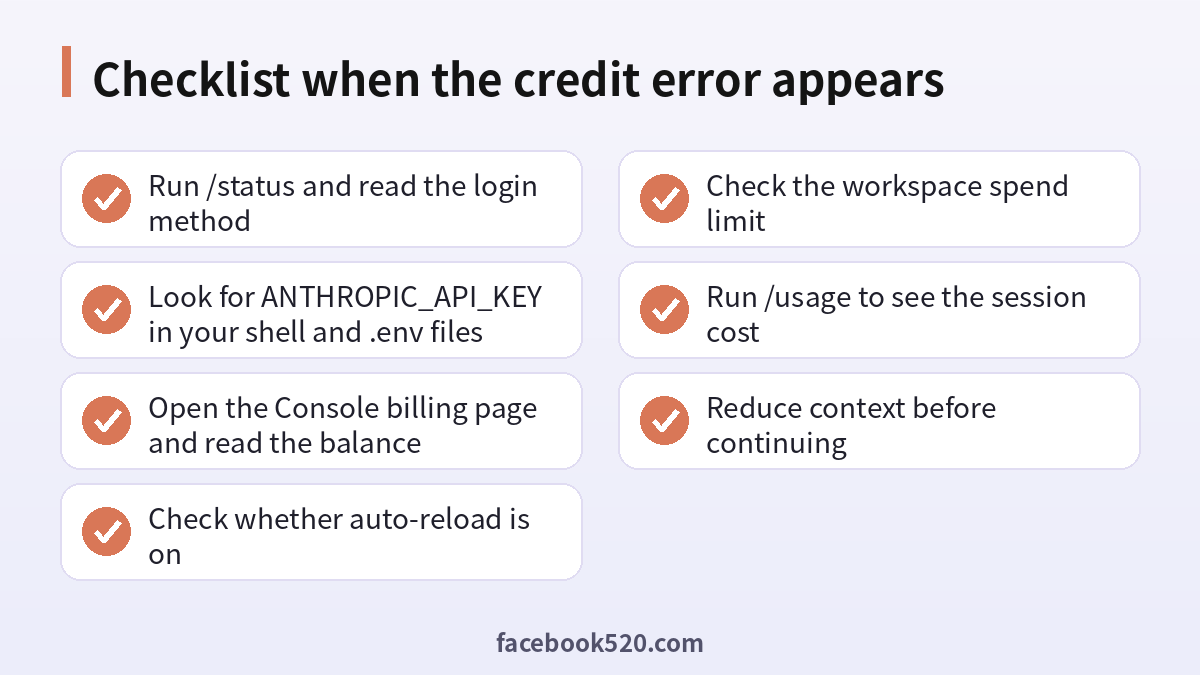
- Run the status command and write down the login method that Claude Code reports.
- Search your shell profile, project .env files, IDE settings and CI variables for ANTHROPIC_API_KEY.
- If you want the subscription, delete the key, open a brand new terminal and run the login command.
- If you want API billing, open the Console billing page, check the organization and add credits.
- Turn on auto-reload with a monthly cap, or set a workspace spend limit that matches your budget.
- Run the usage command, clear the context and continue with a more specific prompt.
| Item to check | Where to find it | What a healthy result looks like |
|---|---|---|
| Login method | /status inside Claude Code | Claude account for subscriptions, API key only if intended |
| Environment variable | Shell profile, .env, CI settings | No stray ANTHROPIC_API_KEY on subscription machines |
| Console balance | Billing page in the Console | Positive balance in the right organization |
| Spend limit | Workspace limits page | Limit higher than your expected monthly use |
| Usage credits | Settings > Usage on your Claude account | On, with a limit you accept |
How much does Claude Code cost?
Costs depend on your route. On a subscription, the cost is the monthly plan price, and the practical limit is how much you can use inside the plan window. On API billing, the cost follows token use. The official documentation states that Claude Code charges by API token consumption and that costs vary widely with model choice, codebase size and habits such as running several instances. It gives an enterprise average of around 13 dollars per developer per active day and 150 to 250 dollars per developer per month, with most users staying under 30 dollars on an active day. Treat these as rough guides, not promises, and measure your own usage for a week before choosing a route.
Ways to reduce token usage
Because the error is ultimately about running out of balance, spending less per task is the most durable fix. Start by clearing the conversation between unrelated tasks, because every new request carries the whole history. Choose the model to match the job: a smaller model handles many routine edits at lower cost, while the largest model is best kept for hard design problems. Keep your CLAUDE.md file short and move rarely needed instructions into skills that load on demand. Disable MCP servers you are not using, and write specific prompts that name the file and the change you want instead of asking the agent to improve everything.
Extended thinking is another lever. Thinking tokens are billed as output tokens, so lowering the effort level for simple tasks saves money. Watch out for background habits too: long idle sessions, scheduled tasks and several subagents all send requests that carry your context.
Checking your balance and spend
Use the usage command inside Claude Code for a quick estimate of the session, but remember that the dollar figure is computed locally at list price and is not an invoice. For the real number, open the Usage page in the Console, which shows spend by workspace and by key. Subscribers can open the usage settings of their account to see the plan bars and usage-credit spend. If something looks wrong, such as spend that does not match your activity, rotate the key and contact support through the in-product help.
Common mistakes that trigger the error
The same few mistakes cause most credit errors. The first is a forgotten key in an old shell profile. The second is a CI job or container that was set up months ago with a key that nobody tops up. The third is funding the wrong organization, which is easy if you belong to several. The fourth is a small spend limit set during a test and then forgotten. The fifth is assuming that a subscription automatically pays for API calls made with a key. They are separate systems with separate balances.
A short routine that prevents interruptions
A tiny routine saves hours. At the start of a work week, run the status command and confirm the login method. Keep one billing route per machine whenever possible. If you use API billing, enable auto-reload with a sensible monthly cap, and set an email alert on spend. If you use a subscription, turn on usage credits with a limit that you are comfortable with. Review the usage page once a week, and rotate any key that has been shared in a chat, a ticket or a screenshot.
Frequently asked questions
Why do I get “Credit balance is too low” with a Claude Pro or Max subscription?
Usually because an API key is set in your environment and Claude Code is billing the Console balance instead of your subscription. Remove the key, restart the terminal and log in with your Claude account.
How do I add credits to Claude Code?
For API billing, open the Console billing page, buy credits and optionally turn on auto-reload. For a subscription, open the usage credits settings from your Claude account and set a spend limit.
Do Console credits and subscription usage share a balance?
No. They are separate. A subscription covers seat usage, while Console credits cover API token usage. Paying for one does not fund the other.
Is there a Claude Code gift card?
We could not find an official dedicated Claude Code gift card. Treat sellers who claim to offer one with caution and pay only through official pages.
How can I get free Claude Code credits?
There is no permanent free credit. Look for official promotions, education or startup programs and event offers, and ignore any site that asks for your API key or login.
Does the error mean my account is banned?
No. It is a billing message, not a suspension. It means there is no available prepaid balance or the spend limit was reached.
How do I know which login Claude Code is using?
Run the status command inside Claude Code. It shows whether you are signed in with a Claude account or with an API key.
Can I use both a subscription and an API key?
Yes, but not at the same time in one session. Decide on a route per machine or per project, and avoid leaving a key in your global profile.
How do I stop surprise bills?
Set workspace spend limits and email alerts in the Console, enable auto-reload only with a cap, and review the usage page weekly.
Is it safe to buy Claude Code credits from a reseller?
We do not recommend it. Resold keys and codes can be revoked, and sharing a key exposes your account. Use official billing pages.
What should I do if I added credits but the error stays?
Check that you funded the same organization and workspace that owns the key, wait a few minutes, restart Claude Code and confirm the balance on the Usage page.
How can I lower my monthly cost?
Clear context between tasks, pick a suitable model, trim CLAUDE.md, disable unused MCP servers and write specific prompts.
Summary
“Credit balance is too low” is an API billing message, not a punishment. Check your login method first, remove a stray ANTHROPIC_API_KEY if you want to use your subscription, or add prepaid credits and set limits if you use the API. Use usage credits to extend a subscription, be skeptical of gift card and free-credit offers, and keep your context small so every dollar goes further.
