


Twitter Account Guide 2026: How to Create, Secure, Verify and Manage an X (Twitter) Account, Plus Business Use, Suspensions and Safe Alternatives to Buying
Twitter is now officially called X, but millions of people still search for “Twitter account” when they want to create a profile, protect an existing one, recover access, or run a business presence on the platform. This guide is the hub for everything account related: how sign-up works, how to pick a handle, how to lock the account down, what verification and Premium actually do, how businesses should structure their presence, why accounts get suspended, and what to do if you lose access. It also explains, plainly, why buying ready-made accounts is a poor idea and what to do instead. Features, names and prices on the platform change often, so treat the details below as a practical framework and confirm anything money-related on the official pages before you act.
If you want a step-by-step walkthrough of registration only, our dedicated sign-up article covers it in detail (https://www.facebook520.com/article/8300.html). Readers who prefer Chinese can start with the Chinese hub page (https://www.facebook520.com/article/8346.html).
What a Twitter (X) account is and what it is for
An X account is your identity on the platform. It consists of a display name, a unique handle that begins with the at sign, a profile photo and banner, a bio, and the posts, replies and follows you accumulate. People use accounts for very different reasons. Journalists and researchers follow breaking news. Creators build audiences and drive traffic to their own sites. Companies run customer support and announce products. Many people simply read and never post. Your goal determines how much effort you should put into profile quality, posting rhythm and security.
An account is also a security surface. It is tied to an email address, usually a phone number, a password, and sometimes connected apps and payment details. Anyone who gains control of these can post as you, read your direct messages and, in a business setting, spend your advertising budget. That is why a large part of this guide is about protection rather than growth.
How to create an account
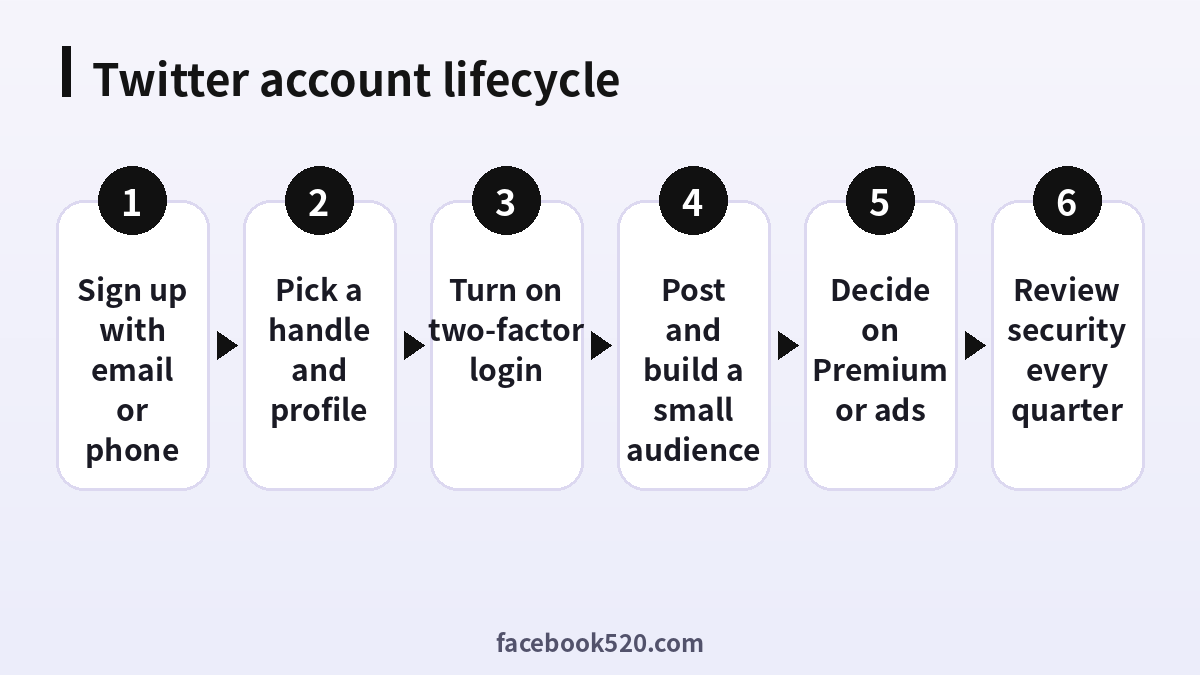
Creating an account takes only a few minutes. Open the official site or app, choose to sign up, and provide a name along with either an email address or a phone number. You will also be asked for a date of birth, which the platform uses to apply age-appropriate rules. After that you receive a verification code, set a password, choose a handle and add a profile photo. Some users can also sign up with an existing Google or Apple account.
- Go to the official website or install the official app from your device store.
- Choose to create an account and enter your name.
- Add an email address or phone number you control and will keep for years.
- Enter your date of birth as required by the platform.
- Type the verification code that is sent to you.
- Create a strong, unique password.
- Choose your handle and upload a profile photo.
- Follow a few accounts so your timeline is useful from day one.
If the platform asks for extra verification, for example because of unusual network activity, complete it honestly and do not try to bypass it with shared numbers or throwaway services. Those shortcuts are the most common reason new accounts are limited within days.
Choosing a handle and profile
A handle can be changed later, but links, mentions and your reputation attach to it, so choose carefully. Short, readable handles are easier to remember. Avoid trademarks that belong to others, since impersonation and trademark complaints are common causes of enforcement. Use a profile photo that suits the purpose: a clear face for a personal brand, a logo for a business. Write a bio that says who you are and what followers can expect, and add a link to a site you own. A pinned post can introduce your best content.
| Element | Good practice | Common mistake |
|---|---|---|
| Handle | Short, readable, consistent with other platforms | Numbers and underscores that look like spam |
| Display name | Real name or brand name | Keyword stuffing or fake titles |
| Bio | One clear sentence plus a link | Empty bio or aggressive sales copy |
| Photo | Sharp, centered, recognisable at small size | Stock photos or someone else’s picture |
| Pinned post | Best introduction or latest announcement | Outdated promotions |
Account security that actually matters
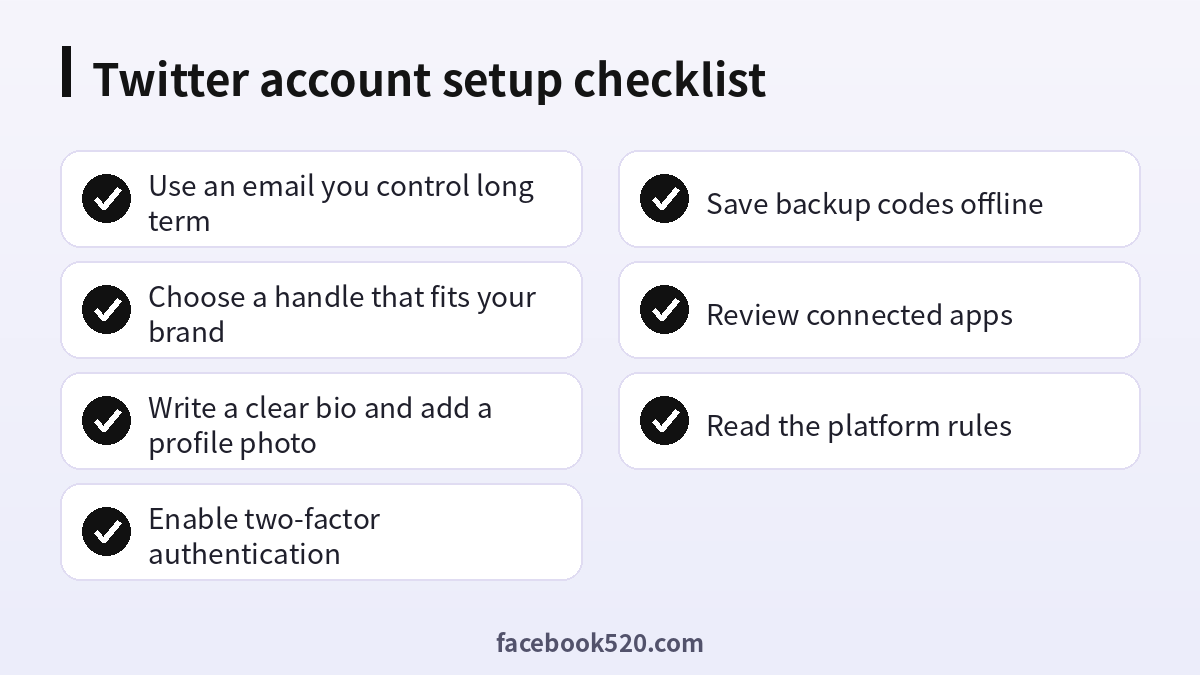
Most account losses come from weak or reused passwords, phishing messages and old email addresses that someone else can take over. Fix these first. Use a password manager to generate a long unique password. Turn on two-factor authentication and prefer an authenticator app or a hardware security key over text messages where the platform allows it. Store backup codes offline. Make sure the email address attached to the account is protected by its own strong password and two-factor login.
Next, review the apps that have been granted access to your account and remove anything you do not recognise. Check the list of logged-in sessions and sign out devices you no longer use. Be wary of direct messages that contain links, claim you violated a rule or offer a verification badge, because these are classic phishing lures. The platform will never ask for your password in a message.
| Security step | Why it matters | How often |
|---|---|---|
| Unique password | Stops credential-stuffing attacks | Once, then on any breach |
| Two-factor login | Blocks most takeovers | Set up once, test twice a year |
| Backup codes | Lets you recover if your phone is lost | Store offline, refresh after use |
| Connected apps review | Removes forgotten access | Every quarter |
| Email security | Email is the key to password resets | Review yearly |
Privacy settings worth reviewing
Beyond security, privacy settings decide who can find and contact you. Review whether people can discover your account by email address or phone number, whether your posts are public or protected, who can send you direct messages, and whether your location is attached to posts. If you use the account for work, consider disabling location sharing and limiting message requests to reduce spam. If you use it for personal commentary, think about whether you want your posts to be indexed by search engines. These options change from time to time, so open the privacy and safety menu once a quarter and confirm each switch still matches your intention.
It also helps to audit what you have already posted. Old posts can resurface in search results and screenshots. Delete anything that no longer reflects you or your brand, and consider scheduling a yearly clean-up. For businesses, adopt a short social media policy that tells staff what to share, what to avoid and how to respond to criticism, so that the account remains consistent even when several people post.
Verification, Premium and what they change
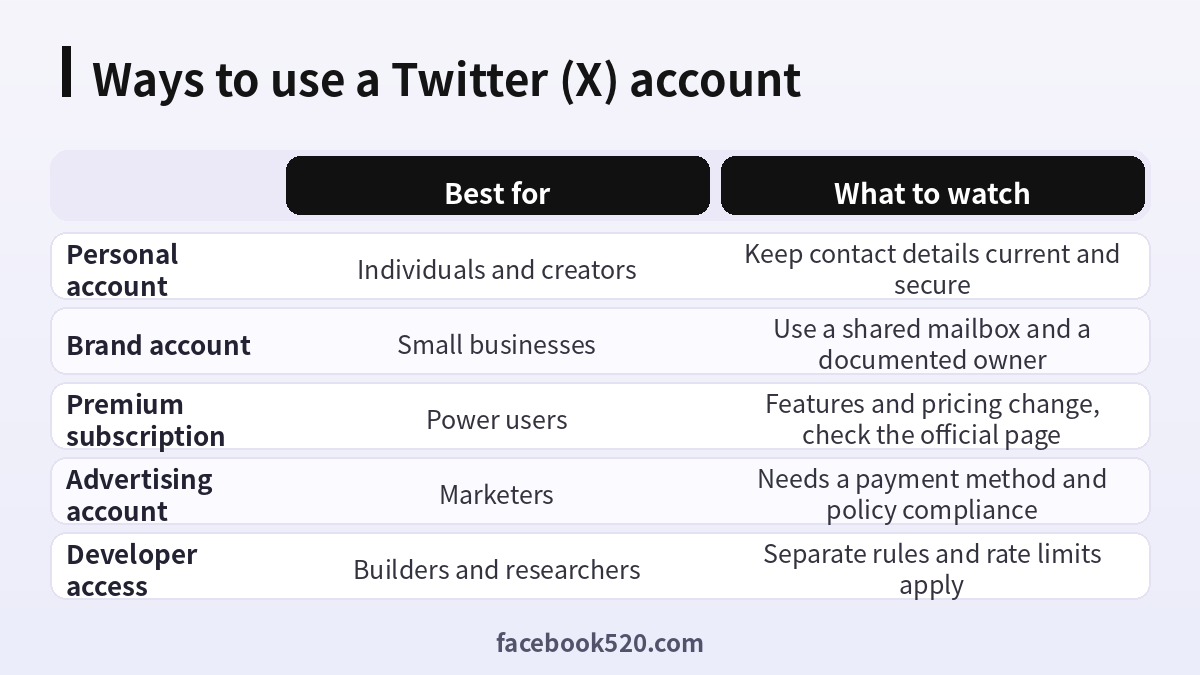
Verification on X used to mean a blue badge granted to notable accounts. Today, verification is tied to the subscription program, with organisations having a separate option. The tiers, features and prices have changed several times, so check the official subscription page for the current list before paying. In general, subscribers receive extras such as longer posts, edit options, fewer ads and priority in replies, and the exact bundle differs by tier and region. A badge does not make an account safer or more trustworthy by itself, and it does not protect you from enforcement if you break the rules.
If you are comparing subscription value for an AI assistant bundled with the platform, you may also want to read our pricing explainer for Grok (https://www.facebook520.com/ai-tools-guide/ai-chat-search/8306.html). For payments on the platform, always use the official purchase flow and keep the receipt.
Using a Twitter account for business
A business presence works best when it is treated like any other company asset. Create the account with a shared mailbox, such as a role address that more than one person can access, instead of a personal email. Document who owns the account, where the credentials and recovery codes are stored, and who may publish. Decide what the account is for: customer support, announcements, content marketing or recruiting. Then align the bio, header image and pinned post to that purpose.
Plan a simple rhythm, for example three posts a week, one reply session per day and a weekly review of what worked. Add the link to your site, track clicks with campaign tags, and respond to mentions quickly. If you run paid campaigns, set a budget and a payment method owned by the company, keep invoices, and ensure ad content follows the advertising policies. Never let a single employee be the only person who can log in.
Why accounts get suspended and how to avoid it
Suspensions and temporary limits usually stem from a handful of behaviours: spammy or repetitive posting, aggressive following and unfollowing, automation that violates the rules, impersonation, posting prohibited content, using multiple accounts to evade enforcement, and suspicious login activity. Newly created accounts are watched more closely, so build slowly. Post original content, interact like a human, and avoid mass actions.
If your account is limited or suspended, read the notice carefully because it states the reason and the options. Use the official appeal form, be factual and polite, and avoid creating replacement accounts to evade the decision, which can lead to permanent action. For a detailed explanation of what suspension means and how appeals work, see our dedicated guide (https://www.facebook520.com/article/8414.html).
| Behaviour | Risk | Safer approach |
|---|---|---|
| Mass following and unfollowing | Rate limits and spam flags | Follow gradually and relevantly |
| Repeated identical posts | Spam detection | Vary wording and timing |
| Third-party automation tools | Policy violations | Use only permitted tools and APIs |
| Impersonation or parody without labels | Suspension | Label parody clearly |
| Logging in from many networks in a short time | Security locks | Keep a stable network and device |
Recovering a lost or hacked account
If you cannot log in, start with the password reset flow using the email or phone number attached to the account. If you suspect a takeover, change your password at once, sign out all sessions, revoke connected apps and enable two-factor login. Check your email for messages that show your email or phone number being changed. If the platform locked the account, follow the prompts to verify your identity. Keep screenshots of error messages and the dates, because they help support teams understand the case.
Prevention is far better than recovery. A recovery process can take days and is not guaranteed, so the habits described in the security section pay for themselves.
Why buying ready-made accounts is a bad plan
Searches for buying accounts are common, and we have a separate explainer on the topic (https://www.facebook520.com/article/8265.html) that lays out the risks. In short, an account you did not create comes with unknown history. The seller may still hold the recovery email, may have used shared numbers, or may have created the account with automation. Platforms can lock or remove such accounts without notice, and you have no standing to appeal because the account is not tied to you. Buying and selling accounts can also breach the platform terms. Payments to anonymous sellers are another risk, because refunds are rarely possible.
A safer alternative is to create your own account, use it consistently, and grow it with genuine content. If you need faster reach, use the platform’s own advertising tools or work with creators who already have audiences. If you need multiple accounts for different brands, create each one with its own mailbox and keep records.
Content ideas that suit most accounts
A steady content mix prevents burnout. Share short tips drawn from your daily work, publish brief explanations of common questions, comment on news in your field with one clear opinion, and repost useful material from others with your own context. Threads work well for step-by-step explanations, while single posts suit announcements. Use images or short clips when they clarify a point, and always write descriptive alt text so your content is accessible. Keep a running list of ideas in a notes app, so you never face a blank page.
Measure results with the native analytics: impressions, engagement rate and profile visits. Compare formats over a month, not a day, because daily numbers are noisy. If a topic consistently draws replies, build a series around it. If a format consistently underperforms, drop it without guilt. The aim is a sustainable routine that you can maintain for a year, not a short burst that ends in silence.
Tools that help without breaking the rules
Many scheduling and analytics tools operate through official interfaces and are allowed. Before connecting any tool, read what permissions it requests. Avoid tools that ask for your password, promise instant followers, or automate likes and follows, because those violate platform rules and often steal accounts. Prefer tools from established vendors with clear privacy policies, and remove access when you stop using them. A simple spreadsheet for a content calendar is often enough.
A simple ninety-day plan for a new account
In the first week, finish the profile, secure the account and follow about fifty relevant accounts. In weeks two to four, post a few times a week, reply thoughtfully to others and save ideas that perform well. In the second month, begin a recurring format such as a weekly tip or a thread, and track which posts earn replies instead of only likes. In the third month, review your analytics, double down on what works and decide whether Premium or ads make sense for your goals. Throughout, keep the account secure and review your settings every quarter.
Frequently asked questions
How do I create a Twitter account in 2026?
Open the official site or app, choose to sign up, enter your name and an email or phone number, confirm the code, set a password and pick a handle. The whole process takes only a few minutes.
Is Twitter the same as X?
Yes. The platform was renamed X, but many users and search engines still use the name Twitter. The account works the same way.
Do I need a phone number?
Not always. Many people sign up with an email address, but the platform may ask for a phone number as an extra check, especially if it sees unusual activity.
Can I change my handle later?
Yes, you can change it in the account settings, but old links and mentions will point to the previous handle, so choose carefully.
How do I make my account more secure?
Use a unique password, turn on two-factor login with an authenticator app or security key, store backup codes offline, review connected apps and protect your email account.
What does verification do?
Verification is linked to the subscription programme and offers features such as longer posts and fewer ads. It does not guarantee safety or protect you from enforcement.
How do I create a business account?
Create a normal account with a shared mailbox, then complete the profile, document ownership and add advertising tools if needed. There is no separate secret business account type.
Why was my account suspended?
Common reasons include spam, automation, impersonation, prohibited content and suspicious logins. The suspension notice explains the reason and how to appeal.
How do I appeal a suspension?
Use the official appeal form linked in the notice, explain the situation factually and wait for the response. Do not create new accounts to evade the decision.
Is it safe to buy a Twitter account?
It is not recommended. Purchased accounts carry unknown history, can be recovered by the original owner, and may break the platform rules. Create your own account instead.
How many accounts can I have?
You can have more than one account, for example personal and brand profiles, but do not use them to evade enforcement or to manipulate conversations.
What should I do if my account is hacked?
Reset the password, sign out all sessions, revoke connected apps, enable two-factor login and check your email for changes. Contact support through the official process if the account is locked.
Conclusion
A healthy Twitter or X account starts with a durable email, a clear profile, strong security and patient, honest activity. Treat the account like a business asset, document who owns it, review security regularly and resist shortcuts such as bought accounts or automation. Do that, and you keep control of your presence and avoid the problems that cost other users their reach.

