


Character AI No Sign Up (2026): Can You Chat Without an Account, How to Sign Up Fast, Free vs c.ai+ Limits, Age Rules, Privacy and Safe Alternatives
Searches for “character ai no sign up” are among the most common queries around AI chat apps, and it is easy to see why. People hear about a character they want to talk to, click a link and immediately hit a login screen. They would rather just start chatting. This guide explains what is realistically possible without an account, why Character.AI asks you to sign up for most features, how to create a free account in a few minutes, what the free plan and the paid c.ai+ plan offer, and how to stay safe if you come across websites that promise unlimited Character AI chats with no login at all. Features, limits and policies change often, so treat the details below as a general explanation and check the official site or app for the current rules.
Can you use Character AI without signing up?
The short answer is: only to a very limited extent, if at all. Character.AI is built around accounts. Your chat history, your favorite characters, the characters you create and your preferences are all tied to a profile. Without an account the service has no place to store those things, and it has no way to apply age rules or safety settings to you. At various times the site has allowed visitors to look at the home page, browse public characters or try a short preview before asking them to register, but whether that is available today, and how much it allows, is decided by Character.AI and can change without notice.
In practice you should plan on one of two things. Either you can browse and see what characters exist, or you will be asked to sign in as soon as you try to send more than a small number of messages. Treat any “no sign up” experience on the official service as a preview rather than as a replacement for an account.
Why Character AI asks you to register
There are several reasons, and they are mostly practical rather than a way to collect data for its own sake. First, saved conversations require an identity. If you close the tab and come back tomorrow, you expect your chat to still be there. Second, safety and age rules require some form of age information, particularly because the service has to treat younger users differently from adults. Third, fair use of limited computing capacity requires a way to manage demand, and accounts make queues and priority possible. Fourth, community features such as creating, publishing and reporting characters need accountable creators. Finally, subscription features such as c.ai+ naturally need an account to attach to.
What you can do at each level
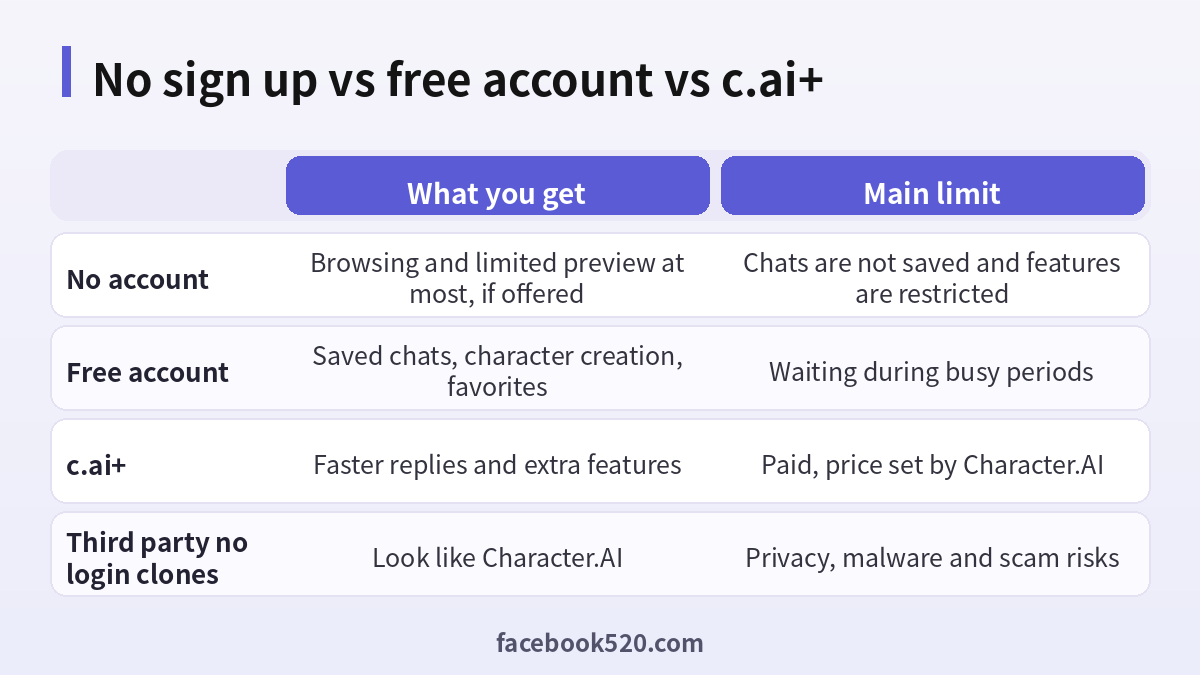
The table below summarizes the typical differences. It is a general picture and not a promise, so check the current feature list inside the app.
| Level | Typical access | Typical limits |
|---|---|---|
| No account | Browse the home page and public characters, possibly a short preview | No saved chats, no creation, prompts to sign in |
| Free account | Saved chats, favorites, character creation, voice options where available | Possible waiting during busy periods, some features reserved for paid users |
| c.ai+ | Faster responses, priority access and extra features | Monthly or yearly fee, rules set by Character.AI |
| Unofficial clone | Looks similar | No guarantee of safety, privacy or real Character.AI characters |
How to create a free Character AI account
Creating an account is fast and does not require payment. The steps below describe the usual flow, which may look slightly different on the website and in the mobile app.
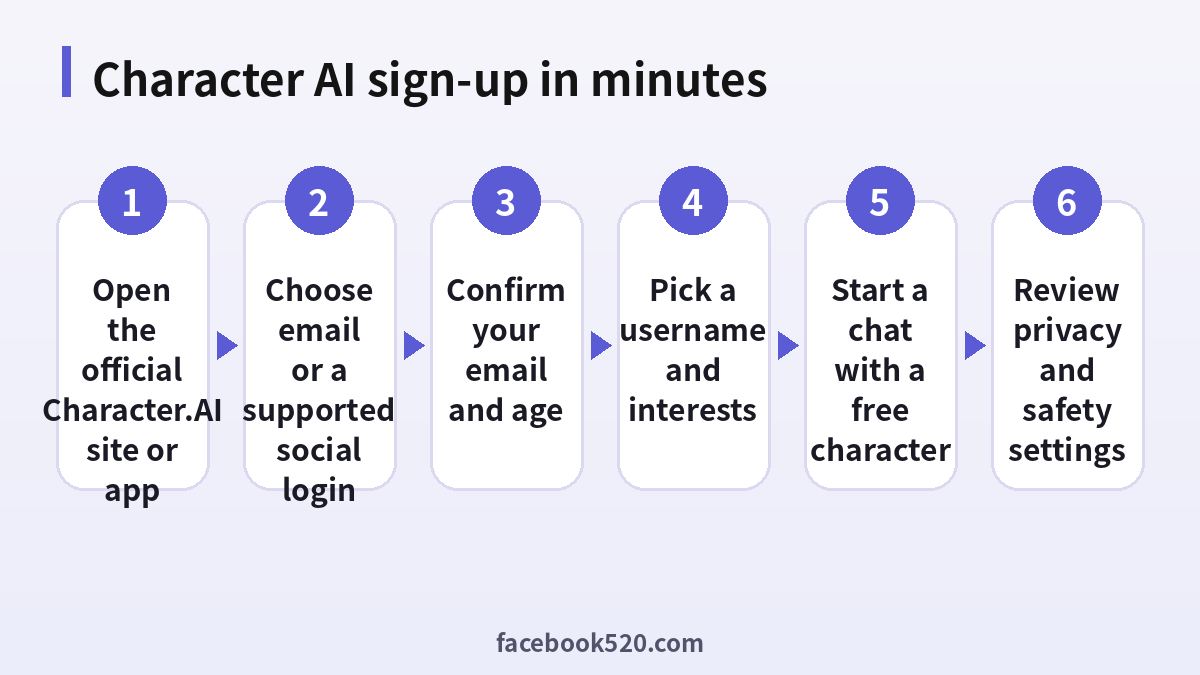
- Open the official Character.AI website or install the official app from your device’s app store. Check the developer name before you install.
- Tap the sign-in or sign-up button on the home page.
- Choose a supported method, such as an email address or an existing social account, depending on what the screen offers.
- If you use email, enter an address you control, create a strong password that you do not use anywhere else, and confirm the message that arrives in your inbox.
- Enter your date of birth truthfully. The service uses it to apply age-appropriate rules.
- Choose a username and, if asked, a few interests so that the home page can recommend characters.
- Accept the terms after reading them, then open a character and send your first message.
- Open the settings menu and review notification, privacy and safety options.
If the confirmation email does not arrive, check your spam folder, make sure the address was typed correctly and wait a few minutes before requesting another message. Using the same device and network for the whole process also helps avoid security checks.
Free plan versus c.ai+
Most people never need a paid plan. The free plan lets you chat with many characters, save conversations and create your own characters. The main trade-offs are that you may wait for a response during busy periods and that some extra features are reserved for subscribers. c.ai+ is the paid tier. It is aimed at people who chat every day and want faster replies and added features. The exact price and benefits are listed on the official pricing page and can differ by country and by purchase channel, for example the web versus an app store. If you are not sure, use the free plan for a week, notice how often you actually wait or feel limited, and only then decide whether paying makes sense.
| Question | Free account | c.ai+ |
|---|---|---|
| Cost | None | Subscription fee |
| Waiting at busy times | Possible | Reduced |
| Saved chats | Yes | Yes |
| Extra features | Core features | More features and priority |
| Best for | Casual users | Heavy daily users |
Age rules and family safety
Character.AI is a conversation product, and conversations with AI characters can drift into topics that are not suitable for everyone. For that reason the service sets minimum age requirements and has announced additional limits for younger users. The details have changed over time, so read the current policy inside the app. Parents and guardians should know that an AI character is not a real person, that it can say things that are inaccurate or inappropriate, and that it cannot replace a friend, a teacher or a professional. If a young person uses the service, the safest approach is to sit down together, review the settings, agree on rules for how long and when to use it, and make sure the child knows that they can come to you if a chat makes them uncomfortable.
Privacy: what not to share
Even on the official service, treat conversations as something that can be stored and reviewed under the privacy policy. Do not share your full name, home address, phone number, identity document numbers, bank or card details, passwords or one-time codes. Characters sometimes ask personal questions as part of role play; you are never obliged to answer truthfully. If you create characters, avoid including real people’s private information in the description, and do not upload photos of other people without their permission.
The risk of “no login” Character AI clone sites
Because so many people search for a version that needs no account, a number of websites and apps advertise themselves as free, unlimited, no login Character AI. Be careful. Many are unofficial and have no connection with Character.AI. Some are thin wrappers around other models, some show aggressive ads, some ask for browser notifications or downloads, and a few exist mainly to collect personal data or to push malware. Even if one of them seems harmless today, you have no guarantee about where your conversations go or how long they are stored.
| Warning sign | Why it matters |
|---|---|
| Unfamiliar domain imitating the brand name | May be a phishing or clone site |
| Asks you to install an extension or APK from outside an app store | High risk of malware |
| Requests payment through unusual methods | Chargebacks and fraud are hard to resolve |
| Promises hacked or unlimited premium access | Not legitimate and may steal your account |
| Asks for your Character.AI password | Never share it, this is a credential theft attempt |
Troubleshooting sign-up problems
| Problem | Likely cause | What to try |
|---|---|---|
| No confirmation email | Spam filter or typo | Check spam, confirm the address, request a new email later |
| Page will not load | Local network or regional availability | Try a different network and check that the service is available where you live |
| Login loop | Cached data or blocked cookies | Clear site data, update the browser, try the app |
| Age message | Date of birth does not meet requirements | Read the official policy, do not enter false data |
| Payment declined | Card or bank restriction | Contact your bank or use another official payment method |
Getting more from your first conversations
Once you have an account, the quality of your experience depends a lot on how you start. Pick a character with a clear description and a recent history of positive feedback, and read the short introduction before you write your first message. Characters are defined by their creators, so a well written description usually leads to more consistent answers. Begin with a simple greeting and one clear request, for example asking the character to help you practice a language, brainstorm a story or explain a topic in simple words. If the answer drifts away from what you want, you can regenerate the reply, edit your message or simply tell the character what you expect. Short, direct instructions tend to work better than long paragraphs.
You can also use the search function and categories to find characters by theme. Favoriting the ones you like keeps them within reach, and following creators whose characters you enjoy makes it easier to find new ones. Try to remember that every character is generated by AI. It can be creative and entertaining, but it can also be wrong, so avoid relying on it for medical, legal or financial decisions.
Creating your own character after you sign up
One of the strongest reasons to register is the ability to create characters of your own. The creator tools ask for a name, a short tagline, a longer description of personality and background, and a greeting message. You can add sample dialogue to show the tone you want. Good characters usually have a focused purpose, such as a study partner, a fictional detective, a language tutor or a writing coach. Test the character yourself before you share it, and change the description if you see unwanted behavior. Respect other people’s rights: do not copy private information, do not impersonate real individuals in a deceptive way, and follow the community rules about what is acceptable. If you plan to share a character publicly, add a clear description so that other users know what to expect.
Managing your data and account over time
An account is something you maintain, not a one-time form. Review your settings every few months. Check which login methods are connected, change your password if you reused it elsewhere, and delete chats or characters that you no longer want to keep. If you subscribe to c.ai+, note the renewal date, and know where you bought it, since cancellation must be done in the same place as the purchase. If you decide that you no longer want to use the service, look in the settings for the account deletion option so that your data is removed according to the privacy policy. Keeping a short note of which email address you used also saves a lot of trouble when you need to recover access later.
Safer alternatives when you do not want an account
Some people avoid sign-ups for privacy reasons, and that is a reasonable preference. If you do not want to create a profile, you have a few safer options than random clone sites. You can browse the official site to see which characters and categories exist without committing to anything. You can use a general-purpose AI assistant from a well-known provider for simple role play or writing practice; many of them allow a limited number of free messages and clearly explain their data practices. You can also use a dedicated email address created only for this purpose, which keeps your main inbox separate and makes it easy to stop using the service later. Finally, a tiny amount of preparation, such as writing down what you want to ask before you start, makes short sessions more productive.
Whatever you choose, read the privacy policy of any tool you try, avoid entering real personal details, and be especially careful with sites that request unusual permissions. A free service is only worth using if you understand what it does with your conversations.
Quick decision guide
If you only want to see what Character.AI looks like, browse the official site and decide afterward. If you want to chat for more than a few messages, create a free account using the official sign-up page. If you chat daily and dislike waiting, compare the price of c.ai+ with how much you use it. If someone offers you an account for sale or promises unlimited premium access without paying, decline and use the official route instead. This approach keeps your account safe, your payments traceable and your conversations private, and it takes only a few minutes of effort.
Frequently asked questions
Can I use Character AI with no sign up at all?
Only limited browsing or a short preview may be available, and that can change. To chat properly and keep your history you need a free account.
Is a Character AI account free?
Yes, the basic account is free. The paid c.ai+ plan is optional.
Do I need to enter a phone number?
The flow may ask only for an email or a social login. The required information can vary, so follow what the official screen requests.
Can I chat without saving my conversation?
Without an account there is nowhere to store it. With an account you can manage or delete chats in the settings.
Are no login Character AI sites safe?
Treat them with caution. They are usually unofficial, and you cannot be sure how your data is handled.
What age do I need to be?
Character.AI sets minimum age rules and extra limits for younger users. Read the current policy in the app.
Can I sign up with a social account?
If the option is shown on the official sign-in page, yes. Use only accounts you control.
Why is my reply slow?
During busy periods free users may wait. A paid plan reduces waiting.
How do I delete my account?
Look in the account or privacy settings for the deletion option, or follow the help center instructions.
Can I use one account on several devices?
Yes, sign in with the same details on the website and the app.
Should I buy a Character AI account from someone?
No. Selling accounts is against the rules, and a purchased account can be recovered by the original owner, closed or used to expose your chats.
Does the character remember everything?
Memory is limited. Long conversations may lose details, so remind the character of key points when needed.
Summary
There is no reliable way to get the full Character.AI experience with no sign up. The practical route is to create a free account on the official site or app, which takes only a few minutes, and to decide later whether the paid plan is worth it. Be careful about clone websites that promise no login access, protect your privacy by sharing less, and respect the age rules that exist to keep younger users safe.
