


Lovable Free Credits (2026): Free Plan Daily Credits, Pro and Business Plans, How Credits Work, Credit Top-Ups and Auto Top-Up, How to Pay, and Why Free Credit Hacks and Gift Card Codes Are Risky
Lovable is an AI app builder that turns plain-language prompts into working web applications. Because every message you send and every action the tool takes uses computing power, Lovable meters usage through credits. That is why so many people search for Lovable free credits, Lovable credits and Lovable gift card codes: they want to know how many credits they get for nothing, how to buy more, and whether there is any legitimate way to stretch their budget. This guide explains how credits work in October 2026, what the Free, Pro and Business plans include, how one-time and automatic top-ups are priced, how to pay and keep control of your spending, and why websites promising unlimited free credits or gift card codes are best avoided. Prices and limits change often, so confirm the numbers on the official pricing page before you spend money.
What Lovable credits are used for
Credits are the unit of work in Lovable. They pay for building and editing your app through chat, for the cloud and database features that your app uses when it is running, for AI features that you add to the app and for some connectors. The cost of any request depends on how much work the tool has to do. A small text change is cheap, while a large feature that touches many files or needs several attempts costs more. Because of this, two people with the same plan can use their credits at very different speeds.
Credits are also granted in different forms. Some are tied to a specific kind of usage, and some are general credits that can be used for anything. According to the documentation, usage-specific grants are consumed first and general credits afterwards. Knowing this helps you understand why your balance may move even when you are not chatting, for example when a published app with a backend is being used.
The Free plan and its daily credits
The Free plan is the legitimate way to get free credits. As of October 2026 the documentation describes a small daily allowance of build credits that resets at midnight UTC and does not roll over, with a monthly cap on how many of those daily credits you can use, together with small monthly allowances for cloud and AI usage. This is enough to try the product, build a simple prototype or learn how prompts translate into features, but it is usually not enough for a serious project. Free workspaces cannot buy top-ups, so when you hit the limit, the choices are to wait for the next reset or upgrade.
A practical strategy on the Free plan is to plan your prompts before you spend credits. Write a short specification of the page you want, list the features in order of importance, and send them in focused steps instead of vague, repeated requests. Each wasted attempt costs credits, so clarity is the cheapest way to stretch a free allowance.
Pro and Business plans
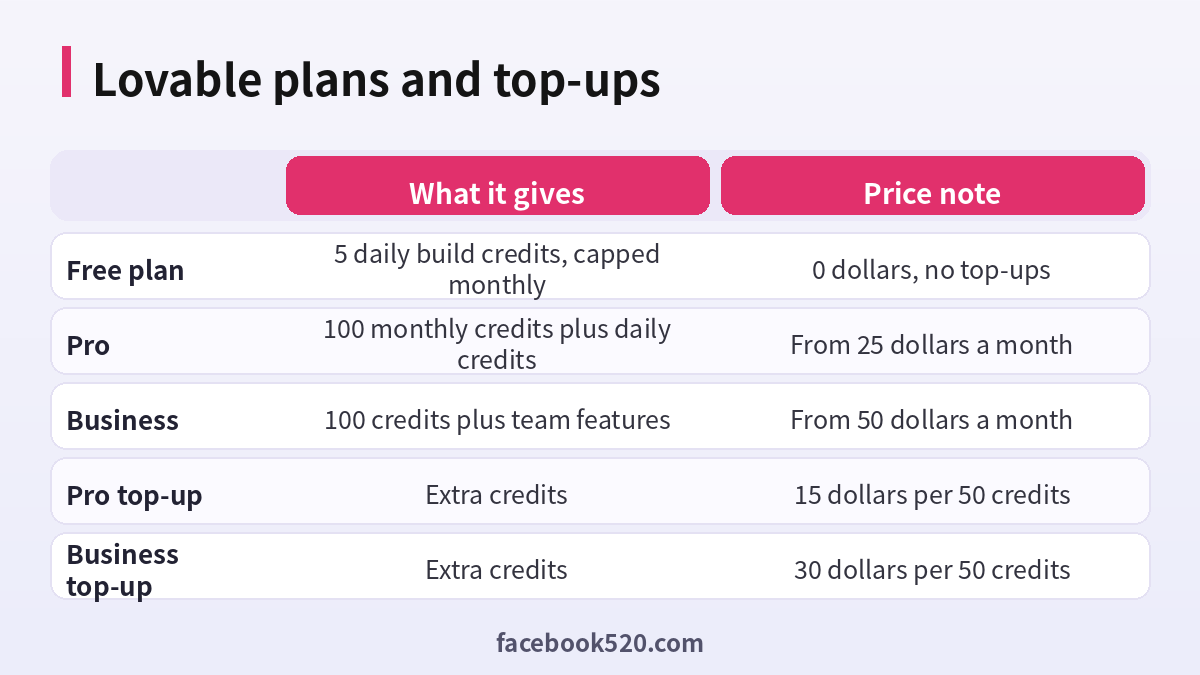
Paid plans add a monthly credit allowance on top of the daily credits and unlock top-ups and more features. Pro starts at about 25 dollars a month and includes 100 credits a month in its base tier, with options to choose a higher credit tier if you need more. Business starts at about 50 dollars a month, also with 100 credits in the base tier, and adds team and security features that matter to companies. Annual billing normally lowers the monthly price, and higher credit tiers raise it.
| Plan | Starting price | Credits | Best for |
|---|---|---|---|
| Free | 0 | Small daily credits with a monthly cap | Trying the product |
| Pro | About 25 dollars a month | 100 monthly credits plus daily credits | Solo builders and freelancers |
| Business | About 50 dollars a month | 100 monthly credits plus team features | Teams and companies |
| Enterprise | Custom | Custom | Large organizations |
If you find yourself needing more credits every month, the documentation suggests that moving up to a higher credit tier is usually better value than buying top-ups repeatedly. Top-ups are best for occasional spikes, such as finishing a launch.
How credit top-ups work
A top-up adds credits to your workspace balance without changing your subscription. It is available on Pro and Business plans, and workspace owners or admins buy it from the plans and credit usage section of workspace settings. Each purchase is a one-time payment processed through a payment provider, and it comes with its own receipt. Top-up credits are valid for twelve months from the purchase date, and the oldest general credits are spent first.
| Plan | Top-up price | Price per credit |
|---|---|---|
| Pro | 15 dollars per 50 credits | 0.30 dollars |
| Business | 30 dollars per 50 credits | 0.60 dollars |
You can choose from preset amounts, from 50 credits up to ten thousand. The price depends on your plan and is the same whether you pay monthly or annually. Note that the price per credit is higher on Business than on Pro, so upgrading to Business only for the sake of cheaper credits would be a mistake.
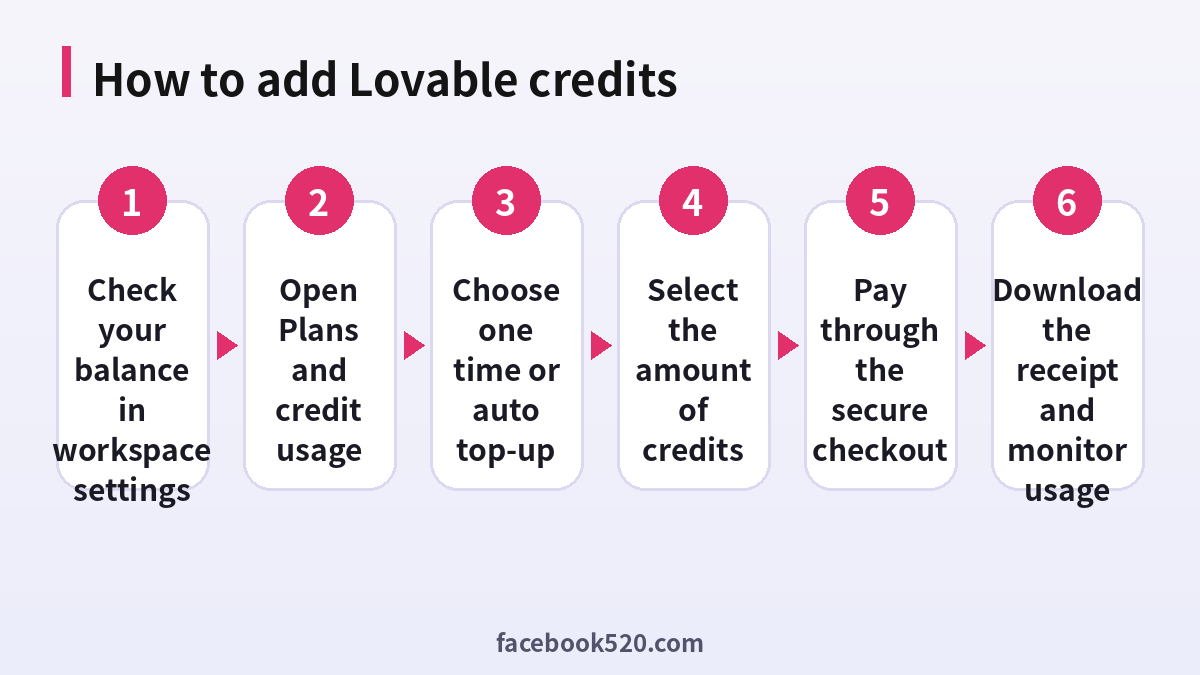
Step-by-step: how to buy credits
- Sign in to Lovable and open workspace settings, then go to the plans and credit usage page.
- Check your current balance, plan and the date on which your plan credits refill.
- Select the option to add credits and choose whether you want a one-time purchase or an automatic top-up.
- For a one-time purchase, pick the amount of credits. The dialog shows the price before you pay.
- Enter or confirm your payment method and complete the payment. Credits usually appear within a minute.
- Download the invoice or receipt from the invoices and payments area, and keep it for your records.
- Return to your project and continue building, watching how fast the balance moves.
Auto top-up: convenient but needs limits
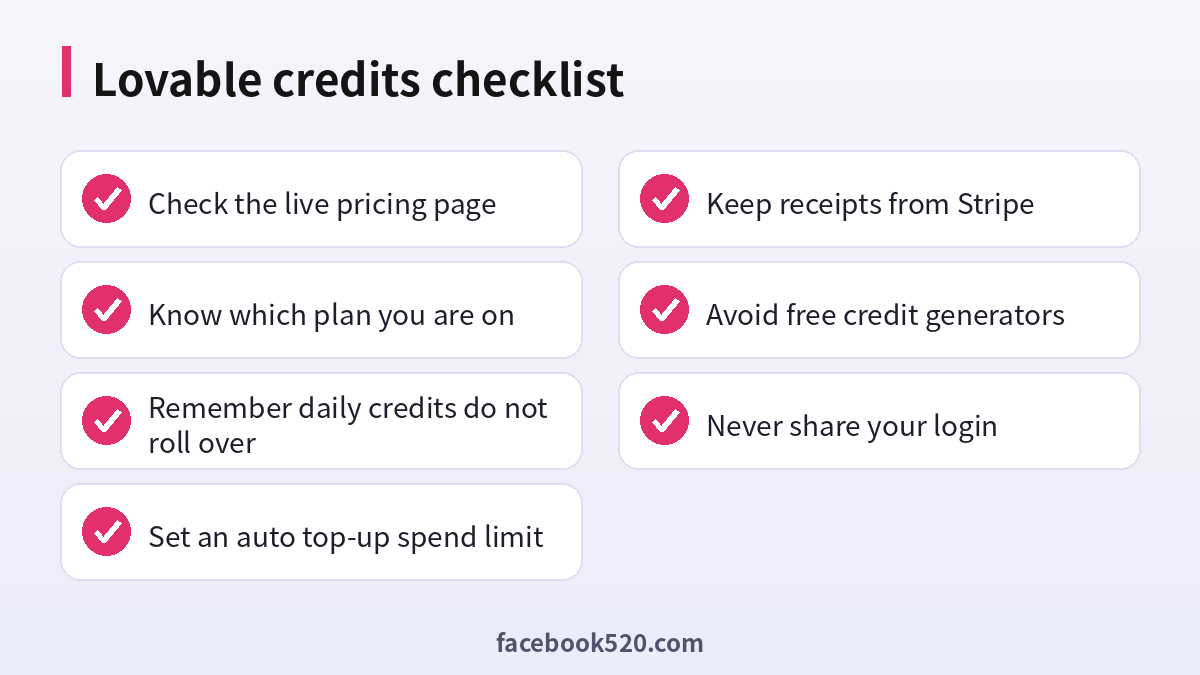
Auto top-up buys credits for you when your balance falls to a threshold you choose, so your build is not interrupted. You set three rules: how many credits to add each time, the balance at which the top-up triggers and a monthly spend limit. If you leave the monthly limit unlimited, the system can keep buying credits whenever the threshold is reached, which could lead to a larger bill than you expected. For that reason, always set a limit that matches your budget. The documentation also notes that the limit resets on the first day of each calendar month and that the system warns you when you have used most of it.
Auto top-up needs a valid card on file. If a payment fails, you receive a banner and an email, and the system will not retry for several days when the problem is with the card. Fix the payment method and retry, or turn auto top-up off and buy one-time top-ups instead. If your balance reaches zero, building stops and AI features in deployed apps may stop working, although your published site stays online.
Payment methods and billing problems
Payments are handled through a secure checkout, with major credit and debit cards as the usual option. If your card is declined, the typical causes are a bank block on international payments, an expired card, a mismatch in the billing address or insufficient funds. Contact your bank, update the card and try again. Always check that the amount shown at checkout matches what you expected, since taxes and currency conversion can change the final charge. Save every receipt so that you can reconcile your accounts and resolve disputes.
| Problem | Likely cause | What to do |
|---|---|---|
| Card declined | Bank restriction or wrong details | Contact the bank or use another card |
| Credits not showing | Processing delay | Refresh and check the receipt email |
| Unexpected charge | Auto top-up without a spend limit | Review settings and set a limit |
| Cannot buy a top-up | You are on the Free plan | Upgrade to Pro or Business |
| Balance drops quickly | Large or repeated requests | Break work into smaller, clearer steps |
Free credit generators and gift card codes: what to know
Searches such as free Lovable credits and Lovable gift card code attract a lot of spam. Websites and videos claim to offer unlimited credits, hacked accounts or secret codes, but they typically ask you to complete surveys, download software or enter your login. These are common routes for phishing, malware and account theft. The official documentation does not describe any generator that gives away credits, and credits are tied to your workspace, so a code from a stranger cannot legitimately add to them. If Lovable runs a promotion, referral program or student offer, it will be announced on its official website, documentation or social accounts. Check there rather than trusting a random page. Never give your password to anyone, never install software to get credits and never buy credits or accounts from unofficial sellers.
How to use credits efficiently
Start with a clear plan. Describe the app, the pages, the data it needs and the user flow before you start building. Use short, specific prompts for each change, and review the result before moving on. Ask the tool to fix one problem at a time instead of combining unrelated changes. Use version history to roll back when a change goes in the wrong direction rather than asking for several repair attempts. Test your app regularly so that bugs are caught early, when they are cheaper to fix. Finally, monitor the usage details in your workspace to see which actions consume the most credits and adjust your habits accordingly.
Budgeting a Lovable project
Treat credits like a project budget. Before you start, break your app into features and estimate how many requests each needs. A simple landing page may take a handful of credits, a login system with a database takes more, and integrations with payments or external services take more again. Add a margin of about thirty percent for fixes and changes of mind. Compare the total with your plan credits and decide whether you will need a top-up. If you are building for a client, include the cost of credits in your quote so that you are not absorbing it silently.
| Project type | Rough complexity | Budgeting tip |
|---|---|---|
| Landing page | Low | Free plan may be enough for a draft |
| Internal tool with a database | Medium | Plan on Pro and a small buffer |
| Marketplace or booking app | High | Higher credit tier and a capped auto top-up |
| Prototype for investors | Medium | Focus on one core flow, then polish |
| Ongoing product | Continuous | Compare tiers instead of repeated top-ups |
Working in a team
If several people use the same workspace, agree on rules for who may spend credits and who can change billing. Owners and admins manage plans and top-ups, so keep that list short and review it when people join or leave. Set up auto top-up only with a spend limit, and ask someone to check the usage details weekly. Use separate projects for experiments so that a risky idea does not drain the credits intended for the main product. When a project ends, export or archive what you need and downgrade or cancel the plan if it is no longer required.
Prompting habits that save credits
Good prompts are the cheapest optimization. State the goal, the audience and the constraints in one clear message, for example the page layout, the colors, the data the form should collect and what should happen after submission. When you want to change something, name the exact element rather than describing it vaguely. Ask the tool to explain its plan before it makes large changes, which lets you correct a misunderstanding before credits are spent on the wrong direction. Reuse components and patterns that already work instead of asking for new designs every time. Keep a short document of decisions, such as naming rules and style choices, and paste the relevant parts into your prompts so that the tool does not have to guess.
Security and ownership of your projects
Your credits and your code belong to your workspace, so protect the account. Use a strong password and two-step verification, limit who can invite new members and review connected services regularly. Avoid pasting secret keys, passwords or customer data directly into prompts or into the project files. If you connect third-party services, use scoped keys with the least permissions necessary, and rotate them if they are ever exposed. Exporting your code to a repository gives you a backup and a way to continue development elsewhere if you decide to change tools.
When to upgrade, top up or wait
Use a simple rule. If you are within a day or two of your refill and have a small task left, wait. If you are in the middle of a deadline and need a few dozen credits, buy a one-time top-up. If you consistently run out before the end of the month, choose a higher credit tier. If your whole team is building, consider a plan that supports collaboration and central billing. Revisit the decision monthly, because your needs will change as the project matures.
Checking your spending after each billing period
At the end of every month, open the usage details and the invoices page and compare them with what you expected. Note which projects used the most credits, how many top-ups you bought and whether any automatic purchases surprised you. If the numbers do not match your budget, change the plan tier, lower the auto top-up limit or adjust how you prompt. Keeping a simple record each month turns credits from a vague worry into a number you can manage.
Frequently asked questions
Does Lovable offer free credits?
Yes, the Free plan includes a small daily allowance with a monthly cap, plus small cloud and AI allowances. It is meant for trying the product.
Do daily credits roll over?
No. Daily credits reset each day and do not roll over.
Can I buy credits on the Free plan?
No. Top-ups are available on Pro and Business plans.
How much do top-ups cost?
In October 2026 the documentation showed 15 dollars per 50 credits on Pro and 30 dollars per 50 credits on Business.
How long do top-up credits last?
They are valid for twelve months from the purchase date.
What is auto top-up?
It is a setting that buys credits automatically when your balance falls to a threshold, up to a monthly spending limit that you choose.
Is there a Lovable gift card code?
Do not trust sites offering codes. Check the official website for any real promotions.
Why did my credits run out so fast?
Large changes, repeated attempts and backend usage all consume credits. Plan your prompts and review the usage details.
Can I get a refund for a top-up?
Refund terms are set by Lovable. Read the billing documentation before you buy, and contact support if there is a problem.
Is it safe to buy an account with credits?
No. Resold accounts can be recovered by the original owner and may violate the terms.
Summary
Lovable credits are the currency of building with AI. Use the Free plan to learn, move to Pro when you need a steady supply, and use one-time top-ups or a capped auto top-up for busy periods. Pay through the official checkout, keep your receipts and ignore websites that promise free credits, gift card codes or hacked accounts. Careful prompts and clear plans will often save you more credits than any discount.
