


Suno Earn Credits (2026): How to Get More Credits the Official Way, Daily Free Credits, Monthly Plan Credits, Top-Ups That Roll Over, Smart Prompting to Save Credits and Why Credit Hacks and Sharing Accounts Are Risky
Suno turns a short text prompt into a full song with vocals, and every generation costs credits. If you create music regularly, you will notice how fast the counter drops, and you may search for ways to earn more credits. The honest answer is that credits come from only a few official sources: the daily free allowance, the monthly credits that come with a paid plan and extra credits that paid subscribers can buy. There is no secret trick that creates unlimited credits, and the offers that promise one tend to end in a lost account or a lost payment. This guide explains how the credit system works as of October 2026, how to collect everything that you are entitled to, how to spend fewer credits per good song, when it is worth upgrading and which shortcuts to avoid. Plans and numbers change, so confirm them on the official Suno pages and help center.
How Suno credits work
A credit is a unit of usage. When you generate a song, the system deducts credits from your balance. Different actions can cost different amounts, and the exact cost depends on the model and feature that you use. A typical generation produces more than one version of a song, so the credits buy you a few candidates to choose from. Your balance and the reset information appear in your account, and the help center explains how each type of credit behaves.
Credits come in three flavors. Free credits arrive daily and are meant for trying the service. Plan credits arrive each month when you subscribe. Top-up credits are bought separately by paid subscribers, and they are designed for people who run out of plan credits before the month ends.
The official sources of credits
| Source | Who gets it | Amount, October 2026 snapshot | Rolls over? |
|---|---|---|---|
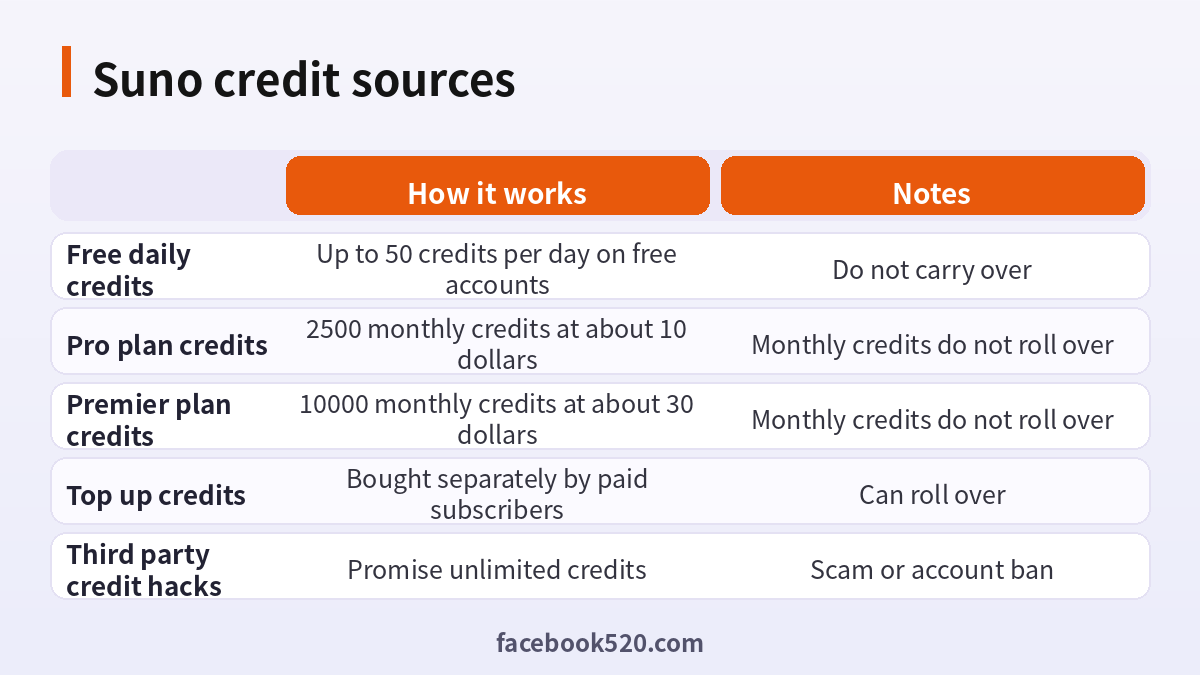
| Daily free credits | Free accounts | Up to 50 per day | No |
| Pro monthly credits | Pro subscribers | 2500 per month | No |
| Premier monthly credits | Premier subscribers | 10000 per month | No |
| Daily credits after plan credits run out | Paid subscribers | 50 per day through the billing cycle | No |
| Top-up credits | Paid subscribers | Bought in packs on the account page | Yes, according to the help center |
The Pro plan is about 10 dollars a month and the Premier plan about 30 dollars a month, with a discount of roughly twenty percent for annual billing. Free accounts do not include commercial use of songs, while paid plans do under the terms published by Suno. These details can change, so read the plan page before you pay. For another look at pricing, you can also read our pricing guide at (https://www.facebook520.com/ai-tools-guide/ai-chat-search/8418.html).
How to collect every free credit
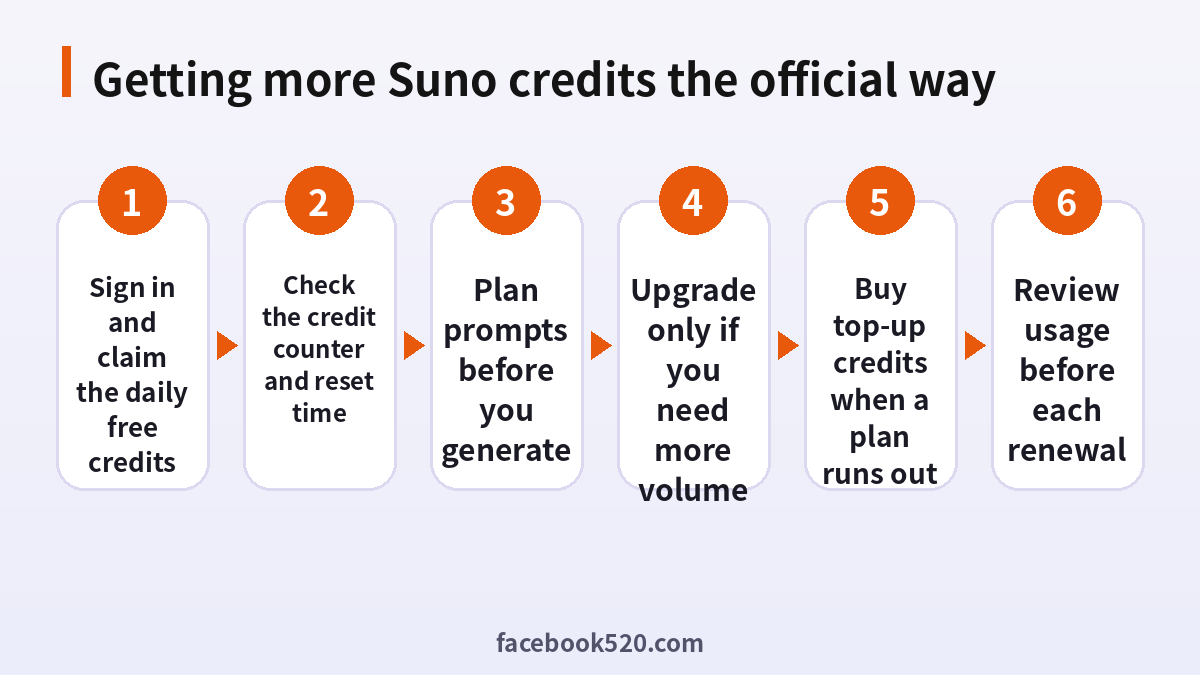
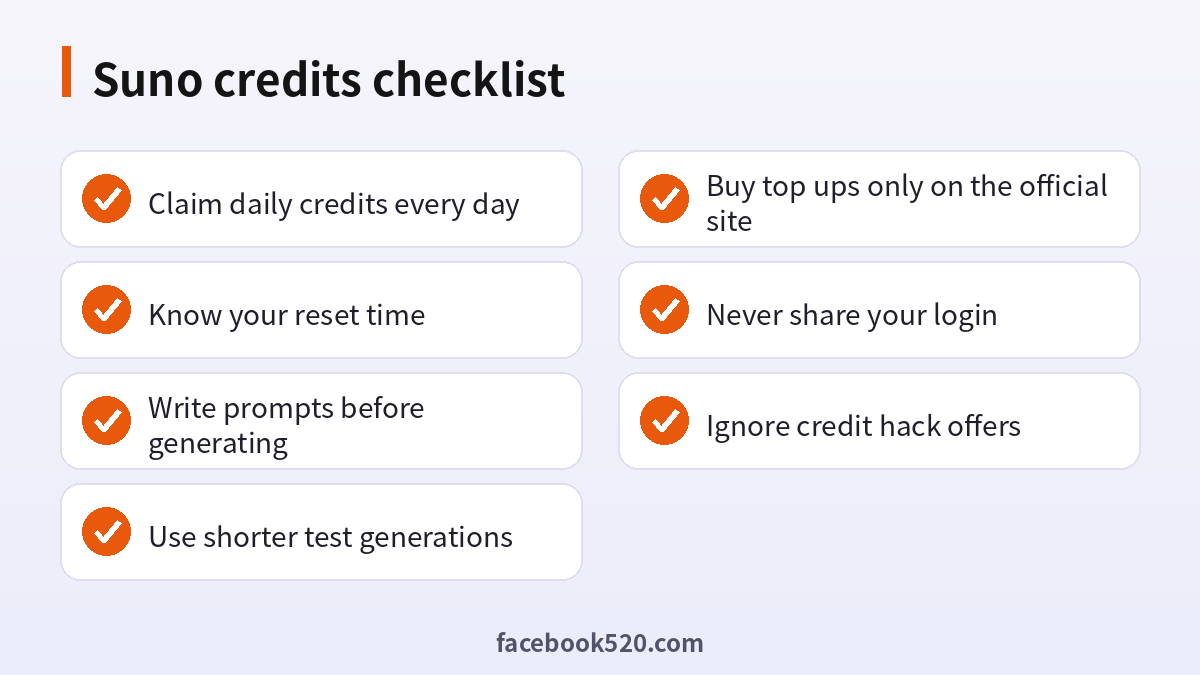
The daily free credits are the only source that costs nothing, so make the most of them. Sign in to your account each day that you plan to create. The balance refreshes at a fixed time, which the help center states in UTC, so your local reset time depends on your time zone. Unused free credits do not carry over, which means that saving them for tomorrow does not work. If you create songs only a few times a week, plan your sessions right after the reset so that you spend a full allowance in one sitting.
- Sign in to your account on the official site or app.
- Open your account page and look at the credit counter.
- Note the time of the daily refresh in your own time zone.
- Prepare your prompts and lyrics before you start so that you do not waste credits on trial and error.
- Generate and listen carefully to every version before you create another.
- Keep the best songs and note the settings that gave you good results.
Spending fewer credits per good song
The cheapest credit is the one that you do not spend. Most wasted credits come from vague prompts and from regenerating too often. Spend time on the preparation, and the results improve.
| Habit | How it saves credits |
|---|---|
| Write lyrics first | Avoids random lyrics that need many retries |
| Describe style in a short, specific phrase | Reduces mismatched genres |
| Reuse a good prompt as a template | Repeats success |
| Listen to both versions | Often one of them is good enough |
| Extend or edit a good take | Cheaper than starting from zero |
| Test ideas with short generations | Confirms direction before a full song |
| Keep notes on what works | Builds a personal library of prompts |
A useful approach is to treat each song like a draft. Write a title, the mood, the instruments and the structure in a couple of lines. Generate once, listen and decide what to change. Change a single element at a time, such as the tempo or the genre tags, so that you can see what caused an improvement. After you have a version that you like, use the editing and extension tools rather than discarding it.
When it is worth upgrading
A paid plan makes sense when you reach the daily limit on most days or when you need the rights to use the songs commercially. Think in terms of cost per song. If a plan gives you a few hundred songs for the price of a lunch, and you publish content regularly, the math is favorable. If you create only a couple of songs a month, the free plan may be enough. Consider the annual option only after you have used the monthly plan for a few months and are sure that you will keep using it.
| Your use | Likely best choice |
|---|---|
| Curious beginner | Free plan |
| Weekly hobby creator | Free, or Pro if you hit the limit |
| Content creator who publishes songs | Pro |
| Heavy user or small studio | Premier |
Top-up credits for paid users
If you run out of plan credits before the month ends, paid subscribers can buy additional credits on the account page. According to the help center, purchased credits can roll over, unlike the monthly plan credits, so a top-up is not wasted if you do not use it right away. Before you buy, compare the price per credit with the price of upgrading to the next plan. For some users, a larger plan is cheaper per credit than repeated top-ups. Always buy on the official site and look at the total price and tax before you confirm.
Credit hacks, shared accounts and other risks
Search results and videos are full of promises: unlimited credits, a generator that gives infinite songs, a cracked app or a discounted account that is shared by many people. These shortcuts are risky for several reasons. Credits are stored on the service’s servers, and no outside tool can legitimately change your balance. Programs that claim to do so usually steal your login, install malware or ask you to complete surveys. Shared accounts and cheap resold subscriptions often rely on stolen cards, and the account may be closed at any time, with your songs and credits gone. Using multiple free accounts to collect daily credits can violate the terms of service and lead to restrictions.
| Offer | Likely reality |
|---|---|
| Unlimited credits generator | Phishing or malware |
| Cheap shared Pro account | Account can be revoked and you lose your songs |
| Cracked app | Security risk and not supported |
| Many free accounts | May violate the rules |
Using your songs responsibly
Credits are only part of the story. If you plan to publish songs, read the license terms for your plan, keep records of the date and plan under which you created each track and be careful with prompts that imitate a specific living artist. Do not claim that AI-made music is entirely human-made if the platform or distributor requires disclosure. Store your downloads in a safe place, because they are your master copies.
A sample workflow that wastes fewer credits
Imagine that you want a three-minute pop song for a short video. A careless approach is to type a one-line prompt and press generate ten times. A careful approach takes about fifteen minutes of preparation and often needs only two or three generations. Start by writing the idea in one sentence: what is the song about, who is it for and what feeling should it give? Then choose a genre and mood in a short phrase, for example upbeat pop with warm synths and a simple chorus. Write lyrics with a clear verse and chorus structure, and keep lines short and rhythmic. Add structure tags if the tool supports them, such as verse, chorus and bridge.
- Write the idea, mood and audience in two sentences.
- Choose three style keywords and avoid contradictory ones.
- Write or generate lyrics separately and read them aloud to check the rhythm.
- Generate once and listen to both versions fully.
- Decide what to change: tempo, vocals, structure or lyrics.
- Change only that element and generate again.
- When you have a good take, extend it or edit sections instead of starting over.
- Download the final song and note the prompt that produced it.
| Stage | Credits at risk | How to keep them low |
|---|---|---|
| Idea | None | Plan on paper |
| First generation | Low | Use a clear prompt |
| Iteration | Medium | Change one thing at a time |
| Extension | Medium | Extend only the best take |
| Final | Low | Download and archive immediately |
Counting your credit budget
Treat credits like a monthly budget. Check the cost of one generation on your account, then estimate how many generations you need per finished song, including a couple of failures. If you want ten finished songs a month and each takes four generations, you need forty generations. Multiply by the cost per generation to learn the credits that you need, and compare it with your plan allowance. This simple calculation helps you to choose between the free plan, Pro and Premier, and to decide whether a top-up is cheaper than an upgrade. Review it every month, because your habits change as you get better at prompting and need fewer retries.
| Question | Why it matters |
|---|---|
| How many finished songs do I want per month? | Defines your target |
| How many generations does a song take on average? | Shows your real efficiency |
| What is the credit cost per generation? | Converts plans into songs |
| Do I need commercial rights? | Determines whether free is allowed |
| Will I use the credits every month? | Decides monthly versus annual billing |
Common mistakes that burn credits
Several habits drain the balance faster than people expect. The first is regenerating immediately after a disappointing result without changing anything. The same prompt will give similar results, so alter something. The second is using very long, contradictory style descriptions, which confuse the model. The third is writing lyrics that are too long for the song length, which leads to rushed or cut-off vocals. The fourth is forgetting to listen to the second version, which is often usable. The fifth is trying many experimental features at once. Finally, many users forget to download songs they like and lose track of them among dozens of generations. Make a habit of saving good takes immediately and deleting the clutter later.
Managing a subscription and billing safely
If you decide to subscribe, do it from the official website or the official app store listing, and use your own payment method. After you pay, open your account page and check that the plan name and the credit balance have updated. Save the receipt that arrives by email, which includes the renewal date. Put the renewal date in your calendar, so that you can review your usage before the next charge. If you no longer need the plan, cancel from the billing page before renewal; the plan generally stays active until the end of the paid period, but check the current rules. Do not give your login details to anyone who offers to renew or discount your plan, as that is a common route for account theft.
| Billing task | Safe practice |
|---|---|
| Subscribing | Use the official site and your own card |
| Checking the plan | Compare the account page with the receipt |
| Renewal | Set a reminder and review usage |
| Cancelling | Use the billing page, not a third party |
| Disputes | Contact official support with the receipt |
Credits and quality: choosing the right settings
More credits do not always lead to better music. The quality comes from the match between your prompt, your lyrics and the model version you choose. Newer models usually produce more natural vocals and cleaner mixes, but they may cost more or have different limits, so check the model selector in the app and read the notes about each version. If you only need a rough demo to share an idea, use the cheapest option and save the best model for the final version. When you work with a collaborator, agree on a credit budget in advance, and keep a shared list of finished songs so that nobody repeats the same experiment.
Staying within the rules
Respect the terms of service. Do not create or use accounts in ways that bypass limits, do not resell your credits and do not upload material that you do not have the right to use. If you plan to distribute songs on streaming platforms, read the platform’s policy on AI-generated music, and keep records of how each track was created. Finally, remember that policies change; a plan that allowed something last year may be updated, so check the current terms from time to time. Following the rules costs nothing and protects your account, your credits and your work.
Frequently asked questions
How can I earn Suno credits for free?
Free accounts receive up to 50 credits per day. There is no official way to earn unlimited credits.
Do unused credits roll over?
Free daily credits and monthly plan credits do not. Top-up credits that you buy can roll over, according to the help center.
When do my credits reset?
Free credits refresh daily at a fixed time shown in UTC in the help center. Paid plan credits refresh monthly with your billing cycle.
What happens when I use all my paid credits?
Paid subscribers receive a daily allowance for the rest of the billing cycle, and can buy top-up credits.
Can I buy more credits without upgrading?
Paid subscribers can buy top-up credits on the account page.
Is there a referral or hack to get unlimited credits?
No official one exists. Treat any such offer as a scam.
Is a shared Pro account safe?
No. It can be closed at any time, and your content may be lost.
How many songs can I make with Pro?
It depends on how many credits each generation costs and which features you use, so check the current numbers on the plan page.
Can I use songs commercially on the free plan?
According to the published terms, commercial use requires a paid plan, so read the current terms.
Should I use several accounts for more free credits?
It can violate the terms, so it is not recommended.
Summary
You can get more Suno credits only through official routes: claim the daily free allowance, subscribe when you need volume and buy top-ups when a plan runs short. The best way to stretch your credits is to prepare lyrics and prompts, change one thing at a time and keep the takes that you like. Avoid hacks, shared accounts and fake generators, which put your login, your money and your songs at risk.
