


Buy Cursor Pro in 2026: Official Pricing, Cheap and Free Ways to Get Cursor, and Why Buying a Cursor Account Is Risky
Cursor is an AI-powered code editor built on the familiar VS Code foundation. It can answer questions about your codebase, edit several files at once, run an agent that plans and makes changes, and complete code as you type. Because it is so popular, many developers search for phrases like “buy Cursor account” and “cheap Cursor Pro account,” hoping to cut the monthly bill. This guide explains the safe way to buy Cursor Pro in 2026, the legitimate ways to pay less, how to decide whether you need a paid plan at all, and why accounts sold by strangers are almost always a bad deal. Plans, usage limits and prices change often, so this article avoids quoting exact numbers as permanent facts. Always confirm the current price on the official pricing page and on the checkout screen before you pay. If you also use other AI tools, our guide to paying for Cursor covers billing in more detail.
What you actually get with a Cursor subscription
A Cursor subscription is not just access to an editor, since the editor itself can be downloaded for free. What you pay for is higher usage of the AI features: more model requests, access to stronger models, longer agent runs, and extra features such as background agents or larger context. The free plan lets you try the product with limited usage. Paid plans raise those limits and unlock additional capabilities. The details of what each tier includes, and how usage is measured, have changed several times over the past couple of years, which is why you should read the official comparison table instead of relying on screenshots in forum posts.
It helps to think of the subscription as a metered service with a base allowance. Light users rarely hit the limit. Heavy users who run long agent sessions all day can reach it quickly and then either wait, pay for extra usage, or move up to a higher plan.
Decide first whether you need a paid plan
Before spending anything, spend a week on the free plan with real work. Use it for tasks you actually do: explaining unfamiliar code, writing tests, refactoring a module, fixing a bug. Keep track of how often you hit a limit. Ask yourself three questions:
- Did I run out of free usage before the end of the week?
- Did the stronger models that the paid plan unlocks noticeably improve my results?
- Does the time saved per month exceed the monthly price?
If the answer to all three is no, stay on the free plan. If the answer to the third is clearly yes, the paid plan pays for itself. Many professional developers conclude that even a few hours saved a month justifies the subscription, but students and hobbyists often do not need it.
Official ways to pay less for Cursor
You can lower the cost without ever touching a reseller. These are the legitimate options to check:
- Yearly billing. Many software products charge less per month when you pay annually. Check whether the checkout screen offers a yearly option and compare the effective monthly cost.
- Student offers. Cursor and similar tools have offered student discounts or free periods for verified students. Look at the official education page and verify with your school email or the verification partner it uses.
- Free trials and promotions. Occasionally the company offers a trial of the Pro features. Only trust promotions announced on the official site or official social accounts.
- Team and company plans. If your employer pays, ask whether your company already has a team subscription so you do not pay twice.
- Right-sizing your plan. Do not buy a higher tier than you need. Start on Pro and upgrade only when you consistently hit limits.
- Managing usage. Smaller prompts, narrower file context, and picking a lighter model for simple tasks stretch your allowance.
A real “cheap Cursor Pro” strategy is simply paying the official price for the plan that fits you, and using the discounts the company itself provides.
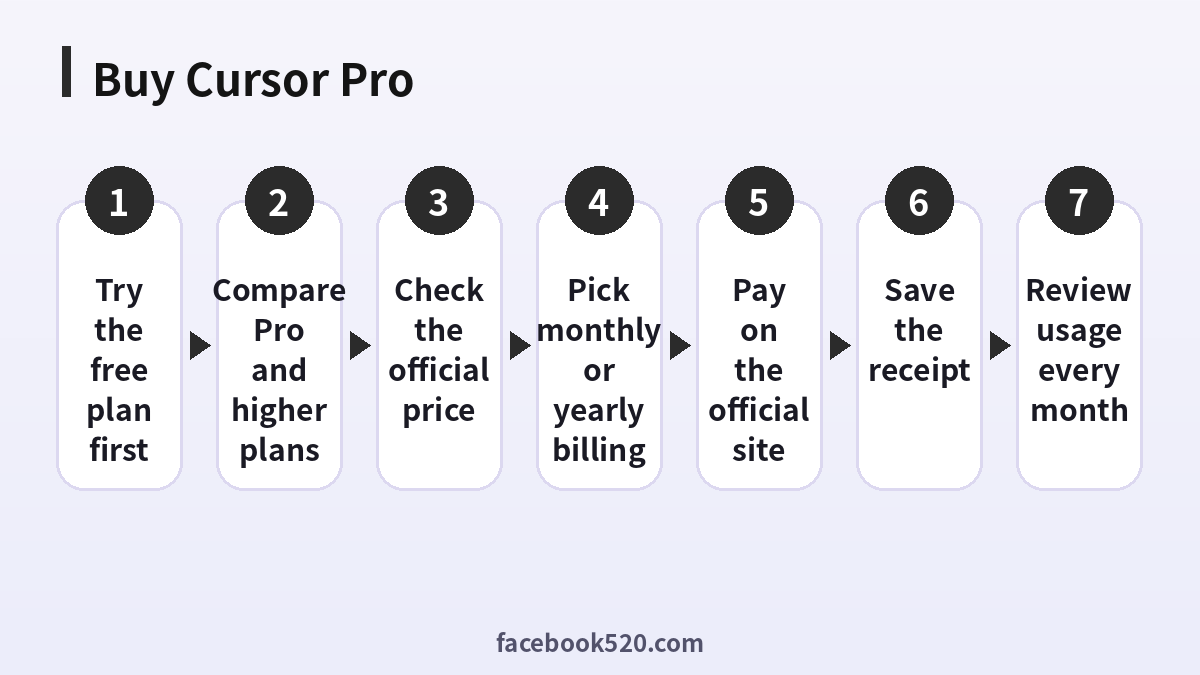
Step by step: how to buy Cursor Pro on the official site
- Open the official Cursor website and sign in, or create an account with your email or a supported sign-in provider.
- Go to the pricing page and compare the plans. Read the usage description for each.
- Choose Pro, or the plan you decided on, and select monthly or yearly billing if offered.
- Enter a payment method. Credit and debit cards are the standard method; other methods appear only if the checkout supports them for your country.
- Review the total, including any tax, and the renewal date.
- Confirm the purchase and complete bank verification if your bank asks for it.
- Check your email for the receipt and open the editor to confirm that your account shows the new plan.
If you already installed the editor, simply sign in with the same account you used to pay. Many problems come from people paying with one email and signing in with another.
Why buying a Cursor account from a third party is risky
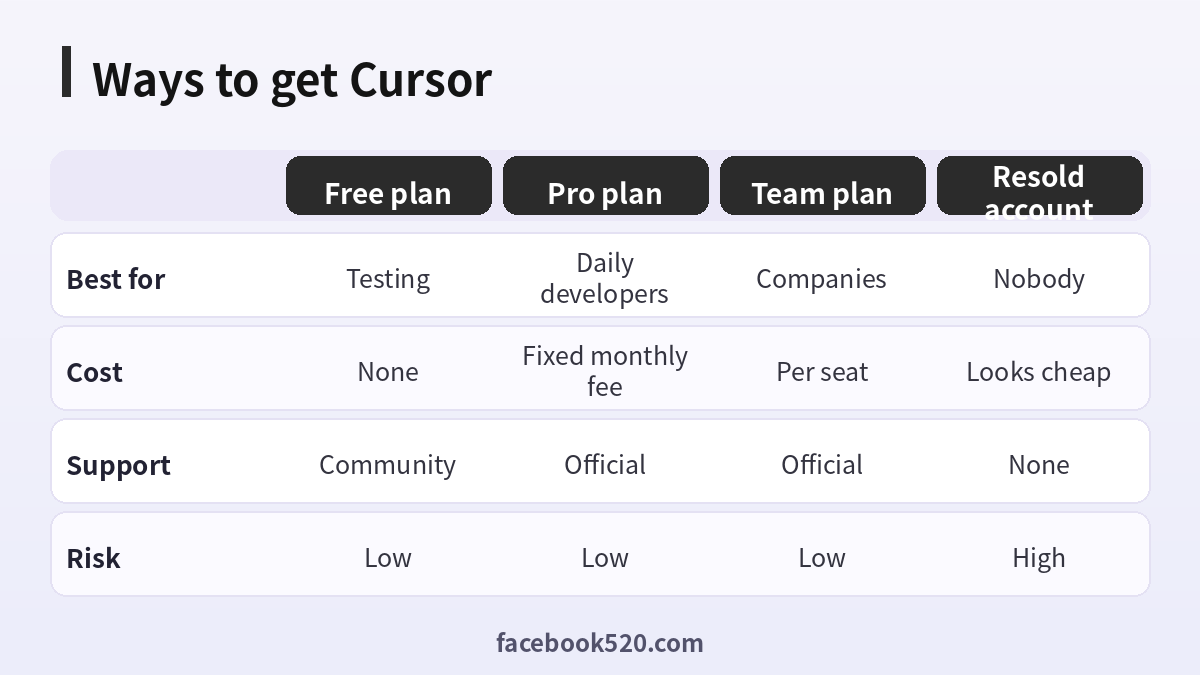
Search for “buy Cursor account” and you will find listings that offer an account for a fraction of the official price. They look attractive, but they come with serious problems:
- You do not own the account. The seller keeps the credentials, the email and the recovery methods. They can take it back or resell it to someone else at any time.
- Terms of service violations. Sharing, reselling and transferring accounts normally violates the terms. The company can suspend accounts it detects as shared or abused, and you lose both the money and your work history.
- Stolen payment methods. Many extremely cheap subscriptions are paid for with stolen or refunded cards. When the charge is reversed, the account is closed.
- Privacy exposure. Your prompts and code can be visible to the account owner. Putting company code into someone else’s account is a serious security and legal risk.
- No support or refunds. If the seller disappears, you have no recourse, and the official support will not help with an account you do not legitimately control.
- Scams. Some sellers simply take the payment and never deliver anything.
| Option | Typical price | Ownership | Support | Overall risk |
|---|---|---|---|---|
| Official Pro, monthly | Official price | You | Yes | Low |
| Official Pro, yearly | Lower per month | You | Yes | Low |
| Student offer | Discounted or free | You | Yes | Low |
| Reseller account | Suspiciously low | Seller | None | High |
| Shared account | Split cost | Nobody | None | High |
If a price looks too good to be true, assume it is. There is no legitimate source of heavily discounted accounts other than the company’s own programs.
Payment methods and common payment problems
Cursor charges through a standard online payment processor. Most users pay with a Visa, Mastercard or American Express card. Digital wallets or local methods may be available in some regions. If your payment fails, check the following:
- International online payments must be enabled on the card.
- The billing address should match what your bank has on file.
- Prepaid and virtual cards can work if they support recurring online charges, but some are single-use and will fail at renewal.
- Your bank may require a one-time code. Make sure your phone can receive it.
- Repeated failed attempts can trigger fraud protection. Wait a few hours and try again, or use a different card.
Currency conversion matters too. If the plan is priced in US dollars and your card is in another currency, the final amount depends on the exchange rate and any foreign transaction fee.
Understanding usage limits and extra usage
One of the most common sources of confusion with AI coding tools is how usage is counted. Cursor has changed how it measures usage as models and costs have changed. In general, a base subscription includes a set amount of usage, and heavier models or long agent sessions consume it faster. When you reach the limit, you may be able to enable on-demand usage with a spending cap, upgrade to a higher plan, or wait until your allowance resets.
To avoid surprises, find the usage page in your account settings, check it weekly, and set a spending limit if the product offers one. Turn off automatic extra usage if you want a strictly fixed bill.
Pro versus higher tiers and team plans
Pro is designed for an individual developer. Higher individual tiers are for people who run agents for hours every day and need much more usage. Team and business plans add shared billing, central administration, privacy controls and the ability to remove members. If you work with others, do not share a single login. A team plan gives each person their own account and gives the administrator control over spending and access, and it is usually the only configuration that meets a company’s security rules.
How to cancel or change your plan
You can manage your subscription from the account or billing page. To cancel, open the billing portal from your account settings and choose to cancel the subscription. Access usually continues until the end of the paid period. To change plans, use the same portal, and read the proration notice so you know what you will be charged. Save the cancellation confirmation email, and check your card statement after the next renewal date to be sure no new charge appears.
Refund eligibility is governed by the official policy and is not guaranteed. If you were charged twice or by mistake, contact official support promptly with the receipt, date and account email.
Security tips for developers using Cursor
Whatever plan you buy, protect your account. Use a strong, unique password, or sign in through a provider that has multi-factor authentication turned on. Review which devices are signed in. Do not paste secrets such as API keys, private certificates or customer data into prompts. Check your organization’s policy before using the editor on proprietary code, and look at the privacy settings the product offers, including any mode that limits data retention. Review the commands the agent wants to run before approving them, especially anything that deletes files, changes permissions or touches production systems.
A simple monthly review
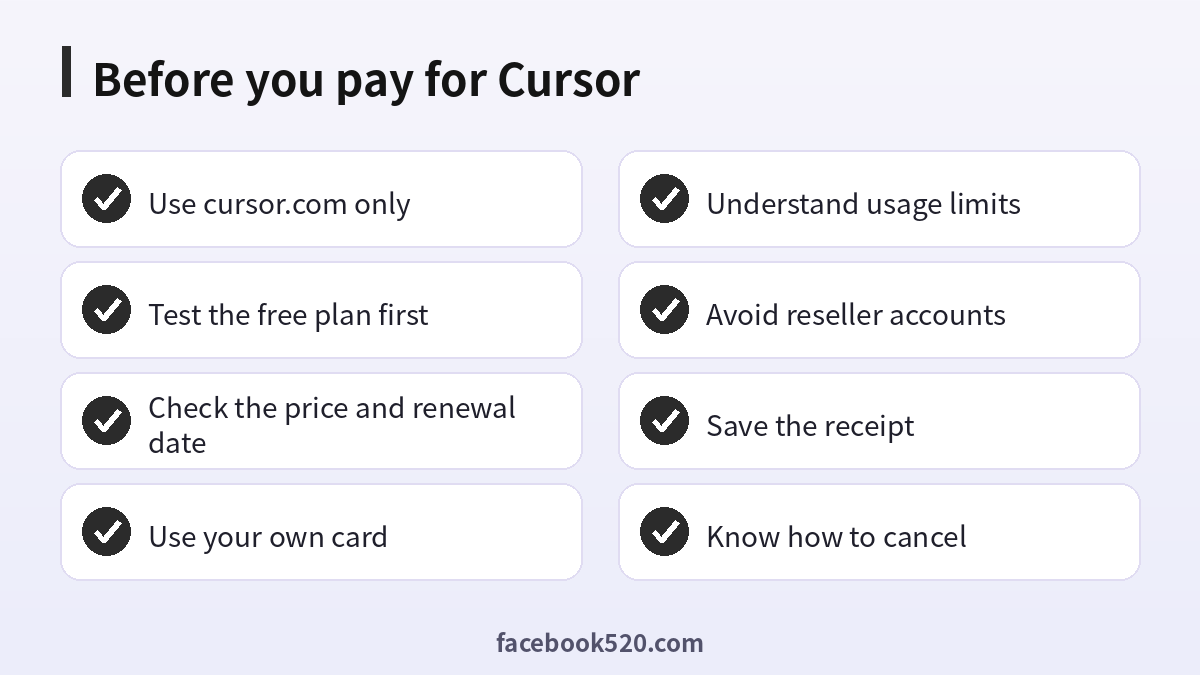
Once a month, spend five minutes on this checklist: How many days did I use Cursor? Did I hit the limit? Did extra usage charge appear? Is the plan still the right size? Is there a cheaper official option, such as annual billing? Am I paying for more than one AI coding subscription that overlaps? If you did not use the editor for weeks, cancel and resubscribe when you need it again, since you lose nothing by pausing.
Example monthly budgets for different developers
Numbers make the decision easier. Consider four typical profiles. A student working on coursework writes code a few evenings a week, rarely runs long agent sessions and is happy to wait for limits to reset, so the free plan or a student offer is the sensible choice. A freelancer who delivers client projects uses AI daily to write tests, refactor and debug, and recovers the subscription price within a few billable hours, so Pro is easy to justify. A senior engineer who runs agents on large codebases for hours may reach the Pro allowance and consider a higher tier or controlled extra usage, but should first check whether better prompts and narrower context solve the problem. A startup with five developers should choose a team plan so billing, access and privacy settings are managed centrally.
| Profile | Typical usage | Sensible choice | What to watch |
|---|---|---|---|
| Student | A few sessions a week | Free plan or student offer | Do not over-subscribe |
| Freelancer | Daily | Pro, yearly if stable | Renewal date |
| Heavy agent user | Hours per day | Higher tier or capped extra usage | Spending cap |
| Small team | Shared projects | Team plan | Seat count and access |
Remember to include indirect costs. Currency conversion, bank fees and tax can add several percent. If your income is in a weaker currency than the dollar, the real burden is larger than the sticker price suggests, which makes yearly billing and careful plan selection even more valuable.
Alternatives and complements to Cursor
Cursor is one of several AI coding tools. Others include editor extensions, terminal-based coding agents and chat assistants that you use alongside your editor. Rather than paying for every product, compare them on the same real task: fix one bug, write one feature, and write tests for one module. Measure the time, the quality of the result and the cost. Many developers settle on one main editor plus one occasional complement. If another tool already covers your needs through an employer licence, you may not need a personal Cursor subscription at all. Whatever you choose, keep your own subscriptions on your own accounts, and avoid anything that depends on a stranger’s login.
Practical habits that make a subscription last longer
Good habits can stretch any plan. Write a short project rules file that describes your stack, conventions and test commands, so you do not repeat instructions in every prompt. Break big tasks into small ones and review each result before moving on, because a wrong direction followed for twenty steps wastes the most usage. Start a fresh chat when the topic changes, since long histories are costly and can reduce quality. Use cheaper models for formatting, simple edits and explanations, and reserve the strongest models for hard design or debugging problems. Commit to version control often so you can discard a bad agent run without losing real work. These habits improve results as well as cost, which is the real way to get more from Cursor Pro.
Frequently asked questions
Is Cursor free?
There is a free plan with limited usage. Paid plans increase usage and unlock additional features. Check the official pricing page for current details.
How much does Cursor Pro cost?
The price is set by Cursor and can change. Look at the pricing page and your checkout screen on the day you buy. Yearly billing may lower the effective monthly cost.
Is there a student discount for Cursor?
Student offers have been available at times. Check the official education page and verify through the process described there.
Is it safe to buy a Cursor account from a seller?
No. You do not control the account, it can be suspended or taken back, and your code can be exposed. The only safe way is to subscribe in your own name on the official site.
Can I use a virtual card to pay?
Often yes, if the card allows online international and recurring payments and your bank approves the charge. Single-use cards fail at renewal.
Why was my payment declined?
Common causes are disabled online payments, mismatched billing address, insufficient funds, a missing verification code, or fraud protection after repeated attempts.
What is the difference between Pro and the higher plans?
Higher plans provide more usage for heavy users. Compare the usage allowances on the official page and upgrade only if you consistently reach your limit.
Can I share one Cursor Pro account with my team?
That is not recommended and may violate the terms. Use team plans so each member has an account and the administrator can manage billing.
How do I cancel?
Open the billing portal from your account settings and cancel. Your access normally lasts until the end of the paid period.
Will I get a refund?
It depends on the official policy and the situation. Contact support quickly if you were charged by mistake.
What if I pay with one email and sign in with another?
Your plan will show on the account you paid for. Sign in with that account, or contact support if you paid on the wrong one.
Is there a way to get Cursor Pro cheaper without risk?
Yes: yearly billing, student offers, official promotions, a team plan paid by your employer, and using the free plan until you really need more.
Conclusion
The cheapest safe way to use Cursor is to match your plan to your actual usage, take advantage of the official yearly and student options, and pay on the official site with your own card. Accounts sold by third parties may look like a bargain, but they expose you to suspension, data leaks and scams, and they leave you with no support. Start on the free plan, measure how much time Cursor saves you, and upgrade only when the numbers justify it. Keep your receipts, review your usage every month, and cancel any plan you no longer need.
