


Grok Account Suspended or Verification Code Not Received: How to Fix Login Problems and Appeal in 2026
Grok is the AI assistant from xAI, and in 2026 most people use it through their X account, through the Grok website and apps, or through the bundled X Subscription. Because access depends on your sign-in, payment status and the rules of the platform, there are three problems that users search for most: Grok says the account is suspended or locked, the verification code never arrives, or a subscription does not unlock what was promised. This guide explains why each happens, what to try in what order and how to write an appeal. We do not have access to any internal system, so the causes below are the common ones that users and the official help pages describe. Plans and menus change, so check the official pages for the latest information. For account basics, see our Grok registration guide.
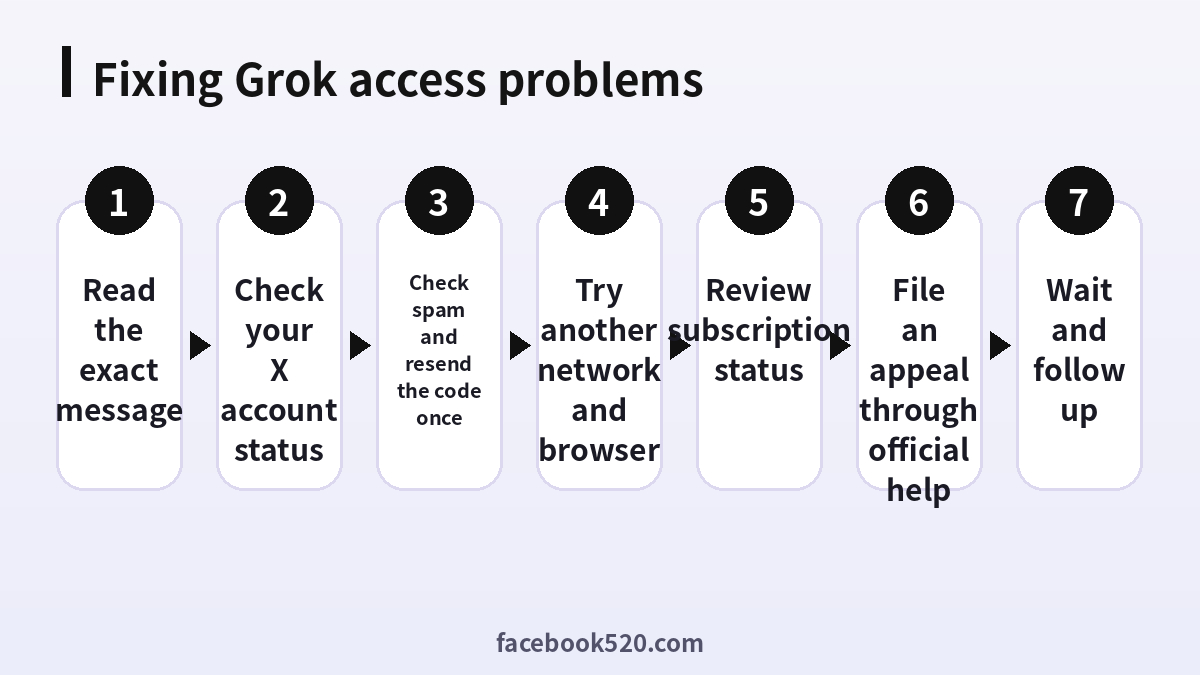
How Grok access works
Grok does not usually have an independent login. You sign in with an X account, or with another method that links to the xAI account system. That means a problem with the X account, such as a suspension or a lock, can show up as a problem in Grok. It also means that the verification code is normally sent by the sign-in provider, not by Grok itself. Before you do anything else, open the X app or site and check whether you can log in and whether your account shows a warning.
Why Grok says your account is suspended
A suspension message can come from several sources. The X account may be locked for suspicious activity, for violating the rules or for spam-like behaviour. The Grok service may limit access if the usage policy was breached, for example by repeated attempts to produce prohibited content or by automated misuse of the service. A payment problem, such as a chargeback or a failed renewal, can also remove paid access without suspending the account. Read the message closely, because it normally tells you whether the problem is with the account, with the service or with billing.
Verification code not received
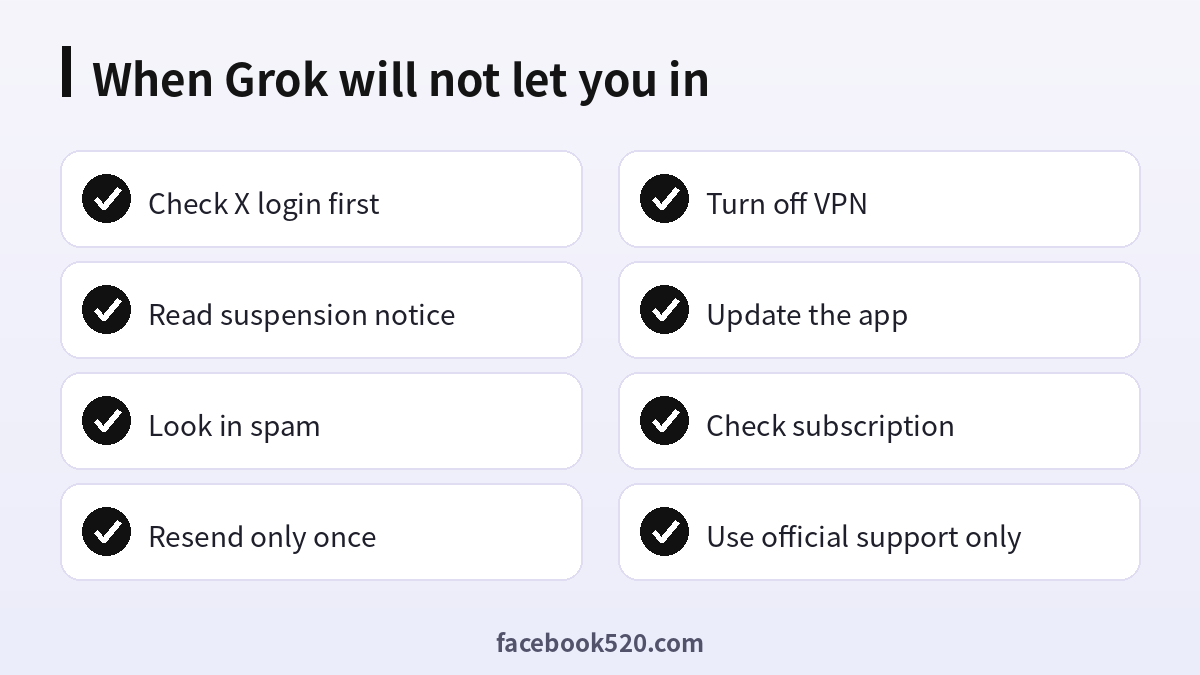
If the code does not arrive, work through the basics. Check that the email address or phone number is correct. Look in the spam, junk and promotions folders. Wait several minutes, because codes are sometimes delayed. Request a new code only once, since several requests can cause the system to treat the activity as suspicious and invalidate older codes. If you use a work or school address, try a personal mailbox. If the code is sent by phone, check the signal, the carrier filters and whether your number is a virtual number that the service does not accept. Turn off VPNs and proxies and try another network.
- Check the address or number you typed.
- Look in spam, junk and promotions.
- Wait a few minutes and request one new code.
- Switch off the VPN and try mobile data or another Wi-Fi network.
- Try a private window or the official app.
- Check whether your X account itself can log in.
- If it fails, contact the official help centre with screenshots.
Login loops and errors
If you receive the code and still return to the login page, clear cookies for the sites involved, close the tabs and try again. Make sure your time zone and clock are correct. Update the app and the browser. If you use a password manager, make sure it does not fill an old password. If you have more than one X account, check that you are logged in to the one that holds your Grok access.
X Subscription tiers in 2026
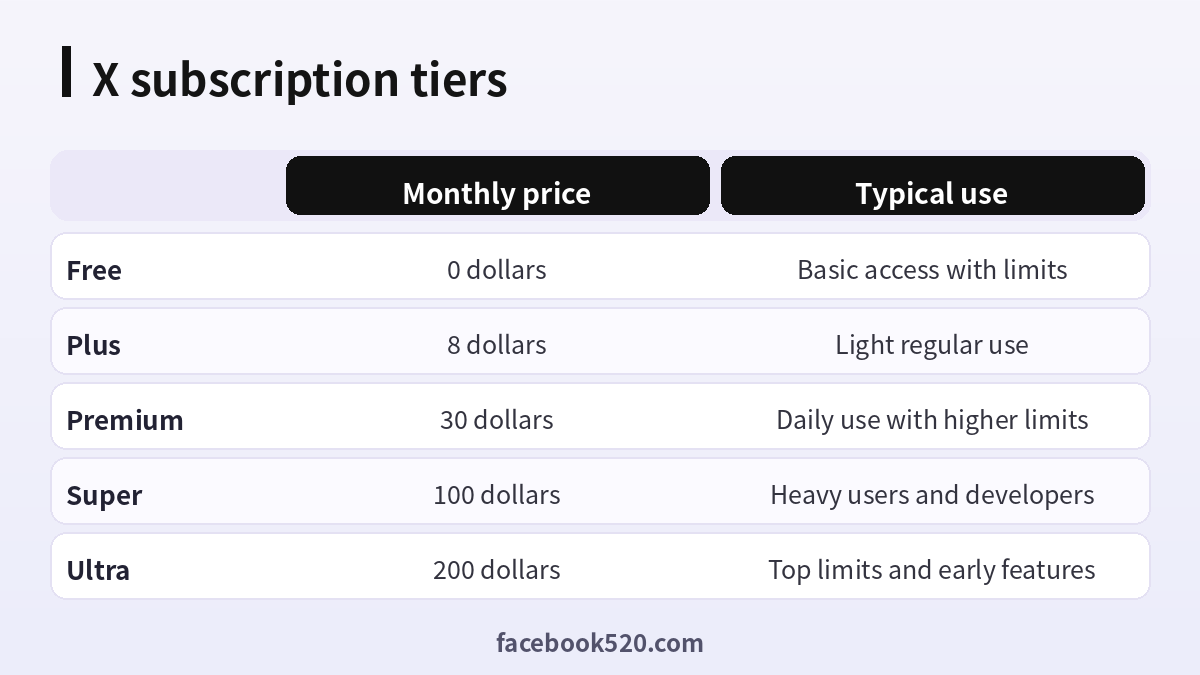
Grok access and limits are linked to the X Subscription. The documentation lists a Free tier, Plus at 8 dollars a month, Premium at 30 dollars a month, Super at 100 dollars a month and Ultra at 200 dollars a month. The higher the tier, the higher the limits and the earlier the access to new features, and some tiers also bundle other products. Older plans, such as the heavy tier that was sold separately, may be closed to new customers. Prices vary by region, so check the pricing page in your country before you pay.
| Tier | Monthly price | Typical use |
|---|---|---|
| Free | 0 dollars | Basic access with limits |
| Plus | 8 dollars | Light regular use |
| Premium | 30 dollars | Daily use with higher limits |
| Super | 100 dollars | Heavy users and developers |
| Ultra | 200 dollars | Top limits and early features |
Subscription shows as inactive
If you paid but Grok does not recognise the plan, check that you are signed in with the same account that holds the subscription. Look at the billing page for a failed renewal or a pending charge. If you bought through an app store, the plan can take a while to update, and you may need to restore the purchase. If you paid on the web, find the receipt and the date. Contact support with the receipt, not with a screenshot of an error alone.
How to appeal
If you believe a suspension was a mistake, use the appeal option shown in the notice, or the help centre form that is linked from the page. Give the account name, the email address, the date and a clear and short explanation. Say what you were doing and that you will follow the rules. Do not send repeated requests or create new accounts to bypass the restriction, because evading a suspension can lead to a permanent ban. Replies may take days or longer.
What not to do
Do not pay strangers who promise to unsuspend an account, and do not click links in direct messages that claim to come from support. Do not buy or sell accounts, since sold accounts are often built on stolen cards and can be removed. Do not send your password or verification code to anyone, because that code is the key to your account. Do not use unofficial apps that claim to give free access, as they can steal your credentials.
Keep a record while you troubleshoot
Write down each attempt: the time, the network, the email or number you used and the exact wording of every message. Take full-window screenshots so that the address of the page is visible. This record helps official support find your case quickly and shows that you acted in good faith. It also stops you from repeating the same failed step several times, which can by itself trigger new automated limits.
Protecting your account
Use a strong, unique password, enable two-factor authentication, preferably with an authenticator app, and keep recovery methods up to date. Review the apps that have access to your X account and remove those you do not recognise. Keep your email account secure, because most recovery steps go through it.
Tips for using Grok within the rules
Grok has usage policies like every major assistant. Requests that are clearly harmful or illegal are blocked, and repeated attempts can lead to limits. If an answer is refused, add context, explain the legitimate goal and ask for general information. Avoid scraping or automating the web interface, and use the official API if you need to build something.
Troubleshooting checklist
If something does not work as expected with Grok, go through the basics in order before contacting anyone:
- Check your internet connection and try again on a different network.
- Update the app or refresh the page, then restart the device.
- Clear the cache or try a private browser window without extensions.
- Confirm that you are signed in with the correct account and email.
- Look for the exact error message and search the official help center for it.
- Wait a short time before repeating an action, since repeated attempts can trigger temporary limits.
- If nothing helps, collect screenshots and contact official support.
A monthly review habit
Set a reminder once a month to review your Grok setup. Check your security settings, payment method, connected apps and notification preferences. If you pay for anything, compare the charge with what you actually used and decide whether to keep, change or cancel. Update your recovery details if you changed phone number or email. Delete old data you no longer need. Ten minutes a month prevents most surprises and keeps your costs and risks under control.
Privacy and personal data
Before you enter personal information anywhere, ask what is really required. Use only the details that Grok needs, review the privacy settings after setup and limit who can see your profile, activity and contact information. Avoid posting documents, addresses, financial data or photos that reveal your location. Check which third-party apps are connected to your account and remove those you no longer use. If you work with client or company data, follow your organization’s policy and do not mix it with personal accounts.
Helping family members and colleagues
If you are setting up Grok for someone else, such as a parent, a teenager or a coworker, guide them rather than doing everything silently. Explain why strong passwords and two-step verification matter, show them how to recognize suspicious messages and agree on who to ask before they click or pay for anything. For minors, follow age requirements and use the available parental or family controls. For teams, document who owns the account, who can approve spending and what to do when someone leaves.
Common mistakes to avoid with Grok
Most problems come from a handful of avoidable habits. People reuse the same password across several services, ignore security notices, click links in unexpected messages, install unofficial apps that promise extra features, or buy accounts and access from resellers. Others skip reading the terms, which leads to restrictions they did not expect, or forget to write down renewal dates and recovery details. Spend a few minutes reading the official help pages, keep your details up to date and treat anything that sounds too good to be true as a warning sign.
Devices, apps and browsers
Use the latest version of the official app or a modern browser when working with Grok. Keep your operating system updated, install security patches and avoid rooted or modified devices, which weaken protection. Browser extensions can read pages you visit, so remove those you do not trust. On mobile, download apps only from official stores, review the permissions they ask for and turn off those that are not needed. Lock your device with a PIN or biometrics so that a lost phone does not become a lost account.
When to contact official support
Contact support when you have tried the basic fixes and the problem remains, when you see an unexpected charge, when you suspect your account was accessed by someone else or when you are locked out. Prepare the account email, the date and time of the problem, the exact message you saw and screenshots. Describe what you did step by step and what you expected to happen. Use only the contact methods listed on the official site and ignore anyone who offers to fix things for a fee through social media or private messages.
Quick recap checklist
Before you finish, confirm the essentials for Grok:
- You are using the official website or app.
- Your password is unique and two-step verification is on.
- Recovery email and phone are current.
- Privacy settings match what you are comfortable sharing.
- You know the price, renewal date and how to cancel if money is involved.
- You saved receipts, confirmation emails and backup codes in a safe place.
- You know where to find the official help center.
Keeping up with changes
Features, prices and rules around Grok change more often than most people expect. Follow the official blog, release notes or help center, and read the emails you receive about policy updates instead of deleting them. When a guide such as this one gives a number or a menu name, treat it as a starting point and confirm it on the official site. If a change affects you negatively, you can usually adjust your plan, settings or usage, so act early rather than waiting for a problem.
Official sources versus unofficial offers
When you search for help with Grok, you will find both official pages and third-party offers. The comparison below shows why it pays to stay with official channels.
| Aspect | Official source | Unofficial offer |
|---|---|---|
| Price | Clearly shown at checkout | Often unclear or too low |
| Support | Documented help channels | Unreliable or none |
| Account safety | Protected by the platform | Risk of bans and data theft |
| Refunds | Governed by published terms | Rarely honored |
| Updates | Always current | Outdated or wrong |
Recognizing scams and fake offers
Scammers often imitate well-known brands such as Grok. Typical signs are urgent messages, requests for passwords or verification codes, links to look-alike websites, promises of free upgrades or guaranteed results, and payment requests through unusual channels. Always type the official address yourself or use a saved bookmark, check the sender of every email and never pay through a link sent by a stranger. If you think you were tricked, change your password, review recent activity, contact your bank if money was involved and report the message to the platform.
Account security basics for Grok
Protect your Grok account before anything else. Use a long, unique password stored in a password manager, turn on two-step verification, and make sure the recovery email and phone number are ones you control. Review the list of devices and active sessions every few months and sign out of any you do not recognize. Never share one-time codes, even with someone who claims to work for support, because genuine support teams never ask for them. If you sign in on a shared or public computer, log out afterwards and avoid saving passwords in the browser.
Frequently asked questions
Why is my Grok account suspended?
The cause may be the X account, the Grok usage policy or a billing issue. Read the notice for details.
Why is the verification code not arriving?
Check spam, confirm the address or number, switch off the VPN and request only one new code.
Can I use Grok without an X account?
Access is normally tied to an X or xAI account, so check the current sign-in options on the official site.
How do I appeal?
Use the link in the notice or the help centre form and explain the situation briefly.
Will paying lift a suspension?
No. Payment and enforcement are separate.
How much does the X Subscription cost?
The tiers run from Free to Plus at 8 dollars, Premium at 30, Super at 100 and Ultra at 200 dollars a month.
Is it safe to buy a Grok account?
No. Purchased accounts can be removed and can expose your data.
Can I make a new account after a ban?
Creating a new account to evade a ban is against the rules and can make things worse.
Where do I get official help?
Use the help centre of X and xAI.
Does Grok work on mobile and desktop with the same login?
Yes. The same X or xAI account normally works on the web and in the apps, so sign in with the same one everywhere.
Summary
Most Grok access problems come from the X login, the code delivery or the billing status. Check these in order, use the official appeal route and avoid shortcuts and resellers.
