


ChatGPT Account 2026: How to Create, Secure, Upgrade and Manage Your OpenAI Account, Plus Plans, Payment Basics and Why Buying Accounts Backfires
A ChatGPT account is the key that unlocks OpenAI’s assistant on the web, on phones and on desktop. People search for the topic for many reasons: they want to create their first account, move from the free plan to a paid one, understand how billing works, protect their conversations, recover a locked login, or work out whether buying a ready-made account is safe. This hub article answers those questions in one place. Plans, limits and prices change frequently, so use the official pricing page for current figures and treat the details here as a practical framework. If you are mainly interested in plan costs, our subscription guide goes deeper (https://www.facebook520.com/ai-tools-guide/ai-chat-search/8148.html), and for the risks of marketplaces see our explainer on selling and buying (https://www.facebook520.com/ai-tools-guide/ai-chat-search/9245.html).
What a ChatGPT account actually is
When you sign up, OpenAI creates an account tied to your login method. The account holds your settings, your conversation history, memory and custom instructions, files you upload, and any subscription. The same login works across the website and the apps on iOS and Android, so your chats follow you between devices. An account is personal by design: the terms of use expect each person to hold their own, which matters for privacy because your history can reveal sensitive information about your work and life.
Separate from the chat product is the developer platform. API usage is billed separately by volume, uses its own keys and has its own dashboard. Many users confuse the two, so remember that a chat subscription does not include API credit and an API balance does not unlock paid chat features.
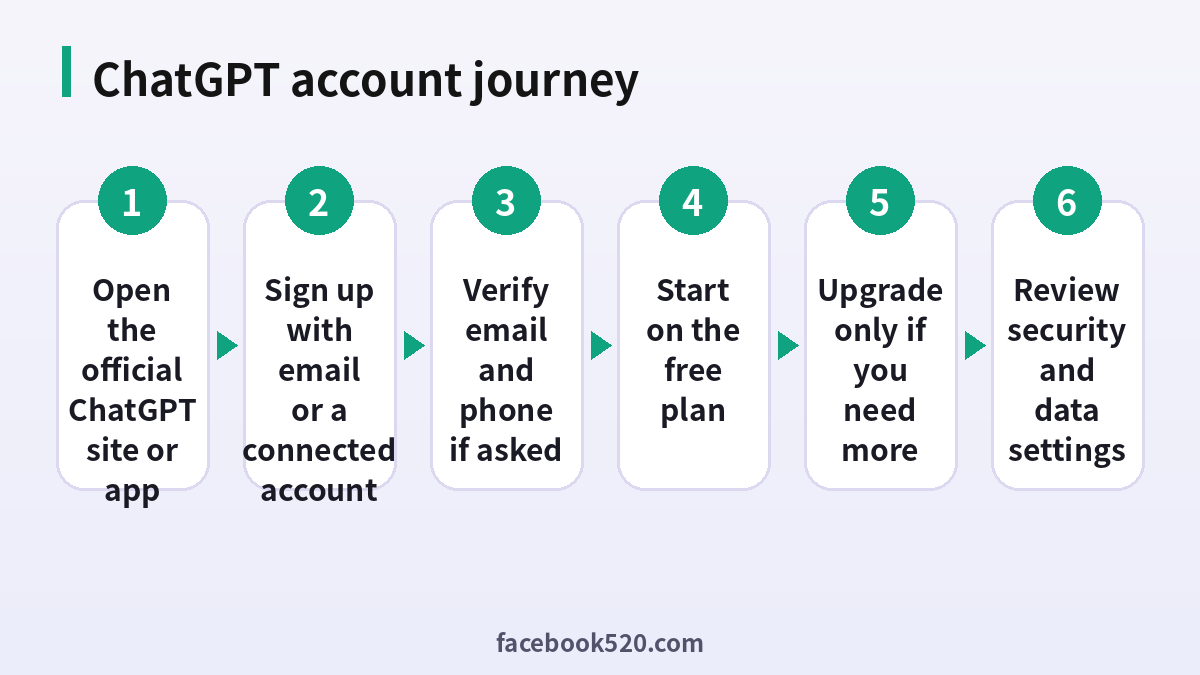
How to create a ChatGPT account
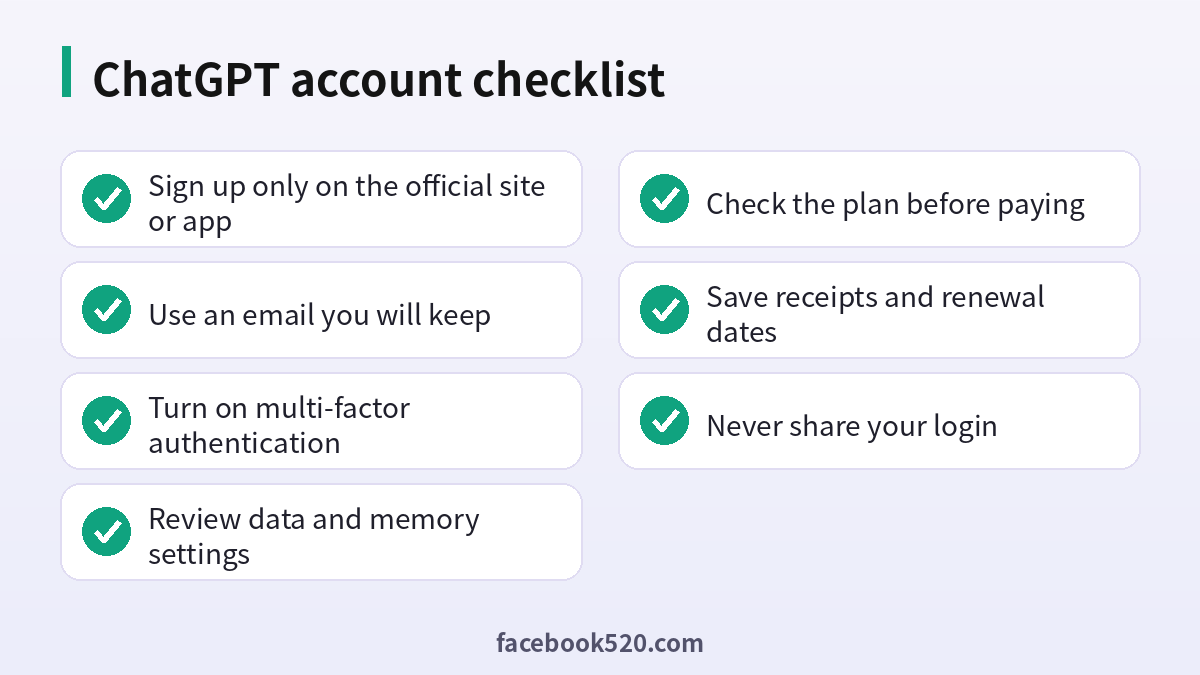
The sign-up flow is short and works the same on web and mobile. Always start from the official website or the official app in your device store, because fake sites and look-alike apps exist.
- Open the official ChatGPT website or install the official app.
- Choose to sign up and select a method: email, or a Google, Microsoft or Apple account.
- If you choose email, enter the address, create a strong password and confirm the message that arrives in your inbox.
- Enter your name and date of birth when asked.
- Verify a phone number if the system asks for it. This is an anti-abuse step, and requirements can vary by region and over time.
- Read the introduction screens, choose a theme and start your first chat.
If the verification message does not arrive, check your spam folder, confirm you typed the address correctly and wait a few minutes before resending. Avoid using disposable or shared mailboxes, since you will need long-term access for password resets and billing notices.
Free plan versus paid plans
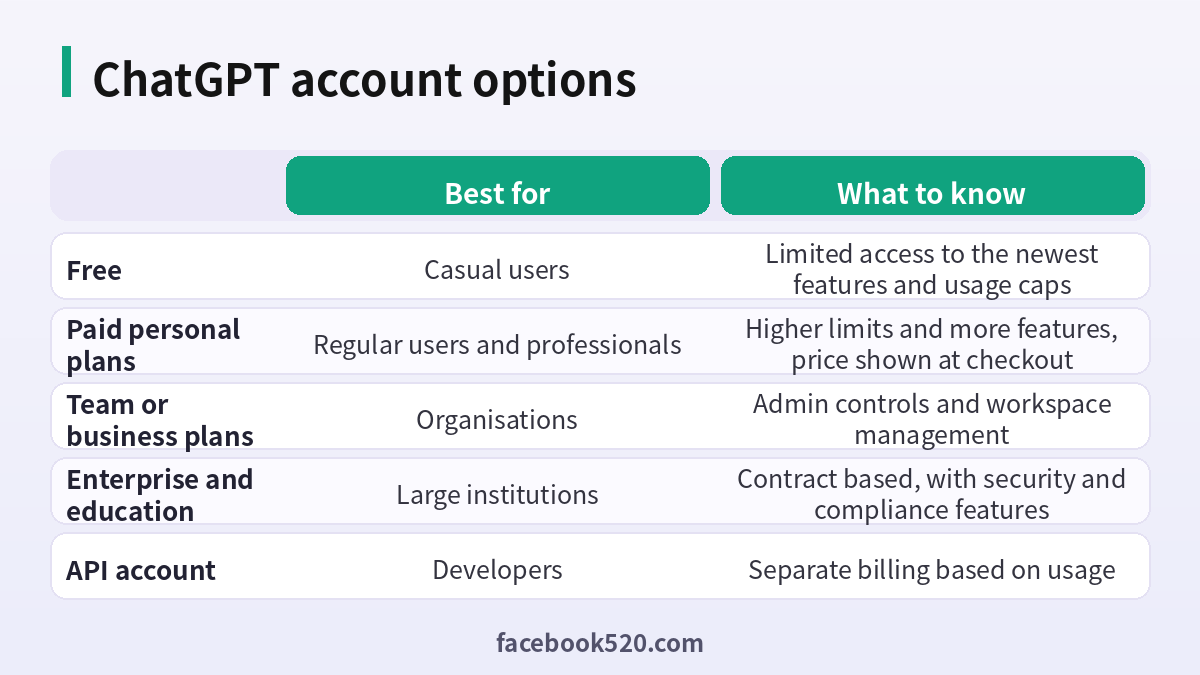
New accounts start on a free plan with limited access to the strongest models and features, and with usage caps that depend on demand. Paid personal plans raise those limits and unlock additional tools, with the exact list and names changing as the product evolves. Team and business plans add shared workspaces and admin controls, while enterprise and education plans are sold through contracts with extra security and compliance options. Because the line-up has changed several times, always read the plan comparison inside your account before paying.
| Plan type | Typical user | Key points | Where to check |
|---|---|---|---|
| Free | Beginners and occasional users | Limited usage and model access | Account menu or pricing page |
| Paid individual | Daily users and professionals | Higher limits, more features | Upgrade screen |
| Team or business | Companies and groups | Workspace admin and data controls | Business pages |
| Enterprise or education | Large organisations | Contracts and compliance | Sales contact |
| API | Developers | Pay per use, separate dashboard | Platform billing page |
Paying for a plan the safe way
Upgrade from inside your own account. Open the account menu, choose the upgrade option, pick the plan and enter a card or another method offered in your region. If you subscribe through an app store, the bill goes through Apple or Google and you manage it there. Keep the confirmation email and note the renewal date. Never pay a third party who promises a cheaper subscription on your behalf, because that often involves stolen cards, shared logins or resold gift cards that can be reversed.
To cancel, open the subscription settings in the place where you paid. If you paid on the web, cancel in your account settings. If you paid through an app store, cancel in that store. Cancelling normally keeps the benefits until the end of the paid period. If you want to compare cost and features before deciding, read our subscription explainer (https://www.facebook520.com/ai-tools-guide/ai-chat-search/8148.html).
Security settings you should enable
Account security matters because your chat history may include work documents, code and personal questions. Use a unique password stored in a password manager, and turn on multi-factor authentication in the security settings. Review the list of active sessions and sign out of devices you no longer use. If you signed up with a Google, Microsoft or Apple login, protect that account too, since it is the real key to ChatGPT.
Be careful with browser extensions that claim to add features to ChatGPT. Some request broad permissions to read and change everything on the pages you visit. Install only extensions from trusted publishers, and remove any you do not use.
| Security step | Why it matters | Frequency |
|---|---|---|
| Unique password | Prevents credential reuse attacks | Once, then after any breach |
| Multi-factor login | Blocks most takeovers | Set up once and test yearly |
| Session review | Removes unknown devices | Quarterly |
| Extension audit | Reduces data leakage | Twice a year |
| Email protection | Email resets everything | Review yearly |
Choosing the right plan without overpaying
The best plan is the cheapest one that removes the friction you actually feel. Start by noticing what blocks you on the free plan: hitting usage caps in the middle of a task, needing a stronger model for analysis, wanting to upload larger files, or needing tools such as data analysis, image creation and voice. If none of these bother you, the free plan is enough, and upgrading adds cost without benefit. If you do hit limits, try a paid individual plan for a month, track how often you use the extra capacity and decide whether to keep it. Highest-tier plans are designed for people who use the assistant for hours every day, such as researchers, developers and analysts, so most users should not start there.
For households and small teams, compare the price of several individual plans with a team plan. A team plan usually costs more per seat but adds a shared workspace, administrative controls and a clear data policy, which can be worth it for any business that handles client information. Students and educators should look for education offers published by the provider itself, and should be wary of websites that sell fake student discounts.
| Situation | Sensible choice | Reason |
|---|---|---|
| Curious beginner | Free plan | No cost, enough for learning |
| Frequent personal user | Paid individual plan | Higher limits and tools |
| Freelancer with client data | Paid plan with strict data settings | Better capacity and control |
| Small company | Team or business plan | Seats, admin and data protection |
| Developer building apps | API account | Usage billing and keys |
Getting more from your account
A few habits make any plan more useful. Use custom instructions to tell the assistant your role, tone and preferences once, instead of repeating them in every chat. Organise conversations with clear titles and projects, so you can find past work. Ask for step-by-step reasoning on hard tasks and verify important facts yourself, because the assistant can be confidently wrong. Upload documents only when you have the right to share them. For repeated tasks, such as weekly reports or email drafts, save a reusable prompt and refine it over time.
Voice and mobile features are helpful for brainstorming while walking or commuting, but remember that voice conversations are also stored according to your settings. Check the data controls before you discuss anything sensitive.
Data controls, memory and privacy
ChatGPT includes settings that decide how your conversations are used. You can review whether chats may be used to improve models, delete individual chats or your whole history, and manage the memory feature that remembers preferences across conversations. Temporary chats let you hold a conversation that is not added to history. For work, never paste secrets such as passwords, private keys, customer records or confidential contracts unless your organisation’s plan and policy explicitly permit it. If you use ChatGPT at an employer, follow the internal AI policy, because many companies require the business workspace rather than personal accounts.
Export your data from the settings if you want a copy of your history. Doing so before closing an account is wise, because deletion is not always reversible.
One account or several?
Some people keep a personal account and a work account. That is acceptable, provided each uses its own email and billing. Do not create multiple free accounts to dodge usage limits, which can violate the terms and may trigger restrictions. Do not share a single login among colleagues either. Shared logins mix conversation histories, leak private information and make security reviews impossible. If your team needs shared access, use the business plan, where each member has a seat and administrators control settings.
Why buying a ready-made ChatGPT account is risky
Marketplaces and social media posts offer ChatGPT accounts at tempting prices. The seller often keeps the recovery email, can change the password at any time and may have paid with a method that is later reversed. The platform can suspend the account for violating the terms, and you have no standing to appeal because the account is not yours. Chat history from the previous owner may remain visible, and your own conversations could be exposed to them. In short, the savings are small compared with the chance of losing access and data. Our deeper analysis of what these sales involve is available here (https://www.facebook520.com/ai-tools-guide/ai-chat-search/9245.html), and a Chinese-language explainer of account types and risks is here (https://www.facebook520.com/ai-tools-guide/ai-chat-search/8138.html).
A safer route for people who want to save money is to start on the free plan, use annual billing only after you are sure you will keep the plan, and look for legitimate student or organisation offers announced by the provider itself.
Recovering a locked or compromised account
If you cannot sign in, begin with the password reset on the official login page and use the same login method you originally chose. Many people forget whether they signed up with email or with Google, so try each method before concluding the account is lost. If you suspect a takeover, reset the password, sign out all sessions, enable multi-factor authentication and check your email for unfamiliar messages. If the problem persists, use the help centre to contact support with the email address on the account and a description of the issue. Do not trust anyone who offers to recover your account for a fee.
Billing problems and how to solve them
The most common billing issues are a declined card, an unexpected renewal, a duplicate charge and a subscription that does not appear after payment. For a declined card, check the number, expiry date and security code, confirm that online and international payments are allowed, and ask your bank whether it blocked the transaction. For an unexpected renewal, open the subscription page to see the renewal date and cancel before the next cycle. For a duplicate charge, compare the statement with the receipts in your email, because one line may be a temporary authorisation that disappears. If a paid plan does not show up, sign out and in again, make sure you are using the same login method that you paid with, and contact support with your receipt.
Keep the receipts for each month. If you use the plan for business, make sure the invoice shows the right company name and tax details, since correcting them later can be difficult.
Using ChatGPT responsibly at work or school
Follow the rules of your employer or institution. Do not paste confidential information into a personal account, disclose where AI assistance is required to be disclosed, and check outputs before sharing them. Students should read the course policy on AI use, and cite or acknowledge assistance if required. Treat generated text, code and images as drafts, review them for accuracy, bias and copyright issues, and keep your own judgment in the loop. Responsible use protects your account, your reputation and the people who depend on your work.
Mobile app, desktop app and browser: which to use
The three ways to use an account have different strengths. The browser is the most flexible and always up to date, and it is the best place to manage billing and settings. The mobile app is best for quick questions, voice conversations and photo input, such as pointing the camera at a document. The desktop app can offer shortcuts that keep the assistant one keystroke away while you work. Whichever you use, download only from official sources, keep software updated and sign out on shared computers.
Frequently asked questions
How do I create a ChatGPT account?
Open the official website or app, choose sign up, pick email or a Google, Microsoft or Apple login, verify your email and follow the prompts.
Is a ChatGPT account free?
Yes. There is a free plan with limited access. Paid plans raise limits and unlock more features.
Do I need a phone number?
You may be asked to verify one as an anti-abuse measure. Requirements can differ by region and may change.
Can I use one account on several devices?
Yes. The same account works on the web and on mobile apps. Sign out of devices you no longer use.
How do I pay for a paid plan?
Upgrade from your account settings and pay with a supported card or through an app store. Keep the receipt.
How do I cancel my subscription?
Cancel where you subscribed, either in account settings or in the app store, before the renewal date.
Is the API the same as a ChatGPT account?
No. The API is billed separately by usage and uses a different dashboard and keys.
Can I share my account with a colleague?
It is not recommended. Use a team or business plan so each person has a seat and administrators can manage access.
How do I protect my account?
Use a unique password, enable multi-factor authentication, review sessions and secure the email or social login you used.
Can I delete my conversation history?
Yes. You can delete individual chats or all history in the data settings, and you can use temporary chats for sensitive questions.
Is it safe to buy a ChatGPT account?
No. Purchased accounts can be taken back by the seller or suspended, and your data may be exposed.
What should I do if I forgot how I signed up?
Try each login method on the official page, such as email, Google, Microsoft and Apple, and use the reset flow for the one that works.
Conclusion
A ChatGPT account is easy to create and worth protecting. Start on the free plan, upgrade from within your own account only when the limits get in your way, secure the login with multi-factor authentication, and review privacy settings. Avoid shared and purchased accounts, keep your receipts, and use the official help centre for any problem.
