


WhatsApp Account (2026): Complete Guide to Sign-Up, Phone Number Rules, WhatsApp Business App vs Business Platform, Click-to-WhatsApp Ads, Payments, Security Settings and Why You Should Not Buy Accounts
A WhatsApp account is tied to a phone number rather than to a username and password, and that single fact explains most of how the service works. It is why you can sign up in a minute, why losing your SIM can cost you access, and why scammers who trick you into sharing a six-digit code can take over your account in seconds. This guide gives you a complete overview of what a WhatsApp account is in 2026, how to create and secure one, how WhatsApp for personal use differs from WhatsApp Business, how businesses connect through the Business Platform, how click-to-WhatsApp ads work, what payment features exist and why buying or selling accounts is a bad idea. Features vary by country and change with app updates, so treat the steps as a general guide and follow the official instructions in the app.
What is a WhatsApp account?
WhatsApp is a messaging and calling service owned by Meta. Your account is identified by your mobile phone number, and your contacts are matched from your address book to other people who use the same service. Messages, calls, photos, documents and voice notes are sent over the internet, and personal chats are protected by end-to-end encryption. Because the number is the identity, one phone number can have only one active WhatsApp account at a time, and moving your number to a new phone moves the account with it.
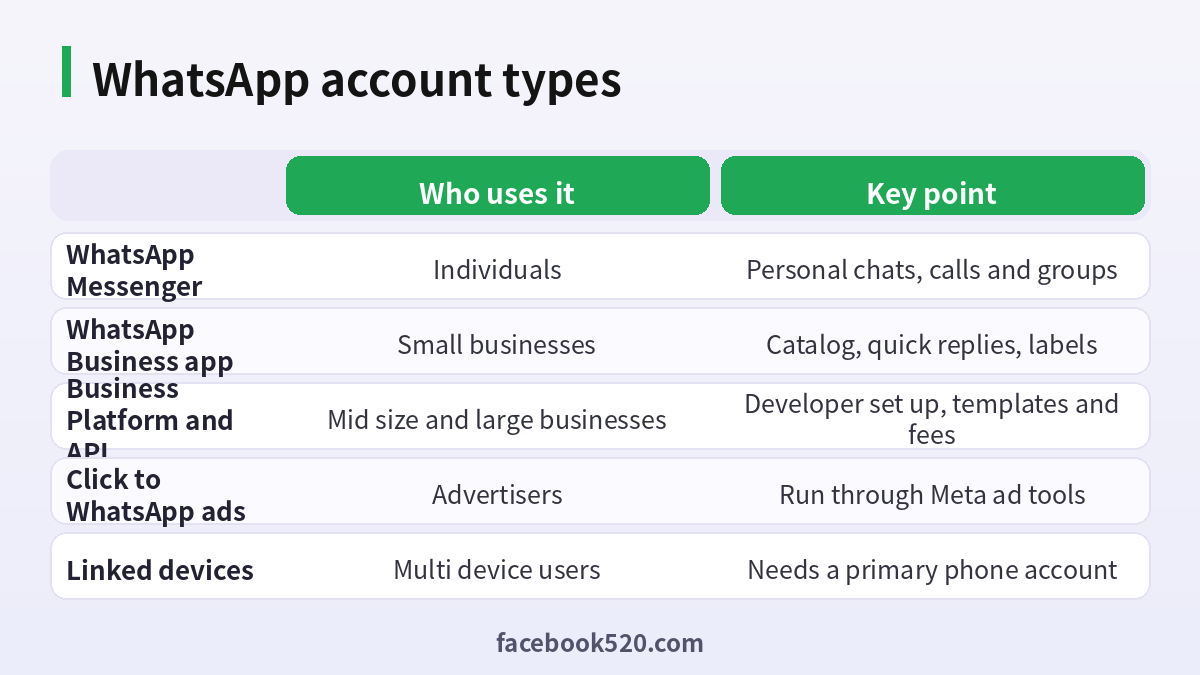
There are three broad ways to use the service. Individuals use the standard app. Small businesses use the free WhatsApp Business app. Larger organizations connect their systems to the WhatsApp Business Platform, which is the programming interface often called the API. All three begin with a phone number, but they differ in features, rules and cost.
What you need to sign up
| Requirement | Details | Tip |
|---|---|---|
| Phone number | A mobile number that can receive an SMS or call | Use a number you will keep for years |
| Smartphone | iPhone or Android with the official app | Download only from the official store |
| Internet | Wi-Fi or mobile data | Needed for verification and messaging |
| Name and photo | Shown to contacts | Optional but helpful |
| Backup plan | Cloud backup of chats | Protect it with a password or key |
A landline can sometimes be verified by a voice call, and some countries restrict certain kinds of virtual numbers. If a number has been used on a previous WhatsApp account, you can restore it on a new phone using the verification code.
Step-by-step: how to create a WhatsApp account
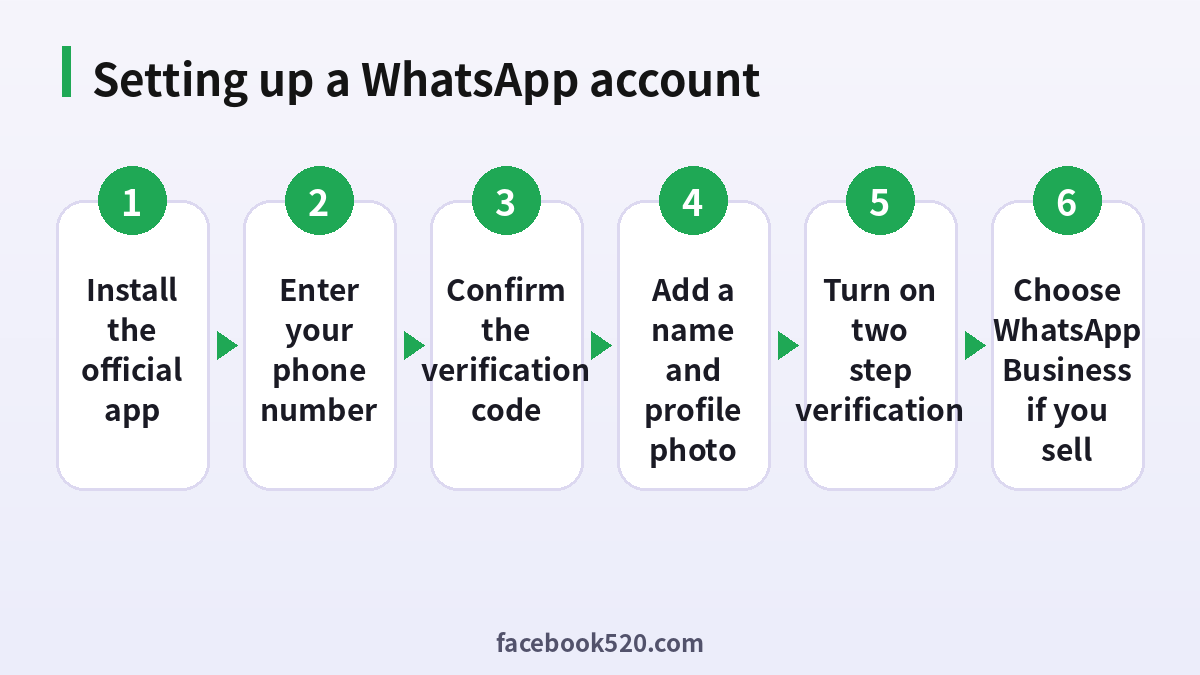
- Install WhatsApp from the App Store or Google Play. Check that the developer is WhatsApp LLC.
- Open the app, read the terms and tap to agree and continue.
- Select your country and enter your phone number, then confirm that it is correct.
- Wait for the six-digit code that arrives by SMS or phone call. Enter it in the app.
- If asked, restore a backup from your previous phone, or skip to start fresh.
- Enter your name and add a profile photo.
- Allow access to contacts if you want WhatsApp to find friends, and choose notification settings.
- Open the settings, go to the account section and turn on two-step verification with a PIN that you will remember.
- Add a recovery email address in case you forget the PIN.
- Review the privacy settings for last seen, profile photo, status and who can add you to groups.
You are now ready to chat. To use WhatsApp on a computer or tablet, open the linked devices section and scan the QR code shown on the other device. This lets several devices work at the same time while your phone remains the primary account.
WhatsApp Messenger vs WhatsApp Business
The business app is a separate download with a similar look, aimed at small companies. It lets you create a business profile with an address, hours, website and description, set up a product catalog, write quick replies and automatic greeting messages, and use labels to organize customers. It works with a phone number, and you can run the business app and the personal app on the same phone only if they use different numbers, although some phones with dual SIM make this easier.
| Feature | WhatsApp Messenger | WhatsApp Business app |
|---|---|---|
| Profile | Name and photo | Business name, hours, address, website |
| Catalog | No | Yes |
| Quick replies | No | Yes |
| Labels | No | Yes |
| Greeting and away messages | No | Yes |
| Cost | Free | Free for the app, optional paid services |
The most important rule for businesses is to use the business app or the official platform for commercial messaging, and to respect the opt-in requirements that apply to sending messages to customers.
The WhatsApp Business Platform and API
When a business needs to message thousands of customers, connect to a customer relationship system, automate support or send notifications such as order updates and appointment reminders, it uses the WhatsApp Business Platform. Companies can apply directly or work with an approved provider. The platform requires a verified business, a phone number dedicated to the platform and message templates that are approved before they can be used to start conversations. Pricing is based on categories of conversations or messages, such as marketing, utility, authentication and service, and the rates differ by country, so check the official pricing page. If you plan to build this yourself, you will need a developer, a business account in Meta’s business tools and a clear plan for customer consent.
Click-to-WhatsApp ads
Many companies use ads that send people straight to a WhatsApp chat. These are created in Meta’s advertising tools, where you select a messaging objective and choose WhatsApp as the destination. A user who taps the ad opens a conversation with your business, which can then be handled by staff or by automated flows. To run these ads you need a Meta business portfolio, a Facebook page or Instagram account, an ad account with a payment method and a WhatsApp number linked to your business. Advertising rules apply, so avoid prohibited products and misleading claims, and measure results by conversations started and sales completed rather than just clicks.
Payments and fees
Some countries support person-to-person or business payments inside WhatsApp, and availability depends on local regulation and partners. Where it is available, you add a bank account or card in the payments section and confirm with a PIN or biometric check. Businesses may also share payment links through other providers. For the Business Platform, the fees are charged by Meta for conversations or messages and are billed to the payment method on your business account, so keep an eye on volumes. Never send money to someone you do not know, and never share payment screens or one-time codes.
Security settings every user should set
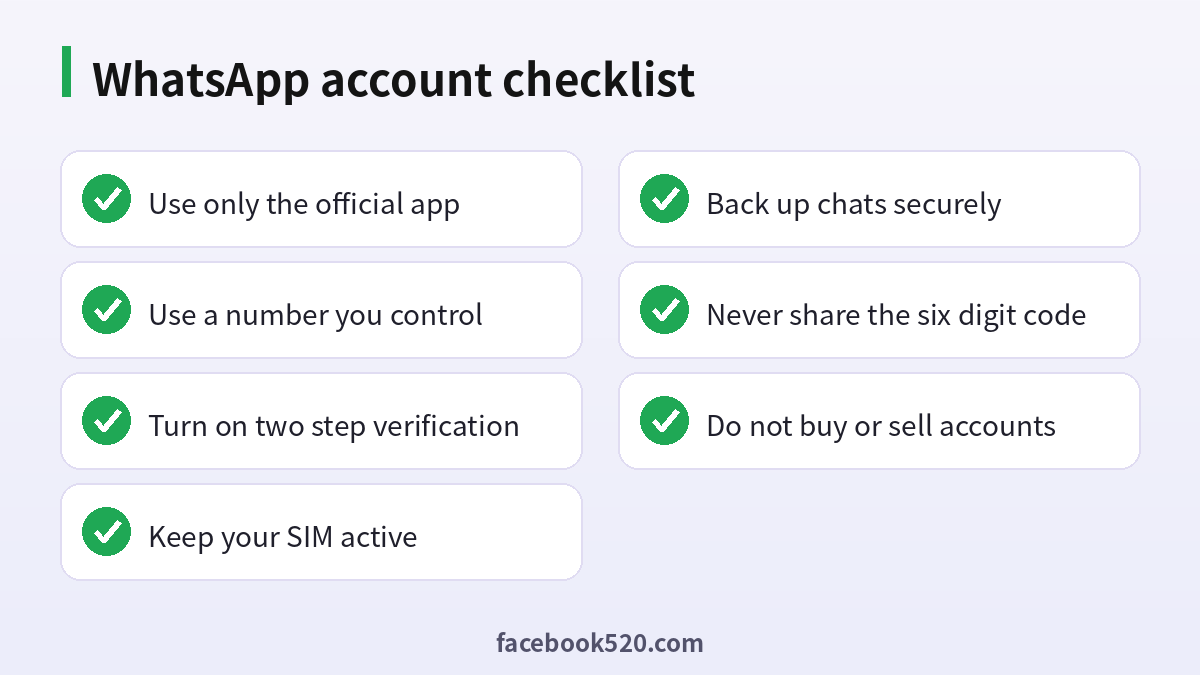
Two-step verification is the most important setting because it requires a PIN when you register your number again. Keep your PIN private and add a recovery email. Be cautious about the six-digit registration code: WhatsApp will never ask you for it, and anyone who does is trying to steal your account. Check your linked devices regularly and log out of any that you do not recognize. Choose who can see your last seen, profile photo and about information, and who can add you to groups. Be careful with unknown links and attachments, and report and block suspicious contacts. Encrypt your cloud backups if the option is available, and use a screen lock on your phone.
| Setting | Why it matters |
|---|---|
| Two-step verification | Blocks takeover with only the SMS code |
| Recovery email | Lets you reset a forgotten PIN |
| Linked devices review | Finds unknown sessions |
| Privacy controls | Limits who sees your information |
| Encrypted backup | Protects chats stored in the cloud |
| Phone lock | Protects chats if the phone is lost |
Changing numbers, losing a phone and recovery
When you change your phone number, use the change number feature in the app so that your chats and groups move to the new number. When you change phones but keep the number, install WhatsApp, verify with the code and restore your backup. If you lose your phone, contact your carrier to block the SIM and obtain a replacement with the same number, then register WhatsApp on the new phone, which will log out the old one. If your account is stolen, re-register with your number, enter your PIN if you set one and tell your contacts not to trust unusual messages. Because the account depends on the phone number, keep your SIM active and your carrier details up to date.
Why you should not buy or sell WhatsApp accounts
Offers to sell WhatsApp accounts, verified business numbers or large lists of ready accounts circulate online, but they are against the terms of service and carry big risks. A sold number can be reclaimed by the seller, who can simply request a new code. Accounts created in bulk are often banned quickly, and a number that sends messages in large volumes without consent can be blocked. Buyers also expose their customers to risk, because a business that loses its number loses its history and contacts. The safe approach is to register your own numbers, use the official business tools and grow your contact list through consent.
| Risk | What happens |
|---|---|
| Seller reclaims the number | You lose the account and the chats |
| Bulk or spam activity | Number banned by WhatsApp |
| No official support | Recovery is almost impossible |
| Privacy exposure | Previous owner may retain access |
| Legal and compliance issues | Messaging without consent can breach laws |
Common problems and fixes
| Problem | Likely cause | What to try |
|---|---|---|
| Code not received | Network or carrier delay | Wait, request a call, check signal |
| Account banned | Policy violation or spam reports | Request a review in the app and stop the behavior |
| Cannot link a device | Outdated app | Update both devices and retry |
| Business messages blocked | Missing opt-in or template issues | Review consent and templates |
| Backup will not restore | Different account or storage | Use the same cloud account and enough space |
Best practices for business messaging
Customers expect quick, useful answers, so set clear business hours and use greeting and away messages to manage expectations. Create quick replies for common questions such as delivery times, prices and return policies, and personalize them with the customer’s name. Use labels to track whether a customer is new, waiting for payment or has an open order. Always get permission before sending promotional messages, and give people an easy way to opt out. Avoid sending the same message to many people at once from a personal account, because mass messaging triggers spam detection and can lead to a ban. If you have a team, agree on tone, response times and what information may be shared in chat.
| Practice | Benefit |
|---|---|
| Greeting message | Sets expectations at first contact |
| Quick replies | Faster support with consistent answers |
| Labels | Organized customer pipeline |
| Catalog | Customers browse products inside the chat |
| Opt-in records | Protects you from complaints and legal risk |
Using WhatsApp for groups and communities
Groups let you chat with many people at once, and communities help organizations or neighborhoods organize several groups under one umbrella with announcements from admins. Use admin settings to control who can send messages, who can add members and how new people join. Pin important messages, set clear rules about spam and politics and review membership regularly. For privacy, remember that anyone in a group can see the phone numbers of other members unless they use privacy features, so be careful about adding customers to a group where they can contact one another.
Staying safe from common scams
Be skeptical of messages that create urgency, such as claims that a relative is in trouble, that you won a prize or that a package is waiting. Verify through another channel before sending money. Do not click links that ask you to log in to WhatsApp, since the real app never asks for your login through a web link. Ignore messages that ask you to forward a code, and treat job offers that require advance payments as fraud. If you receive a suspicious message, use the report and block feature, and warn friends and family who may be targeted.
Privacy, backups and data control
WhatsApp keeps personal chats end-to-end encrypted, but backups stored in a cloud service are only protected as well as the settings you choose. Turn on encrypted backups when the option is available, and write down the password or key in a safe place, since a forgotten key may make the backup unrecoverable. Use disappearing messages for sensitive conversations, and remember that anyone in a chat can still screenshot or forward content. Review which contacts are blocked, and check the settings for read receipts, online status and who can call you. If you share a phone, use a screen lock and consider a separate profile for your work chats. Periodically delete old media to free storage and reduce the amount of personal data stored on your device.
Preparing a business for growth
When a small business begins to grow, a single phone running the business app can become a bottleneck. Plan the next step early. Define who answers messages, document common answers and decide which tasks can be automated. When you consider moving to the Business Platform, collect your business documents, confirm the legal name and website, and choose a provider or a developer. Plan your message templates and consent process before you launch, and start with a small pilot group to catch problems. Track metrics such as response time, resolution rate and customer satisfaction so that you can see whether the change helps.
Frequently asked questions
How do I create a WhatsApp account?
Install the official app, enter your phone number, confirm the six-digit code, add a name and set up two-step verification.
Can I have two WhatsApp accounts?
Each account needs its own phone number. You can use the business app and the personal app with different numbers.
Is WhatsApp free?
Messaging and calls use your internet connection and are free to use. Business platform messages carry fees.
What is the difference between WhatsApp and WhatsApp Business?
The business app adds a profile, catalog, quick replies and labels for small companies.
What is the WhatsApp API?
It is the Business Platform that lets larger companies connect systems and send template messages at scale.
Can I run ads that open a WhatsApp chat?
Yes, through Meta’s ad tools using a messaging objective.
What if I lose my phone?
Block the SIM, get a replacement number and register WhatsApp on a new phone.
Is it safe to buy a WhatsApp account?
No. It breaks the rules and can lead to loss of the account and data.
Why did WhatsApp ask for a code I did not request?
Someone may be trying to register your number. Do not share the code and turn on two-step verification.
Can I use WhatsApp on a computer?
Yes, by linking a device with the QR code while your phone stays the primary account.
Summary
A WhatsApp account is your phone number plus the settings you protect it with. Sign up with the official app, turn on two-step verification, choose the business app or the platform if you sell, and run ads through Meta’s tools with proper consent. Do not buy, sell or share accounts, and treat every request for your six-digit code as a scam. Doing so keeps your messages, your customers and your business safe.

