


Discord Subscription (2026): Nitro vs Nitro Basic, Prices, Server Subscriptions, Server Boosts, How to Subscribe, Change or Cancel, Payment Problems, Gifting and Why Cheap Nitro Offers Are Risky
Discord is free to use, but it also sells several kinds of paid features. People often mix up Nitro, Nitro Basic, server subscriptions and server boosts, and then wonder why a charge appeared on a card or why a perk is missing. This guide explains each type of Discord subscription in plain language, shows the United States prices that were listed in October 2026, describes how to subscribe, change a plan, cancel and fix payment problems, explains how gifts work and warns about the cheap Nitro offers and free gift links that are a favorite of scammers. Prices vary by country, currency, taxes and promotions, so always confirm the number shown in your own app before you pay.
The four things people call a Discord subscription
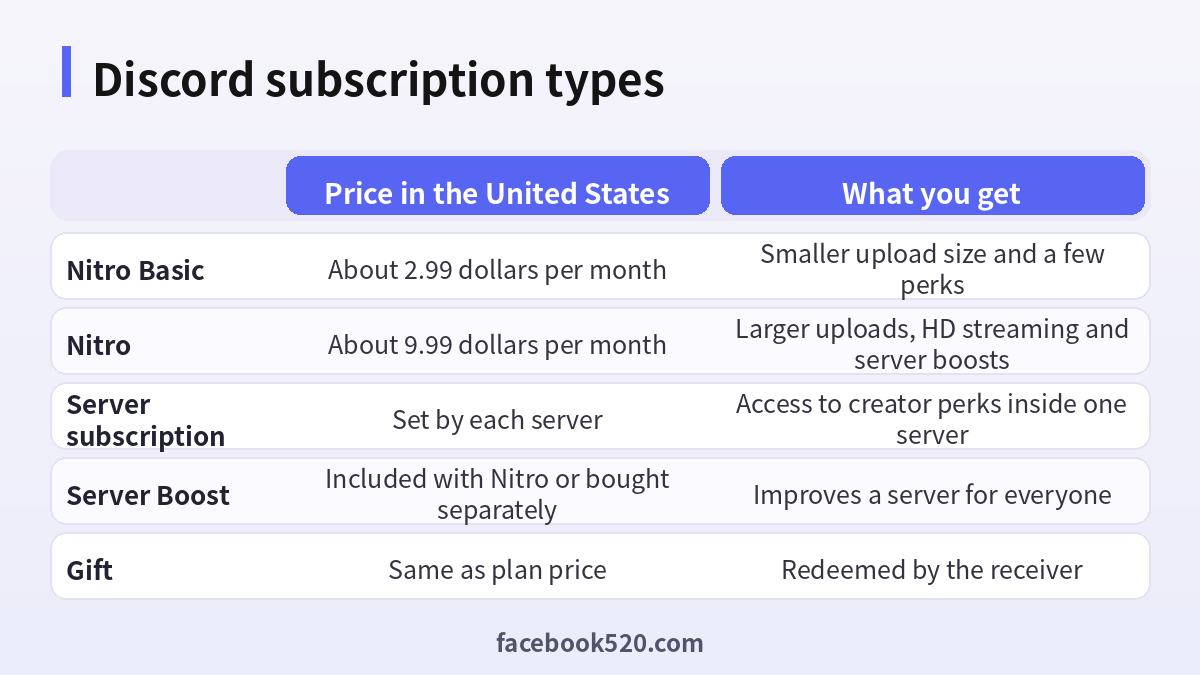
| Product | What it is | Who pays |
|---|---|---|
| Nitro Basic | A lower-priced personal plan | You, monthly or yearly |
| Nitro | The full personal plan with more perks | You, monthly or yearly |
| Server subscription | A recurring membership for one server, with tiers set by the server owner | You, monthly |
| Server Boost | A way to improve a server, included with Nitro or bought separately | You, for the benefit of the server |
Nitro and Nitro Basic belong to your account and follow you across servers. A server subscription belongs to one community, and the money goes mostly to its creator. Boosts unlock server-wide upgrades such as better audio quality and more emoji slots, so they help everyone on that server.
Nitro Basic and Nitro: prices and perks
According to Discord’s pages in October 2026, the United States prices are about 2.99 dollars per month or 29.99 dollars per year for Nitro Basic, and about 9.99 dollars per month or 99.99 dollars per year for Nitro. Prices in other countries and currencies can differ.
| Feature | Nitro Basic | Nitro |
|---|---|---|
| Upload size | About 50 MB | About 1 GB |
| Streaming quality | Standard | HD streaming |
| Server Boosts included | None | Two |
| Custom emoji and stickers anywhere | Emoji usage across servers | Fuller perks |
| Profile customization | Some | More options |
Perks change over time, so read the plan comparison inside the app. A simple way to choose is to ask what you actually need. If you only want to use custom emoji everywhere and upload slightly larger files, Basic may be enough. If you share large videos, stream in high quality or want to support your favorite server with boosts, Nitro makes more sense.
Server subscriptions
Server subscriptions are different. A server owner can create paid tiers that give members access to special channels, roles or content. The price of each tier is set by the owner, billed monthly, and you can see it on the server’s subscription page. You can join or leave at any time, and you manage these memberships in the same subscription area of your settings as your Nitro plan. Because every server is different, read the description of the tier carefully and ask the server’s moderators if you have questions about what you will receive.
How to subscribe step by step
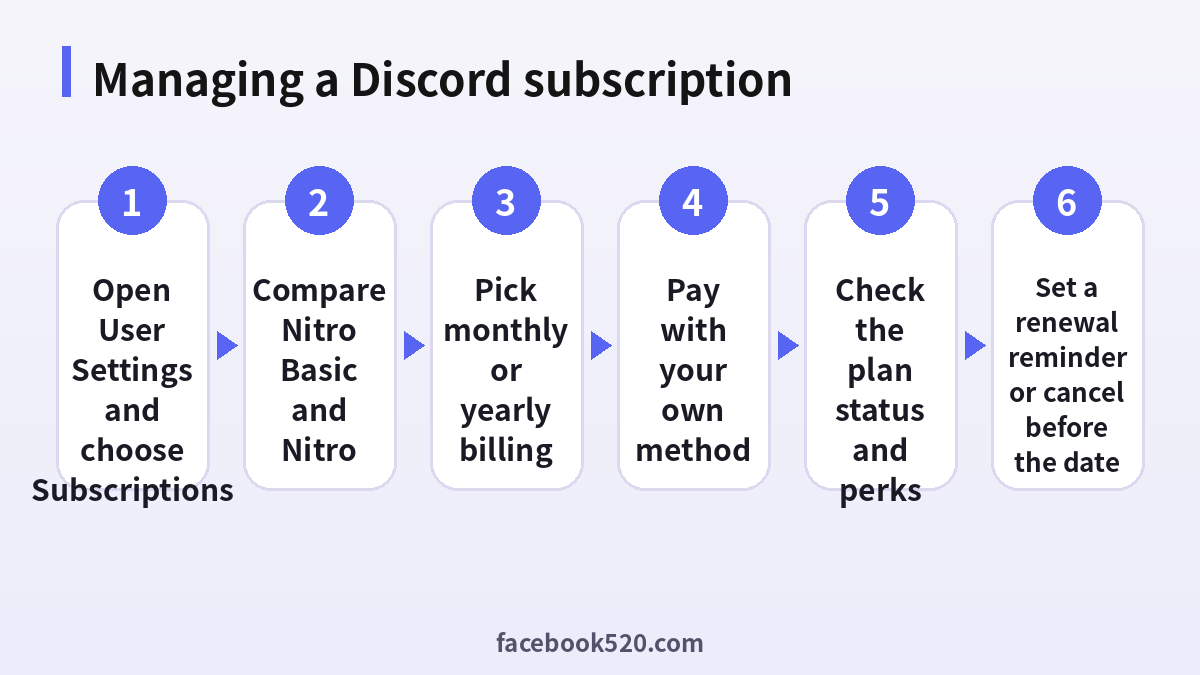
- Open Discord on the app or the official website and sign in to your own account.
- Open User Settings, then choose the Nitro or Subscriptions section.
- Compare Nitro Basic and Nitro and pick the one that suits you.
- Choose monthly or yearly billing. Yearly is cheaper per month, but you pay for twelve months at once.
- Select a payment method and check the total, including tax, in your currency.
- Confirm the purchase and wait for the receipt email.
- Return to your subscription page and check that the plan shows as active.
- Set a calendar reminder for the renewal date, so that you can review the plan before it renews.
If you subscribe through a mobile store, the charge and the cancellation may be managed by that store instead of Discord. Look at where the subscription appears so that you know where to cancel.
Changing or cancelling a subscription
You can cancel Nitro or Nitro Basic at any time from the subscription page in User Settings. According to Discord’s help pages, the plan generally stays active until the end of the current billing period, and perks stop afterward. Cancel server subscriptions in the same area, per server. If you want to switch between Basic and Nitro or between monthly and yearly, use the change plan option, and read the screen to see when the new price starts and whether you receive credit for the unused time. If you bought through a mobile store, manage it there.
| Task | Where to do it |
|---|---|
| Cancel Nitro or Basic | User Settings, Subscriptions |
| Cancel a server subscription | The same Subscriptions area |
| Change monthly to yearly | Plan change option in the subscription page |
| Cancel a store-billed plan | The mobile store’s subscription settings |
| Ask about a charge | Discord support with the receipt |
Payment problems and how to fix them
A payment can fail for several reasons. The card may be expired, the bank may block international or recurring payments, the billing address may not match or the country may not support the chosen method. Check the card details, contact the bank, try another card or an alternative method shown at checkout and avoid trying many times in a row, which can trigger fraud filters. If you are charged twice, collect the receipts and contact support. If you see a charge you do not recognize, review the subscriptions on your account and on the mobile stores, and ask family members who may have used your card.
Gifting Nitro
Discord lets you gift Nitro to a friend. You choose the plan, pay and send a link or deliver it through the app. The receiver redeems it in their own account. Gifts have an expiry period, and a gift that has already been claimed cannot be used by someone else. Only buy gifts inside Discord or on the official site, and only send them to people you know. Avoid free gift links that appear in direct messages, because they usually lead to a fake login page that steals accounts.
Why cheap Nitro and free Nitro offers are risky
Searches for a Discord subscription bring up sellers who offer Nitro at half price, lifetime Nitro, or a free year after you scan a code. Honest discounts exist, such as promotions announced by Discord or by partners in the app, but most outside offers are traps. Common patterns include payment with stolen cards, which leads to chargebacks and removal of perks, scam links that ask you to log in through a lookalike page and offers that need your password or a QR code scan. Giving someone a login QR code lets them access your account. The result can be a stolen account, lost servers and lost friends. If you want a deeper look at buying and registering accounts safely, see our guides at (https://www.facebook520.com/article/9492.html) and (https://www.facebook520.com/article/9520.html).
| Offer | Likely reality |
|---|---|
| Half-price Nitro | Stolen card or scam |
| Free Nitro link | Phishing page |
| Lifetime Nitro | Does not exist as a normal product |
| Nitro for a QR scan | Account takeover |
Safety habits
Turn on two-factor authentication, use a unique password, and be careful with direct messages that contain links or files. Never share your token or scan a QR code for a stranger. Check the URL of the login page, and use only the official app or website. Review authorized apps and remove those you do not use.
Which plan should you choose: a simple decision guide
Before you subscribe, decide what problem you are trying to solve. Many users pay for Nitro because of a single feature and never use the rest. Make a short list of what you do on Discord. If you mostly chat in text channels and voice calls, the free plan is already generous. If you often hit the upload limit when you share clips, a plan with a larger limit helps. If you stream games to friends and want sharper video, the higher plan has the better streaming quality. If you love expressing yourself with emoji and stickers across servers, Basic gives you the access you want at a lower cost. If you run or love a community, boosts matter because they unlock upgrades for everyone.
| Your main need | Suggested choice |
|---|---|
| Chat and voice with friends | Free plan |
| Emoji and stickers everywhere | Nitro Basic |
| Large uploads and HD streams | Nitro |
| Supporting a favorite server | Boosts or a server subscription |
| Supporting a creator directly | Server subscription |
Also think about how long you will use it. If you want it for a single event, such as a month-long game project, pay monthly and cancel afterwards. If you have used it for a year and love it, yearly billing saves money. The yearly option for Nitro is priced at roughly ten months of the monthly price, so it pays off if you keep the plan for at least ten months.
Understanding Server Boosts in more detail
A boost is a way to give a server a lift. When enough boosts are applied, the server reaches levels that unlock perks such as higher audio quality, more emoji slots, bigger upload limits for all members and a custom invite link in some cases. Nitro includes two boosts, and you can buy extra boosts at a separate price. Boosts are tied to a server, last as long as you keep the subscription and can be moved to another server with some limitations. If you cancel a plan, the boosts that come with it disappear, and the server can lose its level. Before you apply boosts, talk to the server owners, because they know which levels they want to reach.
- Open the server that you want to support.
- Open the server menu and choose the boost option.
- Pick how many boosts to apply.
- Confirm, and check that the server progress bar increases.
- Remember to review the renewal date, since boosts end when the subscription stops.
Managing multiple Discord charges
People who use Discord on several devices sometimes end up with duplicate subscriptions. The most common case is subscribing on the website and again on a mobile store. Another case is a family member using the same card to subscribe on a different account. To avoid this, keep a list of your subscriptions: which account holds them, which payment method is used, where they were purchased and when they renew. Review the list every few months, and cancel those that are unused. When you see an unknown charge, search your email for receipts from Discord, check each mobile store and ask whoever shares your card. Do not click links in emails claiming that a charge was made; open the app yourself to check.
Parents, teens and Discord subscriptions
Discord is popular with teenagers, and many younger users ask for Nitro or want to buy server perks. Parents should know that Discord requires users to meet a minimum age, and that purchases made with a parent’s card are the parent’s responsibility. Talk about spending limits before the first purchase. Use the family tools and privacy settings in the app, and check the subscription page together every month. If your child receives a Nitro gift link from a stranger, explain that it is likely a trap. A good rule is that nobody should log in to Discord through a link that they received in a message, and nobody should scan a QR code for another person. If an account was compromised, change the password, enable two-factor authentication and review the devices that are logged in.
| Topic | Suggested family rule |
|---|---|
| Spending | Agree on a monthly limit |
| Gift links | Never click links from strangers |
| QR codes | Never scan for another person |
| Card use | Pay only with approval |
| Review | Check the subscription page together |
Getting a refund or help with a billing mistake
Refund rules depend on where you bought the subscription and on local consumer law. If you bought inside Discord, open the help center, find the billing section and submit a request with the date, the amount and the receipt number. If you bought through a mobile store, the store handles refunds under its own policy. Explain what happened clearly and politely, for example that you were charged twice or that you did not mean to renew. Keep screenshots. While you wait for an answer, turn off auto-renewal so that the issue does not repeat. If you suspect fraud on your card, contact your bank in parallel, and do not give your card details to anyone who contacts you offering a refund.
- Collect the receipt, the date and the amount of the charge.
- Check whether the purchase was made in Discord or in a mobile store.
- Submit a request through the correct help page.
- Turn off auto-renewal while you wait.
- Contact your bank if the charge is fraudulent.
- Keep all communication for your records.
Comparing Nitro with alternatives for supporting communities
If your goal is to support a community rather than get personal perks, you have options. A server subscription sends money to the creator and gives you access to the tier benefits. Boosts help the server’s technical features but do not pay the owner directly. Some communities also accept donations on other platforms, which may be better if the owner wants to avoid platform fees. Before you decide, ask yourself what you want: recognition, exclusive content, a better server or simply a way to say thanks. Reading the server’s description and asking in the chat will help you to choose the best way to contribute, and you can always change your mind later.
A final pre-purchase checklist
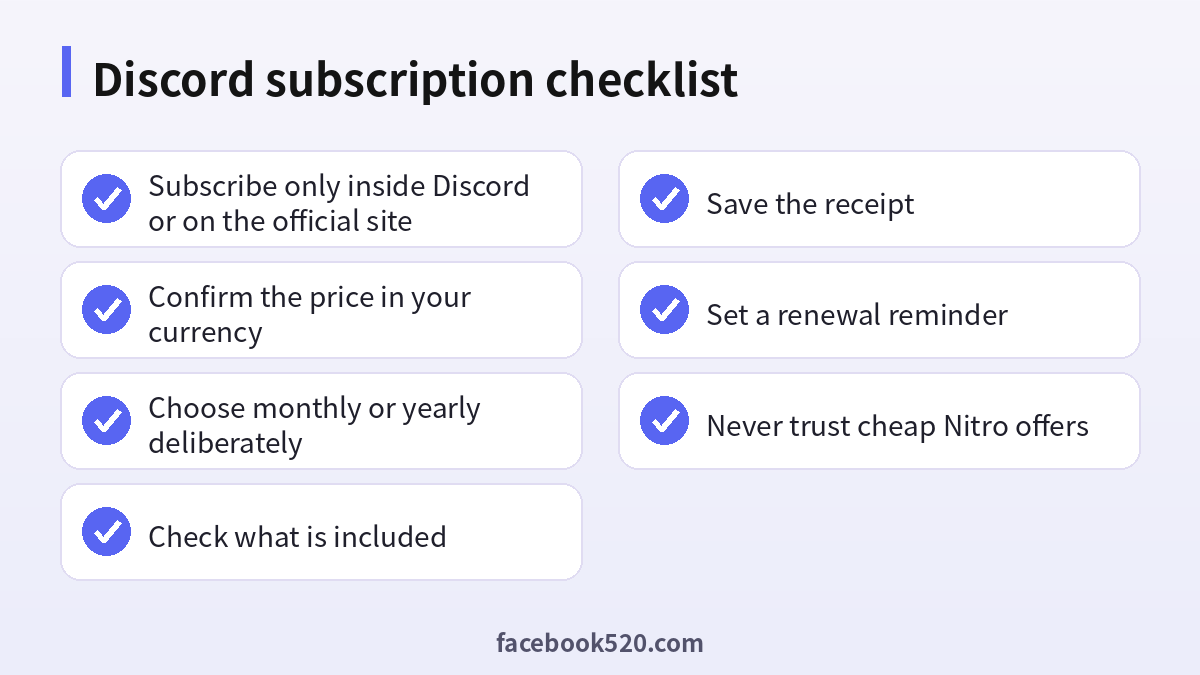
Before you press the pay button, run through the following list. Are you signed in to your own account and on the official app or site? Is the price shown in the right currency, including tax? Did you choose monthly or yearly on purpose? Do you know what will be included, and have you compared it with the free features? Is the payment method yours, and does the bank allow recurring payments? Have you set a reminder for the renewal date? If you can say yes to each question, you are ready, and you can enjoy your subscription without surprises.
Frequently asked questions
What is the difference between Nitro and Nitro Basic?
Nitro has more perks such as larger uploads, HD streaming and included boosts. Basic is cheaper with a smaller set of perks.
How much does Nitro cost?
In the United States, about 9.99 dollars per month or 99.99 dollars per year in October 2026. Prices vary by country.
How much does Nitro Basic cost?
About 2.99 dollars per month or 29.99 dollars per year in the United States.
Are server subscriptions part of Nitro?
No. They are separate memberships set by each server owner.
How do I cancel?
Open User Settings, go to Subscriptions and cancel the plan. It generally stays active until the period ends.
Why was I charged twice?
You may have both a Discord and a mobile store subscription, or a server subscription in addition to Nitro. Check each, and contact support with receipts.
Can I gift Nitro?
Yes, inside Discord. The receiver redeems it in their account.
Is cheap Nitro safe?
No. Most discounted offers use stolen cards or phishing.
Do boosts require Nitro?
Nitro includes boosts, but you can also buy boosts separately.
What if my payment fails?
Check the card details, contact your bank and try another method.
Summary
A Discord subscription can mean Nitro, Nitro Basic, a server subscription or a boost. Choose the one that matches how you use the service, pay only inside Discord or on its official site, read the price in your own currency and keep a reminder for the renewal date. Cancel in the Subscriptions page when you no longer need it, and ignore cheap or free Nitro offers that ask for your login.

