


Gemini Account (2026): Complete Guide to Sign-Up, Setup, Google AI Plans, Payment Methods, Family Sharing, Workspace Accounts and Why You Should Not Buy One
A Gemini account is not a separate product with its own username and password. It is your Google account used with Google’s Gemini assistant, plus whatever subscription, workspace or developer settings are attached to it. That simple fact explains most of the confusion people have when they search for a Gemini account: they wonder where to sign up, how to upgrade, how to pay, whether a team can share it, and whether it is safe to buy one from a seller. This guide is a complete overview of how a Gemini account works in 2026, with practical steps for setup, a plain-English comparison of the Google AI plans, a look at payment methods and a clear explanation of why buying an account from a third party is a risky shortcut. Plans, prices and model access change frequently, so the figures below are a snapshot of what Google showed in October 2026 for the United States, and you should check the official pages before you pay.
What is a Gemini account?
Gemini is Google’s family of AI models and the assistant built on them. You can reach it through the Gemini website and mobile apps, through Google products such as Gmail, Docs and Search, and through developer tools such as Google AI Studio and the Gemini API. In every case, access is tied to a Google account. If you already use Gmail, YouTube or an Android phone, you already have the account you need. You simply sign in on the Gemini page and accept the terms.
What changes from person to person is the type of Google account and the plan attached to it. A personal account can use the free tier or subscribe to a Google AI plan. A work or school account is managed by an administrator, and its access depends on what the organization has enabled. A developer account uses API keys and billing set up in Google AI Studio or Google Cloud, which is a separate matter from the consumer app subscription.
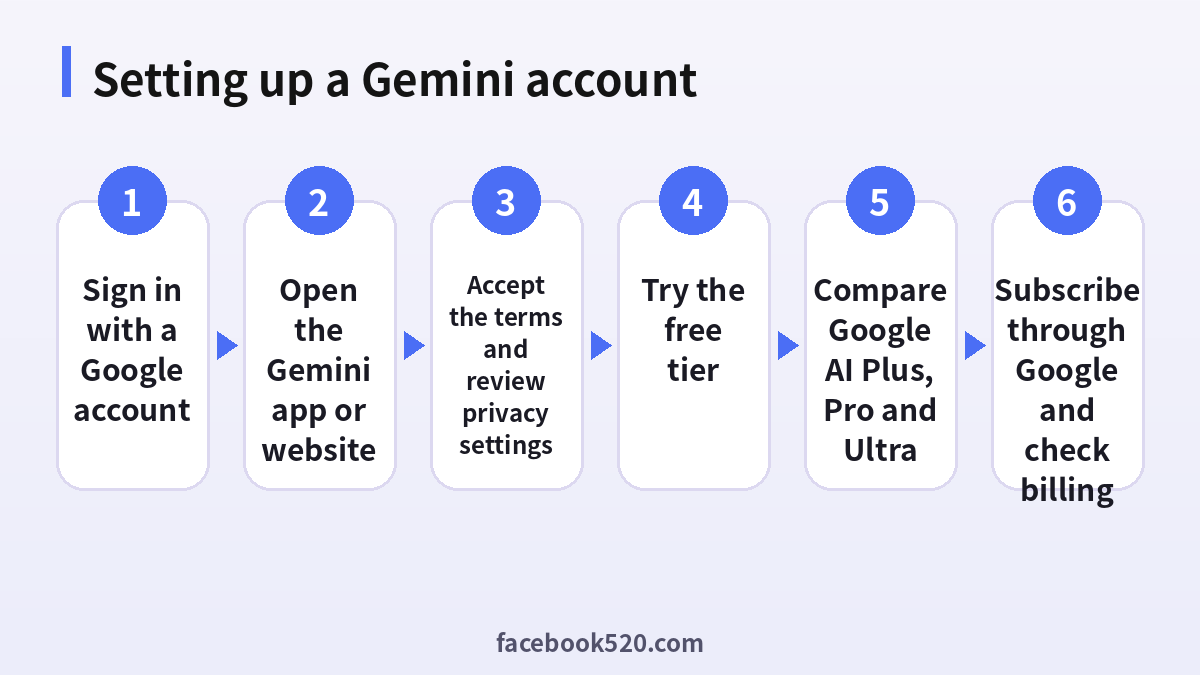
How to sign up for a Gemini account
Because Gemini uses your Google account, the sign-up process is short. If you do not yet have a Google account, you create one first, and then you open Gemini.
- Go to the official Google account creation page and enter your name, a username and a strong password, or sign in if you already have an account.
- Add a recovery phone number and recovery email so that you can regain access if something goes wrong.
- Open the Gemini website or install the official Gemini app, then sign in with the same Google account.
- Read and accept the terms and the privacy notice. Decide whether you are comfortable with your conversations being saved to your activity, and adjust the setting if not.
- Start with a simple prompt to confirm that everything works.
- Open the account menu and review the available plans. If you want more access, you can subscribe from there.
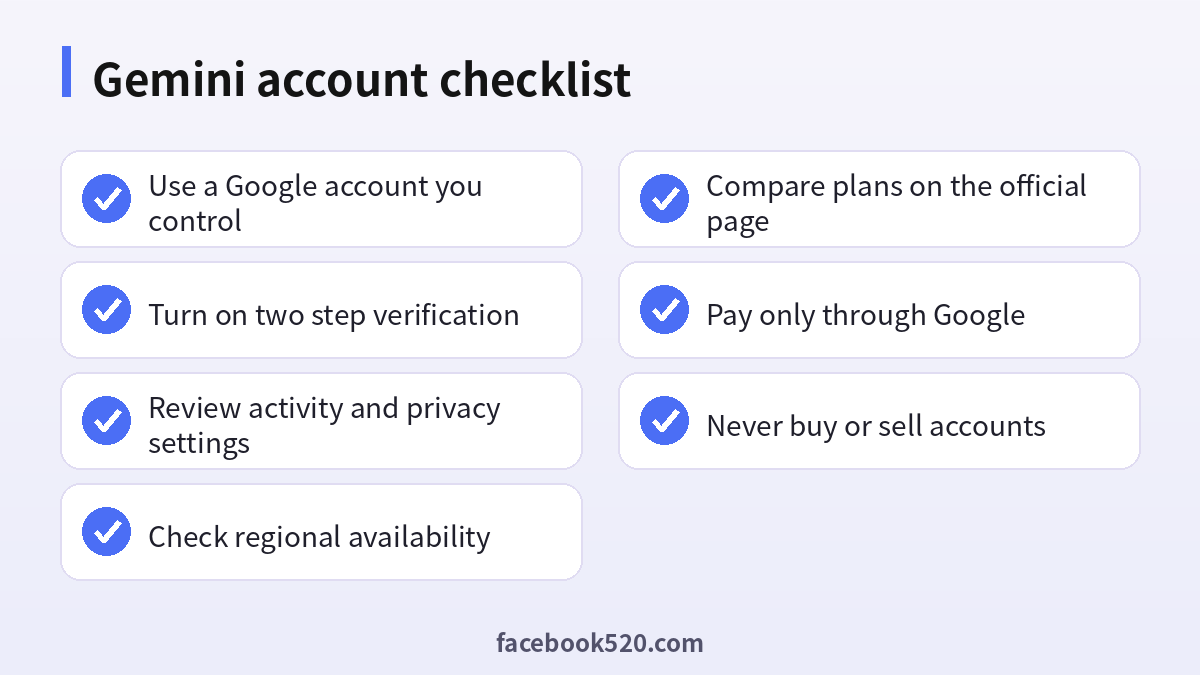
- Turn on two-step verification for the Google account to protect it.
If Gemini does not appear for your account, the cause is usually regional availability, an age restriction, or a work or school account on which the administrator has not enabled the service. In those cases the fix is a settings change or a different account, not a workaround that breaks the rules.
Free tier versus paid Google AI plans
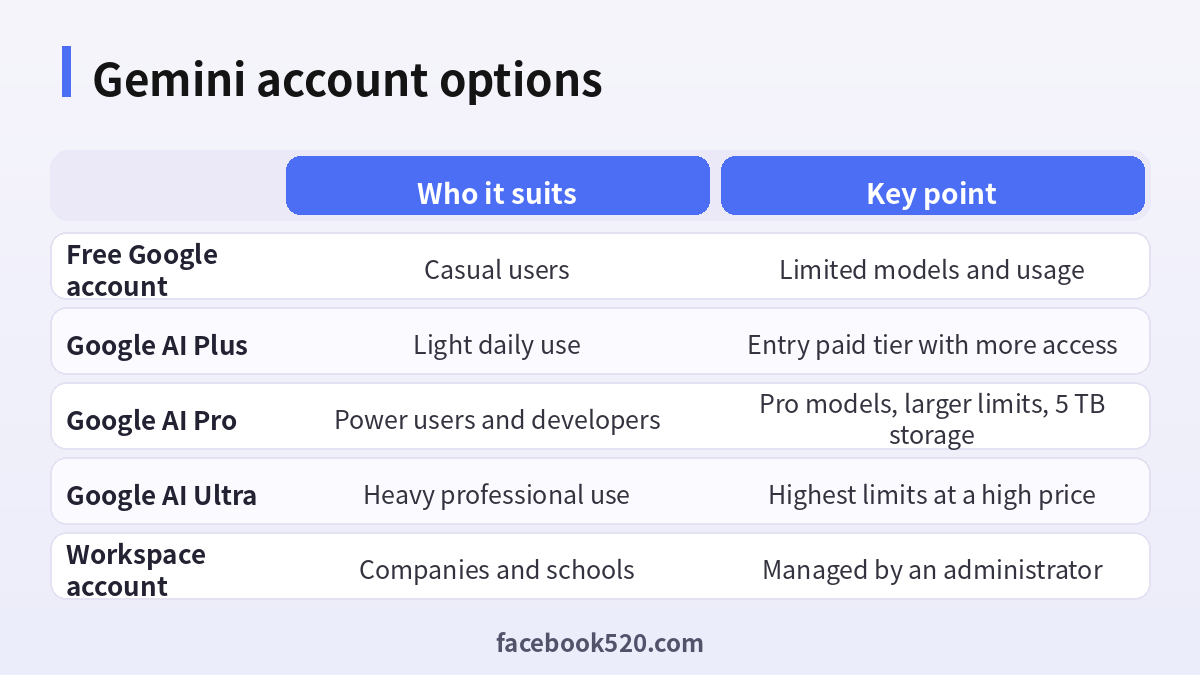
The free tier lets you try Gemini at no cost, but Google has been tightening what it includes. According to reports in early October 2026, free users are limited to the lightest model, while the standard and Pro models are reserved for subscribers. Paid plans are sold under the Google AI name and bundle Gemini access with extra cloud storage and other Google benefits. The table summarizes the United States prices shown in October 2026. Prices differ by country and can change.
| Plan | Price per month | Main benefits | Best for |
|---|---|---|---|
| Free | 0 | Basic Gemini access with limits | Trying it out |
| Google AI Plus | 4.99 dollars | More access, standard model, 400 GB storage | Light everyday use |
| Google AI Pro | 19.99 dollars | Pro models, expanded limits, long context, 5 TB storage | Power users, students, developers |
| Google AI Ultra | 99.99 or 199.99 dollars | Much higher limits, top models, large storage | Heavy professional use |
A useful way to decide is to ask what is actually limiting you. If you rarely hit usage limits, stay on the free tier. If you want the standard model and a little more room, Plus may be enough. If you rely on advanced reasoning, long documents or coding help every day, Pro is the usual sweet spot. Ultra is for people whose work depends on very large amounts of usage. For a deeper look at the mid-tier plan, see (https://www.facebook520.com/ai-tools-guide/ai-chat-search/8144.html), and for the Chinese-language guide to topping up, see (https://www.facebook520.com/ai-tools-guide/ai-chat-search/8134.html).
Google Workspace, school and family accounts
If you use Gemini through a company or a school, your administrator controls the settings. Google Workspace editions can include Gemini features inside Gmail, Docs, Sheets and Meet, and the cost is part of the organization’s plan rather than your personal subscription. This matters for two reasons. First, you should not enter confidential company information into a personal account if your employer has not allowed it. Second, if you leave the organization, you lose access to anything tied to that account, so keep personal work on a personal account.
Google AI plans also support family sharing in many cases, which allows the plan owner to share benefits with a small group of family members. The rules about who qualifies, how many people can join and which benefits are shared are set by Google and can differ by country, so read the family sharing page before you assume everyone is covered.
| Account type | Who manages it | Typical use |
|---|---|---|
| Personal Google account | You | Everyday use, personal subscription |
| Family group | Plan owner | Shared benefits for family members |
| Workspace account | Company administrator | Work documents, team policies |
| School account | School administrator | Education, usually with limits |
| Developer project | You or your team | API keys, usage based billing |
Gemini API and developer accounts
Developers often use the phrase Gemini account to mean API access. The API is a separate path. You sign in to Google AI Studio with a Google account, create an API key and use it in your own applications. There is a free tier with rate limits, and higher usage is billed according to the amount of text, images or other data processed. Enterprise customers can also use the models through Google Cloud. A consumer subscription such as Google AI Pro does not automatically convert into API credits, although it may include some developer benefits. Keep your keys private, never publish them in public code repositories, and set budget alerts so that an error in your code cannot create a surprise bill.
Payment methods and how billing works
Subscriptions are billed through Google. On the web you typically pay through Google One or the Gemini subscription page using a card or another payment method available in your country. On Android or iOS, you may pay through Google Play or the Apple App Store, in which case the store manages renewal and cancellation. Available methods include major credit and debit cards, in some countries local payment options such as bank transfer or carrier billing, and gift cards or store credit where Google supports them. If your card is declined, the most common reasons are an expired card, a mismatch between the billing address and the card, or a bank block on international online payments.
- Open the Gemini or Google One subscription page while signed in to the correct account.
- Choose a plan and a billing period.
- Select an existing payment method or add a new one, and confirm that the billing country is correct.
- Review the total, including taxes, and complete the purchase.
- Check the confirmation email and the subscription page to make sure the plan is active.
- Set a reminder before the renewal date so that you can cancel if you no longer need the plan.
To cancel, go to the same place where you subscribed. A subscription bought through Google can be canceled from the Google subscriptions page, and one bought through an app store must be canceled in the store.
Safety and privacy settings you should check
A Gemini account holds your prompts, uploaded files and, depending on settings, a history of your activity. Open the activity controls and decide whether conversations should be saved and for how long. Be careful about uploading documents that contain personal data, client information or anything covered by a confidentiality agreement. Use a strong, unique password and two-step verification for your Google account, because that account also protects your email and files. Review which third-party apps have access to your Google account and remove any you no longer use.
Why you should not buy a Gemini account
Search results often include sellers offering ready-made Gemini or Google AI accounts at suspiciously low prices. The risks are real. Because the account is simply a Google account, a seller who created it, or who still knows its recovery details, can take it back at any time. Subscriptions sold below the official price are often paid with stolen cards or abused promotions, and Google may cancel them, which leaves you with a locked account and no refund. Sharing a single account among many buyers breaks the terms of service and exposes your chats to strangers. And handing over an email and password pair, or paying a stranger in a way that cannot be reversed, is a common route to losing money.
| Risk | What can happen |
|---|---|
| Original owner keeps recovery details | The account is taken back |
| Subscription paid with a stolen card | Plan canceled or account suspended |
| Shared access | Others can read your prompts and files |
| No official support | Google will not help with an account you do not own |
| Irreversible payment | You may lose the money with no recourse |
The safe path is simple: create your own Google account, subscribe through Google, and keep control of the recovery options.
Troubleshooting common problems
| Problem | Likely reason | What to do |
|---|---|---|
| Gemini not available | Region, age or admin restriction | Check availability, use a personal account or ask your admin |
| Cannot subscribe | Payment method or country mismatch | Update the billing profile or try another method |
| Plan not showing | Subscription tied to another account | Sign in to the account used at purchase |
| Model missing | Plan or model change | Check the plan page for current model access |
| Locked out | Lost password or recovery details | Use Google account recovery with the original device |
Choosing the right plan by use case
The best plan is the cheapest one that removes the limit that actually bothers you. A student who writes essays, summarizes readings and prepares for exams may find that the free tier or Plus covers most days, with Pro worth considering during exam season when long documents and deeper reasoning matter. A freelancer who drafts proposals, analyzes spreadsheets and writes code a few hours a week is usually well served by Pro, particularly because the larger storage allowance replaces a separate cloud storage subscription. A developer who relies on coding assistance in an editor all day may reach Pro limits and consider a higher tier, but should compare it with usage-based API pricing, which can be cheaper for predictable workloads.
| Profile | Likely choice | Reason |
|---|---|---|
| Curious beginner | Free | No cost, enough to learn |
| Student | Free or Pro seasonally | Pay only when workload peaks |
| Freelancer | Pro | Reasoning, documents and storage in one plan |
| Developer | Pro or API billing | Compare plan limits with API costs |
| Small team | Workspace plan | Central billing and policies |
Tips for getting the most from your account
Use clear, specific prompts and include the context the model needs, such as the audience, the format you want and any constraints. For long documents, upload the file and ask targeted questions instead of pasting everything into one message. When a result is wrong, point out exactly what is wrong and ask for a revision, which usually works better than starting over. Keep separate conversations for separate projects so that old context does not confuse new requests. Finally, verify facts, numbers and citations independently, since any AI assistant can produce confident but incorrect statements.
Keeping your account secure over time
Treat the Google account behind your Gemini access as one of your most important online accounts. Enable two-step verification with an authenticator app or a security key rather than relying only on text messages, and store backup codes somewhere safe. Check the security page every few months for unknown devices and recent sign-ins. Be suspicious of emails or messages that claim your Gemini subscription has a problem and ask you to log in through a link; go to the official site by typing the address yourself. If you notice unusual activity, change your password immediately, sign out of all devices and review the recovery options. These small habits protect not only your Gemini access but also your email, documents and photos.
Frequently asked questions
Do I need a separate account for Gemini?
No. You use your Google account. If you do not have one, you can create it for free.
Is Gemini free?
There is a free tier with limits. Paid Google AI plans add more access and models.
How much does a Google AI plan cost?
In the United States in October 2026, Plus was 4.99 dollars, Pro 19.99 dollars and Ultra 99.99 or 199.99 dollars a month. Check the current page for your country.
Can I use Gemini with a work account?
Only if your administrator has enabled it. Do not enter confidential data in a personal account against company rules.
Can I share my plan?
Some Google AI plans support family sharing. Read the official rules for your country.
How do I pay?
Through Google using a supported card or local method, or through an app store if you subscribe on a phone.
How do I cancel?
Cancel in the place where you subscribed, such as the Google subscriptions page or the app store.
Is the Gemini API included in my subscription?
Not automatically. API access is set up separately in Google AI Studio or Google Cloud.
Can I buy a Gemini account?
It is not recommended. The risks include losing the account, losing the money and exposing your data.
Why was my card declined?
Common reasons are expired details, a billing address mismatch or a bank block on international payments.
Does Gemini save my conversations?
That depends on your activity settings. Review them and change them as you prefer.
What if I cannot sign in?
Use Google’s account recovery and keep your recovery phone and email up to date.
Summary
A Gemini account is your Google account, with a plan layered on top. Sign up or sign in with Google, check what the free tier offers, compare Plus, Pro and Ultra against your real usage, and pay only through official channels. Protect the account with two-step verification, review your privacy settings, and avoid buying accounts from third parties. If you do that, you keep control of your data, your payments and your access.
