


Midjourney Banned Words 2026: Why Prompts Are Blocked, Account Suspended Appeals and Verification Code Not Received
Many Midjourney users hit the same wall sooner or later: a prompt is rejected with a message that it contains a banned word, repeated warnings appear, a verification code does not arrive or an account is suspended. Searches such as “midjourney banned words list 2026” suggest people are looking for a complete list, but no official complete list is published, and the filters are updated without notice. This guide explains how the moderation works in general terms, why innocent prompts are sometimes blocked, how to rephrase a request within the rules, how to appeal if you believe your account was restricted by mistake and what to do when the login code does not arrive. We will not provide ways to evade safety rules, because doing so risks your account. Details reflect what is publicly known in 2026, and the policies may change, so read the official community guidelines. For plan and account basics, see our Midjourney pricing and payment guide.
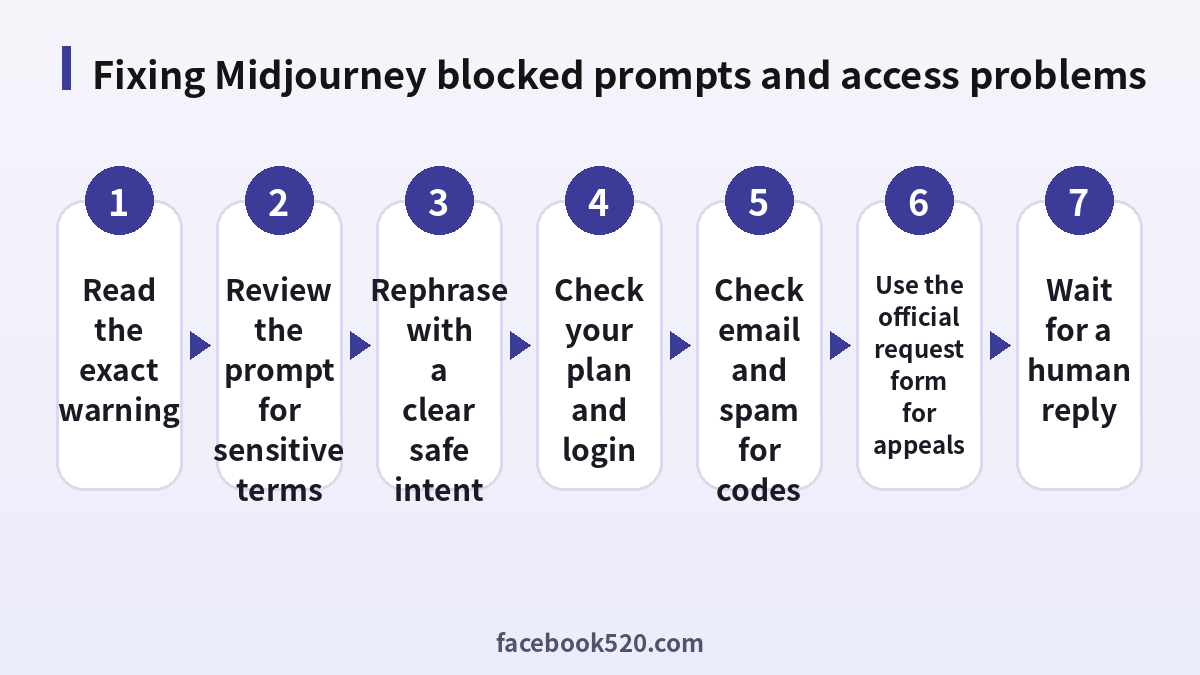
How Midjourney moderation works
Midjourney uses automated filters to check prompts, and sometimes images, against its community rules. The rules aim to prevent content such as graphic violence, hateful content, deceptive images of real people and other categories that the service does not allow. The filters look at words and combinations of words, not only individual terms, which is why a harmless prompt can be blocked if it contains a term that is also used in a prohibited context. The rules differ from the rules of other tools, and they are stricter in some areas.
Why there is no complete banned words list
Websites that claim to publish the full list are guessing. The system changes over time, and the same word can be fine in one prompt and blocked in another. Some terms are blocked in all contexts, others only when combined with a certain subject. Because the filter is not public, a list is not reliable, and relying on it can give a false sense of safety. The better approach is to understand what the rules aim to prevent and to write prompts that clearly describe a safe, creative goal.
What to do when a prompt is blocked
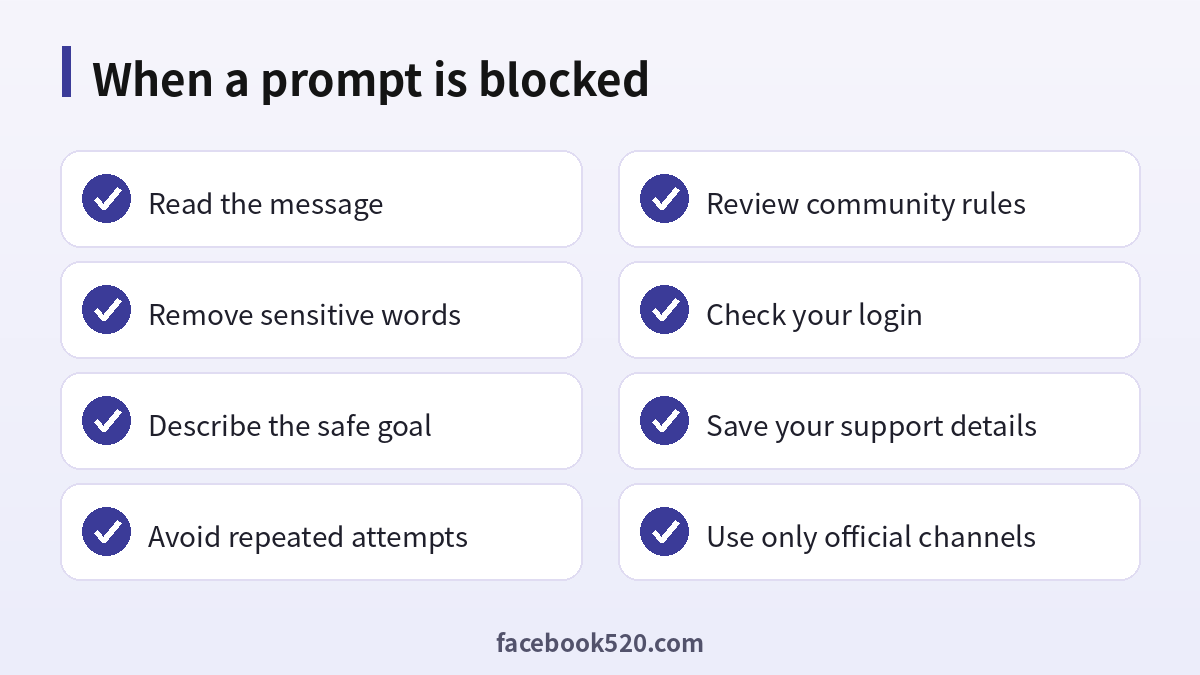
- Read the message carefully. It usually says that a word or phrase is not allowed.
- Review the prompt for terms that could be misread, such as medical, historical or violent words used in a harmless context.
- Replace the word with a neutral description of what you want to see.
- Make the intent clear: describe the subject, style, lighting and mood instead of the sensitive aspect.
- Do not resubmit the same blocked prompt many times, because repeated attempts can lead to warnings.
- If you believe the block is a mistake, use the official feedback channel and include the prompt text.
Examples of safe rephrasing
If you are an illustrator working on a historical battle scene, describe the composition, the costumes, the sky and the atmosphere instead of focusing on injuries. If you want a medical illustration, use educational words such as anatomical diagram and textbook style. If you are designing a horror book cover, describe the mood with words such as eerie, shadowy and abandoned instead of graphic imagery. These changes do not hide anything: they communicate the legitimate goal in terms the filter and the community rules accept.
Repeated warnings and suspensions
Accounts that repeatedly try to produce prohibited content can be warned, temporarily restricted or banned. If you receive a warning, read the guidelines before you continue. Avoid testing the limits of the filter, because that behaviour is itself a signal. Do not use multiple accounts to continue after a restriction. The company states that serious violations lead to bans, and subscription fees are not refunded for bans caused by breaking the rules.
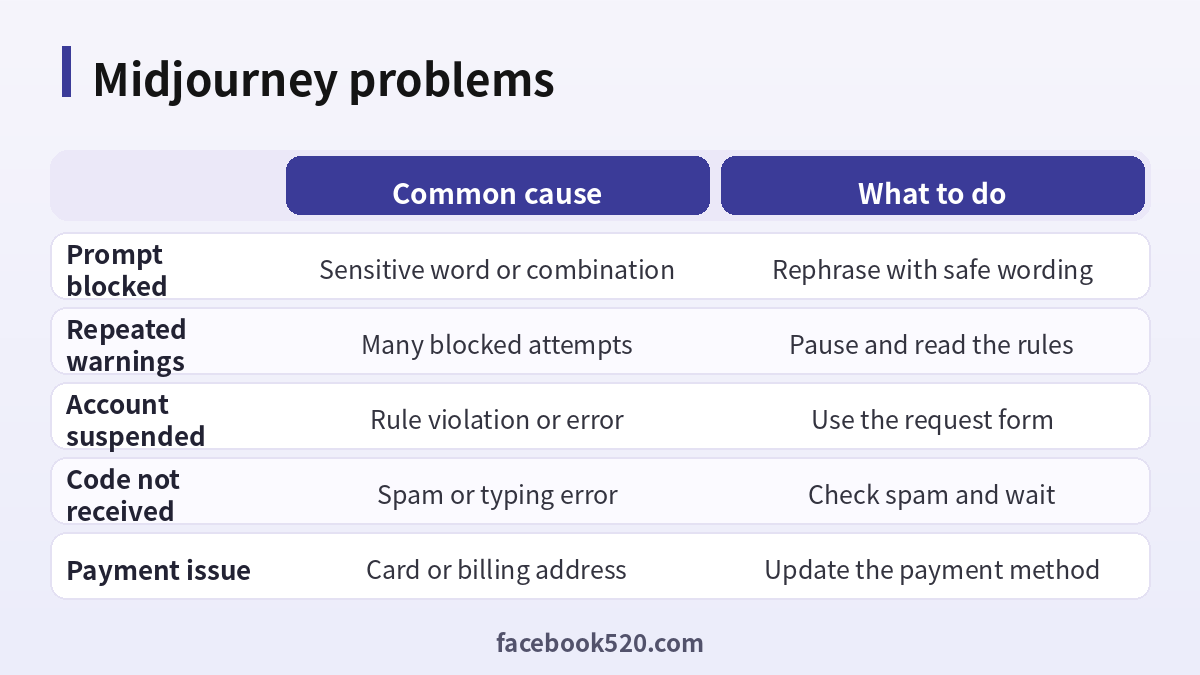
| Problem | Common cause | What to do |
|---|---|---|
| Prompt blocked | Sensitive word or combination | Rephrase with safe wording |
| Repeated warnings | Many blocked attempts | Pause and read the rules |
| Account suspended | Rule violation or error | Use the request form |
| Code not received | Spam or typing error | Check spam and wait |
| Payment issue | Card or billing address | Update the payment method |
How to appeal a suspended account
If you believe your account was restricted by mistake, use the support request form on the official website and choose the option related to appeals or account access. Include your username, the email linked to the account, the date of the issue and a short, polite description of what you were doing. Do not argue, threaten or send many messages. A single clear message is more effective. You may wait several days for a reply, and the outcome is not guaranteed. Keep copies of what you sent. Our earlier article on Midjourney account risks explains why purchased accounts are even more likely to be removed.
Verification code not received
Midjourney signs you in with a Google account or a Discord account, so the code that matters usually comes from that provider. If you do not receive a code, check the email address you typed, the spam and promotions folders and the filters on your mailbox. Wait a few minutes before you request another code. If you use two-step verification, make sure that your authenticator app has the correct time. Turn off VPNs, try another browser and, if needed, use a different login method that you control. If the problem comes from Google or Discord, use that provider’s recovery pages.
Plans, billing and why paying does not change moderation
Basic costs about 10 dollars a month, Standard 30, Pro 60 and Mega 120, with annual billing about 20 percent cheaper. A higher plan gives more fast time and features, but it does not change the content rules. Paying does not lift a ban, and a payment failure can also stop access, so check your billing page if you suddenly cannot generate images.
Staying within the rules while being creative
Most artists never see a block. Use descriptive language about style, composition, colour and emotion. Avoid real private individuals, avoid trademarked characters when you plan to publish commercially and keep prompts free of hateful or graphic terms. Read the community guidelines whenever you start a new project, because they are updated. If your work involves sensitive but legitimate themes, such as history or education, state the context in plain, neutral language.
Keeping a prompt log
A simple habit that prevents many problems is to keep a log of prompts that worked, together with the settings and the date. When a new prompt is blocked, compare it with a similar one that passed and look at what changed. You will often find that a single added word, or a combination of two ordinary words, caused the problem. A log also makes it easier to explain your work to support if you ever need to appeal, because you can show the kind of projects you create and that your purpose is legitimate. Save the log in a document you control, and avoid pasting private client information into prompts.
When to ask for help
If a block seems clearly wrong, for example a prompt about a children’s picture book that is refused, gather the exact text and the message and send it through the official feedback channel. Reports from real users help the team improve the filters. Be specific and keep the tone constructive.
Beware of scams around Midjourney
Websites that promise a banned words list, unlimited accounts, jailbreak prompts or unban services often ask for your login or payment. Do not give your Discord or Google credentials to anyone. Do not buy accounts from resellers, since these can be cancelled and the money lost.
A monthly review habit
Set a reminder once a month to review your Midjourney setup. Check your security settings, payment method, connected apps and notification preferences. If you pay for anything, compare the charge with what you actually used and decide whether to keep, change or cancel. Update your recovery details if you changed phone number or email. Delete old data you no longer need. Ten minutes a month prevents most surprises and keeps your costs and risks under control.
Privacy and personal data
Before you enter personal information anywhere, ask what is really required. Use only the details that Midjourney needs, review the privacy settings after setup and limit who can see your profile, activity and contact information. Avoid posting documents, addresses, financial data or photos that reveal your location. Check which third-party apps are connected to your account and remove those you no longer use. If you work with client or company data, follow your organization’s policy and do not mix it with personal accounts.
When to contact official support
Contact support when you have tried the basic fixes and the problem remains, when you see an unexpected charge, when you suspect your account was accessed by someone else or when you are locked out. Prepare the account email, the date and time of the problem, the exact message you saw and screenshots. Describe what you did step by step and what you expected to happen. Use only the contact methods listed on the official site and ignore anyone who offers to fix things for a fee through social media or private messages.
Troubleshooting checklist
If something does not work as expected with Midjourney, go through the basics in order before contacting anyone:
- Check your internet connection and try again on a different network.
- Update the app or refresh the page, then restart the device.
- Clear the cache or try a private browser window without extensions.
- Confirm that you are signed in with the correct account and email.
- Look for the exact error message and search the official help center for it.
- Wait a short time before repeating an action, since repeated attempts can trigger temporary limits.
- If nothing helps, collect screenshots and contact official support.
Devices, apps and browsers
Use the latest version of the official app or a modern browser when working with Midjourney. Keep your operating system updated, install security patches and avoid rooted or modified devices, which weaken protection. Browser extensions can read pages you visit, so remove those you do not trust. On mobile, download apps only from official stores, review the permissions they ask for and turn off those that are not needed. Lock your device with a PIN or biometrics so that a lost phone does not become a lost account.
Account security basics for Midjourney
Protect your Midjourney account before anything else. Use a long, unique password stored in a password manager, turn on two-step verification, and make sure the recovery email and phone number are ones you control. Review the list of devices and active sessions every few months and sign out of any you do not recognize. Never share one-time codes, even with someone who claims to work for support, because genuine support teams never ask for them. If you sign in on a shared or public computer, log out afterwards and avoid saving passwords in the browser.
Keeping up with changes
Features, prices and rules around Midjourney change more often than most people expect. Follow the official blog, release notes or help center, and read the emails you receive about policy updates instead of deleting them. When a guide such as this one gives a number or a menu name, treat it as a starting point and confirm it on the official site. If a change affects you negatively, you can usually adjust your plan, settings or usage, so act early rather than waiting for a problem.
Quick recap checklist
Before you finish, confirm the essentials for Midjourney:
- You are using the official website or app.
- Your password is unique and two-step verification is on.
- Recovery email and phone are current.
- Privacy settings match what you are comfortable sharing.
- You know the price, renewal date and how to cancel if money is involved.
- You saved receipts, confirmation emails and backup codes in a safe place.
- You know where to find the official help center.
Recognizing scams and fake offers
Scammers often imitate well-known brands such as Midjourney. Typical signs are urgent messages, requests for passwords or verification codes, links to look-alike websites, promises of free upgrades or guaranteed results, and payment requests through unusual channels. Always type the official address yourself or use a saved bookmark, check the sender of every email and never pay through a link sent by a stranger. If you think you were tricked, change your password, review recent activity, contact your bank if money was involved and report the message to the platform.
Helping family members and colleagues
If you are setting up Midjourney for someone else, such as a parent, a teenager or a coworker, guide them rather than doing everything silently. Explain why strong passwords and two-step verification matter, show them how to recognize suspicious messages and agree on who to ask before they click or pay for anything. For minors, follow age requirements and use the available parental or family controls. For teams, document who owns the account, who can approve spending and what to do when someone leaves.
Official sources versus unofficial offers
When you search for help with Midjourney, you will find both official pages and third-party offers. The comparison below shows why it pays to stay with official channels.
| Aspect | Official source | Unofficial offer |
|---|---|---|
| Price | Clearly shown at checkout | Often unclear or too low |
| Support | Documented help channels | Unreliable or none |
| Account safety | Protected by the platform | Risk of bans and data theft |
| Refunds | Governed by published terms | Rarely honored |
| Updates | Always current | Outdated or wrong |
Common mistakes to avoid with Midjourney
Most problems come from a handful of avoidable habits. People reuse the same password across several services, ignore security notices, click links in unexpected messages, install unofficial apps that promise extra features, or buy accounts and access from resellers. Others skip reading the terms, which leads to restrictions they did not expect, or forget to write down renewal dates and recovery details. Spend a few minutes reading the official help pages, keep your details up to date and treat anything that sounds too good to be true as a warning sign.
Frequently asked questions
Is there an official Midjourney banned words list?
No complete official list is public, and the filters change.
Why was my harmless prompt blocked?
A word or combination may be misread by the filter. Rephrase with neutral, descriptive language.
Can I appeal a ban?
Yes. Use the official support request form and explain calmly.
Will paying remove a ban?
No. Plans do not change the content rules.
Why is my code not arriving?
Check spam, confirm the address and wait a few minutes before requesting a new code.
Can I use several accounts after a restriction?
No. Doing so can make the situation worse.
Are jailbreak prompts safe?
No. They are unreliable and can lead to a ban.
Do other tools have the same rules?
Each tool has its own rules and filters.
How much does Midjourney cost?
Between 10 and 120 dollars a month depending on the plan.
Where can I read the rules?
In the official community guidelines.
Summary
Midjourney blocks prompts through automated filters that no public list fully describes. Rephrase with neutral and descriptive language, avoid repeated attempts, use the official request form to appeal and fix code problems by checking your login provider.
