


Google Ads Account Suspended in 2026: Why It Happens, How to Read the Suspension Notice, How to Write One Honest Appeal, What Never to Do, and How to Prevent a Second Suspension
Seeing the message “your Google Ads account has been suspended” is stressful. Campaigns stop, revenue may drop, and the notice can feel vague. The good news is that a suspension is a process with clear steps, and many accounts are reinstated when the advertiser identifies the real reason, fixes it and submits one clear appeal. The bad news is that the most common mistakes, such as repeated appeals or opening new accounts to keep running ads, can turn a fixable problem into a permanent one. This guide explains the main types of suspension, how to find the exact reason in your account, how to prepare and write an honest appeal, what you should never do, and how to prevent the problem from happening again. It follows Google’s public policy and help pages as of October 2026. Policies change, so always compare this article with the notice in your own account.
What a suspension means
When Google suspends an Ads account, your ads stop running and you cannot create new ones until the issue is resolved or the suspension is lifted. Google may suspend an account for violations of advertising policies, for problems with payments, or for behavior that looks like abuse. Some suspensions are tied to the account, and some affect the website, the payment profile or the people behind the account. Understanding which type applies to you is the key to choosing the right fix.
The main suspension types
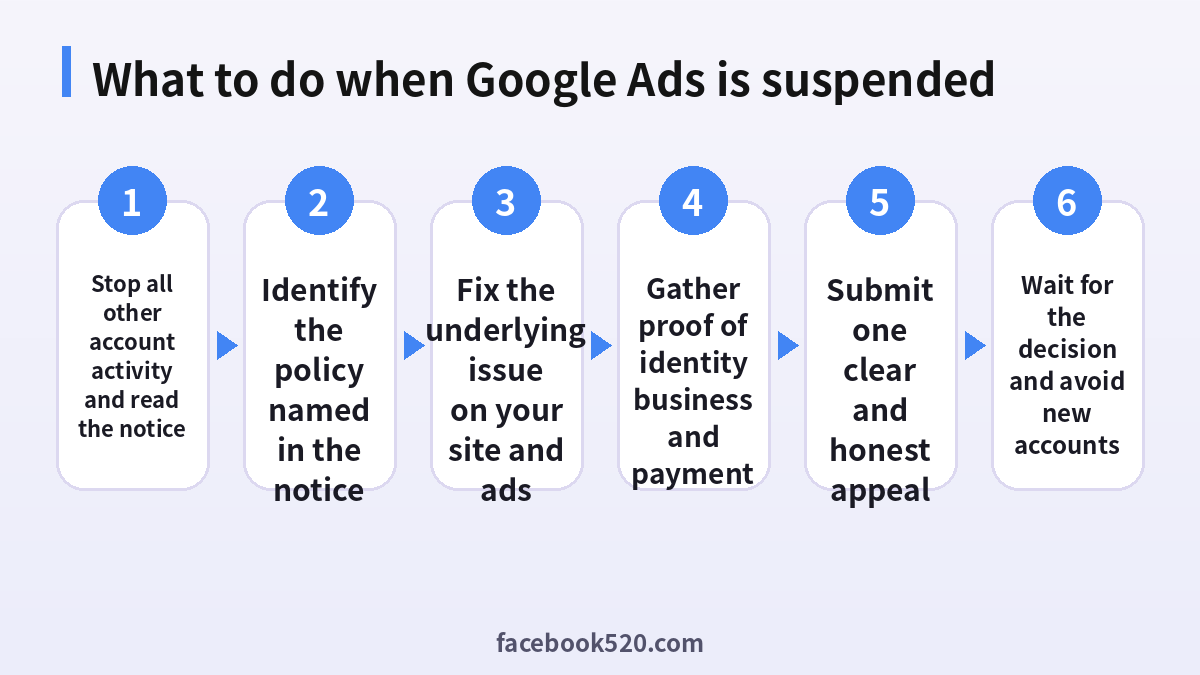
| Type | What it usually means | Typical fix |
|---|---|---|
| Circumventing systems | Attempts to evade review, cloak content, or return after a suspension with new accounts | Stop all such behavior and submit an honest appeal |
| Unacceptable business practices | Misleading claims, hidden costs, or dishonest offers | Change the site and ads so that terms are clear |
| Misrepresentation | Not showing who you are or what you sell | Add accurate contact and business information |
| Suspicious payment activity | Payment methods that look risky or inconsistent | Verify the payer and submit documents |
| Billing and payment issues | Unpaid balance, failed charges or a closed payment profile | Fix payment and clear the balance |
| Compromised account | Unauthorized access | Secure the account and follow the recovery steps |
Circumventing systems is treated as egregious. According to Google’s policy, it can lead to an immediate suspension without a prior warning, and creating new accounts after a suspension is one of the behaviors that triggers it. This is why attempts to start over with another account usually backfire.
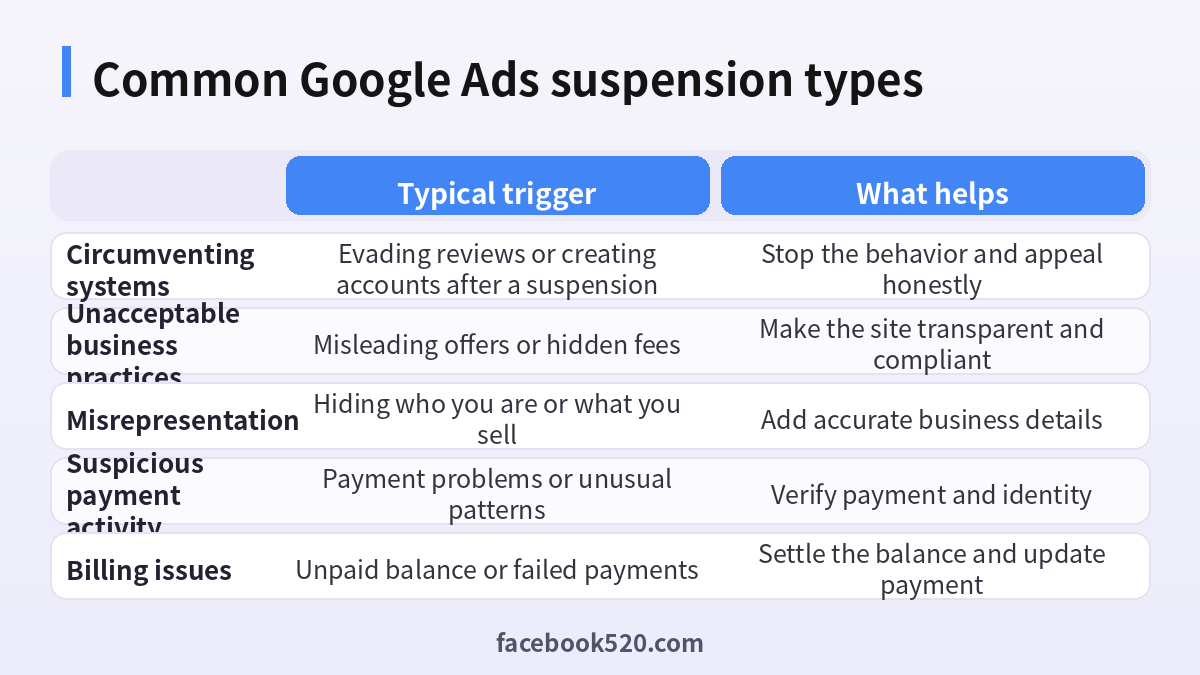
Step 1: Read the notice and find the reason
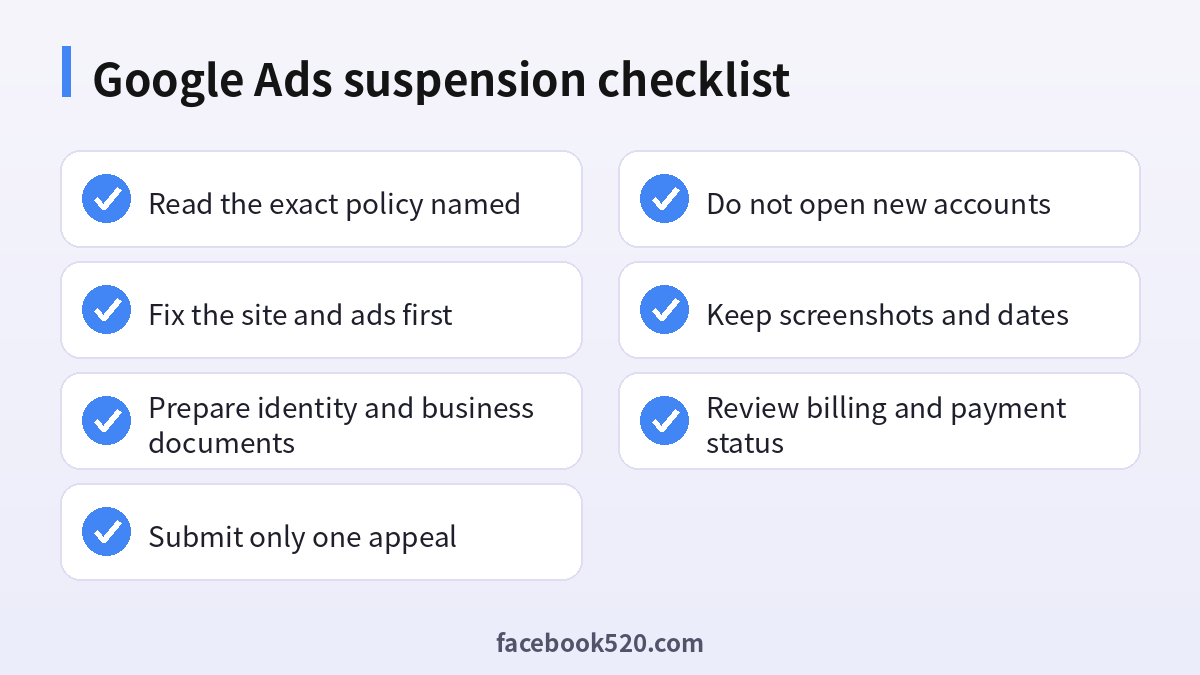
Do not guess. Sign in to the Google Ads account and open the notification or the policy manager. The message names the policy that you violated and sometimes the example that triggered the review. Check your email as well, because Google often sends a notice to the contact address. Screenshot the notice and note the date and time. If the notice mentions a billing or payment issue, the fix is different from a policy violation, so check the billing section too.
- Open the account and read the suspension banner.
- Click through to the notification or policy details.
- Note the policy name, the affected assets and any listed examples.
- Check the email inbox of the account owner and the spam folder.
- Save screenshots of every message and the dates.
Step 2: Fix the real problem before you appeal
An appeal without a fix is likely to fail. If the issue is on your website, correct it before submitting anything. Add clear business information, an address or contact page, and transparent pricing and refund terms. Remove claims you cannot prove. Make sure the landing page matches the ads, loads properly, and does not push visitors to unrelated offers. If the problem is in the ads, remove or edit the offending text and images. If the problem is a payment profile, make sure the name and details match your legal documents and that the card or bank account belongs to the business.
| Problem area | Check |
|---|---|
| Website | Contact details, privacy policy, terms, honest claims |
| Ads | Accurate text, no exaggerated promises, no misuse of brand names |
| Landing page | Matches the ad, easy to navigate, no forced downloads |
| Payment profile | Legal name, address and card match the business |
| Account access | No unknown users, two step verification enabled |
Step 3: Gather your documents
Appeals that include relevant documents are easier to evaluate. Prepare a document that proves who you are and what the business does, such as a business registration, a utility bill or a government identification for the person who owns the account. Gather proof of your relationship with the products you sell, for example invoices or supplier agreements. If payment verification is requested, have the card statement or bank documentation ready. Keep the names consistent across all documents, because mismatches are a common reason for rejection.
Step 4: Submit one honest appeal
Google’s help pages instruct advertisers to open the suspension notification, choose the option to contact or appeal, and explain the situation. Submit a single, thorough appeal. Do not send many short ones. Be factual and polite. State who you are, what your business does, what you believe caused the suspension, what you changed and what you will do to stay compliant. If you do not know the reason, say so and ask for clarification. Do not blame the reviewer, and do not make promises you cannot keep.
A solid appeal can follow this structure:
- A one sentence introduction with the account ID and business name.
- A summary of what the business sells and how it makes money.
- A description of the policy cited in the notice and what you found when you checked.
- A list of the concrete changes you made, with links where possible.
- A statement about the controls you will use to prevent a repeat.
- A request for a review and an offer to provide any documents.
You generally have a long window to appeal, at least six months, but there is no benefit to waiting. The sooner you fix and appeal, the sooner your campaigns can return. Avoid repeated appeals, because several rapid submissions can slow the review and may look like pressure.
What never to do
| Mistake | Why it hurts |
|---|---|
| Creating a new account to keep advertising | It can be treated as circumventing systems and may lead to more suspensions |
| Using someone else’s account or a rented account | It breaks the rules and exposes you and the owner |
| Submitting many appeals in a row | It delays the review and can look like spam |
| Hiding information or using fake documents | It is misrepresentation and usually ends in a permanent ban |
| Paying a stranger to reinstate the account | Scammers target suspended advertisers |
| Changing the website to cloak content | It is a separate violation |
Special case: billing and payment suspensions
If the notice refers to a payment or billing problem, the process is different. Check whether there is an unpaid balance, whether a card was declined, or whether a payment profile was closed. Update the payment method, pay the outstanding amount and, if requested, complete payment verification by uploading the requested documents. Wait for the system to confirm the payment before you appeal. For suspicious payment activity, the account owner may need to prove that they control the payment method, and the name on the card must match the account details. Do not try to use a different person’s card without their explicit authorization and proper documentation.
What happens after you appeal
Google reviews the appeal and sends a response, often within a few business days, although it can take longer. If the appeal is approved, your account is reinstated, and you may need to resubmit ads for review. If the appeal is denied, the notice usually explains why. At that point, take a close look at the explanation, correct anything that remains and consider whether the issue involves a part of your business that cannot meet the policy. In some cases, such as repeated or severe violations, the suspension is final. Do not attempt to circumvent it.
How to prevent another suspension
Prevention is mostly about habit. Review the advertising policies at least once a quarter and whenever you change your offer. Keep the website accurate and up to date. Use a single, properly verified payment profile that belongs to the business. Limit who can access the account, enable two step verification and remove former employees promptly. Avoid tricks such as cloaking, affiliate redirects that hide the final destination or copying other brands. If you hire an agency, check that they follow the same rules and give you access to the account.
| Habit | Benefit |
|---|---|
| Quarterly policy review | Catches changes early |
| Accurate site and contact details | Builds trust with reviewers |
| Verified business payment profile | Avoids payment flags |
| Strong account security | Prevents compromised accounts |
| Documented changes | Provides evidence in an appeal |
Related reading
If you manage ads on other platforms, our guides to LinkedIn ads payments (https://www.facebook520.com/article/9522.html) and Snapchat ads funding (https://www.facebook520.com/article/9731.html) explain payment profiles and billing thresholds in similar terms. For Google account setup, see our guide to the Google business account (https://www.facebook520.com/article/8164.html).
A sample appeal you can adapt
A clear appeal is short enough to read quickly but detailed enough to answer the reviewer’s questions. The wording below is a template for an advertiser whose notice cited misrepresentation. Replace the details with your own facts, and never copy claims that are not true.
“Hello, our account ID is [ID] and our business is [name], a registered [type of company] in [country]. We sell [products or services] to [customers] through our website [address]. We received a suspension notice for misrepresentation. After reviewing our site, we found that our contact page did not show our company address and that the shipping policy was hard to find. We have added our registered address, phone number and email to the footer and the contact page, published a clear shipping and refund policy, and removed a headline that implied a guarantee we cannot provide. We have also restricted account access to two verified employees with two step verification. We would appreciate a review of the account. We can provide our business registration and a recent invoice if needed.”
Notice what the sample does. It states who the advertiser is, shows that they understood the problem, lists changes that can be verified, and offers documents. It does not argue, accuse or threaten.
Working with agencies and freelancers
Many suspensions happen because an agency manages the account without the owner’s close attention. Make sure that you, as the business owner, are an administrator of the account, and that the payment profile is in your name. Ask the agency to explain every campaign and landing page in plain language. Request regular reports and policy reviews. Before you hire anyone, ask how they handle a suspension. A reliable partner will describe an honest process, including reading the notice, fixing the cause and submitting one appeal. Walk away from anyone who guarantees reinstatement, offers to use “clean accounts” or proposes to rotate accounts to avoid detection.
| Question to ask an agency | A good answer |
|---|---|
| Who owns the Google Ads account? | You, with the agency as a user |
| Who owns the payment profile? | Your business |
| What is your process after a suspension? | Read the notice, fix issues, appeal once |
| Do you ever use multiple accounts to avoid limits? | No, never |
Keeping evidence and a change log
Keep a simple log of every change to your site, ads and payment settings, with dates and screenshots. If you receive a notice months later, this log helps you see what changed and prove what you did. It also helps new team members understand the history. Store the log in a shared folder that is accessible to the owner of the business, not only to one employee.
Protecting revenue while you wait
A suspension can hurt cash flow, so plan for continuity without breaking rules. Use channels you control, such as email newsletters, organic search and social media, to keep customers informed. Review whether other ad platforms are suitable for your business, and make sure each one has its own compliant account in your name. Speak to your customers honestly if a promotion is delayed. Treat the waiting period as a chance to improve your site, since the same changes that satisfy the review also improve user trust and conversion rates.
| Option while suspended | Notes |
|---|---|
| Email marketing to your own list | Cheap, effective and fully under your control |
| Organic search improvements | Slow but durable |
| Other ad platforms | Use compliant accounts in your own name |
| Partnerships and referrals | Good for service businesses |
Signs that your appeal is ready
Before you submit, run a final check. Can a stranger visit your site and understand who runs it, what you sell and how to contact you? Do the ads and the landing pages match? Are the payment details consistent? Can you explain in two sentences why the suspension happened and what you changed? If you can answer yes to all, submit the appeal. If not, keep improving, because a rushed appeal that is rejected makes the next one harder.
A calm mindset helps
Finally, remember that most advertisers who handle a suspension patiently and honestly eventually get an answer, even if it takes more than one review. Stay professional in every message, keep your records organized and focus on facts.
Frequently asked questions
Why was my Google Ads account suspended?
The notice names the policy. Common reasons are circumventing systems, unacceptable business practices, misrepresentation and payment problems.
How do I appeal a suspension?
Open the suspension notification, choose the option to contact or appeal, and submit one detailed and honest explanation of what you changed.
How long do I have to appeal?
Google indicates at least six months, but you should appeal as soon as you have fixed the issue.
Can I create a new account while I am suspended?
No. Creating new accounts after a suspension can be treated as circumventing systems and can make the situation worse.
Should I send several appeals?
No. Send one thorough appeal and wait for the response.
How long does the review take?
Often a few business days, although some cases take longer. There is no guaranteed timeline.
What if I do not know why the account was suspended?
Check the notification and policy manager. If the reason is unclear, say so in your appeal and ask for clarification.
Does a billing suspension need an appeal?
Usually you need to fix the payment issue and verify it first. Then follow the instructions in the notice.
Can an agency fix it for me?
An honest agency can help prepare the documents and the appeal, but never pay for guaranteed reinstatement.
Will my website be affected?
The suspension applies to advertising, but policy violations on your site can also affect other Google services.
Summary
When Google Ads is suspended, stay calm, read the notice, fix the underlying issue, gather documents and submit one honest appeal. Never open new accounts to continue advertising, and do not pay anyone who promises guaranteed reinstatement. Build good habits around policy review, transparency and account security so that a suspension does not happen again.

