


VK Payment Methods in 2026: VK Ads Billing, VK Pay, Subscriptions and How Foreign Users Can Pay Safely
VK, formerly VKontakte, is a social network and ecosystem with messaging, music, video, communities, a marketplace and an advertising platform. When people search for VK payment methods or VK Ads billing, they are usually trying to do one of three things: pay for a subscription or an in-app purchase, add money to an advertising account, or work out why a foreign card is rejected. This guide explains what is known about the payment options in 2026, how the advertising billing works in general terms, how to avoid common mistakes and why you should be very careful with anyone who offers to pay for you. Payment systems in this region change frequently because of sanctions and local rules, so check the official VK help pages for the current methods in your country. For account setup, see our VK registration guide.
What can you pay for on VK
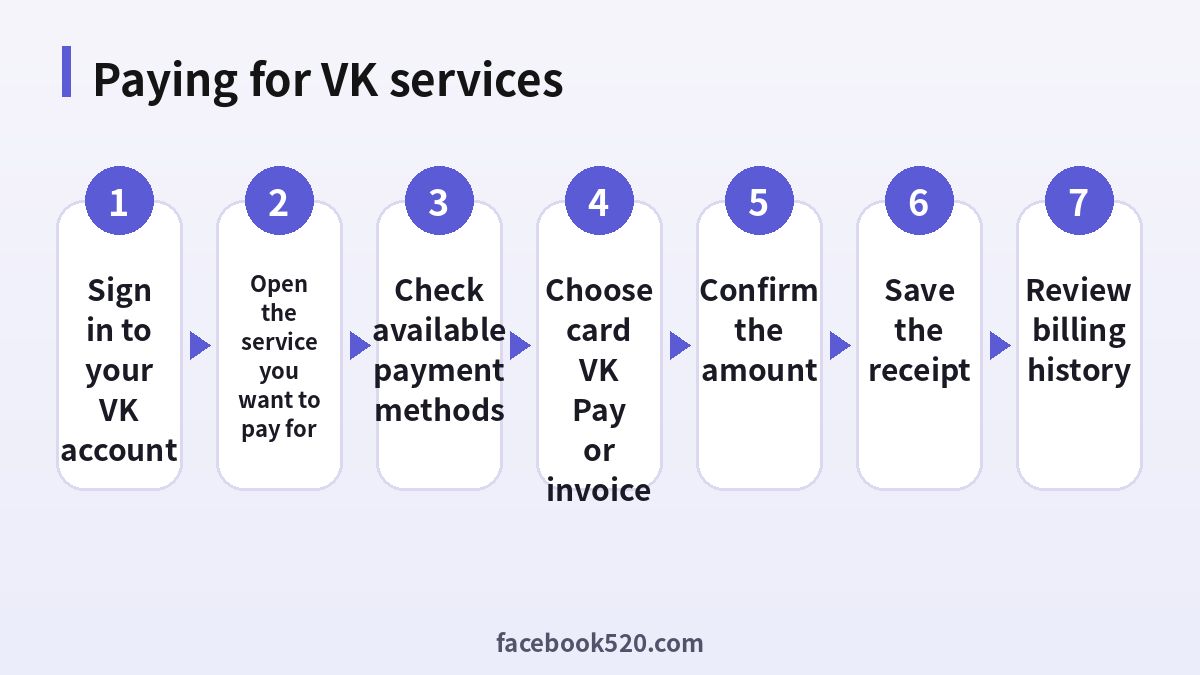
Most of VK is free. Paid items include subscriptions to music and other bundled services, purchases of digital items such as stickers and gifts, paid placement in communities and the advertising platform for businesses. Online shops inside VK also take payments for goods, and these are between the buyer and the seller. Each service has its own checkout, and the available methods can differ by service.
Payment methods overview
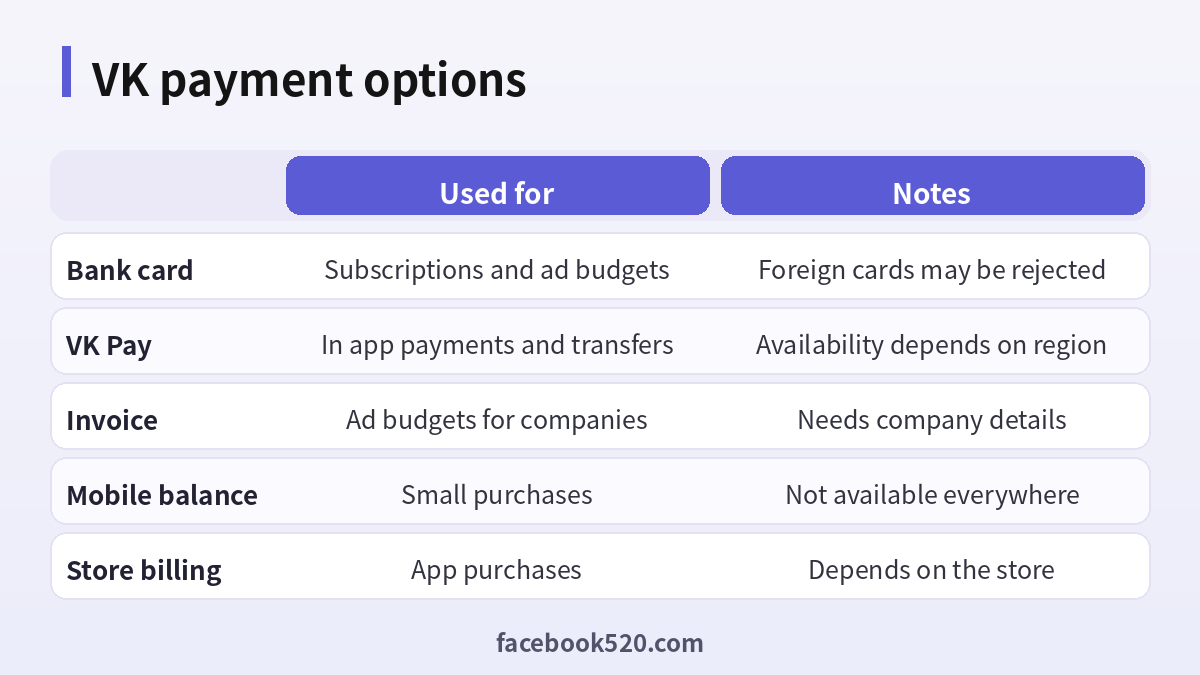
The main payment options are bank cards, VK Pay and similar in-app wallets, invoices for businesses, mobile balance in some cases and store billing for app purchases. Which of them you can use depends on your country, the currency of the service and the provider. Cards issued in Russia are the most widely accepted. Cards issued abroad, including those from major international schemes, are often rejected or limited, and this is the most common reason for failed payments by foreign users.
| Option | Used for | Notes |
|---|---|---|
| Bank card | Subscriptions and ad budgets | Foreign cards may be rejected |
| VK Pay | In app payments and transfers | Availability depends on region |
| Invoice | Ad budgets for companies | Needs company details |
| Mobile balance | Small purchases | Not available everywhere |
| Store billing | App purchases | Depends on the store |
Paying for a subscription
To pay for a subscription, open the service inside VK, choose the plan and follow the payment steps. You will see the price and the billing period before you confirm. Read whether the subscription renews automatically and where to cancel it. Keep the receipt. If your card is declined, check the number, expiry date and security code, and then ask your bank whether it allows payments to the service and in the currency requested. If payments are blocked by the rules of your bank or country, do not try to bypass them with shady intermediaries.
How VK Ads billing works
VK Ads is the platform where companies promote products across VK and partner networks. An ad account has a balance, and campaigns spend from it. The usual flow is to register an ad account, complete the advertiser information, add funds to the balance and then launch campaigns. Companies can often pay by bank transfer against an invoice, and individuals may be able to top up with a card or wallet. Taxes and legal requirements apply, and advertising in some categories needs documents and labelling. Many countries require advertisers to mark ads, so ask an accountant if you are unsure.
- Create or open your VK Ads account using your VK login.
- Fill in the advertiser details, including your company name and tax information when requested.
- Open the billing or balance section.
- Choose a payment method that is available for your account type.
- Enter the amount and confirm the payment.
- Wait for the balance to update, which is quick for cards and slower for bank transfers.
- Keep the invoice and the closing documents for accounting.
Why foreign cards fail
Payment failures usually come from three things. First, sanctions and banking restrictions limit which international cards can be used with services in this region. Second, the processor may accept only certain currencies. Third, anti-fraud systems may block cross-border payments. Retrying many times does not help and may trigger more blocks. If you are outside the region and need to pay, check whether the service offers an option for international customers, whether a local partner can legally invoice you or whether you can use another service instead. Always follow the law and the terms of your bank.
Third-party sellers and resellers
Many sellers on forums and chat groups promise to top up VK Ads or sell subscriptions at a discount if you send them money. This is risky. You may send money to a scammer, and a reseller who uses stolen cards or exploits promotional codes can get your account banned. A refund is unlikely. Never share your VK password or login code, because that allows a seller to take over the account. Deal only with the official checkout, or with a licensed agency that provides contracts and documents.
Refunds and disputes
Refund rules depend on the service and the payment method. Digital purchases are often final, and ad balances may be returned only under specific conditions. If a charge looks wrong, check the billing history in the service first, then contact VK support with the receipt, the date and the amount. If the payment was made by card and the service does not answer, you can also contact your bank, though the process depends on the bank.
Security tips for payments
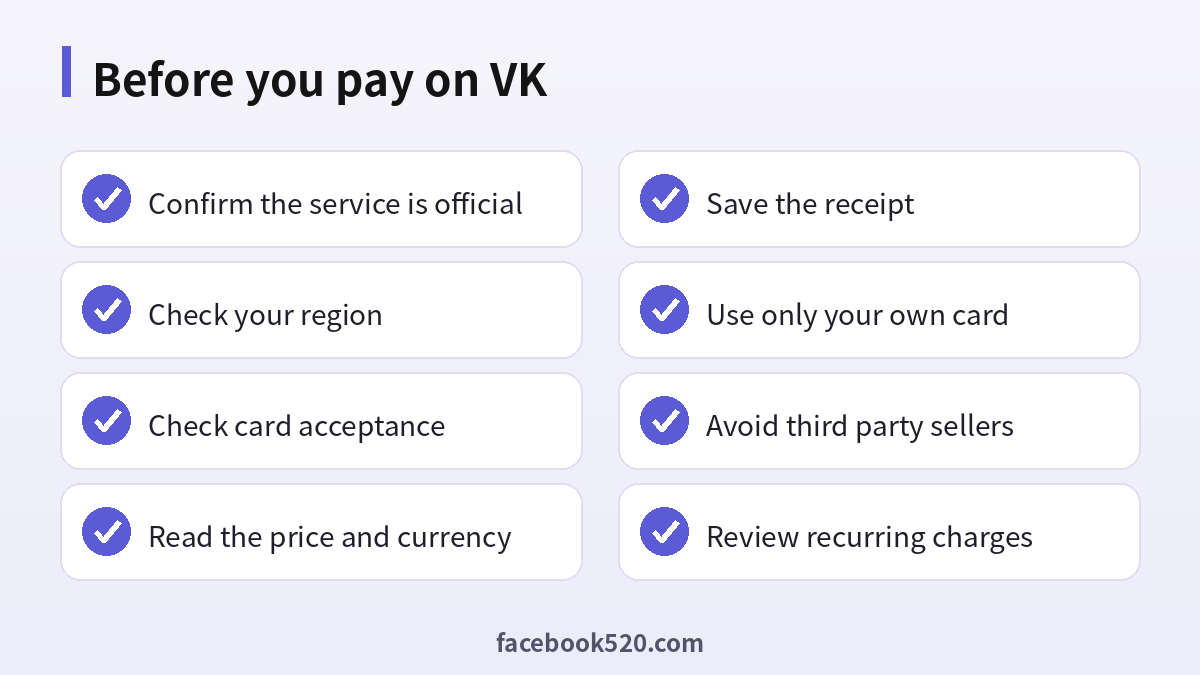
Pay only on pages that belong to the service, and check the address in the browser before entering card details. Do not save your card on shared devices. Use two-step verification on your account and an email you control. Check your statements for recurring charges and cancel what you do not need. Beware of messages from friends asking for money, since their account may have been hacked.
Choosing the right way to pay
Start with the service itself and look at what it lists in your country. If you are an individual who wants a music or content subscription, the in-app checkout is the simplest route. If you run a business and plan to advertise, an invoice with a contract is usually more predictable than repeated card top-ups, and it gives you the documents your accountant needs. For small tests, a modest card top-up is fine, but keep the amount low until you are sure the payment goes through and the balance appears.
Compare the total cost, not just the price shown: check the currency, conversion rate, bank fees and any taxes. For businesses, ask whether the amount includes VAT or similar taxes, and whether the invoice states them separately. Keep every receipt and invoice in one folder, with the campaign name and date, so that you can reconcile spending at the end of the month.
Planning a budget
Set a daily limit for ad campaigns and check the results after a few days before you add funds. Avoid putting a large amount into the balance at once, because refunds can be slow or limited. If a campaign performs poorly, pause it and adjust the audience or the creative before spending more.
Advertising rules to keep in mind
Ad content must follow the platform rules, and some topics, such as financial services, medicine and politics, have extra restrictions. Ads are moderated before they run, and a rejection does not usually refund spent money but does not charge for undelivered views. Keep creatives honest and make sure that you have the rights to images and music.
Keeping up with changes
Features, prices and rules around VK change more often than most people expect. Follow the official blog, release notes or help center, and read the emails you receive about policy updates instead of deleting them. When a guide such as this one gives a number or a menu name, treat it as a starting point and confirm it on the official site. If a change affects you negatively, you can usually adjust your plan, settings or usage, so act early rather than waiting for a problem.
Troubleshooting checklist
If something does not work as expected with VK, go through the basics in order before contacting anyone:
- Check your internet connection and try again on a different network.
- Update the app or refresh the page, then restart the device.
- Clear the cache or try a private browser window without extensions.
- Confirm that you are signed in with the correct account and email.
- Look for the exact error message and search the official help center for it.
- Wait a short time before repeating an action, since repeated attempts can trigger temporary limits.
- If nothing helps, collect screenshots and contact official support.
A monthly review habit
Set a reminder once a month to review your VK setup. Check your security settings, payment method, connected apps and notification preferences. If you pay for anything, compare the charge with what you actually used and decide whether to keep, change or cancel. Update your recovery details if you changed phone number or email. Delete old data you no longer need. Ten minutes a month prevents most surprises and keeps your costs and risks under control.
Helping family members and colleagues
If you are setting up VK for someone else, such as a parent, a teenager or a coworker, guide them rather than doing everything silently. Explain why strong passwords and two-step verification matter, show them how to recognize suspicious messages and agree on who to ask before they click or pay for anything. For minors, follow age requirements and use the available parental or family controls. For teams, document who owns the account, who can approve spending and what to do when someone leaves.
Official sources versus unofficial offers
When you search for help with VK, you will find both official pages and third-party offers. The comparison below shows why it pays to stay with official channels.
| Aspect | Official source | Unofficial offer |
|---|---|---|
| Price | Clearly shown at checkout | Often unclear or too low |
| Support | Documented help channels | Unreliable or none |
| Account safety | Protected by the platform | Risk of bans and data theft |
| Refunds | Governed by published terms | Rarely honored |
| Updates | Always current | Outdated or wrong |
Recognizing scams and fake offers
Scammers often imitate well-known brands such as VK. Typical signs are urgent messages, requests for passwords or verification codes, links to look-alike websites, promises of free upgrades or guaranteed results, and payment requests through unusual channels. Always type the official address yourself or use a saved bookmark, check the sender of every email and never pay through a link sent by a stranger. If you think you were tricked, change your password, review recent activity, contact your bank if money was involved and report the message to the platform.
Quick recap checklist
Before you finish, confirm the essentials for VK:
- You are using the official website or app.
- Your password is unique and two-step verification is on.
- Recovery email and phone are current.
- Privacy settings match what you are comfortable sharing.
- You know the price, renewal date and how to cancel if money is involved.
- You saved receipts, confirmation emails and backup codes in a safe place.
- You know where to find the official help center.
When to contact official support
Contact support when you have tried the basic fixes and the problem remains, when you see an unexpected charge, when you suspect your account was accessed by someone else or when you are locked out. Prepare the account email, the date and time of the problem, the exact message you saw and screenshots. Describe what you did step by step and what you expected to happen. Use only the contact methods listed on the official site and ignore anyone who offers to fix things for a fee through social media or private messages.
Account security basics for VK
Protect your VK account before anything else. Use a long, unique password stored in a password manager, turn on two-step verification, and make sure the recovery email and phone number are ones you control. Review the list of devices and active sessions every few months and sign out of any you do not recognize. Never share one-time codes, even with someone who claims to work for support, because genuine support teams never ask for them. If you sign in on a shared or public computer, log out afterwards and avoid saving passwords in the browser.
Devices, apps and browsers
Use the latest version of the official app or a modern browser when working with VK. Keep your operating system updated, install security patches and avoid rooted or modified devices, which weaken protection. Browser extensions can read pages you visit, so remove those you do not trust. On mobile, download apps only from official stores, review the permissions they ask for and turn off those that are not needed. Lock your device with a PIN or biometrics so that a lost phone does not become a lost account.
Common mistakes to avoid with VK
Most problems come from a handful of avoidable habits. People reuse the same password across several services, ignore security notices, click links in unexpected messages, install unofficial apps that promise extra features, or buy accounts and access from resellers. Others skip reading the terms, which leads to restrictions they did not expect, or forget to write down renewal dates and recovery details. Spend a few minutes reading the official help pages, keep your details up to date and treat anything that sounds too good to be true as a warning sign.
Privacy and personal data
Before you enter personal information anywhere, ask what is really required. Use only the details that VK needs, review the privacy settings after setup and limit who can see your profile, activity and contact information. Avoid posting documents, addresses, financial data or photos that reveal your location. Check which third-party apps are connected to your account and remove those you no longer use. If you work with client or company data, follow your organization’s policy and do not mix it with personal accounts.
Frequently asked questions
Which payment methods does VK accept?
Mainly bank cards, VK Pay, invoices for companies and, in some cases, mobile balance. The options vary by country and service.
Why was my foreign card declined?
Banking restrictions, currency limits or anti-fraud rules often block foreign cards.
How do I add money to VK Ads?
Open the billing section of your ad account and choose an available method, or pay an invoice if you are a company.
Can I pay for someone else?
It is not recommended. Use your own account and your own payment method.
Is it safe to buy VK balance from a seller?
No. Third-party sales are often scams and can lead to a ban.
Where can I find my receipts?
In the billing history of the service or in the confirmation email.
Can I cancel a subscription?
Yes, in the subscription settings, before the next renewal.
Do I need a company to advertise?
Individuals can sometimes advertise, but rules and documents depend on the country.
Will paying fix an account block?
No. Payment does not remove restrictions.
Where do I get official help?
Use the VK help center and the VK Ads support pages.
Summary
Use official checkouts, check which methods are available for your region, expect problems with foreign cards, keep receipts and avoid third-party sellers.
