


LinkedIn Pro Explained in 2026: Premium Career, Premium Business, Sales Navigator and Recruiter Lite Compared, Price Snapshots, Free Trial Rules, What You Really Get and How to Cancel Safely
Searching for LinkedIn Pro usually leads to confusion, because LinkedIn does not sell a product called Pro. People use the phrase for the paid tiers, which are called Premium, Sales Navigator and Recruiter. Each has a different purpose and a different price, and it is easy to pay for the wrong one. This guide explains what is behind the name, compares the main plans, gives price snapshots as of October 2026, describes how free trials work, helps you decide whether a plan is worth it and shows how to cancel without surprises. All numbers are approximate US prices from public pages and vary by country, billing period and promotions, so always check the official pricing screen before paying. If you still need a free account, see our LinkedIn registration guide (https://www.facebook520.com/article/8412.html). If you are wondering about buying accounts, read our warning (https://www.facebook520.com/article/9706.html).
What people mean by LinkedIn Pro
Because many software tools use a Pro label, users assume that LinkedIn has one too. In practice, there are four groups of paid products. Premium Career is aimed at job seekers. Premium Business is for professionals who build networks, research companies or run a small business. Sales Navigator targets sales teams and account managers. Recruiter and Recruiter Lite are for hiring teams. There is also Learning, which is sold separately in some markets. When someone says Pro, ask which of these functions they need.
The plans at a glance
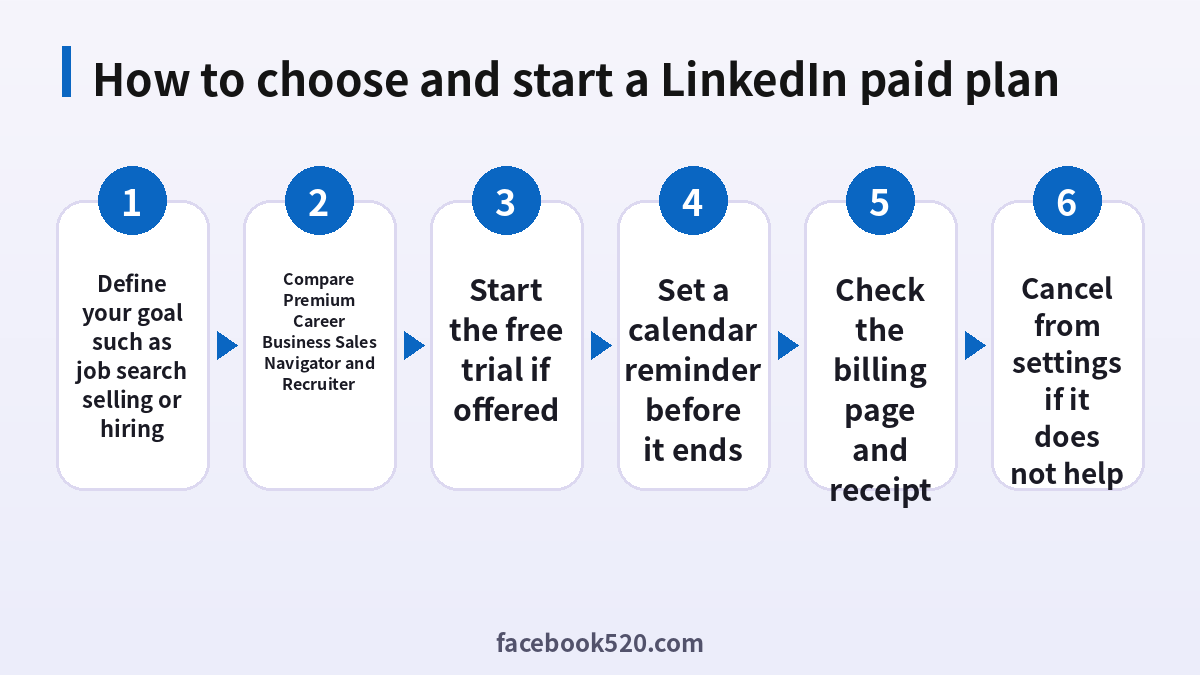
| Plan | Best for | Typical US price snapshot | Main benefit |
|---|---|---|---|
| Free | Everyone | 0 | Profile, network and basic search |
| Premium Career | Job seekers | About 30 to 40 dollars a month | Applicant insights and InMail credits |
| Premium Business | Professionals and founders | About 60 to 70 dollars a month | Company insights and expanded search |
| Sales Navigator Core | Sales professionals | About 100 dollars or more a month | Advanced lead search and alerts |
| Recruiter Lite | Individual recruiters | About 170 dollars or more a month | Candidate search and InMail |
Annual billing normally reduces the monthly equivalent. Prices in other currencies can differ, and taxes may be added at checkout.
Premium Career: who benefits
Premium Career gives job seekers features such as seeing how you compare with other applicants, a small monthly allowance of InMail messages to contact recruiters or hiring managers directly, access to learning content and sometimes AI assisted tools that help write profile text or prepare for interviews. It is most useful during an active job search of a few weeks or months. If you are employed and not looking, the free account is usually enough.
A practical approach is to subscribe for one month during an intense search, use the InMail credits for targeted outreach, and cancel afterwards. Free users can still apply to jobs, follow companies, set job alerts and message their connections.
Premium Business: when it makes sense
Premium Business adds business insights, a larger search allowance and more profile views, which helps with market research, partnerships and prospecting. A freelancer or consultant who regularly contacts new clients can justify it. For casual networking, it is rarely necessary. Check whether you can reach the same people through shared connections, groups, events and thoughtful comments, which cost nothing.
Sales Navigator and Recruiter Lite
Sales Navigator provides advanced filters, lead and account lists, alerts when a prospect changes jobs and integrations with customer relationship systems at higher tiers. It is built for teams that prospect every day. Recruiter Lite offers candidate search with detailed filters, saved searches and message templates for individuals who hire. These tools are priced for professional use and are not designed for casual users.
| Question | Premium | Sales Navigator | Recruiter Lite |
|---|---|---|---|
| Primary user | Individual | Sales rep or team | Recruiter |
| Search depth | Moderate | Advanced | Advanced for candidates |
| CRM integration | No | Higher tiers | Limited |
| Price level | Low to medium | High | High |
How the free trial works
LinkedIn often offers a one month free trial of Premium to eligible users who have not used one before. You must enter a payment method, and the subscription converts to a paid plan when the trial ends unless you cancel. Trial availability depends on your account history, country and sometimes the plan. If the trial is not shown, do not trust third party websites that claim to give a free upgrade. They may be phishing pages. Use only the Try for free button inside LinkedIn.
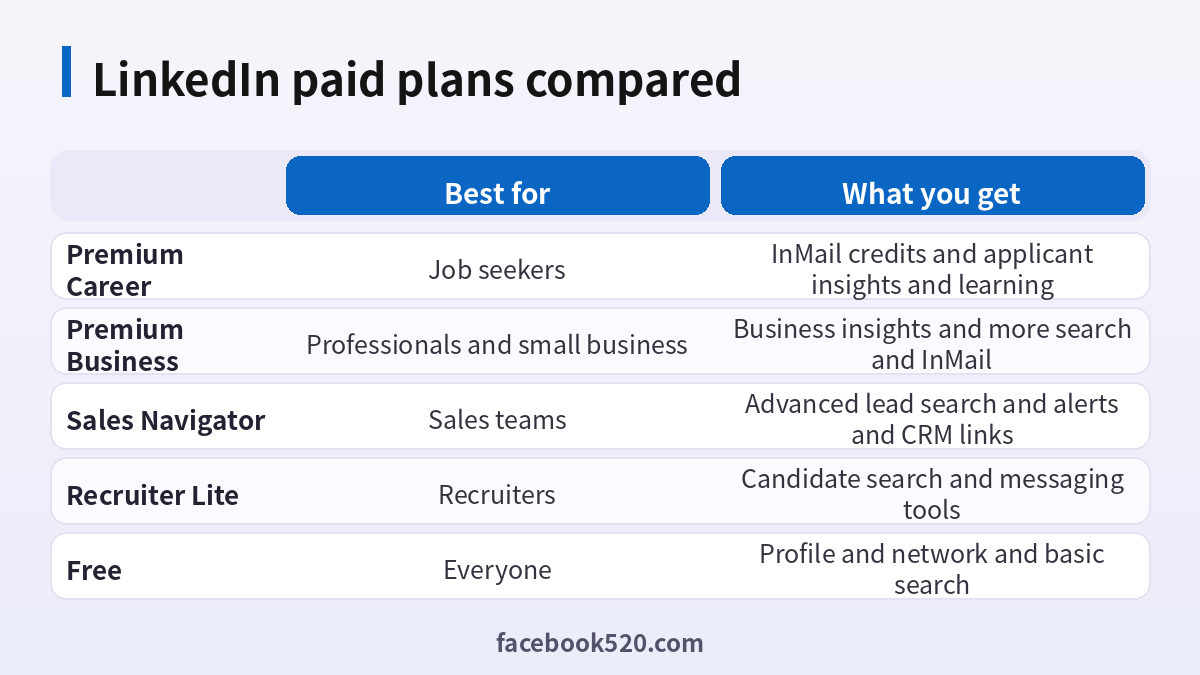
- Open the Premium page from your account.
- Choose the plan that matches your goal.
- Check the trial length and the price after the trial.
- Enter the payment method and confirm.
- Set a reminder two or three days before the trial ends.
Is it worth it
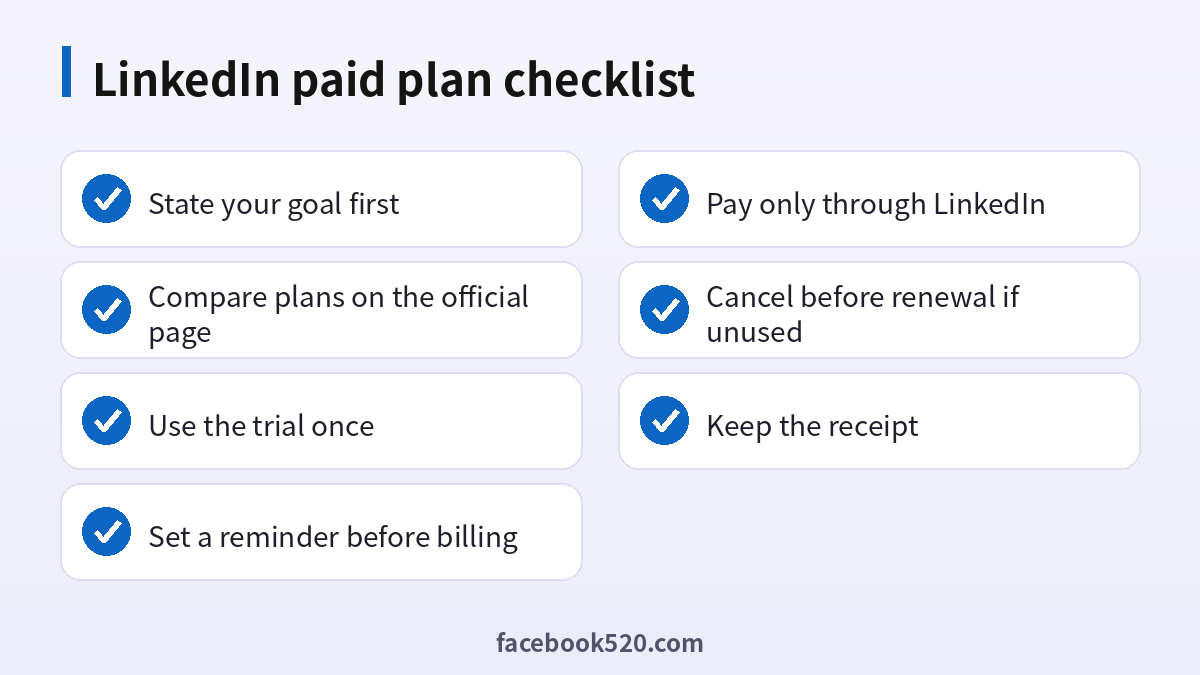
Decide by outcomes rather than features. If you have a specific goal, such as five recruiter conversations in a month, estimate whether the InMail credits and insights will help. If you cannot name the goal, wait. Many people find that a strong profile, a clear headline, a few recommendations and consistent activity bring more results than a subscription.
| Situation | Suggestion |
|---|---|
| Active job search | Try Premium Career for a month |
| Employed and not searching | Stay free |
| Freelancer seeking clients | Consider Premium Business |
| Sales team | Evaluate Sales Navigator with a trial |
| Hiring | Compare Recruiter Lite with job posts |
Avoiding fake offers
Scammers advertise cheap Premium accounts, shared logins or lifetime upgrades. These are not legitimate. Shared accounts violate the terms, can be shut down at any time and often involve stolen payment methods. A message that offers a free year of Premium if you click a link may steal your login. Pay only inside LinkedIn or through the official app store billing, and never send your password to anyone.
Billing, receipts and taxes
After purchase, open settings and find the Premium subscription or billing history page to see the plan, the renewal date and the receipts. If you bought through the Apple or Google store, manage the subscription there. Business buyers can add a company name and tax number for invoices. If you see a charge that you do not recognize, check which email address and account were used, and contact support through the official help center.
How to cancel
Open settings, choose Premium subscription settings and pick the cancel option. Follow the prompts until you see a confirmation, and save the email. After cancellation, you normally keep access until the end of the paid period. If you subscribed through an app store, cancel there instead. Cancel before the renewal date, because refunds are limited and depend on local law and the terms of purchase.
- Open settings and find the subscription page.
- Select cancel and read the final date.
- Complete all confirmation steps.
- Save the confirmation email.
- Check your payment statement on the next cycle.
A realistic one month Premium Career plan
If you decide to try Premium Career, plan the month in advance so that you use the benefits instead of just paying for them. In the first week, rewrite your headline and summary, collect keywords from five job descriptions that you want, and add them naturally to your skills and experience. Ask two former colleagues for short recommendations. In the second week, build a list of twenty target companies, follow them, and identify the hiring managers or team leads for the roles you want. Use the applicant insights to decide which postings are worth your time, for example roles where you match many of the requirements and where few people have applied.
In the third week, spend the InMail credits on the best opportunities. A good InMail is brief. It names the role, states two relevant achievements with numbers, and ends with a simple question such as whether the person is open to a ten minute call. Avoid attaching long documents in the first message. In the fourth week, follow up on open conversations, apply to the remaining jobs, and decide whether the plan helped. If you secured interviews, you may keep it for another month. If not, cancel and keep the profile improvements, which have lasting value.
| Week | Focus | Output |
|---|---|---|
| 1 | Profile rewrite and recommendations | Updated headline, summary and two recommendations |
| 2 | Target company research | List of twenty companies and key contacts |
| 3 | InMail outreach and applications | Personal messages and tailored applications |
| 4 | Follow up and review | Decision to keep or cancel |
How to measure whether a plan paid for itself
Set numbers before you start. Examples include the number of recruiter replies, interviews booked, profile views from target companies and new connections who work at relevant firms. Write down the baseline from the previous month, using the free analytics that LinkedIn shows on your profile. After the first month, compare. If replies doubled and you reached the interview stage at two companies, the subscription helped. If nothing changed, the plan is not the bottleneck, and your time is better spent on the profile, your portfolio or your referrals. This simple measurement prevents the common mistake of renewing out of habit.
Free features that many people overlook
Before paying, use what is free. You can set job alerts with filters for location, seniority and remote work. You can turn on the open to work signal for recruiters. You can follow hashtags and companies, join groups, attend events and comment on posts from people in your field. You can ask your connections for introductions, which often works better than a cold InMail. You can also use the creator tools to publish short posts about your work, which attract inbound messages. These habits cost nothing and combine well with a paid plan if you choose to buy one later.
Common mistakes when paying for LinkedIn
The first mistake is subscribing without a goal. A tool without a plan quickly becomes an expense that you forget. The second is forgetting the trial end date. Many users are surprised by a charge because the reminder was never set. The third is buying the highest plan because it looks more professional. A recruiter does not see which plan you have, except for a small badge on some Premium profiles, so the plan itself does not make you more credible. The fourth is paying through an unofficial seller to save money. Besides the risk of losing the account, you will not have a valid receipt or support. The fifth is sending the same InMail to hundreds of people. It wastes credits and can lead to reports and restrictions.
| Mistake | Better habit |
|---|---|
| No goal | Write a measurable target first |
| Forgetting the trial | Set a reminder for two days before the end |
| Buying the top plan | Start with the plan that matches the job to be done |
| Using resellers | Pay only inside LinkedIn or the app store |
| Mass messages | Send fewer, personal messages |
Teams and companies: licensing and governance
If a company buys Sales Navigator or Recruiter seats for several employees, assign each seat to a named person and keep a record. Use a shared inbox or a shared document for outreach templates, so that messages stay consistent. When someone leaves, reassign the seat and remove access to saved lists. Ask the administrator to review usage after the first quarter. Seats that are barely used are candidates for removal, and the savings can be significant. Companies with strict data rules should also review how candidate and prospect data are stored and whether the use matches local privacy law.
- Name an administrator for the contract.
- Assign seats to specific people.
- Share templates and outreach guidelines.
- Review usage every quarter.
- Reassign or remove unused seats.
Alternatives to paid plans
Depending on your goal, other tools can help. Job seekers can use the career pages of target companies, industry job boards and referrals from friends. Sales teams may use public company websites, events and email outreach tools. Recruiters can use job posts, employee referral programs and communities. LinkedIn is powerful, but it is not the only channel. Combine it with other sources and judge each by results.
Regional pricing, currencies and payment methods
Prices differ widely by country. In some markets LinkedIn charges in local currency with a lower monthly amount, while others add value added tax or goods and services tax on top of the displayed price. Annual plans usually show a lower monthly equivalent but are charged at once, so check whether you are comfortable with the full amount. Payment methods include major credit and debit cards, and in some countries digital wallets or local options. If you pay through the iOS or Android app, the price may be higher than on the web because of store fees. Compare both before you buy, and remember that you must manage the subscription where you bought it.
| Item | What to check |
|---|---|
| Currency | Local currency or US dollars |
| Tax | Included or added at checkout |
| Billing period | Monthly or annual |
| Channel | Web or app store |
| Invoice | Company name and tax number if needed |
Privacy and visibility with a paid plan
Some Premium plans show you who viewed your profile in more detail. That feature is symmetrical: when you browse other people in normal mode, they may see that you visited. You can switch to private mode in the settings if you want to research without revealing your name, although this limits your own viewer list. Decide which option matches your goals. A job seeker may want recruiters to know that they were looked at, while a sales professional may prefer discretion. Review the setting before you start a research session, and respect the privacy of the people you look up.
Timing your subscription
The best moments to subscribe are the start of an active job search, the quarter when you launch a new service, or the time you build a sales pipeline. The worst moment is during a busy period when you will not have time to use the tools. If a free trial is available, start it when you can actually spend several hours that week on the platform. A trial wasted while you are traveling gives you no evidence about the value of the plan, and you may lose the chance to use it again later.
Frequently asked questions
Is there a plan called LinkedIn Pro?
No. People use the term for Premium, Sales Navigator and Recruiter plans.
How much does LinkedIn Premium cost?
Premium Career is roughly 30 to 40 dollars a month in the US, and Business is higher. Check the official page for your country.
Is there a free trial?
Often a one month trial is offered to eligible users who have not tried it before.
Does Premium guarantee a job?
No. It gives tools, but results depend on your profile and activity.
Can I share a Premium account with a friend?
No. This violates the rules and risks suspension.
What is InMail?
It is a message you can send to someone you are not connected with, using credits included in some plans.
How do I cancel?
Use the subscription settings in LinkedIn, or the app store if you subscribed there.
Will I get a refund?
Refunds are limited. Cancel before the renewal date.
Which plan is best for recruiters?
Recruiter Lite for individuals, and the full Recruiter product for teams.
Is it safe to buy Premium from a reseller?
No. Pay only through LinkedIn.
Summary
LinkedIn Pro is a nickname for several different products. Choose by goal, use the trial once, compare the price to the value you expect, and cancel as soon as the plan stops helping. Keep your free profile strong, because it is the foundation for every paid tool.

