


Buy Discord Account (2026): Account Types, Pricing & What to Check Before You Buy
Discord accounts are bought for communities, gaming groups, Web3 projects and customer support servers. Because Discord is built on servers and roles, the account itself matters less than its age, linked details and the servers or Nitro status that come with it.
This guide covers the main Discord account types, what affects the price, how the buying process normally works, and a practical checklist you can use before and after the handover. It deliberately avoids quoting fixed prices, because they change quickly and depend heavily on the quality of what you buy.
Why people buy a ready-made Discord account
- Community managers need multiple accounts for moderation, testing and bots.
- Aged accounts tend to get through verification and anti-spam filters more smoothly.
- Accounts with Nitro offer higher upload limits, custom emoji and profile features.
- Servers with established members save months of growth.
- Teams want clearly separated accounts for support, announcements and moderation.
Buying is not automatically better than creating your own. If you have time, a freshly created account that you grow yourself gives you full control and a clear history. Our sign-up guides explain how to do that properly. Buying makes sense when the age, existing history or time saved is worth more than the extra cost and the extra checking.
Discord account types compared
| Type | Best for | Watch out for |
|---|---|---|
| New account | Testing and secondary roles | Many servers apply verification or account-age filters |
| Aged account | Community roles and moderation | Check age and email status |
| Account with Nitro | Power users | Nitro is a subscription that can end |
| Account with server ownership | Community builders | Ownership transfer is a separate step |
| Verified email and phone account | Servers that require full verification | Check that both are controlled by you after handover |
What affects the price of a Discord account?
The market for these items is not standardised, so two listings with the same title can be very different in quality. These are the main factors that move prices up or down:
- Account age: Older accounts are scarcer.
- Verification level: Email and phone verification add value.
- Nitro status: Active Nitro raises price.
- Server ownership and members: Owned servers with active members cost more.
- Clean standing: No warnings or flags matter.
As a rule, be suspicious of prices that are far below the rest of the market. A very cheap listing is usually a very new, low-quality or previously used account. Equally, a high price is not proof of quality, so ask for evidence either way.
How buying a Discord account usually works
- Define what you need: type, age, country, language, and what you plan to do with it.
- Contact the seller or marketplace and ask for details and evidence of the creation date, contact details and history.
- Agree in writing on what is delivered, the delivery format and the warranty or replacement period.
- Pay through a method that leaves a record; avoid sharing more personal information than necessary.
- Receive the login details and test them straight away on a clean browser or device.
- Secure the account immediately: change credentials, enable two-factor authentication and review active sessions.
- Run it with normal, gradual activity for the first weeks instead of changing everything at once.
Discord account inspection checklist
Before you confirm that the delivery is acceptable, work through these checks:
- Check account creation date (the Discord ID reveals it).
- Confirm email and phone verification and who controls them.
- Review the list of servers and roles for anything you do not want.
- Make sure there are no pending warnings or restrictions.
- Check the active devices list and log out of other sessions.
- Change password, email and enable two-factor authentication.
- For servers, confirm that ownership can be transferred through server settings.
- Keep the agreement and delivery proof.
After the purchase: keep the account healthy
The first two weeks decide whether a purchased account stays in good standing. Log in from a consistent device and location, avoid sudden bulk actions, fill in the profile naturally and let activity build gradually. If the platform asks you to verify yourself, use details that you control. Keep notes on what you changed and when, which makes it much easier to diagnose any problem that appears later.
Common mistakes when buying a Discord account
- Choosing only by price.
- Not asking for the creation date or any proof of age.
- Skipping the login test before releasing payment.
- Leaving the seller’s recovery email or phone attached after delivery.
- Using the account heavily on day one.
- Buying a bigger “package” than the use case needs.
Where to buy: marketplaces, brokers and direct sellers
There are three common routes. Marketplaces list many sellers and often provide dispute handling, but quality is mixed and listings can be copied. Brokers curate sources and may test accounts before delivery, which costs more but saves time. Direct sellers can offer the best fit for repeat orders, but you depend entirely on their reputation. Whichever route you pick, ask the same questions: where does the account come from, how old is it genuinely, and what happens if it stops working within the first days? Written answers are worth more than any promise made in chat.
Payment and delivery tips
- Pay in stages for larger orders: a deposit first, the balance after you have tested the login.
- Use payment methods that give you a receipt or transaction ID.
- Never send your own social or email passwords as part of a purchase.
- Ask for delivery in a clear format (credentials plus the recovery details) and confirm in writing what is included.
- Take screenshots of the account at the moment of delivery for your records.
Warranty and replacement: what to ask before you pay
A short warranty period is common. Before you agree, ask how long it lasts, what exactly counts as a fault (for example, the account being unusable on first login versus restrictions appearing later), how a replacement request must be made, and whether you will need to return or abandon the original. A seller who answers these questions clearly is generally a better choice than one who simply promises “full support”.
Your first hour with the new account
- Log in from a clean browser profile and a stable network connection.
- Change the password and set a strong, unique one in your password manager.
- Replace the recovery email and phone with ones that you control.
- Enable app-based two-factor authentication and save backup codes offline.
- Review and sign out of any other active sessions or devices.
- Check profile information, privacy and notification settings.
- Write down the date and exactly what you changed.
Buy or build yourself: a quick timeline
Creating a Discord account takes minutes, but building history, trust and reach takes weeks to months. Buying compresses part of that timeline, yet you still need to invest time in verifying, securing and warming up what you receive. A mixed approach works well for many teams: buy one carefully verified account for work where history helps, and create fresh ones for tests and lower-stakes uses.
Red flags in Discord account listings
- Screenshots that are cropped so that the creation date or settings cannot be seen.
- Pressure to pay immediately or to move the conversation to an unfamiliar channel.
- Prices far below every comparable listing, with no explanation.
- Refusal to let you log in and test before the deal is closed.
- The same photos and descriptions repeated across many different sellers.
- Vague answers about who keeps the original email or phone after delivery.
Matching Discord to Your Situation
- Buyers who want a Discord server: A server has an owner, admins, roles and bots. Buying means getting the Owner role, not just an invite link. Check how many members are active and what channels exist.
- Communities that want Nitro: Nitro is a subscription tied to an account, with perks such as larger uploads and server boosts. It is not transferable between accounts, so buying Nitro for yourself means subscribing on your own account.
- Brands that want a verified community: Community servers have extra tools but also policies on moderation, rules and safety. A server with a record of reports may carry penalties for the new owner.
Discord at a Glance
- Typical use: community servers, voice chat and gaming or creator communities.
- What you need: an email, a username, a password and a birth date.
- Common friction: repeated captchas or verification prompts, and removal or bans caused by server rules.
- Security tools: two-factor authentication, DM privacy settings and server permission control.
Discord Options Compared, With a Verdict
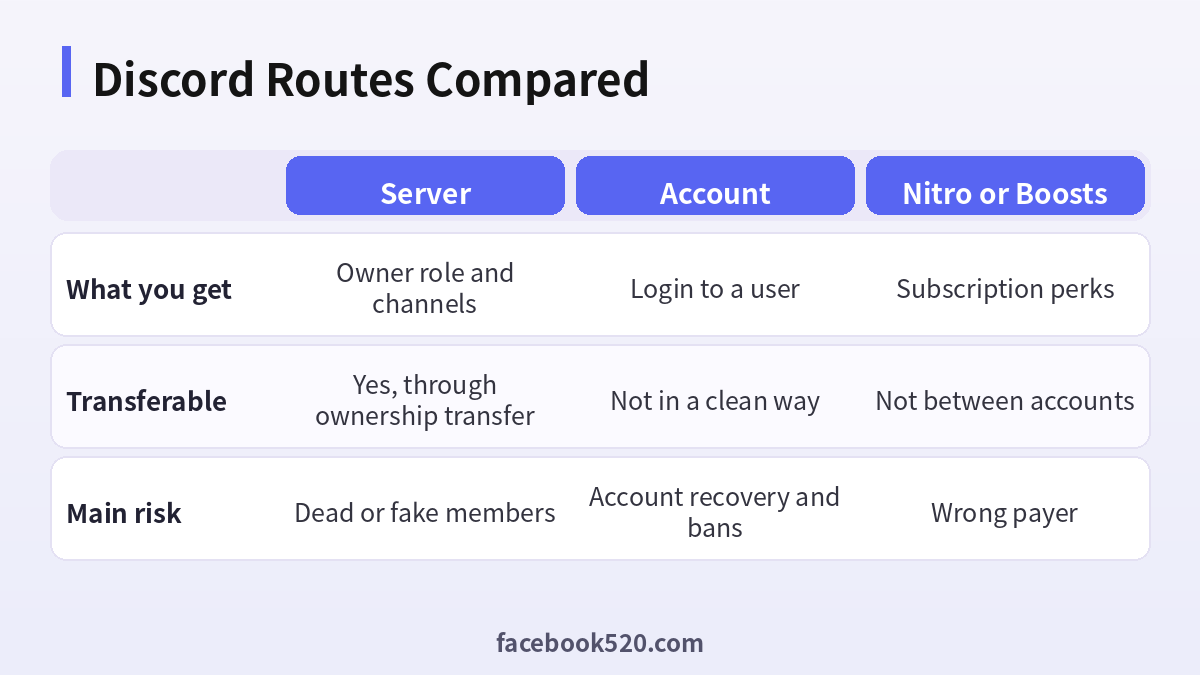
| Factor | Server | Account | Nitro or Boosts |
|---|---|---|---|
| What you get | Owner role and channels | Login to a user | Subscription perks |
| Transferable | Yes, through ownership transfer | Not in a clean way | Not between accounts |
| Main risk | Dead or fake members | Account recovery and bans | Wrong payer |
Verdict: Prefer buying a server through an ownership transfer that you can verify. Avoid buying a personal account with its login, and subscribe to Nitro or Boosts directly on your own account. Do not pay before the Owner role is yours.
Taking over a Discord server
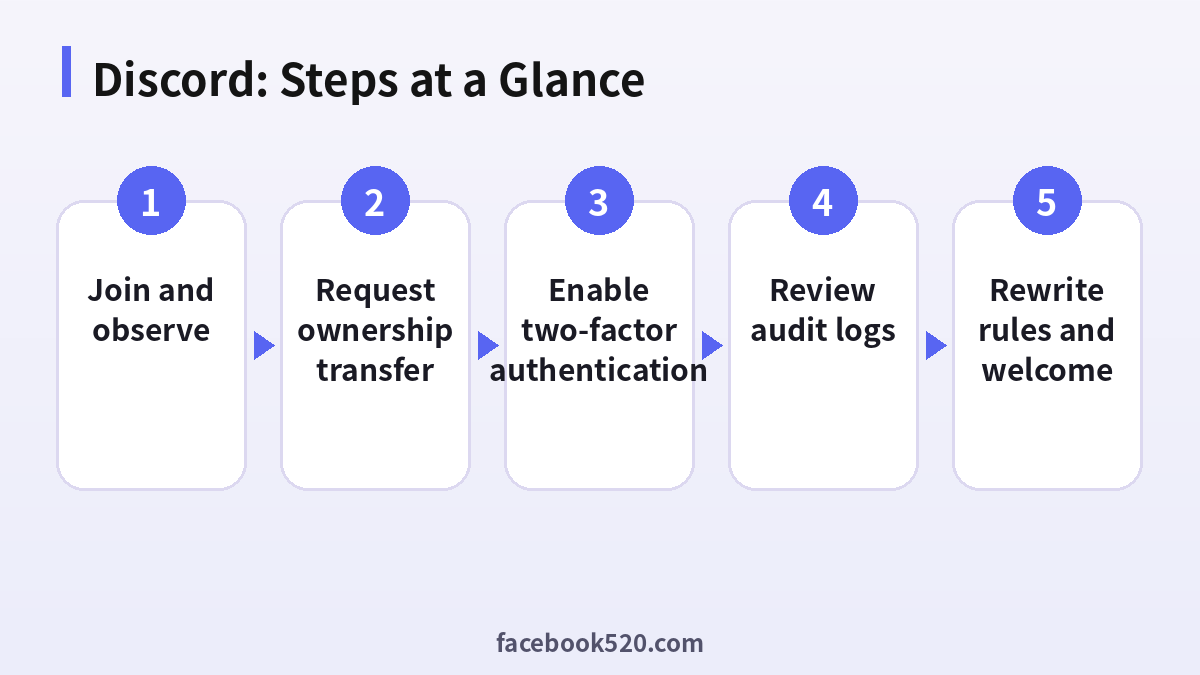
- Join and observe: Look at active members, message frequency and rules.
- Check roles and bots: Open Server Settings and review roles and integrations.
- Request ownership transfer: The owner uses Server Settings to transfer ownership to your account.
- Enable two-factor authentication: You need it enabled to receive ownership.
- Review audit logs: Check recent changes and removed items.
- Remove old admins: Review which admins you keep.
- Rewrite rules and welcome: Update channels and the welcome screen.
Discord Troubleshooting Table
| Symptom | Likely cause | What to do |
|---|---|---|
| Transfer option missing | You lack two-factor on the new owner | Enable it first. |
| Bots stop working | They were authorised by the old owner | Reinvite them with your permissions. |
| Members leave after transfer | Surprise at changes | Announce the change. |
| Community features off | Eligibility requirements not met | Check Server Settings. |
| Boosts missing | Boosts belong to the old payers | Boost from your own account. |
Inspecting activity
Count how many members post in a week. A large server with a few messages a day is closer to a mailing list than a community, and its value depends on what you want to do with it.
Audit log and bots
The audit log shows who changed what and when. Look for recent deletions, role changes and added bots. Unknown bots with wide permissions should be removed.
Roles and permissions
Give each role the smallest set of permissions. Keep Administrator for a few trusted people, and use channel permissions for the rest.
Moderation tools
AutoMod, verification levels and slow mode help keep a server healthy. Set them before inviting large groups of people.
Server rules and community guidelines
Servers must follow platform rules. After taking over, read the rules again, remove content that breaks them and publish clear community rules.
Channels, categories and what they say about the server
The layout of channels shows the purpose of a community. A clean structure with a rules area, a general channel and clear topic channels usually means active management. A pile of empty channels or archived sections may mean the server has lost its way and needs a rebuild after you take over.
Verification level and safety defaults
Discord offers verification levels and explicit-content filters in Server Settings. A new owner should review them quickly because spam bots look for servers with low settings. Raise the level, turn on AutoMod rules for links and mentions, and test them with a second account.
Handling the moment of announcement
When ownership changes, tell the community plainly who the new owner is, what stays the same and where to ask questions. A pinned announcement and a short voice session or AMA make people feel included, and reduce the number of members who leave out of uncertainty.
Costs of running a server
Servers can be free, but boosts, bots and moderation take money or time. List the recurring costs of bots and hosting and decide who will pay, so that features do not disappear a month after the transfer.
Legal and platform terms
Read the community guidelines and the terms for servers before you publish new rules. Items such as age-gated content and monetisation depend on current platform policy, which can change, so verify it in the official pages.
Weekly rhythm for a new owner
Plan a simple weekly rhythm for the first month: one announcement, one community question, one event and one review of moderation logs. A predictable pattern shows members that the server is alive, helps you learn what they respond to and makes it easier to hand tasks to moderators later without confusion.
Discord Checklist
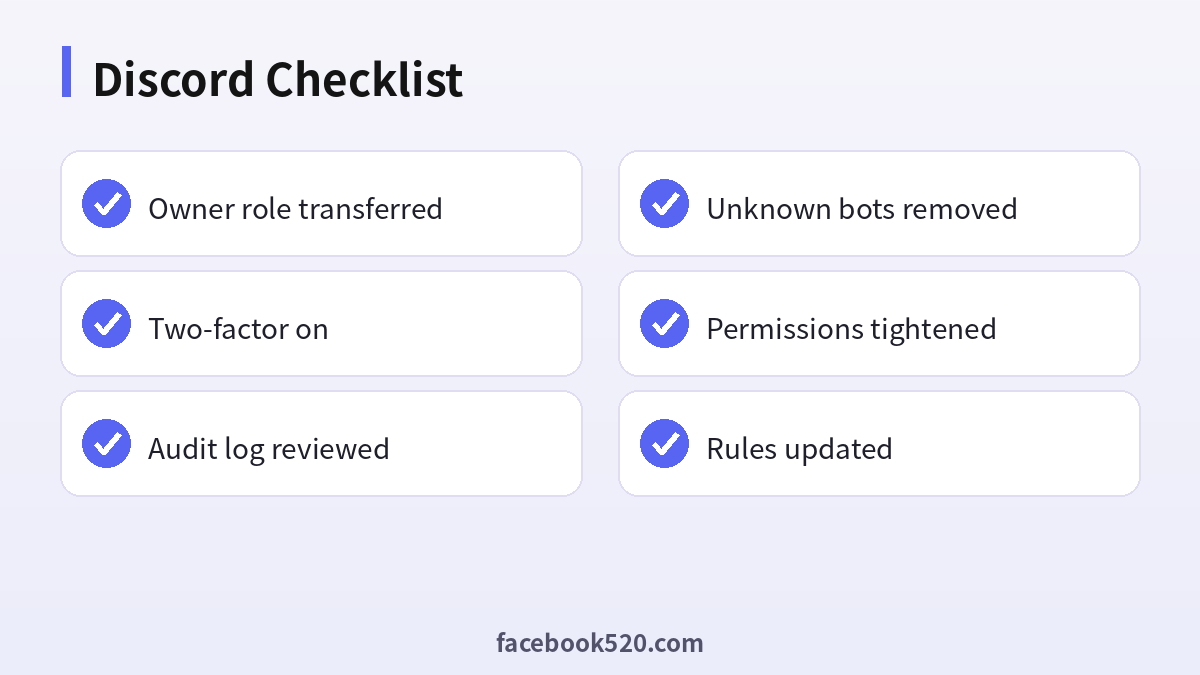
- Owner role transferred
- Two-factor on
- Audit log reviewed
- Unknown bots removed
- Permissions tightened
- Rules updated
Questions worth asking the seller
- How old is this account and how can you prove it?
- Which email address and phone number are tied to it, and will they be handed over?
- Has it ever been restricted, locked or recovered?
- What exactly does the replacement policy cover, and for how many days?
- Which country and language is it set to, and from where was it last used?
- Can I log in and check settings before I release the payment?
Can Nitro be transferred?
No. It is attached to the account that subscribed.
Do server boosts transfer?
Boosts belong to the people who purchased them, so plan to boost again.
How do I check activity?
Look at message counts and the number of active members in insights.
Why is ownership transfer blocked?
The new owner must have two-factor authentication enabled.
Can I keep the old bots?
Only the ones you trust, after reviewing their permissions.
Keep good records
Create a simple spreadsheet for every account you buy: the date, the source, what was promised, what was delivered, the recovery details you control, the date you changed each credential and any problems you noticed. If you manage several Discord accounts, this record is what lets a colleague take over, lets you prove what you paid for, and helps you decide which sources deserve a repeat order. It takes ten minutes to set up and saves hours of confusion later.
Discord account buying FAQ
How do I know how old a Discord account is?
The user ID encodes the creation date and many tools can read it; the profile also shows the “member since” date.
Does Nitro transfer with the account?
Nitro is a subscription tied to the account and billing method, so the seller must clearly state how it will continue.
Can I buy a Discord server?
Server ownership can be transferred, but you should check members, roles and bots before agreeing.
What if my new account asks for phone verification?
Use a number you control and keep it for recovery.
Are prices fixed?
No. They vary by seller, quality and demand. Treat any single quoted number as a snapshot, not a rule.
Do I need to verify the seller?
Yes. Ask for specifics, test before final payment and prefer sellers with a clear support or replacement period.
Related guides
- Telegram buying guide in Chinese
- Telegram sign-up guide
- How do I register and purchase 70+ accounts on TikTok, YouTube, Instagram, Facebook, X, Reddit, Medium, and LinkedIn?
- Facebook, Twitter, Instagram, Pinterest, Snapchat, LinkedIn, YouTube accounts for sale and sell
- Facebook Twitter LinkedIn Youtube WhatsApp Snapchat Messenger Pinterest Instagram Selling accounts from various countries
