


TikTok Account (2026): Complete Guide to Sign-Up, Setup, Top-Up & Payment
A TikTok account can mean a personal profile, a creator profile, a TikTok for Business account or an ad account inside TikTok Ads Manager. Knowing the differences helps you set up correctly whether you want to grow an audience, sell products or run paid campaigns.
This guide is organised as a hub: it explains each account type in TikTok, how registration works, how advertising and payment fit in, what to think about if you want to buy a ready-made account, and how to keep everything secure. Where a topic deserves a deeper walk-through, you will find a link to a dedicated article.
TikTok account types at a glance
| Type | Best for | Notes |
|---|---|---|
| Personal account | Watching and posting | Basic features |
| Creator account | Public creators | Analytics, creator tools and monetisation options in eligible regions |
| Business account | Brands | Analytics, business profile features and commercial music library |
| TikTok Ads Manager account | Paid advertising | Separate login at ads.tiktok.com, billing and ad accounts |
| TikTok Shop seller account | Selling products | Needs seller registration and eligibility |
| TikTok Coins and gifts | Viewer purchases | Coins are purchased for gifts and live-stream support |
Most problems people have with TikTok come from mixing these layers up: using a personal login for a team, or expecting an ad account to behave like a profile. Decide which layers you really need, then build them one at a time.
How to sign up for TikTok
- Download TikTok or go to tiktok.com.
- Choose to sign up with a phone number, email or a social login.
- Enter your birthday and verify the code.
- Create a username and profile photo.
- Switch to a Business account in Settings if you are a company.
A detailed walk-through with troubleshooting is available in the TikTok sign-up guide.
Business and advertising accounts
Paid promotion happens in TikTok Ads Manager. You create a business account, set up an ad account, choose a payment method and launch campaigns with small test budgets. Our dedicated walk-through of that process is in the TikTok sign-up guide.
Good practice for any advertising account:
- Create the business structure first, then the ad account, then the payment method.
- Give every person the lowest role they need.
- Start with a small budget and one clear objective.
- Keep a record of account IDs, owners and billing details.
Payments, top-ups and billing
- Ads Manager supports cards and, in some countries, prepaid balances.
- Check your ad account’s currency and time zone before launch.
- Viewers buy coins through the app or through the official top-up page.
- Keep a backup payment method to avoid campaign interruptions.
For a related, more detailed guide see the TikTok account buying guide (Chinese).
Buying a ready-made TikTok account
Some advertisers buy aged TikTok accounts or business accounts. Careful checks of the creation date, content history, followers and linked contact details are essential, as is changing every credential immediately after delivery. The Chinese buying guide linked above explains the process in detail.
- Ask for the creation date and proof of history.
- Confirm who controls the original email and phone.
- Test the login yourself before paying the balance.
- Change every credential and enable two-factor authentication immediately.
- Document what you bought and from whom.
Security checklist for TikTok
- Enable two-step verification.
- Link a real email address you control.
- Do not share your login; use Business Center roles for team members.
- Check active devices regularly.
- Keep a recovery phone number up to date.
Which setup is right for you?
- Individuals and hobbyists: a personal TikTok account is enough.
- Creators and small shops: a creator or business profile unlocks analytics and selling tools.
- Agencies and companies: a structured business setup with several admins, a documented process and a dedicated payment method.
- Teams testing campaigns: several accounts with clear naming and separate budgets.
Planning your first month on TikTok
- Week one: create or review the account, finish profile details and secure it.
- Week two: publish a few pieces of content and learn what the analytics show.
- Week three: if you need paid reach, set up the ad account and payment method and test a small budget.
- Week four: review results, keep what works and document the process for your team.
How the pieces fit together
Think of TikTok as three layers. The first is the identity layer: the login, email and phone that prove who controls the account. The second is the presence layer: the profile, channel, page or community people actually see. The third is the commercial layer: advertising accounts, billing, catalogues and team roles. Problems appear when the layers are mixed, for example when a company’s advertising depends on one person’s personal login. Keep the identity layer secure and documented, build the presence layer for your audience, and add the commercial layer only when you are ready to spend.
Build it yourself or buy a ready-made account?
Creating a new TikTok account costs nothing but time, and it gives you a clean, documented history. Buying a ready-made one can save weeks, particularly when age or an existing audience matters, but it adds the work of verifying what you receive and securing it. A balanced approach is to build your main brand assets yourself and consider buying only for secondary or test accounts, after you have a verification routine. Whichever way you go, record who controls each credential.
What does it cost to run TikTok?
- The account itself is free; creating a profile, page or channel normally costs nothing.
- Advertising is the main variable cost, and you decide the budget.
- Optional subscriptions or purchases (premium tiers, coins, verified badges) are billed separately.
- Tools around the platform, such as scheduling software or design tools, add monthly costs.
- Time is the hidden cost: content, community management and reporting.
Because pricing in these areas changes often, always confirm current numbers on the official pages and treat any quoted figure as a snapshot.
Team access and handovers
When several people work on TikTok, give each person their own login and a role, and avoid sharing one password. Keep a short register of who has admin rights, which email recovers the account and where two-factor backup codes are stored. When someone leaves, remove their access first and then rotate any shared secrets. If you hand an account to a client or a new owner, transfer ownership formally through the platform’s tools, check that recovery details have been replaced and keep a copy of the agreement.
Glossary
- Identity: the login credentials and recovery details of an account.
- Role: a permission level such as admin, editor or analyst.
- Ad account: the object that holds campaigns, budgets and billing.
- Pixel or tag: a snippet that measures conversions from your website.
- Top-up: adding prepaid funds to an ad or service balance.
- Warm-up: the period of gradual, normal activity that helps a new account build trust.
Pre-launch checklist for campaigns
- Confirm the account owner, admin roles and recovery email.
- Check the currency, time zone and billing country.
- Add a primary and a backup payment method.
- Install tracking and test it.
- Prepare creatives, landing pages and a small test budget.
- Set spending limits and notification emails.
Measuring what matters
After the setup is done, decide in advance how you will judge results on TikTok. For organic activity that may be reach, saves and follower growth; for paid activity it is cost per result and return on spend. Review the numbers weekly instead of daily, because short-term swings are noisy, and write down what you changed each time so you can connect cause and effect. A simple spreadsheet with date, change, budget and result is usually enough to start.
Recovering access when something goes wrong
If a login stops working, begin with the official recovery page and use the email or phone that you registered. Gather evidence of ownership: the sign-up email, the approximate creation date, devices you used and any receipts from paid features. Avoid anyone who contacts you offering to restore the account for a fee, and never share your password. If a business asset depends on the account, the roles you set up earlier with a second administrator are your best insurance, because another admin can often restore access without a full recovery request.
Common mistakes
- Using one personal login for every business function.
- Changing account details repeatedly in the first days.
- Ignoring the currency and time zone of the ad account.
- Having only one administrator.
- Letting cards expire without a backup payment method.
TikTok by Use Case
- Creators opening a first account: A personal account is enough to begin. Choose a username, add a bio and post a few videos before you think about advertising.
- Sellers and businesses: A Business account unlocks tools like a business profile and links to Ads Manager, but it limits some music choices.
- Teams: Share access through Business Center roles rather than sharing a password.
TikTok at a Glance
- Typical use: short-video publishing, live commerce and advertising.
- What you need: a phone number or email and a birth date that meets the age requirement.
- Common friction: a fresh account that follows, likes or logs in from many regions in a short time can trigger limits or extra verification.
- Security tools: two-step verification, device management and login alerts.
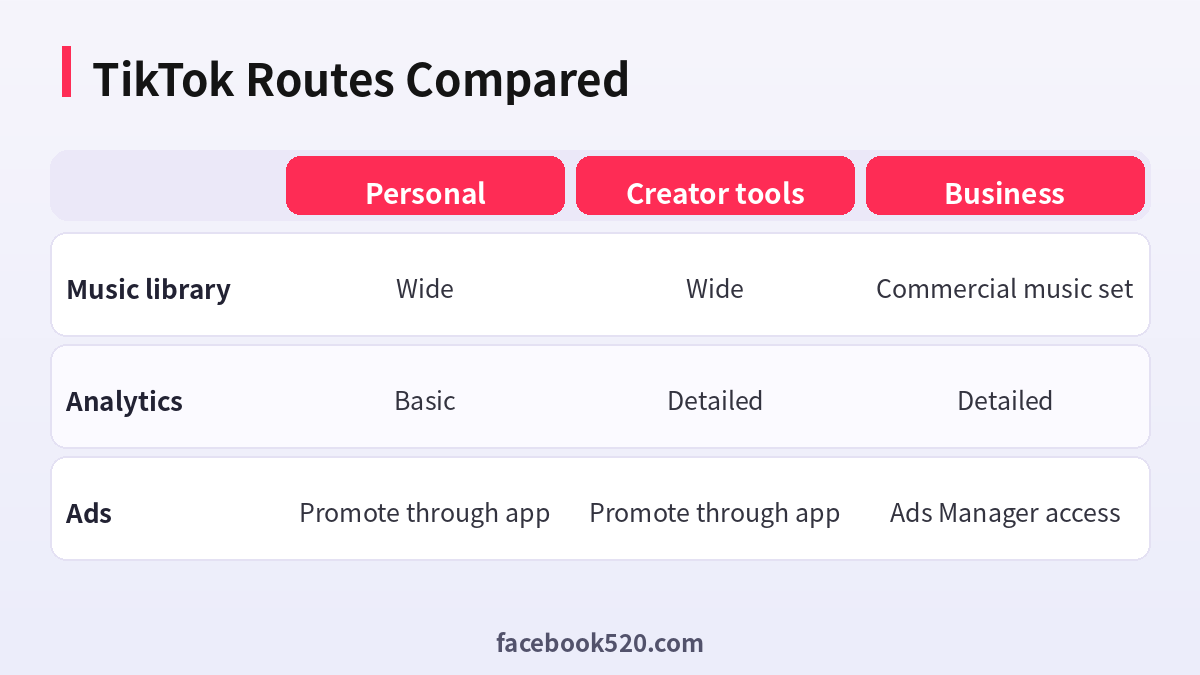
Which TikTok Route Fits? Comparison and Verdict
| Factor | Personal | Creator tools | Business |
|---|---|---|---|
| Music library | Wide | Wide | Commercial music set |
| Analytics | Basic | Detailed | Detailed |
| Ads | Promote through app | Promote through app | Ads Manager access |
Verdict: Use a personal account to learn the platform, switch to a professional type when you want analytics, and choose Business when selling or running ads. Keep your recovery email and phone stable before any switch.
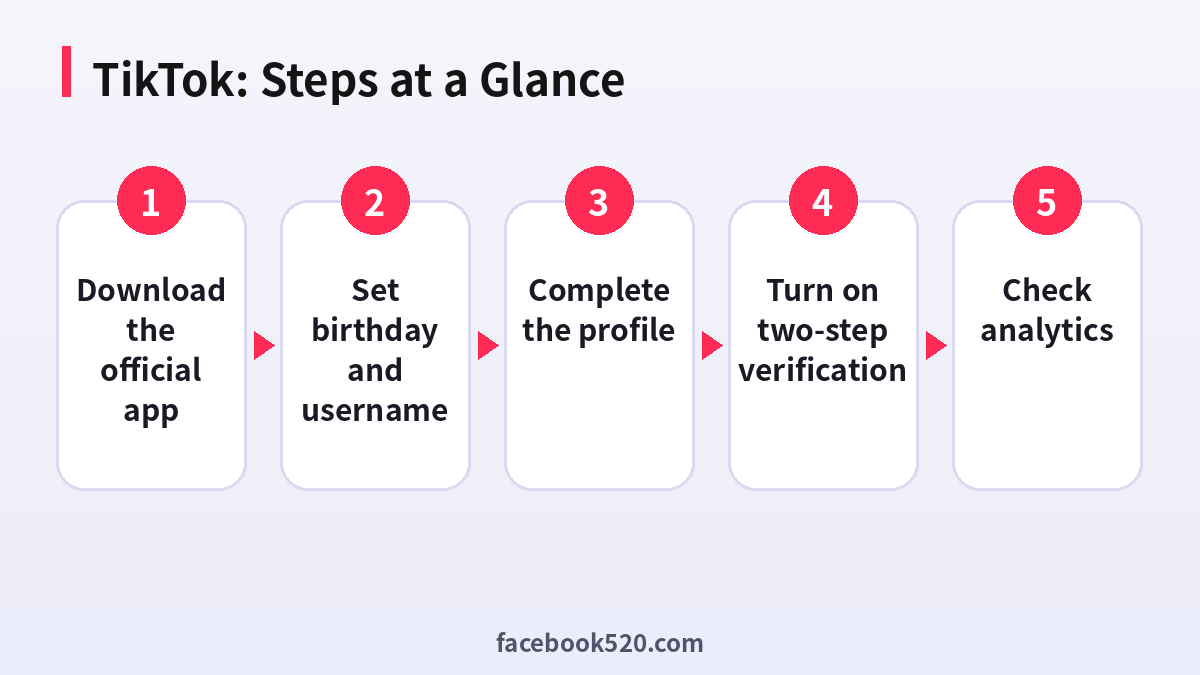
Creating a TikTok account carefully
- Download the official app: Use the store listing from the company.
- Sign up: Use email or phone and confirm the code.
- Set birthday and username: Use real details and a name you can keep.
- Complete the profile: Add a photo and a short bio.
- Turn on two-step verification: Find it in Security and permissions.
- Post and watch: Spend a few days watching videos in your niche before posting.
- Check analytics: After enough videos, read the audience and watch time tabs.
Common TikTok Errors and What to Do
| Symptom | Likely cause | What to do |
|---|---|---|
| Code not received | Carrier or network issue | Wait and retry or use email. |
| Video not recommended | Low retention or policy issue | Check the status in Account check. |
| Account banned from live | Violation | Read the notice and appeal. |
| Cannot link bio | Link needs eligible account | Check the requirements. |
| Duplicate account | Same email used | Use password reset. |
Warm-up routine
Spend the first days watching, liking and following accounts in your niche. This shows the system what you care about and gives a base for recommendations before you start posting.
Watch time and retention
The first seconds decide whether people stay. Review the retention graph in analytics to see where viewers leave and improve the opening.
Region and language
Content language and region influence recommendations. Set them to match your audience and keep captions consistent.
Business account trade-offs
Business accounts may have restricted music for commercial use, so check the library before planning content.
Account check and notices
The Account check page and inbox notifications tell you about policy issues. Read them early and fix problems instead of ignoring them.
Posting rhythm and formats
Short videos with a clear first second work best, but a steady rhythm matters more than perfection. Try three formats in the first two weeks, such as a quick tip, a behind-the-scenes clip and a reply to a comment, and keep the one that holds viewers longest.
Hashtags, captions and sounds
Use a few relevant hashtags rather than a long list, write captions that add context, and choose sounds that fit the mood. Remember that trending sounds change quickly, so a sound that helps today may be stale next week.
Comments as a signal
Replies to comments with video replies often create extra content and keep people engaged. Read the comments for questions that you can answer in the next video, and pin the most useful one to guide new viewers.
Safety and privacy defaults
Check who can duet, stitch, message and download your videos, and set the defaults that fit your comfort. Younger users have stricter default settings, and parents or guardians can use Family Pairing to manage them.
Moving from personal to Business later
If you later switch to Business, review the music library and creator marketplace implications first, and export or note the videos that rely on music that is not cleared for commercial use.
Understanding the For You feed
The feed tests a video with a small group, then widens or stops depending on watch time, shares and completion. That is why a short clip with a strong opening can outperform a long one with a slow start. Treat each video as a small experiment and write down what you changed so that you learn from every post.
Using drafts and scheduling
Save drafts when an idea is not ready and review them with fresh eyes the next day. If you use the web uploader, you can schedule posts for the hours when your audience is online, which keeps your rhythm steady even on busy days.
Protecting the account
Use a strong password, enable two-step verification and review logged-in devices in settings. Do not log in through links in messages, and do not give your password to anyone offering followers or verification, since those offers are a common route to account loss.
A realistic first-month plan
Week one is for setup and watching your niche, week two for posting three to five simple videos, week three for reading analytics and keeping what worked, and week four for planning a series. A series gives viewers a reason to follow you, because they know what the next video will be about before it arrives.
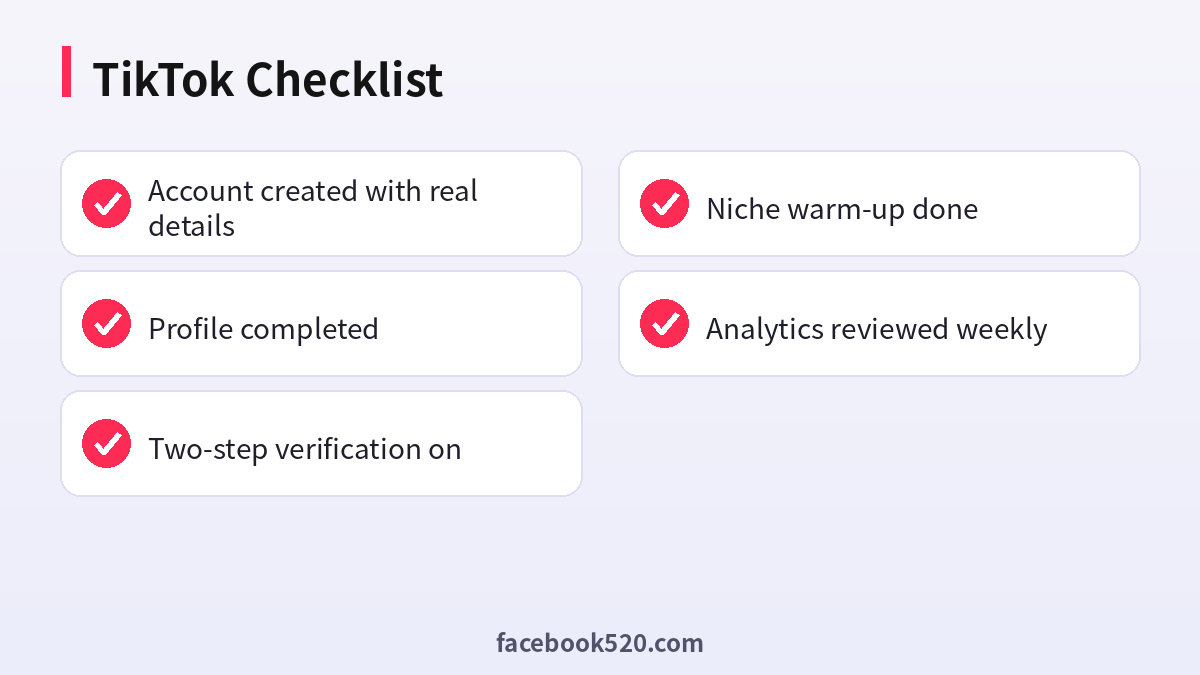
TikTok Self-Check List
- Account created with real details
- Profile completed
- Two-step verification on
- Niche warm-up done
- Analytics reviewed weekly
TikTok account FAQ
Is TikTok free to join?
Yes. You pay only for ads or optional purchases such as coins.
What is the difference between a business account and a creator account?
Business accounts are designed for brands and unlock commercial tools; creator accounts focus on audience and creator monetisation features.
Where do I run TikTok ads?
In TikTok Ads Manager at ads.tiktok.com.
Can I change my username?
Yes, with limits on how often you can change it.
How many TikTok accounts can I have?
Policies differ, but you can usually manage several accounts as long as each has its own verified credentials and is used in line with the platform’s rules.
What should I do if I lose access?
Use the official recovery flow first. Keep recovery email and phone current, and never pay anyone who promises a guaranteed unlock.
Do I need a Business account?
Only if you want business tools or ads.
Why are my views low?
Early accounts lack data, so keep posting and check retention.
How do I contact support?
Use the Report a problem option in settings.
Does TikTok allow multiple accounts?
Yes, within the platform’s limits.

