


Gemini Bulk Delete (2026): How to Delete Chats and Activity in Bulk, Plus Google AI Pro Plans and Safe Ways to Buy
People who search for “gemini bulk delete” usually have one of two goals. Some want to clear a long history of chats from Gemini quickly, without opening every conversation one by one. Others are thinking about moving from the free app to a paid Google AI plan and want to know what is worth paying for, what to avoid and how the account side works. This guide covers both. It explains how bulk deletion and activity controls work in 2026, how the paid plans differ, and what to check before you buy anything that touches your Google account. We do not quote exact prices, because they change by country, currency, taxes and promotions. Always read the amount on the official Google page or inside the Google One purchase screen before you confirm.
What “Gemini bulk delete” really means
Gemini stores your conversations in two related places. The first is the list of chats you see in the sidebar of the Gemini app or website. The second is Gemini Apps Activity, a record kept inside your Google Account that can be used to improve Google services if you allow it and that powers features such as picking up a conversation later. Deleting a chat from the sidebar and deleting activity from your Google Account are connected, but the controls are not identical. When people say bulk delete, they normally mean one of three actions.
- Remove many chats at once instead of deleting them one at a time.
- Delete activity for a time range, such as the last hour, the last day, or everything.
- Switch on automatic deletion so old activity disappears on a schedule.
Google changes the layout of these menus from time to time, so the labels you see may differ slightly from the names used here. The logic stays the same: you manage activity inside your Google Account settings, and you manage individual chats inside the Gemini interface.
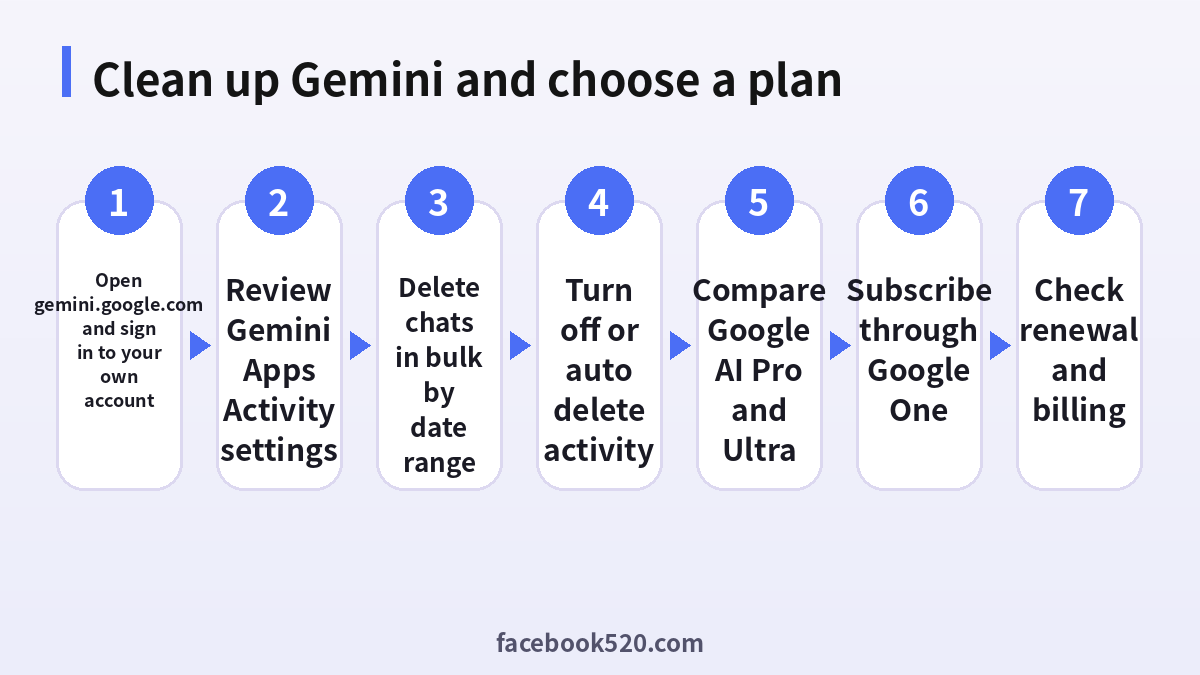
How to delete Gemini chats and activity in bulk
The steps below work on a desktop browser. Mobile apps follow the same order, but the menu icons sit in different places.
- Open gemini.google.com and make sure you are signed in to the Google Account you want to clean up. Check the profile picture in the top corner.
- Open the menu on the left and look for Activity or Gemini Apps Activity. On some versions the entry is under Settings and help.
- Choose Delete and pick a range. Typical options are Last hour, Last day, All time and Custom range.
- Read the confirmation text. It explains that deleted activity cannot be restored from your account.
- Confirm the deletion and wait for the success message.
- Return to the main Gemini screen and refresh the page. The chat list should now be empty for the chosen range.
- If you still see a few chats, they may belong to a different Google profile or to a Workspace account managed by your school or company. Switch accounts and repeat the process.
Deleting a single chat is still useful for sensitive conversations. In the sidebar, hover over the chat, open the three dot menu and choose Delete. That removes only that conversation.
Auto delete and turning activity off
Bulk deletion is a one time action. If you want a habit that keeps your history small, use the automatic options. In Gemini Apps Activity you can usually choose to keep activity for a period such as three months, eighteen months or thirty six months, or turn activity off. When activity is off, Gemini still answers your questions, but new conversations are not saved in your account in the same way and some features that depend on history, such as continuing a chat later, work in a limited form. Even with activity off, Google may keep conversations for a short period to operate the service and for safety reasons. Read the on screen explanation, because the wording can change between regions.
A few practical tips:
- Do not paste passwords, one time codes or full card numbers into any AI chat. Deleting later does not undo the exposure.
- Use a separate Google Account for work and personal topics. It makes cleanup much simpler.
- Check the setting again after a major app update. New features sometimes ask for fresh consent.
- On shared computers, sign out when you finish and clear the browser session.
| Goal | Where to do it | What it affects |
|---|---|---|
| Remove one chat | Gemini sidebar, three dot menu | Only that conversation |
| Remove a time range | Gemini Apps Activity, Delete | Activity in your Google Account for that range |
| Keep history short | Gemini Apps Activity, Auto delete | Future activity, on a schedule |
| Stop saving new history | Gemini Apps Activity, Turn off | New conversations |
| Manage a work account | Admin console of your organization | Rules set by the administrator |
What the Gemini plans include in 2026
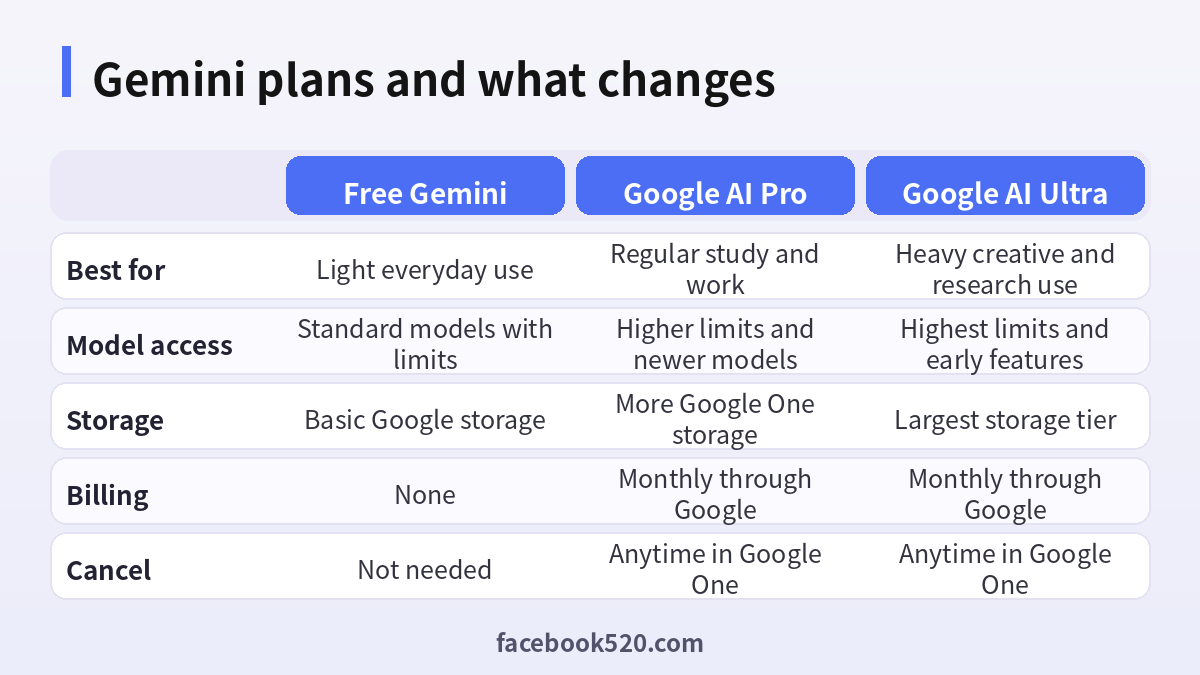
Many users decide to bulk delete because they are about to upgrade and want a clean start. Before paying, it helps to know how the plans differ. Google offers a free tier and paid tiers under the Google AI name, which are sold through Google One. The names and exact limits can change, so treat the table below as a guide to the structure and verify details on the official plan page.
- The free tier gives access to the main Gemini model with usage limits that depend on demand.
- Google AI Pro raises limits, adds access to more capable models and tools such as deeper research and video generation allowances, and bundles extra Google One storage and some Workspace features.
- Google AI Ultra is the premium tier for people who use the most advanced models and agents every day, with the highest limits and early access to new features.
- Students in some countries can receive a promotional period for Google AI Pro after verification. Availability and dates depend on the region, so check the student offer page rather than trusting a third party listing.
The sensible approach is to start on the free tier, note which limits you actually hit, and upgrade only when a limit blocks real work. If you mainly ask questions a few times a week, the paid tier may not be necessary.
Gemini account types you may see offered
Search results for terms such as buy gemini, buy gemini pro or cheap Google AI Pro account lead to a confusing mix of offers. It helps to understand the categories so you can recognise what is legitimate.
| Offer type | What it is | Risk level |
|---|---|---|
| Own account, official subscription | You pay Google inside your account | Low |
| Gift or promotion from Google or a carrier | Time limited access from an official partner | Low, check the terms |
| Family plan invitation from someone you know | A relative shares a plan through Google Family | Low if you trust them |
| Resold family invite from a stranger | A seller adds you to a plan for a fee | Medium to high, can end without notice |
| Shared login | You get a username and password | High, violates terms and may lock you out |
| Account in a cheaper country sold as a service | Seller claims a regional price trick | High, payment and region rules apply |
The phrase google ai pro cheapest country comes from people who notice that prices differ across markets. Google prices subscriptions by region and expects the billing country to match your real address and payment method. Changing the country only to find a lower price can lead to failed payments, a suspended subscription or the loss of purchased storage. If cost matters, look for official student offers, annual plans where available, bundled promotions with phones or other Google products, and the free tier.
Pricing and how to read it correctly
The price of Google AI Pro is shown in your local currency on the Google One or Google AI page when you are signed in. Look for three things before you confirm.
- The billing period, monthly or yearly, and whether the shown price is per month or the total.
- Whether a free trial or discounted period applies, and what the price becomes afterwards.
- The tax line, because some countries show prices with tax and others add it at the final step.
Write the renewal date in your calendar. Subscriptions renew automatically unless you cancel in Google One. If you pay through the Play Store on Android or through Apple on iPhone, the cancel option lives in that store instead.
How to buy or upgrade safely
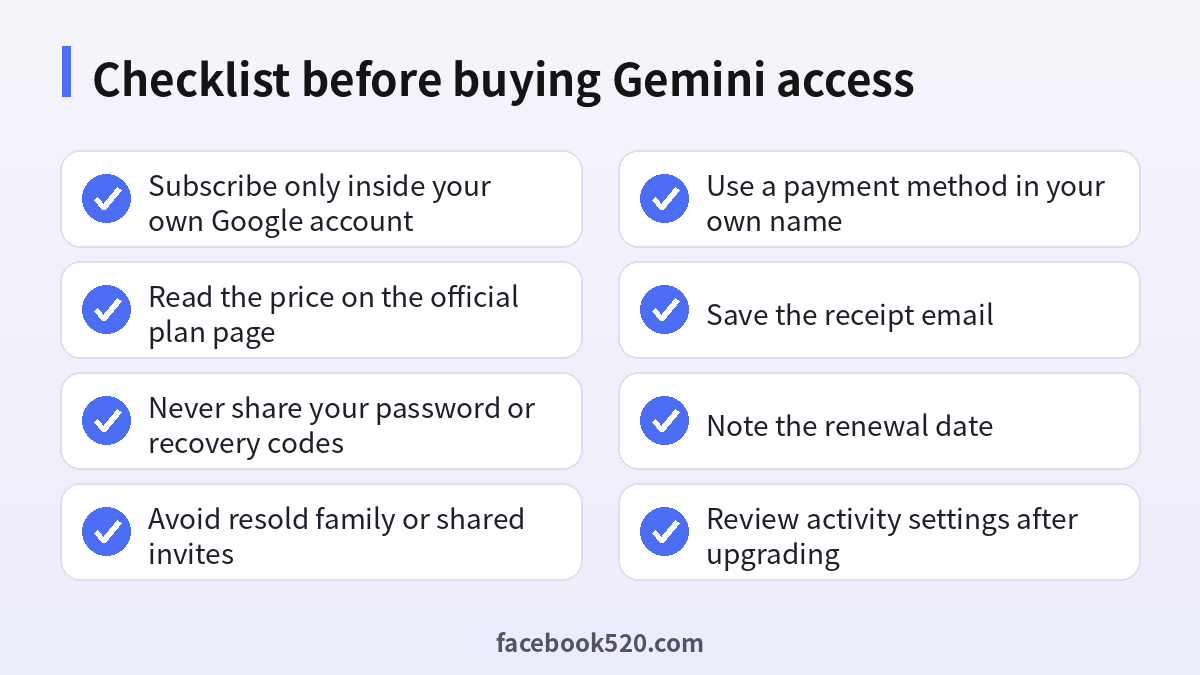
- Sign in to your own Google Account, the one you want to use for Gemini.
- Open the Google AI plans page or the Gemini upgrade button inside the app.
- Pick the plan, read the features list and the price.
- Choose a payment method in your own name. Cards, some local wallets and carrier billing are available depending on the country.
- Confirm the purchase and wait for the receipt email from Google.
- Open Gemini again and check that the plan label changed in the account menu.
- In Google One, open the membership page and confirm the next billing date.
If the payment fails, the usual causes are a card that does not allow online or international charges, a mismatch between the billing country and the card, an expired card, or a bank security check. Contact the bank or try another method. Do not ask a stranger to pay for you, because that often leads to chargebacks and lost access.
Common scams around Gemini access
Searches that include the word cheap attract scammers, so keep these patterns in mind.
- Messages that promise lifetime Gemini Pro for a one time small payment. Google sells monthly or yearly subscriptions, so lifetime access does not exist from the official side.
- Sellers who ask for your Google password or a verification code. Never share them.
- Fake login pages that copy the Google sign in screen. Check the address bar and use bookmarks.
- Offers that require installing an extension or app to unlock features. Such software can read your accounts.
- Requests to pay by cryptocurrency or gift card only. These payments cannot be reversed.
If you have already shared a password, change it immediately, sign out of all devices from the security page, enable two step verification and review recent activity.
Privacy and security after upgrading
A paid plan does not change the basic privacy controls, so keep using them. Review Gemini Apps Activity after upgrading, because new features may introduce extra options. Turn on two step verification with a security key or authenticator app. Review which third party apps have access to your account in the security page. If you use Gemini with Gmail, Drive or Docs, check the connected app permissions and turn off the ones you do not need.
A simple routine for keeping Gemini tidy
Cleaning up once is helpful, but a routine saves more time than any single bulk delete. A workable pattern for most people takes about five minutes a month. At the start of each month, open Gemini Apps Activity and look at what is stored. Delete anything tied to a finished project, a trip, a job application or a personal topic that you no longer need. If you used Gemini to draft emails or reports, copy the final text into your own documents first, because deleted activity cannot be restored later. Then check the auto delete setting and confirm that it still matches your preference. Finally, glance at the Security page of your Google Account for unfamiliar devices or sign ins.
Teams and families can adopt the same habit. Agree which chats should stay, for example shared prompts that work well, and store those in a shared document instead of relying on chat history. This also helps when a person leaves the team, because nothing important is trapped inside a personal history. If you manage a Workspace domain, ask the administrator what retention rules apply, since an organization can override personal settings and keep logs for compliance.
Quick decision guide
| Your situation | Best action |
|---|---|
| You only want a cleaner sidebar | Delete a time range in Gemini Apps Activity |
| You want less data stored in the future | Set auto delete to the shortest option you are comfortable with |
| You hit message limits every day | Compare Google AI Pro on the official page and subscribe in your own account |
| You are a student | Check the official student offer for your country first |
| Someone offers a cheap shared login | Decline and keep your own account |
| You need a company setup | Talk to your Workspace administrator |
Whatever you choose, keep the control in your own account. That single rule prevents most of the problems described above and makes every later step, from deleting chats to cancelling a plan, a matter of a few clicks.
Frequently asked questions
How do I bulk delete my Gemini chats?
Open Gemini Apps Activity in your Google Account or in the Gemini menu, choose Delete, pick a time range such as All time and confirm. The chat list will clear after you refresh.
Can I recover deleted Gemini chats?
Generally no. Once you confirm deletion of activity, it cannot be restored from your account. Export anything you need before deleting.
Is there a button to select many chats and delete them together?
The interface changes often. Some versions allow multi selection in the sidebar, while others rely on the activity page with date ranges. Using the activity page is the most reliable method.
Does turning off activity delete my old chats?
No. Turning it off stops saving new activity. You must delete the old activity separately.
Why do some chats remain after I delete everything?
They may belong to another Google profile, a Workspace account or a different device session. Switch accounts and repeat the steps.
Does deleting chats cancel my Gemini subscription?
No. The subscription is managed in Google One. Deleting history only removes saved conversations.
Is Google AI Pro worth paying for?
It is worth it if you regularly hit usage limits, need stronger models for research or coding, or can use the extra storage. Try the free tier first.
Can I buy Gemini Pro from a third party cheaper?
Third party sellers usually offer shared logins, resold invites or accounts bought with questionable payments. These can be removed at any time and put your Google Account at risk. Subscribe in your own account.
Is the cheapest country trick safe?
Not really. Google expects billing details that match your real location, and mismatches can cause failed payments or suspension. Use official regional offers instead.
Do students get a discount on Gemini?
In some countries Google offers student promotions with verification. Check the official student page for your country and the exact dates.
How do I cancel Google AI Pro?
Go to Google One, open Membership settings and choose Cancel. If you subscribed through Apple or Google Play, cancel in that store. Access normally continues until the paid period ends.
What should I do if I paid a seller and lost access?
Contact your bank or payment provider quickly, keep chat logs and receipts, and secure your Google Account. Report the seller on the platform you used.
Final recommendation
Treat Gemini like any other account with personal data. Clean up your history regularly with the activity page or auto delete, keep two step verification on, and upgrade only through your own Google Account when you truly need the extra capacity. If you want a broader overview, read our guide to the Gemini account setup and the explanation of Gemini Pro plans and payment. Both explain how Google handles regions, billing and sign in. Following the checklist above protects your data and your money, and it keeps you away from the offers that sound cheap but cost far more later.
