


Manus Credits in 2026: How Credits Work, Plan Prices, How to Add Credits and Why Gift Card Offers Are Risky
Manus is an AI agent that carries out multi-step tasks such as research, building web pages and producing slides. Instead of charging per message, it uses credits, and many users are surprised by how quickly a complex task can use them. Searches such as “manus credits”, “Manus add credits” and “Manus gift card” show that people want to know how to buy more, how long they last and whether there is a cheaper way. This guide explains the credit system as described in the official help center in October 2026, shows the plan prices, describes how to add credits and warns about unofficial sellers. Plans and amounts change frequently, so verify the current figures in your account. For plan comparisons in more depth, see our Manus pricing guide.
What a Manus credit is
A credit is the unit that pays for the work of the agent: the language model tokens, the virtual machine time and the third-party services a task uses. The number of credits a task consumes depends on its complexity and duration. Credits are consumed only while a task is actively processing. Finished tasks and the storage or deployment of their output do not use credits, so you do not need to delete completed tasks. If a task fails because of a technical problem on the Manus side, the credits consumed for it are refunded according to the help center.
Plans and prices
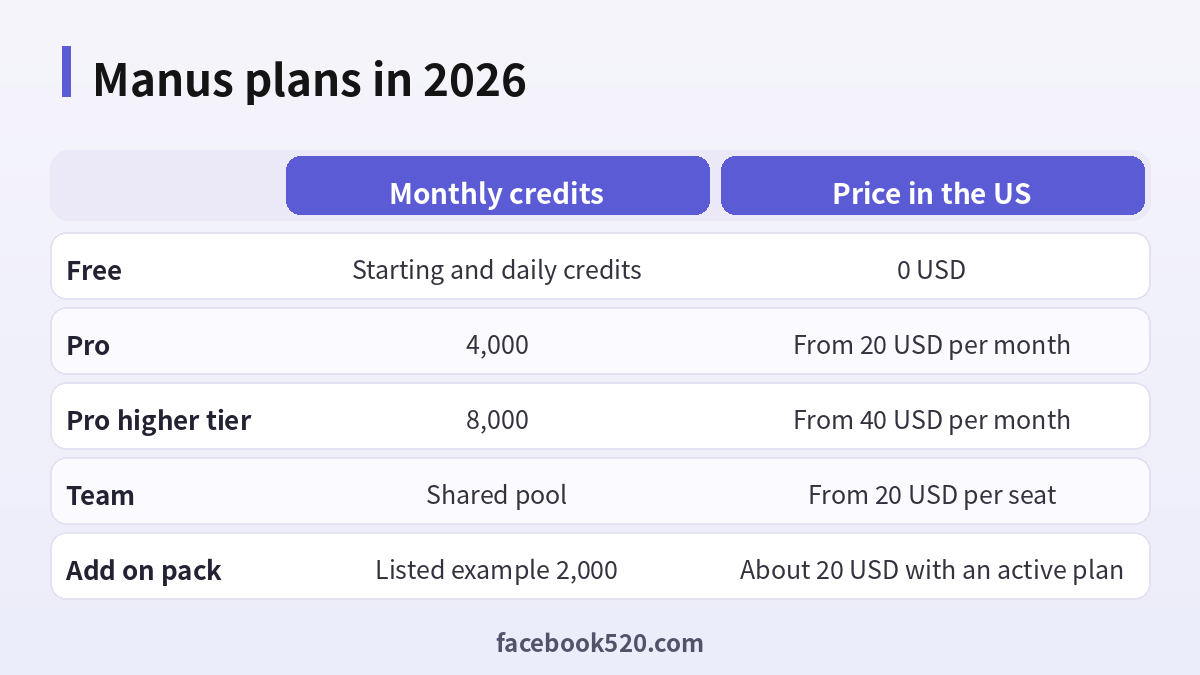
Manus is free to start. A new account receives starting credits and a daily allowance that works only with the lighter model. Pro starts at 20 USD per month with 4,000 monthly credits. A second Pro tier starts at 40 USD per month with 8,000 monthly credits and a seven-day trial, and higher tiers exist inside the app. Team starts at 20 USD per seat per month with a shared pool. Annual billing gives about a 17 percent discount. Existing members who bought the older Basic or Plus plans were moved to Pro at their old prices.
| Plan | Monthly credits | Price in the US |
|---|---|---|
| Free | Starting and daily credits | 0 USD |
| Pro | 4,000 | From 20 USD per month |
| Pro higher tier | 8,000 | From 40 USD per month |
| Team | Shared pool | From 20 USD per seat |
| Add-on pack | Listed example 2,000 | About 20 USD with an active plan |
The order in which credits are spent
The system spends event credits first, then daily credits, then monthly credits, then add-on credits and finally free credits. Daily credits can only be used with the lighter model, and free users have a monthly cap on daily credits. Monthly credits refresh on the same date each month based on your subscription date, and unused monthly credits are cleared at the start of the next cycle, even on an annual plan. Add-on credits can be carried to the next cycle while your paid subscription remains active, but they become inactive if you switch to the free plan or the subscription lapses. Free credits do not expire.
How to add credits
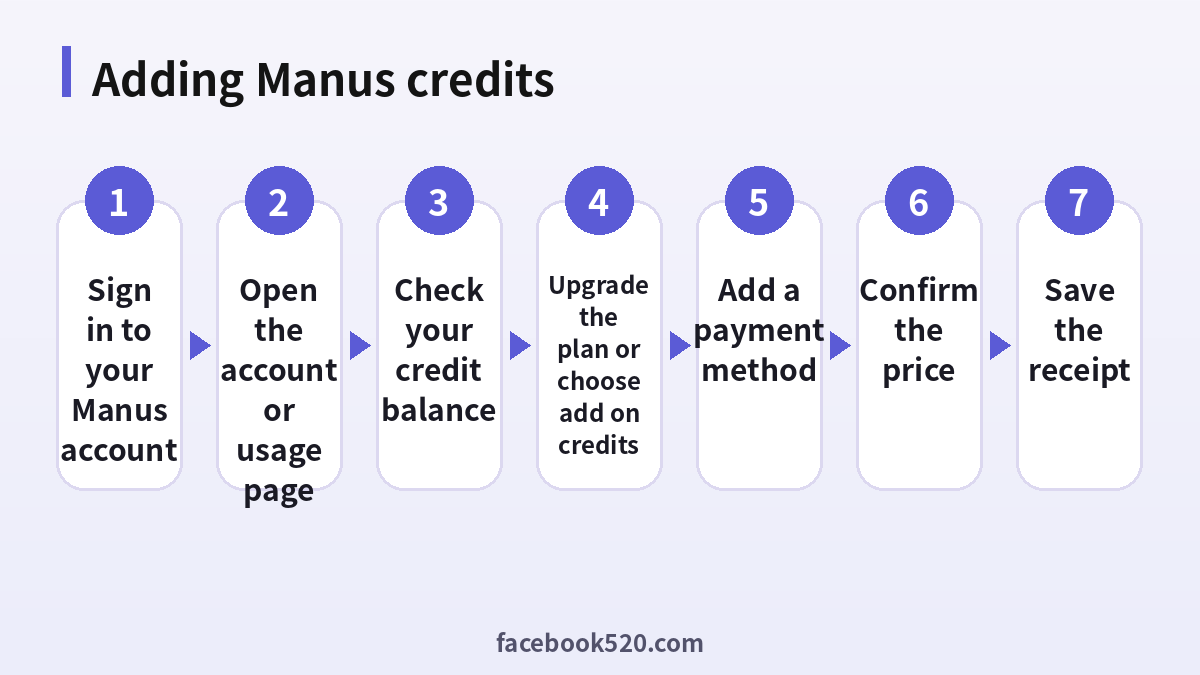
- Sign in to your Manus account on the official site or in the app.
- Open the usage or account page and read your balance and the renewal date.
- If you need more credits for a short period, look for the add-on credit option. It is only offered on paid plans.
- If you need more every month, upgrade to a higher plan instead.
- Add or confirm a payment method and review the price and the number of credits.
- Complete the payment and wait for the balance to update.
- Run a small task and check how many credits it used.
Upgrade or buy add-ons
Compare the cost per credit. Upgrading to a higher plan usually gives a better rate for steady use, while add-ons are better for a single heavy month. Because add-ons need an active subscription and become inactive if it lapses, do not buy a large pack and then cancel. If your monthly credits are leftovers that expire, buy add-ons only after you have used the monthly allowance.
Is there a Manus gift card
At the time of writing there is no official Manus gift card or voucher program that I could confirm. Sites that sell cards or codes for Manus credits at a discount are not official sellers. Common problems include codes that do not work, credits that disappear when the account is suspended, stolen payment methods and requests for your login. Treat any offer for cheap credits as a scam, and do not share your password or verification code with anyone.
Reducing credit use
Write clear instructions and decide the scope before you start, because vague prompts lead to long exploratory runs. Break large projects into smaller tasks, and review the plan the agent proposes before it begins. Stop a task that goes in the wrong direction instead of letting it finish. Use the lighter model for simple work, reuse earlier outputs rather than asking the agent to repeat research and avoid repeatedly regenerating the same slides or pages.
Team accounts and shared credits
Team plans share a pool of credits across seats and add administration features such as access control and usage analytics. Decide who can start expensive tasks, and review usage regularly. When an employee leaves, remove the seat. Use a company card and keep invoices for accounting. For larger deployments, contact sales to discuss contracts and data policies.
Refunds and billing problems
Refund rules depend on where you paid, such as the web or an app store, and on the terms in force. Credits that were already consumed are generally not refundable, except for tasks that failed because of technical issues. If you see an unexpected charge, check your subscription list and the receipt email first, then contact official support with the receipt. Do not dispute a payment before contacting support unless you suspect fraud.
Official sources versus unofficial offers
When you search for help with Manus, you will find both official pages and third-party offers. The comparison below shows why it pays to stay with official channels.
| Aspect | Official source | Unofficial offer |
|---|---|---|
| Price | Clearly shown at checkout | Often unclear or too low |
| Support | Documented help channels | Unreliable or none |
| Account safety | Protected by the platform | Risk of bans and data theft |
| Refunds | Governed by published terms | Rarely honored |
| Updates | Always current | Outdated or wrong |
Devices, apps and browsers
Use the latest version of the official app or a modern browser when working with Manus. Keep your operating system updated, install security patches and avoid rooted or modified devices, which weaken protection. Browser extensions can read pages you visit, so remove those you do not trust. On mobile, download apps only from official stores, review the permissions they ask for and turn off those that are not needed. Lock your device with a PIN or biometrics so that a lost phone does not become a lost account.
A monthly review habit
Set a reminder once a month to review your Manus setup. Check your security settings, payment method, connected apps and notification preferences. If you pay for anything, compare the charge with what you actually used and decide whether to keep, change or cancel. Update your recovery details if you changed phone number or email. Delete old data you no longer need. Ten minutes a month prevents most surprises and keeps your costs and risks under control.
Keeping up with changes
Features, prices and rules around Manus change more often than most people expect. Follow the official blog, release notes or help center, and read the emails you receive about policy updates instead of deleting them. When a guide such as this one gives a number or a menu name, treat it as a starting point and confirm it on the official site. If a change affects you negatively, you can usually adjust your plan, settings or usage, so act early rather than waiting for a problem.
Recognizing scams and fake offers
Scammers often imitate well-known brands such as Manus. Typical signs are urgent messages, requests for passwords or verification codes, links to look-alike websites, promises of free upgrades or guaranteed results, and payment requests through unusual channels. Always type the official address yourself or use a saved bookmark, check the sender of every email and never pay through a link sent by a stranger. If you think you were tricked, change your password, review recent activity, contact your bank if money was involved and report the message to the platform.
Account security basics for Manus
Protect your Manus account before anything else. Use a long, unique password stored in a password manager, turn on two-step verification, and make sure the recovery email and phone number are ones you control. Review the list of devices and active sessions every few months and sign out of any you do not recognize. Never share one-time codes, even with someone who claims to work for support, because genuine support teams never ask for them. If you sign in on a shared or public computer, log out afterwards and avoid saving passwords in the browser.
Troubleshooting checklist
If something does not work as expected with Manus, go through the basics in order before contacting anyone:
- Check your internet connection and try again on a different network.
- Update the app or refresh the page, then restart the device.
- Clear the cache or try a private browser window without extensions.
- Confirm that you are signed in with the correct account and email.
- Look for the exact error message and search the official help center for it.
- Wait a short time before repeating an action, since repeated attempts can trigger temporary limits.
- If nothing helps, collect screenshots and contact official support.
Common mistakes to avoid with Manus
Most problems come from a handful of avoidable habits. People reuse the same password across several services, ignore security notices, click links in unexpected messages, install unofficial apps that promise extra features, or buy accounts and access from resellers. Others skip reading the terms, which leads to restrictions they did not expect, or forget to write down renewal dates and recovery details. Spend a few minutes reading the official help pages, keep your details up to date and treat anything that sounds too good to be true as a warning sign.
Quick recap checklist
Before you finish, confirm the essentials for Manus:
- You are using the official website or app.
- Your password is unique and two-step verification is on.
- Recovery email and phone are current.
- Privacy settings match what you are comfortable sharing.
- You know the price, renewal date and how to cancel if money is involved.
- You saved receipts, confirmation emails and backup codes in a safe place.
- You know where to find the official help center.
When to contact official support
Contact support when you have tried the basic fixes and the problem remains, when you see an unexpected charge, when you suspect your account was accessed by someone else or when you are locked out. Prepare the account email, the date and time of the problem, the exact message you saw and screenshots. Describe what you did step by step and what you expected to happen. Use only the contact methods listed on the official site and ignore anyone who offers to fix things for a fee through social media or private messages.
Privacy and personal data
Before you enter personal information anywhere, ask what is really required. Use only the details that Manus needs, review the privacy settings after setup and limit who can see your profile, activity and contact information. Avoid posting documents, addresses, financial data or photos that reveal your location. Check which third-party apps are connected to your account and remove those you no longer use. If you work with client or company data, follow your organization’s policy and do not mix it with personal accounts.
Helping family members and colleagues
If you are setting up Manus for someone else, such as a parent, a teenager or a coworker, guide them rather than doing everything silently. Explain why strong passwords and two-step verification matter, show them how to recognize suspicious messages and agree on who to ask before they click or pay for anything. For minors, follow age requirements and use the available parental or family controls. For teams, document who owns the account, who can approve spending and what to do when someone leaves.
A worked example of planning credits
Imagine that you subscribe to the entry Pro plan with 4,000 monthly credits. A short research task might use a few hundred credits, while building and deploying a small website or a long slide deck could use several times that. If you plan five such tasks in a month, estimate the high end for each and compare the total with your allowance. Run the first task, look at the real cost and then update your estimate. This kind of simple budgeting prevents the situation in which you run out in the middle of a deadline and must buy an add-on at short notice.
Choosing between monthly and annual billing
Annual billing lowers the monthly price by about 17 percent, but you pay for the year in advance and monthly credits still arrive month by month. If you are not sure that you will use the tool regularly, begin with a monthly plan for two or three cycles. Switch to annual once your usage is steady. Set a calendar reminder before renewal so that you can change or cancel the plan on purpose instead of by accident.
Keeping the account secure
An account that holds paid credits is a target for attackers. Use a unique password, turn on any two-step verification that the service offers and do not log in on shared devices. Do not paste your login into chat windows, and do not hand the account to a seller or a freelancer who promises to reduce the cost of credits. If you suspect that someone else has used your credits, change your password, sign out of all sessions and contact support with the dates and amounts.
Frequently asked questions
What is a Manus credit?
A unit that pays for the work an agent task uses, such as model usage and tools.
How many credits does Pro include?
The entry Pro plan includes 4,000 monthly credits, and a higher tier includes 8,000.
Do monthly credits roll over?
No. They reset at the start of the next cycle.
Do add-on credits expire?
They carry over while the paid subscription is active, and become inactive if it lapses.
Can I add credits on the free plan?
Add-on credits are offered only with an active paid subscription.
Is there an official gift card?
No official gift card was confirmed. Be careful with sellers who claim otherwise.
Are credits refunded if a task fails?
Credits used on tasks that fail because of technical problems on the Manus side are refunded.
What is the cheapest way to get more credits?
Annual billing lowers the monthly price, and a higher plan often gives a better rate than add-ons.
Does storing a finished task cost credits?
No. Stored and deployed outputs do not use credits.
Where can I see my usage?
In your account or usage page after signing in.
Summary
Check your balance, understand the order in which credits are spent, upgrade or add credits through the official account and avoid gift card sellers.
