


Pinterest Account Guide for 2026: Personal Versus Business Setup, Converting and Claiming Your Website, Username and Profile Tips, Boards and Pin Planning, Suspensions and Appeals, Deactivating or Deleting and Why Not to Buy Accounts
A Pinterest account is the starting point for saving ideas, planning projects and driving traffic to a website. Because the platform works as a visual search engine, the way you set up your profile and boards has a direct effect on whether people find you. This guide explains the practical side of a Pinterest account as of October 2026: the choice between personal and business, how to claim a website, how to build boards and pins, what to do if the account is suspended, and how to deactivate or delete it. Features and menus change, so treat the steps as a guide and verify them in the help center. For sign up basics, see our guide to creating an account (https://www.facebook520.com/article/8422.html), and for a business focus, see our Pinterest business account guide (https://www.facebook520.com/article/8390.html).
Choosing between personal and business
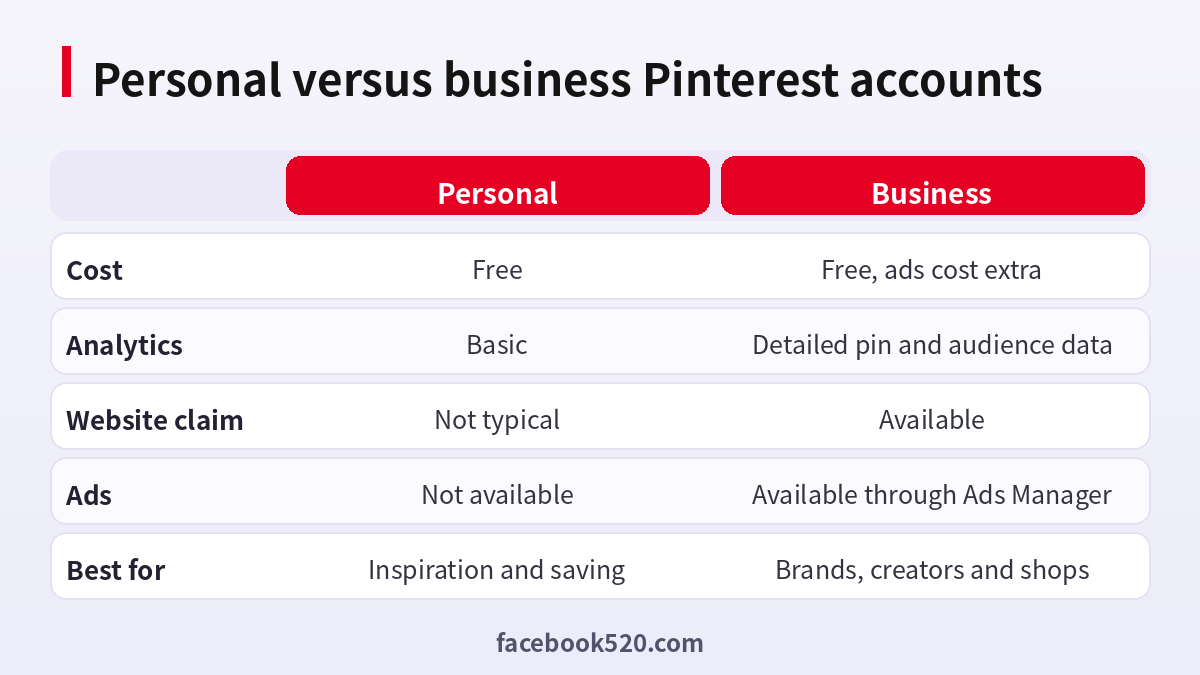
Pinterest does not charge for either account type. A personal account is meant for collecting inspiration, such as recipes, home ideas or travel plans. A business account adds tools that matter if you want to measure results or promote products, including analytics, the ability to claim a website and access to advertising. If you already have a personal account, you can convert it, and your boards and pins remain. If you manage a brand, use a business account from the beginning so that your profile signals what you do.
| Feature | Personal | Business |
|---|---|---|
| Cost | Free | Free, ads cost extra |
| Analytics | Basic | Detailed pin and audience data |
| Claim a website | Not typical | Available |
| Ads | Not available | Available through Ads Manager |
| Best for | Saving ideas | Brands, creators and shops |
Set up your profile
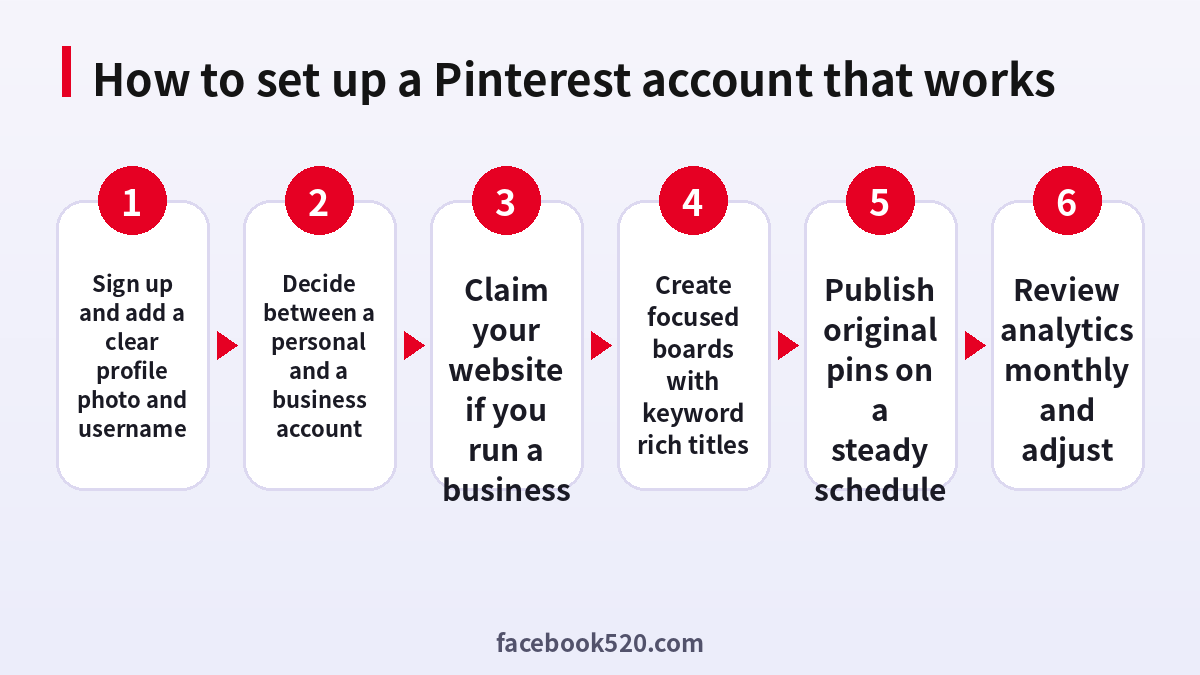
Add a clear profile photo, such as a logo for a brand or a friendly portrait for a creator. Choose a username that is short, easy to spell and consistent with your other channels. In the bio, say who you help and what you offer in one or two sentences, using words people might search for. Add your website, location and language. Keep your profile picture and name consistent so that visitors recognize you.
Claim your website
Claiming a website tells Pinterest that you own it. Once confirmed, your name and logo appear on pins that come from your site, and you can see analytics for them. The method depends on your website platform. You can add a small meta tag to the page header, upload a verification file or add a record at your domain provider. If you use a hosted store or blogging platform, look for a built in Pinterest integration, which may handle the claim for you. Claim only websites that you control.
- Open the settings of your business account.
- Select the option to claim your website.
- Choose a verification method and follow the instructions.
- Wait for confirmation and refresh your profile.
- Check that the pins from your site now show your profile.
Boards that help people find you
Boards are like folders. Give each board a clear title and a short description with keywords that match what people search. A board called Small Space Storage Ideas is better than My Stuff. Keep boards focused on one theme, and fill them with a mix of your own pins and relevant pins from other creators. Archive boards that no longer serve your goals. Aim for a handful of strong boards at first rather than dozens of thin ones.
| Board title | Why it works |
|---|---|
| Small Space Storage Ideas | Specific and searchable |
| Vegan Dinner Recipes | Clear topic and audience |
| Weekend Trips in Europe | Matches common search phrases |
Creating pins people save
Pins that perform well are usually vertical, clear and easy to read on a phone. Use bright, uncluttered images, put the main message in a few words on the image and make sure the link leads to a page that delivers on the promise. Write a descriptive title and a short description in natural language. You can create several pins for the same page with different images and headlines to learn which style works. Avoid reposting identical pins repeatedly, since this can look like spam.
Posting rhythm and analytics
Consistency matters more than volume. Post a few original pins each week rather than a large batch once a month. Check analytics monthly. Look at impressions, saves and outbound clicks to see which topics resonate, then create more of what works and retire what does not. If you run a shop, connect your catalog if the feature is available in your region, and keep product data accurate.
Why accounts get suspended
Suspensions generally relate to spam, misleading content, copyright issues, automated behavior or compromised accounts. Using tools that mass post or follow can cause problems. Linking to deceptive pages or using images you do not have the right to use can also lead to removal. If your account is suspended, read the message to see the reason, remove content that may have caused it and submit one appeal through the official channel. Do not create a new account to avoid the suspension.
| Possible reason | Suggested response |
|---|---|
| Spam like behavior | Reduce volume, avoid automation |
| Copyright claim | Remove the content or obtain permission |
| Misleading links | Fix the landing page |
| Account hacked | Reset the password and review apps |
Security
Use a strong password and two factor authentication if available. Review connected apps and revoke those you no longer use. Do not trust emails that ask for your password or promise followers. Log in by typing the address yourself.
Deactivating or deleting
You can deactivate your account to hide your profile and pins while keeping the option to return. Deleting is permanent after a waiting period. Before choosing either, download your data if you want a copy, disconnect your website claim and cancel any advertising or subscriptions. If you only want to pause, deactivation is the safer choice.
Why you should not buy accounts or followers
Sellers advertise aged accounts, high follower counts and bulk profiles. These are against platform rules, and the followers are usually inactive or fake. A large audience that does not interact will not help your reach, and the account can be removed. The seller may also retain control of the email. Grow real engagement with useful pins and regular activity.
Keyword research inside Pinterest
Because Pinterest works like a search engine, keywords are central. Start typing a topic into the search bar and note the suggestions that appear below it. These suggestions come from real searches and show how people phrase their questions. Try several variations and write down the most relevant ones. Then place those phrases naturally in your profile, board titles, board descriptions, pin titles and descriptions. Do not stuff keywords into every sentence. Write for a person first. Check seasonal trends as well: searches for holiday decorations, wedding ideas or back to school often begin weeks or months before the event, so plan your content early.
| Place to use keywords | Example |
|---|---|
| Profile bio | Home organization tips for small apartments |
| Board title | Small Apartment Organization |
| Pin title | 10 Closet Storage Ideas for Small Spaces |
| Pin description | Practical ways to organize a tiny closet with low cost tools |
Content calendar for a small team
A simple calendar prevents last minute stress. List your main topics and the seasonal events that matter to your audience. For each topic, plan a few pins every week, including a new image for older articles, a video pin or an idea pin when available, and a pin that links to a product or service. Assign who creates the image, who writes the description and who checks the link. Keep a spreadsheet with the pin title, board, link and publish date, so that you can avoid duplicates and review results.
- List topics and seasonal dates for the next quarter.
- Plan the number of pins per week.
- Assign creation and review tasks.
- Record each pin in a spreadsheet.
- Review results monthly and update the plan.
Working with images and video
Use original photos when possible. If you use stock images, check the license and make sure that commercial use is allowed. Keep text on images large enough to read on a phone, and leave space around it. For video pins, show the most interesting moment in the first seconds and add captions, because many viewers watch without sound. Compress files so pages load quickly, and always add alt text to describe the image, which helps accessibility and gives search systems extra context.
Connecting your shop or blog
If you publish a blog, add a save button to your images so readers can pin them easily. Place the most shareable image near the top of each article and use a vertical version designed for Pinterest. If you run an online store, check whether your platform offers a Pinterest connection, which can sync the product catalog and track conversions. Keep titles and descriptions accurate, and update stock and prices. Broken links, out of stock items and mismatched prices lead to a poor experience and can reduce your reach.
| Item | Good practice |
|---|---|
| Blog images | Add vertical pin friendly graphics |
| Save buttons | Make it easy for readers to pin |
| Product catalog | Keep price and stock current |
| Tracking | Install the official tag for conversions |
Ads on Pinterest: what to know before you start
You do not need ads to use Pinterest, but they can help once you know which pins perform well. Start with a pin that already has organic saves and clicks. Choose a clear goal, such as traffic or catalog sales, set a modest daily budget and run the campaign long enough to collect data. Use targeting that matches your customer, such as interests and keywords. Review results by cost per click and conversions rather than by impressions. Pause ads that spend without results and invest in the ones that work. Payment is handled in the official Ads Manager billing area.
Handling copyright and takedown notices
Pinterest respects intellectual property. If someone claims that your pin violates their rights, your content may be removed. If you receive a notice, read it carefully and remove the content if it is not yours. If you believe it was a mistake, use the official counter notice process. If your own images are copied by others, you can report them. To reduce risk, create your own images and keep records of the source files and the dates of creation. Avoid pinning content from sites that clearly prohibit sharing.
Common mistakes to avoid
Many new accounts struggle for similar reasons. The first mistake is a mixed profile, where boards about unrelated topics confuse both visitors and the system. The second is posting only other people’s content without adding original pins. The third is using horizontal images that look small on phones. The fourth is ignoring analytics. The fifth is using automation tools that post in bulk, which can trigger spam detection. The sixth is neglecting links: a great pin that leads to a slow or broken page wastes the effort. Review each of these points once a quarter, and fix what you find.
| Mistake | Better approach |
|---|---|
| Unrelated boards | Focus on a few clear topics |
| Only repinning | Add original pins regularly |
| Horizontal images | Use vertical designs |
| Ignoring analytics | Review monthly |
| Bulk automation | Post manually or through approved tools |
| Broken links | Test every pin link |
Access, roles and handoffs
If a team shares a business account, avoid sharing a single password. Use the permissions and role features available in your account so that each person has their own login. When a team member leaves, remove their access and review connected apps. For agencies, use official access delegation rather than sending credentials by email. Keep a document that lists the account email, the owner of that email, the claimed websites and any subscriptions, so that the business can recover if a key person is unavailable.
- Use individual logins for each team member.
- Remove access promptly when people leave.
- Review connected apps every quarter.
- Document claimed websites and billing contacts.
- Store recovery information securely.
Final tips
Treat Pinterest as a long term channel. Pins can keep sending visitors for months or years after they are published, which is different from many social feeds. Invest in clear, useful content, keep your account safe and review the numbers regularly. This steady approach beats shortcuts every time.
Measuring success realistically
Results on Pinterest build slowly. In the first month, focus on setting up the profile, claiming the website and publishing consistently. In months two and three, you should start to see impressions and saves grow as pins are indexed and distributed. Outbound clicks follow when your pins promise something specific and the landing page delivers. Do not judge the channel after two weeks. At the same time, do not keep investing in a topic that gets no engagement after several months. Use a simple scorecard with four numbers: impressions, saves, outbound clicks and conversions. Compare each month to the previous one and note what you changed.
| Metric | What it tells you |
|---|---|
| Impressions | How often pins are shown |
| Saves | Whether content is useful or inspiring |
| Outbound clicks | Whether the promise attracts visits |
| Conversions | Whether the visitors take action |
Keep a note of experiments, such as a new image style or a different title format, so that you learn from each change instead of guessing.
Accessibility and international audiences
Pinterest is used in many languages. If your audience speaks more than one language, consider creating separate boards or pins for each language, and write titles and descriptions that read naturally rather than relying on automatic translation. Add alt text to describe images for people who use screen readers, and choose high contrast colors for text. Be aware of cultural differences in colors, holidays and symbols, because an image that works in one country may confuse or offend in another. If you ship products abroad, mention the countries you serve, delivery times and return conditions on the landing page, so that visitors know what to expect before they click.
| Audience need | Action |
|---|---|
| Multiple languages | Create language specific pins and boards |
| Screen readers | Add alt text to images |
| Cultural fit | Check holidays, colors and symbols |
| International shipping | State countries, times and returns clearly |
Frequently asked questions
Is a Pinterest account free?
Yes. Ads are optional and paid.
Can I convert a personal account to business?
Yes, in the settings.
How do I claim my website?
Use the claim option and verify with a tag, file or domain record.
Can I change my username?
Yes, in the profile settings.
Why was my account suspended?
Common reasons are spam, misleading content, copyright issues or hacking.
How do I appeal?
Use the official appeal form once and explain clearly.
Is deactivating the same as deleting?
No. Deactivation is reversible, deletion is not.
Can I have more than one account?
Yes, if you follow the rules.
Should I buy followers?
No.
Is it safe to buy a ready made account?
No.
Summary
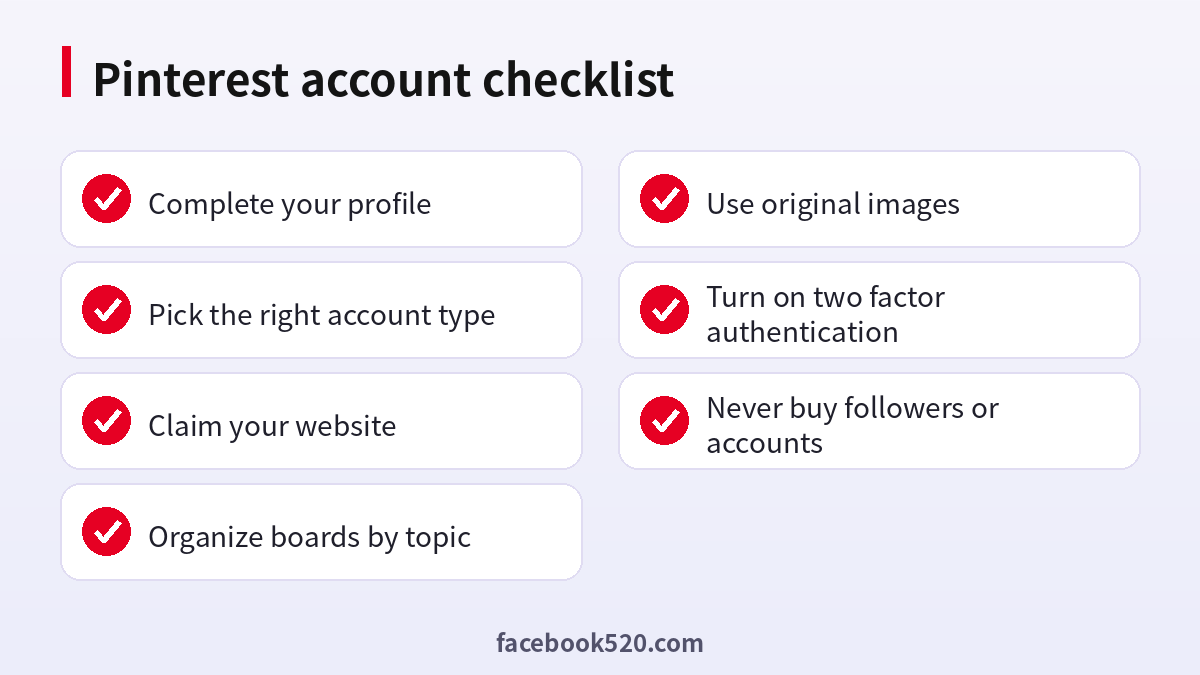
A strong Pinterest account starts with a clear profile, the right account type, a claimed website, focused boards and original pins posted regularly. Protect the account, follow the rules and avoid shortcuts.
