WhatsApp Ads Billing and Payment (2026): Payment Methods, Click-to-WhatsApp Ad Costs, Invoices and Fixes for Declined Payments
Running ads that lead people into a WhatsApp chat is one of the most effective ways to generate leads in 2026, especially in markets where messaging is the default way to buy. But the billing side confuses many advertisers: you pay Meta for the ad itself, you may pay a separate fee for business messages sent on the WhatsApp Business Platform, and each payment method has its own rules about thresholds, currencies, taxes and holds. This guide explains how WhatsApp ads billing and payment work, which payment methods are typically accepted, how the different cost types fit together, how to read invoices, and what to do when a payment fails. Prices and policies are updated often and vary by country, so always confirm exact figures and available methods in Meta Ads Manager and in the official WhatsApp Business Platform pricing pages. For background on creating a business-ready number, see our WhatsApp account guide, and for the account that runs the ads, our Facebook account guide.
How WhatsApp advertising works
“WhatsApp ads” usually means click-to-WhatsApp ads: ads on Facebook, Instagram or other Meta placements with a button that opens a chat with your business on WhatsApp. You create them in Meta Ads Manager, choose a messaging objective, link your WhatsApp Business app or Business Platform number, and set a budget. You pay Meta based on the ad delivery model you pick, such as impressions or link clicks, even though the goal is a conversation. Separate from the ad spend, any messages your business sends after the conversation starts may be billed by WhatsApp under its messaging pricing, depending on the message type and whether you are inside the customer service window. Understanding this split is the foundation of controlling your costs.
The three kinds of cost
Ad spend. What you pay Meta to show the ad. It is billed to the payment method on your ad account, either automatically when you reach a billing threshold or on a set schedule, or deducted from a prepaid balance in some countries.
Business messaging fees. If you use the WhatsApp Business Platform (API), template messages such as marketing, utility and authentication messages are priced per message, with rates depending on the recipient’s country and the message category. Replies inside the customer service window are generally free, and conversations started from click-to-WhatsApp ads may come with a free-entry window on messages within a limited period. Check the current rules, because Meta adjusts these offers.
Tools and partners. If you connect a business solution provider, CRM or chatbot platform, they bill you separately for software, seats, or message markup.
Payment methods you can use
Accepted payment methods depend on your country and ad account currency. Common options include credit and debit cards from major networks, PayPal in many regions, direct debit or bank account payments in some countries, and local methods such as UPI in India, Pix or boleto in Brazil, and other regional wallets and bank transfers. Some regions support prepaid funding where you add money first and ads draw it down; others use postpaid billing where Meta charges you after spend accrues. Business accounts may also be offered monthly invoicing after an approval process. In Ads Manager, open Billing, then Payment settings, and the list of methods you can add appears for your account. If a method you expect is missing, the cause is usually the account country, the currency, or a limit on new or unverified accounts.
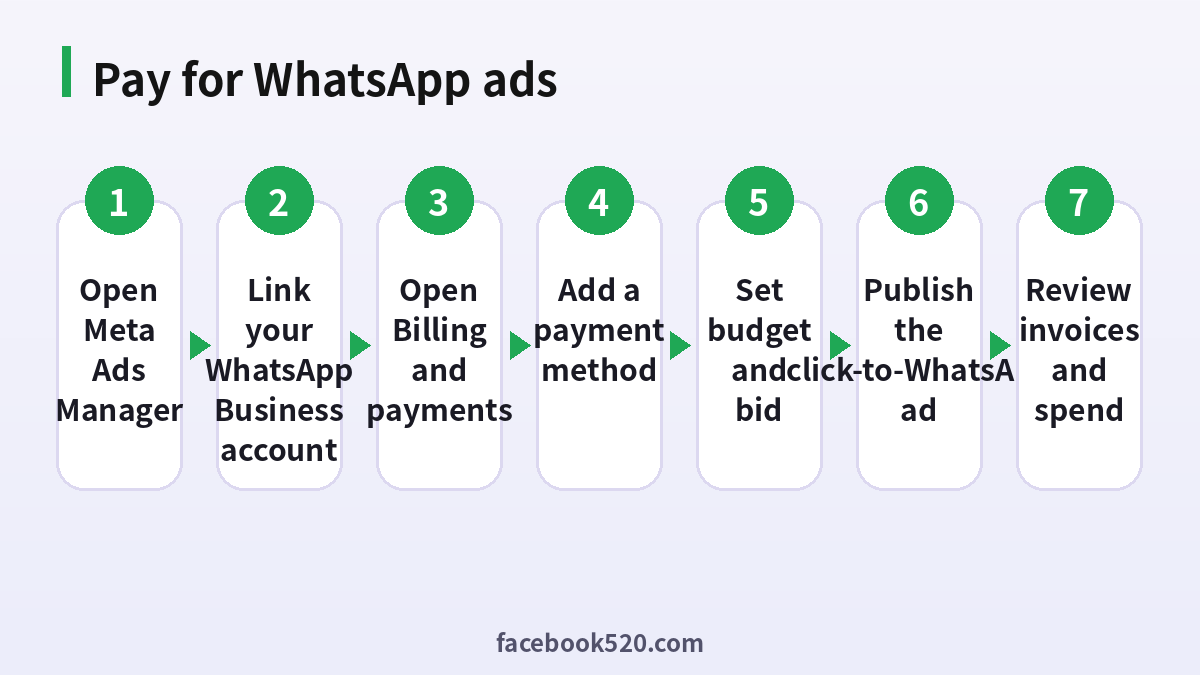
Step by step: set up payment for WhatsApp ads
- Open Meta Ads Manager with the business account that will run the ads.
- Link your WhatsApp account in Business Settings so it can be selected in the ad.
- Go to Billing and payments from the menu.
- Add a payment method by choosing a card, PayPal, bank option or local method, and entering details.
- Confirm currency and time zone, since they cannot always be changed later.
- Create the campaign with a Sales, Leads or Engagement objective and a messaging destination.
- Set your budget, schedule and audience, then publish.
- Monitor spend and keep an eye on the billing threshold and next charge date.
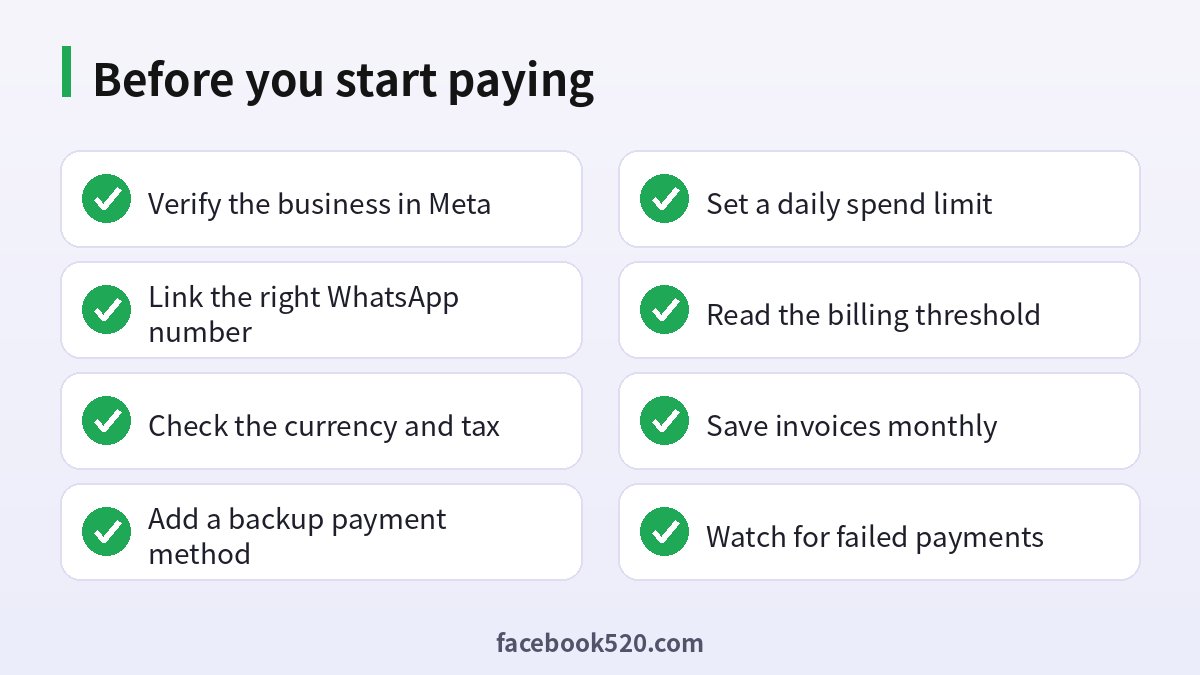
If this is a new ad account, expect a low initial spending limit that rises as your account builds a payment history. Adding a verified business in Business Settings can also help.
Costs compared
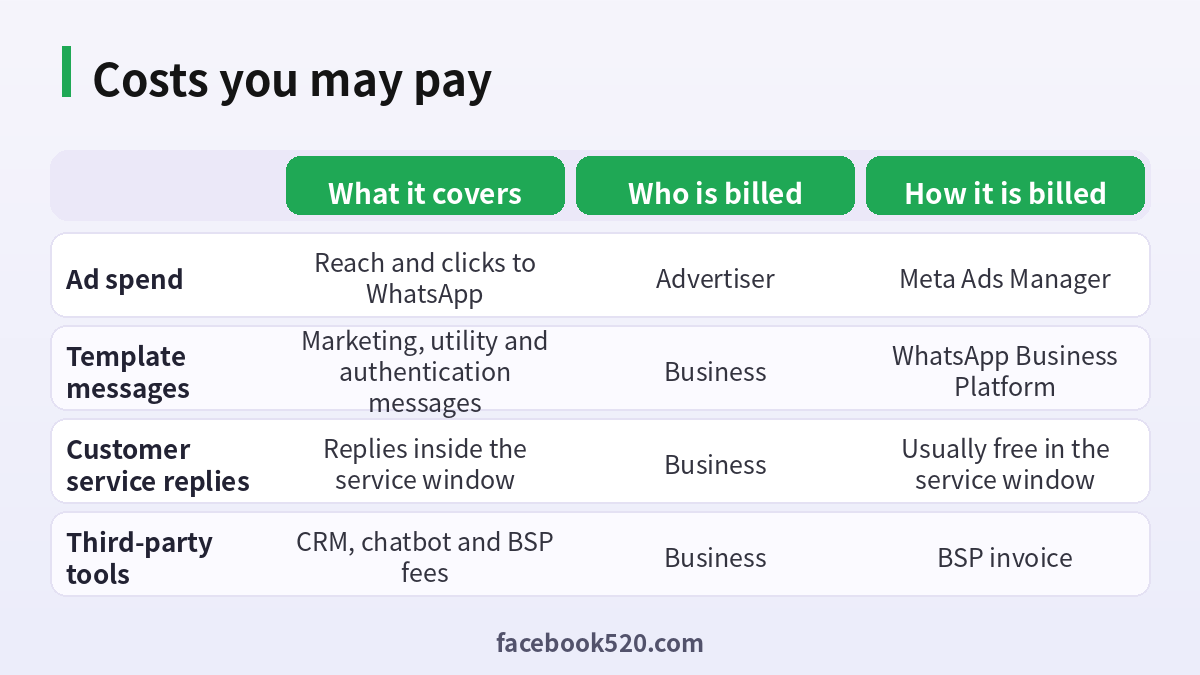
| Cost | What it covers | Who is billed | How it is billed |
|---|---|---|---|
| Ad spend | Reach and clicks to WhatsApp | Advertiser | Meta Ads Manager |
| Template messages | Marketing, utility and authentication messages | Business | WhatsApp Business Platform |
| Customer service replies | Replies inside the service window | Business | Usually free in the service window |
| Third-party tools | CRM, chatbot and provider fees | Business | Provider invoice |
| Taxes | VAT, GST or similar | Business | Added to invoices |
Billing thresholds and charge timing
Meta commonly bills when your spend reaches a threshold or on a monthly date, whichever comes first. New accounts often start with a low threshold, such as a small amount that increases as you build trust. This is why you may see several small charges in the first weeks instead of one monthly charge. Prepaid accounts show a balance, and if it runs out the ads stop delivering. Keep an eye on the Payment activity page, where each charge is listed with a transaction ID, date and amount. Matching these with your bank or card statement makes bookkeeping easy and makes it simple to dispute an unfamiliar item.
Invoices, VAT and receipts
For each charge you can download a receipt from the Billing section, and in many countries you can also download a monthly invoice with the business name, tax ID and VAT lines. Make sure your business information is correct before the first charge, as editing it later may not change past invoices. If your company needs a specific tax invoice, check whether Meta offers invoicing in your country and what details are required. Message fees billed under the WhatsApp Business Platform appear as a separate invoice, so reconcile both. Keep PDFs in a shared folder for your accountant, ideally filed by month.
Why a payment fails and how to fix it
The most common reasons are an expired or incorrect card, insufficient funds, a bank that blocks international or recurring online payments, a mismatch between the billing address and the card, a currency or country restriction, and security checks that flag the account. To fix it, first read the exact message in Billing, since it often names the cause. Then update the payment method, ask the bank to allow the charge, complete any 3D Secure or app verification, and retry. Add a second payment method as a backup so that ads don’t stop if the primary fails. If the account has a billing hold, pay the outstanding amount and wait for the status to refresh, which can take from minutes to a day. Persistent issues should go to Meta business support with the account ID and screenshots.
Avoiding ad account restrictions
Payment problems frequently turn into account restrictions when combined with policy issues. Keep your payment method valid, avoid disputing legitimate charges with your bank before contacting support, and do not use many different cards on one account in a short time. Follow the advertising policies for WhatsApp, including consent for messaging, honest promises, and no prohibited products. Use a verified business and a stable login setup, and do not share the ad account with people you do not trust. A good habit is to review account quality in Business Support Home and fix any warning early.
Controlling costs
Set a daily budget and a lifetime budget, use cost caps or bid caps when appropriate, and test small before scaling. Send customers to a clear first message so that the chat starts with intent rather than curiosity. Use quick replies and a welcome message to answer common questions, so the conversation resolves faster and uses fewer paid template messages. Track cost per conversation, cost per lead and cost per sale in your CRM, not just in Ads Manager. If marketing templates are expensive in your target country, shift part of your follow-up to the free service window by encouraging customers to reply.
Example budget
A small online shop in Mexico spends 20 US dollars per day on click-to-WhatsApp ads. In a month this is around 600 dollars of ad spend billed in several threshold charges. The shop gets 400 conversations, answers most inside the free service window, and sends 300 marketing template messages for a promotion at the per-message rate for its country. Its tool provider charges a flat monthly fee for the shared inbox. The total monthly cost combines three invoices: Meta ad spend, WhatsApp message fees and the software fee. By tracking all three, the owner calculates a cost per sale and decides whether to scale.
Payment troubleshooting table
| Symptom | Likely cause | What to do |
|---|---|---|
| Card declined at checkout | Bank blocks online or foreign charges | Call the bank, approve the merchant, retry |
| Ads paused with a billing notice | Unpaid balance or failed charge | Pay the amount due, then wait for refresh |
| Payment method option missing | Country or currency restriction | Use a supported method or change business country settings |
| Unexpected charge | Threshold billing or a scheduled campaign | Check Payment activity and campaign schedules |
| Charge higher than budget | Daily budget can be exceeded up to a limit on some days | Review budget rules and use caps |
| No invoice available | Missing tax details | Add business details in Billing settings |
Taxes and currency
Ad charges can include VAT, GST or digital services tax depending on your business location and registration. If your business is VAT registered, enter your tax ID in the billing details so that the invoice shows the correct treatment. The ad account currency is chosen when the account is created and usually cannot be changed, which means that if you pay from a card in another currency you may see conversion fees from your bank. Many advertisers open the ad account in the currency of the card they plan to use to avoid unnecessary conversion costs. For WhatsApp message fees, rates are published in several currencies, and the billing currency may differ from your ad account currency, so confirm both before you plan a budget.
Setting up ad spend limits and alerts
An account spending limit caps the total amount that can be spent on an ad account, and a campaign spending limit caps each campaign. Use both while you are testing new creative or a new country. In Ads Manager, create automated rules that pause campaigns if the cost per conversation exceeds a threshold, or that send you a notification when daily spend passes a number. Notification emails for payment failures should go to a shared mailbox, not one person, so that a billing problem on a weekend is seen quickly. Finally, review the account every Monday for pending charges, fast-growing campaigns and any ad rejections that may reduce delivery.
Choosing between the WhatsApp Business app and the API
The WhatsApp Business app is free to download and suitable for small teams that reply manually, use labels and quick replies, and receive chats from click-to-WhatsApp ads. The Business Platform, also called the API, is built for scale: multiple agents, automation, chatbots, integrations with a CRM and messaging at volume. The API is where per-message fees appear, usually through a partner provider that also charges for its software. If you expect only a few dozen chats a day, the app is typically enough. If you need to message customers with templates, route chats between agents or connect to a store, the API makes sense. Whatever you choose, make sure the number used for ads is stable, because moving a number between products can affect history and verification.
Best practices for message templates
Marketing templates cost more than utility templates, so use them deliberately. Get explicit consent before you send promotional messages, make opt-out easy, and keep content relevant and not repetitive. Use utility templates for order confirmations, delivery updates and appointment reminders, where customers expect and value the message. Authentication templates are for one-time passcodes. Quality ratings matter: if many users block or report your messages, your sending limits and cost efficiency suffer. Test templates on a small group first, track read and reply rates, and retire the ones with poor performance.
Security checklist for billing
Use two-factor authentication on every person with access to the ad account and the payment settings. Give each team member only the role they need, such as analyst or advertiser, and keep full admin for the owner. Never share card details in chat, and review the list of people with payment access every quarter. If you work with an agency, ask them to use their own business manager with partner access instead of passing around logins. Keep a record of who changes payment methods and when.
How to read your WhatsApp ads report
In Ads Manager, add columns for results, cost per result, messaging conversations started, link clicks and amount spent. A “result” for a messaging campaign is usually a conversation started, which is not the same as a lead or a sale. Compare the number of conversations in Ads Manager with the chats you see in your WhatsApp inbox, because small differences are normal due to attribution windows. Break results down by placement, age, gender and country to find where chats are cheapest. Then connect conversation outcomes to your CRM so that you know which ads bring paying customers, not just chats. This feedback loop is the best way to lower your effective cost over time.
Frequently asked questions
How do I pay for WhatsApp ads?
You pay for the ad in Meta Ads Manager with the payment method set in Billing and payments. Message fees on the Business Platform are billed separately.
Are WhatsApp ads free?
No. Ad delivery has a cost, though replies inside the customer service window are generally free.
What payment methods are accepted?
Cards, PayPal, bank options and local methods depending on country and currency.
Why is my WhatsApp ad payment declined?
Typical causes are expired cards, bank blocks, insufficient funds, address mismatch or account security checks.
Can I get an invoice for tax purposes?
Yes, receipts and, in many countries, monthly invoices are available in Billing.
What is a billing threshold?
The spend amount at which Meta charges your payment method; it increases as the account builds history.
Do I need the WhatsApp Business app or the API?
Click-to-WhatsApp ads work with both, but the API gives automation and per-message billing on the Business Platform.
Can I use a prepaid balance?
In some countries yes; check your Payment settings.
How can I avoid ad account restrictions?
Keep payments valid, follow policies and respond to account quality warnings.
Who do I contact for billing disputes?
Use Meta business support from your Ads Manager account.
Conclusion
WhatsApp advertising has a simple core, ads that start chats, but billing involves several layers. Add a reliable payment method, understand ad spend versus message fees, keep invoices organized and monitor thresholds. With these basics in place, you can scale conversations without surprise holds or declined payments.