


How Can I Get Payment From YouTube 2026: Setting Up an AdSense Payout Account and Receiving Money Overseas
People type how can i get payment from youtube when they have a channel that is growing and no idea how the money actually reaches a bank account. The answer is a chain of small steps rather than one button: your channel must qualify for the monetization program, you link a payments profile through AdSense, Google verifies who and where you are, you submit tax information, you add a way to be paid, and then you wait until your earnings pass a threshold. This guide treats it as setting up a payout account and receiving payments overseas, because the practical difficulties usually involve currency, bank details and verification rather than video editing. No earnings figures or thresholds are quoted; they and the available methods depend on your country, so confirm each against the official help pages.
How YouTube pays creators in general
YouTube does not send you a cheque simply because your videos got views. Money comes from several streams, and each has its own rules. The main one is advertising revenue, which is paid when your channel is accepted into the YouTube Partner Program and linked to an AdSense account. Other streams, such as channel memberships or viewer purchases during live streams, are paid through the same payments profile where available. Many creators also earn from sponsors, affiliate programs or their own products, and those payments never pass through YouTube at all.
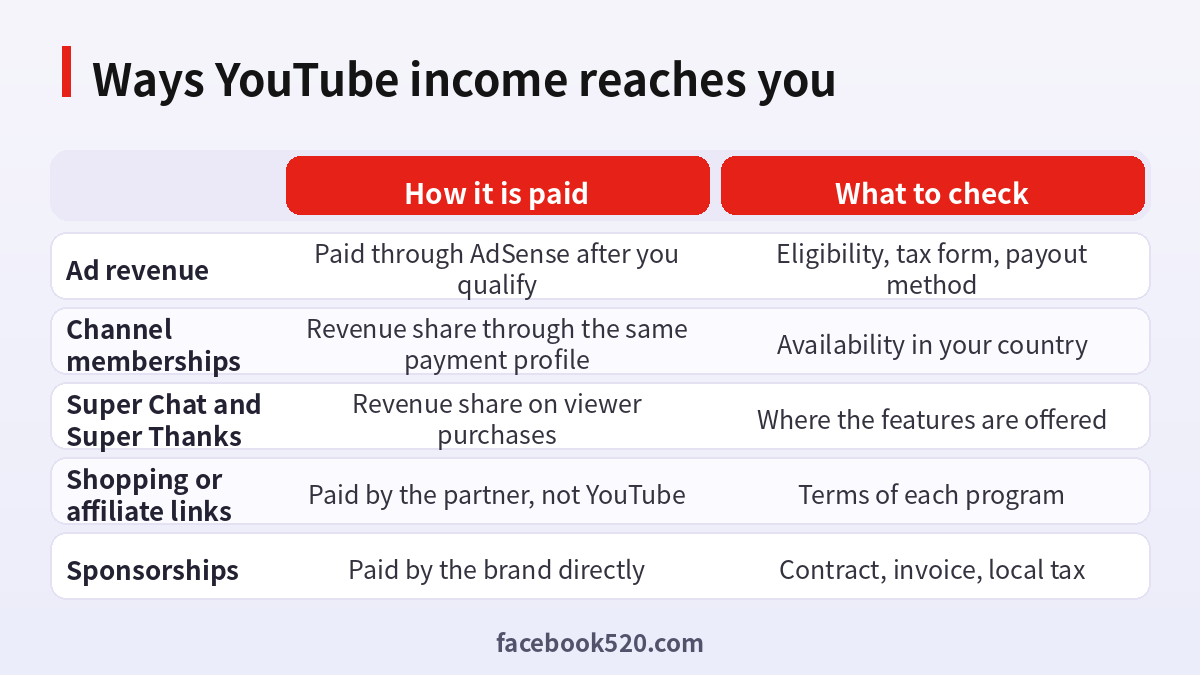
Ways income reaches you
| Source | How it is paid | What to check |
|---|---|---|
| Ad revenue | Paid through AdSense after you qualify | Eligibility, tax form, payout method |
| Channel memberships | Revenue share through the same payment profile | Availability in your country |
| Super Chat and Super Thanks | Revenue share on viewer purchases | Where the features are offered |
| Shopping or affiliate links | Paid by the partner, not YouTube | Terms of each program |
| Sponsorships | Paid by the brand directly | Contract, invoice, local tax |
Step one: qualify for the Partner Program
Monetization is not automatic. The program has requirements around channel size and viewing activity, plus rules about the content you publish and the security of your account. These thresholds are updated from time to time and differ by feature, so read the current conditions in your Studio dashboard, where YouTube shows exactly how close you are. Turn on two step verification, follow community guidelines and avoid copyright strikes, because a restricted channel cannot be accepted. When you meet the conditions, apply through the monetization tab and wait for the review.
Step two: link an AdSense account
Once accepted, you are asked to connect an AdSense account. If you already have one, you can link it. If not, sign up through the prompt in Studio. During sign-up you enter your name and address, choose your country and accept the terms. Take care here: the country and the name you enter are tied to the payment profile and are not easy to change later. Use your legal name as it appears on your bank account, and enter the address where you can receive postal mail.
Step three: verify address and identity
AdSense checks that the person receiving money is real and reachable. In many cases a PIN is sent by post to your address and you enter it online. Some creators are asked to confirm their identity with a document. Delivery times vary, and post can take weeks, so start early. If the letter never arrives, you can request another after a waiting period. Do not request many in a row, and make sure the address is complete with the postal code. A mismatch between your name and address records is a frequent cause of delays.
Step four: add tax information
YouTube and AdSense ask for tax details, which determine whether any tax is withheld from payments. For creators outside the country where Google reports earnings, a form is submitted online, and it asks for your country of residence, a tax identifier where you have one and a declaration. Tax rules differ widely and this guide offers no advice on them. Read the explanations in the form carefully, use accurate details and consider asking a local accountant, since the form influences how much reaches your bank.
Step five: choose a payout method
AdSense offers payout methods that depend on your country. Commonly these include a direct bank transfer, and in some places other options. When you add a method, the system may send a small verification deposit or ask you to confirm details. Enter the account holder name exactly as the bank has it, with the correct account number and routing or SWIFT details as requested. Choose a currency your bank accepts to receive without extra conversion if possible.
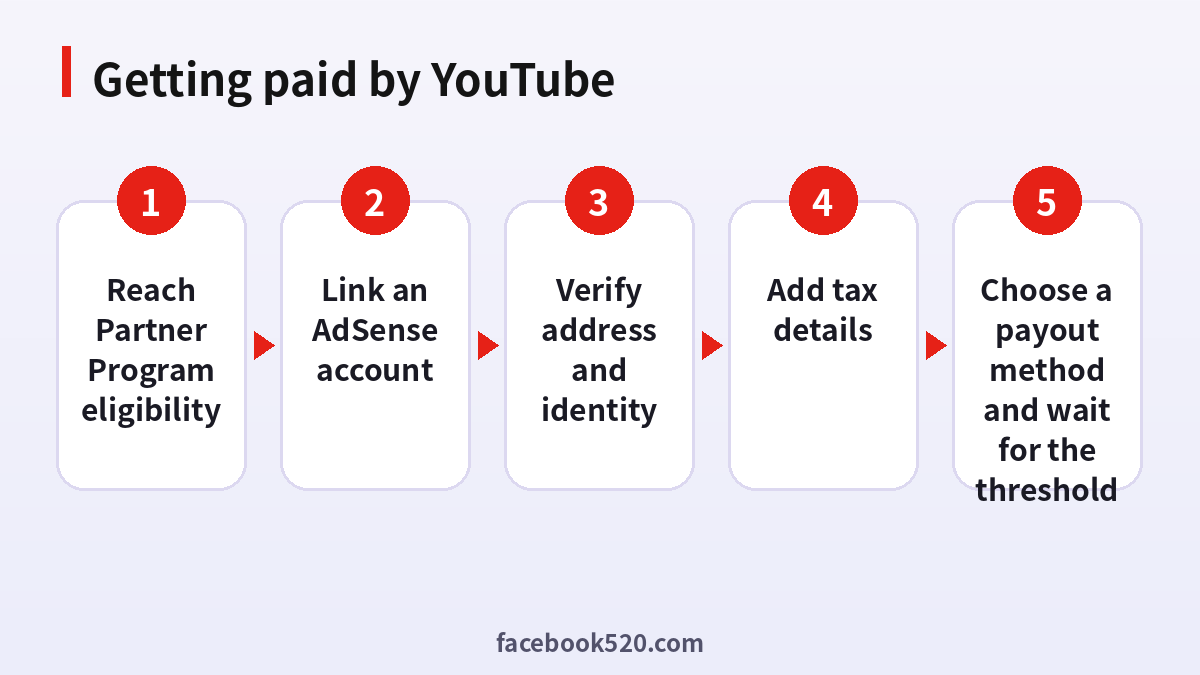
The whole process in order
- Reach Partner Program eligibility. Check the monetization tab in Studio and secure the account.
- Link an AdSense account. Create or connect it with your legal name and a postal address you can receive mail at.
- Verify address and identity. Enter the PIN from the letter or complete any identity check requested.
- Add tax details. Submit the tax form with accurate information for your country.
- Choose a payout method and wait for the threshold. Add and confirm your bank details, then let earnings accumulate until the first payment is released.
A timeline to expect
Most creators underestimate how long the first payment takes. Acceptance into the program can take days or weeks after you apply. The postal PIN can take several weeks to arrive and sometimes needs a second request. After everything is verified, the balance still has to reach the payment threshold, and the first payment is issued only in the next scheduled window after that. Realistically, plan for several months between becoming eligible and seeing money in the bank, and avoid taking financial commitments that assume earlier payment.
Keeping records for the first payment
Save screenshots of the payment profile, the tax form confirmation, the PIN letter and the bank verification. Keep a note of the bank account and currency chosen, and the date of each change. If a payment is delayed, these records let you describe the situation precisely when contacting support. Also keep your own income log with dates and amounts so that you can reconcile what AdSense reports with what your bank shows, including fees and conversion differences.
Using a business structure for payouts
Some creators register a company or sole proprietorship to receive income, particularly if they plan to hire help or sign sponsorship deals. The payment profile can be set up as an individual or a business, and the name must match the tax and bank details. Choosing a business profile affects the tax form you submit and the bank account you can use. Discuss it with an accountant before deciding, and do not change the type casually after you have started earning, since it can trigger new verification.
Understanding the payment threshold and timing
AdSense pays once your accrued balance passes a payment threshold, which is set per currency. Until then, the balance carries over month to month. After the month closes, earnings are finalized and the payment is released in a scheduled window, typically in the following month, and then takes a few working days to appear at your bank. Delays can come from a missing PIN, an incomplete tax form, a payment hold or a bank issue. Check the payments section of AdSense to see the status and any messages.
Receiving payments overseas: the practical issues
When you live outside the United States, three things matter. First, the currency: your payout may be converted, and banks apply their own exchange rate and fees. Second, the transfer route: some banks deduct an intermediary fee when receiving an international transfer, so the arriving amount can be a little lower than the one shown. Third, local rules: your country may have requirements about reporting foreign income. Ask your bank which currency and account type are best for receiving foreign transfers, and whether a dedicated foreign currency account is useful.
Problems and fixes
| Problem | Likely cause | What to try |
|---|---|---|
| No payment this month | Threshold not reached | Wait; balance rolls over |
| Payment on hold | Missing PIN or tax form | Complete the requested step |
| Bank rejected transfer | Name or account mismatch | Correct details and re-verify |
| Less money arrived | Fees or exchange rate | Compare with bank statement and fee schedule |
| Cannot change country | Profile locked | Contact AdSense support for guidance |
Does YouTube pay for AI videos
Creators often wonder whether videos made with artificial intelligence earn money. The platform’s rules focus on whether content is original, adds value and complies with policies about reused, repetitive or misleading material, and it has disclosure requirements for realistic synthetic content. Videos that are mass produced with little added value risk being rejected for monetization. Videos with real creative input, such as your own script, voice or editing, are treated like any other content. Read the current monetization policies, because wording is updated.
Do you have to pay to subscribe to a channel
No. Subscribing to a channel is free, and so is watching most content. Money only enters when a viewer chooses to buy something: a channel membership, a Super Chat during a live stream, a purchase from a shop or a Premium subscription that removes ads. Free subscribing means you can build an audience without charging anyone. That also explains why subscribers alone do not equal income, and why your payout depends on watch time and ads, not simply on subscriber counts.
How Premium viewers fit into revenue
When a viewer pays for YouTube Premium, part of the revenue is shared with creators based on how much those viewers watch their content. You do not need to do anything special to receive it, and it appears in your analytics under revenue sources when applicable. It is another reason to focus on viewing time and viewer satisfaction rather than on any single stream of income.
Reading the earnings reports
Studio and AdSense both show revenue, but in slightly different ways. Studio analytics break earnings down by video, country and source, and are best for understanding what works. AdSense shows the payment profile, the balance and the payment history, and is the place to check status. Numbers in Studio can be estimates that are adjusted when invalid activity is removed, so the final payment sometimes differs a little from what you saw during the month. Compare the two views at month end before you assume anything is missing.
Common mistakes to avoid
Creators lose time by entering a nickname rather than a legal name, by using an address that cannot receive post, by ignoring emails from AdSense, by switching bank accounts right before a payment date, or by publishing content that breaks policy and loses monetization. Another mistake is sharing the login with an editor who then changes payment details. Check the account emails weekly and keep every setting accurate from the first day.
Do not pay anyone to get you paid
Listings promise monetized channels for sale, AdSense accounts for rent or quick approval for a fee. These are traps. Payment details are tied to a legal identity, the platform can freeze a payment profile that does not match, and giving someone control of your channel or bank details can lead to theft. The only legitimate route is to meet the conditions and apply yourself. Helpful background on the topic is available at YouTube and on the main YouTube page.
Keeping the payment profile safe
Protect the Google account behind the channel with a unique password and two step sign-in. Do not share the login with editors or managers; invite them with a limited role instead. Keep your bank details out of chat messages. Review the payment profile for unexpected changes of address or bank account. If you ever receive a message asking you to confirm bank details through a link, go to the AdSense site by typing the address yourself.
Planning income beyond ads
Relying on one stream is risky because ad rates vary with season and topic. Consider memberships for loyal viewers, a small digital product, affiliate links where the program allows and sponsorships negotiated directly. Keep clear records of each income source, the date and the invoice, so that your tax filing is simple. A small spreadsheet with columns for source, amount, currency and date is enough.
Three short examples
A language teacher abroad. Nadia qualifies, links AdSense, waits for the postal PIN, submits the tax form and adds a bank account in her local currency. Her first payment arrives after she crosses the threshold, a couple of months later.
A gaming creator. Tomas finds a payment on hold. The cause is an unfinished tax form. He completes it, and the hold clears at the next cycle.
A small brand. A shop owner is offered a monetized channel for sale and declines. She builds her own channel and uses sponsors and her own products while she works toward eligibility.
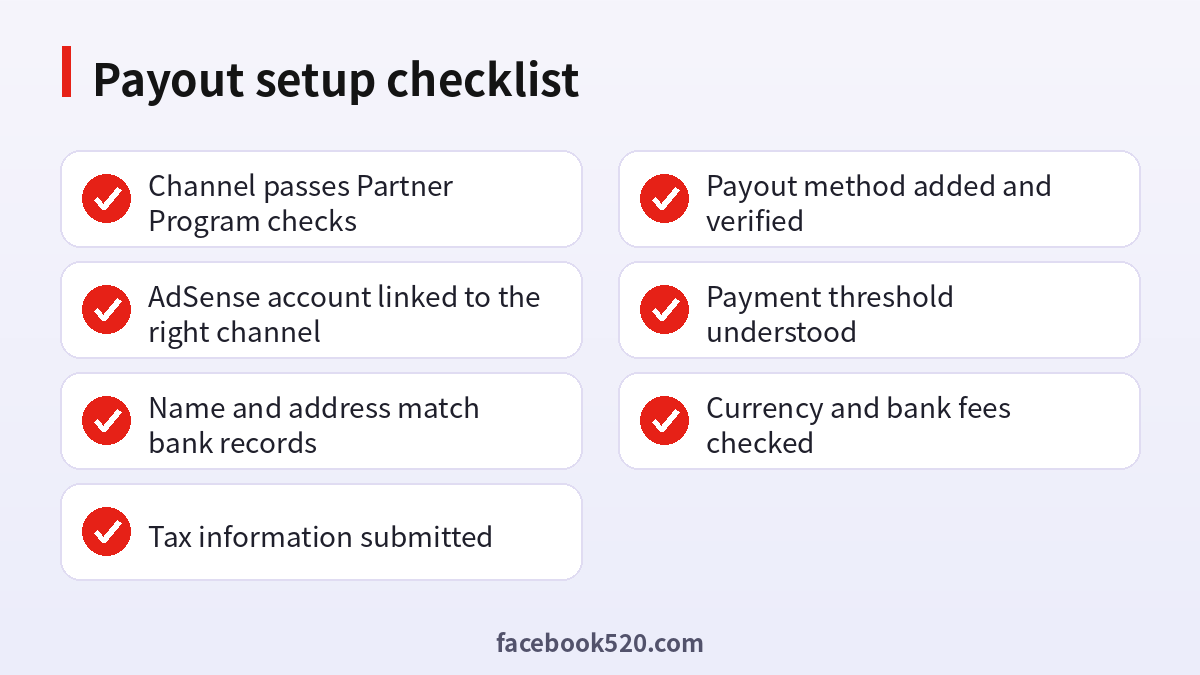
Payout setup checklist
- Channel passes Partner Program checks
- AdSense account linked to the right channel
- Name and address match bank records
- Tax information submitted
- Payout method added and verified
- Payment threshold understood
- Currency and bank fees checked
Questions people ask
How can I get payment from YouTube?
Qualify for the Partner Program, link an AdSense account, verify your address, submit tax details, add a payout method and wait until earnings pass the payment threshold.
Is there a minimum amount before I am paid?
Yes. AdSense pays after the balance reaches a threshold that depends on currency. Until then it rolls over to the next month, so small channels may wait several months for their first payment.
When does the money arrive?
Earnings for a month are finalized after it ends and paid in a later scheduled window, then take a few working days to reach your bank.
Can I get paid outside the United States?
Yes, in supported countries. Available methods and currencies depend on where you live, so check the AdSense payment options for your country.
Why was my payment on hold?
Common reasons are a missing address PIN, an incomplete tax form or a mismatch in bank details. The payments section shows the required action.
Does YouTube pay for AI generated videos?
Only if they meet monetization rules on originality and value. Mass produced or misleading content is likely to be rejected.
Do I have to pay to subscribe to a channel?
No. Subscribing is free. Paid options are memberships, live stream purchases and Premium.
Do I need an AdSense account?
For ad revenue and several other features, yes. You link it after your channel is accepted into the program.
Can someone else receive the money for me?
The payment profile belongs to the person or business named on it. Use a legitimate arrangement with your own accounts instead of giving others control.
Why is the amount at my bank lower than the AdSense figure?
Intermediary bank fees, exchange rates or withholding can reduce the final amount. Compare your statement with the payment report.
Can I change my payout bank?
Yes, in the payment settings, though changes may need re-verification and can delay the next payment.
Is it safe to buy a monetized channel?
No. Eligibility and payment profiles are tied to the original owner, and such deals often end in a loss.

