


Buy Google Ads Accounts (2026): Agency and Verified Offers, Suspension Risks and Safer Official Setup
Searches for “buy Google Ads accounts” usually come from advertisers who hit a suspension, need a higher spending limit, want an agency manager account (MCC), or believe a “aged verified” account will approve sensitive verticals faster. Forums and Telegram channels sell “warm” accounts, agency accounts, and logins that supposedly already passed identity checks. This guide explains what those products are, why Google’s systems often suspend them after a handoff, how to spot scams, and how to set up advertising the official way. We do not list black-market prices; they are unverifiable and irrelevant next to the cost of a banned domain or stolen billing profile. For parallel risks on mailbox logins, see our companion piece on buying old Gmail accounts.
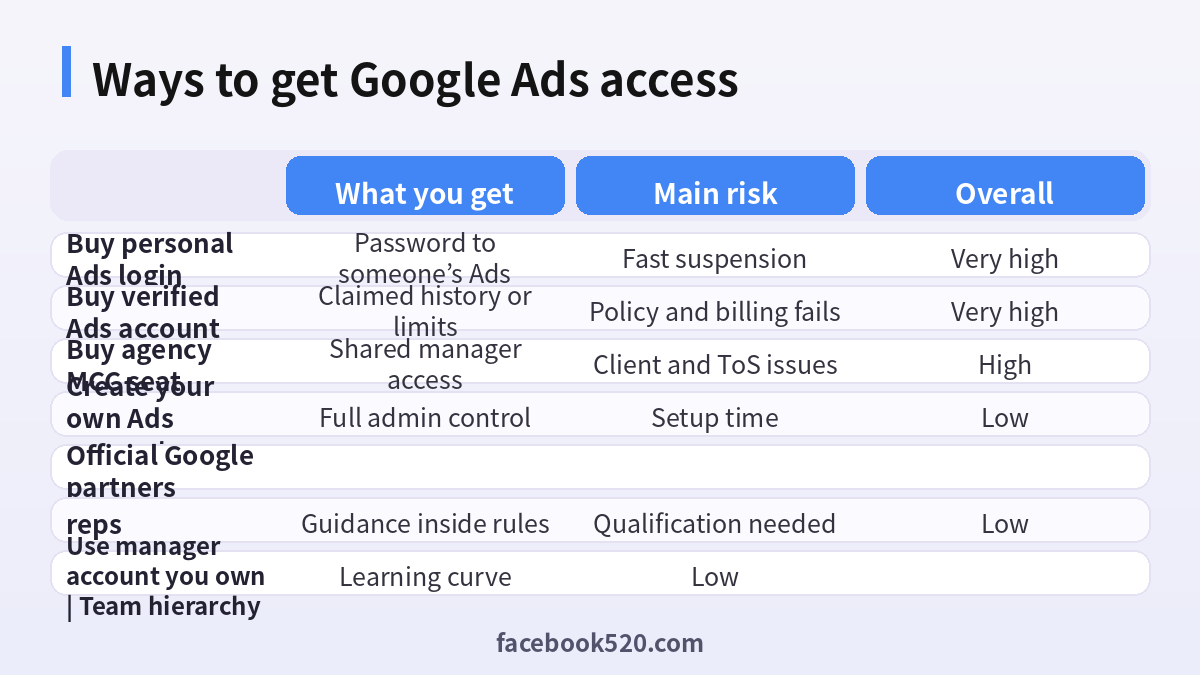
What sellers mean by verified, aged and agency Google Ads accounts
Marketplace language mixes several different products:
- Personal Google Ads accounts are standard advertiser accounts tied to a Google login.
- Verified accounts may mean identity verification was completed, a payment profile was approved, or simply that the seller logged in once.
- Aged accounts claim months of history and previous spend. History does not transfer cleanly when ownership signals change.
- Agency accounts / MCC (Manager accounts) sit above client accounts and are marketed as a way to run many accounts under one roof.
- Whitelisted or niche accounts supposedly clear gambling, supplements or other restricted categories. Those claims are frequently false and dangerous.
Google’s own product names are Google Ads accounts, Manager accounts and payment profiles. Anything sold as a magic approval ticket should be treated with extreme caution.
Why advertisers look for accounts for sale
Common triggers include:
- A previous account was suspended and the team wants a replacement overnight.
- A payment profile is limited and someone promises a higher limit for a fee.
- A startup wants to skip business verification paperwork.
- An agency wants ready-made MCC structure without creating it under its own company.
Each of these problems has an official path: appeal, fix policy issues, complete verification, or create a Manager account under your domain. Buying a login usually recreates the same failure with worse documentation for the next appeal. Our deep dive on Google Ads account suspensions explains how to read notices and write an honest appeal when the account is actually yours.
What you actually receive when you buy
Delivery is often a Google email, a password and screenshots of Ads dashboards. Behind the scenes you may be dealing with:
- A login still recoverable by the seller through the original phone or backup codes.
- A payment profile that uses stolen cards or shared billing instruments.
- Conversion tags and audiences still pointing at the seller’s properties.
- Linked YouTube channels or Merchant Center accounts you cannot fully control.
- A Manager account that was already flagged, so every new client account under it inherits risk.
You do not receive a notarized transfer. Google expects the advertiser of record to match the business paying for ads.
Google policies and why bought accounts get suspended
Google Ads policies cover prohibited content, misrepresentation, payment requirements and circumvention of systems. Creating accounts to evade prior suspensions, sharing credentials against the Terms of Service, and faking business identity are common suspension triggers. Typical sequence after purchase:
- New device or location triggers a review of the Google Account.
- Billing or identity verification fails because documents do not match.
- The Ads account is limited or suspended for circumvention or inaccurate information.
- Linked domains, payment profiles or Manager trees can be impacted.
- Appeals fail when you cannot prove you were the legitimate owner from the start.
If you need a business presence on Google beyond ads, start from a clean Google business account setup that you control end to end.
The risks that matter most
Immediate suspension. Circumvention and unexplained ownership changes are heavily automated. Many bought accounts die within days of the first campaign.
Billing fraud exposure. If the payment method was stolen, you can become part of a fraud investigation even if you thought you were only renting a dashboard.
Domain and brand collateral damage. Suspensions can stick to the Google Account, payment profile, website and sometimes related accounts.
Client liability for agencies. Running client budgets through a purchased MCC can violate contracts and leave clients without access when the seller reclaims admin.
No reliable appeal story. Appeals work best when you can show a continuous ownership timeline. A chat purchase receipt is not that timeline.
Data leakage. Prior owners may retain link access, notification emails or API tokens.
How to recognize scam offers
- Guaranteed approval for previously banned domains.
- Prices that scale with “spending limit” as if limits were a transferable coupon.
- Crypto-only payment and pressure to buy during your suspension panic.
- Sellers who refuse a live screen share unless you log into your own Manager first.
- Screenshots without the ability to change the password and recovery factors to yours.
- Claims that Google employees sell whitelists through middlemen.
| Warning sign | What it often means | What to do |
|---|---|---|
| Guaranteed niche approval | Policy evasion pitch | Refuse |
| Limit sold as a product | Fabricated or shared billing | Walk away |
| Crypto only | No recourse | Do not pay |
| Needs your MCC admin | Takeover attempt | Stop |
| Instant replacement warranty | High churn farm | Avoid |
| No business documents | Cannot survive verification | Create your own |
Safer official setup for Google Ads
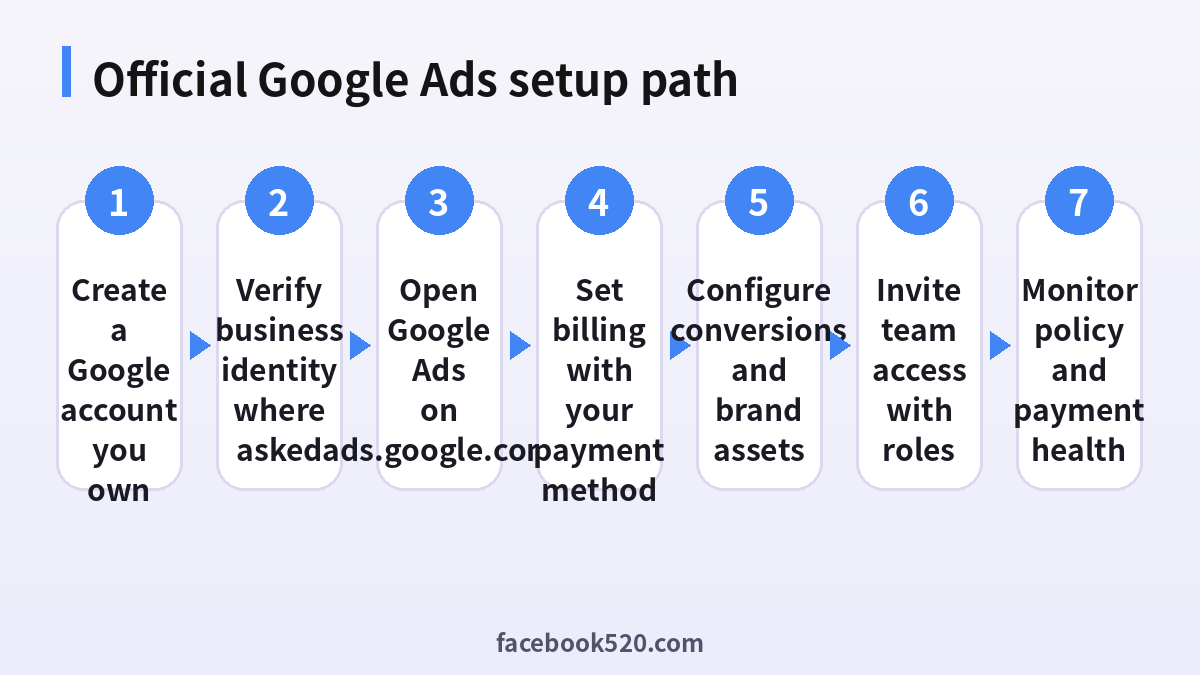
Build the stack under identities you own.
- Create or use a Google Account that belongs to you or your company, with recovery factors you control.
- Confirm your business information early when Google asks for verification. Keep company registration docs ready.
- Open Google Ads at the official site and create a new account with the correct time zone and currency for your billing entity.
- Add a payment method issued to the business. Avoid personal cards for company spend when possible.
- Install conversion tracking correctly before scaling budgets.
- Invite colleagues through account access roles instead of sharing one password.
- If you manage multiple clients, create a Manager account under your agency domain and link client accounts with permission—not by buying a used MCC.
This takes longer than buying a password and produces an account you can actually defend in an appeal.
Agency and Manager accounts explained without the hype
A Manager account (formerly MCC) is an official Google feature for agencies and large advertisers. You can create one for free under your own Google Account hierarchy. What sellers market as “agency accounts” is often either:
- A Manager account they still administer, or
- A personal Ads account with a cosmetic label.
If you need manager functionality, create it yourself, verify your agency business, and link clients the supported way. Purchasing a seat on someone else’s Manager ties your clients to a third party who can remove you.
Verified identity versus “verified account” listings
Google may ask for business information, government ID or domain ownership proof depending on region and risk signals. Completing those checks on an account you own is normal. Buying a listing labeled verified does not transfer the underlying legal entity. When Google re-checks, mismatched documents suspend the account. There is no legitimate shortcut that replaces accurate business data.
What to do after a legitimate suspension
If your own account was suspended, buying a replacement is the behavior Google’s systems are designed to catch. Instead:
- Read the email and the Policy Manager notice carefully.
- Fix the root policy or billing issue on the landing pages and creatives.
- Submit one honest appeal with documentation.
- Wait for the review instead of multiplying accounts.
- Only create a new account when Google’s guidance or your counsel says it is appropriate—and never to hide the same violating content.
Details and appeal hygiene are covered in Google Ads suspensions in 2026.
How healthy Ads accounts earn trust
Trust accumulates through consistent, policy-safe behavior:
- Stable billing that clears without repeated declines.
- Landing pages that match ad claims.
- Gradual budget increases rather than overnight spikes on brand-new setups.
- Accurate business names and customer support contacts.
- Team access via roles, not shared passwords.
- Clean links between Ads, Analytics, Merchant Center and YouTube properties you own.
None of these require a marketplace middleman.
If you already bought a Google Ads account: damage control
- Assume the seller can still enter. Change the Google Account password only if recovery is fully yours; otherwise prepare to abandon it.
- Remove stored payment methods you care about.
- Export campaigns if needed for reference, then rebuild under an account your company owns.
- Rotate API tokens and unlink properties that matter.
- Keep evidence for payment disputes.
- Do not move client budgets back onto the purchased login.
Which option fits which situation
| Goal | Better path | Why |
|---|---|---|
| First campaigns for your brand | New Ads account you own | Clear ownership |
| Agency multi-client | Your own Manager account | Client control |
| After a suspension | Fix and appeal | Avoids circumvention flags |
| Higher verification needs | Complete official business checks | Durable approval |
| Team collaboration | Role-based access | No password sharing |
Payment profiles, thresholds and why “limits” are not a product
Google Ads spending ability depends on billing history, payment success, account standing and risk models. Sellers who productize a “$10k limit” are selling a temporary state, not a transferable coupon. When the payment profile changes or a new device appears, limits reset or the account enters review. Healthy limits grow when invoices clear, chargebacks stay rare and policy compliance stays clean on an account your finance team recognizes on the bank statement.
Linking Merchant Center, YouTube and Analytics
Serious advertisers connect Google Ads to Merchant Center feeds, YouTube channels and Analytics properties. Those links encode ownership. A bought Ads login that does not control the related properties creates broken conversion paths and disputed brand channels. If you are acquiring a real business, use official ownership transfer processes for domains, channels and merchant accounts rather than a password drop in a messenger app. For brand channels specifically, password sales have the same failure modes described in guides about buying other platform assets: the platform can reverse access when the original owner proves control.
Circumvention patterns Google already knows
Common circumvention patterns include creating many Ads accounts under slight email variations, reusing landing pages that were just suspended, and hopping to a purchased “clean” account within hours of a ban. Automated systems correlate domains, payment instruments, creative assets and device graphs. Buying an account does not erase those correlations; it often strengthens them because the timing looks exactly like evasion. The durable fix is to change the business practices that caused the first suspension.
Working with official Google representatives and partners
Advertisers with qualifying spend sometimes receive guidance from Google sales or certified partners. That help still operates inside policy. Nobody legitimate will sell you a backdoor approval for content that violates advertising rules. If a stranger claims insider whitelist access, treat it as a scam. Choose partners who improve measurement, creative testing and feed quality on accounts registered to your company.
Budget pacing on a brand-new official account
New advertisers sometimes buy accounts because a fresh official account starts with lower daily ability to charge. The constructive response is to pace budgets, fix conversion tracking, improve Quality Score style landing relevance, and let billing history accumulate. Spamming multiple bought accounts to force volume usually ends with correlated suspensions. Measure learning-period performance honestly instead of treating account shopping as media buying.
Documentation pack for future appeals
Keep a folder with business registration, domain WHOIS or registrar proof, billing statements, creative change logs and access role screenshots. If Google ever reviews the account, that pack shortens the conversation. Marketplace purchase chats do not belong in that folder because they undermine the claim that you operated the account as the genuine advertiser from day one. Build documentation while campaigns are healthy, not only after a suspension email arrives.
Sensitive verticals and “pre-approved” myths
Gambling, healthcare, finance and political advertising face extra restrictions. No reputable channel sells a guaranteed pre-approval Google Ads account for those verticals. Compliance means certifications, landing page disclosures and regional licenses where required. Buying a so-called whitelisted login is a fast way to lose domains and payment profiles together. Speak with counsel and follow Google’s vertical documentation instead.
When a real business acquisition includes Ads history
Acquiring a company that already runs Google Ads is different from buying a password in a chat. In a real acquisition, legal ownership of the domain, legal entity and contracts changes hands, and access should be transferred through Manager linking, new admin invitations and updated billing profiles. Require the seller to remove personal recovery on company Google Accounts, rotate passwords under your watch, and document every linked property. If the only transfer method offered is a shared password without corporate paperwork, you are not buying a business asset—you are buying risk.
Frequently asked questions
Is it allowed to buy a Google Ads account?
Sharing credentials and buying accounts to circumvent enforcement violates Google’s terms and commonly leads to suspension.
Do aged Google Ads accounts approve faster?
Not after a risky handoff. Fresh ownership signals and prior circumvention patterns often trigger reviews that wipe the supposed advantage.
What is an agency Google Ads account?
Usually a Manager account. Create one officially under your business instead of buying access from a stranger.
Can a verified Ads account be transferred?
Not as a consumer product. Business verification is tied to the entity and documents Google reviewed.
Why was my purchased account suspended so quickly?
Typical causes include device change, payment mismatch, prior farm flags, or detection of circumvention after a previous ban on related assets.
Will buying an account fix a banned domain?
No. Fix the site and policy issues. Reappearing with the same violating content on a new account makes outcomes worse.
Is renting an Ads account safer than buying?
No. Credential sharing still breaks control and policy expectations.
Can the seller take the account back?
Yes, if they retain Google Account recovery factors or Manager admin rights.
Should agencies put client cards on bought accounts?
Never. Use client-owned billing profiles linked through proper access.
What if I already paid?
Dispute the payment if appropriate, secure your own Google Accounts, and rebuild ads under official ownership. See also why old Gmail logins fail for the same recovery reasons.
How do I set up Google Ads the right way for a new business?
Start from a Google Account and business profile you control, then follow a structured Google business account guide before scaling spend.
Does YouTube channel history help if I buy the Ads login?
Channel and Ads links still need coherent ownership. Buying either side as a password is brittle; official transfers and Brand Accounts are the supported tools when a real business sale occurs.
Conclusion
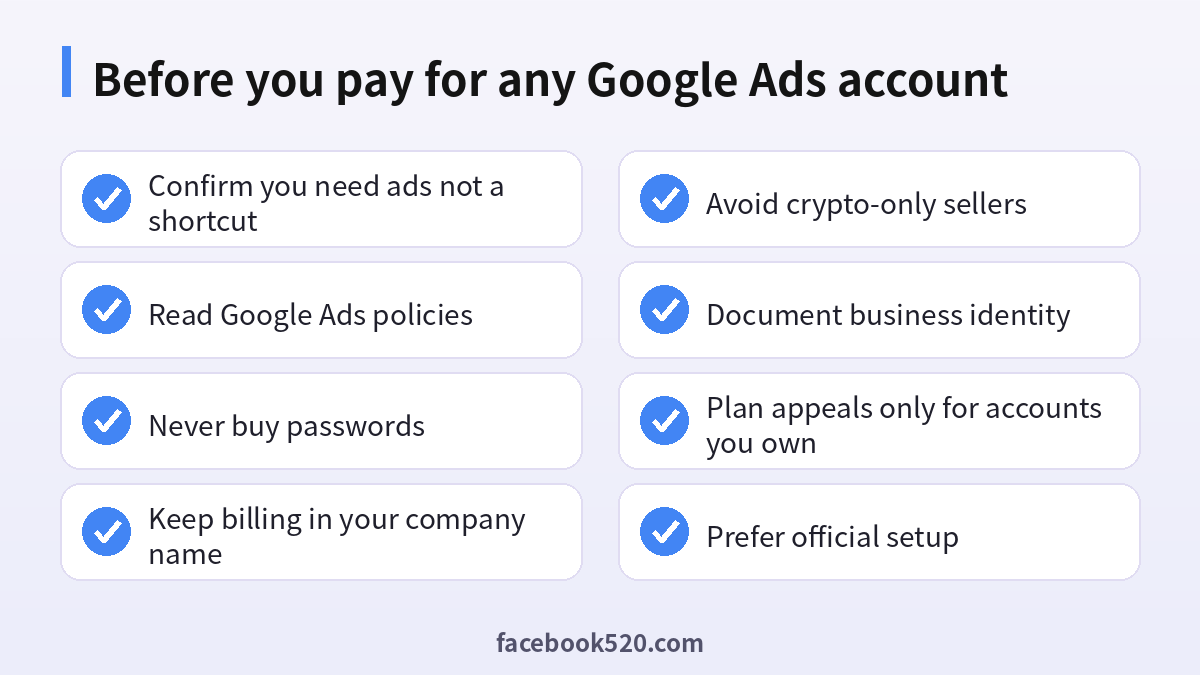
Buying Google Ads accounts—personal, “verified,” aged or agency-branded—trades a short illusion of speed for suspension risk, billing exposure and appeal dead ends. Google expects advertisers to operate under identities and payment profiles they can prove. Create your own Ads and Manager accounts, complete verification honestly, fix suspensions with real policy changes, and invite teammates through roles. That is the path that still works after the first invoice clears and after the first policy review arrives.

