


Claude Code Account 2026: How to Sign Up, Which Plan to Choose, Login, Usage Limits and Fixes
Claude Code is Anthropic’s coding assistant that runs in your terminal, understands your whole project, edits files, runs commands and helps you ship features faster. There is no separate “Claude Code account”: you use a normal Claude account, or an Anthropic Console account for pay-as-you-go API billing, and sign in from the command line. This guide explains how to create the right account in 2026, which plan to pick, how to log in, how the usage limits work and how to fix the most common problems. Prices and limits change, so always confirm them on the official Anthropic pricing page before you pay. For a price-focused view, see our Claude Code pricing guide.
What a Claude Code account really is
When people search for “claude code account” they usually mean one of three things. The first is a Claude subscription account: you sign up at claude.ai with an email address or a Google account, subscribe to Pro or Max, and Claude Code is included in that plan. The second is an Anthropic Console account, where you create an API key and pay for the tokens you use. The third is a company account on a Team or Enterprise plan, where an administrator assigns seats. All three use the same Claude Code tool. The difference is only how you authenticate and how you are billed, which matters because the usage rules are different for each.
Which option should you choose
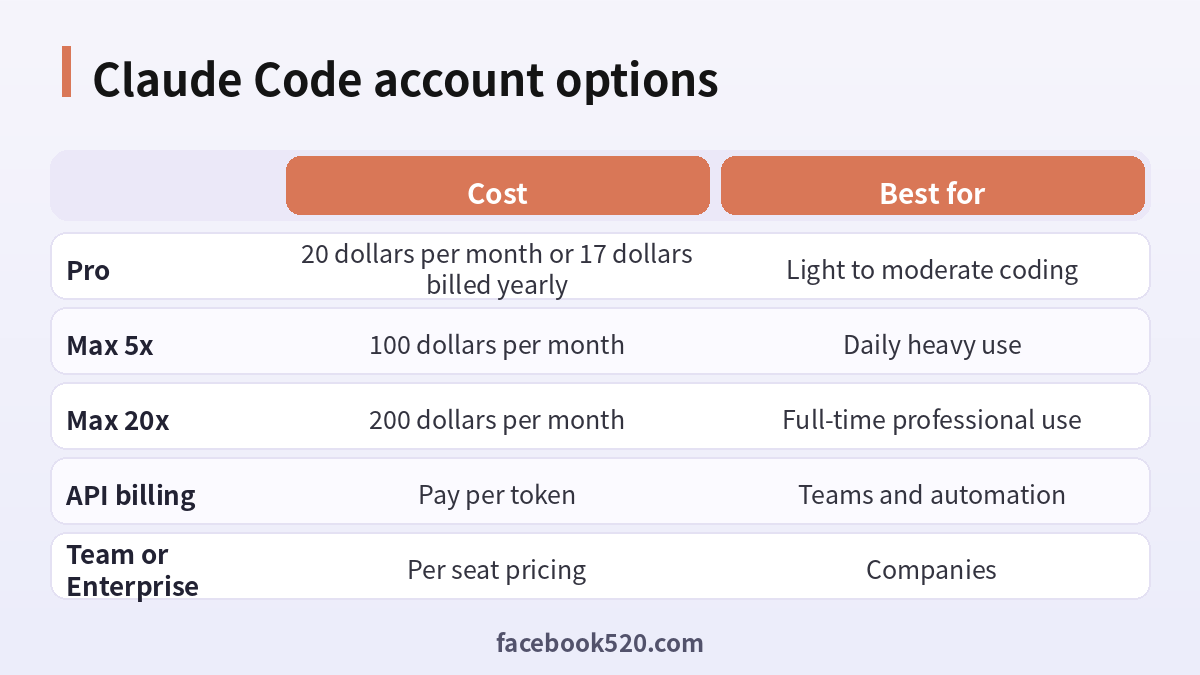
If you code a few hours a week, Claude Pro at 20 dollars per month, or about 17 dollars per month when billed annually, is the usual starting point. If you use Claude Code every day for hours at a time, the Max plans at 100 dollars (5x) and 200 dollars (20x) give far more room. If you build automations, CI jobs or internal tools, API billing is more predictable because you pay for tokens used and can set a hard budget. Teams generally pick Team or Enterprise seats so that billing, access and security settings are managed in one place.
| Option | Cost | Best for |
|---|---|---|
| Pro | 20 dollars per month, or 17 dollars billed yearly | Light to moderate coding |
| Max 5x | 100 dollars per month | Daily heavy use |
| Max 20x | 200 dollars per month | Full-time professional use |
| API billing | Pay per token | Teams and automation |
| Team or Enterprise | Per seat pricing | Companies |
How to sign up step by step
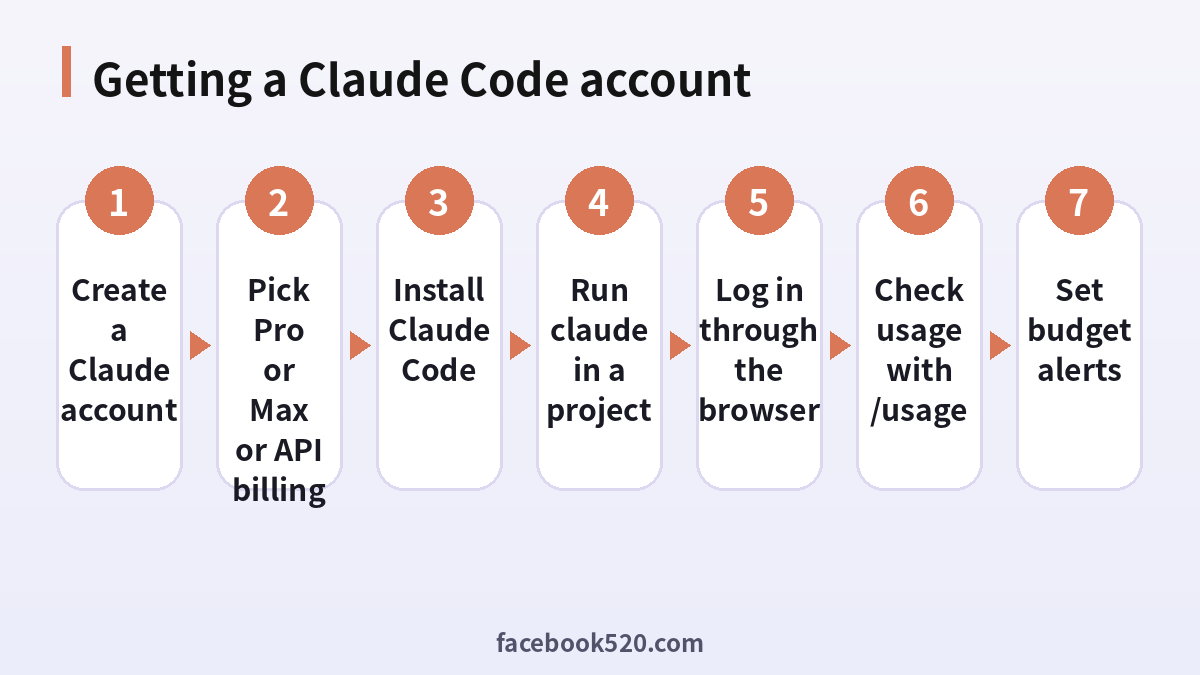
The process takes only a few minutes. Follow these steps in order.
- Go to the official Claude website and choose Sign up.
- Register with your email address or an existing Google account, and confirm the verification code that Anthropic sends.
- Open Settings and turn on any available extra security, such as a strong unique password.
- Choose a plan under Billing. Pick Pro or Max if you want Claude Code included, or open the Console if you prefer API billing.
- Enter your payment details. Cards are the standard method; local availability of other payment methods depends on your country.
- Install Claude Code by following the current instructions on the official documentation page.
- Open a terminal inside your project and run the command claude. A browser window opens so you can approve the login.
After the browser approval, the terminal confirms that you are signed in and you can start giving instructions. If you use the API route, you provide your key through the environment or the login prompt instead.
Availability by country
Claude is not offered in every country. Anthropic publishes a list of supported countries, and signing up from an unsupported location, or using a phone number or payment card from one, can be rejected. Do not try to bypass regional rules with tricks that violate the terms of service, because that is a common reason accounts are suspended. If your country is supported, you can use the normal flow. If it is not, wait for official expansion or use a supported tool from a legitimate arrangement, such as your employer’s account.
Logging in and out
To log in, run claude and follow the browser prompt. If you want to switch accounts, use the logout command inside the tool and sign in again. On a remote server without a browser, you can usually copy the login URL into a browser on your own computer and paste the returned code back into the terminal. Keep in mind that an API key set in your environment can take priority over your subscription login, so if you are being charged by token when you expected your subscription to cover the work, check whether a key is configured.
Understanding usage limits
Subscription plans do not give unlimited use. Usage is measured in sessions that reset on a rolling basis, plus an additional weekly limit. Heavier tasks, large codebases and long conversations consume your allowance faster. Inside Claude Code you can run the usage command to see how much of your allowance remains and when it resets. If you hit a limit, you can wait for the reset, move to a higher plan, or, depending on your plan, enable extra usage that is billed at API rates. Because the exact numbers change, treat any figure from an unofficial source with caution.
Tips to save usage
Keep each session focused on a single task and start a new one when the topic changes. Use a project memory file with concise rules instead of repeating instructions. Ask for plans before large changes so you do not spend allowance on the wrong direction. Avoid pasting very large logs; give the relevant section. Review the changes in smaller steps and commit often, so you can undo anything you do not like.
Security basics for your account
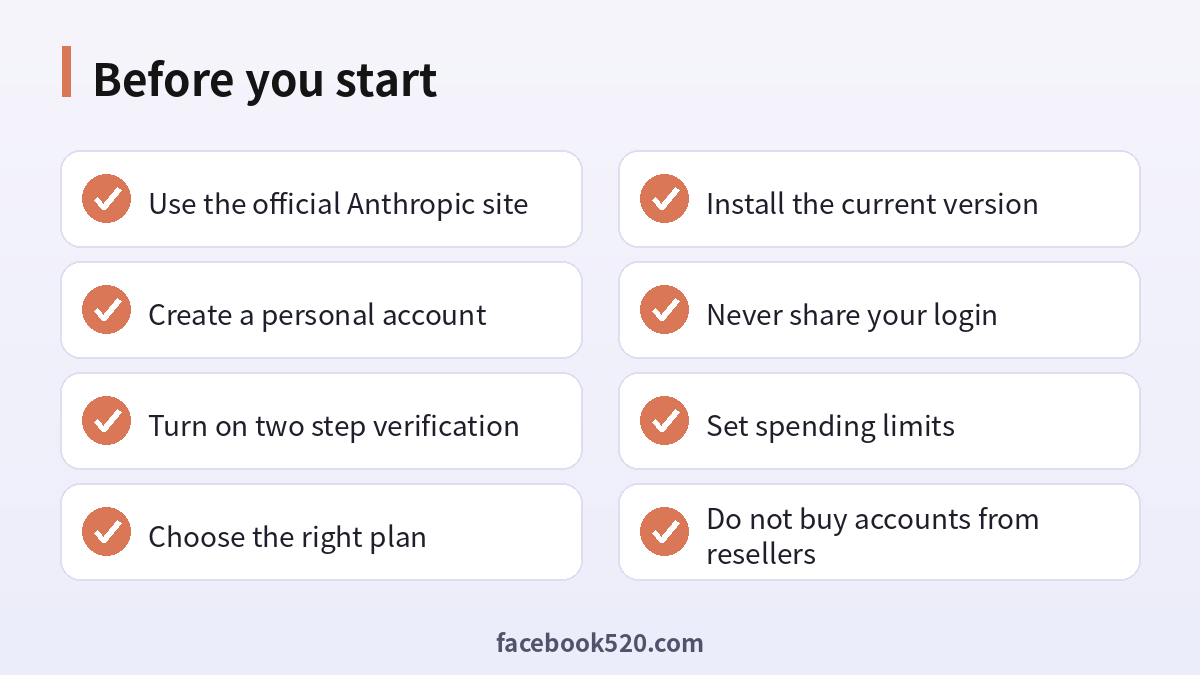
Your account has access to your code, so protect it. Use a unique password, turn on multi-factor authentication where offered, and never share your login with colleagues or friends. Sharing or reselling access violates the terms and can lead to suspension. Be careful about what you allow the tool to run: review commands before approving, and keep secrets such as API keys outside the files the assistant reads. Rotate any key that you pasted into a prompt by mistake.
Why you should not buy accounts from resellers
Some marketplaces and social groups sell “cheap Claude Code accounts” or shared logins. These offers are risky. The accounts may be created with stolen cards, they can be banned without warning, you have no refund path, and the seller can read your prompts and code. If you want to pay less, use legitimate options: start on Pro, choose annual billing, use the free tier of Claude to evaluate the models, or ask your employer or school whether they provide seats. See also our guide on what to check before buying Claude Code access.
Troubleshooting common problems
If the browser does not open, copy the login URL manually. If login loops, clear the old session, log out, and sign in again with the same email you used for the subscription. If you see a message that your credit balance is too low, you are probably authenticating with an API key rather than your subscription, so read the explanation in our credit balance guide. If your card is declined, confirm that international online payments are enabled, that the billing address matches the card, and try another card. If the tool says your plan does not include Claude Code, check that you are signed in with the right account.
Recognizing scams and fake offers
Scammers often imitate well-known brands such as Claude Code. Typical signs are urgent messages, requests for passwords or verification codes, links to look-alike websites, promises of free upgrades or guaranteed results, and payment requests through unusual channels. Always type the official address yourself or use a saved bookmark, check the sender of every email and never pay through a link sent by a stranger. If you think you were tricked, change your password, review recent activity, contact your bank if money was involved and report the message to the platform.
A monthly review habit
Set a reminder once a month to review your Claude Code setup. Check your security settings, payment method, connected apps and notification preferences. If you pay for anything, compare the charge with what you actually used and decide whether to keep, change or cancel. Update your recovery details if you changed phone number or email. Delete old data you no longer need. Ten minutes a month prevents most surprises and keeps your costs and risks under control.
When to contact official support
Contact support when you have tried the basic fixes and the problem remains, when you see an unexpected charge, when you suspect your account was accessed by someone else or when you are locked out. Prepare the account email, the date and time of the problem, the exact message you saw and screenshots. Describe what you did step by step and what you expected to happen. Use only the contact methods listed on the official site and ignore anyone who offers to fix things for a fee through social media or private messages.
Troubleshooting checklist
If something does not work as expected with Claude Code, go through the basics in order before contacting anyone:
- Check your internet connection and try again on a different network.
- Update the app or refresh the page, then restart the device.
- Clear the cache or try a private browser window without extensions.
- Confirm that you are signed in with the correct account and email.
- Look for the exact error message and search the official help center for it.
- Wait a short time before repeating an action, since repeated attempts can trigger temporary limits.
- If nothing helps, collect screenshots and contact official support.
Helping family members and colleagues
If you are setting up Claude Code for someone else, such as a parent, a teenager or a coworker, guide them rather than doing everything silently. Explain why strong passwords and two-step verification matter, show them how to recognize suspicious messages and agree on who to ask before they click or pay for anything. For minors, follow age requirements and use the available parental or family controls. For teams, document who owns the account, who can approve spending and what to do when someone leaves.
Devices, apps and browsers
Use the latest version of the official app or a modern browser when working with Claude Code. Keep your operating system updated, install security patches and avoid rooted or modified devices, which weaken protection. Browser extensions can read pages you visit, so remove those you do not trust. On mobile, download apps only from official stores, review the permissions they ask for and turn off those that are not needed. Lock your device with a PIN or biometrics so that a lost phone does not become a lost account.
Keeping up with changes
Features, prices and rules around Claude Code change more often than most people expect. Follow the official blog, release notes or help center, and read the emails you receive about policy updates instead of deleting them. When a guide such as this one gives a number or a menu name, treat it as a starting point and confirm it on the official site. If a change affects you negatively, you can usually adjust your plan, settings or usage, so act early rather than waiting for a problem.
Official sources versus unofficial offers
When you search for help with Claude Code, you will find both official pages and third-party offers. The comparison below shows why it pays to stay with official channels.
| Aspect | Official source | Unofficial offer |
|---|---|---|
| Price | Clearly shown at checkout | Often unclear or too low |
| Support | Documented help channels | Unreliable or none |
| Account safety | Protected by the platform | Risk of bans and data theft |
| Refunds | Governed by published terms | Rarely honored |
| Updates | Always current | Outdated or wrong |
Account security basics for Claude Code
Protect your Claude Code account before anything else. Use a long, unique password stored in a password manager, turn on two-step verification, and make sure the recovery email and phone number are ones you control. Review the list of devices and active sessions every few months and sign out of any you do not recognize. Never share one-time codes, even with someone who claims to work for support, because genuine support teams never ask for them. If you sign in on a shared or public computer, log out afterwards and avoid saving passwords in the browser.
Common mistakes to avoid with Claude Code
Most problems come from a handful of avoidable habits. People reuse the same password across several services, ignore security notices, click links in unexpected messages, install unofficial apps that promise extra features, or buy accounts and access from resellers. Others skip reading the terms, which leads to restrictions they did not expect, or forget to write down renewal dates and recovery details. Spend a few minutes reading the official help pages, keep your details up to date and treat anything that sounds too good to be true as a warning sign.
Privacy and personal data
Before you enter personal information anywhere, ask what is really required. Use only the details that Claude Code needs, review the privacy settings after setup and limit who can see your profile, activity and contact information. Avoid posting documents, addresses, financial data or photos that reveal your location. Check which third-party apps are connected to your account and remove those you no longer use. If you work with client or company data, follow your organization’s policy and do not mix it with personal accounts.
Frequently asked questions
Do I need a separate account for Claude Code?
No. You use a normal Claude account with a paid plan, an Anthropic Console account for API billing, or a company seat.
Is Claude Code free?
The tool itself can be installed free, but you need a paid plan or API credits to use it for real work.
Which plan includes Claude Code?
Pro and the Max plans include it. Team and Enterprise seats can also include access depending on configuration.
How much does it cost per month?
Pro is 20 dollars per month, or about 17 dollars per month billed annually. Max is 100 or 200 dollars per month. API billing depends on usage.
How do I check my remaining usage?
Run the usage command inside Claude Code to see your allowance and the next reset time.
Can two people share one account?
No. Sharing violates the terms of service and may cause the account to be suspended.
Why am I being charged per token on a subscription?
An API key in your environment may be taking priority. Remove it to use your subscription login.
Can I switch from Pro to Max later?
Yes. You can change plans in your billing settings, and the new limits apply after the change.
Is it safe to buy a discounted account?
No. Discounted accounts are often stolen or unreliable, and you can lose both money and data.
What should I do if I am locked out?
Use the official account recovery steps, check your email for verification messages, and contact Anthropic support through the help center if needed.
Summary
A Claude Code account is simply a Claude subscription, an API billing account or a company seat. Create it on the official site, choose the plan that matches how often you code, sign in with the claude command and monitor your usage. Stay away from resellers, keep your login private and review the pricing page before you pay.
