


Reddit Sign Up (2026): Step-by-Step Sign-Up Guide
Reddit sign-up is simple, but the way you use the first few days decides how smoothly the account is received in communities. This guide covers the sign-up steps and how to start posting without being filtered.
The steps are written from a practical point of view: what to prepare, what to click, what to expect, and what to do when something goes wrong. Interface labels may differ slightly from your screen as Reddit updates its design.
What you need before you start
- An email address.
- An idea of the communities (subreddits) you want to join.
- A username that reflects how you want to be seen (you cannot change it later).
- A password manager.
Reddit sign-up: step by step
- Go to reddit.com and choose Sign Up.
- Enter your email or continue with Google or Apple.
- Choose a username and a password.
- Verify your email by clicking the link in the message.
- Pick topics you like so Reddit can show you communities.
- Join a few subreddits and read their rules.
- Fill in your profile avatar and bio when you are ready.
Take your time on the first screens. Details such as your username, country and date of birth are often difficult or impossible to change later, so enter them carefully.
Verification tips for Reddit
- A verified email is needed for many actions.
- Choose a username you will not regret; it is permanent.
- Some communities need a minimum account age or karma before you can post.
- Read each subreddit’s rules; removal is common for ignoring them.
First-day setup checklist
- Verify your email.
- Enable two-factor authentication in Settings, Account.
- Customise your feed and notification settings.
- Create or join communities for your topic.
- Comment helpfully for a while before posting links.
- Consider a separate account for brand activity.
Keep the account secure from day one
- Use a long, unique password stored in a password manager.
- Turn on two-factor authentication with an authenticator app instead of SMS where possible.
- Add a recovery email and phone number that you control.
- Do not reuse the email address of a closed or lost account.
- Review logged-in devices from time to time and sign out of those you do not recognise.
Common sign-up problems and fixes
- Username is taken: Try variations. Reddit does not allow renaming later.
- Post removed immediately: Check the rules and wait until you meet the community’s age or karma requirement.
- “You are doing that too much”: Wait a few minutes; new accounts have stricter rate limits.
- Verification email not received: Check spam and resend from Settings.
- Account appears empty to others: You may be shadow banned. Check in a logged-out window and contact support if so.
- Too many attempts: If you repeat the sign-up several times quickly, the platform may temporarily block you. Wait a few hours, switch to a stable network and try again carefully.
- Using a VPN or unusual network: Sign-ups from changing locations can trigger extra checks. A normal, stable connection in your own country usually works best.
Using Reddit for business
Brands should read community rules, introduce themselves honestly and add value before linking. Reddit Pro and Reddit Ads are separate tools for businesses once the basics are in place.
Whatever platform you are on, a business setup is easier when it is documented: who owns the account, which email recovers it, who has admin access, and where credentials are stored. Write this down on the first day, before the account is used for anything important.
Getting started on the right foot
Once the account exists, resist the urge to do everything at once. Fill in the profile, post or save a few items that reflect your real purpose, and interact in a natural way for the first days. Platforms judge new accounts on behaviour, and steady, normal activity builds trust faster than a burst of automated-looking actions.
Choosing the right login method
Most services let you register with an email and password or with a Google, Apple or Microsoft login. A social login is faster and often safer because it inherits that account’s two-factor protection, but it ties Reddit to a provider you must keep access to. An email-based account is more portable, as long as the email address is one you will keep for years. Whichever you pick, write down which method you used, because logging in later with the wrong one is the most common reason people think their account has disappeared.
Personal use or business use?
Decide this before you register. Personal accounts are simplest, but they may lack analytics, team access and advertising tools. Business or professional accounts add those tools and are easier to share with colleagues. If you are unsure, start with the personal or standard setup, use it for a short time, and convert to the business option when you know what you need. Converting is usually easy; merging two separate accounts afterwards usually is not.
Your first 30 days on Reddit
- Week one: complete the profile, set security and privacy, and explore the main features without rushing.
- Week two: start regular but moderate activity that matches your purpose.
- Week three: connect external tools (analytics, payment, team members) one at a time.
- Week four: review what worked, remove unused settings and document how the account is managed.
Privacy settings worth reviewing
- Who can find you by email address or phone number.
- Who can message or contact you.
- Whether your activity or location is visible.
- Which apps and websites have access to your account.
- How your data is used for personalisation and advertising.
If you ever lose access
Keep the recovery email and phone current, save backup codes in a safe place, and note the date and device you used to register. When something goes wrong, start with the official password-reset or account-recovery page, answer security questions honestly and avoid anyone who offers to “unlock” the account for a fee. Recovery requests that include accurate account details, such as the registered email, approximate creation date and device, are processed much more smoothly.
Quick troubleshooting checklist
- Check that the email or phone number was typed correctly.
- Look in spam, promotions and blocked-sender folders for verification messages.
- Try a different browser or the official mobile app.
- Disable extensions that block scripts or captchas.
- Switch from mobile data to Wi-Fi or the other way round.
- Wait a few hours if you have made many attempts.
- Contact the platform’s help centre with screenshots of the exact error message.
Staying in good standing
A new Reddit account is judged on behaviour. Be consistent about where you log in from, avoid mass actions in the first days, respect the community or advertising rules, and answer verification prompts quickly. If a warning appears, read it carefully and follow the instructions rather than creating another account to get around it. Accounts with a clear, gradual history are far more resilient than those that look as if they were created only to push volume.
Web, desktop or mobile app: which should you use?
You can usually register on any of them, but the experience differs. The mobile app is the best choice for phone-number verification and camera features, while the website is easier for pasting long text, managing business tools and keeping several windows open. If one route gives an error, try the other before assuming something is wrong with your details. Keeping both installed also gives you a backup way in if one login prompt misbehaves.
Frequently misunderstood points
- A Reddit account is not the same thing as a business or advertising account; those are extra layers on top.
- Verification is not the same as a verified badge. The first confirms you control an email or phone; the second is a separate programme or paid feature.
- Deleting the app does not delete the account.
- Signing up with a social login does not create a separate password; recovery goes through that provider.
- Usernames, countries and birth dates are often permanent, so decide once and carefully.
Mistakes to avoid when signing up for Reddit
- Using a temporary or shared email address.
- Entering a false date of birth or country that does not match your later activity.
- Skipping two-factor authentication.
- Creating several accounts on the same device in a short time.
- Handing over your login details to a third party “to speed things up”.
Reddit by Use Case
- People who want to read and comment: You can browse without an account, but you need one to vote, comment and join communities. Pick a username you are comfortable with, because it appears on every comment.
- People who want to post: Many subreddits require minimum account age or karma. Read each community’s rules first, because posts that break them are removed automatically.
- Brands: Create a separate brand account, use the community rules, and consider Reddit Ads for promotion instead of posting self-promotional content.
Reddit at a Glance
- Typical use: interest communities, content distribution and brand reputation.
- What you need: an email (sometimes optional), a username and a password.
- Common friction: new accounts face posting limits in some communities, and heavy self-promotion breaks community rules.
- Security tools: two-factor authentication and connected-app management.
Which Reddit Route Fits? Comparison and Verdict
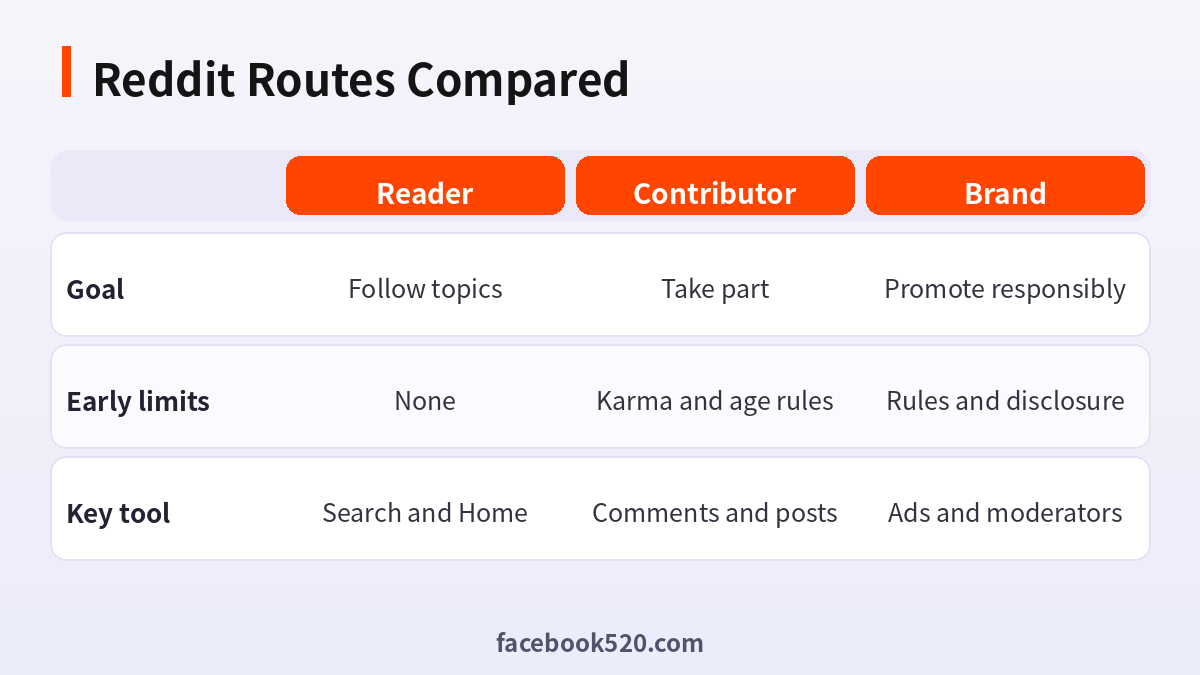
| Factor | Reader | Contributor | Brand |
|---|---|---|---|
| Goal | Follow topics | Take part | Promote responsibly |
| Early limits | None | Karma and age rules | Rules and disclosure |
| Key tool | Search and Home | Comments and posts | Ads and moderators |
Verdict: Start as a reader, comment helpfully before posting, and use ads or moderator permission for brand content. Keep the account email verified so that recovery works.
Joining Reddit sensibly
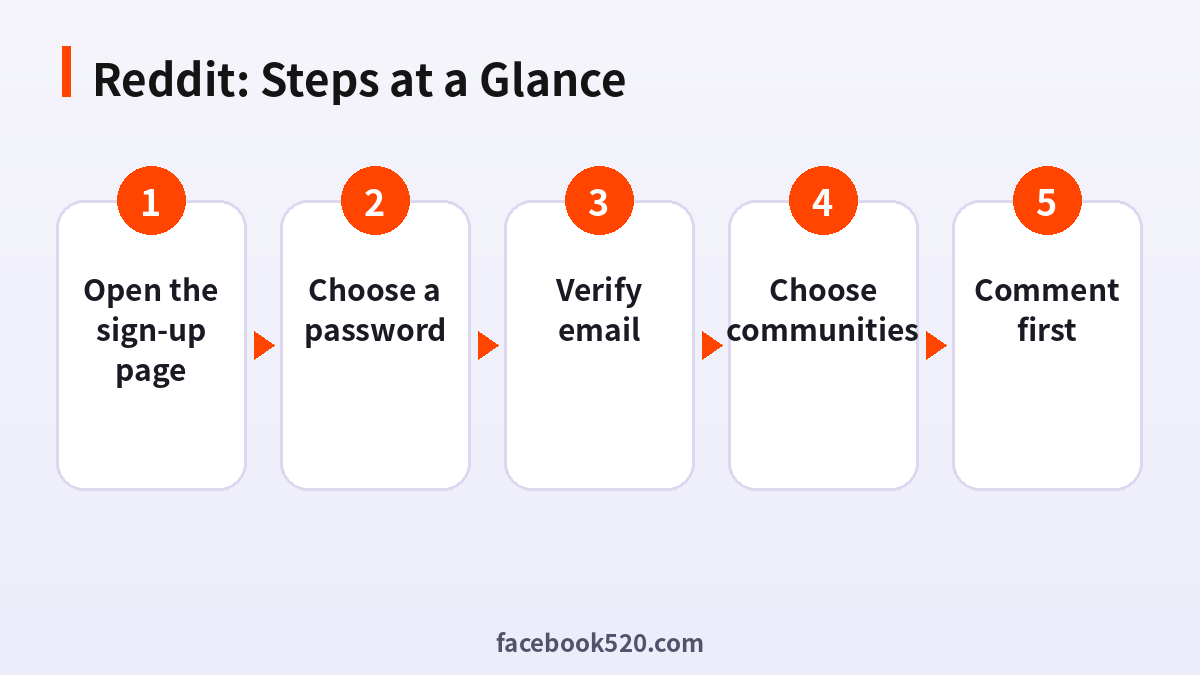
- Open the sign-up page: Use the website or app.
- Enter email and username: The username is permanent.
- Choose a password: Use a strong one.
- Verify email: Click the link.
- Choose communities: Join several that match your interests.
- Read the rules: Each community has its own.
- Comment first: Take part before posting.
Common Reddit Errors and What to Do
| Symptom | Likely cause | What to do |
|---|---|---|
| Username taken | Used | Pick another. |
| Post removed | Karma or age too low | Read community rules. |
| Verification email missing | Spam | Resend. |
| Rate limit | New account | Wait. |
| Cannot comment | Community restrictions | Join first. |
Reading the culture
Each subreddit has its own tone, running jokes and rules about what can be posted. Spend a week reading before you contribute. Look at which posts are upvoted and which are removed, and notice the style used in comments that earn respect.
How karma works
Karma comes from upvotes on your posts and comments, and communities often set minimums. It is a rough signal of participation, not a currency, and chasing it directly often backfires. Contribute useful answers and the number will follow.
Choosing a username
Usernames are public and cannot be changed. Avoid names that reveal personal details or that will not suit a professional setting. If you plan to discuss work topics, a neutral name keeps your options open.
Safety and privacy
Do not share personal information, avoid private chats with strangers who push you to other platforms and review privacy settings regularly. You can limit who can message you and hide your activity from your profile.
Using search and filters
Use search to find existing answers before you ask, and use filters for sort order and time. It saves moderators work and helps you find good communities.
Posting well
Write a clear title, include the details someone needs to answer and use the right flair if the community asks for it. Posts with effort tend to be received better.
Handling downvotes and criticism
Downvotes are normal. Read replies for useful feedback, ignore bad faith comments and do not argue endlessly. Blocking or muting is available if someone harasses you.
Notifications and Home feed
Adjust notifications and the Home feed so that you see the communities you care about. Leave communities that no longer interest you.
Using the mobile app and web
Both let you take part, but some settings are in different places. Check both if you cannot find an option.
A sensible first week
On day one choose five communities and read their rules. On day two upvote and comment on a few posts where you have something to add. On day three answer one question in detail. Keep the rest of the week for reading, saving good threads and noticing which people are regularly helpful, because they show what the community values.
Using multiple accounts honestly
Some people keep a personal account and a separate one for work or hobbies. That is allowed, but voting for yourself or using several accounts in one discussion breaks the rules and gets accounts banned. Keep each account to its own topics and never use one to support another.
Mobile, web and old Reddit
Reddit offers a mobile app, a modern web interface and an older layout for people who prefer it. Settings such as filters and blocked communities can live in different places, so check the preferences page if an option seems missing. Choose the view that lets you read comfortably for long periods.
Avoiding common newcomer mistakes
New users often post links to their own sites in the first days, ask questions already answered in the sidebar or repeat the same comment in several communities. Each of these gets content removed. Read the pinned posts and the FAQ of each community, search before asking and keep your early activity varied and genuinely useful.
When to ask moderators for help
If you are unsure whether a post is allowed, message the moderators before you post. Keep the message short, say what you want to share and ask whether it fits. Moderators appreciate the courtesy, and a friendly reply can save you a removal and a mark against your account.
Reddit Self-Check List
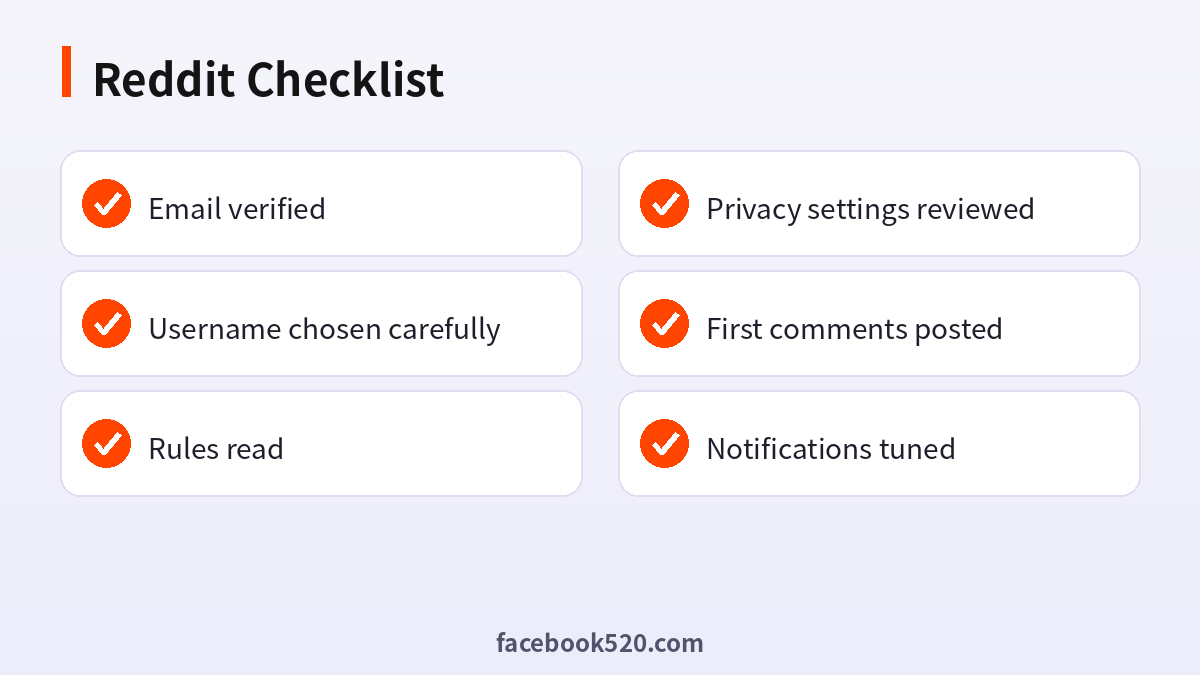
- Email verified
- Username chosen carefully
- Rules read
- Privacy settings reviewed
- First comments posted
- Notifications tuned
Reddit sign-up FAQ
Is Reddit free?
Yes. Reddit Premium and Ads are optional paid items.
Do I need an email to sign up?
Usually yes, or a Google or Apple login.
What is karma?
A score based on how people vote on your posts and comments.
Can I change my username?
No. Create a new account.
How long does it take to set up Reddit?
The sign-up itself usually takes about five minutes. Completing the profile and security settings takes a little longer.
What if I already have an account?
Log in instead of creating a second one. Use the password reset option if you have forgotten the details.
Is it safe to let someone else register for me?
It is better not to. Anyone who creates the account first also holds the first recovery details, so do the registration yourself and add colleagues as members afterwards.
Can I change my email address later?
In most cases yes, through the account or security settings, but you will need access to both the old and new address, so update it before the old one is closed.
Why was my post removed?
Rules or filters. Read the removal message.
Can I use Reddit without an account?
You can read, but cannot take part.

