


Google Ads Manager Account (2026): How to Create an MCC Agency Account, Link Clients and Use Roles Safely
Searches for “Google Ads Manager account” usually come from agencies, freelancers and in-house growth teams that need one dashboard above many advertiser accounts. Google calls this a Manager account (historically MCC — My Client Center). It is free, official and designed for linking client accounts, assigning roles and rolling up reporting. This guide explains what a Manager account is and is not, how to create one, how linking and roles work, how billing and suspensions behave across the tree, and why buying a ready-made “agency account” is a bad idea. For the parallel risk story on purchased Ads logins, read buy Google Ads accounts. If you are still building basic Google presence, start from a clean Google business account setup.
What a Google Ads Manager account actually is
A Manager account sits above one or more Google Ads accounts. It does not replace a client Ads account; it administers them. From a Manager you can:
- Create new client accounts under your hierarchy
- Request link access to accounts your clients already own
- Assign users with Admin, Standard, Read-only or email-only style permissions (labels vary by UI)
- Switch between accounts without sharing passwords
- View cross-account reporting and alerts
It is not Google Ad Manager (the publisher ad server product). People often confuse “Google Ads Manager account” with “Google Ad Manager.” This article is about the Ads Manager / MCC for advertisers and agencies.
Who should create a Manager account
Create one if you:
- Manage ads for more than one brand or legal entity
- Need clean access control for strategists, media buyers and clients
- Want a single place to spot payment or policy issues across accounts
- Plan to grow an agency and need a scalable hierarchy
- Must separate your agency operating account from client spend accounts
Skip a Manager if you only ever run one small brand account and nobody else needs structured access. A single Ads account with proper user invites is enough.
Manager account vs client account vs Google Ad Manager
| Product | Purpose | Typical user | Billing |
|---|---|---|---|
| Google Ads client account | Run campaigns for one advertiser | Brand or small business | Advertiser payment profile |
| Google Ads Manager (MCC) | Administer many Ads accounts | Agency / multi-brand team | Usually no direct media spend |
| Google Ad Manager | Serve ads on publisher inventory | Publishers / networks | Different product stack |
| Google Analytics property | Measure site/app behavior | Marketing / product | Free tier + paid 360 |
Keep naming precise in SOPs so junior buyers do not open the wrong console.
How to create a Google Ads Manager account (official path)
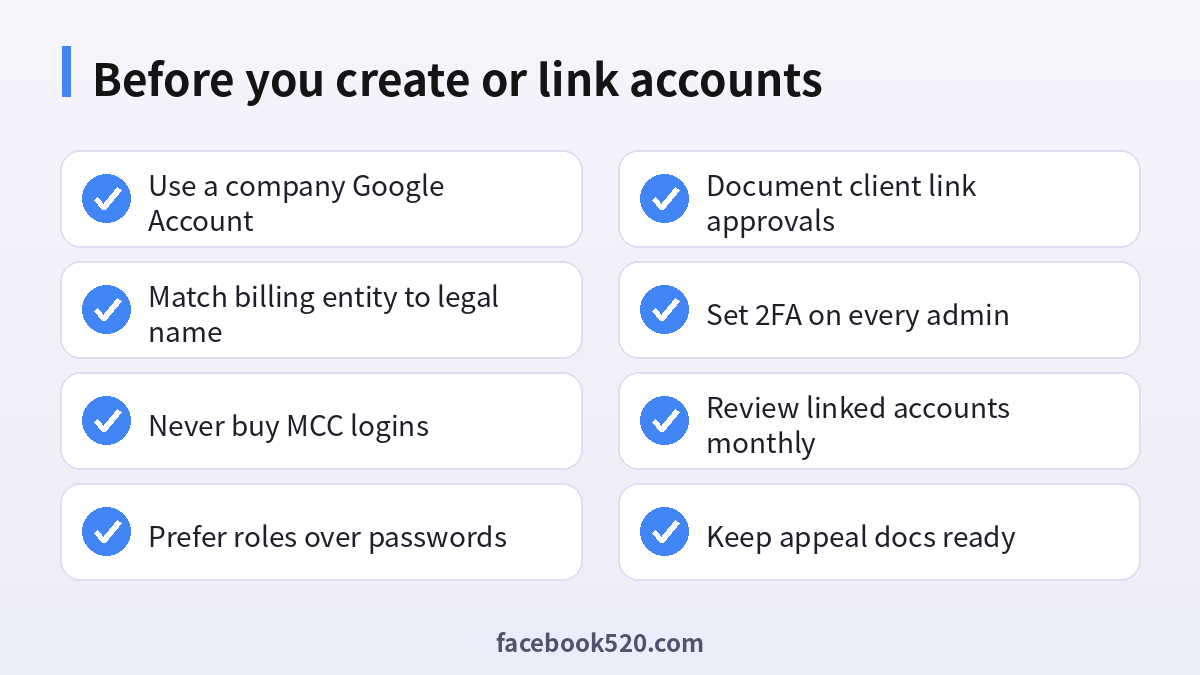
Use an email your company controls. Do not build the agency hierarchy under a personal Gmail you plan to abandon.
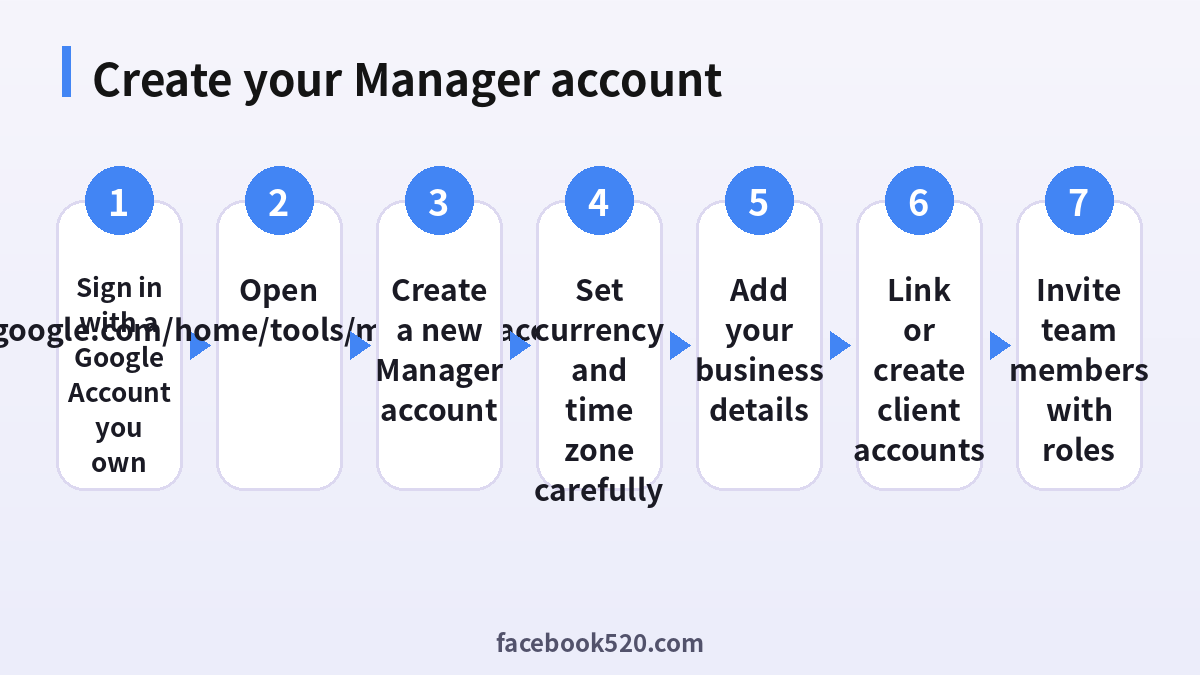
- Sign in to a Google Account owned by you or your agency.
- Go to the official Manager accounts creation flow from Google Ads help or ads.google.com tools for manager accounts.
- Choose Create a manager account (not a standard advertiser account) when prompted.
- Enter a clear account name such as your agency legal or brand name.
- Select the currency and time zone carefully — these are hard to change later and affect reporting rollups.
- Confirm creation and open the Manager dashboard.
- Turn on 2-Step Verification on that Google Account before inviting anyone.
After creation, add business information when Google asks. Accurate legal entity data reduces friction when clients link accounts or when verification appears.
Linking client accounts the right way
There are two healthy patterns:
- You create the client account under your Manager, then grant the client Admin or ownership-appropriate access.
- The client already has an Ads account; they accept your link request from their access settings.
Always prefer explicit link acceptance over password sharing. Password sharing destroys audit trails and often violates client contracts.
When you send a link request:
- Tell the client exactly which Manager name they will see
- Ask them to verify the Manager ID matches your message
- Document acceptance in your onboarding ticket
- Remove former agencies when you take over an account
If a prospect offers to “just email the password to their old Ads login,” refuse and use linking instead. That habit is how accounts get hijacked and how prior suspensions stay invisible until spend scales.
Roles, users and access hygiene
Manager-level and account-level permissions let you avoid shared passwords. Practical rules:
- Give media buyers only the access they need for the accounts they run
- Keep a break-glass Admin user on a hardware key or strong 2FA
- Offboard contractors the same day their contract ends
- Prefer separate Google Accounts per person, not one “team@” login everyone knows
- Review the user list monthly
Shared credentials are the number one operational failure in small agencies. When someone leaves with the only password, clients lose trust and you lose the account narrative needed for appeals.
Features and benefits teams actually use
Agencies search for “Google Ads manager account features benefits” because decks promise magic. The real benefits are operational:
- Faster account switching for buyers
- Centralized alerts for payment failures and policy strikes
- Cleaner handoffs when staff change
- Ability to create standardized account templates under your Manager
- Clearer separation between agency IP and client ownership
Benefits that are not automatic:
- Higher spending limits for every linked account
- Immunity from policy reviews
- Instant approval for restricted verticals
- Transfer of “aged trust” from someone else’s Manager
Spending limits and trust signals attach primarily to payment profiles, domains, policy history and verification — not to the mere existence of an MCC.
Billing, payment profiles and who pays
A Manager account usually does not “hold the money.” Client accounts (or their payment profiles) pay for clicks and impressions. Still, Manager structure interacts with billing:
- Consolidated billing options may exist for eligible setups — confirm current Google documentation for your region
- A bad payment profile under one client does not magically clean another, but related ownership signals can raise scrutiny
- If you operate as the advertiser of record for a client, contracts and invoices must match reality
Never park all clients on one stolen or rented payment instrument. That pattern triggers enforcement across the tree. Our article on Google Ads account suspensions explains how notices cascade and how honest appeals work when you own the account.
Suspensions, linking risk and Manager health
Manager accounts can be limited if Google detects abuse patterns such as mass creation of accounts to evade prior bans, or widespread policy violations under one Manager. Protect the Manager:
- Do not onboard obviously non-compliant offers just to take a fee
- Keep a written policy for verticals you refuse
- Watch new accounts for cloaking, trademark abuse and misleading claims
- Separate experimental sandboxes from production client Managers if needed
- Respond quickly when Google emails policy owners
If a single client is toxic, unlink when appropriate and document why. Protecting fifty good clients beats collecting one bad retainer.
Why buying an “agency MCC” is a trap
Marketplaces sell “aged Google agency accounts,” “verified MCC,” and “manager seats.” Problems include:
- Seller retains recovery of the Google Account
- Prior circumvention history travels with the Manager ID
- Client link graph may already be poisoned
- You cannot prove continuous ownership in an appeal
- Payment profiles may involve fraud
There is no legitimate shortcut that replaces creating a Manager under your company. If someone sells hierarchy as a product, treat it like any other bought Google Ads account: high suspension probability and poor recourse.
Setting up your first client the clean way
- Create or link the client Ads account under your Manager.
- Confirm currency, time zone, business name and URL match the client’s legal entity.
- Attach a payment method the client authorizes — ideally in the client’s name when they are advertiser of record.
- Install conversion tracking and brand assets before spend ramps.
- Invite the client user with the right role so they are not locked out if your agency relationship ends.
- Upload shared negative lists or templates only with client approval.
- Schedule a weekly health check: policy inbox, payment status, change history.
This onboarding beats improvising inside a purchased dashboard.
Reporting and multi-account workflows
Managers help with cross-account reporting, but you still need naming conventions:
- Campaign names that include brand codes
- Label strategies for geo and funnel stage
- Change-history notes when editing live budgets
- Shared dashboards that do not expose Client A data to Client B users
Do not give a freelance designer Admin on the Manager “just in case.” Scope access to the single client Ads account they need.
Comparison: building hierarchy yourself vs shortcuts
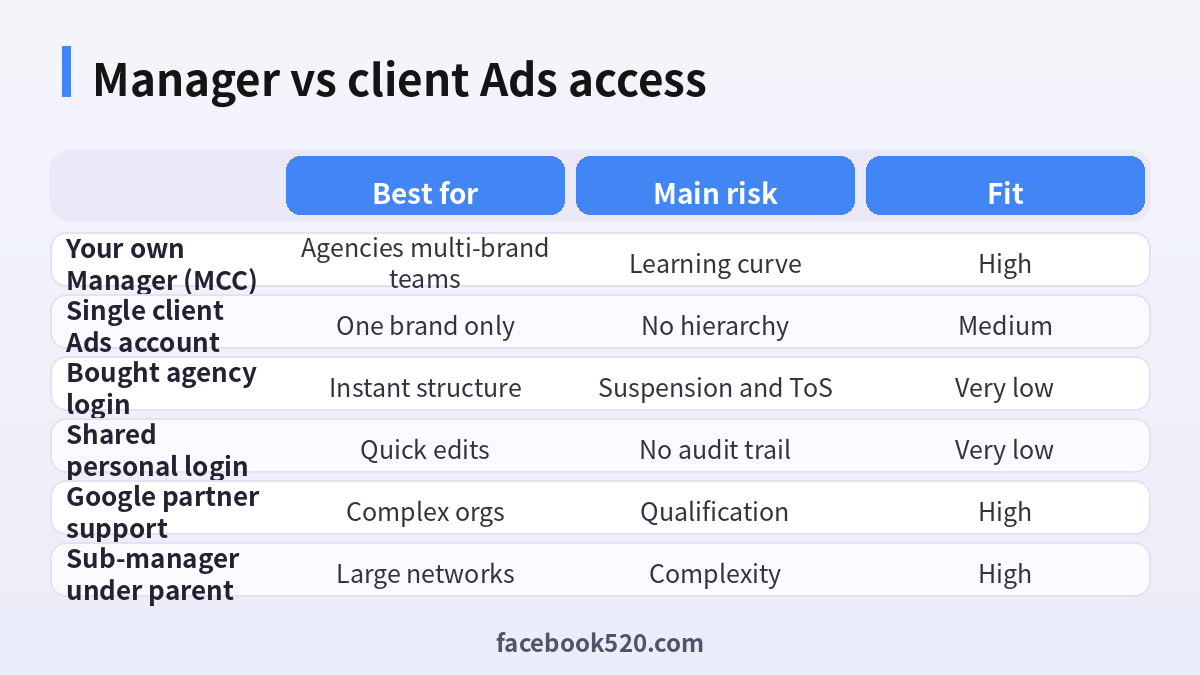
| Approach | Speed | Control | Appeal quality | Recommended |
|---|---|---|---|---|
| Create your Manager | Medium | Full | Strong | Yes |
| Link client-owned accounts | Medium | Shared | Strong | Yes |
| Buy MCC login | Fast | Weak | Weak | No |
| Share one personal Ads login | Fast | Weak | Weak | No |
| Sub-manager under parent network | Slow setup | Structured | Strong if clean | Advanced yes |
Common mistakes in the first 30 days
- Wrong currency locked at creation
- Agency personal Gmail as the only Admin
- Clients still sharing passwords with the previous agency
- No 2FA on Manager owners
- Mixing unrelated verticals under one experimental Manager that later gets noisy
- Creating dozens of empty accounts that look like evasion
Fix these early. Hierarchy debt is expensive.
When you also need Business Manager thinking on Meta
Many agencies run Google and Meta together. The access philosophy is similar: roles over passwords, business verification, and no marketplace logins. If your team also needs Meta structure, see our guide to a Facebook business account for the parallel setup mindset.
FAQ
What is a Google Ads Manager account?
It is Google’s official hierarchy account for managing multiple Google Ads accounts from one login structure, often called MCC by agencies.
Is a Manager account the same as Google Ad Manager?
No. Google Ad Manager is a publisher ad serving product. A Google Ads Manager account administers advertiser accounts.
Does a Manager account cost money?
Creating the Manager itself is free. You pay for advertising spend in the linked Ads accounts according to their billing.
Can I change Manager currency later?
Currency and time zone choices are difficult or impossible to change after creation. Choose carefully using your agency’s primary reporting needs.
How do I link a client’s existing Ads account?
Send a link request from your Manager and have the client accept it in their access settings. Do not take their password.
Can clients see other clients under my Manager?
Not if you configure access correctly. Users should only see accounts they are permitted to open. Audit permissions regularly.
Will a Manager increase my spending limit?
Not automatically. Limits relate to payment history, verification and risk systems on the relevant accounts and payment profiles.
What if my Manager gets limited?
Review policy emails, unlink abusive accounts if needed, fix verification issues and follow Google’s appeal paths for assets you legitimately own.
Should freelancers create a Manager?
Yes if they handle multiple advertisers. A Manager plus proper roles looks more professional than juggling passwords.
Can I buy a ready-made agency MCC?
You can find listings, but they carry high suspension and recovery risk. Create your own Manager under company control instead.
How many accounts can I manage?
Google documents capacity guidelines that can change. Design naming and sub-manager structure before you approach practical limits.
Do I need a Manager for one brand?
No. One Ads account with user invites is enough for a single brand team.
Onboarding template agencies can copy
Use a short written checklist for every new advertiser so buyers do not improvise:
- Collect legal business name, billing country, website and primary contact email.
- Confirm who is advertiser of record and who pays invoices.
- Create or link the Ads account under the correct Manager.
- Invite client users before launch day so they can see change history.
- Verify conversion tags in a test click before unlocking budgets.
- Store screenshots of accepted link requests in the client folder.
- Schedule the first optimization review within seven days.
Templates reduce mistakes when you hire new media buyers. They also create the paper trail you need if a payment dispute or policy question appears later.
Sub-manager structures for larger networks
Large networks sometimes place regional teams under sub-managers beneath a parent Manager. That design helps when:
- Different countries need separate operating teams
- A holding company manages several agency brands
- You must firewall risky test accounts from premium client Managers
Keep the parent Manager Admin circle small. Too many parent Admins increase the blast radius of a compromised login. Document which sub-manager owns which verticals so finance and compliance teams can follow spend.
Security habits that protect the whole tree
- Hardware security keys for owner Google Accounts where possible
- Unique passwords in a company password manager — never a shared spreadsheet
- Alerting on Google Account recovery email or phone changes
- Immediate session revocation when a laptop is lost
- Separate sandbox Manager for training new hires with fake or tiny budgets
Compromise of a Manager Admin is worse than compromise of one client account because the attacker can traverse many advertisers. Treat Manager owners like production root users.
How Manager reporting supports client QBRs
Quarterly business reviews are easier when the Manager hierarchy is clean. You can export cross-account performance, compare brand vs performance campaigns and show wasted spend patterns without logging into ten passwords. Agree with clients in advance which metrics you will roll up so privacy boundaries stay clear. Never paste another client’s numbers into a deck by mistake — naming conventions and filtered views prevent that embarrassment.
Working with Google support and partners
When issues exceed self-serve help, open cases from accounts you own, with users who have Admin access. Third-party sellers claiming special “inside MCC unlocks” are not a substitute for official support. Google partner status, if you pursue it, is earned through qualifications and performance — it is not something you buy as a login. Keep case IDs in your internal ticket system so handoffs between buyers stay coherent.
Migration when you replace a previous agency
- Ask the client to remove the old agency’s users after your link is accepted.
- Inventory campaigns, audiences, conversion actions and automated rules.
- Screenshot payment profile status and any active policy limitations before you change structure.
- Avoid renaming everything on day one; stabilize tracking first.
- Only then rebuild naming conventions and shared libraries.
Rushing a cosmetic rebuild during migration often breaks conversion history and makes early performance look worse than it is.
What is the difference between Admin and Standard access?
Admin users can manage access and critical settings; Standard users can make many campaign changes without full access control. Prefer least privilege.
Can I move an Ads account between Managers?
Link and unlink flows exist, but they require proper permissions and client cooperation. Plan migrations; do not force transfers with shared passwords.
Does Manager access replace Google Analytics admin?
No. Analytics properties have their own permission model. Link products deliberately and keep marketing analytics access separate from media buying Admin when needed.
Final checklist before you scale clients
- Manager created under a company-controlled Google Account
- 2FA on every Admin
- Written vertical acceptance policy
- Linking SOP that forbids password collection
- Billing ownership clear in each contract
- Monthly user access review
- Documented offboarding for staff and departed clients
A healthy Google Ads Manager account is boring infrastructure: clear ownership, careful linking and disciplined roles. That boredom is exactly what keeps client spend online in 2026.
