


Snapchat Subscription (2026): Plans, Pricing & How to Pay
People searching for Snapchat pricing usually want three answers: what each plan includes, what it really costs per month, and how to pay without surprises. Below you will find a clear comparison of the plans, a step-by-step payment walkthrough, tips for keeping spending under control, and fixes for the most common billing problems.
What is Snapchat?
Snapchat offers optional paid subscriptions on top of the free app. Snapchat+ adds extras such as a ghost-trail, custom app icons, story rewatch counts and priority story replies. Snapchat+ is the main consumer subscription. Higher tiers such as Platinum and a Lens+ option have also been introduced. Subscriptions are mostly bought inside the app via Apple or Google.
Snapchat plans and pricing at a glance
Prices below are reference list prices in US dollars that have been published recently. Taxes, currency conversion, regional pricing and promotions can change what you see at checkout, so always confirm on the official page (snapchat.com) before you pay.
| Plan | Reference price | What it is for |
|---|---|---|
| Snapchat (free) | free | Messaging, Stories, Spotlight and standard Lenses. |
| Snapchat+ | about $3.99/month | Exclusive features, early access to experiments and a profile badge. |
| Snapchat Platinum | about $15.99/month | All Snapchat+ benefits plus extra perks such as ad-free Spotlight and further exclusive features. |
| Lens+ | around $8.99/month | Unlimited access to premium Lenses where available. |
| Snapchat+ gift codes | one-off | Prepaid time for friends or yourself. |
How Snapchat billing works
- On iPhone the subscription is billed by Apple; on Android it is billed by Google Play; you manage it in your store account.
- Some countries also support a web checkout or carrier billing.
- Redeem a Snapchat+ code from Settings, then Snapchat+, then “Redeem code”.
- Prices vary by country, and taxes may be included in the displayed price.
None of this is complicated, but each point is something people commonly discover only after the first invoice.
Which Snapchat plan should you choose?
- Casual users: The free app.
- Fans of customisation: Snapchat+.
- Heavy Lens users: Lens+ if available in your country.
- Gift: A gift code; pay careful attention to the country and device.
A useful rule of thumb is to begin with the lowest plan that lets you do real work, track how often you hit its limit for two or three weeks, and only then move up. Most of the plans can be changed or cancelled later, so there is little reason to start on the most expensive tier “just in case”.
Payment methods you can usually use
Most users pay for Snapchat with a card. Some regions add wallet options such as PayPal, Apple Pay or Google Pay, and subscribing inside an iOS or Android app routes the payment through the store account. What you can actually select depends on your billing country and device.
A few practical points about cards:
- Use a card that allows online and recurring (subscription) payments, and that is enabled for international merchants.
- Make sure the billing name and address match what your bank has on file; mismatches are a frequent reason for declines.
- If your bank uses 3-D Secure, approve the prompt in your banking app quickly; the session may time out.
- Virtual cards can work, but some issuers block subscription merchants or cap the first transaction. Test with the amount you actually need.
Step-by-step: how to pay for Snapchat
- Open Snapchat and tap your profile picture.
- Tap the Snapchat+ banner or the settings gear, then Snapchat+.
- Choose the plan (monthly or yearly where offered).
- Confirm with Face ID, Touch ID or the Google Play prompt.
- Return to the app and check for the Snapchat+ badge on your profile.
- If you hold a code, use Redeem code instead of paying.
Ways to keep your Snapchat spending under control
- Make sure the app-store account is the one you want to bill.
- If you share a phone, consider turning on purchase approval.
- Cancel at least a day before the renewal date.
- Gift codes are easiest if both accounts are in the same country.
Common payment and access problems
- Purchase made but features missing: Open Settings, Snapchat+, tap Restore Purchases, and relaunch the app.
- Cannot pay with a card in your country: Check your store payment profile; gift cards or carrier billing may be available instead.
- Card declined: Try a second card, confirm online and international payments are enabled, and check there is no temporary hold from your bank. Waiting an hour and retrying often clears security checks.
- Charged but plan not active: Refresh the page, sign out and back in, and confirm you are on the same account that was used at checkout. If the plan still does not show, keep the receipt and contact the support team of the service you paid.
- Wrong country or currency shown: Pricing follows your billing country and sometimes your IP location. Do not try to bypass it; set the correct billing address in your account instead.
- Unexpected renewal: Subscriptions renew automatically. Check the next billing date in your account and cancel at least a day before it if you do not want another cycle.
How to cancel or change your Snapchat plan
You cancel in the same place you subscribed: the website billing page for web purchases, the Apple subscriptions page for iPhone purchases, or Google Play subscriptions for Android purchases. Cancelling normally stops the next renewal but keeps access until the end of the period you already paid for. Downgrades usually take effect at the next renewal, while upgrades are normally effective immediately with a prorated charge. Keep your receipt emails; they are the quickest proof if you ever need help.
Monthly or yearly billing: how to decide
Yearly billing normally lowers the effective monthly price, but it also locks in a larger payment up front. A sensible approach for Snapchat is to pay monthly for the first one or two cycles, check whether you use it every week, and only then switch to the annual option. If your work is project-based and you only need the tool for a few months, monthly billing is almost always the cheaper choice overall.
A short checklist before you subscribe
- Confirm the plan name and price on the official Snapchat page the same day you buy, since promotions and limits change.
- Log in with the account you actually want to keep; changing the account tied to a subscription later can be awkward.
- Decide who pays: a personal card, a company card or a team plan with central billing.
- Note the renewal date and the cancellation route in your calendar.
- Save the receipt email in a folder; you will need it for expense claims or support requests.
Is Snapchat worth paying for?
The honest test is simple: would the time or money the tool saves you in a month exceed what the plan costs? If you can name two or three concrete tasks where Snapchat helps every week, a paid plan is usually justified. If you are mostly experimenting, stay on the free or lowest tier and revisit the decision after a month of real usage data.
Invoices, receipts and company cards
If you pay for Snapchat as part of your work, look for the billing or invoices section in your account settings. There you can usually download receipts, update the company name and tax number for future invoices, and change the billing email. Use a dedicated company card where possible and a shared mailbox for receipts, so subscriptions do not disappear when a team member leaves. For teams with several users, a business or team plan with central billing is generally easier to audit than many individual subscriptions.
Mistakes to avoid
- Buying the most expensive plan before you know your real usage.
- Subscribing inside a mobile app and then looking for the cancel button on the website, or the reverse.
- Sharing your login with someone who offers to “activate” or “top up” the plan for you; use official checkout only.
- Forgetting a free trial and being charged on the first renewal date.
- Ignoring the usage or credit counter until it is empty in the middle of a deadline.
What if prices or limits change?
AI and software subscriptions move quickly. A plan that included a certain allowance last quarter may be reorganised, renamed or repriced this quarter, and a new tier can appear between the ones you know. When that happens, read the notice email from Snap Inc. instead of assuming nothing changed, compare the new allowance with what you actually used, and decide whether to stay, downgrade or switch to another tool. Existing subscribers are normally told about price changes ahead of renewal, which gives you time to cancel if the new terms no longer make sense.
Who Uses Snapchat and How: Scenarios
- Users deciding on Snapchat+: Snapchat+ is an optional subscription with extra features that the company changes over time. Open the subscription page in the app to see what is included in your country.
- Advertisers and creators: Snapchat Ads Manager is a separate product. A personal subscription does not give you ad features.
- Families and students: Check pricing and plan details in the app store of your device, because prices vary by region and platform.
Snapchat at a Glance
- Typical use: ephemeral photo and video sharing, stories and brand ads.
- What you need: an email or phone number, a username and a birth date.
- Common friction: locked logins, code problems and security locks triggered by third-party plugins.
- Security tools: two-factor authentication and login-verification settings.
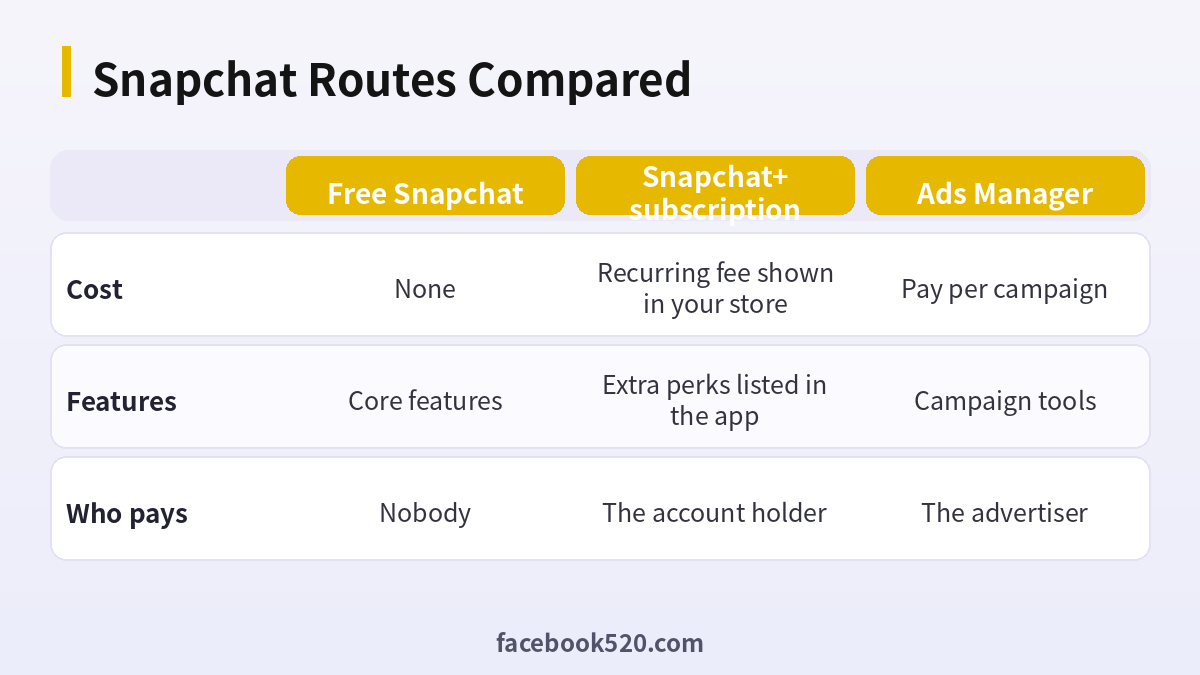
Comparing Your Snapchat Routes: Table and Verdict
| Factor | Free Snapchat | Snapchat+ subscription | Ads Manager |
|---|---|---|---|
| Cost | None | Recurring fee shown in your store | Pay per campaign |
| Features | Core features | Extra perks listed in the app | Campaign tools |
| Who pays | Nobody | The account holder | The advertiser |
Verdict: Do not assume a price or perk list from any third-party page, since both change by region and over time. Check the subscription screen in your own app, and use Ads Manager only for advertising.
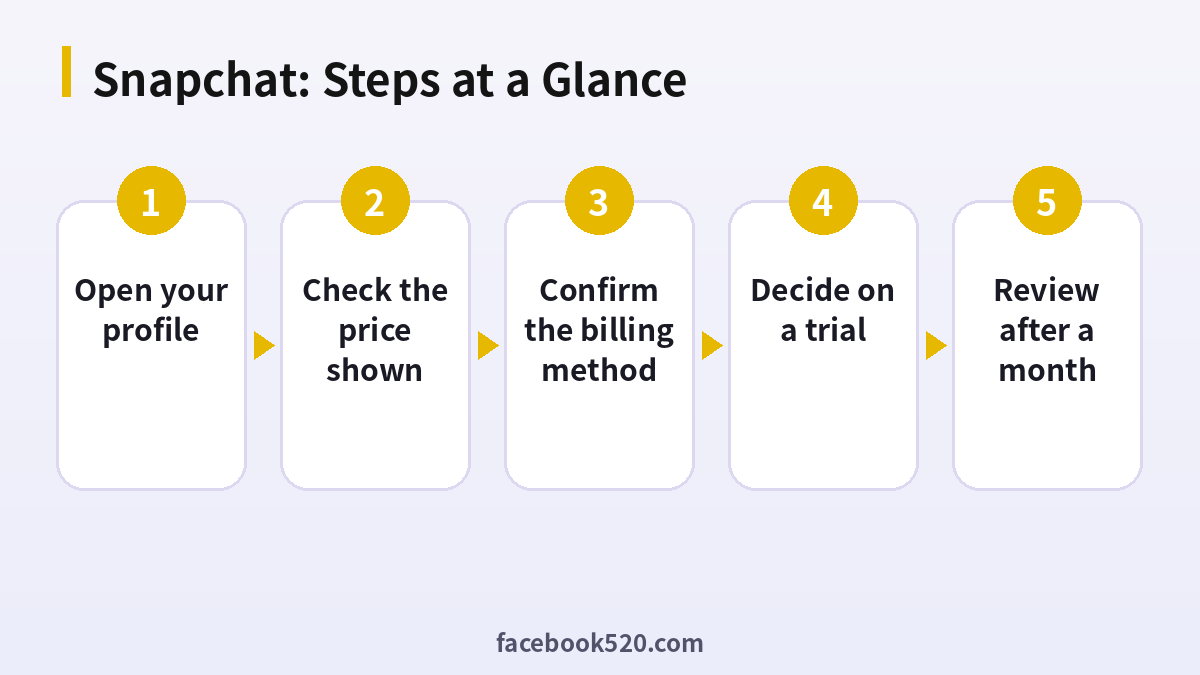
Checking Snapchat+ before you pay
- Open your profile: Tap the Snapchat+ banner or settings.
- Read the perks list: Note what is included now.
- Check the price shown: It is displayed by your app store in your currency.
- Confirm the billing method: Apple, Google or another supported option.
- Decide on a trial: Use a trial if offered, then set a reminder.
- Manage the subscription: Cancel in the store settings, not in the Snapchat app.
- Review after a month: See if you used the perks.
Snapchat Problems and Fixes
| Symptom | Likely cause | What to do |
|---|---|---|
| Perks not showing | Subscription not synced | Restart the app and check store status. |
| Charged twice | Two stores or accounts | Check both subscriptions. |
| Cannot cancel in app | Billing is with the store | Cancel in store settings. |
| Price differs from a friend | Region or store | This is expected. |
| Subscription expired | Payment failed | Update payment method. |
What the plan is and is not
Snapchat+ adds optional features such as customisation and early access items, depending on the period. It does not change who can see your snaps or add reach. Do not buy it expecting growth or ad access.
Pricing and regional differences
The price displayed depends on your country, currency and app store, and may change. Avoid third-party lists that quote a fixed price.
Where billing happens
Snapchat+ is typically billed through the app store on your device. Refunds and cancellations follow the store’s rules, so use the store’s support if you have a problem.
Trials and reminders
If a free trial is offered, set a calendar reminder a day before it ends. Trials often convert to paid plans automatically.
Ads Manager and business tools
Advertising uses a different account, with budgets and billing that are separate from Snapchat+. Read the Ads Manager help pages when planning campaigns.
Other paid features
Snapchat has other optional paid features and may change them. Check the in-app descriptions to see what applies now, and avoid assuming older articles are current.
Family and age considerations
If a young person uses the app, parents can review settings and the Family Center to see safety options and decide on any spending.
Comparing value
Write down the features you will use and what they would cost elsewhere. If you cannot name two, the plan may not be worth it.
Cancelling cleanly
Cancel before the renewal date in the store you used, check the confirmation and keep a screenshot. Perks usually remain until the period ends.
Reading the offer screen carefully
Open the subscription offer and read the whole page, including the fine print about renewal and the payment method. Note whether a trial exists, how long it lasts and what happens when it ends. A calm five minutes here is better than trying to understand charges after the first bill arrives.
When a free trial is a decision point
A trial is a chance to test, not a gift. Decide in advance what you want to learn, such as whether you actually use the extra features, and set a reminder to cancel if the answer is no. If you do not plan to continue, cancel on the first day and still enjoy the trial period.
Using Family Center and parental controls
If a teenager uses Snapchat, parents can use Family Center to see friend lists and report concerns, within the limits the app provides. Before a young user subscribes to anything, talk about what the feature does, how billing works and who is responsible for the payment so that there are no surprises later.
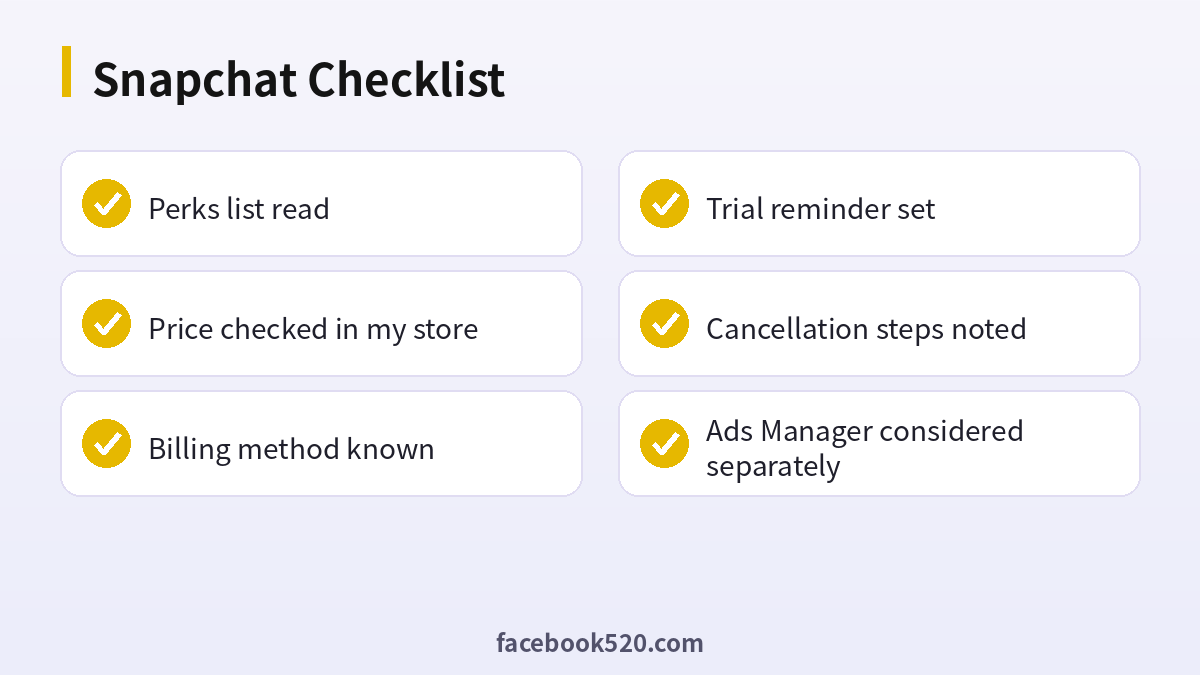
Snapchat: Before-and-After Checklist
- Perks list read
- Price checked in my store
- Billing method known
- Trial reminder set
- Cancellation steps noted
- Ads Manager considered separately
Snapchat FAQ
How much does Snapchat+ cost?
Around four dollars a month at list price; actual price varies by country.
How do I redeem a Snapchat+ code?
Settings, Snapchat+, Redeem code.
How do I cancel?
Through the Apple or Google subscription page, not inside Snapchat itself.
Is Snapchat+ worth it?
Only if you value the extras; the core app is free.
Is it safe to pay for Snapchat through third parties?
The only fully safe route is paying Snap Inc. directly on its official site or in its official app. Be cautious with anyone who asks for your login details, or sells “cheap” access without a clear, verifiable receipt.
Do Snapchat prices differ by country?
Yes. Prices, taxes and available payment methods vary by country and platform. The checkout page always shows the final amount.
Does Snapchat+ give more reach?
No. It offers optional features, not growth.
Can I use Snapchat+ for ads?
No. Ads use Ads Manager.
Is there a free trial?
Sometimes. Check the offer screen.
How do I cancel a Snapchat+ subscription?
Cancel in the app store or billing page where you subscribed, before the renewal date.
Related guides
- Facebook sign-up guide
- Instagram account creation guide
- How do I register and purchase 70+ accounts on TikTok, YouTube, Instagram, Facebook, X, Reddit, Medium, and LinkedIn?
- ChatGPT、Gemini、Perplexity、Claude、Copilot 等 AI 平台最喜欢引用的100个网站
If you are also setting up other platforms for your business, the 70+ accounts register and purchase overview gives a broader map of what is available.

