


Facebook Gift Card 2026: Do Facebook Gift Cards Still Exist, Facebook Ads Credit, Prepaid Funds and How to Add Funds Safely
Searching for a facebook gift card in 2026 usually means one of three things. You want to pay for something on Facebook without a credit card, you were given a coupon or “ad credit” and want to know how to use it, or someone asked you to pay them with gift cards and you want to check whether that is legitimate. The short answer is that classic Facebook gift cards for games are no longer something most people can buy, Facebook Ads does not run on store gift cards, and anyone asking you to pay “Facebook fees” with gift cards is almost certainly a scammer. This guide explains what replaced Facebook gift cards, how Facebook ad credit and prepaid funds really work, how to add funds to Facebook Ads step by step, and which options are safe.
For the wider picture of Facebook accounts, Pages and ads, start with the Facebook guide hub and the complete Facebook account guide. If you are setting up advertising for a business, read Facebook Business Account setup first. Similar payment topics on other platforms are covered in WhatsApp ads billing and payment and Snapchat gift card and ads funding.
What a Facebook gift card used to be
Years ago, Facebook sold physical and digital gift cards in retail stores. They loaded a balance into your Facebook account that you could spend inside games on Facebook, and for a while on virtual gifts. Before that, there was a virtual currency called Facebook Credits, which Facebook retired in 2013 in favor of local currency payments.
As Facebook gaming moved to mobile app stores and Facebook Gaming changed direction, the retail gift card program faded out. In 2026 you will rarely find an official card simply labeled “Facebook gift card” on store shelves. If you do see one, check carefully what it actually is, because most products using Facebook or Meta branding today are one of the following:
- Meta Quest gift cards, which add credit to the Meta Quest (virtual reality) store for apps and games. They do not pay for Facebook Ads and cannot be moved into a Facebook ad account.
- App store gift cards from Apple or Google, which can pay for in-app purchases inside the Facebook app on those platforms, such as Stars or subscriptions, but not for ads.
- Unofficial “Facebook credit” codes sold online by third parties. These are not official Meta products and are a common scam vector.
So if your goal is to run ads, a gift card is the wrong tool. If your goal is to pay for something inside the app, an app store gift card may work. Let us look at each case.
Facebook gift cards vs ad credit vs prepaid funds
People often mix up three different things. Here is how they compare:
| Item | What it is | Where it works | Who issues it |
|---|---|---|---|
| Retail Facebook gift card | Legacy balance for games and gifts | Largely discontinued | Facebook, historically |
| Meta ad credit or coupon | Promotional credit added to an ad account | Facebook and Instagram ads in Ads Manager | Meta, through official promotions or partners |
| Prepaid funds | Money you add to an ad account in advance | Ads in countries and currencies that support it | You, using a local payment method |
| Meta Quest gift card | Store balance for VR apps | Meta Quest store only | Meta, sold at retailers |
| Apple or Google gift card | App store balance | In-app purchases on that phone platform | Apple or Google |
The key point is that Facebook ad credit is not something you buy at a supermarket. It is either a promotional coupon Meta offers to selected advertisers, or a balance you add yourself through the official payment flow.
How Meta ad credits and coupons work
Meta occasionally offers ad credits, for example to new advertisers, small businesses after an official event, or businesses working with an authorized Meta partner or agency. These usually appear as a notification in Ads Manager or Meta Business Suite, or as an email from Meta with a link that opens your own billing page.
Typical rules for an ad credit coupon:
- It is tied to one ad account and cannot be transferred or sold.
- It often requires you to spend a minimum amount of your own money first.
- It has an expiry date, often a few weeks or months.
- It applies only to ads on Meta technologies, not to boosting from personal profiles in some regions, and never to purchases outside Ads Manager.
- Unused credit disappears after it expires and is not refunded.
To check whether you have a coupon, open Billing and payments in Meta Business Suite or Ads Manager and look for a section showing ad credits or promotions. If Meta has not issued one to your account, it will not be there, and no outside website can generate one for you.
How to add funds to Facebook Ads step by step
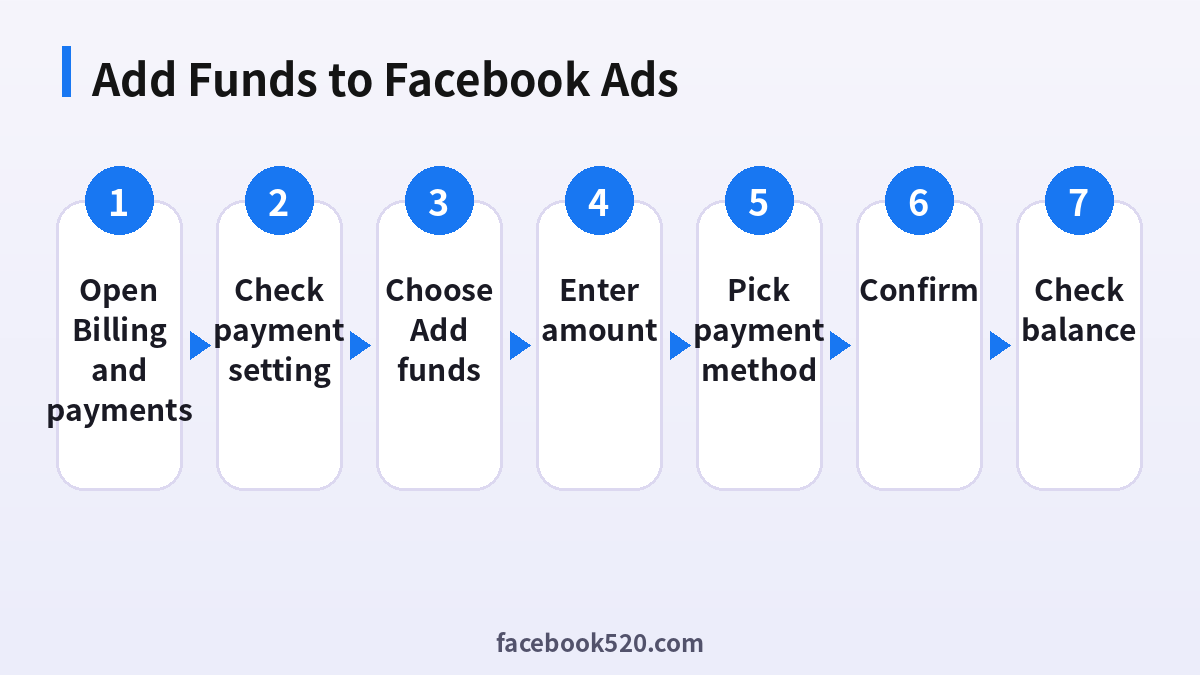
In many countries, Facebook ad accounts can use a prepaid balance instead of, or in addition to, automatic card billing. This is what most people actually want when they search add funds facebook ads. The exact wording varies by country, but the flow is similar:
- Open Meta Business Suite or Ads Manager and go to Billing and payments.
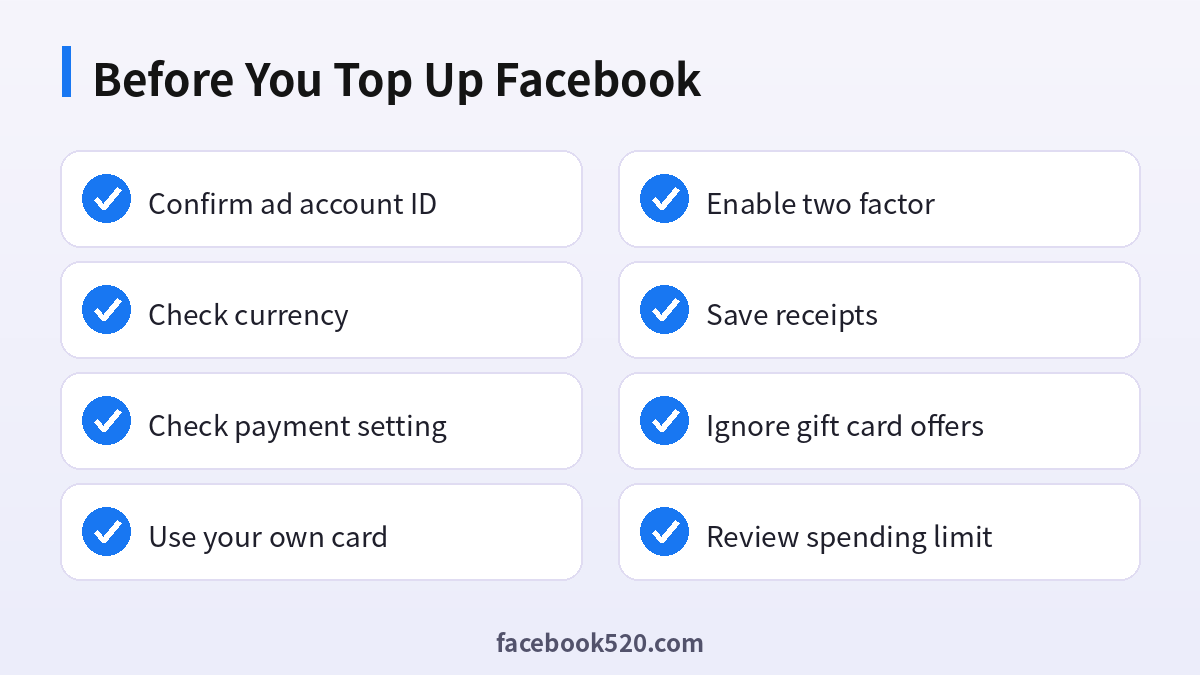
- Select the correct ad account at the top. Check the account ID, currency and time zone, because they cannot easily be changed later.
- Look at your payment setting. Accounts can be set to automatic payments (charged after ads run) or prepaid funds (you pay before ads run). Some markets only support one of these.
- Click Add funds or Add prepaid funds.
- Enter the amount. Meta may show the minimum and any taxes that apply.
- Choose a payment method available in your country, such as a card, PayPal, online banking or a local wallet.
- Confirm the payment and wait for the balance to appear. Card payments are usually immediate; bank transfers may take several days.
- Check that your ads are running and set an account spending limit if you want a hard ceiling on total spend.
If you do not see an Add funds option, your account is probably on automatic payments in a country where prepaid funds are not offered. In that case you pay by adding a card or PayPal and Meta charges you when you reach your billing threshold or on your monthly billing date.
Payment methods you can use instead of a gift card
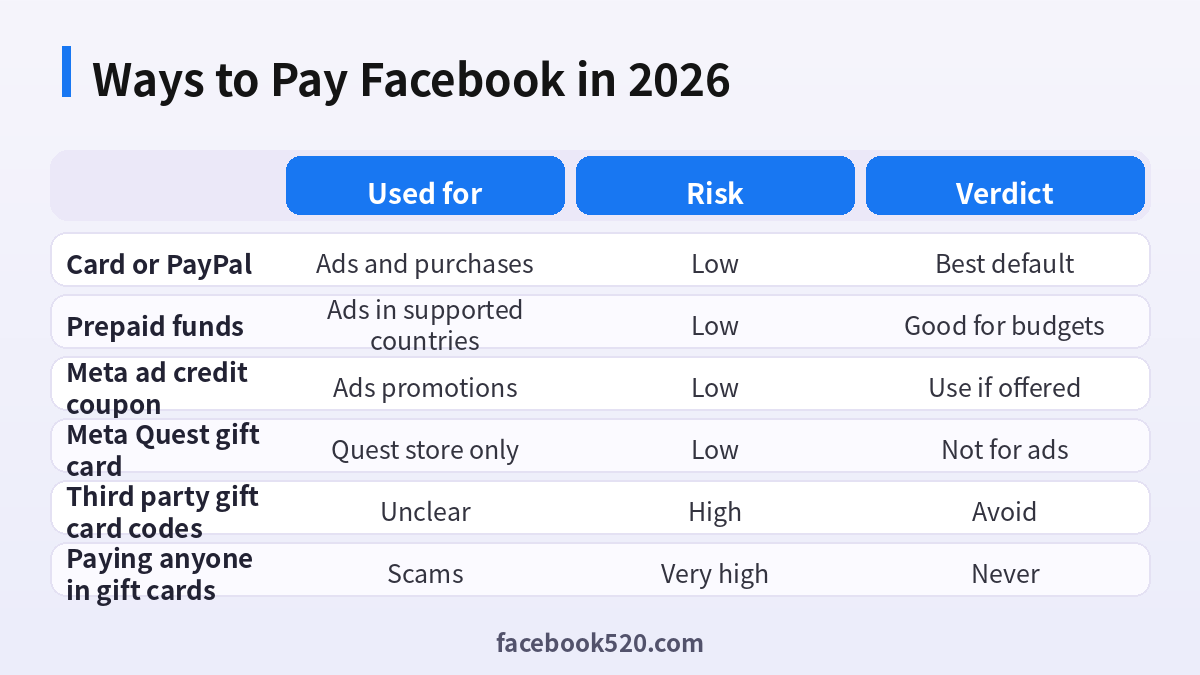
Here are the most common legitimate ways to pay Facebook in 2026 and what each is good for:
| Payment method | Works for ads | Works for in-app purchases | Notes |
|---|---|---|---|
| Credit or debit card | Yes | Yes | Must allow online and international transactions |
| PayPal | Yes, in many countries | Yes, in some regions | Link a funded PayPal account |
| Prepaid funds via bank or local wallet | Yes, in supported countries | No | Good for strict budgets |
| Apple or Google gift card balance | No | Yes, inside the app on that platform | Cannot pay for ads |
| Meta Pay (saved payment details) | Yes, as a stored method | Yes | Lets you reuse a card across Meta apps |
| Store gift cards or crypto codes from strangers | No | No | Always a scam |
A virtual or prepaid debit card from your own bank can work for ads if it supports recurring online payments, but low balance cards often fail when Meta tries to charge after ads have run. If you want to control spending, prepaid funds or a spending limit is more reliable than a low balance card.
Paying for Stars, subscriptions and games inside Facebook
Not every Facebook purchase is about ads. Inside the Facebook app you can buy Stars to support creators during live videos or on reels, subscribe to creators, or make purchases inside some instant games. These are processed differently:
- On iPhone and iPad, purchases inside the app usually go through Apple, so an Apple gift card balance can be used.
- On Android, purchases inside the app may go through Google Play, so a Google Play gift card balance can be used.
- On the web, Facebook uses your saved card or PayPal via Meta Pay.
This is the closest thing to a modern Facebook gift card: add a gift card to your Apple ID or Google Play account, then buy Stars in the Facebook app. Remember that prices inside apps are often higher than on the web because of app store fees, and Stars cannot be converted back into money or ad credit.
Why gift card payment requests are a red flag
Gift cards are popular with scammers because they are fast, hard to trace and hard to refund. Common scam stories involving Facebook include:
- A message claiming your Page or ad account will be disabled unless you pay a “verification fee” with gift cards.
- A fake Meta support agent offering to restore your hacked account for a fee paid in gift cards.
- A Marketplace buyer or seller who insists on payment in gift cards.
- Websites selling “Facebook ad credit gift cards” at a big discount.
- Messages saying you won a prize and need to pay shipping with a gift card code.
Meta does not charge for account verification through gift cards, does not sell discounted ad credit through strangers, and support will never ask for gift card codes. If you already shared a code, contact the gift card issuer immediately, report the conversation on Facebook, and change your password. For hacked or disabled accounts, use only the official steps described in Facebook account recovery.
Common Facebook ads billing problems and fixes
When people give up on cards and start looking for a facebook gift card, it is often because a payment failed. Most failures have simple causes:
- Card declined: the bank blocked an international or online transaction. Enable online payments in your banking app or call the bank.
- Insufficient funds at billing time: Meta charges after ads run, so a low balance card fails later. Use prepaid funds or a card with enough headroom.
- Ad account disabled for unusual payment activity: this can happen when several accounts use the same card, or when a card is added and removed many times. Request a review in Account Quality.
- Wrong currency: an ad account created in the wrong currency cannot be changed. Create a new ad account in Business Manager with the right currency.
- Outstanding balance: if a previous charge failed, ads stop until you pay the balance. Use Pay now in Billing and payments.
Keep receipts for every payment. They are useful for accounting and for any dispute with Meta support.
Automatic payments or prepaid funds: which should you choose
If your country offers both payment settings, the choice matters more than any gift card. With automatic payments, Meta charges your card or PayPal each time you reach a billing threshold and again on your monthly billing date. Your ads keep running as long as the charge succeeds, which suits businesses that advertise every day. The downside is that you only see the charge after the money has been spent, and a failed charge pauses every campaign in the account until you settle the balance.
With prepaid funds, you load money first and ads stop when the balance reaches zero. This feels much closer to a gift card: you decide the amount in advance and can never be billed more than you added. It is useful for testing a new market, for clients who approve budgets monthly, and for teams that want finance to sign off before spend happens. The trade off is that you must watch the balance, because campaigns pause without warning when it runs out, and in some markets you cannot switch an account back to automatic payments once it is on prepaid.
A practical rule: use prepaid funds while you are learning or testing, then move to automatic payments with an account spending limit once campaigns are stable. Either way, write down the ad account ID, currency and time zone before you add money, and add a backup payment method so a single declined card does not stop delivery during an important launch or sale.
Tips for agencies and businesses managing many ad accounts
Agencies and growing brands often ask for a facebook gift card style solution because they want to give a fixed budget to each client. Better options are:
- Create separate ad accounts per client inside a Business portfolio, each with its own payment method or prepaid funds.
- Use account spending limits to cap the total for a campaign or month.
- Use campaign and ad set budgets rather than relying on the card to stop spending.
- Give team members roles in Business Settings instead of sharing logins, and require two factor authentication.
- Work with an authorized Meta partner if you need invoicing or credit lines in your market.
Never buy someone else’s ad account with an existing balance. Ad accounts are tied to their owner’s business, and Meta can disable them along with any remaining balance.
Frequently asked questions
Can I still buy a Facebook gift card in 2026?
Retail Facebook gift cards for games are largely discontinued. You may find Meta Quest gift cards, but they only work in the Meta Quest store and cannot pay for Facebook ads.
Is there a Facebook ads gift card?
No retail product loads money into Facebook Ads. Meta does issue promotional ad credit coupons to some advertisers directly in Ads Manager, and you can add prepaid funds yourself in supported countries.
What is Facebook credit?
Facebook Credits was a virtual currency retired in 2013. Today people use the phrase for ad credits, prepaid balance in an ad account, or Stars bought inside the app.
How do I add funds to Facebook Ads without a credit card?
Depending on your country, you can use PayPal, online banking, local wallets or bank transfer through the prepaid funds option in Billing and payments. Available methods are listed when you click Add funds.
Can I use an Apple or Google Play gift card on Facebook?
Yes, for in-app purchases such as Stars on that phone platform. No, for ads, because ad payments are handled in Ads Manager, not the app store.
Can I transfer ad credit to another ad account?
No. Promotional ad credit is tied to the ad account it was issued to, and prepaid funds generally stay in that account.
Do Meta ad credits expire?
Yes. Promotional credits usually have an expiry date and minimum spend rules shown on the offer. Unused credit is not refunded.
Can I get a refund of prepaid funds?
Refund options depend on your country and payment method. In some cases unused prepaid funds can be refunded when you close the ad account; check the Billing and payments help pages for your region.
Someone offered me cheap Facebook ad credit. Is it real?
Almost certainly not. Discounted credit sold by third parties is usually funded with stolen cards, and Meta can disable the ad account when the payment is reversed.
Can I pay Facebook Marketplace sellers with a gift card?
You should not. Gift card payments cannot be reversed, and sellers who insist on them are a common scam on Marketplace.
Why does Facebook show a different currency than my card?
The ad account currency is set when the account is created. Your bank converts it and may add a foreign transaction fee.
Where do I see how much I have spent?
Open Billing and payments to see payment activity, receipts, any remaining prepaid balance and your account spending limit.
Summary
The classic facebook gift card is essentially gone. In 2026, the closest equivalents are Meta ad credit coupons issued directly in Ads Manager, prepaid funds you add yourself, and app store gift cards for Stars and other in-app purchases. Facebook Ads cannot be paid with retail gift cards, and anyone asking you to pay Meta with gift card codes is running a scam. To fund ads safely, use your own card, PayPal or the official prepaid funds option, set a spending limit and keep two factor authentication on. For more on accounts, Pages and advertising, continue with the Facebook guide hub.
