

Krea AI Pricing 2026: Free, Basic, Pro, Max and Business Plans, Compute Units Explained, Annual Discount, Extra Packs and How to Pay
Krea started as a real-time AI image tool where the picture changes as you draw or type. In 2026 it has become a broad creative suite: its own Krea image models, a large catalogue of third-party image and video models, an upscaler that reaches very high resolutions, LoRA training for your own style, lipsync and 3D tools, Nodes for building workflows and an App Builder. All of that runs on one internal currency, the compute unit, which is why people searching for krea ai pricing often find the plan cards confusing at first. The price is easy to read. What the price actually buys is not.
This guide explains every Krea plan as listed on the official pricing page in November 2026, translates compute units into real images and videos, shows when the annual plan or a top-up pack is the better deal, and walks through payment, upgrades and cancellation. If you are comparing tools, our guides to Midjourney pricing, Runway pricing and Kling AI pricing use the same structure, so you can line them up side by side.
Pricing note: the figures below come from krea.ai/pricing as displayed in November 2026 for US dollar billing. Krea changes its model line-up and unit estimates often, and taxes may be added at checkout depending on where you live. Treat every number as a snapshot and confirm the total on the checkout screen before you pay.
Krea AI pricing at a glance
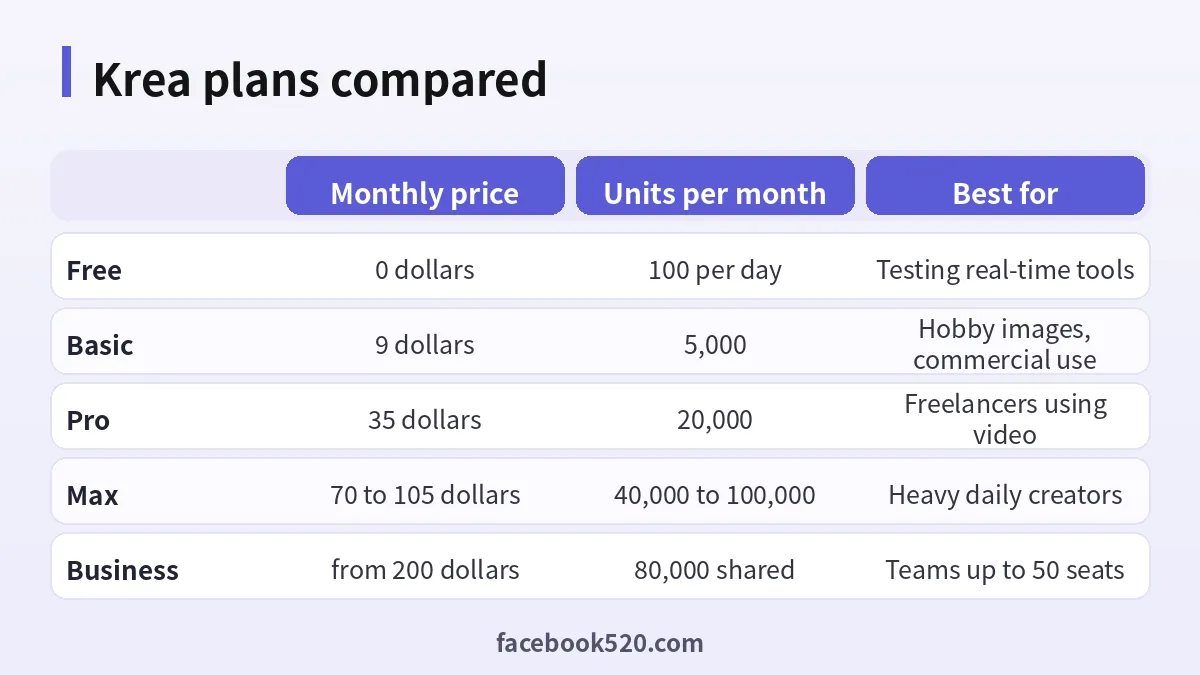
Krea sells five tiers to individuals and teams, plus an Enterprise tier negotiated with sales. Here is the summary.
| Plan | Monthly billing | Billed annually (per month, approx.) | Compute units | Key inclusions |
|---|---|---|---|---|
| Free | $0 | $0 | 100 per day, refills daily | Real-time models, limited model access, limited upscaling, no commercial license |
| Basic | $9 | about $5 | 5,000 per month | All image models, selected video models, 3D and lipsync, LoRA training with 50 images, upscaling up to 22K, commercial license |
| Pro | $35 | about $21 | 20,000 per month | Everything in Basic, all video models, App Builder, bulk discounts on compute packs |
| Max | $105 at 60,000 units ($70 at 40,000) | about $63 at 60,000 units | 40,000 to 100,000 per month, selectable | Everything in Pro, LoRA training with up to 2,000 images, unlimited relaxed generations, more concurrency |
| Business | from $200 | about $160 (third-party reports) | 80,000 shared by default, selectable from 20,000 to 1.5 million | Up to 50 members, rollover of unused units, admin controls, priority email support |
| Enterprise | Custom | Custom | Custom packages | SAML single sign-on, dedicated support, auto top-ups |
Krea advertises “Save 40% with annual”, which matches the Pro and Max numbers. Third-party trackers have seen the Basic annual figure displayed as either $5 or $5.25 per month and the Business annual saving closer to 20 percent, so read the final total at checkout rather than relying on the headline.
What a compute unit actually buys
Every action in Krea, from a quick image to a ten-second video to a LoRA training run, costs a number of compute units. Cheap in-house models cost a handful of units per image. Premium third-party models, especially video models, cost far more. That is why the same 20,000 units can mean several hundred videos or a few thousand images.
Krea prints its own estimates next to each plan. In November 2026 the pricing page showed roughly the following:
| Plan | Units | Nano Banana 2.1 generations (Krea estimate) | Seedance 2.5 videos (Krea estimate) |
|---|---|---|---|
| Basic | 5,000 | about 200 | about 16 |
| Pro | 20,000 | about 803 | about 65 |
| Max | 60,000 | about 2,410 | about 197 |
| Business | 80,000 | about 3,214 | about 262 |
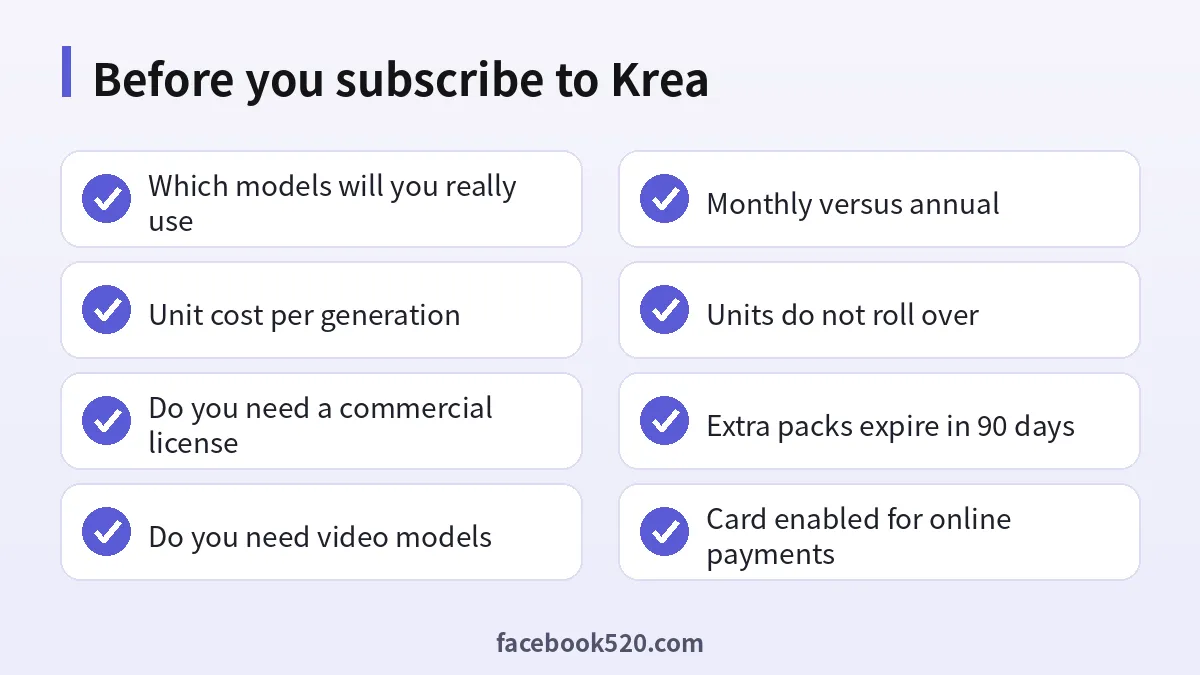
From these numbers you can work out rough unit rates: a Seedance 2.5 video costs around 300 units on Krea’s assumptions, and a Nano Banana 2.1 generation around 25 units. Krea does not always state the resolution, clip length or reference settings behind each estimate, and many models let you raise resolution or duration, which raises the cost. Before you commit, open the model you plan to use, set your usual resolution and length, and note the unit cost shown before you press generate.
A practical way to budget is to write down the two or three models you use most, multiply their unit cost by how many outputs you need in a typical month, then add about 20 percent for retries. Most creators reroll a prompt several times before they are happy, and those retries cost units too.
The Krea Free plan: what you really get
The krea free plan gives you 100 compute units a day and refills them every day. No credit card is required to sign up. It is designed for testing rather than production work:
- Full access to Krea’s real-time models, the feature Krea is best known for, where the canvas responds as you sketch or type.
- Limited access to the wider model catalogue and limited upscaling.
- No commercial license. Krea’s FAQ states that Basic, Pro, Max, Business and Enterprise include a commercial license. Free does not, so do not use free-plan output in client work, ads or products.
- Community support through Krea’s Discord server.
When your daily allowance runs out, you wait for the next refill or upgrade. The free tier is excellent for learning the interface, testing how a particular model handles your style and deciding whether you need video at all. It is not enough for a steady publishing schedule.
Basic, Pro and Max: which individual plan fits you
The three individual plans differ in three ways: how many units you get, which models are unlocked and which power features are included.
Basic at $9 a month suits hobbyists, students and anyone who mostly makes still images. You get every image model, a selection of video models, 3D and lipsync tools, LoRA training on up to 50 images, upscaling to 22K and the commercial license. Five thousand units are enough for a couple of hundred mid-cost images a month or a small number of short videos.
Pro at $35 a month is the plan Krea labels most popular, and for good reason. It unlocks all video models, which matters if you want the premium video engines hosted on Krea rather than only the selected ones in Basic. It also adds the App Builder and bulk discounts on extra compute packs. Twenty thousand units cover regular image work plus a meaningful amount of video. Freelance designers and small studios usually land here.
Max from $70 to $105 a month is for people who generate all day. The headline price of $105 buys 60,000 units, and a slider lets you pick 40,000, 60,000, 80,000 or 100,000 units with the price scaling accordingly; at 40,000 units the page showed $70. Max adds unlimited relaxed generations, meaning you can keep generating on supported models in a slower queue without spending units, plus LoRA training on up to 2,000 images and more parallel jobs. If you are hitting Pro’s limit every month, Max is usually cheaper than buying packs.
A quick way to choose
- Use the Free plan for a few days and record which models you actually use.
- If you only need images and commercial rights, start with Basic.
- If you need premium video models, go straight to Pro, because Basic only unlocks selected video models.
- If you exceed Pro’s 20,000 units two months in a row, compare Max against buying extra packs.
- If more than two or three people need access and share assets, look at Business instead of several individual plans.
Business and Enterprise: Krea for teams
The Business plan is team-based, not seat-based. You pay for a compute pack, from $200 a month for 80,000 units by default, and up to 50 members are included at no extra cost per member. The selectable range runs from 20,000 to 1.5 million units a month. Every member gets the full Business feature set: commercial license, unlimited relaxed generations, custom roles and permissions, fine-grained controls over which models members can use, shared private Node Apps, usage analytics and priority email support. Business is also covered by separate Business terms of service.
Two Business features change the economics:
- Rollover. Unlike Basic, Pro and Max, Business and Enterprise allow unused units to roll over into the next period, with a rollover window you can customise with sales.
- Per-member limits. Admins can monitor usage per person and set individual caps, which prevents one enthusiastic teammate from draining the shared pool.
Enterprise adds custom seat counts beyond 50, custom compute packages with volume discounts, SAML single sign-on through providers such as Google Workspace, Microsoft Entra ID or Okta, a dedicated account manager and auto top-ups so work never stops when units run low. Pricing is by quote.
Monthly vs annual billing: is the 40 percent discount worth it
Annual billing lowers the effective monthly price sharply. On the figures shown in November 2026:
| Plan | Monthly billing, 12 months | Annual billing, 12 months (approx.) | Saving |
|---|---|---|---|
| Basic | $108 | about $60 to $63 | about $45 |
| Pro | $420 | about $252 | about $168 |
| Max (60,000 units) | $1,260 | about $756 | about $504 |
| Business (80,000 units) | $2,400 | about $1,920 | about $480 |
Annual makes sense when you are confident you will use Krea every month. It is risky when your needs are uncertain, because AI creative tools change fast and a competitor may release a better model in the middle of your term. A sensible approach is to pay monthly for one or two months, check your real unit consumption, then switch to annual on the plan that matched your usage. Remember that units on individual plans are allocated monthly even on annual billing and do not roll over, so annual billing does not let you bank units for a busy season.
Extra compute packs and what happens when you run out
When you run out of units before your plan renews, you have three options: wait for the renewal, upgrade, or buy a one-time compute pack. Krea’s pricing page lists packs of 2,000, 5,000, 10,000, 24,000 and 50,000 units. They are added to your account instantly and are valid for 90 days. Prices appear only after you sign in, and Pro and higher plans get bulk discounts on packs.
Some rules of thumb:
- If you need a pack once in a while, packs are fine, and the 90-day validity gives you a little breathing room.
- If you buy packs every month, upgrading is almost always cheaper per unit. Krea itself says upgrading gets you more credits for your money.
- Free-plan users cannot top up the daily allowance in the same way and are pushed towards upgrading.
- Business users can buy additional packs or move to a higher pack; adding members does not increase cost.
How to pay for Krea and manage your subscription
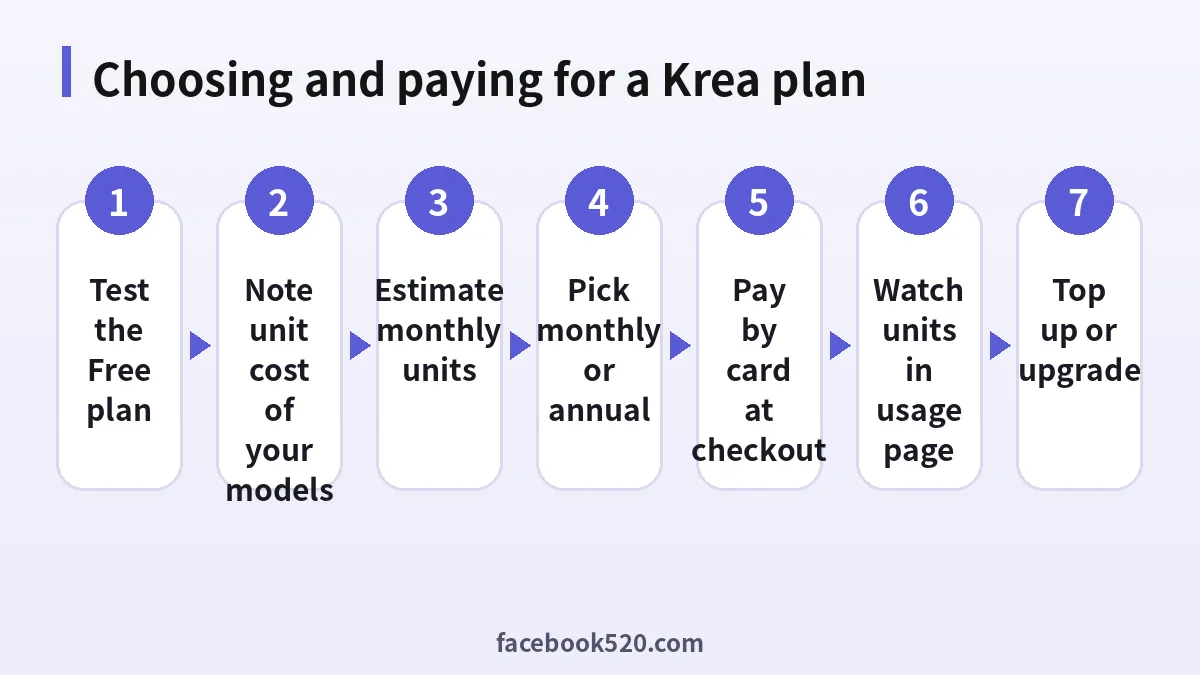
Krea bills subscriptions online through its checkout. The steps:
- Sign in at krea.ai with Google or email and open the Pricing page.
- Toggle between monthly and annual billing and choose your plan. On Max or Business, set the unit slider first.
- Click the plan button to open checkout. Enter a credit or debit card; depending on your country and device, other wallet options may appear on the checkout screen.
- Check the total, including any sales tax or VAT added for your location, and confirm. Your bank may ask for a one-time code.
- Your units appear immediately. Open your account’s billing area to download receipts and see the renewal date.
If a card is declined, the usual causes are cards not enabled for online or international purchases, a low online spending limit, or a mismatch between the billing address and the card. Prepaid and virtual cards can work if your issuer allows recurring merchant charges, but some issuers block subscriptions, so test before relying on one.
Changing plans. Krea’s FAQ says you can upgrade or downgrade at any time and that changes take effect immediately with prorated billing. When you upgrade, you pay only the difference for the rest of the cycle. When you downgrade, credit is applied to future invoices.
Cancelling. Cancel from your account’s billing or subscription settings before the renewal date. You keep access until the end of the paid period. Because units do not roll over on individual plans, plan your final heavy work for the last days of the cycle.
Receipts and invoices. Business accounts receive a single consolidated invoice for all members’ usage. Individual plans get a receipt per charge. If you need a company name and tax number on invoices, add them in billing settings before paying where the option exists, and contact Krea support if it does not.
Commercial license, API pricing and the fine print
The commercial license is one of the strongest reasons to pay. According to Krea’s FAQ, all paid plans allow you to use generated images, videos and other assets for commercial purposes, including marketing, advertising, products and client work. Third-party models hosted on Krea may still carry their own model terms, so for high-stakes work such as a national ad campaign, check the licensing page for the specific model.
The Krea API is billed separately from the subscription plans, typically per second of video or per generation for each model. If you are a developer integrating Krea into an app, budget for API usage on its own and do not expect your Pro units to cover API calls.
Other details worth knowing:
- Unit estimates on the pricing page change as Krea adds models, so the same plan may buy more or fewer outputs a few months from now.
- Relaxed generations on Max and Business are unlimited but slower and limited to supported models.
- Free-plan outputs carry no commercial rights, even if you later upgrade.
Krea compared with other AI image and video tools
Krea’s main selling point is breadth: one subscription gives you access to Krea’s own models plus many third-party image and video engines, an upscaler and training tools. The trade-off is that every premium model draws down the same unit balance quickly.
| Tool | Entry paid plan | Pricing model | Strength | Weakness |
|---|---|---|---|---|
| Krea | $9 per month | Shared compute units across many models | Real-time canvas, many models in one place, 22K upscaling | Premium video burns units fast |
| Midjourney | about $10 per month | GPU time, fast and relaxed modes | Consistent artistic image quality | Fewer third-party models |
| Runway | about $12 to $15 per month | Credits per second of video | Video editing tools and own video models | Credits run out quickly on long clips |
| Kling AI | low-cost entry plans | Credits per video | Strong motion and longer clips | Mostly video-focused |
The comparison figures for other tools are approximate and change often; see the dedicated guides to Midjourney pricing, Runway pricing and Kling AI pricing for details. If you mainly need one model, paying its native service directly can be cheaper. If you switch between several models in a week, Krea’s single subscription is often simpler and competitive.
Ways to keep your Krea bill under control
- Prototype on cheap models. Use Krea’s real-time or low-cost image models to find the composition, then switch to a premium model only for the final render.
- Lower resolution and length while testing. Generate short, low-resolution video drafts first and upscale only the keepers.
- Use relaxed mode if you have Max or Business. Non-urgent batches can run without spending units.
- Train one good LoRA. A well-trained style or product LoRA cuts down on rerolls.
- Set per-member limits on Business. Shared pools disappear quickly without caps.
- Review usage weekly. If you consistently finish the month with many unused units, downgrade; if you buy packs every month, upgrade.
Frequently asked questions about Krea AI pricing
How much does Krea AI cost per month?
Free is $0 with 100 units a day. Basic is $9, Pro is $35, Max ranges from $70 to $105 depending on units, and Business starts at $200 a month, on monthly billing as listed in November 2026.
Is there a Krea free plan?
Yes. The Free plan gives 100 compute units a day that refill daily and requires no credit card, but it has limited model access and no commercial license.
Do Krea compute units roll over?
Not on Basic, Pro or Max. Units are allocated monthly and expire at the end of the cycle. Business and Enterprise plans allow rollover.
How long do extra compute packs last?
One-time packs from 2,000 to 50,000 units are valid for 90 days from purchase.
Does Krea offer an annual discount?
Yes. Krea advertises savings of up to 40 percent with annual billing, which brings Pro to about $21 a month and Max at 60,000 units to about $63 a month.
Can I use Krea images commercially?
Yes on any paid plan. Basic, Pro, Max, Business and Enterprise include a commercial license. The Free plan does not.
Which plan do I need for video?
Basic includes selected video models. Pro and above unlock all video models, so choose Pro if you rely on premium video engines.
What does the Krea subscription include for teams?
Business includes up to 50 members sharing one compute pool, admin roles and permissions, model access controls, usage analytics, unit rollover and priority email support.
Can I change or cancel my Krea plan anytime?
Yes. Upgrades and downgrades take effect immediately with prorated billing, and you can cancel before renewal while keeping access to the end of the paid period.
Is the Krea API included in my subscription?
No. API usage is priced separately per model, usually per generation or per second of video.
What payment methods does Krea accept?
Credit and debit cards through the online checkout are the standard route. Additional wallets may appear depending on your region and device, so check the checkout screen.
Why was I charged more than the plan price?
Sales tax or VAT may be added depending on your location, your bank may add a foreign transaction fee if your card is not in US dollars, and compute packs are billed separately from the plan.
Final verdict on Krea AI pricing
Krea AI pricing in 2026 is simple on the surface and nuanced underneath. Free is a generous sandbox for real-time image work but carries no commercial rights. Basic at $9 is the cheapest way to get every image model plus a commercial license. Pro at $35 is the sweet spot for creators who need all video models. Max, from $70 to $105, pays off only for daily heavy users, and Business from $200 makes sense once a team shares one pool and wants rollover and admin controls.
Before you subscribe, check the unit cost of the models you actually use, start monthly, then move to annual once your usage is stable. Pay by card at the official checkout, watch your usage page, and use packs only as a short-term buffer. For comparisons, read our guides to Midjourney pricing, Runway pricing, Kling AI pricing and the Midjourney account guide.

