
Meta AI Pricing 2026: Is Meta AI Free, Meta One Core and Premium Plans, Creator and Business Bundles, Limits and How to Subscribe
For a long time the answer to meta ai pricing was a single word: free. Meta AI lived inside Facebook, Instagram, WhatsApp, Messenger and Threads, and on the standalone meta.ai website and app, and nobody was asked to pay. That changed in September 2026, when Meta launched Meta One, a family of subscriptions that bundles app perks with extra AI usage. Meta AI itself still costs nothing for everyday use, but heavier image and video generation now has a price tag.
This guide explains exactly what is free, what the paid Meta One Core and Premium bundles add, how the cheaper single app plans and the business bundles fit in, how to subscribe and cancel, and how to avoid the fake “Meta AI Plus” offers that have appeared on marketplaces. If you use Meta’s apps for business, our Facebook hub collects every guide we have on Facebook accounts, ads and payments, and the Threads price guide covers the separate ad-free and verification subscriptions.
Pricing note: the prices below are the US launch prices Meta published on 15 September 2026. Meta states that plans, benefits, pricing and availability may vary by region, by app and by account. Always check the price shown inside your own app before you subscribe.
Is Meta AI free in 2026?
Yes. Meta has been explicit that Meta AI remains free for everyday use. Without paying anything you can:
- Chat with the assistant in WhatsApp, Instagram, Facebook, Messenger and Threads, or on meta.ai and the Meta AI app.
- Ask questions that use web search and get answers with sources.
- Upload images, PDFs and spreadsheets and ask for summaries or analysis.
- Use voice conversations and the camera input on supported devices, including compatible AI glasses.
- Generate and edit a limited number of images and short videos.
- Turn on memory and personalisation, or use an incognito chat that does not keep history.
The free tier is not a trial. It does not expire after a number of days, and you do not need to add a card. What it does have is a usage ceiling on the expensive features, mainly image creation, image editing, video generation and in-app creative tools such as Restyle on Instagram. Most people who only chat with Meta AI never notice that ceiling. Creators who produce several AI images or clips a day reach it quickly.
What Meta One is and why it exists
Meta One is the umbrella name for all of Meta’s consumer and business subscriptions. It replaces the idea of separate, unrelated paid features with three layers:
- Single product plans, which add perks to one app.
- Personal bundles, Core and Premium, which combine the three single plans and add more Meta AI usage.
- Creator and business bundles, from Essential to Max, which add verification, publishing tools and Meta Business Agent capacity on WhatsApp.
The reason is simple: generating images and especially video with Meta’s Muse models costs real computing power. Meta keeps the chat assistant free to reach billions of users, and charges the minority who want a lot of media generation. That is the same logic used by Google with Gemini, OpenAI with ChatGPT and xAI with Grok, although Meta’s plans are cheaper at the entry level because they are bundled with social features.
Meta AI pricing at a glance
Here are the plans as announced at launch in the United States.
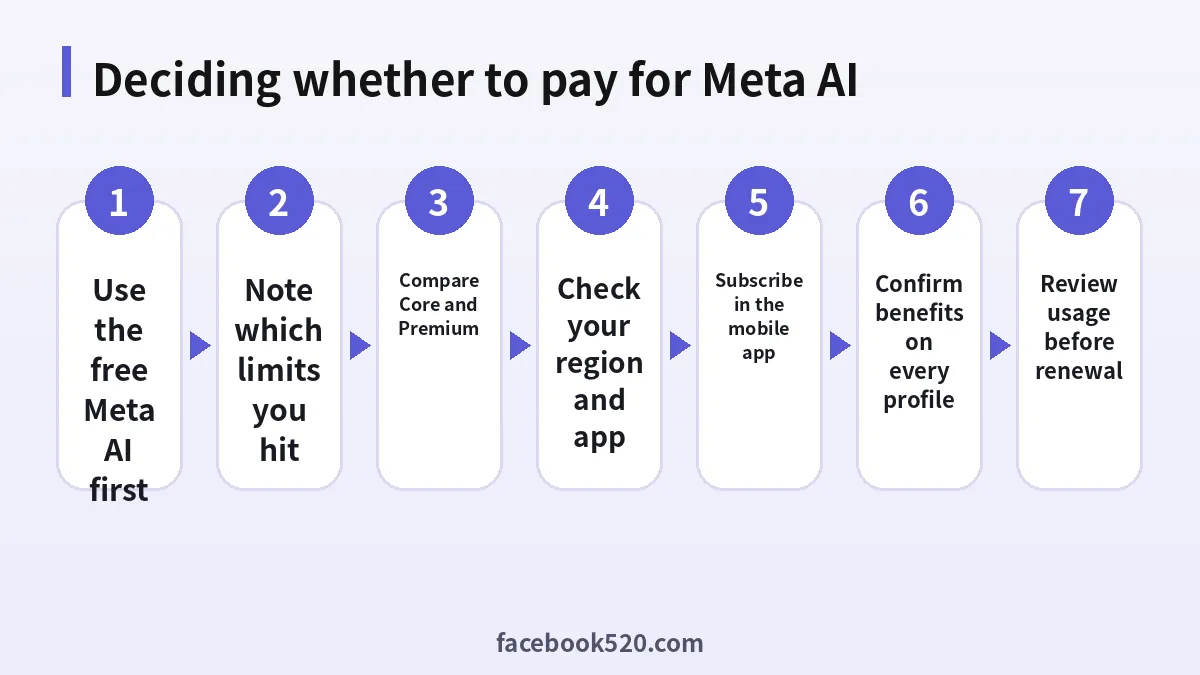
| Plan | US price per month | What it adds | Who it suits |
|---|---|---|---|
| Meta AI (free) | $0 | Everyday chat, search, file analysis, limited image and video creation | Almost everyone |
| Plus for WhatsApp (official Meta plan) | $2.99 | Exclusive themes and icons, effect stickers, more pinned chats | WhatsApp fans who do not need extra AI |
| Instagram Plus | $3.99 | Story audiences, super hearts, story rewatch insights, custom fonts | Active Instagram users |
| Facebook Plus | $3.99 | Custom app icons, super hearts and other profile extras | Daily Facebook users |
| Meta One Core | $7.99 | All three Plus plans plus more Meta AI image and video generation and more Restyle and voice effects | Regular personal creators |
| Meta One Premium | $19.99 | Everything in Core with the largest personal AI allowance | People who generate AI media every day |
| Essential (creator/business) | from $14.99 | Verified badge, impersonation protection, Meta Business Agent on WhatsApp | Creators and small brands |
| Advanced | from $49.99 | Story scheduling up to 30 days ahead, links in organic posts and reels, exportable analytics, team access | Growing businesses |
| Expert / Max | from $149 / from $499 | Highest feature access and Business Agent capacity | Teams managing at scale |
Two details are worth noticing. First, Core costs less than buying the three Plus plans separately, which would come to roughly $11 a month, so if you want even two of the single plans, Core is usually the better deal. Second, the creator and business prices are “starting at” prices, which means the final amount depends on the app, the region and the capacity you choose.
Meta One Core vs Premium: which one is worth it
Core and Premium share the same feature list. The difference is the amount of AI usage. Meta has not published a fixed number of images or videos per tier, and it describes the plans in relative terms: Core gives more media generation than the free tier, and Premium gives “the most room to create content with Meta AI” across the apps.
That makes the choice a practical one:
- Choose Core if you hit the free image or video limit a few times a week, if you use Restyle and voice effects on Instagram stories, or if you were already considering Instagram Plus plus another single plan.
- Choose Premium if you create AI videos most days, run a fan page or meme account that posts several AI visuals daily, or regularly see the “limit reached” message even after upgrading to Core.
- Stay free if you mainly ask questions, summarise documents and generate an occasional picture. The paid tiers do not make the chat assistant itself smarter; they mostly raise creative quotas.
A sensible approach is to start with Core for one month, keep an eye on whether you still run into limits, and move up to Premium only if you do. Downgrading later is possible from the same subscription screen.
What you do not get with Core or Premium
The personal bundles do not include a verified badge, impersonation protection, business scheduling tools or Business Agent capacity. Those belong to the creator and business plans. They also do not include API access for developers. Meta’s developer offering for its Muse models and Llama models is a separate product with its own terms.
Creator and business bundles explained
Businesses and creators who already paid for Meta Verified will recognise parts of these plans. The new bundles combine verification with professional tools and with Meta Business Agent, an AI that replies to customers on WhatsApp around the clock.
Essential, from $14.99 a month, gives a verified badge and verified channel on the WhatsApp Business app after successful verification, impersonation protection and more Business Agent replies. It is the natural entry point for a freelancer, a coach or a small shop.
Advanced, from $49.99 a month, adds professional publishing: scheduling stories up to 30 days in advance, links in organic posts and reels, exportable analytics and deeper audience insights. It also lets you give team members access without sharing your password and adds linked devices and broadcast credits on WhatsApp.
Expert, from $149, and Max, from $499 a month, are built for agencies and brands with high message volumes and several team members. Pricing here is the most variable and may be quoted inside Business Suite or by a Meta representative.
If you manage ads, remember that none of these subscriptions pays for advertising. Ad spend is billed separately through Ads Manager. For setting up that side, see our guide to the Facebook business account, the WhatsApp ads billing guide and our complete Facebook account guide.
How to subscribe to Meta One step by step
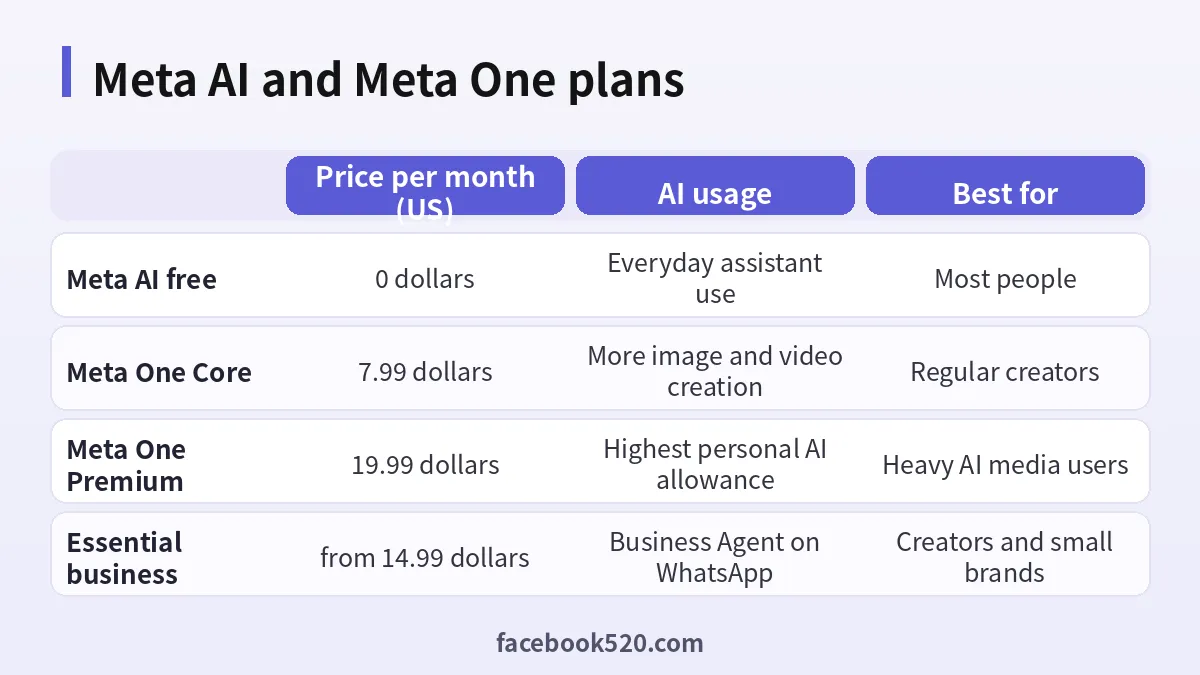
Meta asks you to subscribe through its mobile apps. The exact screens vary by app and region, but the flow is similar:
- Update Instagram, Facebook or WhatsApp to the latest version and sign in to the account you want to upgrade.
- Open the menu or settings and look for Meta One or Subscriptions. In some regions Meta AI itself shows an upgrade prompt when you reach a creative limit.
- Compare the plans shown. The prices displayed there are the ones that apply to your account, including local currency.
- Choose Core, Premium or a single Plus plan. For business bundles, start the verification flow if you want the badge.
- Pay with the payment method linked to the App Store or Google Play, or with a card or other method offered in the Meta checkout where available.
- Confirm the plan in the Accounts Center, where Meta One subscriptions are managed. Check that the benefits appear on each linked profile you expect.
If you link Facebook and Instagram in the same Accounts Center, the bundle benefits can be used across those profiles. If you keep separate, unlinked accounts, benefits may not carry over, so link them before you subscribe if that matters to you.
Prices outside the US and app store differences
Meta launched Meta One “globally”, but it also states that it is not available in all regions and that eligibility requirements apply. In practice you should expect:
- Local currency pricing. Europe, the UK, India, Brazil and other markets typically see prices adjusted for local purchasing power and tax, so the euro or rupee price is not a straight conversion of $7.99.
- Store markups. Subscriptions bought through Apple or Google in-app purchases sometimes cost more than those bought through a direct checkout, because the stores take a commission. Compare both if your app offers both.
- Tax added at checkout. VAT or GST may be included or shown separately depending on the country.
- Feature differences. Some AI features, including certain video tools, roll out to some countries later than others. A plan may be on sale where a specific feature is not yet live.
The only reliable source is the price your app shows you when you open the subscription screen. Screenshots of prices on social media are often from another region or another month.
Meta AI compared with other AI subscriptions
Because Meta AI is bundled with social apps, its pricing looks very different from standalone assistants. Here is how the entry plans compare in late 2026.
| Service | Free tier | Main paid entry plan | What the paid plan is mainly for |
|---|---|---|---|
| Meta AI / Meta One | Yes, full assistant | Core, $7.99 a month | More AI image and video creation plus Instagram, Facebook and WhatsApp perks |
| ChatGPT | Yes | Plus, about $20 a month | Higher limits on advanced models, tools and image generation |
| Google Gemini | Yes | Google AI Pro, about $19.99 a month | Advanced Gemini models, Flow video tools, storage |
| Grok | Yes | SuperGrok or X subscriptions | Higher Grok limits and Imagine media generation |
The comparison shows where Meta One makes sense. If you mainly want a stronger reasoning model or long research reports, a dedicated assistant subscription is usually the better choice; see our guides to ChatGPT subscription plans and Gemini Pro pricing. If you mainly want to create visual content that you post on Instagram and Facebook anyway, Meta One Core is one of the cheapest ways to raise your creative limits.
Cancelling, refunds and renewal
Meta One renews automatically every month until you cancel. To stop it:
- If you subscribed through the App Store, cancel in your Apple ID subscriptions.
- If you subscribed through Google Play, cancel in Play Store subscriptions.
- If you paid directly through Meta, cancel in Accounts Center > Meta One / Subscriptions.
Cancel at least a day before the renewal date to avoid another charge. After cancelling you keep the benefits until the end of the paid period. Refunds follow the store’s policy for in-app purchases, or Meta’s terms for direct purchases; partial months are generally not refunded. Content you created with Meta AI while subscribed stays in your chats and posts after you cancel.
Fake Meta AI Plus offers and account risks
Whenever a popular service introduces a paid tier, resellers appear. Since Meta One launched we have seen listings for “Meta AI Plus lifetime”, “unlimited Meta AI accounts” and cheap “Meta One Premium” activations. Treat them with suspicion:
- There is no lifetime Meta One plan. Every legitimate plan is a monthly subscription tied to your own account.
- Activation services usually require your password or a login code, which gives a stranger access to your Facebook, Instagram and WhatsApp identity.
- Shared or purchased Meta accounts violate Meta’s terms and are frequently disabled, taking any paid subscription with them.
- Business verification is linked to real identity documents, so a purchased “verified” account can be stripped of its badge at any time.
If you need several team members to use business features, use the team access in the Advanced plan or Business Suite roles rather than sharing a single login.
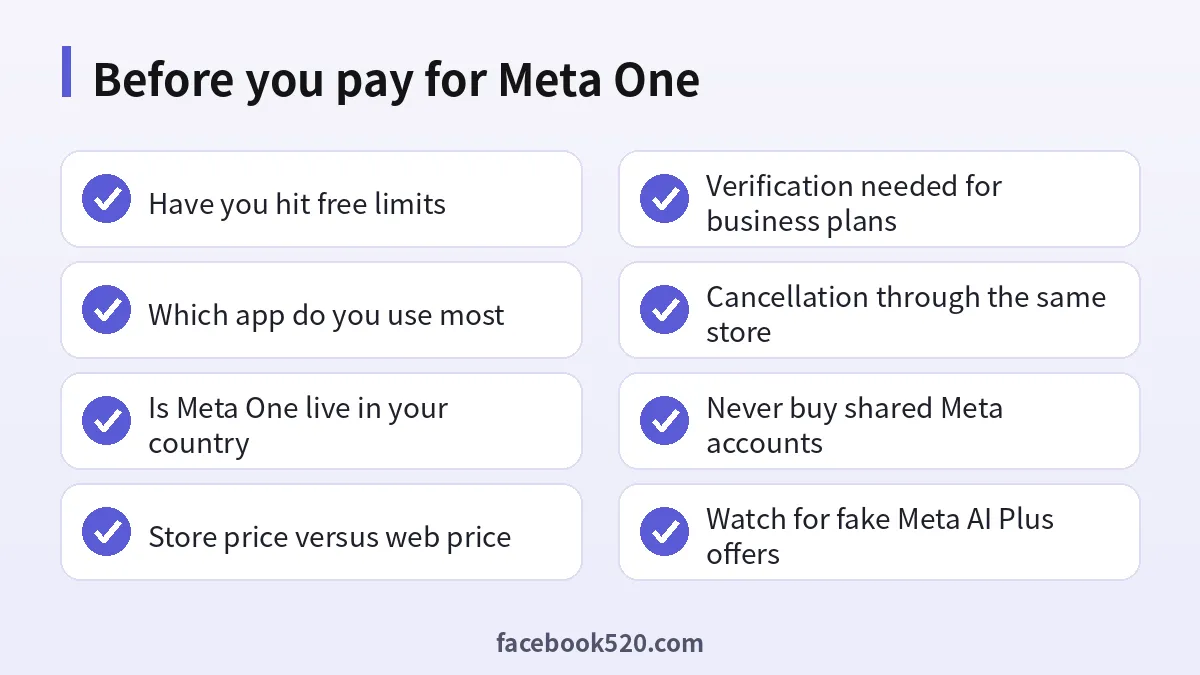
Tips to get the most out of the free tier first
Before paying, try these habits that stretch the free allowance:
- Draft ideas in chat and generate images only for the final version, rather than rerolling many times.
- Use image editing on an existing picture instead of generating from scratch when you only need small changes.
- Keep videos short; longer or higher quality clips use more of the allowance.
- Spread creative work across the week if your limit resets over time.
- Use Meta AI for text tasks freely, since chat is not where the paid tiers make the biggest difference.
If you still reach the limit regularly after a couple of weeks, that is a clear sign Core will pay for itself in convenience.
Frequently asked questions about Meta AI pricing
Is Meta AI completely free?
The everyday assistant is free in Facebook, Instagram, WhatsApp, Messenger, Threads and on meta.ai. Extra image and video generation beyond the free allowance is what the paid Meta One bundles provide.
How much does Meta One Core cost?
Meta One Core was launched at $7.99 a month in the United States. Local prices vary by country, app store and tax.
How much is Meta One Premium?
Premium costs $19.99 a month in the US and gives the largest personal AI allowance in the Meta One family.
Is there a Meta AI Plus subscription?
Not under that name. Meta’s paid options are Meta One single plans such as Instagram Plus, the official Plus plan for WhatsApp and Facebook Plus, and the Core and Premium bundles. Offers sold as “Meta AI Plus” by third parties are not official products.
Does Meta One make Meta AI smarter?
The paid tiers mainly increase how much media you can create and how often you can use creative tools. The everyday chat experience remains available to free users.
Can I use one Meta One subscription on Instagram and Facebook?
Yes, bundle benefits work across profiles linked in the same Accounts Center. Unlinked accounts may not receive the benefits.
Is Meta One available in every country?
No. Meta says it is not available in all regions and that eligibility requirements apply. If you do not see the subscription option in your app, it is probably not offered in your country yet.
Does Meta One include a verified badge?
Only the creator and business bundles, starting with Essential, include a verified badge after successful verification. Core and Premium do not.
Does Meta One cover my Facebook ad spend?
No. Advertising is billed separately in Ads Manager based on your campaigns.
How do I cancel Meta One?
Cancel through the same place you subscribed: Apple subscriptions, Google Play subscriptions or Accounts Center for direct purchases. Benefits stay active until the end of the paid period.
Is it safe to buy a cheap Meta One account?
No. Purchased or shared accounts break Meta’s terms, can be disabled without warning and may expose your personal data. Subscribe on your own account instead.
Do developers pay for Meta AI through Meta One?
No. Meta One is a consumer and business subscription. Developer access to Meta’s models is a separate offering with its own pricing.
Final verdict on Meta AI pricing
In 2026 Meta AI pricing has two sides. The assistant you talk to in WhatsApp or Instagram is still free and good enough for most questions, summaries and the occasional picture. If you create AI images and videos regularly, Meta One Core at $7.99 is the cheapest upgrade among the big AI platforms and adds useful app perks, while Premium at $19.99 is for daily heavy creators. Businesses should look at Essential and Advanced instead, because those include verification, publishing tools and Business Agent capacity.
Start free, upgrade only after you have hit the limits a few times, subscribe on your own account inside the official app, and ignore anyone selling lifetime or shared access. For more on Meta’s platforms, browse the Facebook hub and the all platform hubs index.

