

TikTok Pro Account 2026: What Happened to Pro, Personal vs Business Account, How to Switch and How TikTok Ads Payment Works
If you search for a TikTok Pro account in 2026, you will find tutorials that tell you to open Settings, tap “Manage account” and switch to “Pro”. Follow those steps today and you will not find a Pro button anywhere. That is not a bug in your app. The Pro account was a free setting TikTok introduced around 2019 to unlock analytics, and it has since been replaced by the account types TikTok uses now: a personal account (which today includes the creator tools) and a TikTok business account. To make things more confusing, TikTok has also used the name “TikTok Pro” for a separate rewards app in a few markets, and scammers use the same name for fake apps.
This guide clears all of that up. You will learn what the old Pro account did, which account type replaced it, how the TikTok pro account switch works in the current app, what you gain and lose by switching, and how TikTok ads payment works once you are ready to spend money on promotion. Everything here describes official TikTok features only. For the bigger picture of TikTok accounts, start with the TikTok guide hub and the complete TikTok account guide.
What the old TikTok Pro account was
The Pro account appeared in 2019 as a free upgrade for people who wanted data about their videos. Turning it on gave you an analytics dashboard with video views, follower growth, the countries your audience came from and the times they were most active. It did not cost anything, it did not unlock monetization by itself and it did not change how the algorithm treated your videos.
Around 2020 and 2021 TikTok split the Pro idea into two paths: Creator for individuals building an audience and Business for brands, shops and organizations. Later the creator features were folded into the standard personal account, so most people now simply see two choices: a personal account and a business account. Analytics, which used to be the main reason to switch to Pro, are available on both.
So when someone says “I need a TikTok Pro account”, they usually mean one of three things:
- They want analytics to see which videos work. That is already available in a personal account.
- They want to sell or promote a business. That calls for a business account, and later an Ads Manager account.
- They saw an ad or a message about TikTok Pro rewards. That is a different product, covered below.
Is TikTok Pro the same as the TikTok Pro app?
No. In some European countries, and more recently in the US as an events and rewards app, TikTok has published a separate app under a “TikTok Pro” name. It plays normal TikTok videos and adds a reward layer, such as challenges or charity programs, depending on the country. It is not an account type, it does not give your main account business features, and it is only available where TikTok has released it.
Because the name is so recognizable, it has also been abused for years by fake Android apps that promise “TikTok Pro” features and actually steal data. A simple rule protects you: only install TikTok apps from the official App Store or Google Play, check that the developer is TikTok, and never install an APK file that someone sent you in a message.
| Thing called “TikTok Pro” | What it really is | Should you use it? |
|---|---|---|
| Pro account setting from 2019 | Free analytics upgrade, retired | It no longer exists |
| Personal account with creator tools | Current account for individuals | Yes, for creators |
| Business account | Current account for brands and shops | Yes, for businesses |
| TikTok Pro app in selected countries | Separate rewards app from TikTok | Only from the official store, where available |
| “TikTok Pro” APK files or mod apps | Unofficial, often malware | Never install |
Personal account vs business account in 2026
The real decision today is not “Pro or not”, but personal or business. Here is what changes in practice.
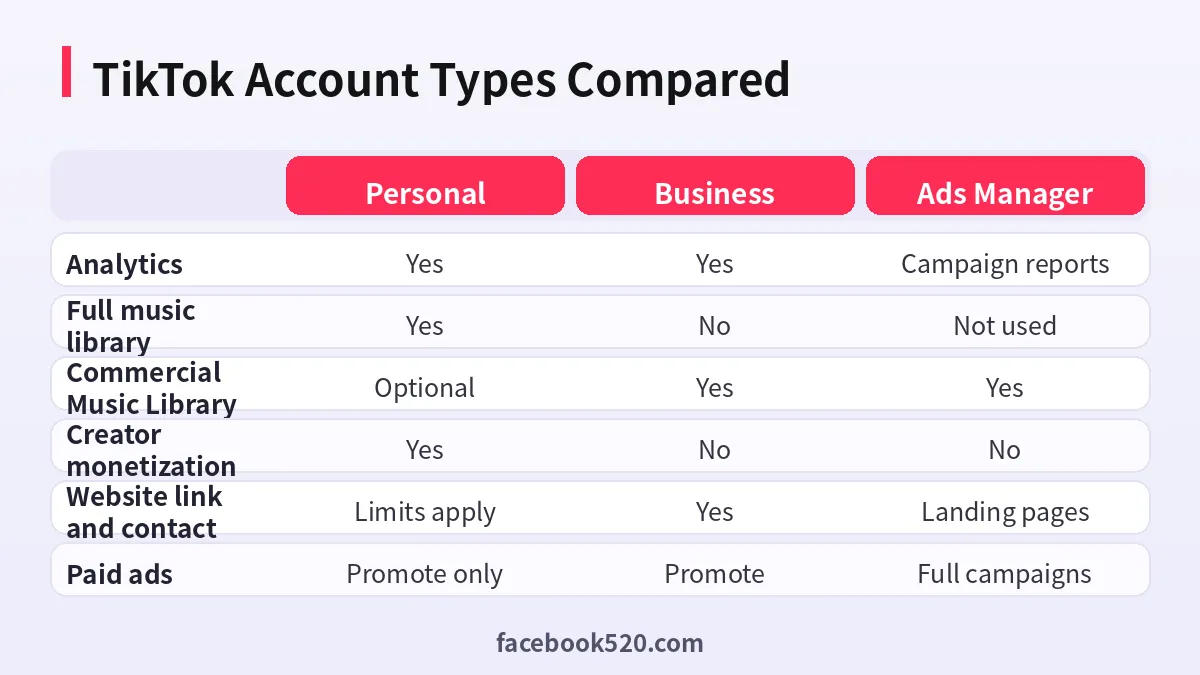
Personal account. This is the default. It includes analytics, the full music library, the option to make the account private, and access to creator monetization programs if you meet their requirements in your country. It is the right choice for creators, influencers and anyone who wants to use trending sounds freely.
Business account. This is designed for companies. You get a business category, contact options such as an email button or website link, access to business tools like the Business Suite area, lead generation features in some regions, and the Commercial Music Library, which contains sounds that are cleared for commercial use. You lose access to the full general music library, because brands are not licensed to use most popular songs in marketing.
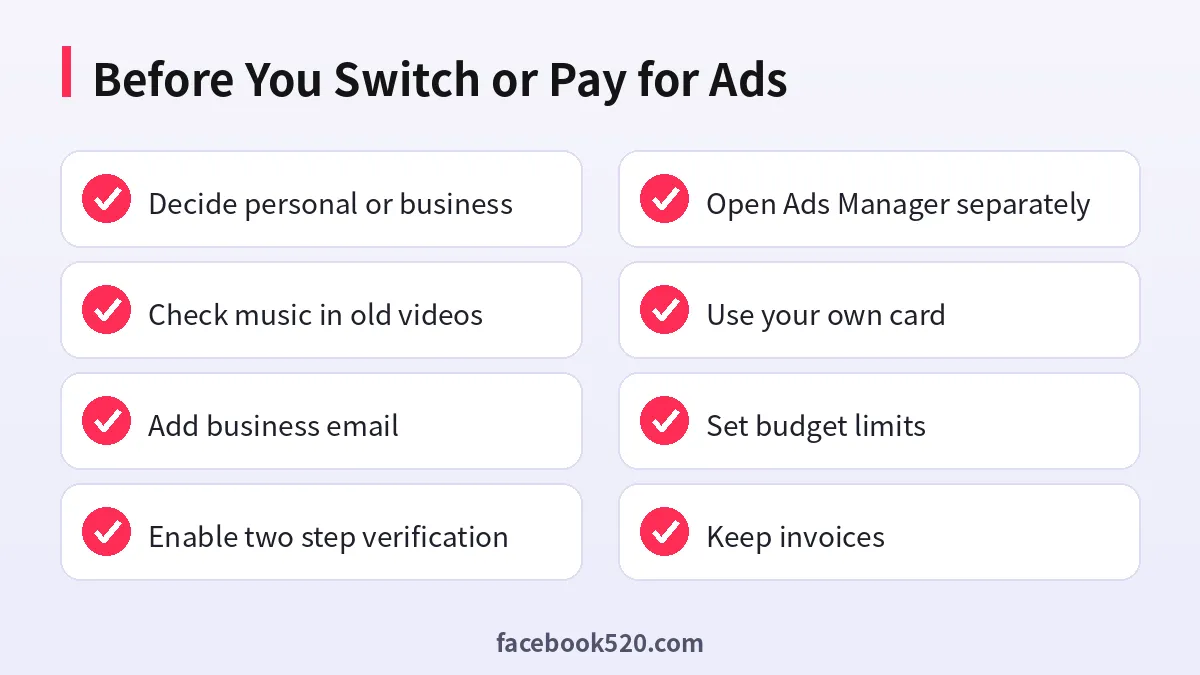
That music difference is the most common surprise. If you switch an existing account with many videos using popular songs, some of those sounds may become unavailable on your older videos. Check this before switching an established account.
How to do the TikTok pro account switch today
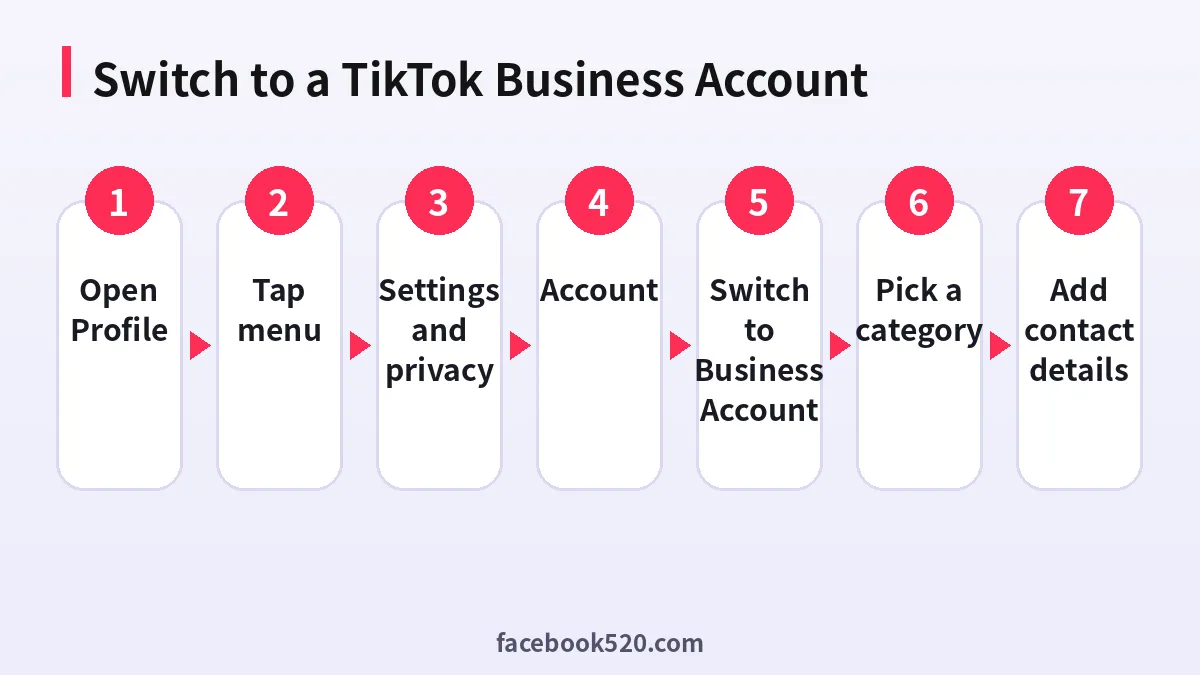
What older guides call the “pro account switch” is now the switch to a business account. In the current app the path looks like this, although labels can vary slightly by version and language:
- Open TikTok and go to your Profile.
- Tap the menu icon in the top right corner.
- Open Settings and privacy.
- Tap Account.
- Choose Switch to Business Account.
- Pick the category that best describes your business, for example retail, education or apps.
- Add a business email and, where offered, a website link, then confirm.
Switching back is possible from the same Account menu, but TikTok advises against switching back and forth repeatedly, and some settings or data may not carry over cleanly. Decide once, based on what the account is for.
If you want to run real ad campaigns, a business account on its own is not enough. Campaigns run in TikTok Ads Manager, which is a separate tool with its own sign-up, billing and verification. Our TikTok Ads Manager setup guide walks through creating it.
What changes after you switch
| Area | Before (personal) | After (business) |
|---|---|---|
| Music | Full library of popular sounds | Commercial Music Library only |
| Analytics | Available | Available, with business focused views |
| Profile | Name, bio, link if eligible | Category, contact button, website |
| Monetization programs | Creator programs if eligible | Not available for business accounts |
| Promotion | Promote individual videos | Promote plus access to business tools |
| Privacy | Can be private | Business accounts are public |
There are a few other details worth knowing. A business account is always public, because the point is to be found. Some creator programs that pay for views are not open to business accounts. On the other hand, a business account looks more trustworthy to customers, and contact buttons make it easier for them to reach you.
Do you need a business account for TikTok ads?
Not always. There are two ways to pay TikTok to show your content:
- Promote is the in-app feature. You pick a video, choose a goal such as more views or profile visits, set a budget and duration, and pay inside the app. It is available to many personal and business accounts and is the simplest way to boost a single video.
- TikTok Ads Manager is the full advertising platform. It supports campaign objectives such as traffic, conversions and app installs, targeting by location, age and interests, pixel tracking on your website, and detailed reports. It is the right tool for any business that plans to advertise regularly.
For a shop or app, the usual setup is a business account for organic content and an Ads Manager account for campaigns, connected to each other through TikTok’s business tools. A personal creator account can still use Promote for occasional boosts.
How TikTok ads payment works
TikTok ads payment depends on where you pay. Promote inside the app is paid like an in-app purchase, often through coins or the payment options offered by your app store and region. Ads Manager uses its own billing, which is closer to how Google Ads or Meta Ads work.
In Ads Manager there are two common billing setups, depending on your country, currency and account:
- Automatic payment. You add a card and TikTok charges it after ads run, either when spending reaches a threshold or on a regular billing date.
- Manual payment (prepaid). You add funds to the account balance first, and ads stop when the balance runs out. This is popular with businesses that want strict budget control.
Which one you get is usually decided when you first set up billing, and the payment methods you see depend on the account country and currency. Credit and debit cards are the most widely available option; PayPal and local methods exist in some regions. The detailed steps for adding money are in our guide to TikTok ad credits and adding funds.
Payment methods compared for TikTok promotion
| Option | Where it is used | Best for | Watch out for |
|---|---|---|---|
| In-app Promote | TikTok app | Boosting one video | Limited targeting and reporting |
| Card with automatic payment | Ads Manager | Ongoing campaigns | Card must allow international online payments |
| Prepaid balance | Ads Manager in supported regions | Fixed budgets | Ads stop when balance hits zero |
| Agency or reseller account | Ads Manager through a partner | Larger budgets, invoicing | Use only authorized partners |
| Promo credits from TikTok | Ads Manager | New advertisers | Conditions and expiry dates apply |
A note on agencies: many companies, especially those advertising across borders, open TikTok ad accounts through an authorized agency so that they can pay by invoice or bank transfer and get local support. That is a legitimate route. Buying a “ready made” ad account with spend history from an unknown seller is not; such accounts can be disabled at any time and any remaining balance is usually lost.
Common mistakes with TikTok Pro and business accounts
Following a tutorial from 2019. If a guide tells you to switch to “Pro”, it is out of date. Look for “Switch to Business Account” instead, or stay on a personal account if you are a creator.
Switching an established creator account to business. You may lose access to popular sounds on old videos and creator programs. Many brands run a separate business account and keep the personal creator account as it is.
Installing a “TikTok Pro” APK. Fake TikTok apps are a well documented malware route. Use only official stores.
Buying a TikTok account to skip the setup. Accounts sold online often have fake followers, a history of violations or an original owner who can recover them. If you are tempted, read our article on buying TikTok accounts and the risks first.
Paying for ads with someone else’s card. Billing problems are one of the fastest ways to get an ad account restricted. Always use a payment method in the name of the business that owns the account.
Analytics: what you get without Pro
The original reason to switch to Pro was analytics, and that reason has disappeared. In the current app you can open analytics from your profile menu or the Creator or Business tools area and see:
- Overview: views, profile views, likes, comments and shares over a selected period.
- Content: performance of each video, including average watch time and traffic source.
- Followers: growth, gender split, top territories and when followers are most active.
- Live: data on your live sessions, if you go live.
Use these numbers to decide what to post and when. If you plan to advertise, the same insights help you choose which video to promote: a video that already holds attention organically usually performs better as an ad.
Security for business and creator accounts
Business accounts are attractive targets for account takeovers, because they often have payment methods attached. Before you start spending on ads:
- Turn on two step verification in Settings and privacy, Security.
- Use a business email that several team members cannot share passwords for; give people access through Business Center roles instead.
- Review devices logged in to the account and remove any you do not recognize.
- Never share login codes. TikTok staff will not ask for them.
If something does go wrong, official recovery steps are covered in our article on verification codes not arriving, which also explains how to secure an account after you regain access.
Frequently asked questions
Does the TikTok Pro account still exist?
No. The Pro account setting from 2019 has been retired. Its analytics are now available to everyone, and the account choice today is personal (with creator tools) or business.
What replaced the TikTok Pro account?
The creator tools moved into personal accounts, and businesses use a TikTok business account. If you used Pro for analytics, a personal account already gives you that.
Is a TikTok business account free?
Yes. Switching to a business account costs nothing. You only pay if you choose to promote videos or run campaigns in Ads Manager.
How do I switch my TikTok account to business?
Go to Profile, menu, Settings and privacy, Account, Switch to Business Account, then choose a category and add your contact details.
Can I switch back to a personal account?
Yes, from the same Account menu. TikTok recommends not switching back and forth often, so think about what the account is for before you change it.
Why can I not use popular songs after switching?
Business accounts can use the Commercial Music Library only, because most popular songs are not licensed for commercial use. This protects you from copyright claims in marketing content.
Is the TikTok Pro app the same as a Pro account?
No. The TikTok Pro app is a separate rewards app that TikTok has released in selected countries. It does not change your account type and is only safe to install from official app stores.
Do I need a business account to pay for TikTok ads?
For the in-app Promote feature, a personal account can often be used. For full campaigns you need a TikTok Ads Manager account, which is separate from the app profile.
Which payment methods does TikTok Ads Manager accept?
It depends on your country and currency. Cards are the most common option; PayPal, prepaid balance and local methods are available in some regions, and agencies can offer invoicing.
Why was my TikTok ads payment declined?
Common reasons are cards that block international or online payments, a billing address mismatch, insufficient funds or a security check by your bank. Try another card in the business’s name or contact your bank.
Can creators earn money with a business account?
Generally no. Creator monetization programs are aimed at personal accounts that meet eligibility requirements. Businesses earn through sales, leads and TikTok Shop where available.
Is it safe to buy a TikTok Pro or business account?
It is risky and usually against TikTok’s terms. Bought accounts can be recovered by the original owner or banned for earlier violations. Creating your own account is free and takes minutes.
Which setup should you choose?
Here is a simple way to decide:
| You are | Recommended account | Paid promotion |
|---|---|---|
| Creator or influencer | Personal account | Promote, occasionally |
| Small local business | Business account | Promote, then Ads Manager |
| E-commerce brand | Business account plus Ads Manager | Ads Manager campaigns |
| App developer | Business account plus Ads Manager | App install campaigns |
| Agency managing clients | Business Center with client accounts | Ads Manager per client |
Summary
There is no TikTok Pro account to switch to in 2026. The old Pro setting became today’s personal account with built-in analytics and creator tools, and the TikTok business account for brands. Switch to business only if you are a business and can live with the Commercial Music Library. For paid reach, start with Promote, then move to Ads Manager, and pay with a method in your own business’s name, either automatically by card or through a prepaid balance where available. Ignore anything called “TikTok Pro” that arrives as an APK file or a direct message.
For related guides, see the TikTok guide hub, TikTok Ads Manager setup and adding funds to TikTok ads.
