


WeChat Sign Up in 2026: How to Create a WeChat Account Outside China, Mobile Number Rules, Friend QR Verification, Payment Card and WeChat Pay Alternatives, Sign Up via Facebook and Fixes for Failed Registration
WeChat (called Weixin inside mainland China) is far more than a chat app. It is how people in China pay for coffee, book taxis, receive work files, join school groups and talk to suppliers. If you are travelling to China, studying there, doing business with Chinese partners or simply have family who only use WeChat, you will eventually need to sign up for WeChat. For many people outside China the process takes two minutes. For others it stops at a screen asking a friend to scan a QR code, and that is where the confusion starts.
This guide explains WeChat sign up in 2026 for users outside mainland China: what you need, the exact steps, how the assistance (friend) verification works, the alternatives WeChat now offers when no friend can help, and what to do if registration keeps failing. Everything here follows WeChat’s official Help Center articles, checked in late November 2026. If you are comparing Asian messengers, our LINE sign up guide and Zalo sign up guide cover the two other apps most often used across Asia, and the platform hubs page lists every network we cover.
WeChat and Weixin: which one are you creating?
The app you download outside China is WeChat, operated for international users. Inside mainland China, users with a +86 number get Weixin. They talk to each other, share Moments and send files across the two, but terms, some features and payment options differ. When you sign up with a non-Chinese mobile number on the international app, you are creating a WeChat account under the international terms.
Why it matters:
- Some features available to mainland users are limited or missing for international accounts.
- Payment features depend on your region and the card you link.
- Help Center articles sometimes use “Weixin Pay” and “WeChat Pay” for the same step in the verification process.
What you need before you start
| Item | Why it matters |
|---|---|
| The official WeChat app | Unofficial or modified versions are a common reason registration fails and can get the account blocked |
| Your own mobile number | WeChat sends an SMS code; each mobile number can create only one WeChat account |
| A stable, normal network | WeChat asks you to disconnect from any VPN during registration |
| A password you do not reuse | You will set it on the sign-up screen |
| Optional: a Facebook account | You can start the sign-up “via Facebook”, but you still enter a mobile number and password |
| Optional: an existing WeChat user | Needed only if assistance verification appears |
| Optional: a bank card | One of the alternatives when no friend can help |
Download WeChat only from the App Store, Google Play or weixin.qq.com. APK mirror sites and “WeChat Plus” style builds are exactly what WeChat warns against.
How to sign up for WeChat with a mobile number
This is the method WeChat describes first in its Help Center, and it works for most people.
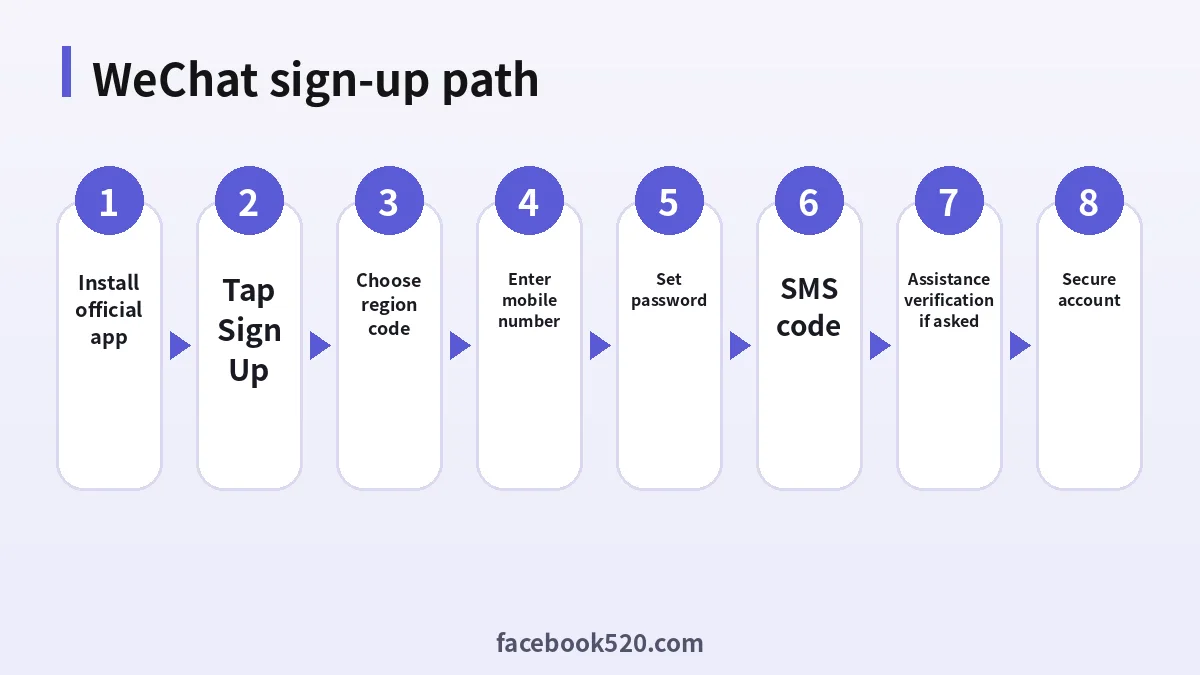
- Install WeChat and open it.
- Tap Sign Up, then Sign up with mobile.
- Choose your region code carefully, for example +44 for the UK or +84 for Vietnam. A wrong code is the most common cause of missing SMS messages.
- Enter your mobile number without the leading zero if your country normally adds one.
- Set a password. Use a long, unique one.
- Accept the terms and privacy policy after reading them.
- Complete the security check (usually a slider puzzle).
- Enter the SMS verification code that WeChat sends.
- Set your profile name and photo.
If no extra screen appears, you are done. If WeChat shows a page asking for assistance verification, continue with the section below; it does not mean you did something wrong.
Signing up via Facebook
WeChat also offers Sign up via Facebook. You tap Sign Up → Sign up via Facebook, WeChat sends you to Facebook to approve the login permission, and then you still choose your region code, enter your mobile number and set a password. In other words, Facebook replaces part of the profile step, not the phone requirement. It is useful if you want WeChat to pick up your name and photo quickly, but it does not help you skip phone or assistance verification.
If you manage your Facebook login carefully, our Facebook hub explains how to keep that account secure, because anyone who controls it can try to use it on other services.
Assistance verification: what the friend QR scan really is
After registration, WeChat may ask for assistance verification, or ask you to verify again when you use certain features. It is a security review triggered by risk signals such as a new device, an unusual network or a number with little history. Plenty of people never see it.
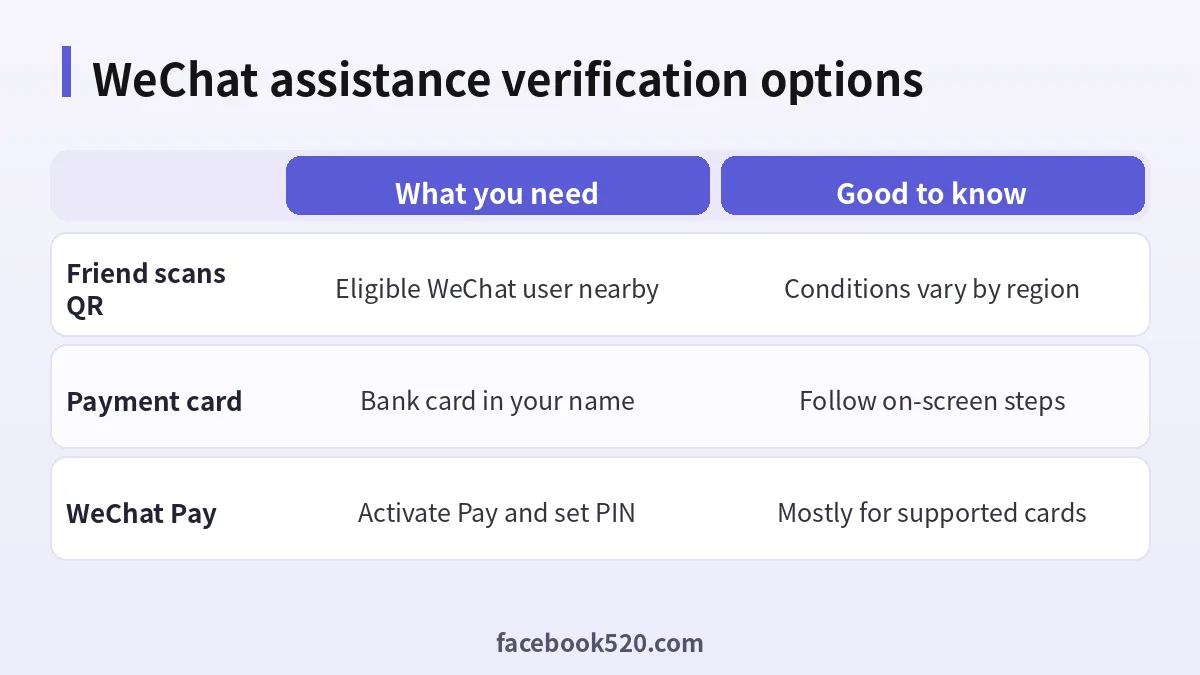
When it appears, WeChat offers these routes according to its Help Center:
- Invite a nearby friend or another WeChat user to scan the QR code shown on your screen using their WeChat scanner.
- If no WeChat user is available, tap Verify via Payment Card, follow the on-screen instructions to enter the required information, complete any authentication, and finish registration.
- Alternatively, tap Verify and Activate WeChat Pay, follow the instructions, complete authentication if asked, set a payment password, and finish registration.
WeChat notes that the conditions for assistance registration can differ depending on the helper’s country or region, so the on-screen prompt is the final authority. In practice, helpers need an account in good standing that has existed for some time and that has not helped someone else very recently. If a friend’s scan is rejected, it is usually because they do not meet the current helper conditions, not because your account is broken.
How to make the friend scan work
- The QR code is time-limited. Contact your helper before you start, so they can scan as soon as the code appears.
- The helper must scan with WeChat’s own scanner (the + menu → Scan), not their phone camera.
- If you are not in the same room, send the QR code as a screenshot in another messenger only if the on-screen prompt allows remote help; otherwise use the “unable to scan” option shown on the page.
- Ask the helper to read the confirmation questions carefully. They are confirming that they know you.
Never pay a stranger to verify you
Online “WeChat verification services” offer to scan your code for a fee. Avoid them. The helper becomes linked to your registration, some of these services harvest accounts, and if their account is later banned for mass verification your account can be reviewed too. The same logic applies to buying a pre-registered account; see Buy WeChat Accounts in 2026 for why verified and aged accounts are risky, and our account buying overview for the general picture.
Comparing the verification options
| Option | Who it suits | What happens | Watch out for |
|---|---|---|---|
| Friend scans QR | Anyone with a WeChat contact | Helper scans with WeChat and confirms | Helper must meet current conditions; code expires |
| Verify via Payment Card | Users with a bank card in their own name | Enter card details and complete authentication | Card must be accepted in your region |
| Verify and Activate WeChat Pay | Users who will use WeChat Pay anyway | Activate Pay, verify, set payment password | Payment features vary by country |
| Contact WeChat support | Users still blocked after trying again | Submit the mobile number and screenshots | WeChat replies within about three working days |
Why WeChat registration fails and how to fix it
WeChat’s own guidance points to a short list of causes. Work through them in order.
- VPN or proxy turned on. Disconnect completely during registration, including “always-on” VPN profiles on the phone.
- Unofficial app. Delete it, reinstall from the official store and start again.
- Unsafe device or network. Rooted or jailbroken phones, emulators and public Wi-Fi raise the risk score. Use your own phone on home Wi-Fi or mobile data.
- Number already used. Each mobile number can be linked to only one WeChat account. If you registered years ago, try logging in with that number instead.
- SMS not arriving. Check the region code, allow messages from international short codes with your carrier, and wait for the countdown before requesting another code.
- Too many attempts. Repeated failures make the next attempt harder. Wait several hours, then try once carefully.
If it still fails, WeChat’s Help Center provides a form where you enter the mobile number you want to register and attach screenshots of the failure. WeChat says it will follow up within three working days.
Securing your new WeChat account
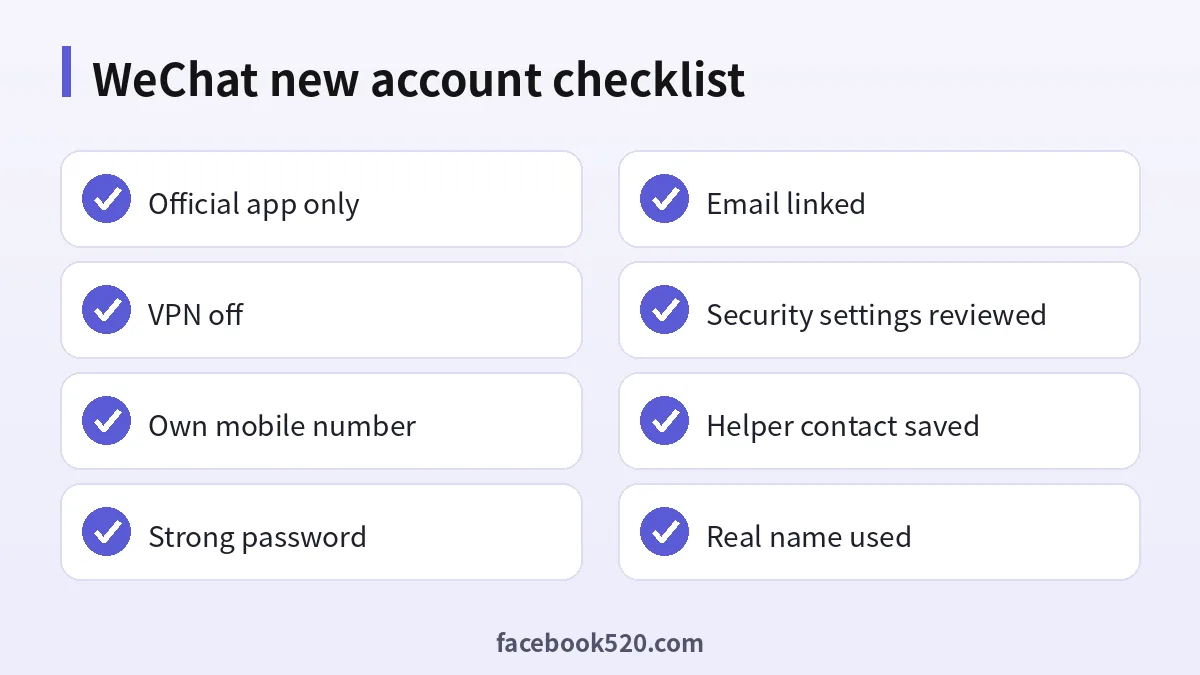
Once you are in, spend five minutes on security. WeChat accounts are valuable to scammers because they are linked to payments and to trusted contacts.
- Link an email address in Me → Settings → Account Security. It is an extra way to log in and recover the account.
- Check your login devices and remove any you do not recognise.
- Review privacy settings: who can find you by mobile number or WeChat ID, who can add you from groups, and who sees your Moments.
- Set a WeChat ID if the app lets you choose one; it is easier to share than your phone number. Note that WeChat IDs can only be changed rarely, so choose carefully.
- Keep the mobile number active. If you change numbers, update WeChat first; a recycled number in someone else’s hands is a recovery risk.
- Use your real name and a clear photo if you plan to use payments, because identity checks later must match.
WeChat Pay after sign-up
Many visitors sign up mainly to pay in China. WeChat Pay for international users depends on your region and your card. Add the card in Me → Services (or Pay) → Wallet → Cards, complete identity verification when asked, and test a small payment before you travel. Keep an alternative such as Alipay or cash for the first days. Fees and limits are set in the app and can change, so check them there rather than trusting old blog posts. Our payment hub collects payment guides for other platforms.
Using WeChat on a computer
WeChat for Windows and macOS, and WeChat Web where available, do not create accounts. You log in by scanning a QR code with the phone app. That means:
- Create and verify the account on your phone first.
- Keep the phone nearby; some actions on desktop still need confirmation on the phone.
- Log out of shared computers and check Settings → Account Security for active sessions.
A sign-up timeline for travellers going to China
Most failed registrations we hear about happen at the airport the day before a flight. Spreading the work over a few weeks removes almost every problem.
- Four weeks before travel: install WeChat at home, sign up with your regular mobile number on your normal Wi-Fi, and complete any assistance verification while friends are easy to reach.
- Three weeks before: link an email, set a WeChat ID, add your hotel, business contacts or school group, and send a few normal messages so the account has ordinary history.
- Two weeks before: add a bank card in Wallet, complete identity verification, and make a small test payment if your region allows it.
- One week before: confirm that roaming will deliver SMS on your number in China, because WeChat may send a code when you log in from a new network.
- On arrival: log in on mobile data rather than airport Wi-Fi, keep the same phone, and avoid switching devices during the trip.
Rules that get new WeChat accounts restricted
New accounts are watched more closely during their first weeks. Behaviour that looks like marketing or automation can trigger limits even if you are a genuine user:
- adding dozens of strangers in a short time, especially from group member lists;
- sending the same message or link to many contacts;
- logging in on several phones or switching between WeChat and a modified client;
- posting external links that WeChat considers spam or misleading;
- using the account on behalf of someone else, or letting a “verification service” control it.
If the account is restricted, WeChat shows the reason and an unblock path in the app (often a security check, an SMS code or a friend verification). Follow only those in-app steps; websites promising “instant unblock” are scams.
Groups, Official Accounts and Mini Programs after sign-up
A new account becomes useful once you join the right spaces, and each of them has its own etiquette.
- Groups. You are usually invited by a member who shares a group QR code. Group QR codes expire after a few days, and large groups only accept invitations from existing members. Mute busy groups instead of leaving them, because rejoining can require a new invitation.
- Official Accounts. Companies, schools, hotels and government services publish news and customer service through Official Accounts. Follow them by scanning their QR code or searching their name; check the verification mark before sharing personal data.
- Mini Programs. Ride-hailing, food delivery, train tickets and museum bookings often run as Mini Programs inside WeChat. Some require identity verification or a supported payment method, and a few are only available to mainland users. Test the ones you need before travelling.
- Moments. Your Moments feed is visible to contacts according to your privacy settings. Limit it to “last three days” or “last month” if you add many business contacts.
These features are where most real-world use happens, so set them up while you still have time to solve problems calmly.
WeChat Sign Up FAQ
Can I sign up for WeChat without a friend?
Yes. Many people never see assistance verification. If it appears and no WeChat user can help, WeChat offers Verify via Payment Card or Verify and Activate WeChat Pay as alternatives, according to its Help Center.
Can I sign up for WeChat without a phone number?
No. Both sign-up methods, including Sign up via Facebook, require a mobile number and a password.
Can one phone number have two WeChat accounts?
No. WeChat states that each mobile number is only eligible to create one WeChat account.
Why does WeChat say my friend cannot help?
The helper does not meet the current conditions for assistance registration, which vary by country or region. Ask another contact whose account is older and in good standing, or use a payment card.
Should I use a VPN when signing up from China?
No. WeChat asks users to disconnect from any VPN during registration. If you are already in China, use a local mobile network without VPN.
Does WeChat sign up cost money?
No. Creating an account is free. The payment card and WeChat Pay options are verification methods, not fees, although banks may apply their own card rules.
Can I use a virtual or online SMS number?
It is not recommended. Such numbers are often rejected, shared with other users, or recycled, which can cost you the account later.
How long does WeChat support take to reply about a failed sign-up?
WeChat says it will follow up or contact you within three working days after you submit the number and screenshots.
Can I change my WeChat ID after signing up?
WeChat allows changes to the WeChat ID only rarely, so pick one you are happy to keep. Your display name can be changed more freely.
Is it safe to buy a verified WeChat account?
No. Bought accounts are often recovered by the original owner, linked to other people’s payment details, or banned during reviews. Registering your own account is free and safer.
Can I sign up on my computer?
No. Desktop and web versions only log in by scanning a QR code with the phone app, so create the account on your phone first.
Conclusion
WeChat sign up is easy when you use the official app, your own mobile number and a clean network without VPN. If assistance verification appears, prepare a helper in advance or use the payment card or WeChat Pay alternatives, and contact WeChat support with screenshots if it still fails. Then link an email, check your devices and privacy settings, and test payments before you travel.
