


Payment Methods for Ads and Subscriptions in 2026: Cards, Virtual Cards, PayPal, Gift Cards, App Stores and Ad Account Top-Ups
For businesses working across borders, getting money to a platform is often harder than creating the account. An ad account refuses a card, ChatGPT says the payment was declined, a TikTok top-up does not show up, or an App Store subscription will not cancel. This page is Facebook520’s overview of payment methods for ad accounts and subscriptions. It covers both of the payment situations you will meet, the methods available and when each makes sense, how ad billing works on the major platforms, how AI subscriptions are paid, and a fix list for declined payments. At the end you will find every payment and top-up guide we have published in English.
Last reviewed: 2026-11-17 · Compiled by the Facebook520 editors from official platform pages and our own guides. Not an offer to open, sell or guarantee any account.
Two kinds of payments
Start by working out which kind of payment you are making, because the rules differ:
| Ad account payments | Subscription payments | |
|---|---|---|
| Typical platforms | Meta (Facebook and Instagram), Google Ads, TikTok Ads, X Ads, LinkedIn Ads | ChatGPT, Claude, Gemini, Midjourney, Cursor, Canva, Telegram Premium, X Premium |
| How you are charged | For delivery: when spend reaches a billing threshold or on a billing date, or from a prepaid balance | A fixed monthly or annual price, sometimes with usage-based credits on top |
| Who pays | The owner of the ad account, an individual or a business | The holder of the subscription account |
| Typical problems | Card not accepted, failed charges pausing ads, prepaid funds not appearing | Card declined, country not supported, double charges, cannot cancel |
| Receipts | Receipts and invoices in the platform billing centre | Receipts in the account billing settings |
Payment methods compared
| Method | Where it works | Advantages | Watch out for |
|---|---|---|---|
| Credit or debit card in your own name (Visa, Mastercard, American Express and others) | Almost every ad platform and subscription | The widest acceptance; traceable and disputable | International transactions must be enabled; some banks block the first cross-border charge |
| Company card | Ad accounts and team subscriptions | Billing matches the business; easier for accounting and invoices | Still needs cross-border support and 3D Secure |
| Virtual card | Subscriptions and some ad accounts | Separate limits per merchant; easy to control | Prepaid virtual cards are often refused; cards of unclear origin can trigger risk reviews |
| PayPal | Some ad platforms and subscriptions in some regions | Your card number is not shared with the merchant | Not every platform or country supports it |
| App stores (Apple App Store, Google Play) | In-app subscriptions on mobile | Can use store balance and gift cards | Apple or Google bills you; prices can differ from the web; cancel in the store |
| Gift cards and vouchers | App store balances and some platforms’ own gift cards | No bank card needed | Only usable on that platform; heavily discounted cards often come from fraud |
| Bank transfer or monthly invoicing | Large advertisers | Suits big budgets | Usually requires credit approval by the platform or an authorised agency |
| Local payment methods | Ad platforms in certain countries | Local wallets or online banking | Limited to specific countries and currencies; check your billing page |
A note on crypto: the major ad platforms and AI subscriptions generally do not accept cryptocurrency directly. When someone offers to “top up with USDT”, they are paying with their own card on your behalf, so the billing identity does not match your account, and any chargeback or risk review will land on you.
How ad accounts are billed
Payment settings look different on each ad platform, but they fall into three patterns:
- Automatic payments (post-pay). You add a card, ads run first, and the platform charges you when spend reaches your billing threshold or on your billing date. Meta, Google Ads, TikTok, X and LinkedIn all offer this. New accounts start with a low threshold that rises as you build a payment history.
- Manual payments (prepay). You add funds to a balance and ads draw from it. This makes budgets easy to control, but ads stop the moment the balance runs out. Availability depends on the account’s country and currency.
- Monthly invoicing. For large advertisers, the platform or an authorised agency approves a credit line and bills monthly.
One rule catches many advertisers out: on Meta, an ad account’s currency and time zone cannot be changed after it is created; if you picked the wrong one, you need a new ad account. Other platforms have similar rules, so choose carefully at the start. Platform-specific walkthroughs: TikTok Ad Credits and Adding Funds in 2026, Google Ads Credit US (2026), WhatsApp Ads Billing and Payment (2026) and Facebook Gift Card 2026, which explains what happened to Facebook ad credits and gift cards. How ad accounts and Business Managers relate to billing is covered in Facebook Ad Accounts and BM Numbers.
Prepaid or post-paid: which should you choose?
Where a platform offers both, the choice comes down to cash flow, control and risk. Post-paid (automatic) billing is the default for most advertisers because campaigns never stop for lack of funds, and a clean payment history steadily raises your billing threshold and spending limits. Its weakness is that a single failed charge can pause every campaign in the account, and if the card belongs to someone else the whole account is exposed to that person’s disputes.
Prepaid (manual) billing suits teams that must stay within a fixed budget, agencies that receive client money in advance, and advertisers whose cards are frequently blocked for cross-border use. The trade-off is constant attention: when the balance reaches zero, ads stop immediately, and refunds of unused prepaid funds can take time and follow the platform’s own rules. Many advertisers combine both approaches across different ad accounts, keeping a post-paid account for always-on campaigns and a prepaid one for tests.
| Situation | Usually better | Why |
|---|---|---|
| Always-on campaigns with a reliable company card | Automatic (post-pay) | No interruptions, and thresholds grow with good history |
| Strict monthly budget or client-funded spend | Manual (prepay) | Spend can never exceed the money you loaded |
| Cards often blocked for international charges | Manual (prepay) or local methods | Fewer charges to fail mid-campaign |
| Large, stable spend with a finance team | Monthly invoicing | Credit terms and consolidated invoices |
| Short tests on a new account | Automatic with a low account spending limit | Keeps the risk small while history builds |
Whichever you pick, set an account spending limit or campaign budgets as a safety net, and make sure at least two people on the team can see billing alerts, so a failed charge on a Friday evening does not silently stop sales for the weekend.
Paying for AI tools and subscriptions
Most AI tools can be bought in two places: on the web, where the vendor or its payment processor charges you, and inside the mobile app, where Apple or Google charges you. Price, accepted payment methods and the cancellation route can all differ between them:
- Web checkouts usually accept cards, and some offer PayPal or local methods. OpenAI’s pricing page states that Go, Plus, Pro and Business can be bought with any major credit card, and that Enterprise customers can contact sales for options such as invoicing.
- In-app purchases can use your app store balance and gift cards, which helps if you do not have a suitable card, but you must cancel from your Apple ID or Google Play subscriptions.
- APIs and developer products (OpenAI API, Claude API, Gemini API and others) are billed separately, usually as prepaid credits or pay-as-you-go. A chat subscription does not include API usage and vice versa.
- Team plans such as ChatGPT Business and Claude Team are billed per seat by an admin, which is safer and more compliant than sharing one login.
Official prices for the main tools are collected in AI Tool Pricing 2026; ChatGPT gift cards and wallet balances are explained in ChatGPT Gift Card 2026.
Declined payment fix list
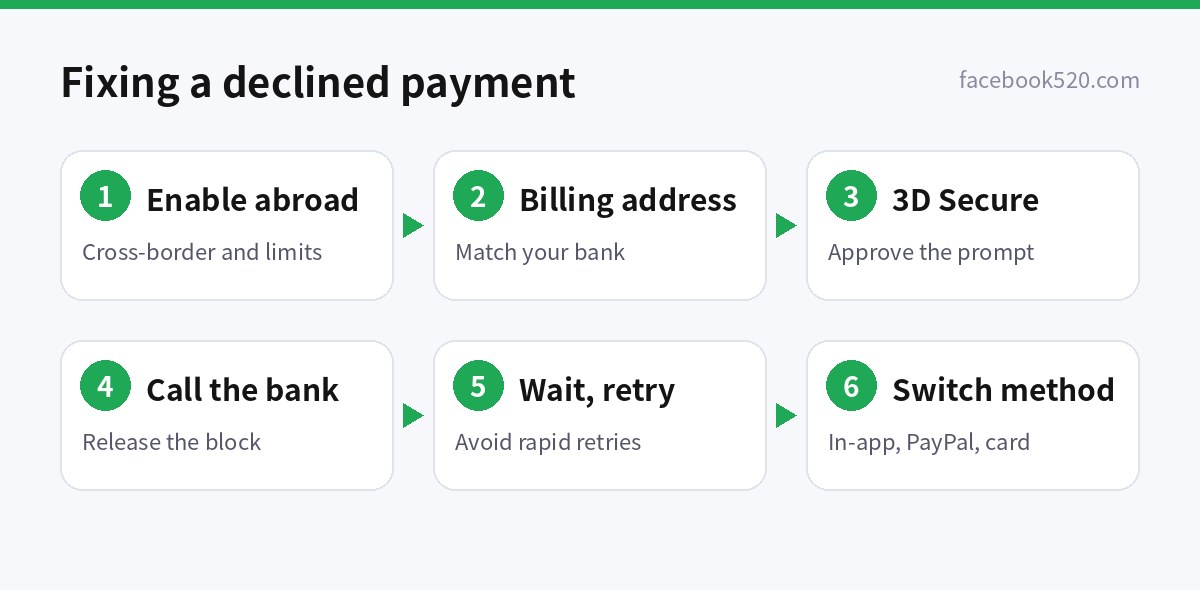
- Make sure the card allows international and online payments, and that you are within single-transaction and daily limits.
- Check the billing address. The country and postcode must match what your bank has on file; mismatches are a common reason for declines.
- Complete 3D Secure. Approve the prompt in your banking app or the SMS code promptly.
- Ask your bank whether it blocked the charge. First-time cross-border charges are often stopped by fraud checks and can be released.
- Confirm the service is available in your country. Some subscriptions are not sold in every country, and the account country is compared with the card’s issuing country.
- Do not retry over and over. Repeated failures in a short time can temporarily lock the card or the account; wait before trying again.
- Switch to another official method, such as in-app purchase, PayPal, or another card in your own name.
- Contact support. Ad platforms have payment help in their support centres; subscription vendors have help-centre forms.
Currency, tax and invoices
Listed prices on most platforms exclude tax. Depending on your billing address, the platform may add VAT, GST or a digital services tax, and business advertisers in some countries can enter a tax ID to be invoiced as a business. Your card issuer may also charge currency conversion and foreign transaction fees, which have nothing to do with the platform.
If you need invoices for accounting, open ad accounts and team subscriptions under the business from day one and enter the correct company name, address and tax ID in the billing settings. Changes made later usually apply only to future invoices.
Refunds and unused balances
Refund rules differ by platform and by payment type. Subscriptions can normally be cancelled at any time and stay active until the end of the paid period; refunds beyond that follow each vendor’s policy and, for in-app purchases, Apple’s or Google’s process. Unused prepaid ad balances are generally refundable only through the ad platform’s own request flow, sometimes only to the original payment method, and promotional credits are usually not refundable at all. Keep receipts, note which account and payment method each charge came from, and raise any billing question with the platform’s support centre rather than through third parties. If a charge looks fraudulent, contact your bank first so the card can be blocked, then report it to the platform from the account’s billing page.
Payment safety and compliance
- Only use payment methods in your own or your company’s name. Cards of unknown origin that are later charged back can get ad accounts and every linked asset banned.
- Never give card numbers or one-time codes to someone offering to “top up for you”. The billing identity will not match your account, and you will have no standing in an appeal.
- Review subscriptions and ad invoices regularly and cancel what you no longer use.
- When taking over an account, remove the old payment methods and add your own, as described in Buying Social Media Accounts: Risk Checklist.
Most payment problems we see in reader questions come down to three things: a card that was never enabled for international use, a billing address that does not match the bank’s records, and a payment method that does not belong to the account owner. Fixing those three before you start removes most of the friction, and makes any later conversation with platform support much easier because the account, the business and the money all point to the same owner.
Ad payment guides
- Facebook Gift Card 2026
- Google Ads Credit US
- TikTok Ad Credits and Adding Funds in 2026
- WhatsApp Ads Billing and Payment
- VK Payment Methods in 2026
- Snapchat Gift Card and Ads Funding 2026
- How Can I Get Payment From YouTube 2026
- Facebook Account (2026): Complete Guide to Sign-Up, Setup, Top-Up & Payment
- Instagram Account (2026): Complete Guide to Sign-Up, Setup, Top-Up & Payment
- YouTube Account (2026): Complete Guide to Sign-Up, Setup, Top-Up & Payment
- TikTok Account (2026): Complete Guide to Sign-Up, Setup, Top-Up & Payment
- Facebook Ad Accounts and BM Numbers: Unlimited Billing, BM1 to BM10000 Explained
- difference between Facebook billing account and Facebook BM account
Subscription payment guides
- ChatGPT Subscription (2026): Plans, Pricing & How to Pay
- Claude Pricing (2026): Plan Comparison, Subscription & How to Pay
- Gemini Pro (2026): Plans, Pricing & How to Pay
- Cursor Pricing (2026): Plan Comparison, Subscription & How to Pay
- Midjourney Pricing (2026): Plan Comparison, Subscription & How to Pay
- GitHub Copilot Pricing (2026): Plan Comparison, Subscription & How to Pay
- Grok Pricing (2026): Plan Comparison, Subscription & How to Pay
- Perplexity Pricing (2026): Plan Comparison, Subscription & How to Pay
- Canva Pro Free Trial (2026): Plans, Pricing & How to Pay
- Runway Pricing (2026): Plan Comparison, Subscription & How to Pay
- Suno Pricing (2026): Plan Comparison, Subscription & How to Pay
- Lovable Pricing (2026): Plan Comparison, Subscription & How to Pay
- Twitter Blue Cost 2026
- Telegram Premium Subscription 2026
- Discord Subscription
- Snapchat Subscription (2026): Plans, Pricing & How to Pay
- Reddit Pro (2026): Plans, Pricing & How to Pay
- Threads Price in 2026
- ChatGPT Gift Card 2026
- Claude API Credits 2026
- Gemini API Credits in 2026
- Cursor Credits in 2026
- Canva Credit Explained in 2026
Platform hubs: Facebook, TikTok, Google and Google Ads, ChatGPT, Telegram, X / Twitter, LinkedIn, Discord and all hubs. Chinese version: 海外平台充值与支付方式总览.
FAQ
Can I pay for ads or subscriptions without a credit card?
Often, yes. Options include app store balances and gift cards for in-app subscriptions, PayPal or local payment methods where supported, and debit cards on many platforms. What is available depends on the platform and your country, so check the payment page.
Can I use a virtual card for an ad account?
Some virtual cards work, but prepaid virtual cards and cards of unclear origin are frequently declined or cause restrictions later. For ad accounts, a physical or business card in your own or your company’s name is the safest choice.
Will my ads stop if a payment fails?
Yes. When a charge fails, platforms usually pause delivery until the balance is paid or the payment method is updated. Fix it promptly in the billing page to avoid the account being restricted after repeated failures.
Are web and in-app subscription prices the same?
Not necessarily. App stores set regional prices and take a commission, so some products cost more in the app. Compare both, and remember to cancel where you subscribed.
I was charged twice for a subscription. What should I do?
Check whether you subscribed once on the web and once in the app, or created two accounts with different emails. Cancel the extra subscription where it was purchased and request a refund through the official help centre.
Can I change the currency of an ad account?
On Meta, no: currency and time zone are fixed when the ad account is created, so you would need a new ad account. For other platforms, check their help centre before you open the account.