


Buying Social Media Accounts in 2026: What You Actually Get, a 10-Point Checklist, Safe Handover and Scam Signs
Searches for “buy Facebook accounts”, “aged TikTok accounts” or “cheap ChatGPT Plus” usually come from a real problem: a new profile cannot run ads, a fresh TikTok account gets no reach, or a card will not go through for an AI subscription. Buying a ready-made account looks like the shortcut. But an account is not an ordinary product. It is tied to a phone number, an email address, login devices, payment methods and a trust history, and most platforms’ terms forbid transferring it. This page brings together what Facebook520 has published across more than a hundred buying guides: what you are actually paying for, what the rules say, a checklist you can work through on delivery, a safe handover process, the scams we see most often and the alternatives that usually work better.
Last reviewed: 2026-11-17 · Compiled by the Facebook520 editors from official platform pages and our own guides. Not an offer to open, sell or guarantee any account.
What you are actually buying
When a seller says “account”, they usually mean several layers bundled together. A screenshot of a dashboard makes them look like one thing; separating them shows what can be handed over and what cannot.
- The identity layer: username, password, the recovery email and phone number, and the two-factor authentication method. Whoever controls recovery controls the account.
- The asset layer: Facebook Pages and Business Managers, TikTok business and ad accounts, YouTube channels, Telegram channels and groups. Assets can often be moved by adding you as an admin, without transferring anyone’s login.
- The trust layer: account age, login history, ad spend and any past violations. Platform risk systems look mostly at this layer. It does not reset when the owner changes, and a sudden change of device and country is exactly what triggers checks.
- The payment layer: cards, PayPal, ad account balances and unpaid bills. Unclear ownership of the payment method is the most common reason a purchased ad account stops delivering.
Facebook is the clearest example: the personal profile is identity, the Page and Business Manager are assets, and the ad account is where billing lives. Buy Facebook Accounts (2026) and Buy Old Facebook Accounts (2026) break this down, and Facebook Business Manager (BM5 to BM2500) explains what the numbers sellers attach to Business Managers really mean.
Platform rules and real risks
It is worth being direct about the rules before anything else. The terms of Meta, TikTok, Google, X, Telegram, OpenAI, Anthropic and most other platforms say an account is for the person who registered it and may not be sold, transferred or shared. In practice this means:
- The platform can ask for identity verification at any time, or disable the account, citing a change of ownership or suspicious login. Money paid to a seller is rarely recoverable.
- The original owner can reclaim the account through the recovery email or phone number at any time. Sellers call this “recovery”; buyers call it losing the account a week later.
- If an ad account is judged to be circumventing enforcement, for example a fresh account used to replace one that was restricted, the linked Pages, Business Managers and payment methods can be restricted as well.
- Shared AI subscriptions, where several people use one ChatGPT Plus, Claude Pro or Cursor login, break the same terms and expose your chats, files and code to strangers. Cursor’s official pricing FAQ states plainly that it does not authorise any resellers and that subscriptions bought elsewhere may be terminated.
Our position is therefore consistent: if you can register an account yourself or open one through official channels, do not buy one. If you genuinely need to take over existing assets, for example after an acquisition, a team change or through an authorised ad agency, use the checklist below to keep the risk as low as possible. For how ad accounts are opened properly, see the Facebook Accounts Guide and Google Accounts and Google Ads Guide.
Account types by platform
| Platform | What sellers call it | What it really is | The key thing to verify | Our guide |
|---|---|---|---|---|
| Aged profile, BM, Page, “unlimited” ad account | Personal profile, Business Manager, Page, ad account | Recovery email and phone, BM admin list, ad account limit and card owner | Buy Facebook Accounts | |
| TikTok | Aged account, account with followers, ad account | Personal or business account, TikTok Ads account | Registration region, linked phone, ad account entity and top-up history | Buy TikTok Accounts |
| Aged account, account with followers | Personal, creator or business account | Follower quality, linked Facebook Page, login activity | Buy Instagram Account | |
| Aged Gmail, Google Ads account | Google account, Google Ads account, manager (MCC) account | Verification status, payments profile owner, policy history | Buy Google Ads Accounts | |
| X / Twitter | Aged account, blue check account | Personal account with or without X Premium | Login email, two-factor authentication, any reach limits | Buy Twitter Accounts |
| Telegram | Session account, aged account | A personal account tied to a phone number | Who holds the number, two-step password, active sessions | Buy Telegram Accounts |
| AI tools | Cheap ChatGPT Plus, Claude Pro, Cursor Pro | An individual subscription or a shared seat | Who pays the subscription, whether the email can be changed, whether it is shared | AI Tool Pricing 2026 |
The names in the second column are market labels, not product names you will find in any platform dashboard. “Unlimited” or “never-banned” accounts are a seller’s description of an account’s limits or stability; no account is immune from enforcement if it breaks the rules.
10-point inspection checklist
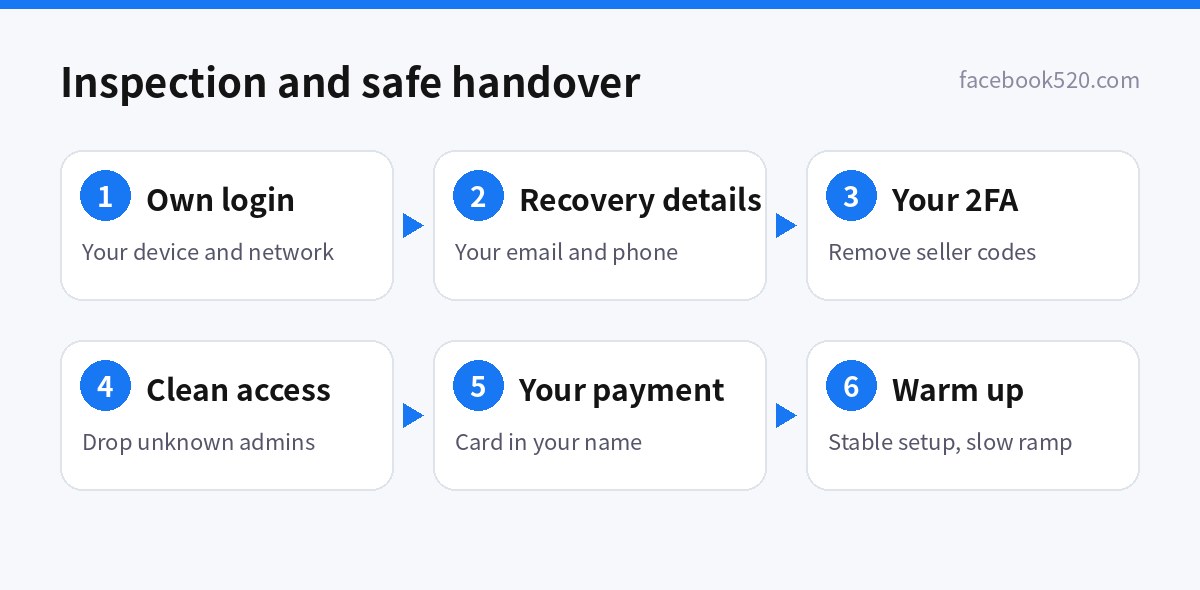
Work through this list within 24 hours of delivery and before you release final payment:
- Independent login. Sign in from your own device and network, without relying on the seller’s browser profile or cookie file.
- Recovery email and phone. Confirm you can replace both with ones you control. If you cannot, you have not really received the account.
- Two-factor authentication. Remove the seller’s authenticator and backup codes and set up your own app or security key.
- Devices and sessions. Open the login activity page and sign out every device you do not recognise.
- Age and history. Check the creation date with the platform’s own tools rather than the seller’s claim.
- Violations and restrictions. Review account quality pages, support inboxes and policy warnings. Accounts with past restrictions are more likely to have new ones.
- Admin lists. Look for sellers or strangers still listed as admins on Business Managers, Pages, channels and groups, including hidden admins.
- Payment ownership. Find out whose card is attached, what happens to balances and unpaid bills, and whether you can remove the old method and add your own.
- Real numbers. Cross-check followers, engagement and ad spend against public profile data or third-party tools, not just screenshots.
- Written terms. Put what is delivered, the inspection window and what support covers in writing, and pay with a method that is traceable and supports disputes.
Safe handover in 6 steps
Passing inspection is only the start. The first two weeks after a handover are when accounts are most likely to be flagged because the environment changed. Follow this order:
| Step | What to do | Why it matters |
|---|---|---|
| 1. Stabilise the environment | Use one device and one stable connection; avoid hopping between IP addresses and countries for the first days | Sudden location changes are the main trigger for checkpoints |
| 2. Replace security details | Change the password, recovery email, phone number and two-factor method in that order | Stops the previous owner from recovering the account |
| 3. Clean up access | Remove unknown admins, app permissions and active sessions | Prevents assets from being moved again |
| 4. Replace payment methods | Delete old cards and add one in your own name | Avoids chargebacks and disputes that drag the account down |
| 5. Warm up gradually | Browse, post and engage normally before raising ad budgets or message volume | Aggressive activity in a new environment looks abnormal |
| 6. Keep records | Save the transaction, inspection screenshots and conversations | You will need evidence for appeals or disputes |
If you hit a checkpoint or a suspension after the handover, the platform-specific steps are in Facebook Account Recovery (2026), Google Ads Account Suspended in 2026, Twitter Account Suspended (2026) and Telegram Account Recovery 2026.
Taking over assets as a business
Many legitimate situations involve moving accounts between people: a company buys another company, an agency hands a client’s assets back, a founder leaves and passes the brand’s Page to the team. These are not “account purchases” in the grey-market sense, but they need the same discipline. The goal is always to move assets (Pages, Business Managers, ad accounts, channels) to identities you already own, rather than taking over someone else’s personal login.
- Make an inventory of every asset: Pages, Business Managers, ad accounts, pixels, catalogues, channels, groups, domains and the email addresses used for recovery.
- Ask the current owner to add your own business or profile as an admin through the platform’s official sharing tools, then confirm the access from your side.
- Once you have full control, remove the previous owner’s access in the order the platform recommends, so that no asset is ever left without an admin.
- Move billing to your own payment method and download past invoices for your records, because history usually stays with the old payment profile.
- Update business verification details so they match the new legal owner, and document the change for your accountants and lawyers.
Done this way, nothing breaks the platforms’ terms, every step leaves an audit trail, and you will be able to prove ownership if you ever need to appeal a restriction.
What drives the price
We do not publish prices for second-hand accounts: the market is volatile, sellers quote on different bases, and the product is not one the platforms recognise. What we can say is what moves the price: account age and country (older US and European accounts usually cost more), whether identity or business verification is complete, whether the account carries assets such as Pages, Business Managers, channels or followers, ad spend history and limits, and how long the seller supports the account. Official subscriptions are different, because they have published prices. Any “account” sold far below the official ChatGPT, Claude or Midjourney price deserves suspicion; compare against AI Tool Pricing 2026.
Common scams and how to spot them
| Scam | Typical pitch | How to spot it |
|---|---|---|
| Reclaimed accounts | “Three days of support included”, then the account is recovered | Insist on changing the recovery email and phone before you accept |
| Screenshot-only delivery | A dashboard screenshot but no real access | Require delivery through official admin invites or a full login |
| Inflated followers | “100k followers, ready to sell” | Check engagement rate, follower geography and growth history |
| Shared seats sold as private | “Private Plus account” | Look for other people’s chats; try changing the login email |
| Prepayment exit | “Pay in full and we deliver” | Pay in stages with a traceable method that supports disputes |
| Fake official agents | Charging “account opening fees” in a platform’s name | Check the platform’s official partner directory; never pay a personal account |
Worked examples are in Guide to Buying Social Media Accounts Worldwide, 108 Social Media Accounts Worldwide (2026) and our newest warning, Tinder Accounts for Sale? Risks, Scam Signs, and Safer Alternatives.
Safer alternatives
- Register yourself. Most platforms only need a real phone number and email; see Facebook Sign Up (2026), TikTok Sign Up (2026), Instagram Create Account (2026) and Twitter Sign Up (2026).
- Open ad accounts officially. Use the platform’s self-serve flow or an authorised agency so the money and assets stay in your name.
- Collaborate instead of sharing logins. Facebook Business Manager, Google Ads manager accounts, ChatGPT Business and Claude Team all let you give colleagues their own access.
- Pay properly. Use a card in your own or your company’s name or an officially supported payment method; see Payment Methods for Ads and Subscriptions.
Buying guides by platform
- Tinder Accounts for Sale? Risks, Scam Signs, and Safer Alternatives (2026)
- Buy Verified Nextdoor Accounts
- Buy Old Facebook Accounts
- Buy Google Ads Accounts
- Buy Facebook Accounts
- Buy TikTok Accounts
- Buy Old Gmail Accounts
- Perplexity Group Buy and Cheap Pro Accounts 2026
- Buy WeChat Accounts in 2026
- Buy a Midjourney Account in 2026
- Buy Cursor Pro in 2026
- Gemini Bulk Delete
- LINE Verification Code in 2026
- CapCut Account Guide 2026
- Pinterest Account Guide for 2026
- Sora 2 Sign Up in 2026
- Cursor Account
- WhatsApp Account
- Gemini Account
- Partnered Twitch Account for Sale
- Telegram Account 2026
- Claude Account 2026
- Sora Buy in 2026
- ChatGPT Account 2026
- Twitter Account Guide 2026
- Buy Naver Accounts in 2026
- Buy LinkedIn Accounts 2026
- Buy Snapchat Accounts 2026
- Claude API Credits 2026
- Claude Code Buy 2026
- Claude Account for Sale 2026
- ChatGPT Sale 2026
- Buy Discord Account
- Buy Reddit Account (2026): Account Types, Pricing & What to Check Before You Buy
- Buy YouTube Channel
- Buy Telegram Accounts
- Buy Twitter Accounts
- Buy Instagram Account
- Facebook, Twitter, Instagram, Pinterest, Snapchat, LinkedIn and YouTube Accounts
- Guide to Buying Social Media Accounts Worldwide
Browse by platform: Facebook, TikTok, Instagram, Google, YouTube, WhatsApp, Telegram, X / Twitter, LinkedIn, Discord, ChatGPT and all platform hubs. Chinese readers can use 海外账号购买指南大全.
FAQ
Is it legal to buy social media accounts?
Buying an account is mainly a breach of the platform’s terms rather than a crime in most places, but it can still cost you money and data. Platforms can disable transferred accounts at any time, and the original owner can usually recover them. Where you can, register your own account or open one officially.
How soon should I check an account after buying it?
Within 24 hours and before you release final payment. The three must-pass checks are independent login, replacing the recovery email and phone, and replacing two-factor authentication.
Why does a bought account ask for verification as soon as I log in?
Moving from the seller’s device and network to yours looks like a login from a new place. Use one device and a stable connection, complete the check, and avoid switching environments for the first few days.
Are aged accounts always better than new ones?
No. Age only helps if the history is clean. An old account with violations or unusual logins is more likely to be restricted than a new one used normally.
Should I buy cheap ChatGPT Plus or Claude Pro accounts?
We advise against it. Official prices are public, and accounts sold well below them are usually shared seats or were paid for with stolen cards or abused promotions. They can be closed at any time and others may see your chats and files.
What should I do if I was scammed?
Keep the chat history, payment proof and account details, open a dispute with your payment provider straight away, and report larger losses to the police. Change any passwords you reused with the account.