


Zalo Sign Up in 2026: How to Create a Zalo Account With a Vietnamese or Foreign Phone Number on Phone and PC, Activation Codes, Naming Rules, Email and 2-Layer Security
If you work with Vietnamese suppliers, date someone from Vietnam, rent an apartment in Ho Chi Minh City or simply have a Vietnamese family, you will hear one sentence sooner or later: “Add me on Zalo.” Zalo is Vietnam’s dominant messaging app, used for everything from family chats and school groups to invoices from small shops and delivery updates. Outside Vietnam it is far less known, so the sign-up screens, the activation code messages and the Vietnamese-language help pages can feel confusing the first time.
This guide explains the Zalo sign up process in English for 2026: what you need before you start, how to create an account on Android, iPhone and the desktop app, whether a foreign phone number works, what to do when the activation code does not arrive, the naming rules Zalo enforces, and the security settings to switch on in the first ten minutes. All steps were checked against Zalo’s official help centre (help.zalo.me) and the Zalo app FAQ on 26 November 2026. If you already have an account and want to compare Zalo with the other messengers you use, the comparison section near the end links to our guides for LINE, KakaoTalk, WhatsApp and Telegram.
What you need before you sign up
Zalo is built around a phone number. The official FAQ is explicit: you can only use your phone number to register a new account. There is no email-only or social-login registration. Before you begin, check that you have:
- A mobile number that can receive SMS or calls. Zalo sends an activation code by text message or phone call.
- A real mobile line, not a landline or internet number. Zalo’s help page on registration problems says it does not support landline numbers or VoIP numbers.
- A smartphone or computer with the official app. Download Zalo from the App Store, Google Play, or zalo.me/pc for Windows and macOS.
- A stable internet connection. The activation request fails without one.
- A name you are happy to show. Zalo asks for your Zalo name first and recommends using your real name so friends can recognise you.
Zalo itself is free to download and use for messages and calls. Paid add-ons exist (for example extra cloud storage and business features), but you do not need them to create an account.
Can you sign up for Zalo with a foreign phone number?
Yes, in most cases. The Zalo FAQ states that it supports the Vietnamese carriers Mobifone, Viettel and Vinaphone and other carriers from 190 countries worldwide. The help page about registration problems has a short section on creating an account from abroad, and its only advice is to double-check the country code and phone number.
| Number type | Can register? | Notes |
|---|---|---|
| Vietnamese mobile (Viettel, Mobifone, Vinaphone and others) | Yes | Extra SMS options to request a code if the limit is reached |
| Foreign mobile number (US, UK, EU, Asia and more) | Usually yes | Pick the right country code; after too many code requests you wait 24 hours |
| Landline | No | Not supported for registration |
| VoIP or app-generated number | No | Not supported; codes may never arrive |
| Someone else’s number | Technically possible, strongly discouraged | Whoever owns the number can reset your password later |
Two foreign-number quirks are worth knowing. First, the FAQ notes that if you exceed the maximum number of code requests per day with a foreign number, you have to wait 24 hours before trying again, while Vietnamese numbers can request a code by sending an SMS to a short code. Second, delivery of international SMS can take longer, so wait a minute or two before pressing “resend”.
Avoid “Zalo verification code” services that lend you a Vietnamese number. The account will be tied to a number you do not control, and the real owner can reclaim it with a password reset at any time.
How to sign up for Zalo on Android or iPhone
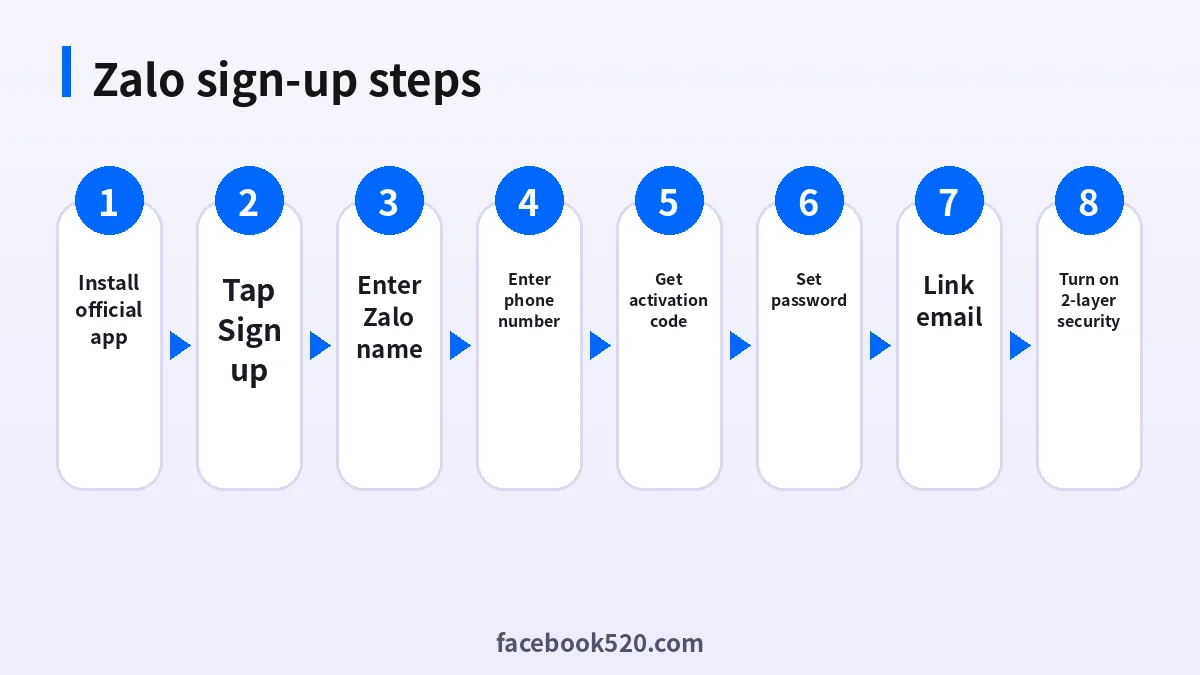
The phone app is the main way to create a Zalo account. The official steps are short:
- Install Zalo from Google Play or the App Store. You can also open zalo.me on your phone and follow the download link.
- Open the app and tap Đăng ký / Sign up (the interface can be switched to English).
- Enter your Zalo name. Use your real name or a familiar name; see the naming rules below.
- Enter your phone number, choosing the correct country code, then tap Continue.
- Confirm the number and receive the activation code by SMS or phone call.
- Enter the activation code. If you chose a call, listen carefully and type the code exactly.
- Follow the prompts to finish your profile, then log in with the account you just created.
After activation, Zalo may ask for access to your contacts so it can suggest friends who already use Zalo. This is optional. If you prefer not to upload your address book, skip it and add people by phone number or QR code instead.
Make sure your account has a password. Zalo’s own login instructions describe logging in on a phone with your phone number and password, so a password is what you will need on your next device. You can check or change it in Settings → Account and security.
How to sign up on a computer
Zalo also runs as a desktop app for Windows and macOS, downloadable from zalo.me/pc. The help page says that after installing it you can register a new account or log in with a QR code. Registration on the PC works the same way as on the phone: enter your phone number, confirm it, and type the activation code you receive on that phone.
What you can no longer do is create an account on the web. Zalo’s browser version (chat.zalo.me) is meant for logging into an existing account by scanning a QR code with your phone, not for sign-ups.
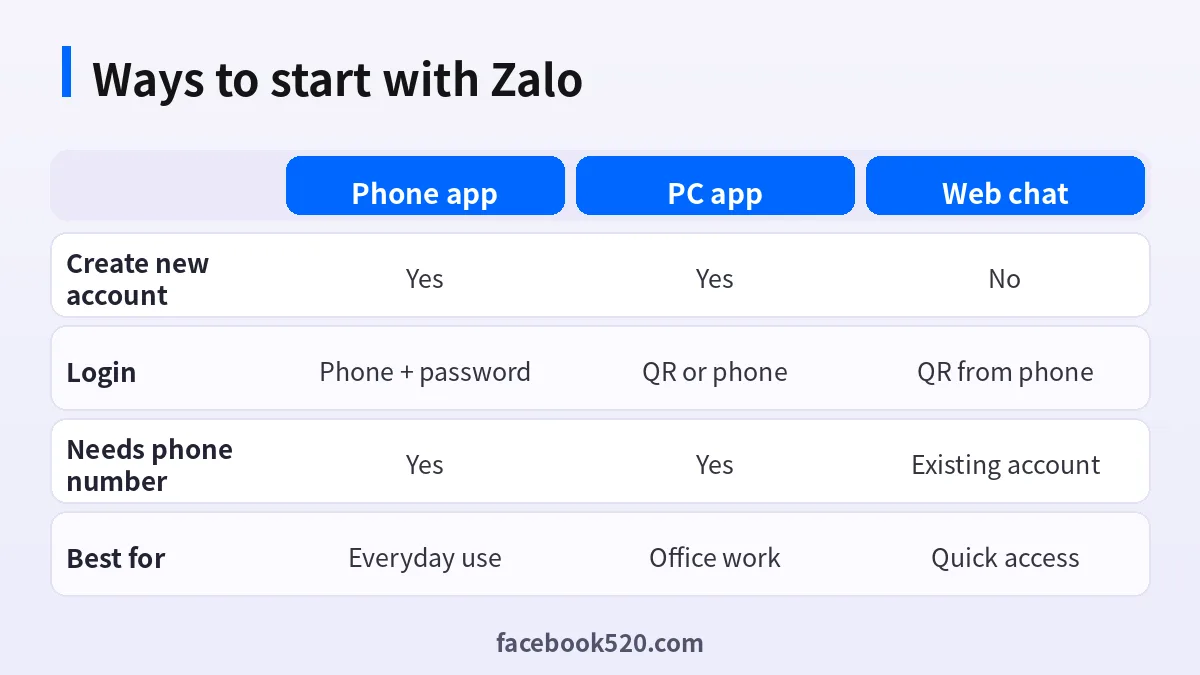
| Task | Phone app | PC app | Web (chat.zalo.me) |
|---|---|---|---|
| Create a new account | Yes | Yes | No |
| Log in | Phone number + password | QR code from phone or phone number | QR code from phone |
| Needs the phone nearby | No | For QR login | Yes, to scan |
| Good for | Daily chats and calls | Office work, files | Quick access on a shared device |
For most people the best setup is: create the account on your phone, then link the PC app by scanning the QR code. Before you tap Log in after scanning, Zalo shows the login details; check that the device and location are yours. Zalo’s help centre has a separate safety article on QR logins because scammers send QR codes that secretly log their computer into your account.
Zalo naming rules you should follow
New users are often surprised when Zalo removes their display name. The official naming rules say a Zalo name and username should be a real name or a familiar name, and they must not:
- contain offensive, violent, hateful or discriminatory words;
- use names of political organisations, local organisations or historical figures;
- contain words that could be confused with banks, financial or lending companies;
- copy registered trademarks or trade names from Vietnam or any other country;
- look like Zalo’s own brands;
- be written entirely in capital letters or use numbers.
If a name breaks the rules, Zalo removes it automatically and notifies you; repeated violations can lead to the account being locked. So “MINH TRAN 1990” or “Vietcombank Support” will not survive, while “Minh Tran” will. Businesses that want a brand name should create a Zalo Official Account (OA) instead of renaming a personal profile.
Fixing activation code problems
The registration-problems article in the Zalo help centre lists four common situations. Here they are with practical fixes.
“Invalid phone number.” Check every digit and the country code. Remove the leading zero of a Vietnamese number if you also selected +84. Landline and VoIP numbers are rejected.
No internet connection. Switch between Wi-Fi and mobile data, then try again.
The activation code does not arrive. Make sure the SIM for that number is in the phone you are watching. Try the call option instead of SMS. With a Vietnamese number you can also request a code by sending an SMS as instructed on screen. With a foreign number, if you hit the daily limit, wait 24 hours.
The code is wrong. Codes expire; request a new one and type the newest code. If you chose a voice call, note the digits on paper while listening.
Other tips that help: turn off spam-blocking apps that filter unknown senders, avoid roaming networks that drop international SMS, and do not keep requesting codes every few seconds, which only triggers the limit sooner.
Security settings to switch on right after signing up
The first ten minutes after registration are the best time to lock the account down. Zalo’s official guide recommends two settings in particular.
Link an email address. A linked email lets you recover the account if you forget your password, receive important security notifications, and receive one-time codes (OTP) when logging in on a new device. Path: Personal → Settings → Account and security → Email, then verify the address.
Turn on 2-layer security (two-step verification). Once enabled, every login on a new device needs two steps: your password, then an OTP. Even if someone learns your password, they cannot log in without the second code. Path: in the same Account and security screen, switch on 2-layer security after linking your email.
Other good habits:
- Use an email you check regularly and do not share OTP codes with anyone, including people claiming to be Zalo staff or “partners”.
- Review logged-in devices from time to time and log out of PCs you no longer use.
- Be careful with QR codes from strangers; scanning the wrong one can log another person’s computer into your account.
- Keep backups of your messages turned on, especially before changing phones.
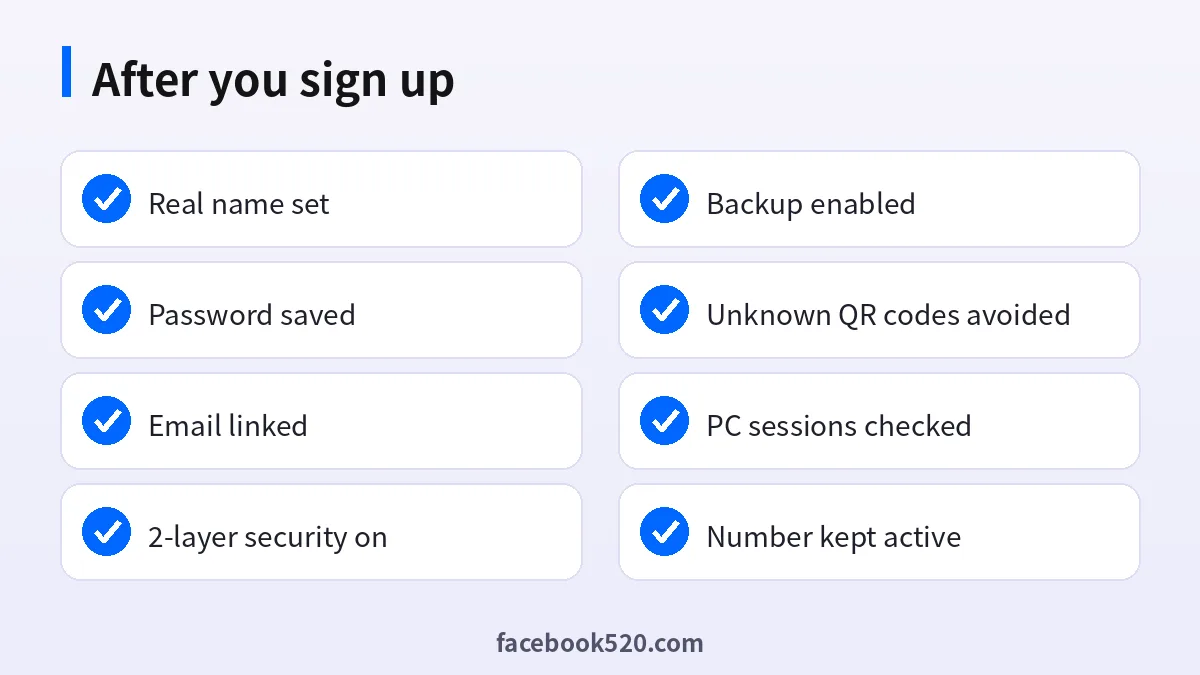
Keep your number active: recycled numbers
Zalo accounts must use a valid phone number under Vietnamese telecom rules. When a carrier reclaims a number, Zalo shows a notice asking you to update to a new number within 14 days. If you ignore it, the account can be disabled, and the new owner of your old number could try to take it over. Updating is done in Settings → Account and security → Phone number → Start changing phone number; the new number must not already be used by another Zalo account, and you confirm it by SMS. Changing the login number does not delete your account or the data on your device.
For travellers this is the main long-term risk: a prepaid Vietnamese SIM bought for a holiday can expire and be resold. If you plan to keep using Zalo at home, switch the account to a number you will keep before you leave.
Your first week on Zalo as a foreigner
Once the account works, a few habits make Zalo much easier if you do not read Vietnamese.
- Switch the language. Zalo’s settings let you change the interface language to English, which makes security menus far easier to follow.
- Add contacts by QR code in person. When you meet a supplier, landlord or colleague, ask them to show their Zalo QR code and scan it. It avoids typing errors with country codes and makes sure you add the right person.
- Set a recognisable profile photo. Vietnamese contacts often have several people with similar names in their list; a clear photo helps them find you.
- Use the built-in translation carefully. Zalo offers automatic translation in chats. It is helpful for everyday messages, but double-check prices, dates and addresses with the other person before you pay or travel.
- Expect business messages. Shops, schools and service providers often contact customers through Zalo Official Accounts. Real OAs show the business name; be suspicious of accounts that ask you to pay into a personal bank account or to click short links.
- Keep work and private life apart if needed. Because one number equals one account, people who want a separate work identity usually use a second SIM for a second account rather than sharing one login.
If you change your mind: deleting a Zalo account
You can delete a Zalo account from the phone app: Personal → Settings → Account and security → Delete account, enter the phone number you use to log in, a reason if you like, then your password. Zalo deletes the account after 48 hours, and you can cancel during that window from the same menu. Once deletion completes, your account information, name, profile picture, messages, timeline posts and friends are removed and cannot be restored.
Zalo sign up compared with other messaging apps
If you are used to other apps, Zalo’s sign-up will feel closest to WhatsApp: everything hangs on a phone number. LINE has moved the other way: in most countries outside Asia it now creates accounts through Apple or Google rather than a number (see our LINE sign-up guide). KakaoTalk sits in between and is common with Korean contacts (KakaoTalk account guide). For the WhatsApp side of the comparison, read our WhatsApp account guide, and for Telegram’s optional usernames and cloud chats, the Telegram account guide. Our platform hubs page links to account guides for every platform we cover.
| App | Sign-up key | Email login | Second device |
|---|---|---|---|
| Zalo | Phone number | Email used for recovery and OTP | PC app or web via QR |
| Phone number | Email only for re-verification | Linked devices | |
| LINE (outside Asia) | Apple or Google | Via Apple or Google | PC or iPad login |
| Telegram | Phone number | Login email optional | Any device with code |
Frequently asked questions
Is Zalo free to sign up for?
Yes. Creating an account, messaging and calls are free. Some extras, such as additional cloud storage or business tools, are paid.
Can I sign up for Zalo without a phone number?
No. The official FAQ says a phone number is the only way to register a new account.
Can I use a US or UK number for Zalo?
Usually yes. Zalo supports carriers in about 190 countries. Select the correct country code; if codes do not arrive, try the call option or wait and try again.
Why does Zalo say my number is invalid?
The number may be mistyped, missing or duplicating the country code, or it may be a landline or VoIP number, which Zalo does not support.
How long must I wait after too many code requests?
For foreign numbers, the FAQ says you have to wait 24 hours after exceeding the daily maximum. Vietnamese numbers have extra SMS options.
Can I create a Zalo account on the website?
No. The web version is for logging into an existing account with a QR code. Create the account in the phone or PC app.
Can I have two Zalo accounts on one phone number?
No. Each number is tied to one account, and a new number used for a change must not already belong to another Zalo account.
Why was my Zalo name removed?
It probably broke the naming rules, for example all capital letters, numbers, brand names or bank-like names. Use a real or familiar name.
How do I turn on two-step verification in Zalo?
Link an email in Settings → Account and security, then switch on 2-layer security. New-device logins will then need your password plus an OTP.
What happens if my Vietnamese SIM expires?
If the carrier reclaims the number, Zalo asks you to update to a new number within 14 days. Otherwise the account can be disabled.
Can I cancel a Zalo account deletion?
Yes, within 48 hours, via Settings → Account and security → Delete account → cancel deletion.
Is a Zalo Official Account the same as a personal account?
No. An Official Account (OA) is a business page for brands and shops. Create a personal account first, then follow the OA process separately.
Conclusion
Signing up for Zalo takes a few minutes: install the official app, enter your name and phone number, type the activation code, and log in. The details that matter come right after: choose a name that follows Zalo’s rules, set a password, link an email, turn on 2-layer security, and keep the phone number alive. Do that and your Zalo account will work as smoothly with Vietnamese contacts in five years as it does today.

