


Kling AI Account in 2026: Login Methods, Personal Space vs Team Space, Credits and Membership, Account Rules, Content Rights, Security, Suspension Appeals and Permanent Deletion
Kling AI is the video and image generator from the Kuaishou group, offered internationally by Kling AI Pte. Ltd. in Singapore. Most people meet it through a viral clip, open the website, click a login button and start generating within two minutes. That speed is great, but it also means few users ever look at the account itself: which login they used, whether the credits they bought sit in a personal space or in a team, what the Terms of Service say about sharing a login with a colleague, and what really happens when the account is deleted.
This guide is about the Kling AI account as a long-term asset. If you only want the click-by-click registration walkthrough, our Kling AI sign-up guide covers that, and the Kling AI pricing page compares the membership tiers. Here we focus on everything that comes after the first login: how identity works on kling.ai and in the mobile app, the difference between your personal space and a Team Space, how credits relate to the account, the rules that can get an account suspended, content rights, security, appeals and permanent deletion. The rules quoted below come from the Kling AI Terms of Service dated 21 April 2026 and the Kling AI privacy policy, both checked on 26 November 2026.
What a Kling AI account actually is
A Kling AI account is the identity you use across the Kling website (now served from kling.ai, with the older klingai.com addresses redirecting there) and the official Kling AI apps for iOS and Android. One account holds:
- your login method (email verification, a username and password, or a third-party sign-in where offered);
- your profile and display name;
- your membership status and credit balance;
- your generation history, uploaded reference images and downloaded or published works;
- any Team Spaces you created or joined.
The Terms describe the account in very plain language: to use Kling AI you sign up for an account and become a user, you can log in with the username and password you create, and the first time you log in with email verification, an account is created for you automatically. That last sentence explains a common surprise. Many people never press a “Sign up” button at all; they type an email address, receive a code and are suddenly “registered”. The account exists from that moment, with the email address as its anchor.
Kling AI is a separate product from the Chinese-market Kling app tied to Kuaishou accounts. A login there does not automatically carry credits or memberships into the international service, so treat them as two different accounts even if the brand looks the same.
Login methods and why the first one matters
The login screen on kling.ai and in the app shows an email option and, depending on your device and region, third-party buttons such as Google or Apple. Whatever you choose the first time becomes the key to that specific account. If you later press a different button with a different address behind it, you will usually create a second, empty account rather than reach the first one.
| Login method | How it works | Password needed | Typical risk |
|---|---|---|---|
| Email verification code | Kling sends a one-time code to your inbox; first login creates the account | No, the inbox is the key | Losing access to the inbox locks you out |
| Username and password | Credentials you set inside the account | Yes | Password reuse and phishing |
| Google sign-in (where shown) | Your Google account vouches for you | No separate Kling password | Using the wrong Google profile creates a new account |
| Apple sign-in (app, where shown) | Apple ID, optionally with Hide My Email | No separate Kling password | Relay address is hard to recognise later |
Three habits prevent almost every “my credits disappeared” ticket:
- Write down which method you used the day you buy anything. A note such as “Kling – Google – work address” saves hours later.
- Use an inbox you will keep for years. A school or employer address that will be closed is a poor anchor for paid credits.
- Do not use disposable email services. They work for a quick test, but the next login code goes to an inbox that no longer exists, and the account is effectively gone.
If you are not sure which account you are in, open your profile and compare the email address shown there with the one on your payment receipt. Our Kling AI free credits guide also explains why a second account does not double your daily allowance: the credits belong to each account separately and the Terms forbid using extra accounts to get around limits.
Who can have an account
The Terms set the minimum age at 13, or a higher minimum age where local law requires it. Users who have reached the minimum age but are still below the age of majority may only register and use Kling AI through a parent or legal guardian, who accepts the agreement on their behalf. Some countries add stricter rules in the regional section of the Terms; for example, users in Mexico under 18 need the explicit consent of a parent or guardian. If Kling learns that an underage child has an account, it says it will verify and delete it.
You must also give true, accurate and up-to-date information when asked, must not impersonate another person, and must keep your username and password confidential. Kling is entitled to assume that anyone using your credentials is you or someone you authorised, which matters if a shared login is later used to create something that breaks the rules.
Personal space and Team Space
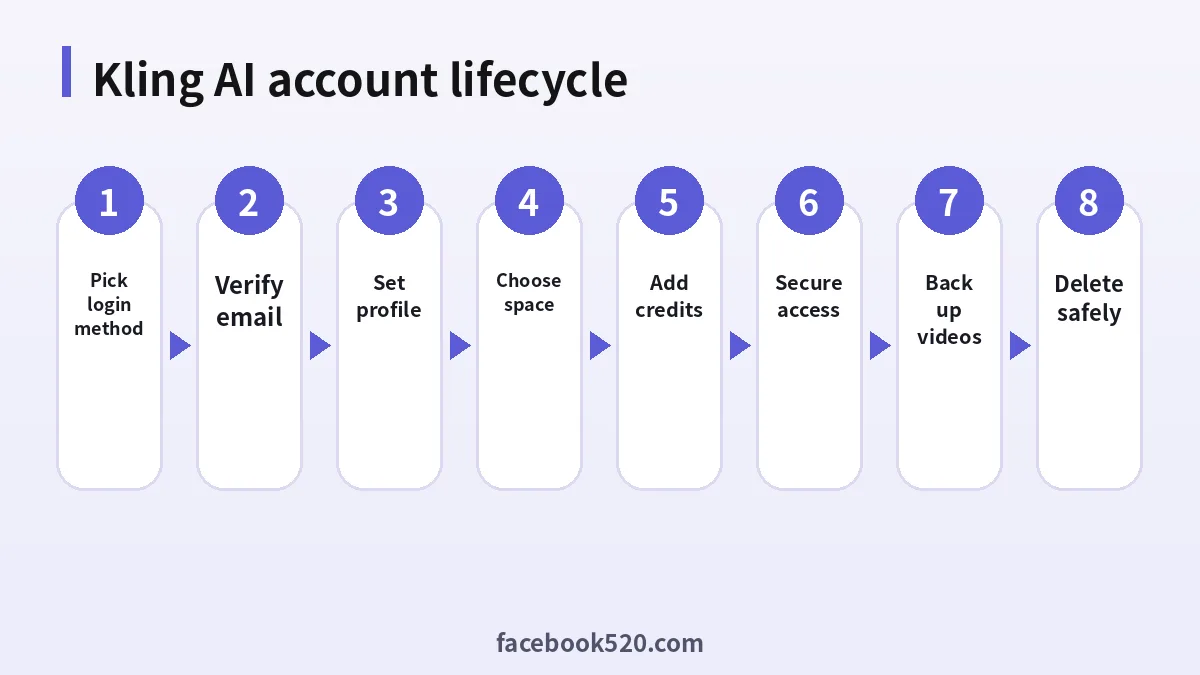
The current Terms include a proper team layer. Section 5 of the Terms introduces Teams, also called Team Spaces. The person who creates a Team is the Team Owner; people invited to join act as Administrators or Collaborators. Every individual account also has its own personal space.
The difference is not cosmetic. According to the Terms:
- A Team Space is separate from the personal space automatically attached to each account, and multiple Team Spaces are independent of each other.
- Assets, membership benefits, credits and similar entitlements are not shared or transferable between personal spaces and Team Spaces.
- Everything team members create inside a Team Space is a Team Asset, owned by the Team Owner unless the law or a separate written agreement says otherwise.
- The Team Owner or Administrators can edit, organise, share or reassign Team Assets.
- If a team breaks the law or platform rules, Kling may restrict, suspend, freeze or dissolve the whole team.
In practice that gives freelancers and agencies a clear rule of thumb. If a client invites you into their Team Space, the videos you produce there belong to the client’s team, and the credits you spend come from the team’s pool, not from your personal membership. If you want to keep a portfolio copy, download it while you still have access and make sure your contract allows it. If you are the owner, invite people with the lowest role that lets them do the job and remove leavers promptly.
| Question | Personal space | Team Space |
|---|---|---|
| Who owns new works | You, subject to the Terms | The Team Owner (Team Assets) |
| Whose credits are used | Your own balance and membership | The team’s balance and benefits |
| Can credits move between them | No | No |
| Who can edit or reassign works | Only you | Owner and Administrators |
| What happens on misuse | Your account can be restricted | The whole team can be frozen or dissolved |
Credits and membership on your account
Kling runs on credits. Free accounts receive a limited allowance, and paid memberships add a monthly credit pool, faster queues and features such as higher resolutions or longer clips. Exact tiers and prices change regularly and depend on where and how you buy, so we keep them on a dedicated page: see the Kling AI pricing comparison and, for other tools, the AI pricing hub.
What matters for the account side:
- Credits are tied to the space where you bought or received them. Personal credits stay personal, team credits stay in that team, and there is no official way to merge them.
- The Terms allow Kling to change fees and start charging for features that are free today (section 7.2). Treat free daily credits as a promotion, not a right.
- App store purchases are managed by the store. If you subscribed through the iOS or Android app, cancel through Apple or Google; deleting the Kling account does not stop the store from renewing.
- Third-party services inside Kling are governed by their own agreements, according to section 7.3. Read the extra terms before you connect anything.
- If Kling ever discontinues the service, the Terms promise advance notice and a refund for prepaid, unused services.
A practical tip: before you buy a large credit pack, run a few test generations with the free allowance in the exact mode you plan to use. Credit costs differ by model, length and quality, and it is easier to compare that on your own prompts than on a marketing chart.
Account rules: what can get you restricted
The section that causes the most trouble in reseller groups is short. Section 2.5 says your account can only be used by yourself, and you may not lend, give away or rent the account, or transfer, sell or share it with others; otherwise you are responsible for the legal consequences. Other parts of the Terms add that you may not resell or lease the service for a fee, use it for unauthorised commercial solicitation without written consent, or use Kling outputs to train other AI models.
That has direct consequences for anyone tempted by “cheap Kling accounts” or “shared Pro logins”:
- A bought or shared account can be suspended, blocked or deleted at any time, and the Terms allow Kling to do this without notice and without liability.
- Whoever controls the original email or third-party login can take the account back whenever they like.
- Generations made from a shared login are attributed to the account holder, which can be a serious problem if someone else creates prohibited content.
- Credits on such accounts are often bought with stolen cards and get reversed, leaving the account negative or banned.
If the price is the issue, a single official membership paid for by the person who uses it is cheaper in the long run than replacing banned accounts. Teams should use a Team Space with individual member logins instead of passing one password around. Our buying hub explains the general risks of buying accounts on any platform.
Your content and the license Kling receives
Kling does not claim ownership of your content. Section 4.4 says you own the intellectual property rights in your content under applicable law, or those rights belong to whoever lawfully holds them. At the same time, section 4.7 grants Kling a non-exclusive, royalty-free license to use the inputs you upload and the outputs you generate for promotion, product upgrades and research, and to process usage data and inputs for lawful business purposes.
Two details are worth knowing:
- You can revoke the license by email. Section 4.7.4 says that if you do not want Kling to keep using all or part of your content, you can send a request to support@kling.ai.
- Other users may reuse public content in some features, subject to your prior approval where applicable, so check the visibility of anything you publish to the community feed.
Do not upload faces, voices or artwork you have no right to use. Kling’s community guidelines and copyright complaint policy apply to every account, and repeated complaints are a common reason for restrictions.
Securing a Kling AI account
Kling’s security features are simpler than those of big platforms, which means more of the work falls on you. The most important protection is the security of the inbox or third-party account you log in with.
A sensible routine looks like this:
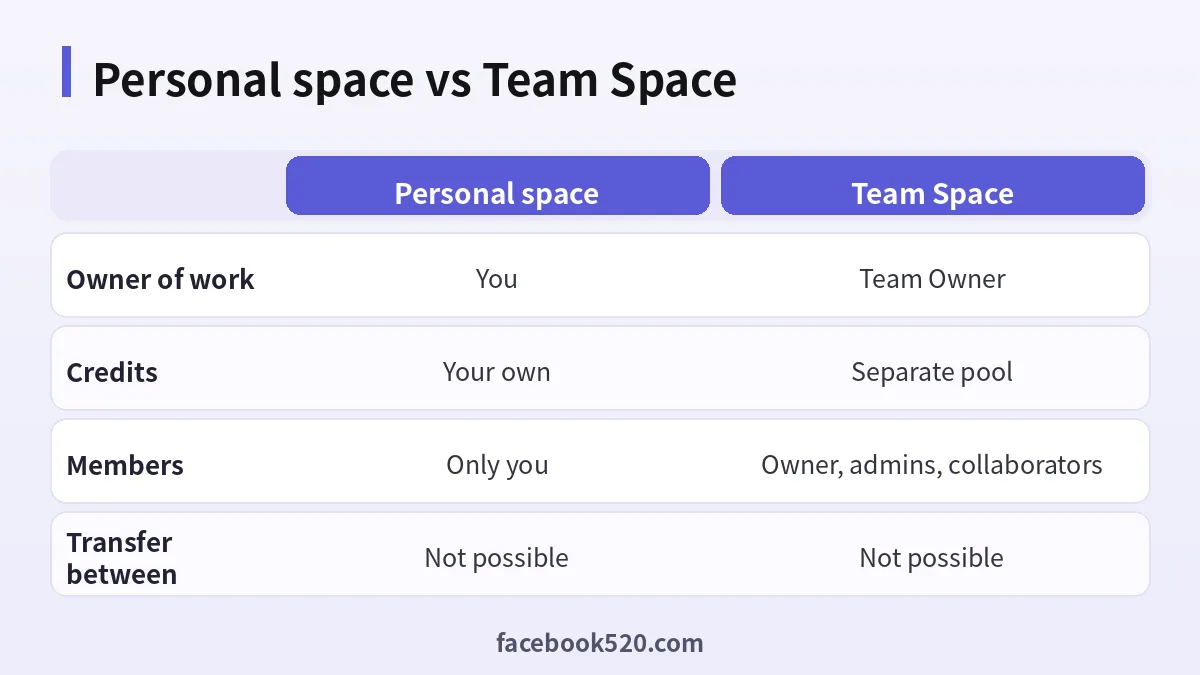
- Protect the anchor. Turn on two-step verification for the Gmail, Outlook or Apple ID that controls your Kling login. Anyone who can read that inbox can request a Kling login code.
- Use only official entry points. Type kling.ai yourself or use the app from the official store. Search ads and social posts regularly lead to look-alike “Kling” sites that collect payment details or login codes.
- Never share login codes. Kling staff will not ask for a verification code by chat, Discord or Telegram.
- Use a unique password if your account has one, stored in a password manager.
- Sign out on shared computers, especially in studios or schools where several people use the same browser.
- Watch for unusual credit drops. A balance that falls without your generations in the history is a sign that someone else has access.
If you suspect a takeover, change the password (or secure the email account first), sign out of other sessions where possible, and write to support@kling.ai from the address linked to the account with a short timeline and any receipts.
Troubleshooting common account problems
Most account trouble falls into a handful of patterns.
The login code does not arrive. Check spam and promotions folders, wait a couple of minutes before asking again (repeated requests can slow delivery), and confirm you typed the address exactly. Corporate mail filters sometimes block automated messages; a personal inbox is more reliable.
“My credits are gone.” In most cases you logged into a different account by choosing another sign-in button. Try each method you might have used, and compare the email on your receipt with the one in your profile. Also check whether you are looking at a Team Space instead of your personal space.
The app and the website show different balances. Make sure both are logged into the same account and the same space. Purchases made in the app store can take a short time to sync.
Region or network errors. Kling may not be available in every country. Using VPNs to bypass availability can trigger security checks or restrictions; it is better to use the service only where it is offered.
Payment declined. Try the card holder’s own billing details, a different card, or the store payment method. Avoid “virtual card” offers from unknown sellers; see our payment hub for safer options.
Suspension, termination and appeals
The Terms give Kling broad rights. Your permission to use the service ends automatically if you break the agreement, break the law, or create risk or harm for Kling, other users or third parties. Kling may also suspend, block or delete accounts at its discretion, with or without notice.
If you believe this happened by mistake, section 14.3 tells you to file an appeal by contacting support@kling.ai. A good appeal is short and factual:
- Send it from the email address that owns the account.
- State the account email, the date you noticed the restriction and the exact message shown.
- Explain what you were doing at the time (for example, a specific prompt or upload) without arguing about the rules.
- Attach payment receipts if a paid membership is affected.
- Wait for the reply in the same thread instead of opening many new tickets.
You can also reach Kling through the Community link in the website’s top navigation and through Contact Us in the app menu. Appeals for accounts that were bought, shared or rented are rarely successful, because the rule broken is the sharing itself.
Deleting a Kling AI account permanently
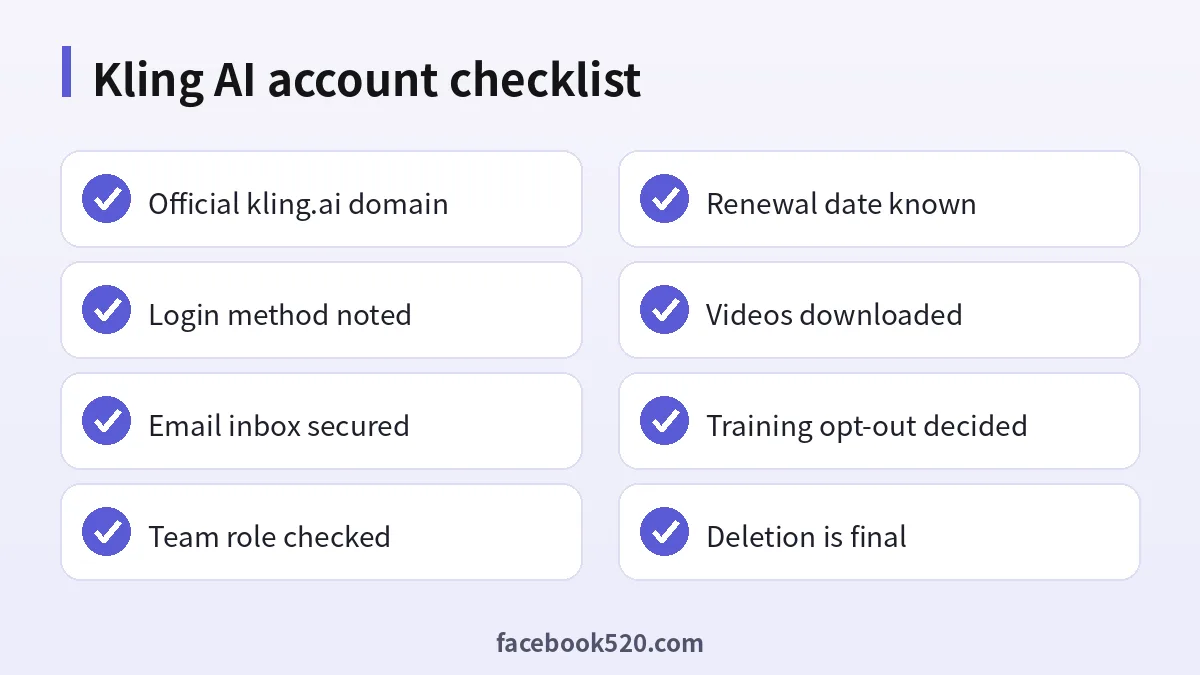
You can stop using Kling at any time. The Terms say you may delete your account through the account settings or by contacting support@kling.ai, and the privacy policy describes the in-app path My Space → tap your profile picture → Account Deletion. Once the account is deleted you cannot reactivate it or recover any content or information connected with it.
Before you press the button:
- Download every video and image you want to keep. Your history disappears with the account.
- Cancel any app store subscription in Apple or Google settings, and any web membership in the billing area, so renewals stop.
- Hand over Team Spaces you own. Team Assets belong to the Team Owner; if you leave without a plan, colleagues may lose access to shared work.
- Use unspent credits or accept losing them. Credits are not transferable and are not paid out when you delete.
- Decide on the content license. If you also want Kling to stop using previously uploaded content, say so in a separate email to support@kling.ai.
If you only want a break, simply sign out and cancel renewals; there is no need to delete the account.
Kling AI account compared with other AI video tools
Kling’s account model is close to other creator tools but has its own quirks. Compared with the HeyGen account, Kling puts more weight on email verification codes, so the inbox you choose matters even more. Compared with a Midjourney account, Kling lets you log in with email directly instead of requiring Google or Discord, but its Team Space rules on ownership are stricter: team output belongs to the owner by default. Across all of them the same advice applies: one person, one account, a durable email, and paid plans bought from the official site or store. You can browse more platform guides on our platform hubs page.
Frequently asked questions
Do I need to sign up separately or does logging in create the account?
Logging in with email verification for the first time creates the account automatically, according to the Terms. There is no separate registration step if you use the email code route.
Can I use one Kling AI account on the website and in the app?
Yes. Use the same login method on both and you will see the same personal space, credits and history. Different methods may lead to different accounts.
Is the international Kling AI account the same as my Kuaishou login?
No. The international Kling AI service is run by Kling AI Pte. Ltd. Treat a Chinese-market Kling or Kuaishou login as a separate account; credits and memberships do not automatically move across.
What is the minimum age for a Kling AI account?
Thirteen, or a higher minimum set by local law. Users above the minimum age but below the age of majority need a parent or guardian to accept the Terms for them.
Can I share my Kling AI Pro account with a friend or colleague?
No. The Terms say the account can only be used by you and may not be lent, rented, shared, transferred or sold. Colleagues should join a Team Space with their own accounts.
Can I move credits from my personal space to a Team Space?
No. The Terms state that assets, membership benefits and credits are not shared or transferable between personal spaces and Team Spaces, or between different Team Spaces.
Who owns the videos I make in a client’s Team Space?
By default the Team Owner, because everything created in a Team Space counts as a Team Asset, unless law or a separate written agreement says otherwise.
Does Kling own my generated videos?
Kling does not claim ownership, but it receives a non-exclusive, royalty-free license to use inputs and outputs. You can ask it to stop using your content by emailing support@kling.ai.
Why did my Kling AI account get banned?
Common reasons are breaking the Terms or community guidelines, copyright complaints, shared or purchased accounts, payment chargebacks and suspected automation. Kling may act without notice.
How do I appeal a suspended Kling AI account?
Write to support@kling.ai from the account email with the date, the message shown, what you were doing and any receipts. Keep it factual and wait for a reply in the same thread.
How do I delete my Kling AI account?
Use the account settings, the app path My Space → profile picture → Account Deletion, or email support@kling.ai. Deletion is permanent and content cannot be recovered.
Will deleting the account cancel my subscription?
Not necessarily. Subscriptions bought through Apple or Google must be cancelled in the store. Cancel renewals before deleting the account.
Conclusion
A Kling AI account is quick to create and easy to lose track of. Pick one login method and remember it, anchor it to an inbox you will keep, buy credits in the space where you will actually use them, and keep client work inside the client’s Team Space. Do not share, rent or buy accounts; the Terms are explicit and enforcement is at Kling’s discretion. Download your work regularly, and if you ever leave, cancel renewals and export everything first, because deletion is final.

