


Lovable Account in 2026: How to Sign Up With Email, Google, GitHub, Apple or SSO, Account vs Workspace, Free, Pro and Business Credits, Login Methods, 2FA, Ownership Transfer and Deletion
Lovable lets you build websites and web apps by chatting: describe a landing page, a booking tool or an internal dashboard, and the AI writes and deploys the code. That makes the Lovable account surprisingly important. It is not just a login — it decides which workspace owns your projects, who pays for the credits, how your GitHub code is connected, and what happens to everything if you ever leave.
This guide covers the account side of Lovable in 2026, based on Lovable’s official documentation and the pricing page checked on 26 November 2026: the five sign-up methods, the difference between your account and a workspace, how Free, Pro and Business credits work, login methods and password resets, two-factor authentication, moving projects to someone else, and the 30-day deletion window. For pricing details and the history of Lovable’s plans, see our Lovable pricing guide and the article on Lovable free credits.
Account vs workspace: the one concept to understand first
Lovable’s docs draw a clear line:
- Your account is you. It holds your login, your profile, your
@usernameand your preferences. - A workspace is where you work. It holds projects, members, billing and credits.
You log in with one account, and from that account you can belong to one or many workspaces. Right after sign-up, Lovable automatically creates your first personal workspace on the Free plan. When you invite colleagues, they join a workspace; they do not get access to your account.
This is why “upgrading my Lovable account” is technically wrong — you upgrade a workspace. And it is why deleting an account can wipe out other people’s projects if you are the only owner of a shared workspace (more on that below).
How to create a Lovable account
Lovable accepts five sign-up methods at lovable.dev/signup:
| Method | Lovable password? | Notes |
|---|---|---|
| Email and password | Yes — at least 8 characters including a number | Passwords seen in known data leaks are rejected |
| No, managed by Google | Google may show a one-tap card on the login page | |
| GitHub | No, managed by GitHub | Natural fit if you plan to sync code to GitHub |
| Apple | No, managed by Apple | Works with Hide My Email |
| SSO (SAML or OIDC) | No, managed by your company | For Business and Enterprise organisations that configured SSO |
Step-by-step sign-up
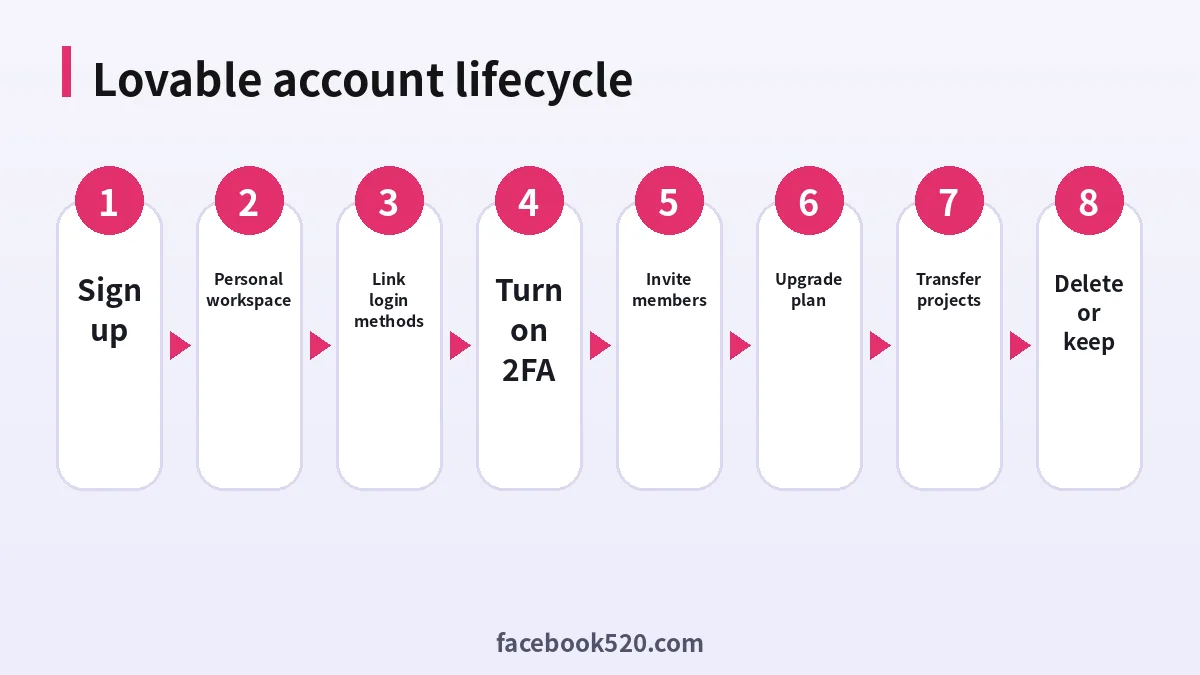
- Go to lovable.dev/signup.
- Pick a method. If your company uses SSO, ask the admin which provider to use first.
- For email and password, choose a password of at least 8 characters with a number; Lovable warns you if it appears in a known breach.
- Confirm your email if prompted.
- Lovable creates your personal workspace on the Free plan and opens the dashboard.
- Open Account settings → Account → Login methods and check which provider is marked Primary.
- Build a first test project so you can see how many credits a typical prompt consumes.
Logging in later
Use the same method you signed up with. If you are not sure which one that was, type your email on the login page: Lovable checks the account, marks the linked method as Recommended, and takes you straight to it when only one method is linked. If two-factor authentication is on, Lovable asks for your 6-digit code after the first step.
Login methods, passwords and recovery
Under Account settings → Account → Login methods, each provider appears with the email it is linked to. You can link additional methods and unlink old ones, with two limits: email-and-password login cannot be unlinked, and neither can your last remaining method.
Linking a second method is the single best thing you can do for recovery. If you signed up with Google only and that Google account is lost, a linked GitHub or Apple login is your way back in.
Password resets work only for email-and-password accounts:
- Go to lovable.dev/login, enter your email and click Forgot password?.
- Follow the link in the email; you are logged in once the new password is set.
If you signed up with Google, GitHub, Apple or SSO, there is no Lovable password. Forgot password? shows a “Password reset unavailable” message; reset the password at the provider instead. If your only login was a company SSO provider that has since been removed from the workspace, the login page has a recovery flow that lets you set a password for the first time.
If you see “Login denied due to suspicious activity”, Lovable’s docs have a dedicated page for it — typically triggered by VPNs, shared IPs or repeated sign-ups. Do not create a new account to get around it; contact support with the email you used.
Lovable plans and credits in 2026
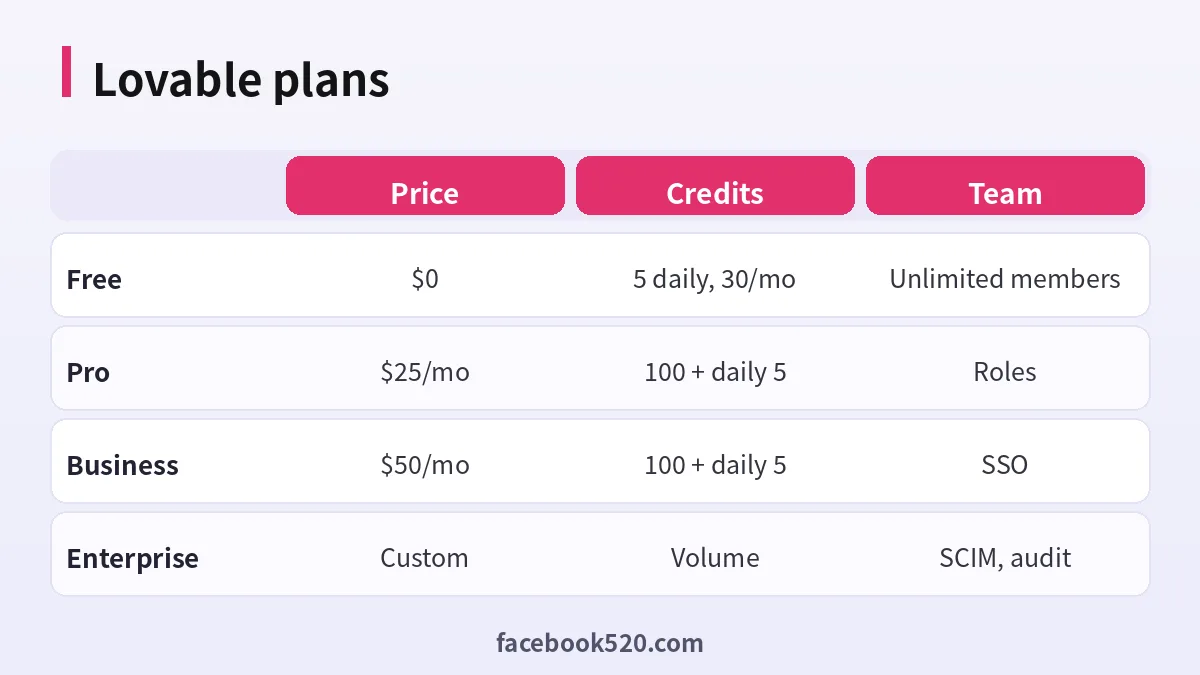
Checked on lovable.dev/pricing on 26 November 2026 (US dollars, monthly billing, before tax; yearly billing advertises “2 months free”):
| Plan | Price | Credits and grants | Key extras |
|---|---|---|---|
| Free | $0 | 5 daily build credits (up to 30 a month), 20 Cloud credits/month, 4 AI-feature credits/month, 1 connector credit/month | Unlimited workspace members |
| Pro | $25/month | 100 Pro credits/month added to the balance, plus the same daily 5 build credits and monthly grants | Rollover, top-ups, custom domains, roles and permissions, per-member limits, remove badge |
| Business | $50/month | 100 Business credits/month plus grants | Team workspace, SSO, security center, workspace-only publishing, priority support |
| Enterprise | Volume-based | Custom | SCIM, audit logs, publishing controls, EU inference, GitHub Enterprise |
Things the pricing FAQ makes clear:
- Plans are not priced per seat. Every plan allows unlimited members; inviting more people only makes the shared credit pool run out faster. Owners and admins can set a default monthly credit limit and per-member overrides.
- Credit cost depends on the work. Plan Mode costs 1 credit per message; Default Mode varies with complexity. Lovable’s examples range from 0.50 credits for “make the button gray” to 1.70 for a landing page with generated images.
- Credits expire. Unused monthly-plan credits expire two months after they are issued; annual-plan credits one month after the annual period ends; top-up credits last 12 months; daily build grants expire at the end of each day.
- Credits are not refundable or redeemable for cash.
- After cancelling, you keep using remaining credits until the end of the billing period, then the workspace falls back to Free. Unused paid credits reactivate if you re-subscribe before they expire.
- Students (18 or older, with a valid university email) can get up to 50% off Pro via lovable.dev/students.
Business costs more per credit than Pro, but the FAQ notes that running apps and AI features in apps cost the same on both — so Business shows lower credit usage for those items.
Who owns what you build
Lovable’s FAQ states that you own your code — the apps, websites and other projects you build, customer data stored in Lovable, and the AI output you generate (subject to third-party rights in the underlying models). In practice, “you” means the workspace that holds the project. Keep this in mind when freelancing:
| Scenario | Where the project should live | Why |
|---|---|---|
| Your own side project | Your personal workspace | You control billing and deletion |
| Client project you will hand over | Client’s workspace, you as a member | Client owns code and billing from day one |
| Client project built in your workspace | Transfer project ownership when done | Avoids the client depending on your account |
| Company tool | Company workspace with at least two owners | Survives any single person leaving |
Connecting a project to GitHub is the safety net: even if access to Lovable is lost, the repository still holds the code. If you work with many tools that bill per account, our Cursor account guide shows how a similar AI coding product handles seats and subscriptions.
Securing a Lovable account
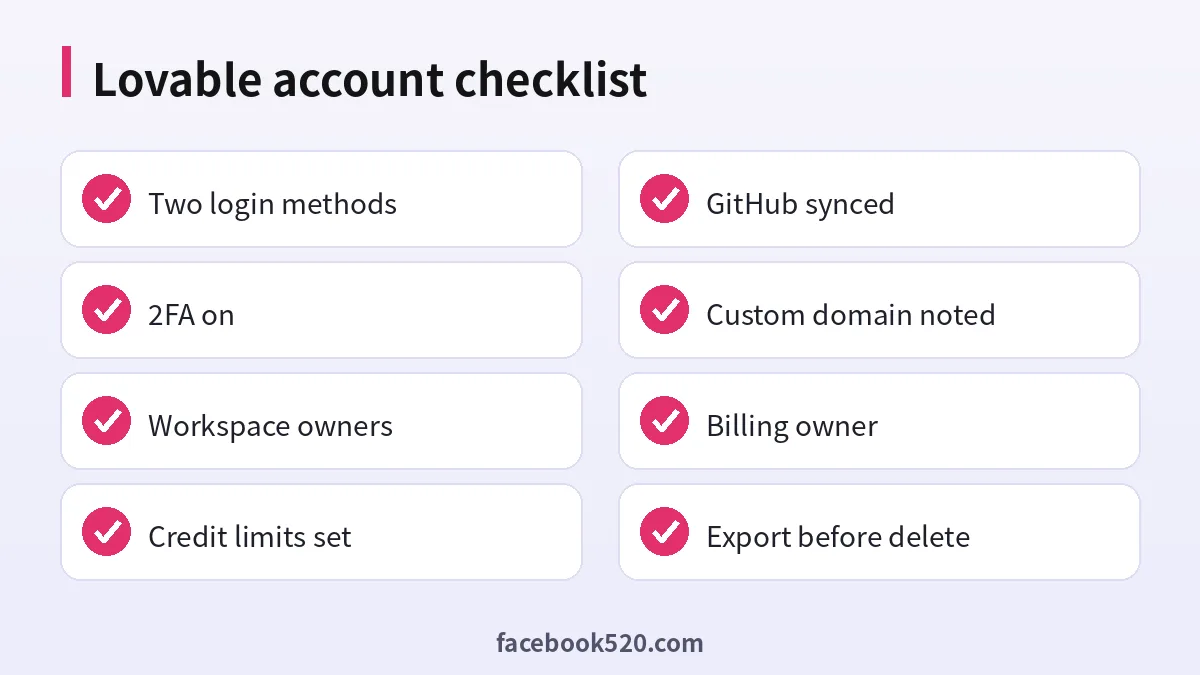
- Turn on two-factor authentication in account settings; Lovable then asks for a 6-digit code at login, including when you use the Google one-tap card.
- Link a second login method so that losing one provider is not fatal.
- Protect the provider. A GitHub or Google login is only as strong as that account’s own 2FA.
- Review workspace members and roles, especially after a project ends. Members share the credit pool and may be able to publish.
- Set per-member credit limits in team workspaces so a single runaway prompt loop does not empty the balance.
- Check secrets in projects. API keys pasted into prompts or code are visible to anyone with project access; use the platform’s secret storage instead.
Transferring projects and workspaces
Lovable supports handing work over without sharing a password:
- Change project owner for several projects at once from the dashboard, or transfer ownership one project at a time.
- Promote a member to owner of a workspace in Workspace settings → People.
- Transfer primary ownership of a workspace to any Lovable account; that person is added as an owner.
Buying or selling a “Lovable account with credits” is a different matter: credits belong to a workspace, are non-refundable and non-transferable for cash, and Lovable reserves the right to close accounts for fraud or terms breaches, deleting remaining credits. If you need more capacity, a top-up or plan change in your own workspace is the only safe route; our buying hub explains the general risks of resold AI accounts.
Deleting a Lovable account (30-day grace period)
Deletion lives at Account settings → Account → Danger zone → Delete account. The dialog walks you through four steps:
- Transfer or delete workspaces where you are the only owner. For workspaces with other members, promote someone to owner or delete the workspace (typing its name to confirm). A workspace where you are the only member is deleted with your account unless you transfer primary ownership first.
- Email confirmation — type your account email.
- Reason for leaving (required).
- Confirm — Lovable shows Deletion scheduled and logs you out of all sessions.
What happens next:
| Time | Status |
|---|---|
| Day 0 | Account scheduled for deletion, all sessions logged out |
| Days 1–30 | Recoverable: log back in with the same method to cancel |
| During the window | Active workspace subscriptions keep billing — cancel them separately |
| After 30 days | Account, profile, username, linked logins, MFA, owned workspaces and memberships permanently removed; your @username becomes available to others |
Since 9 September 2026, deletion also stops your content from being included in AI training data assembled after the request; it does not retract data from datasets or models created before.
If you only want to stop paying, do not delete: go to Workspace settings → Plans & credit usage → Manage → Downgrade to free. To step away from a team, leave the workspace instead.
A sensible first week with a new Lovable account
Most credit waste happens in the first days, when people prompt “build me an app like Airbnb” and burn through the daily grant on rewrites. A calmer routine:
- Day 1 — settings first. Link a second login method, turn on 2FA and set your display name and
@username(it becomes public on shared projects). - Day 1 — a throwaway project. Ask for something small, such as a one-page contact form, and hover over the three dots of each message to see what it cost. You will quickly learn how expensive “small” and “large” requests are.
- Day 2 — use Plan Mode for thinking. Plan Mode costs a flat 1 credit per message, so use it to agree on structure, pages and data model before switching to Default Mode to generate code.
- Day 3 — connect GitHub. Sync the real project to a repository so that your code exists outside Lovable from the start.
- Day 4 — decide on the workspace. If the project is for a client or employer, move it into their workspace now rather than after launch.
- Day 5 — check the balance. Only upgrade once you know your weekly consumption; a top-up may be cheaper than a higher plan for one busy week.
Roles inside a team workspace
Pro and Business workspaces add user roles and permissions. The exact labels can change, but the logic is consistent:
| Role | Typical rights | Give it to |
|---|---|---|
| Owner | Billing, members, deletion, ownership transfer | At least two trusted people |
| Admin | Members, credit limits, settings | Team leads |
| Member / editor | Create and edit projects, spend credits within limits | Builders and freelancers |
| Viewer or invited guest | See or test projects | Clients reviewing work |
Having two owners is not bureaucracy: it is what prevents a workspace — and every project in it — from being deleted when one person closes their account. On Business, workspace publishing lets you restrict a published app to logged-in workspace members, which is handy for internal tools that should never be public.
Common Lovable account issues
Two accounts by accident. Signing up once with Google and later with GitHub on a different email creates two accounts. Link methods to the one you want to keep and move projects over.
Lost access after SSO change. Use the recovery flow on the login page to set a password.
Team ran out of credits. Check per-member limits and usage details in workspace settings; buy a top-up (valid 12 months) rather than upgrading mid-month if the spike is one-off.
Client wants “the account”. Transfer the projects or the workspace; never hand over your login.
Frequently asked questions
Is a Lovable account free?
Yes. Sign-up is free and creates a personal workspace on the Free plan with 5 daily build credits (up to 30 a month) plus small monthly Cloud and AI-feature grants.
Can I sign up for Lovable with GitHub?
Yes. Lovable supports email and password, Google, GitHub, Apple and SSO.
Does Lovable have a password if I use Google?
No. With Google, GitHub, Apple or SSO you reset the password at that provider; Lovable’s Forgot password only works for email-and-password accounts.
What is the difference between a Lovable account and a workspace?
The account is your identity and login; the workspace holds projects, members, billing and credits. One account can belong to many workspaces.
How much is Lovable Pro?
On 26 November 2026 the official pricing page showed Pro at $25 per month and Business at $50 per month on monthly billing.
Is Lovable charged per user?
No. All plans allow unlimited members; members share the workspace credit pool.
Do Lovable credits expire?
Yes: monthly-plan credits two months after issue, annual-plan credits one month after the annual period, top-ups after 12 months, daily grants at the end of each day.
Can I unlink my Google login?
Yes, if another method remains linked. Email-and-password login and the last remaining method cannot be unlinked.
Can I transfer a project to a client?
Yes. Change the project owner from the dashboard or transfer workspace ownership; the client does not need your login.
How long does Lovable account deletion take?
Deletion is scheduled for 30 days. During that time you can log back in to cancel; afterwards it is permanent.
Does deleting my account cancel my subscription?
Only subscriptions of workspaces that are deleted with your account. Subscriptions of workspaces that survive keep billing, so cancel them first.
Is there a student discount?
Yes, up to 50% off Pro for university students aged 18 or older with a valid student email, via lovable.dev/students.
Conclusion
A Lovable account is easy to create but carries real weight: it determines which workspace owns your apps, who pays for credits and how you get back in. Link at least two login methods, turn on 2FA, keep client work in client workspaces, connect important projects to GitHub, and use ownership transfer instead of sharing logins. Check current credit allowances on the official pricing page before upgrading, and compare with other AI tools in the AI pricing hub.

