


Manus Account in 2026: How to Sign Up With Google, Apple, Microsoft or Email, Free and Pro Credits, Team Workspaces, Sign-in Methods, Passkeys, Cloud Browser Logins, Recovery and Deleting Your Manus Account
Manus is an AI agent rather than a plain chatbot: you give it a goal, and it plans the steps, opens a cloud browser, writes code, builds slides or websites and hands back the result. Because it can act on websites for you and run tasks on a schedule, your Manus account carries more weight than a typical AI login. It holds credits you may have paid for, task history with documents and code, saved logins for third-party websites and, in many cases, a billing relationship.
This guide explains how a Manus account works in 2026: how to sign up, which login methods are supported, how credits and plans attach to the account, how to protect it, how to find an account you have lost and how deletion works (including its effect on Cue, which shares the same account). Facts were checked against the Manus Help Center on 25 November 2026. For plan prices in more depth see our Manus pricing guide and the Manus credits explainer.
What a Manus account includes
A Manus account is more than a username. It bundles:
- Your identity: one or more sign-in methods (email, Google, Apple, Microsoft) and optionally passkeys.
- A linked email address used for notifications, receipts and verification codes.
- Your plan and credits: Free daily credits or a Pro or Team allocation.
- Task history: prompts, files, generated reports, slides, websites and code.
- Scheduled automations that run without you being present.
- Cloud browser data: login sessions for websites that you allowed Manus to save.
- Connected devices, including the Manus desktop app.
Manus also states that Cue and Manus share the same account and data. That matters most when you delete the account, because it removes both.
How to sign up for Manus
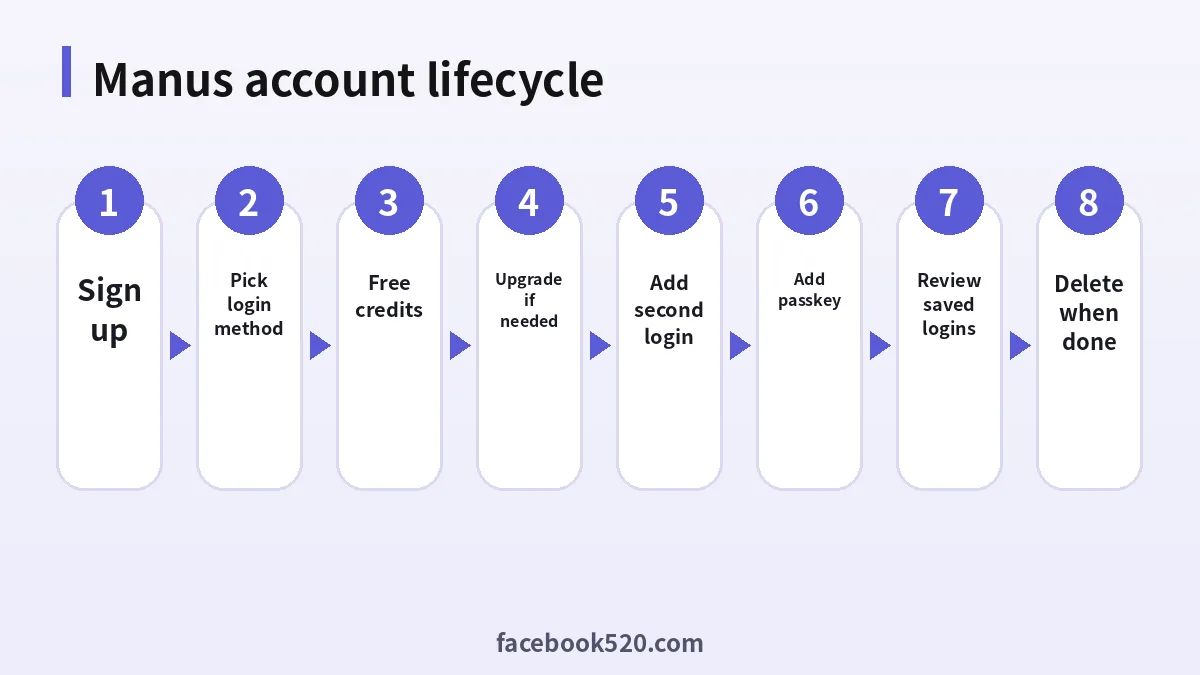
- Go to manus.im and choose Sign up (or open the Manus app).
- Pick a method: Continue with Google, Continue with Apple, Continue with Microsoft, or register with email.
- If you register with email, confirm the verification code Manus sends.
- Complete any onboarding questions and land in the task interface with Free credits.
- Open Settings → Account and review your linked email and sign-in methods straight away.
- Optional: add a second sign-in method and a passkey (explained below).
- Optional: upgrade from the pricing page if Free credits are not enough.
Which method should you choose? If your company uses Microsoft 365, signing in with Microsoft keeps work and personal tools aligned. If you use Manus personally, Google or Apple is quick. Email registration is fine too, but remember the rules explained in the recovery section: a Google-only account does not automatically get a password.
One account per provider
Manus’s rules on login methods are strict and worth remembering:
- Each login provider can be linked to only one Manus account at a time. You cannot link two different Google accounts to the same Manus account, and one Google account cannot sit on two Manus accounts.
- At least one login method must remain linked. You cannot disconnect the last one.
Free, Pro and Team: how plans attach to the account
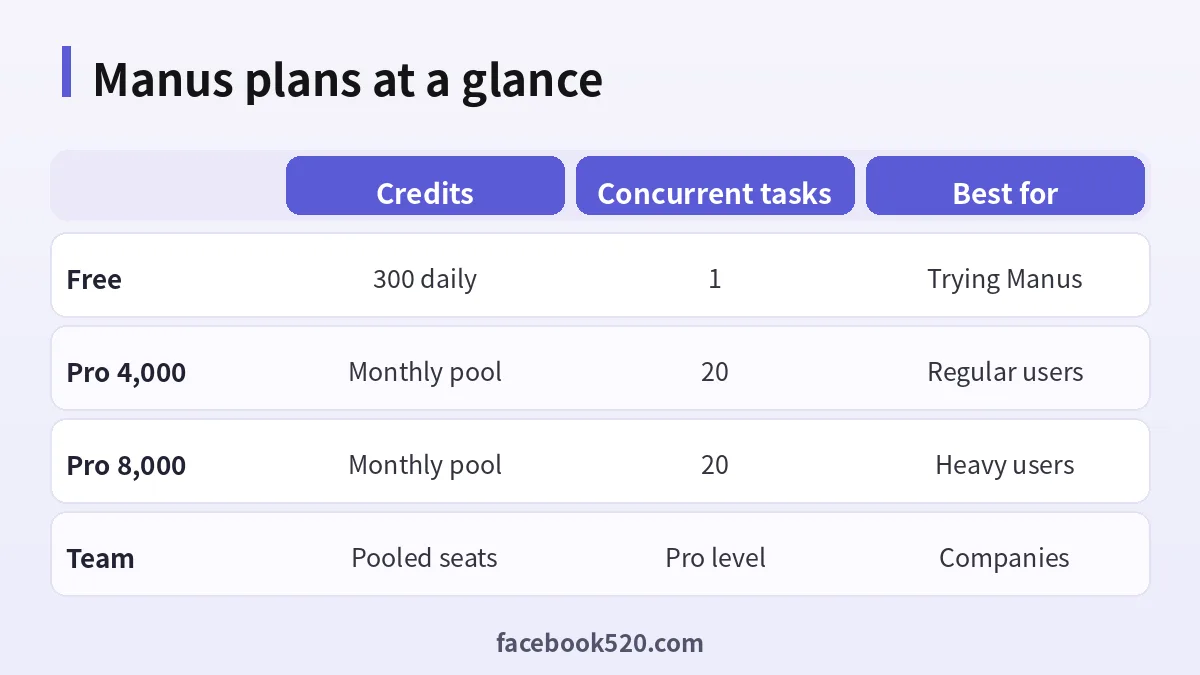
According to the Manus Help Center article on membership pricing (checked 25 November 2026), Manus currently offers Free, Pro and Team plans. The Help Center adds that everything is subject to what is displayed on the actual pricing page, so treat the table as a snapshot.
| Plan | Credits | Concurrent tasks / automations | Typical user |
|---|---|---|---|
| Free ($0) | 300 credits refreshed daily | 1 concurrent task, 2 scheduled automations | Trying Manus, simple questions |
| Pro (from $20/month) | From 4,000 credits per month | 20 concurrent tasks, 20 scheduled automations | Regular research, slides, websites |
| Pro (from $40/month) | From 8,000 credits per month | 20 concurrent tasks, 20 scheduled automations | Heavy daily use |
| Team (from $20 per seat/month) | Pro features for each seat | Pro level plus SSO and admin tools | Companies and agencies |
Manus states that annual billing gives a 17% discount, that existing members keep auto-renewing at unchanged prices, and that the older Basic and Plus plans were renamed to Pro. Team adds SSO, data-training opt-out, team usage analytics, internal access control and shared slide templates.
A Cue phone-number subscription is purchased separately from a Manus membership, and phone usage counts toward Cue’s weekly allowance instead of Manus credits.
Credits belong to the account
Credits are attached to the account that bought them. That has two consequences:
- If you sign in with a different provider by mistake, you may land in an empty second account and think your credits vanished.
- Credits cannot be “moved” by sharing your login. Sharing a paid account with others risks suspension and exposes your task history.
For how credits are consumed per task and why some tasks cost more than expected, see our Manus credits guide.
Managing sign-in methods and your linked email
Manus separates two ideas that often get confused: the linked email and the login methods.
- The linked email is the address where Manus sends notifications, updates and verification codes.
- Login methods are the ways you can sign in: Google, Apple, Microsoft and passkeys.
Changing the linked email does not automatically create a new login method. To change it, Manus describes these steps:
- Open Account Settings.
- Click Change in the Email section.
- Click Send to receive a verification code at your current email and confirm it.
- Enter the new email address and confirm the code sent there.
- If you want to sign in with the new address, add it under Manage sign-in methods.
To add a provider, go to Settings → Account, click Manage next to Sign-in methods, choose Connect beside Google, Apple or Microsoft and complete that provider’s login. To remove one, click Disconnect. You can link as many supported providers as you like, as long as each is linked to only one Manus account.
Passkeys and connected devices
Manus also offers Add passkey under Passkeys. A passkey lets you sign in with your device or a security key instead of a password. For an account that can run tasks on websites for you, this is one of the most valuable settings to turn on.
The Help Center recommends reviewing any unfamiliar sign-in method together with your Connected devices. If you see a device you do not recognise:
- Disconnect the unknown sign-in method.
- Change the password of the email account linked to Manus.
- Check your scheduled automations for tasks you did not create.
- Contact Manus support if credits were used without your knowledge.
Manus notes that when you change your password, you can check whether other devices are logged out; treat a password change as the first step after any suspected compromise.
Saved website logins in the cloud browser
When Manus visits a website for the first time, it may hit a login page or CAPTCHA. Manus lets you take over its computer and log in manually through its browser, then asks whether to save the login status so it can visit the site on its own later.
This is convenient but deserves care:
- Saved sessions effectively let Manus act on that site under your name.
- You can disable the feature entirely in Settings → Cloud Browser.
- You can manage the saved login information for individual websites there.
A safe pattern is to save logins only for low-risk sites (public dashboards, research portals) and never for banking, payment, advertising or email accounts. If you run ads, keep your Facebook account and ad accounts out of any agent’s saved sessions.
Lost your Manus account? How to find it
Most “lost account” cases are really a different sign-in method. Manus’s recovery advice:
- Open the sign-in page and look for a Last used label next to a sign-in option.
- Use the same email address or the same Google, Apple or Microsoft account you used originally. If you have several Google accounts, pick the one you used for Manus.
- Search your inboxes, including spam, for Manus welcome emails, login messages, receipts or invoices.
Important details from the Help Center:
- A Google-only account does not automatically have an email-and-password method. Typing the same email with a password may show “incorrect password”, and resetting the password does not enable email login for a Google-only account.
- If you try to register again with the same email and see “Email already registered”, no second account is created. Go back and choose Continue with Google.
- If you originally registered with email and password and later choose Continue with Google using the same address, you may be asked to verify your email before Google is linked.
If you still cannot find the account, contact Manus support with the email addresses or methods you may have used, a link to a task from the account if available, and an invoice number or receipt if you paid. Support can help without a payment record but will verify ownership before sharing details.
Deleting your Manus account
Manus describes deletion as permanent: once deleted, all data is removed and cannot be recovered. Because Cue and Manus share the same account and data, deleting affects both products; you cannot currently delete only Cue and keep Manus.
Steps from the Help Center:
- Click your icon at the top right.
- Click Account.
- Click Edit profile.
- Click Delete account.
- Click Send Code, enter the verification code from your email and confirm Delete account.
If deletion fails in the desktop app, try the Manus website. If the error continues, contact support with the error message and whether you used the website or the app.
Before deleting, download any reports, slides or code you want to keep, cancel or note your subscription status, and remove saved website logins.
What to put into Manus tasks (and what to keep out)
An agent account is only as safe as the material you hand it. Because Manus works through files, a cloud browser and scheduled jobs, it helps to set a few personal rules before your first serious task:
- Share documents, not credentials. Upload the spreadsheet you want analysed rather than giving the agent the password of the system it came from.
- Strip personal data. Remove customer names, phone numbers and ID numbers from files when the task does not need them. If you work for clients, check whether your contract allows AI processing at all.
- Prefer read-only access. When a task needs a website, use an account with viewing rights instead of an admin account.
- Name your tasks clearly. A task list called “Q4 competitor research” is far easier to audit later than twenty tasks called “new task”.
- Delete what you no longer need. Manus has a help article on deleting tasks; old tasks with sensitive files are a liability, not an archive.
These habits matter more on Free and Pro, which are personal accounts. On Team, administrators can add controls, but each member is still responsible for what they upload.
Personal account or work account?
If you use Manus both privately and for your employer, keep two separate accounts with two different sign-in methods, for example a personal Google account and your company Microsoft account. Remember that each provider can sit on only one Manus account, so this split happens naturally. It keeps credits, invoices and task history apart, avoids awkward questions when you change jobs and lets your employer move you onto a Team seat later without touching your private work.
Using Manus for a team
For companies, a Team plan is better than sharing one Pro login:
- Each person signs in with their own identity, ideally via SSO.
- Credits are managed for the team, with usage analytics.
- Admins control internal access and can offer shared slide templates.
- Team includes a data-training opt-out, which matters for client work.
Sharing a personal account among colleagues mixes task histories, breaks audit trails and can violate the terms. For a broader view of AI tools for teams, compare our ChatGPT account guide and Claude account guide.
Manus account checklist
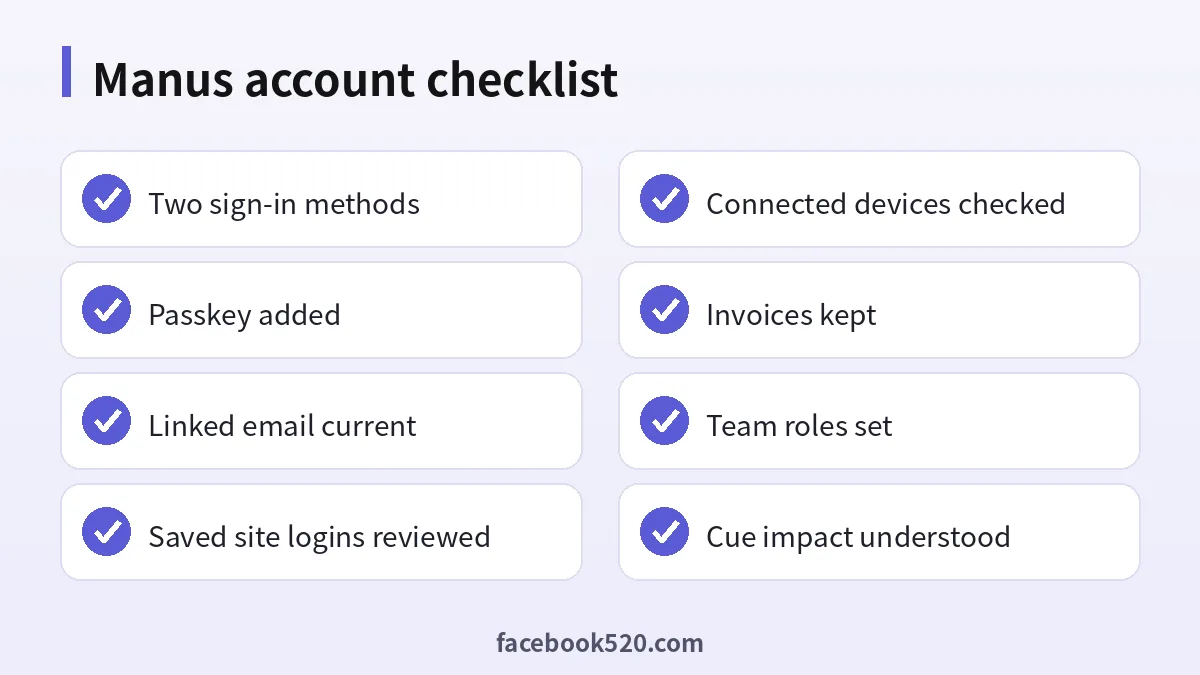
| Check | Where | Why |
|---|---|---|
| Two sign-in methods | Settings → Account → Manage | Backup if one provider fails |
| Passkey added | Settings → Account → Passkeys | Stronger than a password |
| Linked email current | Account Settings → Email | Codes and receipts arrive there |
| Saved site logins reviewed | Settings → Cloud Browser | Limits what the agent can do as you |
| Connected devices | Settings → Account | Spots unknown sessions |
| Scheduled automations | Task list | Stops forgotten or unknown jobs |
| Invoices saved | Billing emails | Needed for recovery and taxes |
| Cue impact understood | Before deletion | Deleting removes both products |
Should you buy a Manus account?
You will find sellers offering “Manus Pro accounts” or invitation codes. Since Manus has an open Free plan and lets anyone upgrade on its own pricing page, buying an account has no advantage and real downsides: the seller keeps the original sign-in method and can take the account back, credits may have been bought with stolen cards, and your task history becomes visible to a stranger. Pay Manus directly; for official plan details use the AI pricing hub.
Common problems
My daily Free credits did not refresh. Manus has a help article for this case; check that you are in the right account, then contact support.
I see “Email already registered”. You already have an account, often created with Google. Sign in with that method.
I can’t remove a login method. It is probably your last one. Add another method first.
The agent asked me to log in to a site. That is the take-over flow. Log in only if you trust the site and want Manus to save the session.
Credits ran out mid-task. Pause the task, check usage and decide whether to upgrade or simplify the request.
Frequently asked questions
Is a Manus account free?
Yes, the Free plan costs $0 and gives 300 credits that refresh daily, with one concurrent task.
Which login methods does Manus support?
Email, Google, Apple and Microsoft, plus passkeys.
Can I link two Google accounts to one Manus account?
No. Each provider can be linked to only one Manus account, and only one account per provider.
Does changing my email change my login?
No. The linked email is for communication. Add the new address separately as a login method if needed.
Why does my password not work?
If you signed up with Google, your account may have no password at all. Use Continue with Google.
How do I delete my Manus account?
Icon → Account → Edit profile → Delete account → Send Code, then confirm. Deletion is irreversible.
Does deleting Manus delete Cue?
Yes. Manus says Cue and Manus share the same account and data.
Can Manus remember my website logins?
Yes, if you allow it after logging in through its browser. You can disable or manage this under Settings → Cloud Browser.
What happened to the Basic and Plus plans?
Manus says both were renamed to Pro, and existing members keep renewing at unchanged prices.
Is there a Team plan?
Yes, from $20 per seat per month according to the Help Center, with SSO, analytics, access controls and a data-training opt-out.
Is there an annual discount?
Manus states a 17% discount for annual billing.
What should I send support if I lost my account?
Possible emails and sign-in methods, a task link if you have one and an invoice or receipt if you paid.
Summary
A Manus account combines your identity, credits, task history and saved website sessions. Sign up with the method you will keep using, add a second method and a passkey, be selective about saved logins, keep invoices and remember that deleting Manus also deletes Cue. For other AI tools and their accounts, browse all platforms.

