


Meta AI Account in 2026: Do You Need a Separate Account, Logging In With Facebook, Instagram, Email or Phone, Your Meta AI Username and Public Profile, Privacy Settings, Deleting Chats and Keeping the Account Secure
Meta AI is now everywhere in Meta’s products: a sparkle icon in WhatsApp, a search bar in Instagram, an assistant inside Messenger and Facebook, a standalone app on iOS and Android, a desktop app on Mac and a website at meta.ai. Because it appears in so many places, one of the most common questions is simple: do I need a Meta AI account, and if so, how is it different from my Facebook or Instagram login?
The short answer is that there is no separate “Meta AI password”. Meta AI runs on a Meta account, the same login system Meta is rolling out for Facebook, Messenger, Instagram, Threads, Meta AI and its devices such as AI glasses and Quest headsets. What is new is a Meta AI profile with a public username, a history of your chats and generated media, and a set of privacy controls that many people never open. This guide walks through how the account works, which login to choose, what other people can see, how to delete your chats and how to keep the account safe. Facts below were checked against Meta’s Help Center and the official Meta AI pages on 25 November 2026.
If you are also wondering whether Meta AI costs money, read our separate Meta AI pricing guide. For the wider Facebook side of things, the Facebook account guide and the Facebook hub cover sign-up, security and recovery.
Do you need a separate Meta AI account?
No. According to Meta’s own FAQ, Meta AI is available at meta.ai on the web, in the Meta AI mobile app, in the Mac desktop app, and directly inside WhatsApp, Instagram, Messenger and Facebook, and no separate account is needed beyond your existing Meta account.
What changes depends on where you use it:
- Inside WhatsApp, Instagram, Messenger or Facebook: you are already logged in to that app, so Meta AI simply uses that session. You tap the Meta AI icon or open a chat with Meta AI.
- In the Meta AI app or on meta.ai: you log in with a Meta account. If you do not have one, you can create it on the spot using Facebook, Instagram, an email address or a phone number.
- On AI glasses: Meta’s help pages say a Meta account is required to use the glasses, and setup happens through the Meta AI app on your phone.
So “Meta AI account” really means two things: the Meta account that handles login and security, and the Meta AI profile (username, optional name, picture) that appears inside Meta AI and the Vibes video feed.
What a Meta account is and why it matters
Meta describes the Meta account as a single login that works across its apps and devices. It is gradually replacing the older Accounts Center: some people still see “Accounts Center” in their settings, others already see “Meta account”. Either way, it is the place where you manage connected experiences, passwords, passkeys and some shared settings.
A few points from Meta’s account FAQ are worth knowing before you start:
- A Meta account is needed for Facebook, Messenger, Instagram, Threads, Meta AI and Meta devices.
- WhatsApp is optional. It is not added to a Meta account by default; it is only included if you choose to add it or added it to Accounts Center earlier. WhatsApp passkeys are managed separately.
- You do not have to put everything in one account. Meta explicitly allows separate Meta accounts for different apps, for example one for Facebook and another for Threads.
- Some settings are shared inside the same Meta account, such as your birthday and ad preferences. Profile details and audience settings stay app-specific.
- Recovery works through the email address, phone number or other verification methods you have added, so keeping them current matters.
This has practical consequences for Meta AI. If you log in with your Facebook account, your Meta AI activity sits in the same Accounts Center as Facebook and Instagram. Meta’s notes on Meta AI say that information such as your age, gender and interests based on activity across its products can be used to personalise AI interactions. If you prefer a cleaner separation, creating a Meta account with a fresh email address is a legitimate option.
How to create or log in to a Meta AI account
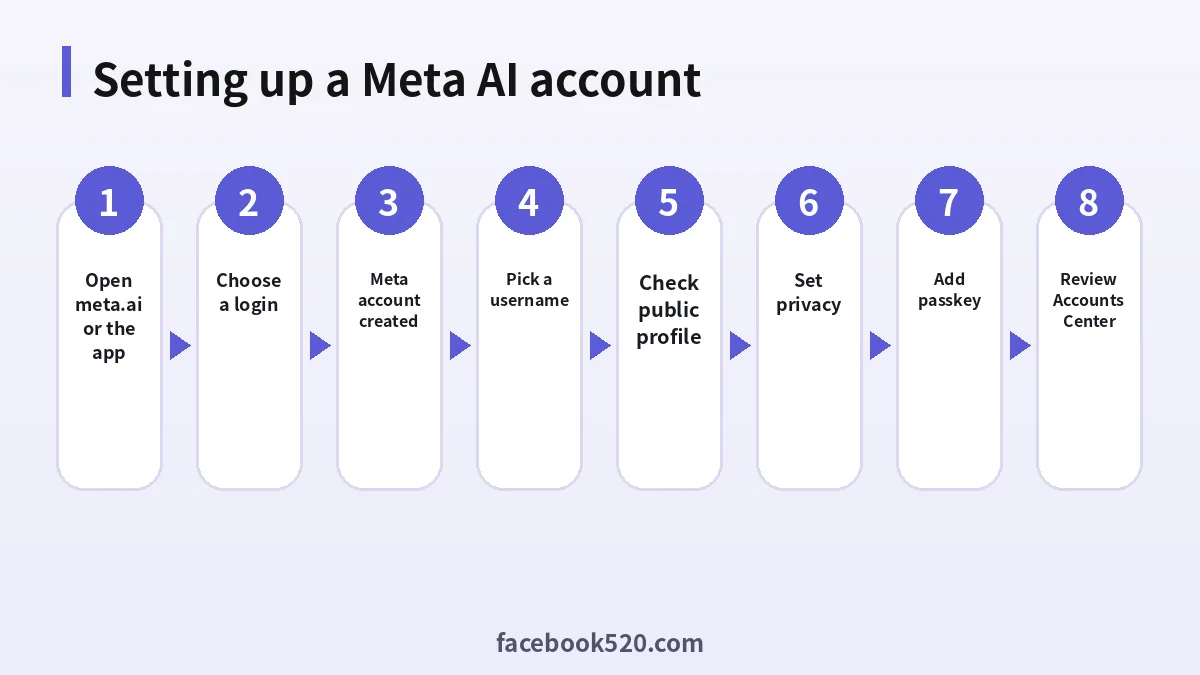
The steps below follow Meta’s Help Center article on creating a Meta AI and Vibes profile. Availability varies: Meta notes that the Meta AI and Vibes apps and websites are not yet available everywhere, and some features may be missing in your region.
- Download the Meta AI app from the App Store or Google Play, or open meta.ai in a browser.
- Choose how to continue: Facebook, Instagram, email address or phone number.
- If you choose Facebook or Instagram, confirm the account you want to use. The new Meta account connects to the same Accounts Center as that profile.
- If you choose email, enter the address, your name, birthday and a password. Meta’s setup notes say you can create only one Meta account per email address, you must be at least 13 in most regions, and the password must be at least 8 characters.
- Confirm the verification code sent to your email or phone.
- Create a Meta AI username. Meta lists this as required. First and last name are optional.
- Review your profile picture and the privacy prompts the app shows you.
- Open Settings and check Data & privacy before you post anything.
The whole process takes a couple of minutes. The step most people rush is the username, which matters more than it looks because it is public.
Using a real name or not
Meta’s guidance for device accounts suggests using your real name if you may need to recover the account or manage store purchases, but it is not required. For Meta AI itself, first and last name are optional. A good compromise is to use your real name on the Meta account (for recovery) and a neutral username on the Meta AI profile.
Choosing the right login: Facebook, Instagram, email or phone
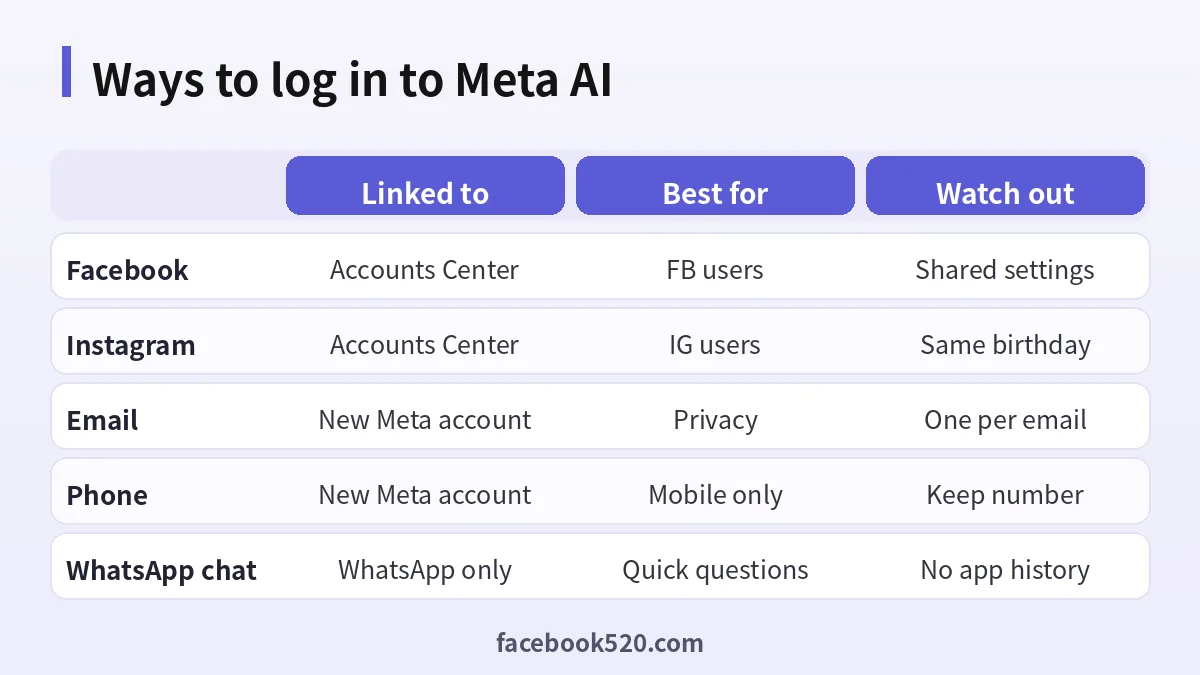
Each login route leads to a working Meta AI account, but they behave differently over time.
| Login method | What it connects to | Good for | Things to watch |
|---|---|---|---|
| Same Accounts Center as your Facebook profile | People who already use Facebook daily | Birthday and ad preferences are shared | |
| Same Accounts Center as your Instagram profile | Creators and Instagram-first users | Personalisation may use Instagram activity | |
| Email address | A new Meta account | Keeping AI use separate from social profiles | One Meta account per email address |
| Phone number | A new Meta account | Mobile-only users | Keep the number active for recovery |
| Inside WhatsApp only | Your WhatsApp account | Quick questions without the app | History stays in WhatsApp, not the Meta AI app |
If you are a business owner who manages Pages or ad accounts through Facebook, think twice before tying a heavily used personal assistant to the same login that controls your advertising. A separate Meta account for Meta AI keeps your ad-related account cleaner and reduces the number of sessions that could be hijacked.
Your Meta AI username and public profile
This is the part that surprises people. Meta’s Help Center states that your Meta AI profile information is publicly visible, and your Meta AI username is how you appear on Meta AI and Vibes. The profile is the same for both Meta AI and Vibes.
What does that mean in practice?
- If you publish a prompt, image or video to the feed, other people can see it together with your username and profile picture.
- If you share a link to a conversation, anyone with the link can open it until you delete the link.
- Private chats are not posted automatically, but the app makes posting very easy, so a careless tap can make something public.
To edit your profile, Meta’s instructions are: in the Meta AI app, tap Menu, tap your profile picture in the lower left, tap Edit profile, change the picture or details, then tap Save.
Picking a username
Choose a username that does not reveal your full name, employer, city or birth year if you plan to experiment with prompts. Avoid copying the exact handle you use on Instagram if you want to keep a bit of distance between your social presence and your AI activity. If you run a brand, the opposite applies: reserving a username that matches your brand prevents confusion.
Privacy settings to change on day one
Meta AI’s privacy controls live under Menu → Settings → Data & privacy → Manage your information in the app. From there you can:
- Remove all public vibes from your profile and feed.
- Delete all chats and media you created with Meta AI.
- Review options for making public prompts visible only to you, where your app shows them.
A few additional facts from Meta’s notes on Meta AI are worth reading slowly:
- Meta uses your interactions with AIs to improve AI at Meta.
- If Meta AI cannot answer a query, Meta may share the messages you send and general information such as your region with select partners to get better results.
- Meta AI uses location information based on your device settings and activity to give more relevant answers.
- Depending on your region, interactions with AI products can be used to personalise content and ads.
- Voice recordings are kept in your history temporarily, while text transcripts remain.
The practical rule follows from this: do not type passwords, bank details, ID numbers, client data or medical information into Meta AI, the same advice you would follow with any public chatbot.
Teens and family accounts
Meta’s account system generally requires users to be at least 13 in most regions, and Meta offers Family Center supervision tools for teen accounts. Parents who supervise a teen’s Instagram or Facebook should check how Meta AI appears in those apps and what supervision options are available in their country.
Deleting chats, media and shared links
Meta’s Help Center explains how to remove content step by step.
Delete all chats and generated media:
- In the Meta AI app, tap Menu in the top left.
- Tap Settings in the bottom left.
- Under App settings, tap Data & privacy.
- Tap Manage your information.
- Tap Delete all chats and media → Delete all.
After this you no longer see chats, prompts or media in the History or Media sections. Note two limits Meta mentions: your public vibes are not deleted by this action, and other people’s vibes that include you remain visible unless you remove them in Media that includes me.
Remove a single public vibe: open your profile, tap the vibe, tap Menu and choose Remove from feed. Removed vibes stay in your Media section, so you can repost them later.
Shared conversation links: if you shared a link to a chat, delete the link separately; deleting the chat is not the same as revoking a link someone already has.
Deleting the account itself
Because Meta AI uses your Meta account, there is no separate “delete Meta AI account” button that leaves Facebook untouched in every case. Your options are:
- Clear Meta AI data (chats, media, public vibes) and simply stop using the app.
- Remove the Meta AI profile from Accounts Center / your Meta account, if your settings show that option.
- Delete the whole Meta account if you created it only for Meta AI with a separate email address. This is the cleanest route for people who want a full exit.
If your Meta AI login is your main Facebook account, deleting the Meta account would also affect Facebook, so clear the AI data instead. Our Facebook account recovery guide is useful if you ever lock yourself out while changing these settings.
Is a Meta AI account free?
Meta’s official FAQ says Meta AI is free for everyday use, and that Meta has started testing usage limits on some compute-intensive features. When people hit a daily or monthly limit, they may get the option to buy a subscription to unlock more usage before the free limit resets. Prices and plan names depend on region and change over time, so we keep them in the dedicated Meta AI pricing article rather than repeating numbers here. For other assistants, the AI pricing hub compares plans side by side.
Buying a “premium Meta AI account” from a third party makes no sense: the account is your Meta login, and handing it to a seller means handing over Facebook, Instagram and possibly your ad accounts.
Security: passkeys, two-factor and suspicious logins
The Meta account supports passkeys, which let you sign in with your fingerprint, face or device PIN instead of a password. Meta says a single passkey can work across its apps and devices, while WhatsApp passkeys are managed separately. If passkeys are not available on your device, turn on two-factor authentication in the Password and security section.
Good habits for a Meta AI account:
- Use a unique password that you do not use on any other site.
- Keep at least two recovery methods (email and phone) up to date.
- Review where you are logged in from time to time and log out of devices you no longer use.
- Ignore messages that claim your “Meta AI account will be disabled” and ask you to log in through a link. Meta does not ask for your password in chat.
- Be careful with browser extensions or “Meta AI unlocker” tools that ask for your login; they are a common way to steal sessions.
If your account is taken over, start from the official Facebook or Instagram help pages, depending on which login you used. Our Instagram account guide covers recovery for Instagram-based logins.
Meta AI inside WhatsApp versus the Meta AI app
Many people first meet Meta AI as a chat in WhatsApp. That experience is convenient but different from the app:
- In WhatsApp, Meta AI is a separate chat. Your personal chats remain end-to-end encrypted; Meta AI only sees what you send to it or deliberately share with it.
- Your WhatsApp account does not need to be part of a Meta account. You can use Meta AI in WhatsApp without linking WhatsApp to Facebook or Instagram.
- History, media and the public feed of the Meta AI app do not automatically appear in WhatsApp.
If you mostly want quick answers, the WhatsApp chat may be enough. If you want image and video creation, a history you can manage, or AI glasses, the app with a Meta account is the better fit. The WhatsApp account guide explains how WhatsApp accounts and linked devices work.
Meta AI for businesses and creators
Meta also offers AI tools for businesses inside its ad and messaging products. These are tied to business assets such as Pages, Business Manager and WhatsApp Business, not to your personal Meta AI profile. Keep the two separate:
- Use your personal Meta account for experimenting with prompts.
- Use Business Manager roles for anything involving customers, ads or business messaging.
- Never share your personal login with an agency to “set up Meta AI”; grant business roles instead.
Common problems and fixes
“Meta AI isn’t available in your country.” Meta states that the apps and websites are not yet available everywhere. A VPN may violate the terms and can trigger security checks on your main account, so it is better to wait for official availability.
“I can’t log in with my email.” Check whether you originally created the account through Facebook or Instagram. Each email can hold only one Meta account, so you may already have one.
“My chats disappeared.” You may be logged in with a different Meta account, for example Instagram instead of Facebook. Check the account switcher.
“Someone saw my prompt.” You probably posted it or shared a link. Remove the vibe from the feed and delete the shared link.
“The app asks me to update to a Meta account.” This is part of Meta’s gradual migration from Accounts Center. Your existing connections remain; Meta says the apps previously in the same Accounts Center become your Meta account.
Meta AI account checklist
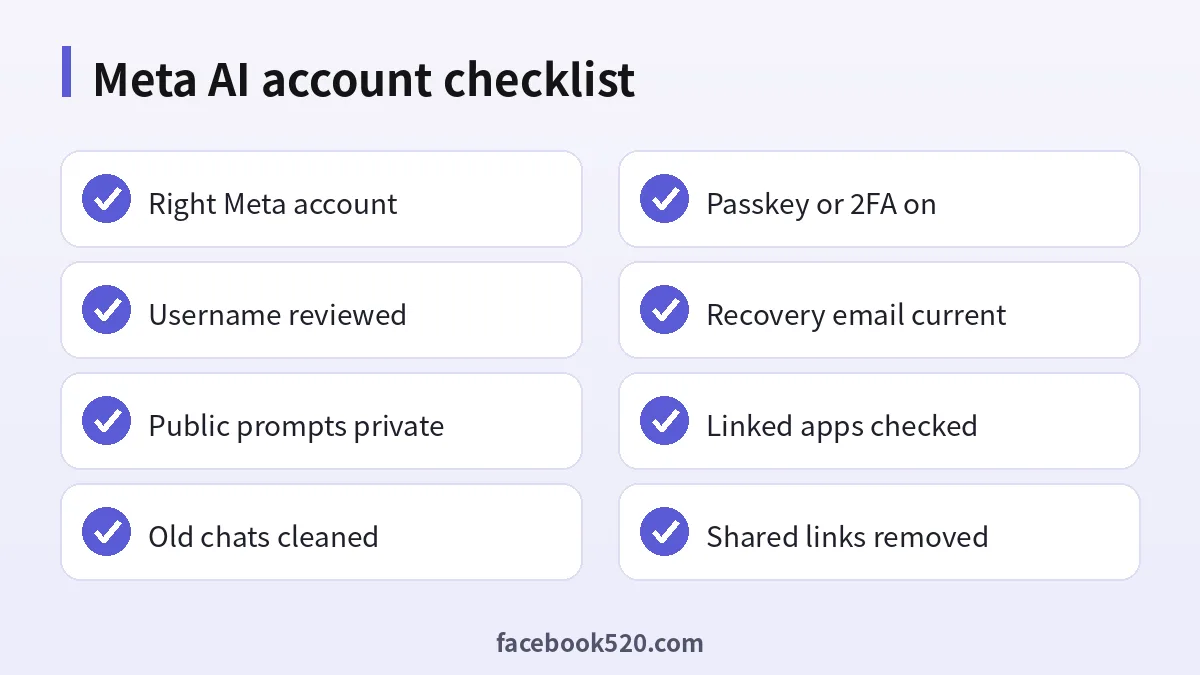
Run through this list once after setting up the account, and again every few months:
| Check | Where to find it | Why it matters |
|---|---|---|
| Right Meta account in use | Account switcher in the Meta AI app | Avoids mixing work and personal history |
| Username reviewed | Menu → profile picture → Edit profile | The username is public on Meta AI and Vibes |
| Public prompts and vibes | Data & privacy → Manage your information | Removes anything you posted by mistake |
| Old chats cleaned | Delete all chats and media | Reduces stored personal data |
| Passkey or two-factor on | Password and security | Blocks most account takeovers |
| Recovery email and phone | Meta account / Accounts Center | Needed if you lose access |
| Linked apps checked | Accounts Center | Decide whether Facebook, Instagram or WhatsApp belong together |
| Shared links removed | Each shared conversation | Deleting a chat does not revoke a link |
Frequently asked questions
Do I need a Meta AI account to use Meta AI?
You need a Meta account for the Meta AI app and website. Inside WhatsApp, Instagram, Messenger and Facebook you use the account you are already logged in with.
Can I create a Meta AI account without Facebook?
Yes. Meta lets you create a Meta account with an email address or phone number, without Facebook or Instagram.
Is my Meta AI username public?
Yes. Meta’s Help Center says Meta AI profile information is publicly visible and your username is how you appear on Meta AI and Vibes.
How do I delete all my Meta AI chats?
In the Meta AI app go to Menu → Settings → Data & privacy → Manage your information → Delete all chats and media → Delete all.
Does deleting chats remove my public posts?
No. Public vibes are removed separately with “Remove all public vibes” or “Remove from feed”.
What is the minimum age for a Meta account?
Meta says you need to be at least 13 in most regions; some countries set a higher age.
Can I use one email for two Meta accounts?
No. Meta allows only one Meta account per email address.
Is WhatsApp part of my Meta account?
Only if you add it. WhatsApp is optional and is not included by default.
Is Meta AI free?
Meta says it is free for everyday use and is testing usage limits on some heavy features, with an optional subscription to unlock more. See our pricing guide for details.
Can I use Meta AI on a computer?
Yes, at meta.ai in a browser, and Meta also offers a desktop app for Mac.
Does Meta use my chats to train AI?
Meta says it uses interactions with AIs to improve AI at Meta. Avoid entering sensitive information.
Should I buy a Meta AI account?
No. A Meta AI account is just a Meta login. Buying one exposes you to theft and breaks Meta’s terms.
Summary
A Meta AI account is really a Meta account plus a public Meta AI profile. Pick the login that matches how much you want AI activity to mix with your social profiles, choose a neutral username, open Data & privacy on day one, delete chats you no longer need and protect the account with a passkey or two-factor authentication. For everything else across Meta’s apps, browse the Facebook hub and the Messenger account guide.

