


Microsoft Copilot Plans 2026: Free, Microsoft 365 Personal, Family, Premium and Pro Compared, Copilot Business and Enterprise Pricing, What Happened to Copilot Pro and How to Pay
Searching for Microsoft Copilot plans in 2026 can be confusing, because Microsoft no longer sells one product called “Copilot” with a simple price tag. The AI assistant appears in at least four places: the free Copilot app and website, the consumer Microsoft 365 subscriptions (Personal, Family, Premium and the new Pro tier), the small-business add-on called Microsoft 365 Copilot Business, and the enterprise licence that large organisations buy per user. On top of that, the old Copilot Pro subscription that many guides still mention was retired for new customers in October 2025.
This guide puts every plan side by side: what each one costs in the US, what level of Copilot usage it includes, who the AI features are actually for, and how to pay without running into the most common billing mistakes. Prices below are the US list prices published by Microsoft as of November 2026, before tax; local prices differ and promotions change often, so always confirm on the official Microsoft store for your country. If you are comparing AI subscriptions in general, our AI pricing hub collects our pricing guides for ChatGPT, Claude, Gemini, Copilot and more.
The short answer: which Copilot plans exist in 2026
Here is the structure in one sentence each:
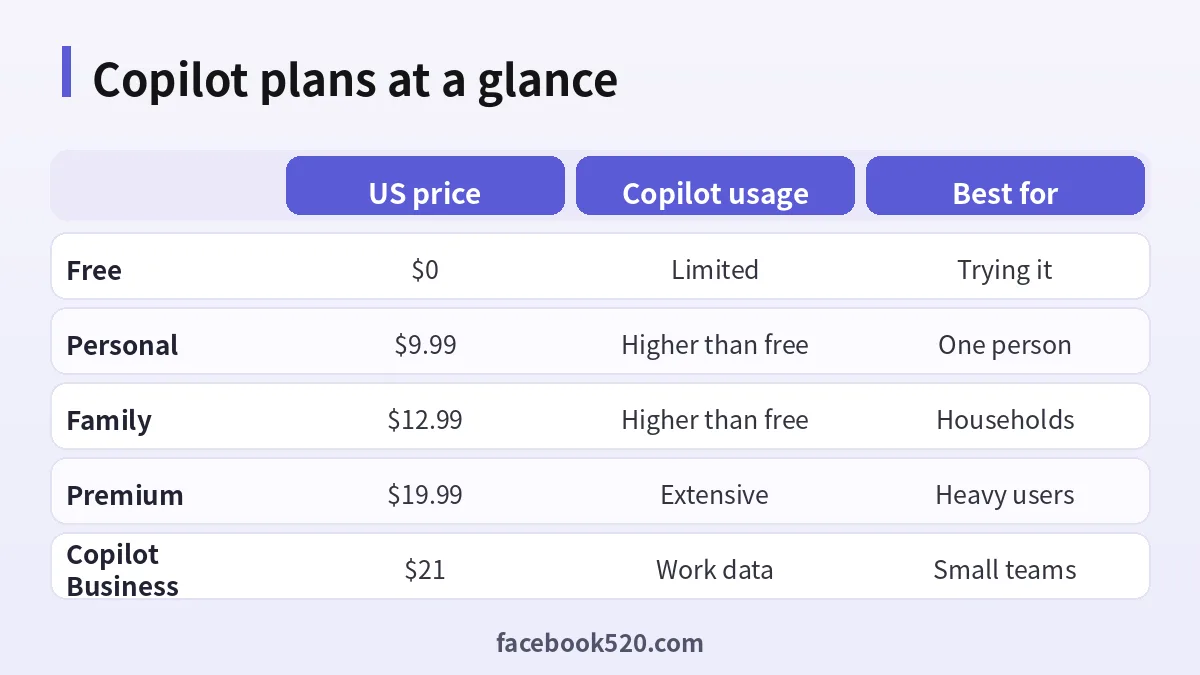
- Microsoft Copilot (free): the Copilot app on Windows, iOS, Android and copilot.microsoft.com. Chat, image creation and voice with limited usage. Sign in with a free Microsoft account.
- Microsoft 365 Personal: $9.99/month or $99.99/year. Word, Excel, PowerPoint, Outlook, OneNote, 1 TB of OneDrive, and Copilot inside the apps with usage higher than free.
- Microsoft 365 Family: $12.99/month or $129.99/year. Apps and storage for up to six people, but Copilot only for the subscription owner.
- Microsoft 365 Premium: $19.99/month or $199.99/year. Everything in Family plus “extensive” Copilot usage, agentic features such as Researcher and Analyst, and preferred access at peak times. This is the effective replacement for Copilot Pro.
- Microsoft 365 Pro: $99.99/month, monthly billing only. The highest consumer usage limits and more storage, aimed at people who exhaust Premium every day.
- Microsoft 365 Copilot Business: an add-on for small and medium businesses (up to 300 users) with a list price of $21 per user per month on annual commitment; Microsoft has been running a promotional $18 rate.
- Microsoft 365 Copilot (enterprise): $30 per user per month on annual commitment for organisations on qualifying enterprise Microsoft 365 plans.
There are also bundles such as Microsoft 365 Business Standard with Copilot ($23.50 per user per month, annual) and Business Premium with Copilot ($32 per user per month, annual) that include the business apps and Copilot in one price.
Microsoft Copilot plans compared side by side
| Plan | US price | Users | Copilot usage | Copilot in Office apps | Storage | Best for |
|---|---|---|---|---|---|---|
| Copilot (free) | $0 | 1 | Limited | No | 5 GB with a Microsoft account | Trying Copilot, light chat |
| Microsoft 365 Personal | $9.99/mo or $99.99/yr | 1 | Higher than free | Yes | 1 TB | Individuals who live in Office |
| Microsoft 365 Family | $12.99/mo or $129.99/yr | Up to 6 | Higher than free, owner only | Yes, owner only | Shared, per Microsoft plan | Households sharing Office |
| Microsoft 365 Premium | $19.99/mo or $199.99/yr | Up to 6 | Extensive, owner only | Yes, plus agents | Shared, per Microsoft plan | Former Copilot Pro users |
| Microsoft 365 Pro | $99.99/mo (monthly only) | Up to 6 | Highest, owner only | Yes | 5 TB | Very heavy individual use |
| Copilot Business (add-on) | $21 list, $18 promo, per user/mo | Per seat | Work-grade, with data protection | Yes, with work files | From base plan | Businesses up to 300 users |
| Microsoft 365 Copilot | $30 per user/mo | Per seat | Work-grade, enterprise controls | Yes, plus Teams and Graph | From base plan | Enterprises |
Two notes that most comparison tables leave out. First, on Family, Premium and Pro the AI features belong to the subscription owner only, even though apps and storage are shared with up to five other people. Second, the business licences are add-ons or bundles: Copilot Business requires a qualifying Microsoft 365 Business plan underneath it unless you buy one of the “with Copilot” bundles.
What happened to Copilot Pro
Microsoft launched Copilot Pro in January 2024 at $20 per month as an individual add-on that gave priority access to new models, more image generation and Copilot inside Microsoft 365 apps (if you also paid for Personal or Family). Over 2025 the line-up changed:
- January 2025: Copilot features were folded into Microsoft 365 Personal and Family with a monthly usage allowance, and the US price of those plans rose by about $3 per month. Microsoft also kept “Classic” plans without Copilot for existing subscribers who did not want the price increase.
- October 2025: Microsoft introduced Microsoft 365 Premium at $19.99 per month, combining Family with the capabilities of Copilot Pro and higher limits, and stopped selling Copilot Pro to new customers.
If you still have Copilot Pro, it keeps working while you renew, and Microsoft offers a switch to Premium. For anyone buying today, “Copilot Pro price” effectively means the price of Microsoft 365 Premium. Our Spanish-language guide on buying Copilot Pro covers the transition for readers in Spain and Latin America.
Consumer plans in detail
Free Microsoft Copilot
The free tier is surprisingly capable for casual use: web-grounded chat, image creation, voice conversations and Copilot Vision on supported devices. Limits apply to the number of image generations and to access to the newest models at busy times. It does not work inside the desktop Word, Excel and PowerPoint apps with your files; for that you need a Microsoft 365 subscription.
Microsoft 365 Personal and Family
Personal and Family give you the full Office apps plus Copilot inside Word, Excel, PowerPoint, Outlook and OneNote, with an allowance that Microsoft describes as “higher than free”. In practice, people who ask Copilot to draft a few emails, summarise a long document or build a chart a handful of times per day rarely hit the cap. Family is the better value for households because apps and storage are shared, but remember that only the owner gets Copilot.
Microsoft 365 Premium
Premium is aimed at individuals who use AI every day. Compared with Family it adds:
- Extensive usage of Copilot chat, image creation and visual assistance from your screen or camera.
- Agentic features, including the Researcher agent for multi-step research with sources and the Analyst agent for working through spreadsheets and data.
- Preferred access to the latest models at peak times and early access to new features.
- The ability to use Copilot in select apps with work files in a more controlled way.
Microsoft often runs first-month or first-year discounts on Premium and also offers a one-month free trial, though the two are usually not combinable.
Microsoft 365 Pro
The Pro tier at $99.99 per month is monthly-only and targets power users who would otherwise hit Premium limits daily, with the highest usage amounts and 5 TB of storage. For the vast majority of individuals, Premium is enough; consider Pro only for specific months of very heavy workload.
Business and enterprise Copilot plans
When documents, mailboxes and chats belong to an organisation, consumer plans are the wrong tool. Business licences add enterprise data protection: prompts and responses are covered by your organisation’s data agreements, Copilot respects the permissions already set in SharePoint, OneDrive and Teams, and admins get usage analytics and controls.
Microsoft 365 Copilot Chat (included)
Users on eligible business plans get Copilot Chat at no extra cost: web-grounded chat with enterprise data protection, plus pay-as-you-go agents. It is a good first step before buying full licences.
Microsoft 365 Copilot Business
Designed for organisations with up to 300 users. List price is $21 per user per month on an annual commitment, with a promotional $18 rate that Microsoft and its partners have offered through parts of 2026; monthly billing costs more. It adds Copilot inside Word, Excel, PowerPoint, Outlook and Teams with access to work data, pre-built agents such as Researcher and Analyst, and agent creation tools.
Bundles with Copilot included
- Microsoft 365 Business Standard with Copilot: $23.50 per user per month, annual.
- Microsoft 365 Business Premium with Copilot: $32 per user per month, annual, including advanced security and device management.
For a company that does not yet have Microsoft 365, a bundle is usually simpler than buying a base plan and a separate add-on.
Microsoft 365 Copilot for enterprise
Large organisations on Microsoft 365 E3/E5 or similar pay $30 per user per month (annual), with extra spend for heavy agent usage through Copilot Studio credits. Purchasing is done by the IT admin in the Microsoft 365 admin center or through a Microsoft partner, not by individual employees.
Which Copilot plan should you choose?
| Your situation | Typical Copilot use | Recommended plan | Why |
|---|---|---|---|
| Student or casual user | A few chats per week | Free Copilot | No cost; upgrade only if you need Office apps |
| Freelancer writing proposals | Daily drafting in Word and Outlook | Microsoft 365 Personal | Office plus Copilot at the lowest price |
| Family with one AI power user | Office for everyone, AI for one | Microsoft 365 Premium | Shared apps; extensive AI for the owner |
| Former Copilot Pro subscriber | Daily chat, images, research | Microsoft 365 Premium | Direct successor with agents |
| Analyst using AI all day | Long research and data work | Premium, Pro in peak months | Highest limits without a business tenant |
| Small business, 5-50 staff | Shared files, Teams meetings | Copilot Business or a bundle | Data protection and admin control |
| Enterprise | Org-wide rollout | Microsoft 365 Copilot | Enterprise compliance and Graph access |
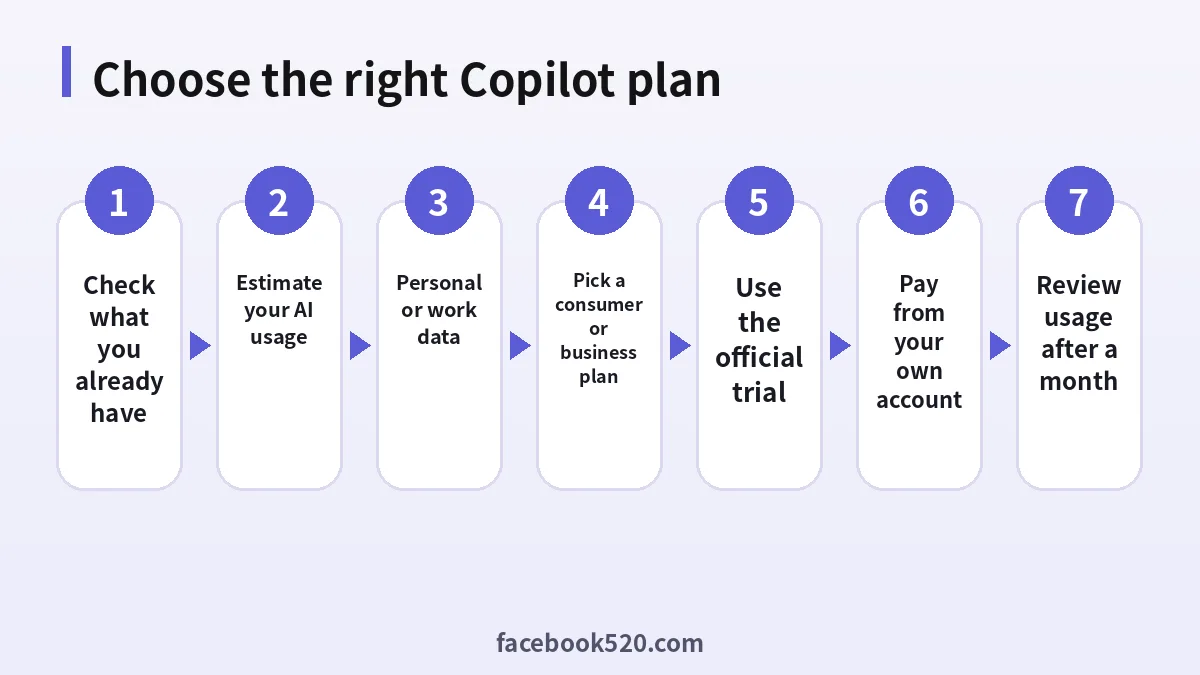
A simple rule: if the documents you will show Copilot belong to your employer or clients, use a business licence. If they are your own, a consumer plan is fine.
How to subscribe and pay for a Copilot plan
For consumer plans:
- Sign in at account.microsoft.com and open Services & subscriptions to see whether you already have Microsoft 365 or an old Copilot Pro subscription.
- Go to the official Microsoft 365 plans page or the Copilot pricing page for individuals.
- Choose Personal, Family or Premium and monthly or yearly billing. Yearly is roughly two months cheaper.
- Decide between the free trial and the first-period discount if both are shown.
- Pay with a credit or debit card, PayPal where available, or redeem a Microsoft 365 product key or gift card bought from an authorised retailer.
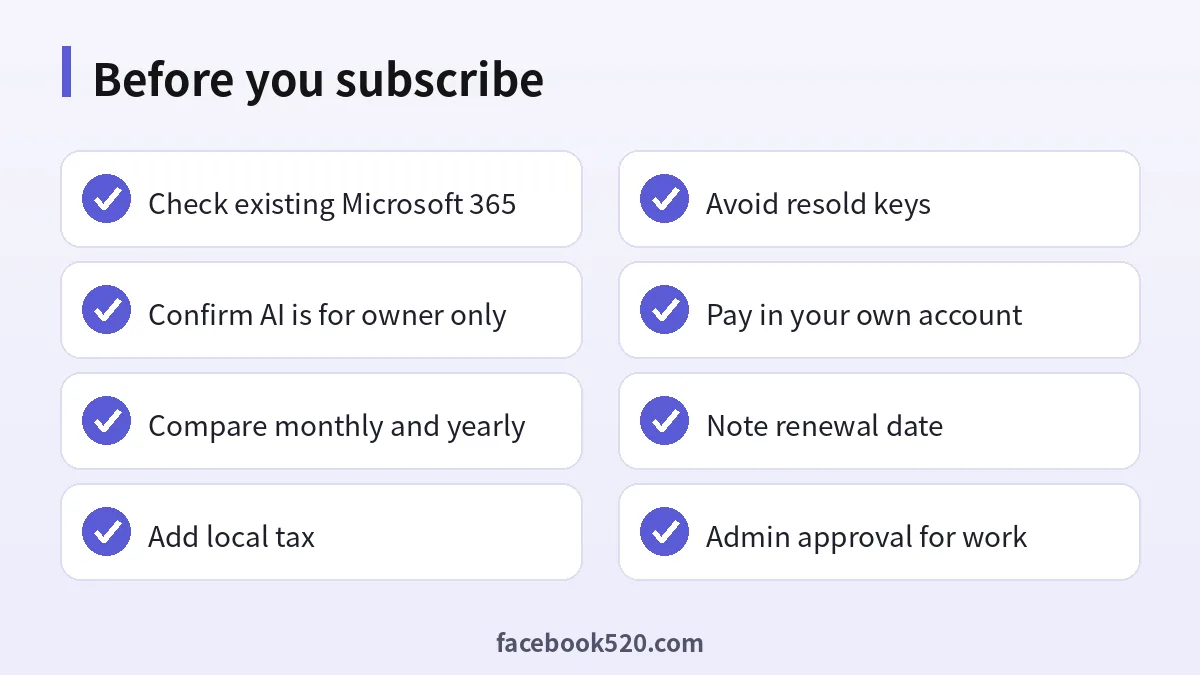
- Check the receipt for local sales tax or VAT and note the renewal date.
For business plans, the admin signs in to the Microsoft 365 admin center, opens Billing > Purchase services, selects Copilot Business or a bundle, assigns licences to users and pays by card or invoice. Many companies buy through a Microsoft partner (Cloud Solution Provider) for invoicing in local currency.
Paying from outside the US
Prices are set per country and usually shown including VAT in Europe and the UK. Microsoft accepts major international cards; if your card is declined, check that online and foreign-currency payments are enabled and that the billing country in your Microsoft account matches the card. Our payment hub covers card-payment troubleshooting for AI and ad platforms in more detail.
Copilot compared with other AI subscriptions
| Subscription | US price | Strength | Limitation |
|---|---|---|---|
| Microsoft 365 Premium | $19.99/mo | Native in Word, Excel, Outlook, OneDrive | AI for the owner only |
| ChatGPT Plus | About $20/mo | Broad model access, GPTs, strong general assistant | No native Office integration |
| Google AI Pro (Gemini) | $19.99/mo | Integrated with Gmail and Google Docs | Best inside Google’s ecosystem |
| Claude Pro | About $20/mo | Long documents and writing quality | No Office suite included |
| GitHub Copilot Pro | $10/mo | Coding inside the editor | Not for office documents |
If your work happens in Office files, Premium is usually the best value because the subscription also includes the apps and storage. If you mostly need a general assistant, compare our guides on the ChatGPT subscription, Gemini Pro pricing and Claude pricing. If you were actually looking for the coding assistant, see our GitHub Copilot pricing guide and the GitHub Copilot account walkthrough, which are separate products with their own plans.
Ways to pay less, legally
- Start on the free tier and upgrade only when you hit limits you care about.
- Pay yearly once you know you will keep the plan.
- Use the official trial or first-period discount, and set a reminder before renewal.
- Check your employer or school: many organisations already license Microsoft 365, sometimes with Copilot Chat or Copilot included.
- Choose Family over several Personal plans for a household, accepting that AI is for the owner only.
- Downgrade in quiet months: you can switch from Premium to Personal in Services & subscriptions.
Why cheap Copilot accounts are a bad deal
Marketplaces advertise “lifetime Copilot Pro”, shared Premium accounts or product keys for a few dollars. Most are invitations to someone else’s Family or Premium plan, which does not give you Copilot because the AI is reserved for the owner; keys from unauthorised sellers that Microsoft later revokes; or shared logins that expose your documents and email. Buying from authorised retailers or directly from Microsoft is the only reliable route, as we explain in our article on where ChatGPT and other AI accounts are actually sold.
Managing, switching and cancelling
- Open account.microsoft.com > Services & subscriptions.
- Select your plan and choose Change plan to move between Personal, Family, Premium and Pro, or Cancel subscription to stop renewal.
- If you subscribed through the Apple App Store or Google Play, manage it there instead.
- When moving from Copilot Pro to Premium, confirm that the old subscription is cancelled to avoid double billing.
Frequently asked questions about Microsoft Copilot plans
Is Microsoft Copilot free?
Yes. The Copilot app and website are free with limited usage. Copilot inside Word, Excel and PowerPoint requires a Microsoft 365 subscription.
Can I still buy Copilot Pro?
Not as a new customer. Microsoft stopped selling Copilot Pro in October 2025; Microsoft 365 Premium is its replacement. Existing subscribers can keep renewing.
How much is Microsoft 365 Premium?
$19.99 per month or $199.99 per year in the US before tax, often with a discounted first month or year.
Does Microsoft 365 Personal include Copilot?
Yes. Personal includes Copilot in the Office apps with usage that is higher than the free tier but lower than Premium.
Do family members get Copilot on a Family or Premium plan?
No. They get the apps and storage, but the AI features are for the subscription owner only.
What is the difference between Copilot Business and Microsoft 365 Copilot?
Copilot Business is priced for organisations of up to 300 users ($21 list, $18 promo, per user per month). Microsoft 365 Copilot is the enterprise licence at $30 per user per month for larger organisations.
Can I use a personal Premium plan for work documents?
Technically you can open files, but company data should be handled under a business licence with enterprise data protection. Check your employer’s policy first.
Is there a free trial for Copilot plans?
Microsoft usually offers a one-month trial on Personal, Family and Premium, sometimes replaced by a first-month discount. Business trials are arranged through the admin center or partners.
Is GitHub Copilot part of Microsoft 365?
No. GitHub Copilot is a separate coding assistant with its own Free, Pro, Pro+ and business plans.
Which Copilot plan is best value?
For individuals who live in Office, Microsoft 365 Personal or Premium. For households, Premium if one person uses AI heavily. For companies, a bundle with Copilot or the Copilot Business add-on.
Can I pay for Copilot without a credit card?
Yes, in many countries you can use PayPal or redeem a Microsoft 365 product key or Microsoft gift card bought from an authorised retailer.
Conclusion: match the Copilot plan to whose data you use
The 2026 line-up of Microsoft Copilot plans is easier to understand once you split it in two. For your own files, choose between free Copilot, Microsoft 365 Personal, Family, Premium or Pro depending on how much AI you use and whether you share Office with a household. For company data, use Copilot Chat, Copilot Business, a bundle with Copilot or the enterprise Microsoft 365 Copilot licence. Copilot Pro is gone for new buyers, Premium is its successor, and resold accounts rarely deliver the AI they promise.
For more comparisons, visit our AI pricing hub, the ChatGPT hub and our payment hub.
