


HeyGen Account in 2026: How to Sign Up, Log In With Google, Apple, Magic Link or SSO, Personal Account vs Workspace, Free, Creator and Pro Plans, Credits, Security, Recovery and Deletion
HeyGen has become one of the default tools for AI presenter videos: product explainers, training clips, translated ads and short social videos where a digital avatar reads your script. Almost everything in HeyGen hangs off one thing that people set up in thirty seconds and then forget about: the HeyGen account. Which email you use, whether you sign in with Google or a magic link, whether your videos live in a personal account or in a team workspace — these choices decide who owns your avatars, who pays, and whether you can get back in after losing access to an inbox.
This guide walks through the account side of HeyGen in 2026: the sign-up options shown on the official login page, the difference between a personal account and a workspace, the current Free, Creator and Pro plans (checked on heygen.com/pricing on 26 November 2026), how credits behave, how to secure the account with two-factor authentication, what happens when you change email or lose access, and how permanent deletion works. If you mainly care about what the free tier allows, read our separate HeyGen free plan guide after this one; for a side-by-side view of other AI subscriptions, the AI pricing hub collects our pricing pages.
What a HeyGen account is (and what it is not)
A HeyGen account is your personal identity in HeyGen: the login, your profile, your plan, and the videos, avatars and voices you create. Since HeyGen grew into a team product, there is a second layer on top of it — the workspace. When you open the menu next to your name in the bottom-left corner of the dashboard, HeyGen shows two groups: Personal, which is your individual account, and Workspace, which lists every team workspace you have joined or been invited to.
That split matters more than it looks:
- Your personal account usually starts on the Free plan. Videos you make there belong to that account.
- A workspace is a shared space with its own plan, seats, branding and settings. Projects created inside a workspace belong to the workspace, not to you as an individual.
- Enterprise workspaces add security controls (SSO, allowed sign-in methods, invite-only joining) that can override how you log in.
So “my HeyGen account” can mean three different things depending on where you click. Before you create anything important — especially a custom avatar of your own face — check in the bottom-left menu whether you are working in your personal space or in a company workspace.
Ways to sign up and log in
HeyGen’s login page (auth.heygen.com) currently offers four routes:
| Method | What you need | Password? | Good for |
|---|---|---|---|
| Sign in with Google | A Google account | No separate HeyGen password | Most individual creators |
| Sign in with Apple | An Apple Account | No separate HeyGen password | iPhone and Mac users, Hide My Email |
| Email: magic link | Any email inbox you control | No, a one-time secure link | People who prefer not to link Google or Apple |
| Email: password | Email plus a password you choose | Yes | Shared admin mailboxes, password managers |
| SSO | A company identity provider (SAML) | Managed by your company | Enterprise workspaces |
There is no phone-number sign-up, and you do not need a credit card to open a free account.
Step-by-step: creating a HeyGen account
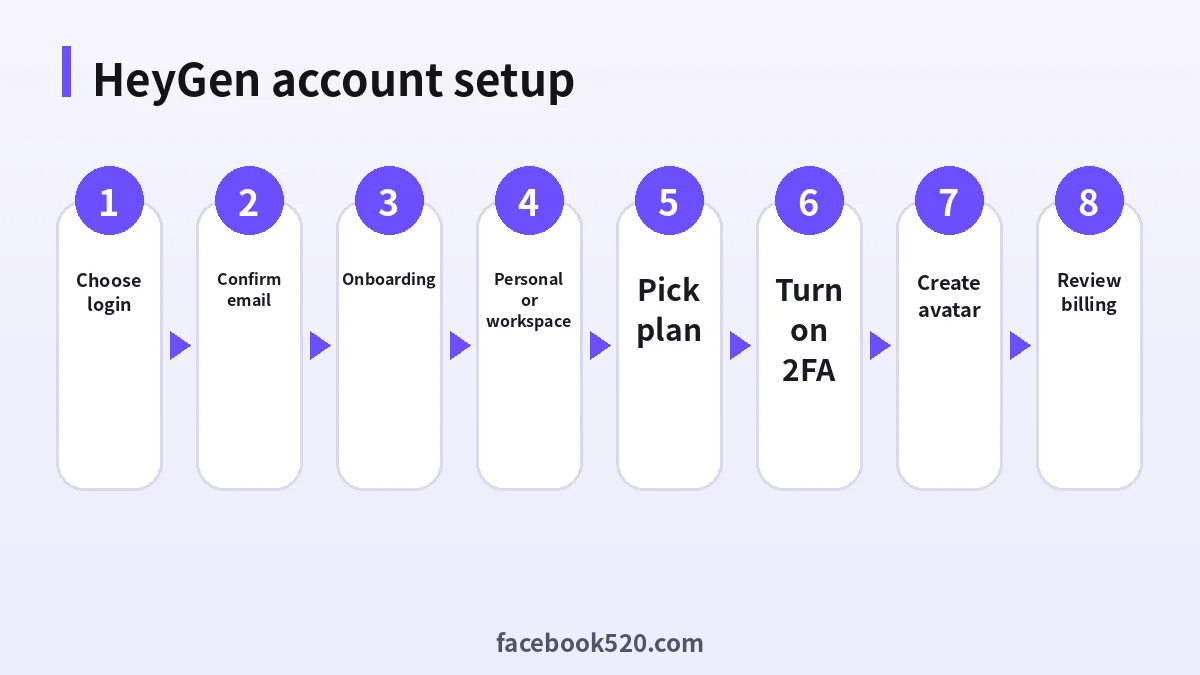
- Open heygen.com and click Get started or Sign up; you land on the HeyGen login page.
- Choose Sign in with Google, Sign in with Apple, or Use email. With email you can request a secure magic link or set a password.
- If you chose email, open the message from HeyGen and click the link (or confirm the code) on the same device where you started.
- Complete the short onboarding questions (role, what you want to make). They only tailor templates; they do not change your plan.
- Check the bottom-left menu: you should see your name under Personal. If your company already uses HeyGen with your email domain, you may also see a workspace or a request-to-join option.
- Open Settings → Account and note which login method and email address the account uses. You will need this later if you ever lose access.
Which login method should you choose?
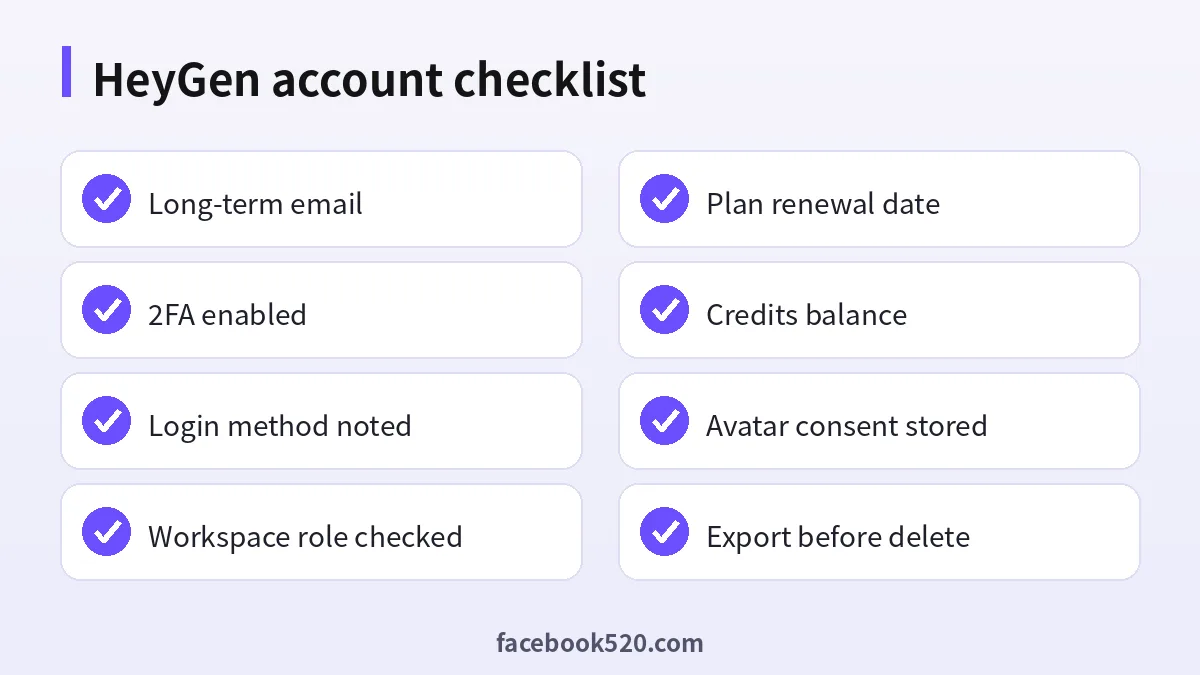
Pick the method tied to the email you will still own in five years. A Google or Apple login is convenient, but it ties HeyGen access to that provider: if your Google account is suspended, your HeyGen login goes with it. Magic links avoid passwords entirely but depend on fast access to your inbox. Email and password works well with a password manager, especially for a shared marketing mailbox, but then two-factor authentication becomes essential.
Avoid signing up with a temporary or disposable address. HeyGen’s own help center is blunt about what happens if you lose the email: if you are fully signed out and no longer control the mailbox, support cannot recover or transfer the account — they can only cancel future charges.
Personal account vs workspace
Workspaces are where HeyGen’s team features live. The HeyGen Academy setup guide describes how an admin creates one from Settings: workspace name, logo, a short description, who can join and who can invite.
Joining rules come in three flavours:
- Anyone with the company email domain joins automatically — convenient for large teams with unlimited seats; people who sign up with that domain skip the paywall and land straight in the workspace.
- Domain users must request to join — the admin approves or denies each request, useful when seats are limited.
- Invite only — the workspace is not discoverable; only people invited by email or share link can enter.
When an invitation is sent, the person appears in the member list as Invite Sent; once they accept, they become Active and occupy a seat on the plan.
Since July 2026 HeyGen has also removed the old single “owner” role in Enterprise workspaces: all Super Admins have equal permissions, and handing off a workspace now means granting Super Admin to the new person and removing it from the person who leaves.
| Question | Personal account | Team workspace |
|---|---|---|
| Who pays? | You, on your own plan | The workspace plan (company card or invoice) |
| Who owns the videos? | You | The workspace |
| Who can see projects? | Only you, unless you share | Members, depending on roles and sharing settings |
| What happens if you leave the company? | Nothing changes | You lose access; the work stays in the workspace |
| Login rules | Any method you linked | Can be restricted by admins (SSO, allowed methods) |
Practical rule: keep personal experiments and your own avatar in the personal account, and keep client or company work inside the workspace that pays for it. Mixing them is the most common reason people later cannot find, move or delete their videos.
HeyGen plans in 2026
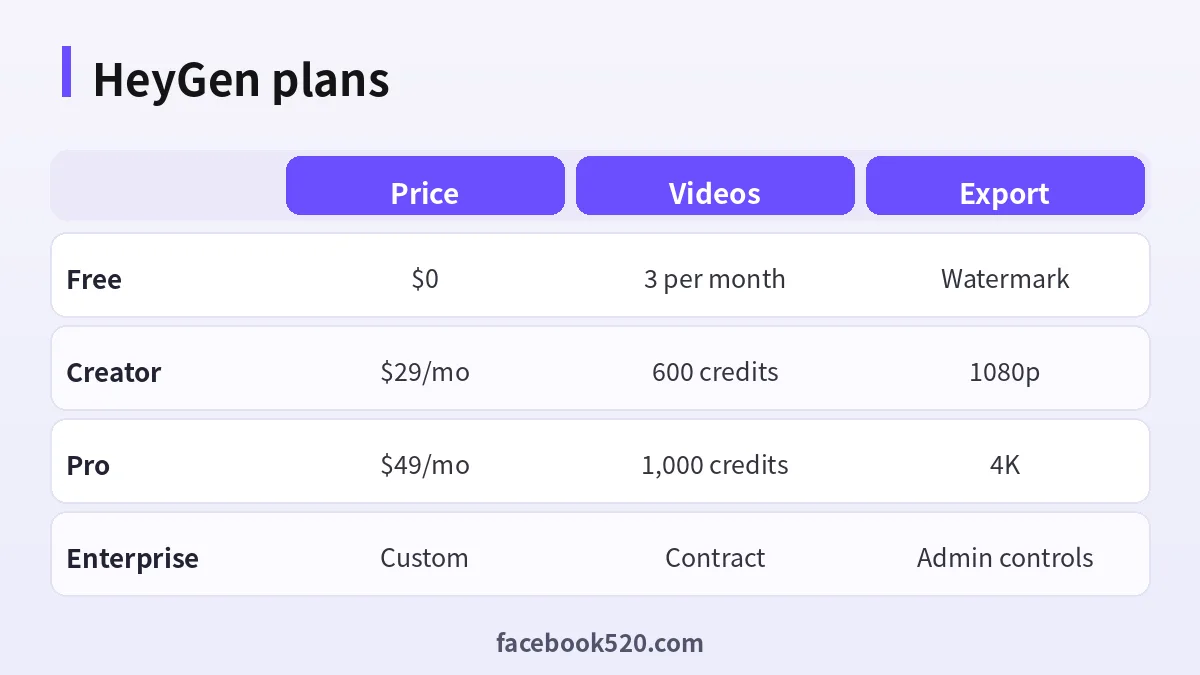
The pricing page was checked on 26 November 2026. Prices are in US dollars, monthly billing, before tax; the yearly toggle advertises “2 months free”.
| Plan | Monthly price | What the page lists |
|---|---|---|
| Free | $0 | 3 watermarked videos per month, up to 1 minute each, Avatar 6 and Video Agent, one Custom Video Avatar, 500+ stock presenters, 30+ languages |
| Creator | $29 | 600 credits, 1080p export, no HeyGen branding, custom avatar with your own voice and likeness, 175+ languages and dialects, credits roll over one month |
| Pro | $49 | 1,000 credits, Avatar 6 Pro, 4K export, videos up to 30 minutes, faster processing, one professional voice clone included, Seedance 2.5 access, raise monthly credits any time |
| Enterprise | Custom | SSO, advanced workspace settings, authentication controls, sub-workspaces |
Three things trip people up:
- The Free plan is a trial, not a production tier. Three short watermarked videos a month are enough to test avatars and voices, not to run a channel.
- Credits, not minutes. Paid plans are measured in credits, and different features (avatar engines, video models, translation) consume credits at different rates. Watch the balance before starting a long batch.
- Rollover is limited. On Creator, unused credits roll over for one month, so buying a big plan “for later” does not bank credits forever.
Prices change often in AI video, so always confirm the figure on heygen.com/pricing in your own currency before you pay. For comparisons with other video and voice tools, see the AI pricing hub and our overview of payment methods for online services.
Upgrading, downgrading and billing
Upgrades are done from the plan page inside the dashboard. A few points worth knowing before you click:
- Upgrade the right space. If you are in a workspace, the upgrade applies to the workspace plan. If you want a personal plan, switch to Personal first.
- Monthly vs yearly. Yearly billing is cheaper per month but locks you in; try a month first if you are unsure about credit consumption.
- Cancel or pause, do not delete. If you just want to stop paying, cancel or pause the subscription. Deleting the account is a separate, irreversible action.
- Receipts. Download invoices from billing settings if you need them for expenses; workspace invoices are only visible to admins.
If you are tempted by cheap “HeyGen Pro accounts” sold on marketplaces, remember what you are actually buying: someone else’s login, often paid with a card that will be disputed, inside an account you can never secure because the seller still controls the email. Our buying hub explains why shared and resold AI accounts end in lockouts; with HeyGen the risk is worse because custom avatars contain your face and voice.
Securing a HeyGen account
HeyGen offers two-factor authentication for every account. According to the help center, you enable it from Settings → Account → 2-factor authentication; HeyGen sends a code to your email, you confirm it, and 2FA is on. Once enabled, the login page asks for a 6-digit code from your authenticator after the first step.
Beyond 2FA:
- Use a unique password if you chose email and password, stored in a password manager.
- Secure the email itself. A magic-link or Google login is only as safe as the inbox or Google account behind it — turn on 2FA there too.
- Review workspace members regularly if you are an admin; remove people who left and check pending invites.
- Protect avatar material. Custom avatars are built from real footage and consent recordings. Do not share login access with freelancers; invite them to a workspace with a limited role instead.
- Watch for phishing. Fake “your HeyGen credits expire” emails are common. Open the dashboard yourself instead of clicking links.
Changing your email and recovering access
You can change the login email yourself: Settings → Account → Change Email. Projects, avatars and plan stay exactly as they were — only the login address changes. The change requires verification through the original inbox, which is why keeping that inbox alive matters.
HeyGen’s help center separates three situations:
| Situation | What HeyGen says |
|---|---|
| Forgot password | Use Forgot password? on the login page |
| Lost the email but still signed in on a device | Contact support; after ownership verification they can cancel the old subscription and review moving eligible content and avatars to a new account |
| Lost the email and fully signed out | The account cannot be recovered or transferred; support can only cancel pending and future charges |
If you signed in with Google or Apple, “forgot password” does not apply — recover the Google or Apple account first, then sign in to HeyGen with the same provider.
Custom avatars, voices and consent
The reason a HeyGen account deserves more care than a typical SaaS login is that it can hold a digital copy of you. When you create a custom video avatar, you upload footage of yourself and record a consent statement; Creator and Pro plans can also clone your voice. That material is tied to the account where it was created.
Good habits:
- Create your own avatar in your own account, not in a client’s workspace, unless the client is meant to own it.
- Keep the original recordings and consent clip somewhere safe outside HeyGen.
- If you leave a company, ask the workspace admin to delete avatars of you that are no longer needed.
- Never let anyone else log in to the account that holds your avatar; a resold or shared login can be used to generate videos of you saying things you never said.
Deleting a HeyGen account
Deletion is permanent and immediate. The help center describes the flow:
- Click the box with your initial in the lower-left corner and select Settings.
- Under the Account tab, click Delete Account.
- Type your email address to confirm.
- The account and all its data are deleted instantly — there is no grace period.
Before you do that, export every video you want to keep, cancel any subscription (deletion is not the recommended way to stop billing), and make sure you are not the only admin of a workspace your team still uses. Enterprise admins can separately delete an entire workspace from workspace settings; that removes all members’ projects and assets and cannot be undone either.
Common HeyGen account problems
“I signed up twice.” Using Google once and a magic link with a different address another time creates two separate accounts. Check Settings → Account in each and decide which one to keep before buying a plan.
“My company workspace forces SSO.” Enterprise admins can disable Google, Apple, magic link or password sign-in for your email domain. Use the SSO button with your work email; your personal account (with a personal email) is unaffected.
“I joined a workspace and my free videos disappeared.” They did not: switch back to Personal in the bottom-left menu.
“I can’t remove the watermark.” Watermarks are removed only on paid plans; enterprise admins can also enable AI-assisted watermarking for a whole workspace.
“Credits ran out mid-project.” Pro lets you raise monthly credits at any time; on Creator, wait for the next cycle or upgrade.
Which HeyGen setup fits you
| You are | Recommended setup | Login | Plan to start with |
|---|---|---|---|
| Solo creator testing avatars | Personal account only | Google, Apple or magic link | Free, then Creator |
| Freelancer working for clients | Personal account + invitations to each client workspace | Your own email, never the client’s | Your own plan for personal work |
| Agency with several clients | One workspace per client or sub-workspaces | Work email, 2FA mandatory | Pro or Enterprise |
| Company training or marketing team | Company workspace, request-to-join or invite-only | SSO where available | Enterprise or team plan |
The freelancer row is where most ownership disputes start. If a client asks you to “just log in with our account”, ask for a workspace invitation instead: you keep your own identity, they keep their projects, and nobody has to share a password. For a wider view of generative video tools billed by credits, our Runway pricing guide is a useful comparison.
Frequently asked questions
Is a HeyGen account free?
Yes. Creating an account costs nothing and includes the Free plan: three watermarked videos per month, up to one minute each, checked on 26 November 2026.
Can I sign up for HeyGen without Google?
Yes. Use email with a magic link or a password, or Sign in with Apple. Enterprise users can use SSO.
How do I log in to HeyGen with a magic link?
Choose Use email on the login page, enter your address and request the secure link. Open it on the same device, ideally right away.
What is the difference between Personal and Workspace in HeyGen?
Personal is your individual account and plan. A workspace is a shared team space with its own plan, members and settings; projects there belong to the workspace.
How much does HeyGen cost per month?
On 26 November 2026 the pricing page listed Creator at $29 and Pro at $49 per month (monthly billing, before tax), with Enterprise priced on request.
Do HeyGen credits expire?
On Creator, unused credits roll over for one month. Check the plan card in your dashboard for the exact rule on your plan.
How do I turn on two-factor authentication?
Go to Settings → Account → 2-factor authentication, confirm the code HeyGen emails you, and 2FA is enabled.
Can I change the email on my HeyGen account?
Yes, from Settings → Account → Change Email. You need access to the original inbox to verify the change.
I lost access to my email. Can HeyGen recover my account?
Only if you are still signed in somewhere: support can verify ownership and help move eligible content. If you are fully signed out, the account cannot be recovered or transferred.
Can I transfer my HeyGen account to someone else?
Not as a personal account. In a workspace, give the new person admin rights instead; in Enterprise workspaces, grant Super Admin and remove it from yourself.
Is it safe to buy a HeyGen Pro account?
No. Resold logins stay under the seller’s control, are often paid with disputed cards, and can expose any avatar or voice you create.
How do I delete my HeyGen account?
Settings → Account → Delete Account, then type your email. Deletion is instant and permanent, so export videos and cancel billing first.
Conclusion
A HeyGen account takes seconds to create, but the details — login method, personal versus workspace, plan and credits, 2FA, and a long-term email — decide whether your avatars and videos stay under your control. Sign up with an address you will keep, turn on two-factor authentication on day one, keep client work in the workspace that pays for it, and confirm current prices on the official page before upgrading. For more AI tool accounts and plans, browse the platform hubs.

