


Twitch Sign Up in 2026: How to Create a Twitch Account on Phone, PC and Console, Username Rules, Email or Phone Verification, Social Login Limits, Extra Accounts and Fixes When the Code Never Arrives
Twitch is still the default place to watch live gaming, music, Just Chatting and esports streams, and you can watch most of it without an account. The moment you want to chat, follow a channel, claim Drops, subscribe or go live yourself, Twitch asks you to sign up. The form looks simple, but a few choices you make in those two minutes are hard or impossible to undo later: the username, the sign-in method, and the email or phone number you verify.
This guide walks through Twitch sign up in 2026 on a phone, on a computer and on a console or TV, explains the username rules, shows the difference between email/phone sign-up and “Continue with Google, Apple or Amazon”, and covers the most common problem of all: the verification code that never arrives. The rules were checked against Twitch’s official Help Center articles on creating an account in late November 2026. If you have just joined Discord as well, our Discord sign up guide uses the same step-by-step format, and the platform hubs page lists every network we cover.
Before you start: what you need for a Twitch account
You do not need much, but having these ready avoids most failed attempts:
- A device and the official app or site. Use twitch.tv in a browser or the Twitch app from the App Store, Google Play or your console/TV store. Do not install modified APKs or “Twitch Plus” style builds; they can steal your login.
- Your real date of birth. Twitch does not allow anyone under 13 to create an account, and in some countries the local minimum age is higher. Entering a fake birthday can lead to the account being closed later if the age has to be checked.
- An email address or a mobile number that you control. Twitch verifies one of them with a code. The phone number must be a real mobile line: landlines and VoIP numbers are not accepted.
- A username idea, plus two backups. Popular names are taken, so prepare alternatives.
- A password you do not use anywhere else, ideally stored in a password manager.
Twitch is free to join. Subscriptions, Bits and Turbo are optional purchases you can make later; nothing during sign-up requires a payment card.
Twitch username rules you should know before typing
Your username becomes your public identity and your channel URL (twitch.tv/yourname). Twitch shows a display name as well, but the display name can only change capitalisation of the username, not the actual letters. That makes the username the most important decision in the whole sign-up.
| Rule | What it means in practice |
|---|---|
| Length | 4 to 25 characters |
| Allowed characters | Letters, numbers and underscores; no spaces or other symbols |
| Must be unique | If someone already uses it, or it belongs to a closed account, you cannot take it |
| Display name | Same letters as the username, but you may change upper and lower case |
| Changing later | Possible from Settings, but with a waiting period between changes, and old links stop working |
| Content | No hate, harassment, impersonation of other streamers or Twitch staff |
Tips for choosing:
- Keep it short and easy to spell out loud. Streamers often say their name on air; viewers must be able to type it.
- Avoid adding your birth year or real surname if you value privacy.
- If you plan to stream, check whether the same handle is free on YouTube, X, TikTok and Discord so your brand is consistent.
- Do not pick a name that copies a known creator. Impersonation reports are one of the fastest ways to lose a new account.
How to sign up for Twitch on a phone (iPhone and Android)
The mobile app is where most people create their account today.
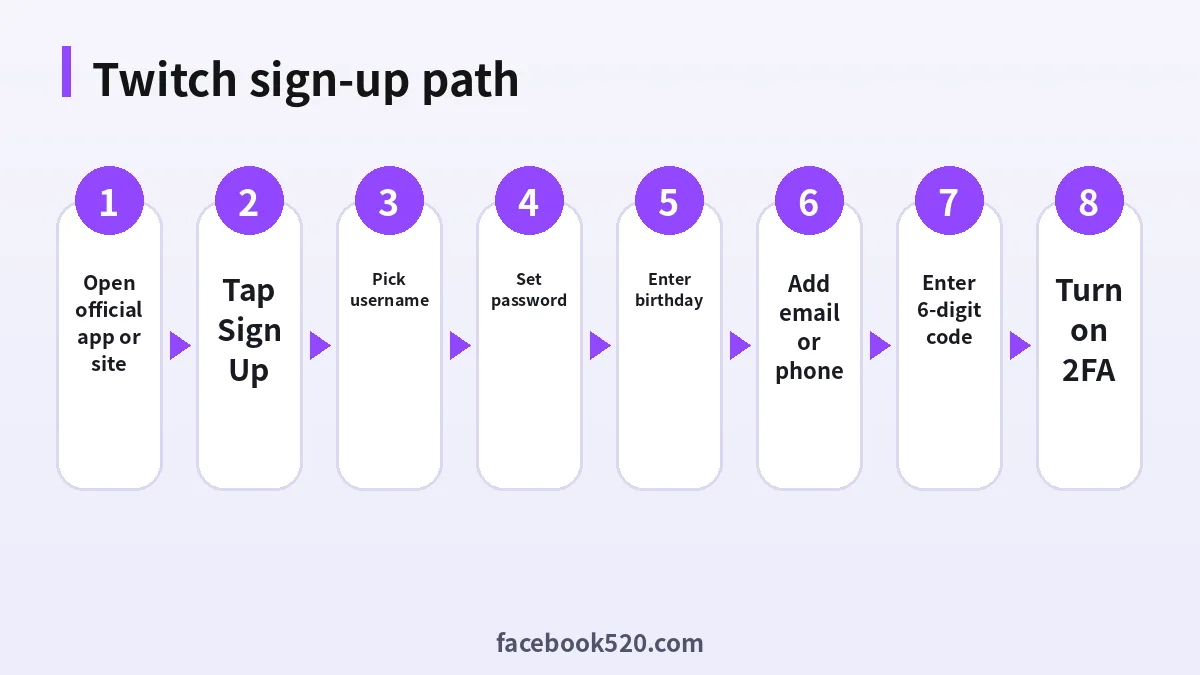
- Install Twitch from the App Store or Google Play and open it.
- Tap the profile icon or Sign Up at the top of the screen.
- Choose whether to continue with a phone number or email, or with Google, Apple or Amazon (see the comparison below before you decide).
- Enter the username you want. The app tells you immediately if it is taken or breaks a rule.
- Create a password. Use a long passphrase rather than a short word with numbers.
- Enter your date of birth.
- Enter your email or mobile number and tap Sign Up.
- Twitch sends a 6-digit verification code. Enter it in the app. The code expires after about five minutes, so keep the app open.
- Choose a few categories you like so the home page has recommendations, then you are in.
If you signed up with a phone number, add an email later in Settings → Security and Privacy (and the other way round). Having both makes recovery much easier if you ever lose one of them.
How to sign up for Twitch on a computer
- Go to twitch.tv and click Sign Up in the top-right corner.
- Fill in username, password, date of birth and either email or phone (there is a link to switch between the two).
- Complete the security check if one appears.
- Click Sign Up and type the 6-digit code sent to your email or phone.
- Open Settings from the avatar menu to finish your profile: profile picture, banner, bio and notification preferences.
Desktop sign-up is the better choice if you plan to stream, because you will configure stream keys, OBS or Twitch Studio, and moderation tools on the computer anyway.
Signing up on a console, smart TV or streaming stick
Twitch apps on PlayStation, Xbox, smart TVs and streaming devices usually show an activation code instead of a full sign-up form. The typical flow is:
- Open the Twitch app on the TV or console and choose Log In or Sign Up.
- The screen shows a short code and a web address such as twitch.tv/activate.
- On your phone or computer, sign in (or create the account there first), open the activation page and type the code.
- The TV refreshes and you are logged in.
Creating the account on the phone first and then activating the TV is faster than typing a username and password with a remote control.
Email or phone versus Google, Apple or Amazon: which to choose
Twitch also lets you continue with Google, Apple or Amazon. It is quick, but it has trade-offs that the sign-up screen does not explain clearly. According to Twitch Help, accounts created through these providers cannot add a separate Twitch password and cannot be disconnected from the provider later. If you lose access to that Google, Apple or Amazon account, you lose the easy way into Twitch too.
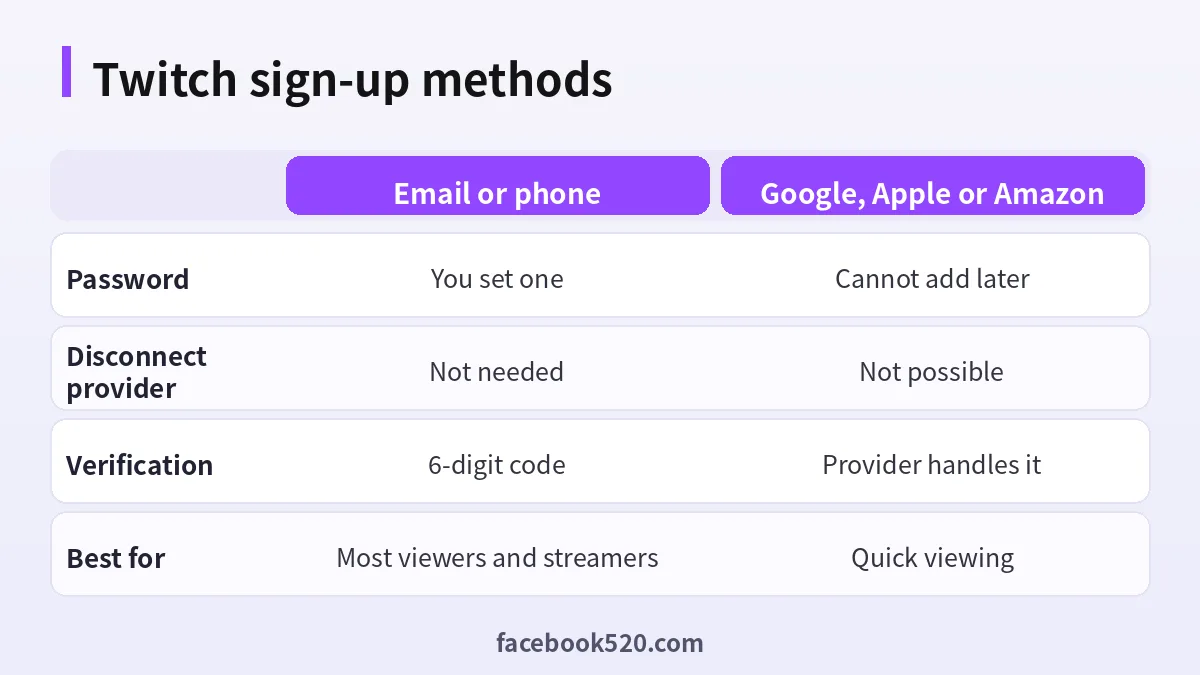
| Question | Email or phone sign-up | Google, Apple or Amazon sign-up |
|---|---|---|
| Do I set a Twitch password? | Yes | No, and you cannot add one later |
| Can I switch login method later? | You can update email or phone | You cannot disconnect the provider |
| Verification step | 6-digit code by email or SMS | Handled by the provider |
| Good for streamers? | Yes, most flexible | Possible, but recovery depends on the provider |
| Good for casual viewing? | Yes | Yes, fastest |
| Risk if the provider account is lost | None | Twitch access becomes hard to recover |
Our recommendation: if you plan to stream, earn money as an Affiliate, or manage moderators, use email or phone sign-up with your own password and two-factor authentication. Use social login only for a viewing account you would not mind recreating.
Verification: email codes, phone codes and why codes fail
The verification code is where most sign-ups get stuck. Here is what Twitch’s rules mean in practice.
Email verification
- The code arrives from Twitch within a minute or two. Check spam, promotions and “updates” tabs.
- Work or school email systems sometimes block automated mail; a personal mailbox is more reliable.
- The code is only valid for a short time (around five minutes). Request a new one instead of typing an old code.
Phone verification
- Use your own mobile number. Landlines, VoIP numbers and many virtual “receive SMS online” numbers are rejected.
- Include the correct country code. A missing or wrong prefix is the most common reason an SMS never arrives.
- Some carriers block short-code messages from abroad; ask your carrier to allow them or switch to email verification.
Too many accounts on one email or phone
Twitch limits how many accounts can be created with the same verified email. By default an email can be verified on one account, and you can allow one additional account by enabling “Enable additional account creation” in the security settings of the first account. Phone numbers are linked across accounts in a stricter way: if one account that uses a phone number is suspended sitewide, the other accounts on that same number can be suspended too. That is a good reason not to share your number with friends’ accounts.
What to do right after you create your Twitch account
The first ten minutes after sign-up decide how safe your account will be.
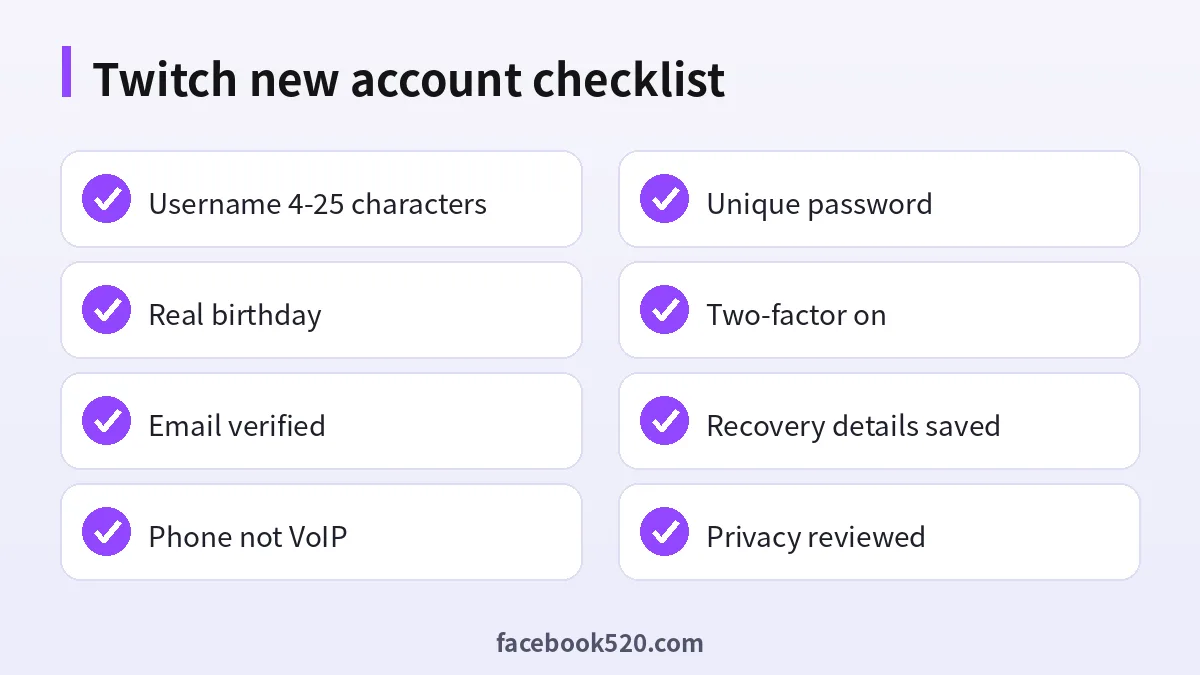
- Turn on two-factor authentication (2FA). Go to Settings → Security and Privacy → Two-Factor Authentication. Use an authenticator app if offered; it is safer than SMS alone.
- Add the missing contact method. If you signed up with phone, add and verify an email; if you used email, add a phone. Both help with recovery.
- Review privacy settings. Decide who can whisper (private message) you, whether to block whispers from strangers, and whether your activity is visible.
- Upload a profile picture and write a short bio. Channels with a complete profile get more follows and fewer “is this a bot?” reports.
- Connect other accounts carefully. Connections to Discord, YouTube or game accounts are useful for Drops and subscriber roles, but only connect accounts you own.
Going from viewer to streamer
A brand-new account can go live immediately from the mobile app, Twitch Studio or OBS. Before the first stream:
- Enable 2FA: Twitch requires it for some streaming features such as using stream keys in third-party software and for monetisation.
- Set your stream category and title so the right viewers find you.
- Configure AutoMod and moderation, even if you expect only a few viewers. Spam bots target new channels.
- Read the Community Guidelines. Strikes on a new channel can lead to suspensions quickly.
The Affiliate programme opens monetisation once you meet the requirements shown in your Creator Dashboard (minimum followers, broadcast days and average viewers over a recent period). Do not buy followers or “viewbots” to get there: Twitch detects them and removes fake engagement, and accounts can be suspended. For the same reason, buying a ready-made Affiliate or Partner channel is a bad idea; we explain the risks in Partnered Twitch Account for Sale, and our account buying overview explains why second-hand accounts on most platforms break the rules.
Common Twitch sign-up errors and fixes
| Message or symptom | Likely cause | Fix |
|---|---|---|
| “This username is unavailable” | Taken or reserved | Try a variant with an underscore or a different word |
| Code never arrives (email) | Spam filter, typo in address | Check spam, correct the address, resend after the timer |
| Code never arrives (SMS) | Wrong country code, VoIP number, carrier filter | Use correct prefix, a real mobile line, or switch to email |
| “Code is invalid” | Old or expired code | Request a new code and use it within five minutes |
| “Too many accounts on this email” | Limit reached | Enable additional account creation on the first account or use another email |
| Sign-up blocked or looping captcha | VPN, ad blocker, unusual network | Disable VPN and extensions, try another browser or the mobile app |
| Account closed soon after creation | Underage birthday, spam behaviour, ban evasion | Read the email from Twitch and appeal through the official form if it is a mistake |
If nothing works, wait a few hours before trying again. Repeated attempts from the same network in a short time look like automated sign-ups and can make the block last longer.
Twitch sign up versus related platforms
If you are setting up a creator presence, you will probably create several accounts in the same week. These guides follow the same format:
- How to create a YouTube account for VOD uploads and Shorts.
- TikTok sign up for short clips from your streams.
- Discord sign up and our new Discord account setup for a community server.
- The YouTube hub and TikTok hub collect every guide on those platforms.
Use the same handle where possible and the same secure email, but a different password for each service.
Scams that target brand-new Twitch accounts
New accounts are attractive to scammers because their owners do not yet know what normal Twitch messages look like. Watch for these patterns in your first weeks:
- “You won a giveaway” whispers that ask you to log in on a lookalike site. Twitch never asks for your password in a whisper or chat.
- Fake “verification” or “partner team” emails from addresses that are not twitch.tv. Open Twitch directly instead of clicking links in unexpected mail.
- “Free followers” or “viewer bot trial” offers. Even a free trial can get your channel flagged for artificial engagement.
- Requests to share your stream key. Anyone with the key can broadcast on your channel; reset it in the Creator Dashboard if you ever leak it.
- Collaboration offers that require installing a program. Malware disguised as overlays or “sponsor software” is a common way to steal sessions and cookies.
If you click something suspicious, change your password, sign out of all sessions from Settings → Security and Privacy, re-check your two-factor method and review connected apps. Acting within minutes usually prevents a takeover.
Twitch Sign Up FAQ
Is it free to sign up for Twitch?
Yes. Creating a Twitch account, watching streams, chatting and following channels are free. Subscriptions, Bits and Turbo are optional paid features.
How old do you have to be to create a Twitch account?
You must be at least 13, or older if your country sets a higher age for online services. Users under the age of majority need permission from a parent or guardian under Twitch’s terms.
Can I sign up for Twitch without a phone number?
Yes. You can sign up with an email address and verify it with the code Twitch sends. You can add a phone later, which helps with recovery.
Can I sign up for Twitch without an email address?
Yes, you can use a mobile phone number instead. It must be a real mobile line, not a landline or VoIP number. Adding an email afterwards is strongly recommended.
How long is the Twitch verification code valid?
The 6-digit code is valid for about five minutes. If it expires, request a new code rather than retrying the old one.
Why can’t I add a password to my Twitch account?
If you signed up with Google, Apple or Amazon, Twitch does not let you add a separate password or disconnect that provider. Sign-in always goes through the provider.
Can I have two Twitch accounts?
Yes, but each needs its own verified email unless you enable “additional account creation” on the first account, which allows one extra account with the same email. Remember that accounts sharing a phone number can be affected together by a sitewide suspension.
Can I change my Twitch username after signing up?
Yes, from Settings → Profile, but there is a waiting period between changes and your channel URL changes too. You can change the capitalisation of your display name more freely.
Do I need an account to watch Twitch?
No. You can watch most streams logged out. You need an account to chat, follow, subscribe, claim Drops or go live.
My sign-up page keeps refreshing. What should I do?
Turn off VPNs, proxies and aggressive ad blockers, clear cookies for twitch.tv, and try another browser or the mobile app. Persistent loops are usually caused by network or extension problems.
Is it safe to buy an old Twitch account instead of signing up?
No. Twitch’s terms do not allow selling or transferring accounts, purchased channels are often recovered by the original owner, and fake followers are removed. A fresh account is safer and free.
Conclusion
Twitch sign up takes only a few minutes, but plan the username, choose email or phone sign-up if you want full control, and verify the code within its five-minute window. Then switch on two-factor authentication, add a second contact method and tidy your privacy settings. With those steps done you can chat, follow and go live without worrying about losing the account you just created.

