


Character.AI Account in 2026: Sign-Up Methods, Age Assurance and Reading Mode, c.ai+ Billing, Security, Lost Logins and Deleting Your Account
A Character.AI account looks simple from the outside: you press “Continue with Google”, type a birthday and start chatting with a character. Underneath, though, there are several moving parts that decide what you can actually do with the account in 2026 — the login method you picked on day one, the age check that every account now goes through, the difference between the full chat experience and the under-18 reading mode, and the way a c.ai+ subscription is billed and cancelled.
This guide explains each of those parts using the Character.AI Help Center pages and Terms of Service as they read on 29 November 2026. If you only want the quick registration walkthrough, read our separate guide on using Character.AI with or without signing up. If you are deciding whether to pay, our article on what is really free in Character.AI Plus goes deeper into the subscription. For other AI tools and their plans, the AI pricing hub collects our pricing guides, and the platform hubs page lists account guides for every platform we cover.
What a Character.AI account actually is
A Character.AI account is your identity on character.ai and in the official iOS and Android apps. It holds:
- your login link to Google, Apple or an email address;
- your birthday and the age group that the platform has assigned to you;
- your profile: username, display name, avatar and the personas you use in chats;
- your chat history with characters and any characters you have created;
- your subscription status, if you pay for c.ai+.
You can browse some public pages without an account, but chatting, creating characters, saving history and subscribing all need one. The same account works on the web and in both mobile apps, so you do not need separate registrations for your phone and your laptop.
| Part of the account | Where you manage it | Why it matters |
|---|---|---|
| Login method | The sign-in screen; you must reuse the same method | A different method can create a second, empty account |
| Birthday and age group | Set at sign-up; age status under Settings → Advanced | Decides full chat access or reading mode |
| Profile and personas | Profile and Profile Settings | What characters and other users see |
| Chats and created characters | Your chat list and creator pages | Lost permanently if you delete the account |
| c.ai+ subscription | Settings → Account → Manage, or the app store | Billing and cancellation path differ by where you bought it |
Who can create a Character.AI account
The Terms of Service (last updated 27 August 2025) set a clear minimum: if you are under 13, or under 16 and a citizen or resident of the European Economic Area or the United Kingdom, you must not sign up. The Help Center Safety Center page repeats the same rule — at least 13, or at least 16 in Europe.
The Terms also require you to give accurate information when you register. That matters more than it used to, because the birthday you type is only the starting point: Character.AI now runs an age check on every account, and a birthday that does not match other signals can move the account into the under-18 experience.
Login methods: Google, Apple or an email link
Since 30 July 2024 Character.AI supports only three ways to sign in:
- Continue with Google
- Continue with Apple
- Email verification link — you type your address and click a link sent to your inbox
The older methods — Discord, Facebook and the classic email-plus-password form — are no longer supported. The Help Center explains that emailed links and trusted identity providers protect accounts without the extra effort of multi-factor codes.
In practice this means three things:
- There is no Character.AI password to remember. Your security depends on the Google account, the Apple ID or the email inbox behind your login.
- Stick to one method. If you created the account with Google, keep using Google. Typing the same address into the email-link field is not guaranteed to land you in the same account, and many “my chats disappeared” reports turn out to be a second account.
- Keep the inbox alive. If you use email links, losing access to that inbox effectively means losing access to the account.
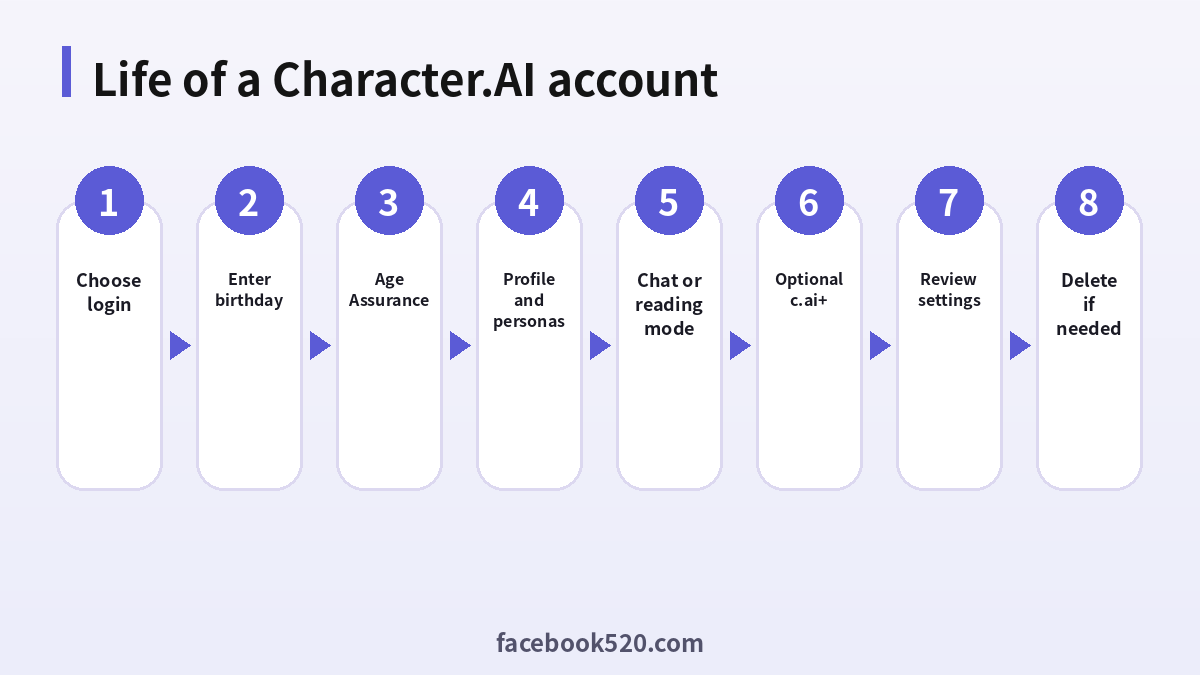
Step by step: creating the account on the web
- Open character.ai in your browser and choose Sign up or Log in.
- Pick Google, Apple or email. For email, enter the address and open the verification link from the same device if possible.
- Enter your real birthday. Do not round it up “just to get in” — the age check that follows can override it.
- Choose a username and display name. Avoid using your full real name if you want some privacy.
- Accept the Terms and Community Guidelines, then you land on the home feed of characters.
Age Assurance: why every account is checked
The biggest change to Character.AI accounts in 2026 is Age Assurance. According to the Help Center (updated 17 July 2026) all users are required to complete an age assurance check, and the result decides which experience the account gets:
- accounts verified as 18 or older keep full access to chatting with characters and all standard features;
- accounts verified as under 18 are placed in the Under-18 experience, which includes reading mode — chatting with characters is not available there.
The Age Assurance FAQ (updated 1 August 2026) describes how this works in layers:
- Automatic age assurance. Character.AI looks at signals such as login information, activity on the platform and some third-party signals. If those indicate you are an adult, nothing else happens — most adults never see a prompt.
- Selfie check. If the signals suggest you are under 18 and you disagree, you can verify with a selfie handled by Persona, an identity provider also used by LinkedIn, OpenAI and others.
- ID only as a last step. Only if Persona cannot confirm you are 18 or older from the selfie will it ask for a government ID. Character.AI says it does not see or store the document, and Persona deletes biometric information within seven days.
If you are not prompted but want to check or start the process yourself, go to Settings → Advanced → Verify Age on the web or in the latest app version. If you are under 18 today and turn 18 later, the Help Center asks you to contact support so they can reset your verification attempts.
What reading mode means for an account
Reading mode is not a ban. The account still exists, your profile is still there and you can read content, but you cannot hold conversations with characters. This is important for families and schools: an under-18 user cannot “upgrade” out of reading mode by paying for c.ai+, and buying or borrowing an adult’s account to get around the check breaks the Terms and can lead to the account being closed.
| Situation | What happens | What you can do |
|---|---|---|
| Signals say you are an adult | Full chat access, no prompt | Nothing needed |
| Signals say under 18, you are an adult | Account moves to the Under-18 experience | Verify with a selfie via Persona; ID only if requested |
| You have no government ID and the selfie is inconclusive | Verification cannot be completed | The account stays in the Under-18 experience |
| You are a teen | Reading mode, no chat | Wait until 18, then ask support to reset attempts |
| You turned 18 | Still in reading mode | Contact support, then verify again |
Setting up the profile and personas
Once you are in, spend five minutes on the profile:
- Username and display name. The username is how other users find you; the display name is what characters call you unless you set a persona.
- Personas. A persona is a short description of “who you are” in a chat. You can keep several and switch between them. Avoid real addresses, school names or phone numbers in persona text — characters are AI, but conversations can still be reviewed for safety.
- Avatar. Use an image you have the right to use. Photos of other real people are a bad idea.
- Created characters. If you build characters, check their visibility setting (public, unlisted or private) before you share links.
c.ai+ on your account: billing and cancelling
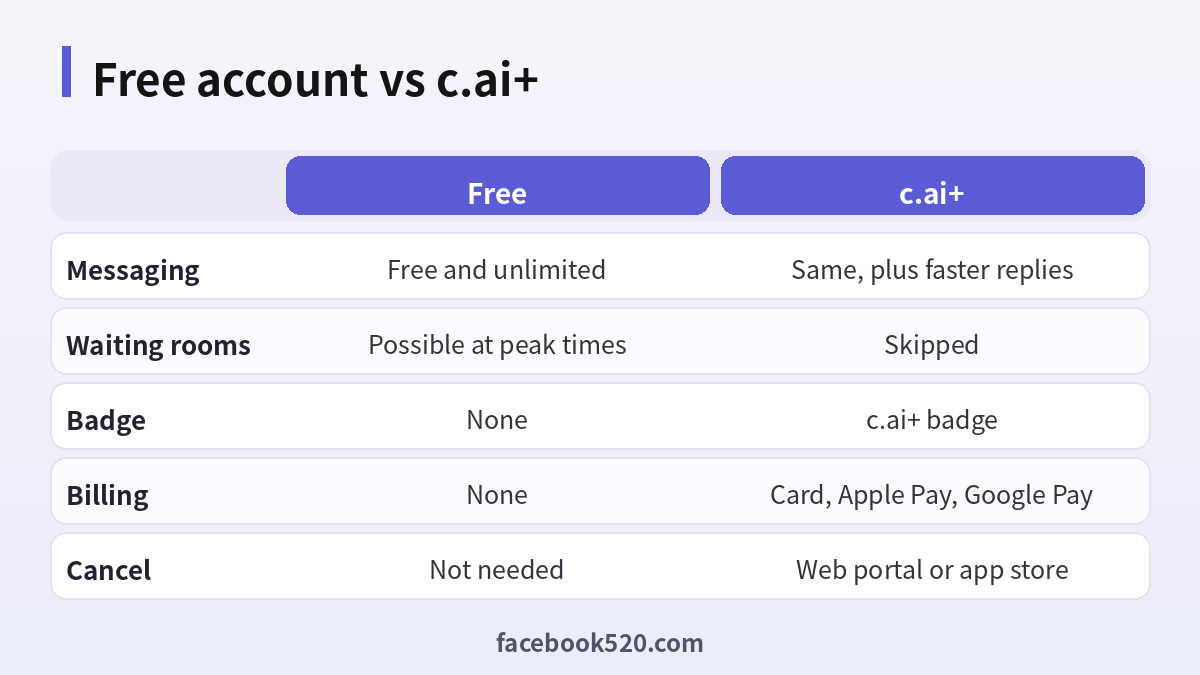
Character.AI stresses that messaging remains free and unlimited for all users. c.ai+ is an optional subscription that adds faster message generation, skipping waiting rooms, a members’ badge, access to an exclusive community channel and early access to new features (C.ai+ FAQ, updated 14 September 2026).
On price, the official offer terms page lists the standard rates in US dollars as $9.99 per month or $94.99 per year, with a note that actual prices vary by region, currency and taxes. Promotional offers appear from time to time — the summer 2026 offer, for example, was $14.99 for the first three months or $59.99 for the first year for new and eligible returning subscribers — and they renew automatically at the standard rate. Always trust the price shown at checkout in your own region over any number you read online, including ours.
How you pay decides how you cancel:
- Bought on the website (billed through Stripe): go to Settings → Account → Manage, enter the email address of your Character.AI account, open the secure link that arrives by email and manage or cancel the plan in the Customer Portal. If the link does not arrive within about five minutes, check spam and make sure you typed the account email.
- Bought in the iOS app: cancel in your Apple ID subscriptions; refunds go through Apple.
- Bought in the Android app: cancel in Google Play subscriptions; refunds go through Google Play.
Accepted payment methods on the web are credit card, Apple Pay and Google Pay. Cancelling stops the next renewal; the subscription stays active until the end of the period you already paid for, and partial refunds for unused time are not issued under the offer terms.
Keeping the account secure
Because there is no separate password, account security is really the security of your login provider:
- Google login: turn on 2-Step Verification in your Google account and review which apps have access.
- Apple login: keep two-factor authentication on your Apple ID; if you used “Hide My Email”, remember that the account is tied to that relay address.
- Email link: use an inbox only you control, with its own strong password and two-step verification. Never forward Character.AI login links to anyone — whoever clicks the link can be logged in as you.
Other good habits:
- Log out of shared or school computers after use.
- Do not paste login links or verification codes into chats with “support” accounts. Official support works through support.character.ai tickets.
- Be careful with browser extensions that promise “unlimited c.ai+” or “no filter” modes; they often ask for your session and can hijack the account.
- Do not buy accounts, age-verified profiles or “lifetime c.ai+” from third-party sellers. They break the Terms, the seller can take the account back through the original login, and Character.AI can close accounts that bypass age assurance.
When you cannot log in
Most login problems fall into a few patterns:
| Symptom | Likely cause | Fix |
|---|---|---|
| Chats and characters are gone after login | You used a different login method and created a second account | Log out and sign in with the original Google, Apple or email method |
| Email link never arrives | Typo, spam filter, or the inbox blocks bulk mail | Check spam, request a new link, try the app instead of the browser |
| “Continue with Discord” or password login missing | Those methods were retired in July 2024 | Use Google, Apple or the email link with the same address |
| Account suddenly in reading mode | Age Assurance placed it in the Under-18 experience | Verify age under Settings → Advanced if you are an adult |
| Subscription not showing | Bought in the app store on another account or platform | Check Apple or Google subscriptions; contact support with the receipt |
If none of this helps, open a ticket at support.character.ai and describe the login method you originally used, the email address involved and roughly when the account was created.
Deleting a Character.AI account
The Help Center is direct about it: account deletion is permanent and cannot be reversed. On the web the path is:
- Open your Profile.
- Click Profile Settings.
- Go to Account.
- Choose Manage Account & Data.
- Select Delete Account and confirm.
Before you do that:
- Cancel c.ai+ first, especially if you pay through Apple or Google. Deleting the Character.AI account does not automatically stop an app-store subscription.
- Save anything you want to keep. Copy character definitions or important conversations you created yourself; once the account is deleted they are gone.
- Think about the login. If you used Google or Apple, you may also want to remove Character.AI from the list of apps connected to that provider afterwards.
The Terms also allow Character.AI to deactivate or delete accounts that break the rules, without notice. That is another reason to avoid shared or bought accounts: you cannot appeal on behalf of an account that was never really yours.
Account checklist for parents and schools
If a teenager in your family or class uses Character.AI, the account rules give you a few concrete levers:
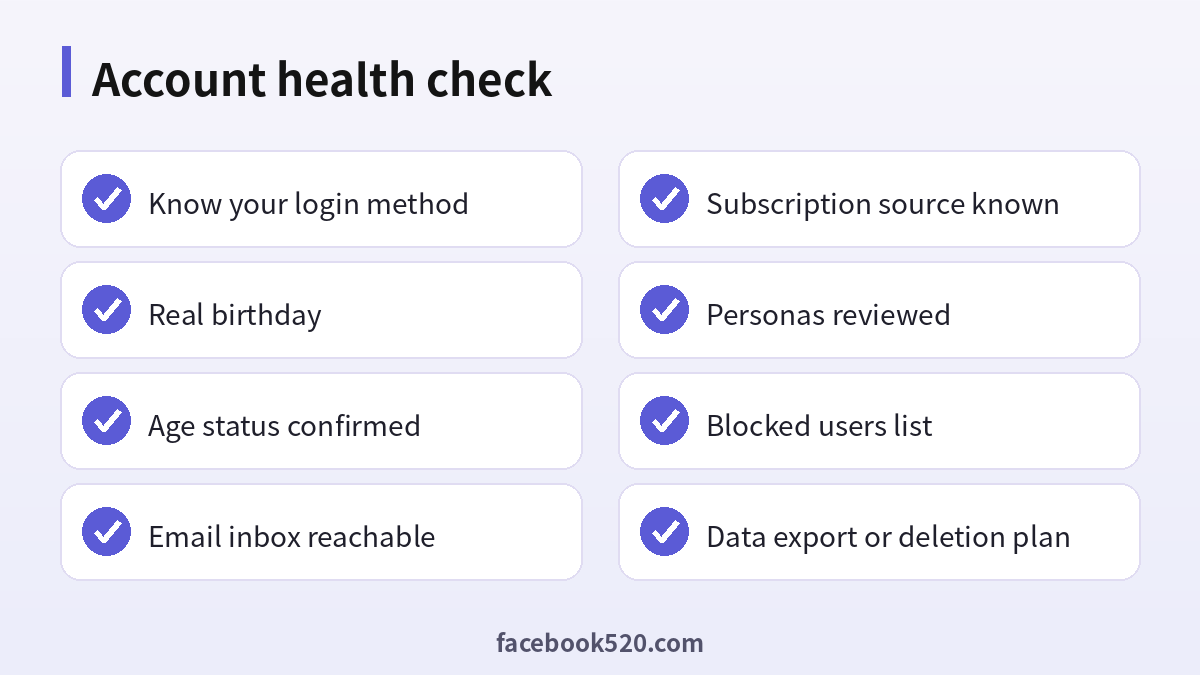
- Confirm that the birthday on the account is real. A false adult birthday is likely to be caught by age assurance anyway, and it breaks the Terms.
- Explain reading mode in advance, so a teen is not surprised when chat is unavailable.
- Check the app store for subscriptions on the child’s device; teens cannot unlock chat by paying.
- Use the Safety Center and reporting tools on support.character.ai if you see content that breaks the Community Guidelines.
- If the account is no longer wanted, delete it from Profile Settings rather than just uninstalling the app — uninstalling leaves the account and its data in place.
Character.AI account compared with other AI chat accounts
Character.AI is built for role-play and entertainment, so its account rules differ from general assistants. ChatGPT, Claude and Gemini accounts focus on productivity features, workspaces and API keys, while Character.AI focuses on characters, personas and age-appropriate experiences. If you use several of them, our ChatGPT account guide and Claude account guide explain how those accounts handle login, plans and security, which makes it easier to keep each one separate and safe.
Frequently asked questions
Do I need an account to use Character.AI?
You need an account to chat with characters, create characters, keep chat history and subscribe to c.ai+. Some public pages can be viewed without signing in, but the core experience requires an account.
What is the minimum age for a Character.AI account?
13 years old in most countries and 16 in the European Economic Area and the United Kingdom, according to the Terms of Service. Accounts verified as under 18 are placed in the Under-18 experience with reading mode.
Can I still log in with Discord or a password?
No. Since 30 July 2024 the supported methods are Continue with Google, Continue with Apple and an email verification link. If you used Discord or a password before, sign in with the email address that was linked to that old account.
Why did my account switch to reading mode?
Age assurance decided that the account probably belongs to someone under 18. If you are an adult, verify your age under Settings → Advanced → Verify Age; Persona will usually only need a selfie.
Does Character.AI keep my ID or selfie?
The Help Center says Character.AI does not handle or store the documents; Persona processes them and deletes biometric information within seven days.
How much does c.ai+ cost?
The official offer terms list $9.99 per month or $94.99 per year in US dollars, with regional prices and taxes varying. Check the price shown at checkout in your own account.
How do I cancel c.ai+?
On the web, use Settings → Account → Manage to reach the Stripe Customer Portal. If you subscribed in the iOS or Android app, cancel in Apple or Google Play subscriptions.
Will deleting the app delete my account?
No. Uninstalling only removes the app from your device. To delete the account you must use Profile Settings → Account → Manage Account & Data → Delete Account.
Can I recover a deleted Character.AI account?
No. Deletion is permanent and cannot be reversed, so export or copy anything you want to keep first.
I have two accounts by mistake. Can they be merged?
The Help Center does not offer self-service merging. Decide which account to keep, log in with that method from now on and contact support if a subscription is attached to the wrong one.
Is it safe to buy a Character.AI account with c.ai+ or age verification?
No. Bought accounts break the Terms, the original owner can recover them through the login provider, and accounts that bypass age assurance can be closed without notice.
Can a teen pay for c.ai+ to unlock chat?
No. c.ai+ adds speed and perks, but it does not change the age-based experience. Under-18 accounts stay in reading mode regardless of subscription.
Summary
A healthy Character.AI account in 2026 comes down to a handful of decisions: sign in with one method and stick to it, enter your real birthday, let age assurance run and verify with a selfie only if you are wrongly placed in reading mode, know where your c.ai+ was purchased so you can cancel it in the right place, and remember that deletion is final. Get those right and the account will follow you between web and mobile without surprises.

