


Microsoft Copilot Sign Up in 2026: How to Create a Microsoft Account for Copilot, Age and Country Rules, Signing In on Web, Windows and Mobile, Work Accounts and Common Sign-In Problems
Microsoft Copilot is now built into Windows, Edge, Bing, the Microsoft 365 apps and its own mobile and web apps, so many people meet it long before they decide to “sign up”. The moment you want your conversations saved, want to use Copilot across devices, or want features that are tied to an identity, you need an account. That is where people get confused: there is no separate “Copilot account”. Copilot uses your Microsoft account — the same identity you may already use for Outlook.com, Xbox, OneDrive, Skype or a Microsoft 365 subscription — or, for employees and students, a work or school account managed by an organisation.
This guide explains the Microsoft Copilot sign up process in 2026 step by step: what account you need, the age and country rules Microsoft publishes, how to sign in on the web, on Windows and on your phone, how personal and work accounts differ, which security settings to switch on during the first session and how to fix the most common sign-in errors. The rules below were checked against Microsoft’s Copilot Supplemental Terms of Use (effective 18 August 2026) and Microsoft Support pages at the end of November 2026. Plans and prices are covered separately in our guide to Microsoft Copilot plans; if you are comparing assistants, the AI pricing hub lists our guides to ChatGPT, Gemini, Claude and others.
What “signing up for Copilot” actually means
Copilot is a consumer service from Microsoft, and since the August 2026 update of its terms Microsoft states plainly that you must be logged in with a Microsoft account to use Copilot. The terms apply to the Copilot app on computers and phones, to the web versions at copilot.microsoft.com, copilot.com and copilot.ai, and to conversations with Copilot inside other Microsoft apps such as the Microsoft 365 apps.
So “signing up” is really one of three things:
- You already have a Microsoft account (for example an Outlook.com or Hotmail address, an Xbox login, or the account you used to set up Windows). In that case you simply sign in to Copilot with it; nothing new is created.
- You do not have a Microsoft account yet. You create one during the Copilot sign-in flow, using an existing email address, a phone number or a new Outlook.com address.
- You sign in with a non-Microsoft identity where Copilot offers that option. Microsoft’s terms say that in this case it may automatically create a Microsoft account for you, or let you link that identity to an existing Microsoft account. The result is the same: Copilot is tied to a Microsoft account.
Work and school accounts are a different world. If your employer or university gives you a Microsoft Entra ID account (the old “Azure AD” account), Copilot under that account is governed by your organisation’s contract, not by the consumer Copilot terms. We cover the difference in detail further down.
| Situation | What you do | What gets created |
|---|---|---|
| You use Outlook.com, Hotmail or Xbox | Sign in with that address | Nothing new |
| You only have Gmail or another email | Create a Microsoft account with that email | A Microsoft account using your existing email |
| You prefer a new address | Create a new Outlook.com address during sign-up | New mailbox plus Microsoft account |
| You only want to use a phone number | Create the account with your mobile number | Microsoft account identified by phone |
| Your company provides Microsoft 365 | Sign in with your work email | Nothing new; your admin controls access |
Who can sign up: age and country rules
Microsoft’s Copilot terms set two conditions that matter before you create anything.
Minimum age. You need to be at least 13 years old, “but sometimes older, depending on your country’s laws”. Microsoft Support publishes a list of countries with statutory age limits for children: in those places, anyone below the listed age must have a parent manage their Microsoft account. Examples from that list: the United States, the United Kingdom, Singapore, Sweden, Türkiye, the United Arab Emirates and Uruguay use 13; Canada, Spain, South Korea and Taiwan use 14; Vietnam, Switzerland, Ukraine and EU countries not listed separately use 16; Germany, France, India, Tunisia and Australia use 18; Thailand uses 20. If you are below the age for your country, the account must be set up as a child account in a Microsoft family group.
Real information. If Copilot asks for your birthday and country during sign-up or sign-in, the terms say you must give your real information. If you are under 18, Microsoft “might turn off or limit some features for legal or safety reasons”. Entering a fake birthday to unlock features is both a breach of the terms and a practical risk: if you ever need to prove ownership of the account, mismatched details make recovery harder.
Availability. The terms also note that because laws vary, “Copilot isn’t available everywhere”. If Copilot does not load or refuses sign-in in your country, that is a regional limitation, not a problem with your account. Using a VPN to appear elsewhere is not a fix we recommend: it can trigger security checks on the Microsoft account itself, and it does not change which country your account is registered in.
| Country (examples) | Age below which a parent manages the account |
|---|---|
| United States, United Kingdom, UAE | 13 |
| Canada, Spain, South Korea, Taiwan | 14 |
| Vietnam, Switzerland, most EU countries | 16 |
| Germany, France, India, Australia | 18 |
| Thailand | 20 |
Step by step: Microsoft Copilot sign up on the web
The web version is the simplest place to start, because it works on any computer and the steps are the same as on most devices.
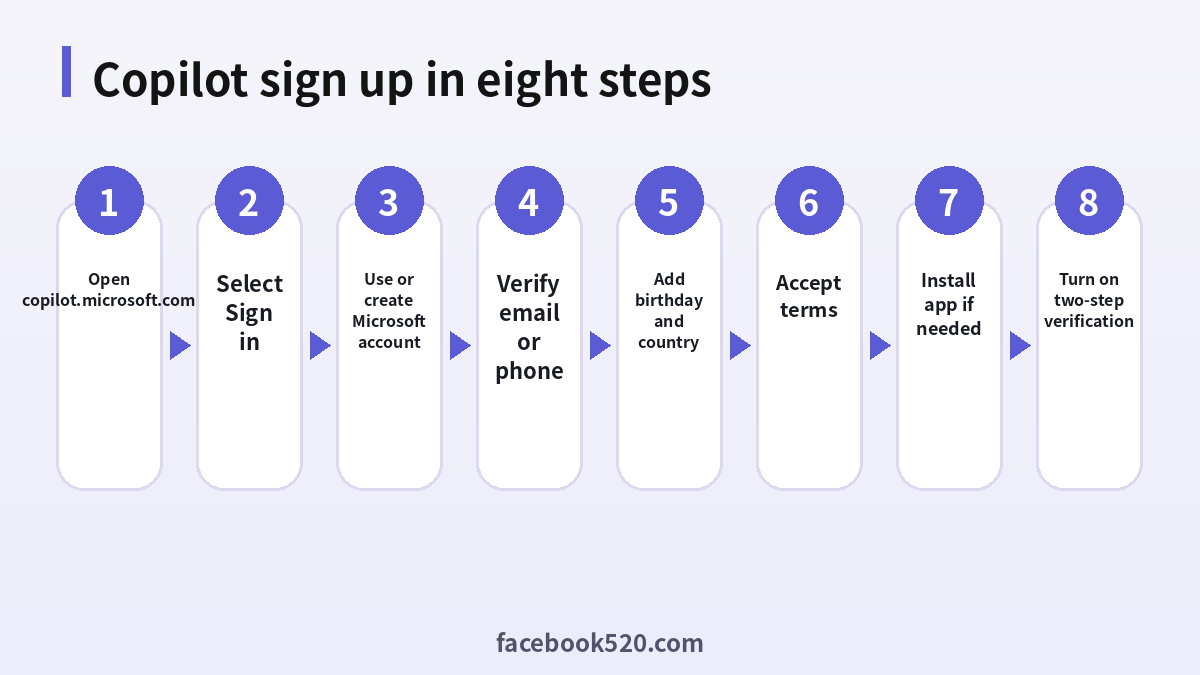
- Open Copilot. Go to copilot.microsoft.com in a current browser (Edge, Chrome, Firefox or Safari all work). You can type a question straight away on some devices, but history and personal features require signing in.
- Select “Sign in”. The button is in the corner of the page or in the side panel.
- Enter your Microsoft account email or phone number if you already have one. If you do not, choose the option to create a new account. Microsoft’s own sign-in page shows “Create an account” (or “New to Microsoft? Create an account”) for exactly this purpose.
- Choose how the account is identified. You can use an email address you already own, your mobile number, or create a new Outlook.com address.
- Verify. Microsoft sends a one-time code to the email address or phone number you entered. Type it in. If you chose a password, set a strong one; Microsoft also supports passwordless sign-in with the Authenticator app or a passkey.
- Add your details. Enter your country or region and your date of birth. As explained above, these must be accurate.
- Complete the human check if one appears (a puzzle or audio challenge). This protects Microsoft against automated account creation.
- Accept the terms and return to Copilot. You are now signed in, and your chats can be saved to your account history.
Tip: if you share a computer, use a separate browser profile for your Microsoft account, or sign out when you finish. Copilot conversations are personal content, and anyone using the same signed-in browser can open them.
Signing up on Windows
On Windows 11 the Copilot app is usually pre-installed or available in the Microsoft Store. Windows asks you which account to use the first time you open it.
- If your Windows user is already a Microsoft account, Copilot normally offers that account in one click.
- If you use a local Windows account, the app asks you to sign in with a Microsoft account inside Copilot only. You do not have to convert your whole Windows login to a Microsoft account; you can add the account “to this app only” when Windows offers that choice.
- If your PC is managed by an employer, Copilot may sign in with your work account automatically. In that case your IT department decides what you can do.
On Windows the app follows the same rules as the web: the same account, the same history, the same age and country conditions. If you sign in with the same Microsoft account on the web and in the Windows app, your conversation history is available in both places.
Signing up on iPhone and Android
- Install Microsoft Copilot from the App Store or Google Play. Check that the publisher is Microsoft Corporation; there are many look-alike “AI assistant” apps with similar icons.
- Open the app and choose Sign in.
- Pick an existing Microsoft account or create one, exactly as on the web.
- Grant only the permissions you need. The microphone is required for voice conversations and the camera for vision features, but you can leave them off and enable them later in your phone’s settings.
On mobile you will often see an option to continue with another identity provider. Remember what Microsoft’s terms say: signing in that way can create a Microsoft account for you in the background. If you later want to sign in on a PC, you will need to use the same method, so note down which one you chose.
Personal account or work account: which should you use?
Copilot exists in two “modes” depending on the account. The consumer Copilot terms explicitly do not apply to people who sign in with a work, school or organisational (Entra) account; for those users Microsoft refers to Enterprise Data Protection and the organisation’s own agreement.
| Question | Personal Microsoft account | Work or school (Entra) account |
|---|---|---|
| Who creates it? | You | Your employer or school |
| Who can reset or disable it? | You (and Microsoft for policy reasons) | Your IT administrator |
| Which rules apply to Copilot? | Copilot Supplemental Terms + Microsoft Services Agreement | Your organisation’s contract and policies |
| Can you keep it if you leave? | Yes | No, it is removed when you leave |
| Suitable for company documents? | Only if your employer allows it | Yes, that is its purpose |
| Can you buy consumer plans on it? | Yes | Licences are assigned by the organisation |
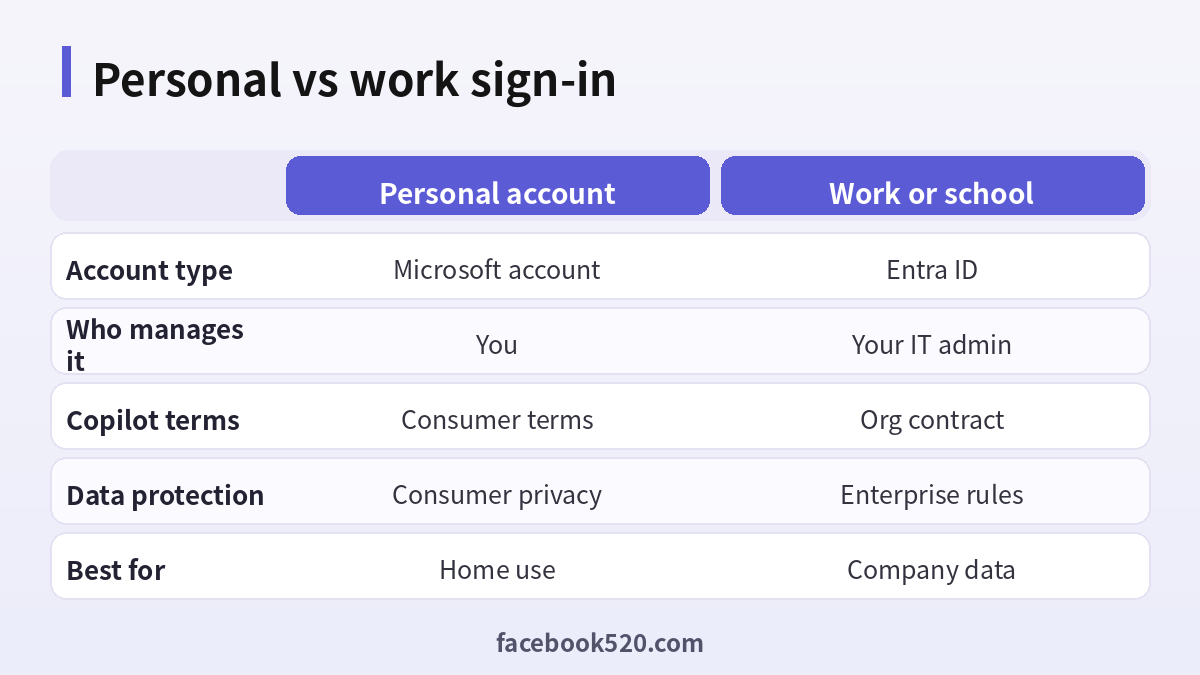
The practical rule is simple: use your personal account for personal questions and your work account for work data. Do not paste confidential company documents into Copilot under your personal account unless your employer explicitly permits it, and do not use your work account for private matters, because your organisation may be able to review activity under its compliance rules.
If both accounts are signed in on the same browser, Copilot may show a switcher. Check the account picture in the corner before you start a conversation.
What you get after signing up
Signing in to Copilot with a free Microsoft account gives you the standard Copilot experience: chat, web-grounded answers, image creation within the free limits, voice conversations on supported devices and your saved conversation history. Paid options are separate and are layered on top of the same account — for example Microsoft 365 Personal or Family subscriptions, which include Copilot features inside Word, Excel, PowerPoint and Outlook, or higher Copilot tiers. Because Microsoft adjusts plan names and prices by country, we keep them in one place: see our Microsoft Copilot plans guide before you pay for anything.
A few things the sign-up itself does not give you:
- It does not give you a work licence. Copilot for business is assigned by an administrator.
- It does not unlock features that are restricted for under-18 users in your country.
- It does not change the language or the region of your Microsoft account; those come from your profile settings.
First-day security settings for your Microsoft account
Your Microsoft account is not just “the Copilot login”: it may also unlock your email, OneDrive files, Xbox purchases and saved payment methods. Take ten minutes to protect it.
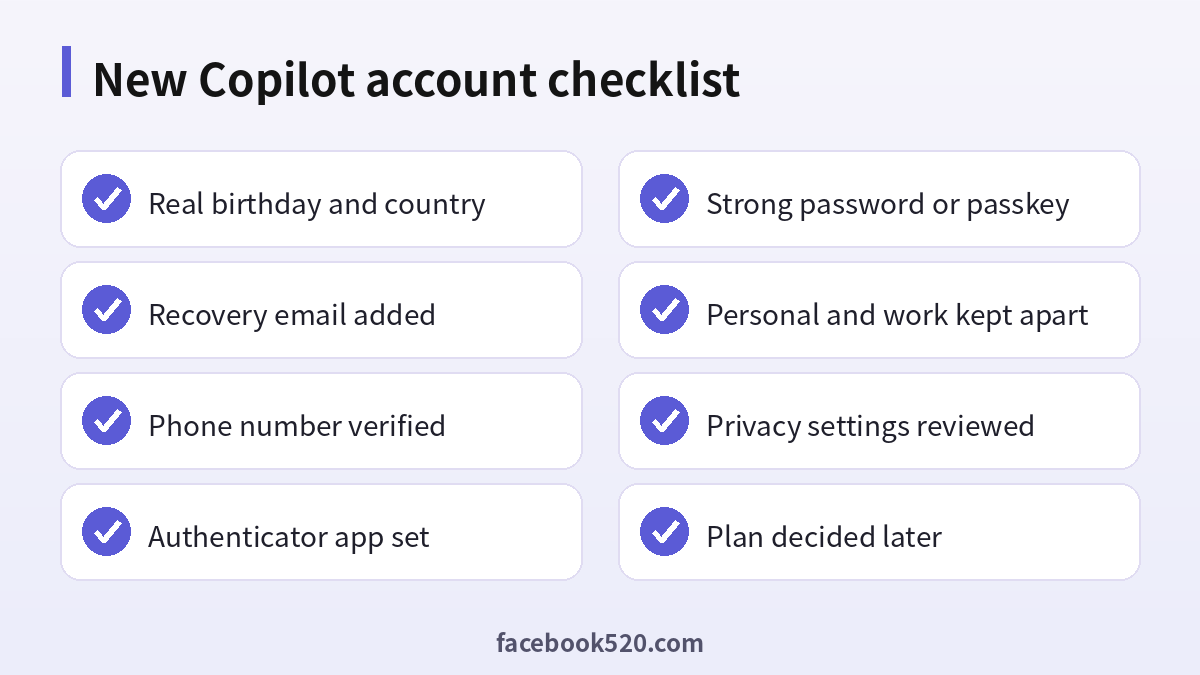
- Add a recovery email and phone number at account.microsoft.com under Security. Without them, recovering a locked account is much harder.
- Turn on two-step verification, ideally with the Microsoft Authenticator app rather than SMS alone.
- Consider going passwordless with Authenticator or a passkey stored on your phone or security key.
- Review recent sign-in activity after setting up a new device; unknown locations should be investigated.
- Check the devices list and remove old phones or computers you no longer use.
- Look at your privacy settings for Copilot (for example personalisation, memory and whether conversations can be used to improve products, where those controls are offered in your region).
Common Copilot sign-in problems and how to fix them
| Problem | Likely cause | What to try |
|---|---|---|
| “This account doesn’t exist” | Typo, or you used another email for your Microsoft account | Try the other addresses you own, or your phone number |
| Code never arrives | Spam folder, wrong number format, carrier delay | Check spam, request a new code once, confirm the country code |
| Sign-in loop on the web | Blocked third-party cookies or an old session | Allow cookies for Microsoft sites, sign out everywhere, retry in a private window |
| Copilot opens with your work account | Windows or Edge is signed in with Entra ID | Switch profiles in Edge or use the account switcher |
| “Copilot isn’t available” | Regional availability or age restrictions | Check your account country and birthday; Copilot is not offered everywhere |
| Features missing for a teenager | Under-18 restrictions | Expected behaviour under Microsoft’s terms |
| Account locked | Suspicious activity or many failed attempts | Follow the unlock steps on the sign-in page; Microsoft may send a code to your phone |
If you cannot sign in at all, Microsoft Support offers a sign-in helper and a recovery form for Microsoft accounts. Fill in the recovery form from a device and network you have used before; it improves the chances that Microsoft recognises you.
When you have two Microsoft accounts by accident
A common situation: you created a Microsoft account years ago with an old Hotmail address, and now you create another with your Gmail address while signing up for Copilot. Both are valid accounts, but purchases, Xbox progress and OneDrive files stay on the old one. Before you start using Copilot seriously, decide which account is your “main” Microsoft identity. You can add a second email address as an alias to one account in your account settings, which lets you sign in with either address without maintaining two separate accounts.
Shared and family devices
On a family PC, give every person their own Windows user or at least their own browser profile. Copilot conversations, memory and history belong to the signed-in account. Parents of younger teenagers can use Microsoft Family Safety to manage child accounts; in countries with statutory limits, the parent-managed setup is required below the listed age.
What you should not do when signing up
The Copilot terms include a short code of conduct. Three rules are directly relevant to sign-up:
- Do not use bots or scrapers to access Copilot. Automated account creation or automated querying breaks the terms.
- Copilot is for your own personal use. Sharing one personal account among a team is not what the consumer service is designed for; teams should look at business offerings.
- Do not buy or sell accounts. Accounts “with Copilot Pro already active” are sometimes advertised. They are usually shared or obtained with stolen payment details, and the seller keeps control of the recovery options. Microsoft can lock such accounts at any time and you have no claim. If you want a paid plan, subscribe on your own account; our AI pricing hub and the buying guide hub explain why “cheap shared AI accounts” end badly.
Copilot compared with other assistants’ sign-up
If you are deciding which assistant to use, the sign-up experience is a small but real difference.
| Assistant | Account you need | Can you try without signing in? | Our sign-up guide |
|---|---|---|---|
| Microsoft Copilot | Microsoft account (or work Entra ID) | Limited on some surfaces; history requires sign-in | This article |
| ChatGPT | OpenAI account (email, Google, Microsoft or Apple) | Limited | ChatGPT account guide |
| Gemini | Google account | Some features without sign-in | Gemini sign up |
| Claude | Anthropic account with phone verification | No | Claude sign up |
| Perplexity | Perplexity account (Google, Apple or email) | Yes, limited | Perplexity sign up |
The practical difference is ecosystem: if you already live in Outlook, OneDrive, Teams and Windows, Copilot’s account model means there is nothing new to manage. If your digital life is built around Google, Gemini will feel the same way. You can use several assistants; each simply has its own account.
How to delete or reset your Copilot data
Because Copilot is attached to your Microsoft account, deleting “the Copilot account” is not a separate action. You have three levels:
- Delete individual conversations inside Copilot’s history.
- Clear Copilot activity from the Microsoft privacy dashboard, where Microsoft offers that control for your region.
- Close the whole Microsoft account at account.microsoft.com. This affects email, OneDrive, purchases and subscriptions — not only Copilot — so cancel subscriptions and download your files first.
A practical setup plan for the first week
Signing up takes five minutes, but a little structure in the first week saves problems later:
- Day 1: sign up, set the recovery email and phone, turn on two-step verification.
- Day 2: install the Copilot app on your phone and sign in with the same account so your history syncs.
- Day 3: decide whether you want personalisation or memory features on; review the privacy controls.
- Day 4: if you use Copilot at work, confirm with IT whether you should use your work account instead.
- Day 5–7: use the free experience for real tasks before deciding on any paid plan. Check the current options in our plans guide.
Frequently asked questions
Is Microsoft Copilot sign up free?
Yes. Creating a Microsoft account and signing in to Copilot costs nothing. Paid plans are optional and are added to the same account later.
Do I need an Outlook email to use Copilot?
No. You can create a Microsoft account with any email address you already own, such as Gmail, or with a phone number. An Outlook.com mailbox is only created if you choose that option.
What is the minimum age for Copilot?
At least 13, and higher in some countries. Microsoft’s list of statutory ages includes 14 in Canada and Spain, 16 in Vietnam and most EU countries, and 18 in Germany, France and India. Below that age, a parent must manage the account.
Can I use Copilot without signing in?
On some surfaces you can try a few prompts, but Microsoft’s 2026 terms state you must be logged in with a Microsoft account to use Copilot, and history and personal features always require an account.
Is a Copilot account the same as a Microsoft 365 account?
They use the same Microsoft account. Microsoft 365 is a subscription you can add to that account; Copilot itself is available with the free account.
Can I sign in to Copilot with my company email?
Only if your company has set it up as a work account (Microsoft Entra ID). In that case your employer’s rules apply, not the consumer terms. Do not create a personal Microsoft account with your work address.
Why does Copilot say it is not available in my country?
Microsoft states that because laws vary, Copilot is not available everywhere. Check that your Microsoft account’s country is correct; if Copilot is not offered there, no setting will change that.
Can several people share one Copilot account?
The consumer terms limit Copilot to your own personal use. Each person should have their own Microsoft account; families can use a Microsoft family group.
I forgot which email I used for my Microsoft account. What now?
Try the addresses and phone numbers you own on the sign-in page. Microsoft can also look up your account by a recovery email or phone in its “forgot username” flow.
Does Copilot keep my conversations?
When you are signed in, your conversations are saved to your history so you can return to them. You can delete individual chats and manage Copilot activity in your privacy settings.
Can I change my birthday later?
You can edit profile details at account.microsoft.com, but Microsoft may restrict changes for child accounts or require parental consent. Enter the correct date from the start.
Is it safe to buy a ready-made Copilot Pro account?
No. Such accounts are controlled by the seller, often paid for with stolen cards and can be locked without notice. Subscribe on your own account instead.
Conclusion
Microsoft Copilot sign up is really Microsoft account sign-up: reuse the account you already have, or create one with your own email or phone number, enter your real birthday and country, and protect it with two-step verification. Keep personal and work accounts separate, use the official apps, and decide on paid plans only after you have used the free version for real tasks. For plan details see our Microsoft Copilot plans guide, and browse the platform hubs for sign-up guides to other tools.

