

Google AI Studio Sign Up in 2026: How to Create Your Account, Pass the Age and Region Checks, Get Your First Gemini API Key and Move From the Free Tier to Paid Billing
Google AI Studio is Google’s browser workspace for trying Gemini models, building small apps, and creating the API keys that developers use to call the Gemini API. A lot of people search for a Google AI Studio sign up page and expect a long registration form. In reality there is no separate AI Studio account: you sign in with a Google Account, accept the terms, and AI Studio creates a Google Cloud project and an API key for you in the background. What can still go wrong are the checks around that login, namely age, country, account type and, later, billing.
This guide walks through the whole process as of late November 2026, based on the official Gemini API documentation (available regions, troubleshooting, API keys and billing pages, all checked on 28 November 2026). It covers what you need before you start, the first login step by step, what the free tier really includes, how to switch to paid billing, how to protect your key, and how to fix the most common errors. If you only want to chat with Gemini in the consumer app, read our Gemini sign up guide instead. For the consumer product as a whole see the Gemini account guide, and for API top-ups see Gemini API credits. All Google-related guides are collected on the Google hub.
What Google AI Studio is (and what it is not)
It helps to separate three Google products that share the Gemini name, because each has its own sign-up logic:
| Product | Where | Who it is for | Account and billing |
|---|---|---|---|
| Gemini app | gemini.google.com and mobile apps | Everyday users | Google Account; optional Google AI Plus, Pro or Ultra plan via Google One |
| Google AI Studio | aistudio.google.com | Developers, prompt engineers, builders | Google Account aged 18 or older; free tier or paid Gemini API billing |
| Gemini Enterprise Agent Platform (formerly Vertex AI) | Google Cloud console | Companies with cloud contracts | Google Cloud billing account, IAM roles, enterprise terms |
AI Studio sits in the middle. It is free to open and experiment with, but everything it does is tied to a Google Cloud project in the background. That project is what holds your API keys, your usage and, if you upgrade, your billing account. Understanding this early saves confusion later, for example when a teammate cannot see your keys or when your work account is blocked by an administrator.
A Google AI Pro or Ultra subscription that you pay for in the Gemini app does give you extra daily quota inside AI Studio on a personal account, according to the troubleshooting guide. It does not change your Gemini API usage tier and does not pay for API calls made with your key. Those are billed separately through Cloud Billing.
What you need before you sign up
- A Google Account. A personal Gmail account works. A Google Workspace account (company or school) also works, but only if the administrator has not switched off AI Studio for your organisational unit.
- Age 18 or older. Google states plainly that you must be 18 or older to use Google AI Studio. The check uses the birthday on your Google Account and, in some cases, age verification. If your birthday is wrong or unverified, AI Studio redirects you to an age requirements page.
- A supported country or territory. AI Studio and the Gemini API are available in a long list of places, including the United States, the United Kingdom, Canada, Australia, most of Europe, India, Indonesia, the Philippines, Japan, South Korea, Taiwan, Vietnam, Thailand, Türkiye, Brazil, Mexico, Nigeria, Kenya, Egypt, Saudi Arabia and the United Arab Emirates. Check the official “Available regions” page if you are unsure, because the list changes.
- A normal browser session. Chrome, Edge, Firefox or Safari all work. Using one signed-in account at a time avoids a common 403 error (more on that below).
- Optional for later: a payment method. You do not need a card to sign up or to use the free tier. You only need one when you link billing to move to the paid tier.
People outside the supported regions sometimes try to get around the check with a VPN. Google’s troubleshooting page lists “unsupported region, VPN or proxy routing” as a cause of the 403 Access Restricted error, and the terms require you to be in a supported location. A VPN-based setup can also get your project flagged later, so we do not recommend it. If your country is not supported, the official route is the Gemini API through Google Cloud’s enterprise platform, which has a different availability list.
Step-by-step: creating your Google AI Studio account
- Open aistudio.google.com in a private or incognito window if you are signed in to several Google Accounts in your normal browser.
- Click Sign in and choose the Google Account you want to use for development. For a business, use a work account or a dedicated developer account rather than your personal inbox, so that access can be handed over later.
- If this is your first visit, AI Studio shows the Terms of Service and related policies. Read the parts on data use for the free tier, then accept.
- After you accept, AI Studio creates a default Google Cloud project and an API key for new users automatically. You can rename the project later under Dashboard, Projects.
- If you already use Google Cloud, AI Studio does not create a default project. Instead you import an existing project: Dashboard, Projects, Import projects, search for the project, Import.
- Open the Playground (the chat view), pick a model that is available on the free tier, and send a short test prompt. If you get a normal answer, your account is working.
- Go to API keys in the dashboard to see the key that was created. Copy it only when you need it, and store it as described in the security section.
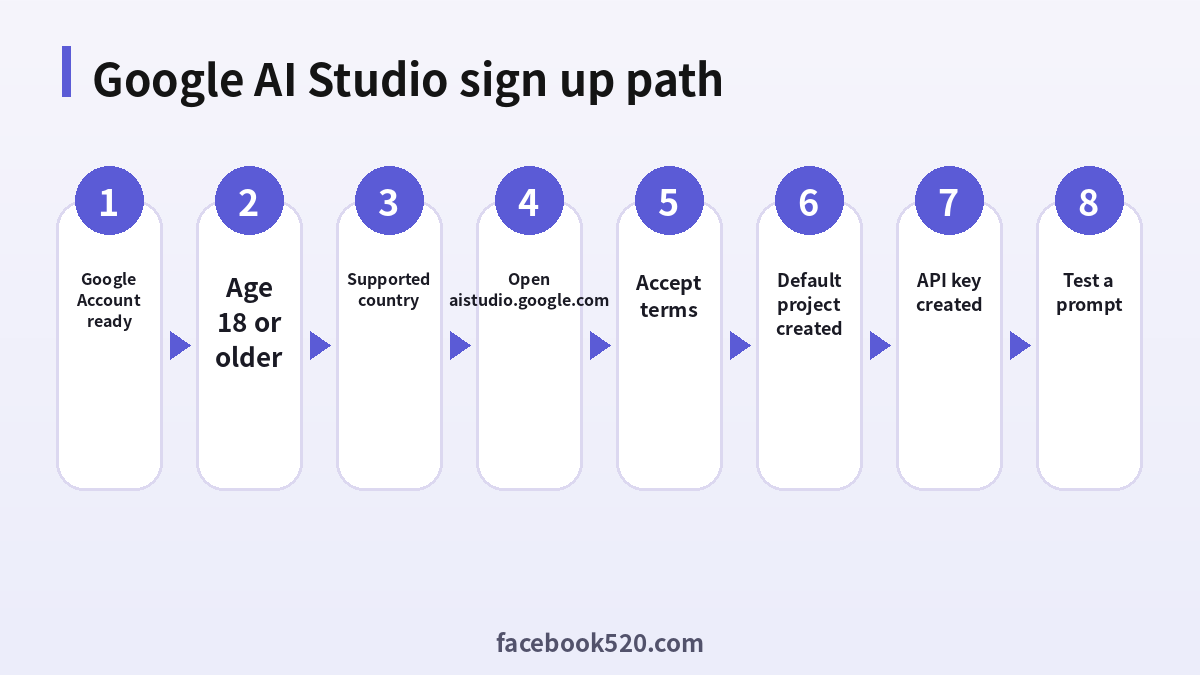
That is the whole sign-up. There is no separate username, no password for AI Studio itself, and no phone number step at this stage, although some accounts are asked for extra verification later (see the troubleshooting section).
What the default project and key are for
The default project is a normal Google Cloud project. It holds your keys and your quota and, if you set up billing, it is the thing that gets linked to a billing account. Since 28 May 2026 every new key created in AI Studio is an authorization key bound to a service account, rather than the older “standard” key. Auth keys are restricted to the Gemini API by default, and Google says they allow faster blocking if a key is detected as leaked. Older unrestricted standard keys are rejected by the API, and unrestricted keys that sat unused for a long time have been blocked since 7 May 2026. If you are following an old tutorial that pastes a key copied years ago, that is why it fails.
Limits on projects and keys
AI Studio is a lightweight front end, so it has a few limits worth knowing:
- You can create at most 10 projects at a time from the AI Studio Projects page.
- The API keys and Projects pages show at most 100 keys and 50 projects.
- AI Studio only shows keys that are unrestricted or restricted to the Gemini API. Keys restricted to other Google APIs are visible only in the Cloud console.
Free tier vs paid tier
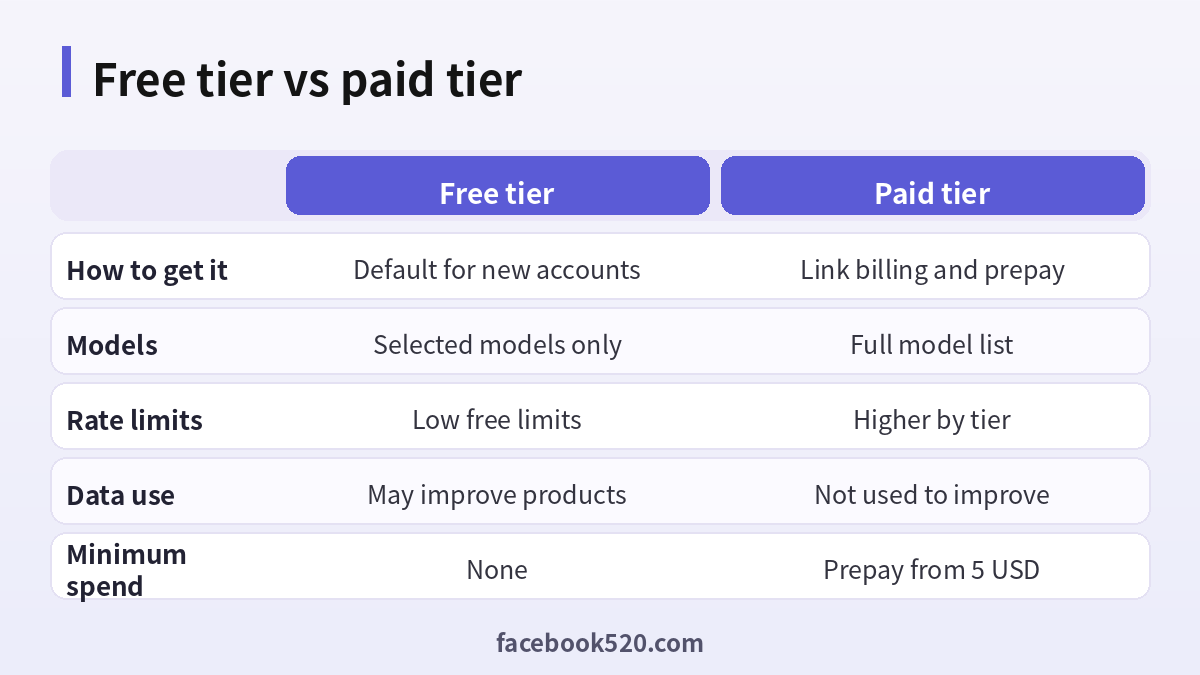
New accounts start on the free tier. According to the billing documentation it gives you access to certain models in the Gemini API and AI Studio, up to each model’s free rate limits. Some newer, larger models are paid-only. The Gemini 4 Carbon and Argon reasoning models, for example, are listed as “not available on the free tier” on the pricing page we checked on 28 November.
The most important practical difference is data use. On the free tier, content you send may be used to improve Google’s products. On the paid tier it is not. Anyone working with customer data, internal documents or unpublished code should keep that in mind before pasting anything into a free-tier project.
| Usage tier | How you qualify | Billing cap shown by Google |
|---|---|---|
| Free | Active project or free trial; some projects need verification | Not applicable |
| Tier 1 | Link an active billing account | 250 USD |
| Tier 2 | 100 USD paid and 3 days since first successful payment | 2,000 USD |
| Tier 3 | 1,000 USD paid and 30 days since first successful payment | 20,000 to 100,000+ USD |
Tiers, rate limits and caps are set at the billing account level, not per key. If you have several projects on one billing account, they share that account’s tier.
How to set up billing and move to the paid tier
You can upgrade from inside AI Studio without opening the Cloud console:
- Go to the API keys page or the Projects page and find the free-tier project you want to upgrade.
- Click Set up billing in the Billing Tier column.
- If you have never created a Google billing account, choose your country, accept the terms, and enter contact details and a payment method.
- If you already have billing accounts, pick one or click Add new billing account.
- Most new accounts are then asked to prepay at least 5 USD (or the local equivalent). That puts the account on the Prepay plan. Some accounts are offered a choice between Prepay and Postpay.
- Once the prepayment or Postpay choice is complete, the project moves to the paid tier and higher limits apply.
Google warns about one trap. If you start adding Prepay to an existing Postpay billing account and then close the window before paying, the billing account can be left in an unchargeable state, and every project linked to it loses access to the Gemini API until you finish the payment or ask Cloud Billing support to reset it. Finish the flow in one go.
What the API actually costs
Prices are per million tokens and differ a lot between models, so always check the official pricing page on the day you budget. Two points from our 28 November check are worth flagging because they change within days:
- Gemini 4 Carbon and Gemini 4 Argon carry an introductory price of 2 USD per million input tokens and 10 USD per million output tokens through 30 November 2026, rising to 4 USD and 20 USD from 1 December 2026.
- From 1 December 2026, requests to the old
gemini-2.5-promodel are routed to Gemini 3.8 Flash and billed at that model’s rates.
For a side-by-side view of AI subscription prices (Gemini, ChatGPT, Claude, Grok and others), see the AI pricing hub.
Keeping your API key safe
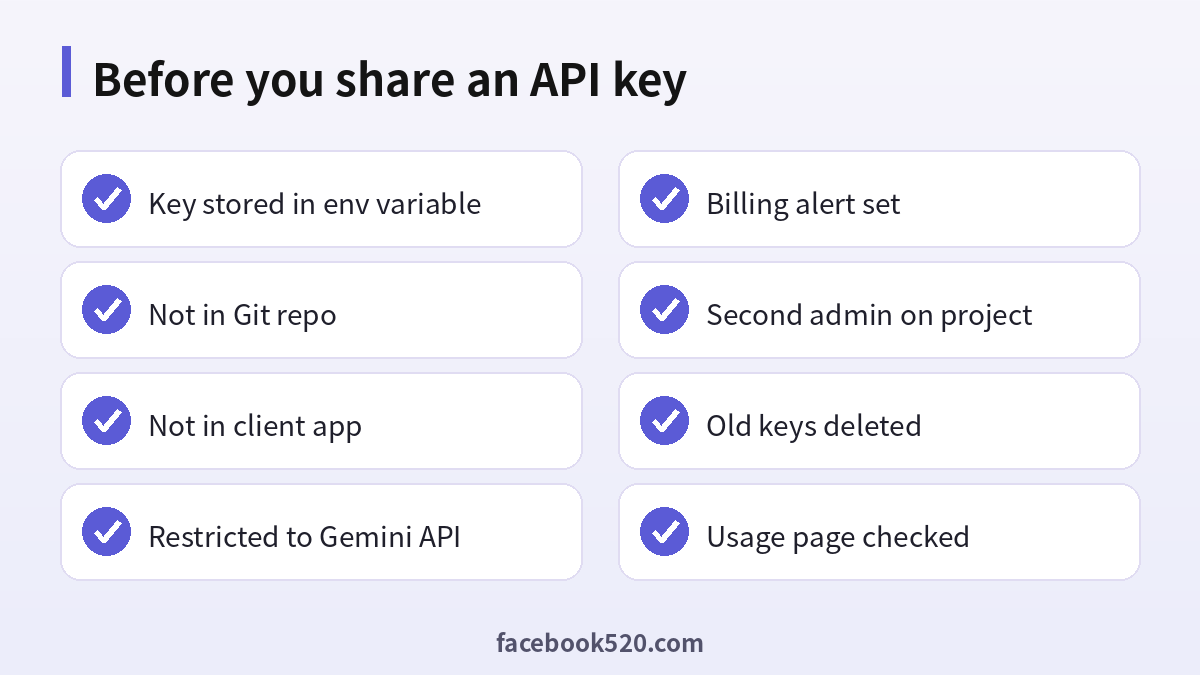
An API key is effectively a password that spends your money. Google’s own key guide lists the rules, and they are worth following from day one:
- Read the key from an environment variable (
GEMINI_API_KEYorGOOGLE_API_KEY; if both are set,GOOGLE_API_KEYwins) rather than writing it into code. - Never commit keys to Git. Leaked keys on public repositories are found by bots within minutes.
- Never ship a key inside a web page or mobile app. Anyone can extract it. Call the API from your own backend instead.
- For production, keep keys in a secret store such as Google Cloud Secret Manager and set billing alerts in the Cloud console.
- If a key leaks: create a new key, deploy it, then disable the old one, then audit usage in the Cloud console.
Sharing access with a teammate is better done through the Google Cloud project than by sending them your key. Give them a role such as Editor on the project (Viewer can see dashboards and keys but cannot create or delete them), and they can create their own key under the same billing.
Common sign-up problems and how to fix them
| Message or symptom | Likely cause | What to do |
|---|---|---|
| Redirected to an age requirements page | Account birthday under 18 or not verified | Fix the birthday in your Google Account, complete age verification; ID date must match the birthday |
| 403 Access Restricted | Unsupported region, VPN or proxy, terms not accepted, or several accounts signed in | Turn off VPN, check the region list, open AI Studio in an incognito window with one account |
| “You do not have access to Google AI Studio” | Workspace admin switched AI Studio off | Ask your admin to enable it for your organisational unit |
| FREE_TIER_VERIFICATION_REQUIRED or a verification prompt | Free-tier project or unusual activity | Complete QR-code verification with an Android phone or iPhone, or set up billing |
| 429 errors or model missing | Free-tier or plan limit reached, or model is paid-only | Wait for the limit to reset, or link a paid key |
| “You do not have permission to create a key in this project” | Missing IAM permissions on an imported project | Ask the project owner for a role such as Editor, or create a new project outside your organisation |
Workspace and school accounts
Company and school accounts are managed by an administrator. If AI Studio is switched off for your organisational unit, there is nothing you can do from your side except ask. Google Workspace for Education accounts also need the administrator to mark the account as belonging to someone 18 or older. If your workplace does not allow AI Studio, do not move company data into a personal account to get around it. That usually breaks the company’s data policy, and free-tier content may be used to improve Google’s products.
Phone and identity verification
The basic sign-up does not ask for a phone number, but Google can ask for project or account verification on the free tier when it sees unusual activity. The documented method is a QR code scanned with an Android phone or iPhone. If you cannot complete it, linking a billing account is the documented alternative. If you want to know more about Google verification codes in general, our article on Gemini verification code problems covers SMS and authenticator prompts.
Should you buy a ready-made AI Studio account or API key?
You will find sellers offering “verified Google AI Studio accounts”, “high-tier Gemini API keys” or “unlimited keys”. We advise against them for practical reasons. The key belongs to someone else’s Google Cloud project, so the seller can see your usage, rotate the key, or lose the project at any time. Google can also block keys that it detects as leaked or shared. And because the free tier may use your content to improve Google products, you would also be sending your prompts through a stranger’s account. Getting your own key takes minutes and the paid tier starts with a 5 USD prepay, so the official route is cheaper than most offers. Our buying hub explains the general risks of buying accounts.
Frequently asked questions
Is there a separate Google AI Studio sign up form?
No. You sign in with an existing Google Account and accept the terms. AI Studio then creates a default Google Cloud project and an API key for new users.
Is Google AI Studio free?
Opening AI Studio and using the free tier is free, within each model’s free rate limits. Some models are paid-only, and on the free tier your content may be used to improve Google’s products.
How old do I have to be?
You must be 18 or older. AI Studio checks the birthday on your Google Account and may ask for age verification.
Which countries can use Google AI Studio?
Google publishes an “Available regions” list for AI Studio and the Gemini API. It covers most of the Americas, Europe, Africa, the Middle East and Asia-Pacific, including India, Indonesia, Japan, Korea, Taiwan, Vietnam and the Gulf states. Mainland China, for example, is not on the list.
Do I need a credit card to sign up?
No. A card or other payment method is only needed when you set up billing for the paid tier, which normally starts with a prepayment of at least 5 USD.
Does a Google AI Pro subscription give me paid API access?
No. Google AI Pro and Ultra add daily quota inside AI Studio on personal accounts, but they do not change your Gemini API usage tier and do not pay for API calls.
Can I use my work Google Account?
Yes, if your Workspace administrator has enabled AI Studio. If you see a message that you do not have access, the service is switched off for your organisation.
Why does my old API key no longer work?
Since 2026 the Gemini API rejects unrestricted standard keys and blocks long-dormant unrestricted keys. Create a new key in AI Studio (new keys are auth keys) or restrict the old one to the Gemini API.
How many projects can I create?
Up to 10 at a time from the AI Studio Projects page. The dashboard lists at most 50 projects and 100 keys. Use the Cloud console for more advanced management.
What should I do if my key leaks?
Create a replacement key, update your application, then disable the leaked key and check usage and billing logs in the Cloud console.
Final checklist
Signing up for Google AI Studio takes only a few minutes once the basics are right: a Google Account set to an age of 18 or older, a supported country without a VPN, and a clean browser session. After the first login you already have a project and a key. Use the free tier to experiment with non-sensitive data, move to the paid tier with a small prepay when you need advanced models, higher limits or data protection, and treat your key like a password. For related guides on Gemini plans, Google accounts and other AI tools, browse the Google hub and the AI pricing hub.

